

Register and Promote Models
Register each trained model in your model registry and decide which version production uses. When you finish this page, every fit adds a new version under a candidate alias, a champion alias marks the version your scoring jobs use, and a scoring job loads the champion by name without knowing its version.
This page continues from Track Runs. Kumo registers models in your tracker’s registry, as listed in Supported Platforms. The Snowflake Model Registry (preview) is in the connector’s database and schema.
Name the Model
Choose a model name that your registry accepts:
Creating kumo.MLOps checks SageMaker, Snowflake, and three-part Unity Catalog names, so an invalid name fails before training. For a three-part Unity Catalog name, it also checks that the identity can use the schema; the identity needs USE CATALOG and USE SCHEMA, and permission to create the model or add a version to it. For Snowflake, the role needs CREATE MODEL on the schema.
Register Every Fit
Add registry= to your kumo.MLOps configuration. This example registers the model as users-churn on an MLflow server and moves the candidate alias to each new version:
For other platforms, use the tracking value from Track Runs and a model name from the table above.
The command prints the model name and its new version. MLflow and Unity Catalog number versions 1, 2, and so on; Snowflake names them V1, V2, and so on. On MLflow platforms the fit run is renamed after the version, such as fit-users-churn-v2. Each registered version records the model id as kumo_bundle_id. In Unity Catalog, the version comment names the fit run and the model bundle, and the version is linked to the fit’s logged model, which records the holdout metrics:
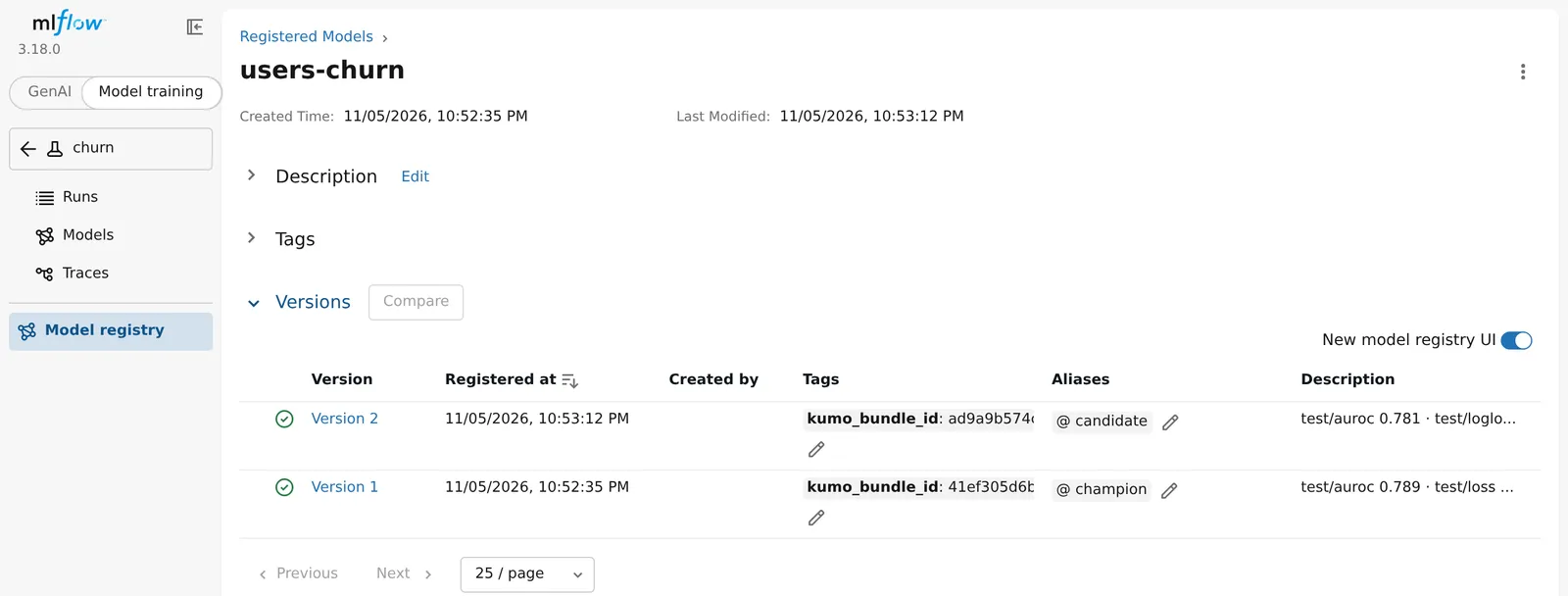
If registration fails, trainer.fit() warns and returns with fit_result.registered_model set to None, or raises when on_error="raise".
To register a model you trained or loaded earlier, call export with the configuration. trainer is a fitted or loaded Trainer:
Registering the same model bundle again returns its existing version instead of adding one, and moves the alias to it. On Snowflake, a version holds at most one alias, so Kumo cannot move candidate to a version that already holds champion; it warns and leaves the aliases unchanged.
Promote a Version
Register every fit under candidate, and let your scoring jobs load champion. A new version reaches production only when you move champion to it.
Before you promote, compare the candidate with the current champion on your model plan’s tuned metric, training_job.tune_metric. registered_model.metrics holds a version’s holdout metrics under their tracker names, such as test/auroc, both on the result of a fit and on a model loaded from the registry. They describe the model that ships, including when training_job.refit_trainval refits the best model on training and validation data. A loaded model has the trainer’s metrics, such as test/auroc, test/ap, test/auprc, and test/loss, but not test/logloss or test/brier. With training_job.refit_full, the shipped model has no holdout, so registered_model.metrics has only before_refit/<metric>, the model before the refit; compare such models on your own evaluation data instead.
Each model’s holdout comes from its own training table, so if a new fit uses newer data, also check both models on the same recent data when the difference matters.
MLflow, Databricks, and SageMaker
Snowflake (Preview)
The following code moves champion to the new version when its holdout AUROC is higher than the champion’s, or when no champion exists yet. fit_result and cfg come from the example above. Replace test/auroc with your tuned metric; for a metric where lower is better, such as test/loss, use < in the comparison. The code does not apply to models trained with training_job.refit_full:
cfg.tracking.client() is described in Find Runs. When the code moves the alias, it prints the version that now holds champion. You can also move an alias in the MLflow or Unity Catalog UI.
Load a Model by Alias
A scoring job loads the version an alias points to. Create a kumo.MLOps configuration with the same artifact root and tracker as the training job; scoring never registers models or moves aliases, so registry= is optional here. Then load the model:
This works the same way on every platform; use your registered model name, such as main.ml.users_churn on Unity Catalog. The result is a fitted Trainer, and champion.result is its TrainingResult. The code prints the model id and the version champion points to. To load a specific version instead, pass version="2" (or version="V2" on Snowflake) in place of alias=.
Recreate graph and query as described in Recreate the Prediction Context. Then score with the loaded model inside the block so the prediction run is stored and recorded:
Given only a snapshot, predict() scores the query’s population as of the latest time in the tables the query’s target reads, such as the newest order time for a query over orders; a static query has no prediction time. The scores are stored under predictions/<prediction id>/ in the artifact root, and prediction.files lists the Parquet files this process wrote locally. To choose the population, prediction time, and an output table or path, see Making Predictions. The prediction run is named after the version it scored with, such as predict-users-churn-v1-2026-11-02. Jobs that load champion pick up a newly promoted version on their next run.
If the snapshot’s graph differs from the graph the model was trained on, predict() warns and names the changes. With on_error="raise", it instead raises a ValueError before scoring when its tables, column types, or edges changed.
On MLflow platforms, you can also load a model by its MLflow model URI:
target takes the same values as in MlflowTracking, such as a DatabricksConnector or SageMakerMLflow. This also returns a fitted Trainer, but it does not record which registered version it loaded, so its prediction runs are not named or tagged after the version. Use Trainer.load_from_connector() for scoring jobs.
Load only models from registries and publishers you trust.