

Track Runs
Record each fit and prediction run in the experiment tracker your team already uses. When you finish this page, every fit appears as a run with its model plan as parameters, per-epoch training curves, holdout metrics, and a run card, and you can find a model’s runs with a filter.
This page continues from Turn On MLOps, which covers the install extras for each tracker. You choose the tracker with the tracking argument of kumo.MLOps; the rest of your code stays the same.
Choose a Tracker
Each tab shows the tracking value for one platform and what that platform needs before the first run. Pass it as kumo.MLOps(<artifact root>, tracking=tracking). Kumo creates the experiment if it does not exist.
MLflow Server
Databricks
SageMaker
Snowflake (Preview)
Record runs on any MLflow tracking server. Replace <mlflow-host> with your server’s address; "churn" is the experiment name:
The process that runs your code needs network access to the server and, unless the server proxies artifact uploads, write access to the server’s artifact store. Without target, MlflowTracking records wherever MLflow itself is configured to record, for example through the MLFLOW_TRACKING_URI environment variable or mlflow.set_tracking_uri(). With target, the experiment name is required.
Read a Fit Run
Run a fit inside the block, then open the run from fit_result.tracking.url or from the experiment’s run list. Recent MLflow versions open the UI on GenAI pages; select Model training in the sidebar, or add ?workflowType=machine_learning to the URL.
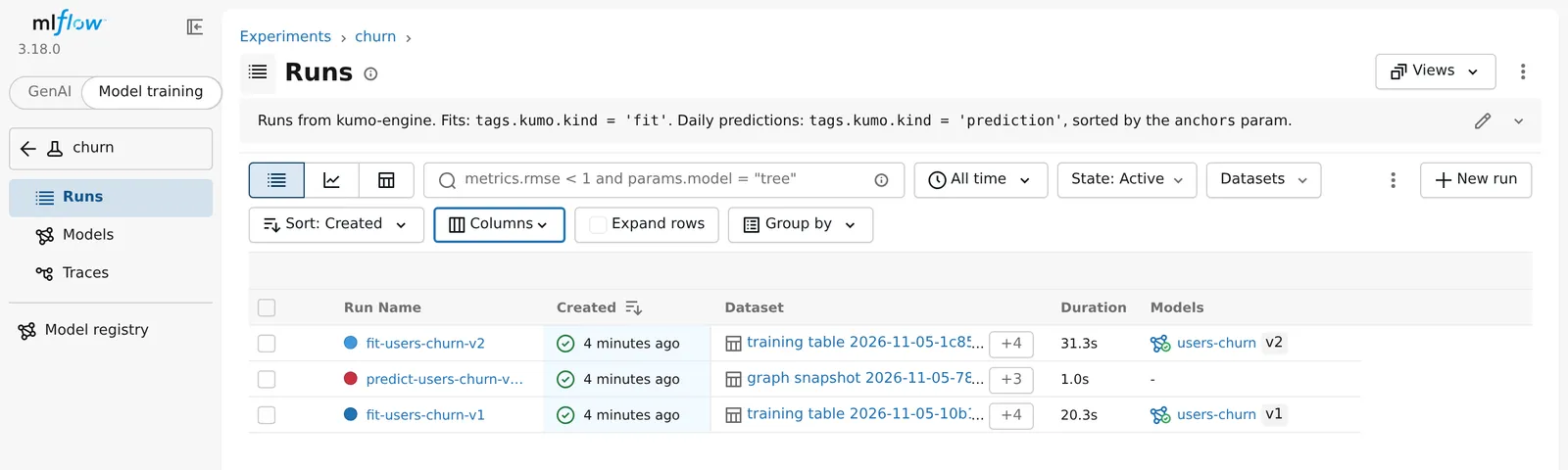
The run list below shows two fits and a prediction run of the users-churn model, with the datasets each run used and the registered version each fit produced. Kumo describes a new experiment with the filters for its fits and prediction runs:
Run Names
<model> is the registered model name; for Unity Catalog, it is the last part of the name. A prediction run of a static query, which has no prediction time, adds the run’s start time, as -<HHMMSS>, after the date. Snowflake uses the same names in upper case with underscores, such as PREDICT_CHURN_GNN_V1_2026_11_02. A Snowflake fit always keeps its start time, as in FIT_CHURN_GNN_20261105_142037, because Snowflake runs cannot be renamed; its registered version is in the kumo.model_version parameter.
To name runs yourself, pass run_name= to the tracker, for example MlflowTracking("churn", target=..., run_name="weekly"). Fits are then named fit-weekly and prediction runs predict-weekly-<prediction date>.
Run Card
The run’s description, shown on the MLflow Overview tab, starts with a run card. It leads with the tuned holdout metric and says which trial and epoch the reported metrics come from. It then lists the holdout metrics, the classification matrix at the threshold when a binary model has one, the training data per split, data preparation time and size, lineage from source tables to model, and the location of every artifact.
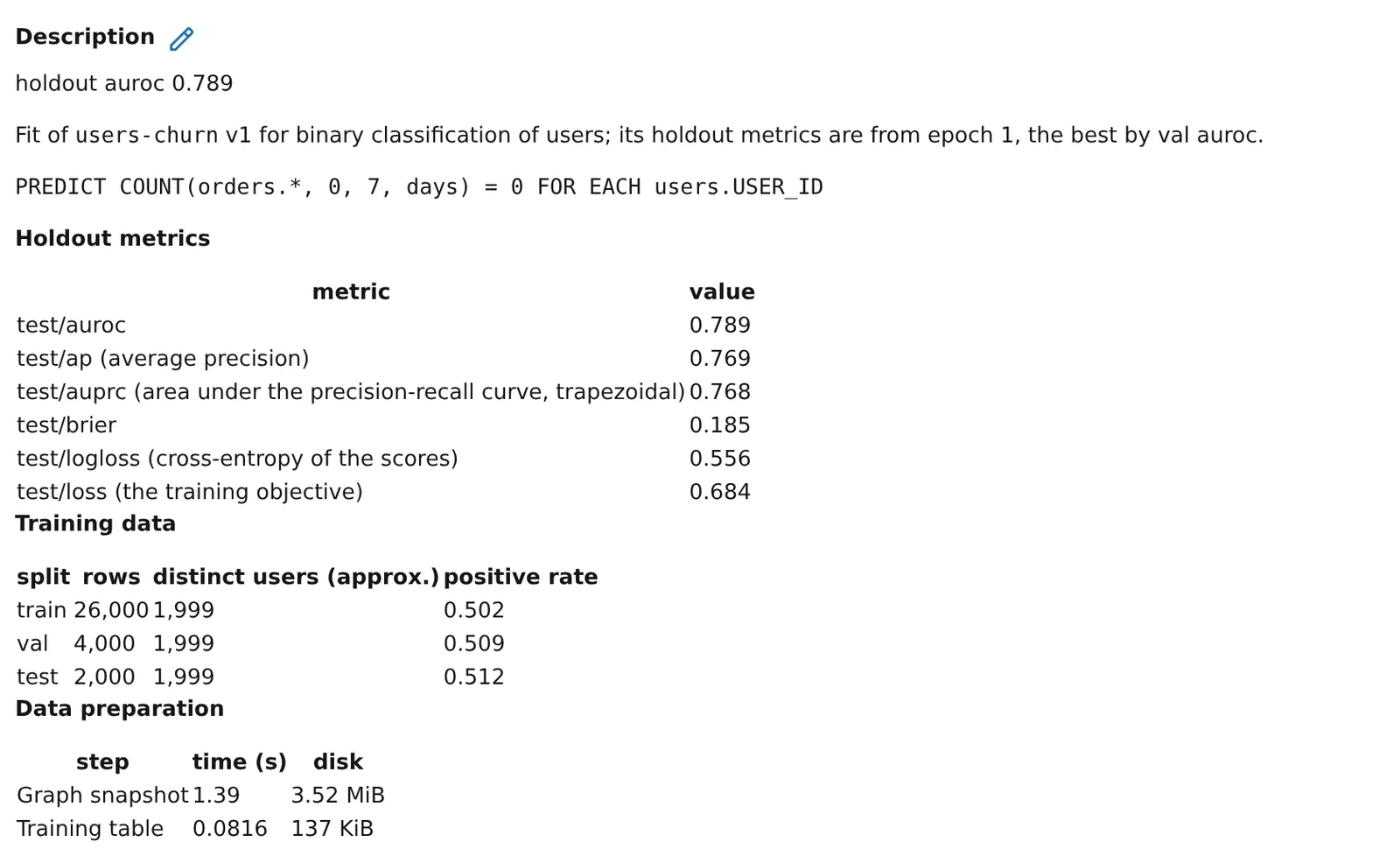
Kumo writes and rewrites the card. In MLflow, the card ends with the line “kumo rewrites everything above this line; editing it stops kumo’s updates.”, a horizontal line, and a hidden marker that the description editor shows as <!-- /kumo:card sha256=... -->. Write your own notes after that marker and keep the marker. If you edit anything above it, or remove it, Kumo stops updating the card. A Snowflake (preview) run card is written once when the run ends and has no notes line.
Metrics and Parameters
In Python, the same holdout metrics are in fit_result.metrics with an underscore, such as fit_result.metrics["test_auroc"]. When the model plan refits the best model on training and validation data after tuning, the refit model is the one that ships: test/<metric> describes it, fit_result.metrics reports it as test_refit_<metric>, and the tracker logs the model before the refit as before_refit/<metric>.
The Model metrics tab charts each group.
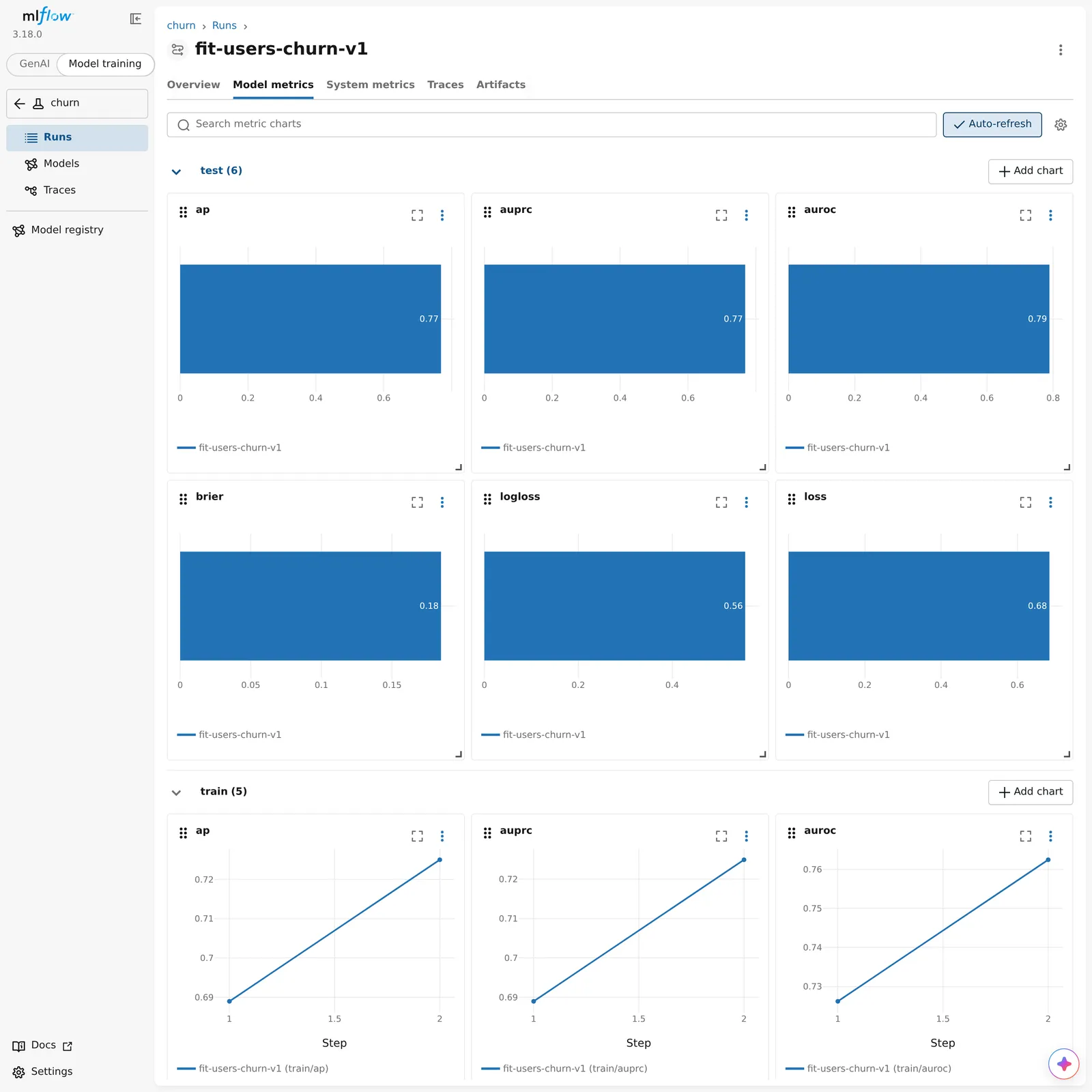
loss is the training objective of the model plan, so compare it only between fits with the same objective. To compare different models, use the tuned metric, or test/logloss for classification. A model loaded from the registry has no test/logloss, as described in Promote a Version.
Tags and Inputs
Every run carries kumo.kind (fit, trial, or prediction) and kumo.engine_version. A fit also carries kumo.bundle_id, kumo.task_type, and kumo.snapshot_id, and, when it registered a version, kumo.model_name and kumo.model_version. A prediction run carries kumo.prediction_id, kumo.bundle_id of the model it scored with, and, when that model was loaded from the registry, kumo.model_name and kumo.model_version; a model loaded by path leaves them out. kumo.model_name holds the full registered name, such as main.ml.users_churn on Unity Catalog. In MLflow, a fit lists the training table, the graph snapshot, and each source table as dataset inputs, and a hyperparameter search records each trial as a child run.
Find Runs
Use these filters in the MLflow run search box, or as filter_string in mlflow.search_runs(). Tag keys that contain a dot need backticks. Filters by model name need a registry, as described in Register and Promote Models:
To call MLflow yourself with the tracker’s server and credentials, use the tracker’s client. This example lists the fits in the tracker’s experiment:
Inside the with block, client is an MlflowClient for the tracker’s server, and module-level calls such as mlflow.search_runs() reach the same server.