Skip to navigation

BeeGFS

View as Markdown

10.1 BeeGFS Introduction

Integration of BeeGFS with BCM is a legacy option that is no longer supported. It is discussed in this chapter for legacy cluster purposes only.

10.1.1 BeeGFS Concepts

BeeGFS is a high-performance parallel file system, developed by the Fraunhofer Competence Center for High Performance Computing, and optimized for intensive I/O. It uses a distributed metadata architecture designed for scalability and flexibility. More information about BeeGFS can be found at the official online documentation at https://www.beegfs.io/content/documentation/.

NVIDIA Base Command Manager provides packages to allow BeeGFS to be deployed, managed, and monitored on a cluster running RHEL and derivatives. The deployment tool provided by BCM is cm-beegfs-setup (section 10.2).

A BeeGFS cluster consists of a management server, one or more metadata servers and one or more storage servers. Clients should have client servers running on them.

If high-availability is required, then the administrator needs to arrange for it separately, for the BeeGFS management servers.

Since BeeGFS is a parallel filesystem, it means that adding more nodes increases not only the storage capacity, but also system performance. BeeGFS can work with any local file system for data storage as long as it is POSIX compliant.

By default, the latest version of BeeGFS is supported. However, at the time of writing (November 2022), the latest BeeGFS version is 7.3, which is supported for RHEL8 and variants.

The BeeGFS Mon monitoring service is on the roadmap for future BCM integration.

10.1.2 BeeGFS Installation Notes And Options

By default all logging is done to the systemd journal. The installation logs can be viewed using:

journalctl -u 'beegfs-*'.

Log locations can be changed using cmsh or Base View at any moment after installation, by editing BeeGFS roles for the corresponding configuration overlays (section 10.3.2).

Authentication is possible for the BeeGFS cluster via a shared secret file. The shared secret file can be installed during cm-beegfs-setup installation (section 10.2).

10.2 Deployment And Uninstallation Of BeeGFS With cm-beegfs-setup

Deployment and uninstallation for BCM can be carried out with a TUI utility, cm-beegfs-setup. The utility is a part of a cluster-tools package that comes with BCM. If the BeeGFS packages are not installed, then the utility installs them.

The cm-beegfs-setup utility can be run as root from the head node. The first screen that shows up is the main menu for operations (figure 10.1):

BeeGFS Operations Via cm-beegfs-setup Main Menu

Figure 10.1: BeeGFS Operations Via cm-beegfs-setup Main Menu

In the main menu, the administrator can choose to:

  • Deploy BeeGFS (section 10.2.2)

  • Modify an existing BCM BeeGFS configuration (the options are a subset of the deployment as described in section 10.2.2)

  • Uninstall BeeGFS (section 10.2.3)

  • Simply exit the TUI session

10.2.1 Preparation Of The Cluster For BeeGFS

While cm-beegfs-setup can configure many aspects of BeeGFS installation, the optimization and disk layout aspects are expected to be managed by the system administrator. This section discusses the preparations needed before running cm-beegfs-setup.

10.2.1.1 Creation Of A New Software Image For BeeGFS

An existing default image is first cloned as follows:

Example

[{basecm10} \textasciitilde]# cmsh
[basecm10]% softwareimage
[basecm10->softwareimage]% clone default-image beegfs-image
[basecm10->softwareimage*[beegfs-image*]]% commit
[basecm10->softwareimage]% task wait --last

The software image is now modified to store additional configuration files to optimize performance. The modifications made to this image may be unnecessary, or even harmful in the default image.

10.2.1.2 Preparation Of The Software Image Directories

Directories are created for storage and metadata in the image. The directories are to be used later in the disk setup layout and when running cm-beegfs-setup.

Example

[{basecm10} \textasciitilde] cm-chroot-sw-img /cm/images/beegfs-image
[root@default-image /]# mkdir -p /beegfs/{storage,metadata}

10.2.1.3 Creation Of Disk Setup XML For Storage And Metadata VMs

The XML examples that follow illustrate the connection between the storage and the metadata directories of BeeGFS. The examples are simplified for illustration. A more realistic scenario would typically involve a hardware or a software RAID configuration.

The XML disk setup is saved as a file, /root/beegfs-storage.xml, on the head node, and may look similar to:

Example

<?xml version="1.0" encoding="UTF-8"?>
<diskSetup>
<device>
<blockdev>/dev/sda</blockdev>
<partition id="efi" partitiontype="esp">
<size>100M</size>
<type>linux</type>
<filesystem>fat</filesystem>
<mountPoint>/boot/efi</mountPoint>
<mountOptions>defaults,noatime,nodiratime</mountOptions>
</partition>
<partition id="boot">
<size>500M</size>
<type>linux</type>
<filesystem>ext4</filesystem>
<mountPoint>/boot</mountPoint>
<mountOptions>defaults,noatime,nodiratime</mountOptions>
</partition>
<partition id="root">
<size>max</size>
<type>linux</type>
<filesystem>ext4</filesystem>
<mountPoint>/</mountPoint>
<mountOptions>defaults,noatime,nodiratime</mountOptions>
</partition>
</device>
<device>
<blockdev>/dev/sdb</blockdev>
<partition id="beegfs">
<size>max</size>
<type>linux</type>
<filesystem>xfs</filesystem>
<mkfsFlags>-d su=128k,sw=8 -l version=2,su=128k -isize=512</mkfsFlags>
<mountPoint>/beegfs/storage</mountPoint>
<mountOptions>noatime,nodiratime,logbufs=8,logbsize=256k,largeio,inode64,\
swalloc,allocsize=131072k</mountOptions>
</partition>
</device>
</diskSetup>

While the setup for /dev/sda is rather generic, there are some important modifications in the /dev/sdb section:

  • The value for filesystem is set to XFS, which is as recommended at https://doc.beegfs.io/latest/advanced_topics/storage_tuning.html.

  • mkfsFlags has settings designed to help optimize for large I/O. In particular, many large files are assumed per directory. This assumption is based on how BeeGFS saves its own files rather than the users’ files: BeeGFS stores the data aggregated and split into large-sized chunks.

  • mountPoint is important later when running cm-beegfs-setup. This directory must be later specified as a BeeGFS storage directory.

  • mountOptions, just like the mkfs flags, are intended to optimize for I/O in large-sized chunks. It also assumes many large files per directory.

The BeeGFS metadata XML file disk setup is saved as a file, /root/beegfs-metadata.xml, on the head node, and may look similar to:

Example

<?xml version="1.0" encoding="UTF-8"?>
<diskSetup>
<device>
<blockdev>/dev/sda</blockdev>
<partition id="efi" partitiontype="esp">
<size>100M</size>
<type>linux</type>
<filesystem>fat</filesystem>
<mountPoint>/boot/efi</mountPoint>
<mountOptions>defaults,noatime,nodiratime</mountOptions>
</partition>
<partition id="boot">
<size>500M</size>
<type>linux</type>
<filesystem>ext4</filesystem>
<mountPoint>/boot</mountPoint>
<mountOptions>defaults,noatime,nodiratime</mountOptions>
</partition>
<partition id="root">
<size>max</size>
<type>linux</type>
<filesystem>ext4</filesystem>
<mountPoint>/</mountPoint>
<mountOptions>defaults,noatime,nodiratime</mountOptions>
</partition>
</device>
<device>
<blockdev>/dev/sdb</blockdev>
<partition id="beegfs">
<size>max</size>
<type>linux</type>
<filesystem>ext4</filesystem>
<mkfsFlags>-i 2048 -I 512 -J size=400 -Odir_index,filetype</mkfsFlags>
<mountPoint>/beegfs/metadata</mountPoint>
<mountOptions>noatime,nodiratime</mountOptions>
</partition>
</device>
</diskSetup>

Similar to the storage setup XML, the mkfs options are based on BeeGFS recommendations, in this case as found at https://doc.beegfs.io/latest/advanced_topics/metadata_tuning.html.

The setting for mountPoint here too is the one used when running cm-beegfs-setup.

10.2.1.4 Creation Of Categories For Storage And Metadata Nodes

Categories are necessary to tie images and disk layout together (output truncated):

Example

[{basecm10} \textasciitilde]# cmsh
[basecm10]% category
[basecm10->category]% clone default beegfs-metadata
[basecm10->category*[beegfs-metadata*]]% set softwareimage beegfs-image
[basecm10->category*[beegfs-metadata*]]% set disksetup /root/beegfs-metadata.xml
[basecm10->category*[beegfs-metadata*]]% clear roles
[basecm10->category*[beegfs-metadata*]]% commit
[basecm10->category*[beegfs-metadata]]% clone beegfs-metadata beegfs-storage
[basecm10->category*[beegfs-storage*]]% set softwareimage beegfs-image
[basecm10->category*[beegfs-storage*]]% set disksetup /root/beegfs-storage.xml
[basecm10->category*[beegfs-storage*]]% commit
[basecm10->category*[beegfs-storage]]% clone beegfs-metadata beegfs-management
[basecm10->category*[beegfs-management*]]% set softwareimage beegfs-image
[basecm10->category*[beegfs-management*]]% commit

10.2.1.5 Tuning Kernel Parameters

The BeeGFS Wiki at https://www.beegfs.io/wiki/StorageServerTuning suggests enabling transparent huge tables. Further information about huge pages may be found at https://www.kernel.org/doc/html/latest/admin-guide/mm/transhuge.html.

Kernel parameters can be set for the image to permanently enable this feature:

Example

[{basecm10} \textasciitilde]# cmsh
[basecm10]% softwareimage
[basecm10->softwareimage]% use beegfs-image
[basecm10->softwareimage[beegfs-image]]% append kernelparameters transparent_hugepages=always
[basecm10->softwareimage[beegfs-image*]]% commit
[basecm10->softwareimage[beegfs-image*]]% task wait --last

10.2.1.6 Tuning Device Configuration

Assuming the preceding disk setup layout, with BeeGFS using /dev/sdb, the following udev rules can be added, to improve large and highly-parallel I/O.

Example

[{basecm10} \textasciitilde]# cm-chroot-sw-img /cm/images/beegfs-image
[root@default-image /]# cat <<EOF > /etc/udev/rules.d/90-beegfs.rules
ACTION=="add|change", KERNEL=="sdb", ATTR{queue/scheduler}="deadline"
# To improve throughput for sequential reads,
# increase the maximum amount of read-ahead data.
# The actual amount of read-ahead is adaptive,
# so using a high value here won't
# harm performance for small random access.
ACTION=="add|change", KERNEL=="sdb", ATTR{queue/read_ahead_kb}="4096"
# Now give the IO scheduler more flexibility by increasing the size
# of the request queue:
ACTION=="add|change", KERNEL=="sdb", ATTR{queue/nr_requests}="4096"
EOF

It is always a good idea to test the preceding optimization suggestions. Benchmarking the system before and after making the adjustments is therefore recommended. Benchmarking BeeGFS is discussed at https://www.beegfs.io/wiki/Benchmark.

10.2.1.7 Tuning VM Parameters

Similarly, VFS caching can be optimized by setting a lower latency:

[{basecm10} \textasciitilde]# cm-chroot-sw-img /cm/images/beegfs-image
[root@default-image /]# cat <<EOF > /etc/sysctl.d/90-beegfs.conf
#####################################################################
# BeeGFS-related settings
#####################################################################
# To avoid long IO stalls (latencies) for write cache flushing in
# a production environment with very different workloads, you will
# typically want to limit the kernel dirty (write) cache size:
vm.dirty_ratio = 10
vm.dirty_background_ratio = 5
# Most likely already the default
# Buffering of file system data requires frequent memory allocation.
# Raising the amount of reserved kernel memory will enable faster and
# more reliable memory allocation in critical situations.
# Raise the corresponding value to 64 MB if you have less than 8GB
# of memory, otherwise, raise it to at least 256 MB
vm.min_free_kbytes = 262144
# Assigning slightly higher priority to inode caching helps to
# avoid disk seeks for inode loading:
vm.vfs_cache_pressure = 50
EOF

10.2.1.8 Preparation Of Storage And Metadata Nodes For BeeGFS Setup

The categories created earlier on must now be connected to the actual nodes.

In the following illustrative cluster node002 is used for metadata, node001 is used for management, and node003..node005 are used for storage:

Example

[basecm10]% device
[basecm10->device]% use node002
[basecm10->device[node002]]% set category beegfs-metadata
[basecm10->device*[node002*]]% commit
[basecm10->device[node002]]% ..
[basecm10->device]% use node001
[basecm10->device[node001]]% set category beegfs-management
[basecm10->device*[node001*]]% commit
[basecm10->device]% foreach -n node003..node005 ( set category beegfs-storage; commit )
[basecm10->device]% reboot -n node001..node005

10.2.1.9 Running cm-beegfs-setup

During the cm-beegfs-setup run, when prompted to select categories for BeeGFS metadata, the beegfs-metadata category should be selected.

Similarly, when prompted to select categories for BeeGFS storage, the tt beegfs-storage category should be selected.

The client nodes are the nodes where users access the storage. However, the client service is deployed to other BeeGFS nodes as well.

The BeeGFS helper is needed to help other BeeGFS services with DNS and other functionality that is not part of the BeeGFS kernel module.

When prompted to select nodes for BeeGFS helper, all cluster nodes that are intended to run BeeGFS-related services should be selected.

When prompted to configure the BeeGFS metadata role, the /beegfs/metadata directory should be set in the Data directories field. This directory should already be configured in the disk setup XML step which sets up the mount point for data disks for storage and metadata.

Similarly, when prompted to configure the BeeGFS storage role, the /beegfs/storage directory should be set in the Data directories field.

10.2.2 Deployment Of BeeGFS

If the Deploy option is chosen, then the deployment options are presented by the wizard.

10.2.2.1 Name, Mount Point, Authentication File, Multi Mode

The first BeeGFS settings options that can be configured in the wizard are the BeeGFS cluster name, BeeGFS client mount point, BeeGFS authentication file name, and BeeGFS Multi Mode (figure 10.2):

BeeGFS Cluster Name, Mount Point, BeeGFS Authentication File, And Multi Mode Options

Figure 10.2: BeeGFS Cluster Name, Mount Point, BeeGFS Authentication File, And Multi Mode Options

A suggested mount point name and authentication file name are generated automatically as the cluster name file is typed in. The suggestions can be modified if needed.

10.2.2.2 Select Management Node

The next screen (figure 10.3) then asks for one node to be selected to be the BeeGFS management server:

Select Management Node

Figure 10.3: Select Management Node

10.2.2.3 Select Metadata Nodes

The next screen then asks for node categories to be selected for the BeeGFS metadata servers. Zero or more categories can be chosen. The next screen (figure 10.4) in any case displays the remaining nodes that have not already been selected by category, and allows these remaining nodes to be individually set to be metadata servers.

One or more metadata servers are needed for a BeeGFS instance.

Select Metadata Nodes

Figure 10.4: Select Metadata Nodes

10.2.2.4 Select Storage Nodes

The next screen then asks for node categories to be selected for the BeeGFS storage servers. Zero or more categories can be chosen. The next screen (figure 10.5) in any case displays the remaining nodes that have not already been selected by category, and allows these remaining nodes to be individually set to be storage servers.

One or more storage servers are needed for a BeeGFS instance.

Select Storage Nodes

Figure 10.5: Select Storage Nodes

10.2.2.5 Select Client Nodes

The next screen then asks for node categories to be selected for the BeeGFS clients. Zero or more categories can be chosen. The next screen (figure 10.6) in any case displays the remaining nodes that have not already been selected by category, and allows these remaining nodes to be individually set to be BeeGFS clients.

One or more BeeGFS client servers are needed for a BeeGFS instance.

Select Client Nodes

Figure 10.6: Select Client Nodes

10.2.2.6 Select BeeGFS Helper Nodes

The next screen then asks for node categories to be selected for the BeeGFS helper service. Zero or more categories can be chosen. The next screen (figure 10.7) in any case displays the remaining nodes that have not already been selected by category, and allows these remaining nodes to be individually set to be BeeGFS helper nodes. By default, the selection of the helper nodes, which provide logging and DNS lookup functions to the BeeGFS clients, matches the selection that has been made earlier on of the BeeGFS client servers.

Select Helper Nodes

Figure 10.7: Select Helper Nodes

10.2.2.7 Select BeeGFS Version

The next screen asks for a BeeGFS version to be selected. By default the latest stable compatible version is selected.

10.2.2.8 Management Server Configuration

The next screen (figure 10.8) asks for some configuration parameters for the BeeGFS management service to be set:
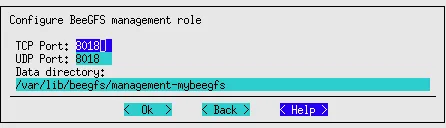
Configure Management Service

Figure 10.8: Configure Management Service

Default suggestions are presented.

10.2.2.9 Metadata Server Configuration

The next screen (figure 10.9) asks for input on configuring the BeeGFS metadata service:
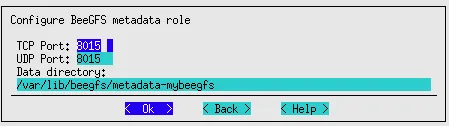
Configure Metadata Servce

Figure 10.9: Configure Metadata Servce

Default suggestions are presented.

10.2.2.10 Storage Server Configuration

The next screen (figure 10.10) asks for input on setting some configuration parameters for the BeeGFS storage service:

Configure Storage Servce

Figure 10.10: Configure Storage Servce

10.2.2.11 Client Configuration

The next screen (figure 10.11) asks for input on configuring the BeeGFS clients:

Configure Client Servce

Figure 10.11: Configure Client Servce

10.2.2.12 Helper Configuration

The next screen (figure 10.12) asks for input on configuring the BeeGFS helper:

Configure Helper Servce

Figure 10.12: Configure Helper Servce

10.2.2.13 Deployment Summary

Finally, the wizard displays a deployment summary (figure 10.13):

Deployment Summary

Figure 10.13: Deployment Summary

From this screen the deployment process can be started, the deployment configuration can be viewed and saved, or the wizard can simply be exited.

10.2.2.14 Command Line Installation

If a configuration file is saved from a cm-beegfs-setup run, then it can be used to install a BeeGFS cluster automatically:

Example

cm-beegfs-setup -c cm-beegfs-setup.conf

10.2.3 Uninstalling BeeGFS

If the Uninstall option is chosen from the main menu (figure 10.1), then the uninstallation process starts.

An extra Are you sure? prompt is thrown in the way first, to help avoid a mistaken removal, and after confirmation, a further confirmation is needed to remove an authentication file that was installed with the BeeGFS instance.

The uninstallation process then starts. It can take several minutes in order to ensure that services are stopped properly, so that errors and junk files are avoided.

10.3 Managing The Deployed BeeGFS Instance

A BeeGFS cluster consists of:

  • One Management node

  • Some Metadata nodes

  • Some Storage nodes

Information about the right number of nodes to use can be found at https://www.beegfs.io/docs/whitepapers/Picking_the_right_Number_of_Targets_per_Server_for_BeeGFS_by_ThinkParQ.pdf

BeeGFS clients should have client servers running on them.

10.3.1 Setup

Associated with BeeGFS are the following BeeGFS-related packages, most of which provide services:

  1. beegfs-mgmtd

  2. beegfs-meta

  3. beegfs-storage

  4. beegfs-client

  5. beegfs-helperd

  6. beegfs-utils

The repository from which these packages are picked up is added to the repositories list when BeeGFS is installed by BCM (section 10.2), and the packages are then installed on all of the cluster nodes. The services are assignable by the cluster administrator to cluster devices as roles. In cmsh these BeeGFS roles are treated as objects, and the configuration of these roles is determined by role parameters (object attributes). The roles are described in detail section 10.3.2.

10.3.2 BeeGFS Objects

The BeeGFS configuration settings are updated by BCM in instance-specific configuration files under /etc/beegfs/.

10.3.2.1 BeeGFS Instances Properties

In section 10.2.2, an example session is run with the BCM utility cm-beegfs-setup. During the session, an example of a BeeGFS instance, mybeegfs, is created. BeeGFS instances such as mybeegfs, that have been created by BCM, can be listed, and can have their main properties viewed in the beegfs main mode of cmsh.

  • The list command lists the instances and the allocation of nodes to the BeeGFS servers:

    Example

    [root@basecm10 ~]# cmsh
    [basecm10]% beegfs
    [basecm10->beegfs]% list
    Name (key) Management nodes Client nodes Storage nodes Metadata nodes
    ---------- ---------------- ----------------- ---------------- ----------------
    mybeegfs basecm10 node005,basecm10 node003,node004 node001,node002
  • The main properties of a particular BeeGFS instance, such as mybeegfs can be shown with:

    Example

    [basecm10->beegfs]% show mybeegfs
    Parameter Value
    -------------------------------- ------------------------------------------------
    Name mybeegfs
    Revision
    Multi mode yes
    Authentication file /etc/beegfs/mybeegfs.d/auth
    Mountpoint /mnt/beegfs-mybeegfs
    Management Nodes basecm10
    Client Nodes node005,basecm10
    Storage Nodes node003,node004
    Metadata Nodes node001,node002
    Helper Nodes node005,basecm10
    [basecm10->beegfs]%

The properties that are specific to the BeeGFS services can be viewed via the associated cmsh roles. The tree layout for the submodes associated with BeeGFS roles is according to the following scheme:

|--roles
| |--[beegfs::management]
| | `--configurations
| | |--logsettings
| | `--connectionsettings
| |--[beegfs::client]
| | `--configurations
| | `--connectionsettings
| |--[beegfs::helper]
| | `--configurations
| | |--logsettings
| | `--connectionsettings
| |--[beegfs::metadata]
| | `--configurations
| | |--logsettings
| | `--connectionsettings
| `--[beegfs::storage]
| `--configurations
| |--logsettings
| `--connectionsettings
|

10.3.2.2 BeeGFSManagement Role

The BeeGFSManagement role is used to configure BeeGFS management services. The role parameters are described in table 10.1:

ParameterDescriptionOption to beegfs-mgmtd
Data directoryPath to data directorystoreMgmtdDirectory
Allow new serversAllow new servers registrationsysAllowNewServers
Allow new storageAllow new storage targets registrationsysAllowNewTargets
targets
Backlog TCPTCP listen backlog sizeconnBacklogTCP
Interfaces filePath to file with interfaces listconnInterfacesFile
Management port TCPTCP port for management serviceconnMgmtdPortTCP
Management port UDPUDP port for management serviceconnMgmtdPortUDP
Net filter filePath to file with list of allowed IPconnNetFilterFile
subnets
Log levelLog levellogLevel
No log dateDo not show date along with time in loglogNoDate
Number of log linesNumber of lines in log file, after whichlogNumLines
it will be rotated
Number of logNumber of old log files to keeplogNumRotatedFiles
rotated files
Log filePath to log file, empty means logs gologStdFile
to the journal
Enable QuotaEnable quotaquotaEnableEnforcement
Quota query GID filePath to file with GIDs to be checked by quotaquotaQueryGIDFile
Quota query GIDGID range to be checked by quotaquotaQueryGIDRange
range
Quota query UID filePath to file with UIDs to be checked byquotaQueryUIDFile
quota
Quota query UIDUID range to be checked by quotaquotaQueryUIDRange
range
Quota query typeQuery type for quotaquotaQueryType
Quota query withAllow also system users/groups to bequotaQueryWithSystemUsersGroups
system users groupschecked by quota
Quota updateQuota update intervalquotaUpdateIntervalMin
interval
Target offlineTimeout for targets on storage serversysTargetOfflineTimeoutSecs
timeoutto be considered offline when no target
status received
Client auto removeTime after which an unreachable nodetuneClientAutoRemoveMins
timeis considered dead
Number of workersNumber of worker threadstuneNumWorkers
Meta dynamic poolsRaise lower limits if difference intuneMetaDynamicPools
capacity becomes too large between
targets
Meta inodes lowMetadata inode free space pooltuneMetaInodesLowLimit
limitthreshold
Meta inodesMetadata inode free space pooltuneMetaInodesEmergencyLimit
emergency limitthreshold
Meta space low limitMetadata space free space pooltuneMetaSpaceLowLimit
threshold
Meta space emergencyMetadata space free space pooltuneMetaSpaceEmergencyLimit
limitthreshold
Storage dynamicRaise lower limits if difference intuneStorageDynamicPools
poolscapacity becomes too large between
targets
Storage inodes lowStorage inode free space pooltuneStorageInodesLowLimit
limitthreshold
Storage inodesStorage inode free space pooltuneStorageInodesEmergencyLimit
emergency limitthreshold
Storage space lowStorage space free space pooltuneStorageSpaceLowLimit
limitthreshold
Storage spaceStorage space free space pooltuneStorageSpaceEmergencyLimit
emergency limitthreshold

Table 10.1: BeeGFSManagement role parameters and beegfs-mgmtd options

The settings can be managed in cmsh via the beegfs::management role. As is usual for roles, they can be managed by device mode, category mode, or configurationoverlay mode. The parameters of the role that correspond to the parameters in the preceding table can then be set.

If the management role is assigned to the head node, as suggested in the example session in section 10.2.2, then the role can be viewed from the cmsh session as follows:

Example

[root@basecm10 ~]# cmsh
[basecm10]% device use basecm10
[basecm10->device[basecm10]]% roles
[basecm10->device[basecm10]->roles]% use bee<TAB><TAB><TAB>
beegfs::client beegfs::helper beegfs::management
[basecm10->device[basecm10]->roles]% use beegfs::management
[basecm10->device[basecm10]->roles[BeeGFS::Management]]% show
Parameter Value
-------------------------------- ------------------------------------------------
Name BeeGFS::Management
Revision
Type BeeGFSManagementRole
Add services yes
Configurations <1 in submode>

The configuration settings can be viewed within the submodes of the role for a particular BeeGFS instance:

Example

[basecm10->device[basecm10]->roles[BeeGFS::Management]]% configurations
[basecm10->device[basecm10]->roles[BeeGFS::Management]->configurations]% list
BeeGFS cluster (key)
--------------------
mybeegfs
[basecm10->device[basecm10]->roles[BeeGFS::Management]->configurations]% use mybeegfs
[basecm10->device[basecm10]->roles[BeeGFS::Management]->configurations[mybeegfs]]% show
Parameter Value
-------------------------------------- ------------------------------------------------
BeeGFS cluster mybeegfs
Revision
Data directory /var/lib/beegfs/management-mybeegfs
Allow new servers yes
Allow new storage targets yes
Target offline timeout 3m
Client auto remove time 30m
Number of workers 4
Meta dynamic pools yes
Meta inodes low limit 10M
Meta inodes emergency limit 1M
Meta space low limit 9.3GiB
Meta space emergency limit 2.79GiB
Storage dynamic pools yes
Storage inodes low limit 9.5MiB
Storage inodes emergency limit 976KiB
Storage space low limit 931GiB
Storage space emergency limit 18.6GiB
Enable Quota no
Quota query GID file
Quota GIDs
Quota query GID range
Quota query UID file
Quota UIDs
Quota query UID range
Quota query type system
Quota query with system users groups no
Quota update interval 10m
Connection settings <submode>
Log settings <submode>

The Connection settings submode for the management server in the BeeGFS instance has the ports and interface settings for the management service: Similarly, the Log settings submode for the management server in the BeeGFS instance has log configuration settings for the management service:

Example

[basecm10->...[BeeGFS::Management]->configurations[mybeegfs]]% connectionsettings
[basecm10->...[BeeGFS::Management]->configurations[mybeegfs]->connectionsettings]% show
Parameter Value
-------------------------------- ------------------------------------------------
Revision
Port TCP 8018
Port UDP 8018
Backlog TCP 128
Interfaces file
Interfaces list
Net filter file
Use RDMA yes

Similarly, the Log settings submode for the management server in the BeeGFS instance has log configuration settings for the management service:

Example

[basecm10->...[BeeGFS::Management]->configurations[mybeegfs]->connectionsettings]% ..; logsettings; show
Parameter Value
-------------------------------- ------------------------------------------------
Revision
Log type Syslog
Level 2
No date no
Number of lines 50000
Number of rotated files 5
File
[basecm10->device[basecm10]->roles[BeeGFS::Management]->configurations[mybeegfs]->logsettings]%

10.3.2.3 BeeGFSMetadata Role

The BeeGFSMetadata role is used for configuring BeeGFS metadata services. The role parameters are described in Table 10.2:

ParameterDescriptionOption to beegfs-meta
Data directoryPath to the data directorystoreMetaDirectory
Management nodeNode with a management rolesysMgmtdHost
Backlog TCPTCP listen backlogconnBacklogTCP
Fallback expirationTime after which a connection to aconnFallbackExpirationSecs
timefallback interface expires
Interfaces filePath to the file with a list of interfacesconnInterfacesFile
for communication
Max internode numberMax number of simultaneousconnMaxInternodeNum
connections to the same node
Meta port TCPTCP port for metadata serviceconnMetaPortTCP
Meta port UDPUDP port for metadata serviceconnMetaPortUDP
Net filter filePath to a file with a list of allowedconnNetFilterFile
IP subnets
Use RDMAUse RDMAconnUseRDMA
RDMA type of serviceRDMA type of serviceconnRDMATypeOfService
Tcp only filter filePath to a file with a list of no DRMAconnTcpOnlyFilterFile
IP ranges
Log levelLog levellogLevel
No log dateDo not show date along with time in loglogNoDate
Number of log linesNumber of lines in log file, after whichlogNumLines
it will be rotated
Number of logNumber of old log files to keeplogNumRotatedFiles
rotated files
Log filePath to the log file, empty means logslogStdFile
go to the journal
Client xattrsEnable client-side extended attributesstoreClientXAttrs
Client ACLsEnable handling and storage of client-side ACLsstoreClientACLs
client-side ACLs
Use extendedStore metadata as extended attributesstoreUseExtendedAttribs
attributesor not
Target attachmentFile with a list of targets to be groupedsysTargetAttachmentFile
filewithin the same domain for
randominternode
Target offlineTimeout for targets on a storagesysTargetOfflineTimeoutSecs
timeoutserver to be considered offline when no
target status is received
Allow user setAllow non-privileged users to modifysysAllowUserSetPattern
patternstripe pattern settings for directories
they own
Bind to numa zoneZero-based NUMA zone number totuneBindToNumaZone
which all threads of metadata process
should be bound
Number of streamThe number of threads waiting fortuneNumStreamListeners
listenersincoming data events
Number of workersNumber of worker threadstuneNumWorkers
Target chooserThe algorithm to choose storage targetstuneTargetChooser
for file creation
Use aggressiveActively poll for events instead oftuneUseAggressiveStreamPoll
stream pollsleeping until an event occurs
Use per user msgUse per-user queues for pendingtuneUsePerUserMsgQueues
queuesrequests

Table 10.2: BeeGFSMetadata role parameters and beegfs-meta options

The settings for BeeGFS metadata can be managed in cmsh via the beegfs::metadata role. Roles are, as usual, assigned via device, category, or configurationoverlay mode. The parameters of the role that correspond to the parameters in the preceding table can then be set.

Example

[basecm10 ~]# cmsh
[root@basecm10 ~]# cmsh
[basecm10]% device use node001
[basecm10->device[node001]]% roles
[basecm10->device[node001]->roles]% use beegfs::metadata
[basecm10->device[node001]->roles[BeeGFS::Metadata]]% configurations
[basecm10->device[node001]->roles[BeeGFS::Metadata]->configurations]% use mybeegfs
[basecm10->device[node001]->roles[BeeGFS::Metadata]->configurations[mybeegfs]]% show
Parameter Value
-------------------------------- ------------------------------------------------
BeeGFS cluster mybeegfs
Revision
Data directory /var/lib/beegfs/metadata-mybeegfs
Bind to numa zone
Run daemonized yes
Client xattrs no
Client ACLs no
Use extended attributes yes
Allow user set pattern no
Use aggressive stream poll no
Use per user msg queues no
Target chooser Randomized
Target offline timeout 3m
Target attachment file
Number of stream listeners 1
Number of workers 0
Start by CMDaemon yes
Connection settings <submode>
Log settings <submode>
[basecm10->...::Metadata]->configurations[mybeegfs]]% connectionsettings; show; ..
Parameter Value
-------------------------------- ------------------------------------------------
Revision
Port TCP 8015
Port UDP 8015
Backlog TCP 128
Max internode number 12
Fallback expiration time 15m
Interfaces file
Interfaces list
Net filter file
Tcp only filter file
Use RDMA yes
RDMA type of service 0
[basecm10->...::Metadata]->configurations[mybeegfs]]% logsettings; show; ..
Parameter Value
-------------------------------- ------------------------------------------------
Revision
Log type Syslog
Level 2
No date no
Number of lines 50000
Number of rotated files 5
File
[basecm10->device[node001]->roles[BeeGFS::Metadata]->configurations[mybeegfs]]%

10.3.2.4 BeeGFSStorage Role

The BeeGFSStorage role is used for configuring BeeGFS storage services. The role parameters are described in Table 10.3:

ParameterDescriptionOption to beegfs-storage
Data directoriesPath to the data directoriesstoreStorageDirectory
Management nodeNode with a management rolesysMgmtdHost
AuthentificationPath to the shared secretconnAuthFile
fileauthentification file
Backlog TCPTCP listen backlogconnBacklogTCP
Interfaces filePath to the file with a list of interfacesconnInterfacesFile
for communication
Max internode numberMax number of simultaneousconnMaxInternodeNum
connections to the same node
Storage port TCPTCP port for storage serviceconnStoragePortTCP
Storage port UDPUDP port for storage serviceconnStoragePortUDP
Net filter filePath to a file with a list of allowedconnNetFilterFile
IP subnets
Use RDMAUse RDMAconnUseRDMA
RDMA type of serviceRDMA type of serviceconnRDMATypeOfService
Tcp only filter filePath to a file with a list of subnetsconnTcpOnlyFilterFile
with no RDMA
Log levelLog levellogLevel
No log dateDo not show date along with time in loglogNoDate
Number of log linesNumber of lines in log file, after whichlogNumLines
it will be rotated
Number of logNumber of old log files to keeplogNumRotatedFiles
rotated files
Log filePath to the log file, empty means logslogStdFile
go to the journal
Resync safetyAdd an extra amount of time to the lastsysResyncSafetyThresholdMins
thresholdsuccessful communication timestamp
in case of a potential cache loss
Target offlineTimeout until targets on a storagesysTargetOfflineTimeoutSecs
timeoutserver are considered offline when no
target status is received
Bind to numa zoneZero-based NUMA zone number totuneBindToNumaZone
which all threads of metadata process
should be bound
File read ahead sizeByte range submitted to the kernel fortuneFileReadAheadSize
read-ahead after number of bytes was
already read from target
File read aheadNumber of bytes read after whichtuneFileReadAheadTriggerSize
trigger sizethe read-ahead is triggered
File read sizeMaximum amount of data servertuneFileReadSize
should read in a single operation
File write sizeMaximum amount of data servertuneFileWriteSize
should write in a single operation
File write sync sizeNumber of bytes after which kerneltuneFileWriteSyncSize
advised to commit data
Number of resyncNumber of threads to gather filesystemtuneNumResyncGatherSlaves
gather slavesinformation for a buddy mirror resync
Number of resyncNumber of threads to sync filesystemtuneNumResyncSlaves
slavesinformation for a buddy mirror resync
Number of streamNumber of threads waiting fortuneNumStreamListeners
listenersincoming data events
Number of workersNumber of worker threadstuneNumWorkers
Use aggressiveActively poll for events instead oftuneUseAggressiveStreamPoll
stream pollsleeping until an event occur
Use per targetCreate a separate set of workers andtuneUsePerTargetWorkers
workersattach it for each storage target
Use per user msgUse per-user queues for pendingtuneUsePerUserMsgQueues
queuesrequests
Worker buffer sizeSize of network and io buffers, allocated for each workertuneWorkerBufSize

Table 10.3: BeeGFSStorage role parameters and beegfs-storage options

The beegfs-storage settings are updated by BCM in /etc/beegfs/beegfs-storage.conf.

The settings can be managed in cmsh via the beegfs::storage role. Roles are, as usual, assigned via device, category, or configurationoverlay mode. The parameters of the role that correspond to the parameters in the preceding table can then be set.

Example

[root@basecm10 ~]# cmsh
[basecm10]% device use node003
[basecm10->device[node003]]% roles
[basecm10->device[node003]->roles]% use beegfs::storage
[basecm10->device[node003]->roles[BeeGFS::Storage]]% show
Parameter Value
-------------------------------- ------------------------------------------------
Name BeeGFS::Storage
Revision
Type BeeGFSStorageRole
Add services yes
Configurations <1 in submode>
[basecm10->device[node003]->roles[BeeGFS::Storage]]% configurations
[basecm10->device[node003]->roles[BeeGFS::Storage]->configurations]% use mybeegfs
[basecm10->device[node003]->roles[BeeGFS::Storage]->configurations[mybeegfs]]% show
Parameter Value
-------------------------------- ------------------------------------------------
BeeGFS cluster mybeegfs
Revision
Data directories /var/lib/beegfs/storage-mybeegfs
Target offline timeout 3m
Use aggressive stream poll no
Use per target workers yes
Use per user msg queues no
Run daemonized yes
Bind to numa zone
Resync safety threshold 10m
File read ahead size 0B
File read ahead trigger size 3.8MiB
File read size 122MiB
File write size 122MiB
File write sync size 122MiB
Worker buffer size 3.8MiB
Number of resync gather slaves 6
Number of resync slaves 12
Number of stream listeners 1
Number of workers 12
Connection settings <submode>
Log settings <submode>
Start by CMDaemon yes
[basecm10->...->roles[BeeGFS::Storage]->configurations[mybeegfs]]% connectionsettings; show; ..
Parameter Value
-------------------------------- ------------------------------------------------
Revision
Port TCP 8013
Port UDP 8013
Backlog TCP 128
Max internode number 12
Interfaces file
Interfaces list
Net filter file
Tcp only filter file
Use RDMA yes
RDMA type of service 0
[basecm10->...->roles[BeeGFS::Storage]->configurations[mybeegfs]]% logsettings; show; ..
Parameter Value
-------------------------------- ------------------------------------------------
Revision
Log type Syslog
Level 2
No date no
Number of lines 50000
Number of rotated files 5
File
[basecm10->device[node003]->roles[BeeGFS::Storage]->configurations[mybeegfs]]%

10.3.2.5 BeeGFSClient Role

The BeeGFSClient role is used for configuring BeeGFS client services.

The role parameters are described in table 10.4.

ParameterDescriptionOption to beegfs-client
Management nodeNode with a management rolesysMgmtdHost
Client port UDPUDP port for client serviceconnClientPortUDP
Communication retry timeTime for retries in case of a network failureconnCommRetrySecs
Fallback expiration timeTime after which a connection to a fallback interface expiresconnFallbackExpirationSecs
Interfaces filePath to file with list of communication interfacesconnInterfacesFile
Max internode numberMaximum simultaneous connections to the same nodeconnMaxInternodeNum
Net filter filePath to a file with a list of allowed IP subnetsconnNetFilterFile
Use RDMAUse RDMAconnUseRDMA
RDMA buffers numberNumber of RDMA buffersconnRDMABufNum
RDMA buffer sizeMaximum size of a buffer that will be sent over the networkconnRDMABufSize
RDMA type of serviceRDMA type of serviceconnRDMATypeOfService
Tcp only filter filePath to a file with a list of no RDMA IP rangesconnTcpOnlyFilterFile
Log levelLog levellogLevel
Enable QuotaEnable quotaquotaEnabled
Create hardlinks as symlinksCreate a symlink when an application tries to create a hardlinksysCreateHardlinksAsSymlinks
Mount sanity checkTime in ms that server has to respond after mount sanity checksysMountSanityCheckMS
Session check on closeCheck for valid sessions on storage server when a file is closedsysSessionCheckOnClose
Sync on closeSync file content on closesysSyncOnClose
Target offline timeoutTimeout until all storage targets are considered offline when no target state updates can be fetched from management serversysTargetOfflineTimeoutSecs
Update target states timeInterval for storage targets states checksysUpdateTargetStatesSecs
Enable xattrsEnable xattrssysXAttrsEnabled
Enable ACLsEnable ACLssysACLsEnabled
File cache typeFile read/write cache typetuneFileCacheType
Preferred meta filePath to a file with preferred metadata serverstunePreferredMetaFile
Preferred storage filePath to a file with preferred storage targetstunePreferredStorageFile
Remote fsyncShould fsync be executed on server to flush cached filetuneRemoteFSync
Use global append locksShould files, opened in append mode, be protected by locks on local machine (false) or on servers (true)tuneUseGlobalAppendLocks
Use global file locksShould advisory locks be checked on local machine (false) or on servers (true)tuneUseGlobalFileLocks

Table 10.4: BeeGFSClient role parameters and beegfs-client options

The settings can be managed in cmsh via the beegfs::client role:

Example

[root@basecm10 ~]# cmsh
[basecm10]% device use node005; roles; use beegfs::client; configurations; use mybeegfs
[basecm10->device[node005]->roles[BeeGFS::Client]->configurations[mybeegfs]]% show
Parameter Value
-------------------------------- ------------------------------------------------
BeeGFS cluster mybeegfs
Revision
Enable Quota no
Create hardlinks as symlinks no
Mount sanity check 11s
Session check on close no
Sync on close no
Target offline timeout 15m
Update target states time 1m
Enable xattrs no
Enable ACLs no
File cache type buffered
Preferred meta file
Preferred storage file
Preferred metadata server IDs
Preferred storage server IDs
Remote fsync yes
Use global append locks no
Use global file locks no
Connection settings <submode>
Log type Syslog
Level 2
Add clientid no
Helper IP 0.0.0.0
[basecm10->device[node005]->roles[BeeGFS::Client]->configurations[mybeegfs]]% connectionsettings; show; ..
Parameter Value
-------------------------------------------------------- ------------------------------------------------
Revision
Port UDP 8014
Max internode number 12
Communication retry time 10m
Fallback expiration time 15m
Interfaces file
Interfaces list
The maximum number of simultaneous connection attempts 0
Net filter file
Tcp only filter file
Use RDMA yes
RDMA buffers number 70
RDMA buffer size 8192
RDMA type of service 0
[basecm10->device[node005]->roles[BeeGFS::Client]->configurations[mybeegfs]]%

10.3.2.6 BeeGFS Helper Role

The BeeGFS helper role is used for configuring BeeGFS helper services. The role parameters are described in table 10.5:

ParameterDescriptionOption to beegfs-helperd
Helper workers numberNumber of worker threads for helper servicetuneNumWorkers
Helper port TCPTCP port for helper serviceconnHelperdPortTCP
No log dateDo not show date along with time in loglogNoDate
Number of log linesNumber of lines in log file, after which it is rotatedlogNumLines
Number of log rotated filesNumber of old log files to keeplogNumRotatedFiles
Log filePath to the log file, empty means logs go to the journallogStdFile

Table 10.5: BeeGFS Helper role parameters and beegfs-helperd options

The role settings can be accessed as follows in cmsh:

Example

[root@basecm10 ~]# cmsh
[basecm10]% device use node005; roles; use beegfs::helper; configurations; use mybeegfs
[basecm10->device[node005]->roles[BeeGFS::Helper]->configurations[mybeegfs]]% show
Parameter Value
-------------------------------- ------------------------------------------------
BeeGFS cluster mybeegfs
Revision
Run daemonized yes
Helper workers number 2
Connection settings <submode>
Log settings <submode>
[basecm10->device[node005]->roles[BeeGFS::Helper]->configurations[mybeegfs]]% connectionsettings; show; ..
Parameter Value
-------------------------------- ------------------------------------------------
Revision
Port TCP 8016
[basecm10->device[node005]->roles[BeeGFS::Helper]->configurations[mybeegfs]]% logsettings; show; ..
Parameter Value
-------------------------------- ------------------------------------------------
Revision
Log type Syslog
Level 2
No date no
Number of lines 50000
Number of rotated files 5
File
[basecm10->device[node005]->roles[BeeGFS::Helper]->configurations[mybeegfs]]%

10.3.3 Usage

10.3.3.1 Accessing The Filesystem

After the installation process finishes, the BeeGFS filesystem can be accessed on the client nodes or on the head node. The default mount point for a BeeGFS instance with the name <name> is /mnt/beegfs- <name>, as set early on during BeeGFS installation, when using cm-beegfs-setup (figure 10.2).