

Switch the ConnectX-7 Network Link Type#
Certain network functionalities require the ConnectX-7 Network Link Type to be changed from Infiniband to Ethernet. This section covers how to switch the ConnectX-7 Network Link Type to Ethernet from the UEFI boot menu.
Use the following steps to switch the ConnectX-7 Network Link Type to Ethernet from the UEFI boot menu:
During boot, press ESC to access the UEFI menu.
Once you’ve accessed the menu, go to Device Manager, Network Device List.
Select one of the ConnectX-7 interfaces (likely the bottom two MAC addresses).
With NVIDIA Network Adapter as the Device Name, change Network Link Type to Ethernet. The UEFI menu display should look like the one shown in the following image:
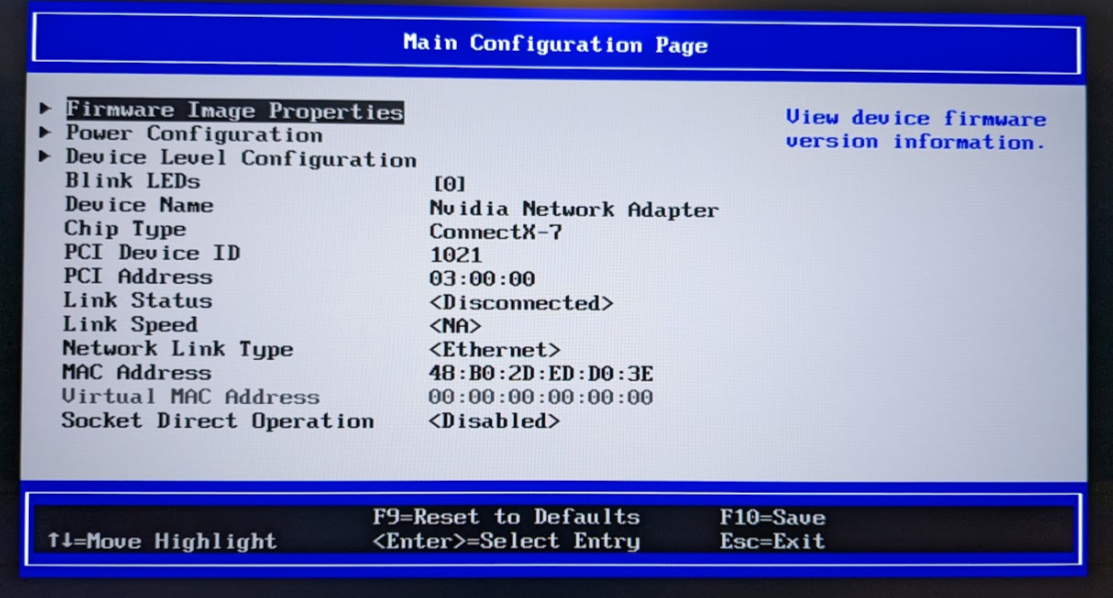
Save and exit the UEFI menu.