

LeRobot: Background and Community#
What Do I Need for This Module?
Nothing — this module is theory-only.
In this session, we’ll explore the background of the SO-101 robot in front of you, the Hugging Face LeRobot project, and the community resources available to support your work.
This framework is an approachable way to learn robotics, and become familiar with the same practices used on industrial robots, in an affordable way you can even try yourself at home.
Learning Objectives#
By the end of this session, you’ll be able to:
Describe the SO-101 robot and its capabilities
Explain the LeRobot project and its role in the robotics community
Identify community resources for continued learning
The SO-101 Robot#
The SO-101 is a 6-DOF (degrees of freedom) robot arm designed for research and education in manipulation tasks.
While we colloquially refer to the SO-101 as a single robot, it’s typically sold or made as a pair:
Teleop arm (also called the “leader”): You move this arm by hand to perform demonstrations. The encoder positions can be recorded or used to directly manipulate the robot arm, or both.
Robot arm (also called the “follower”): During teleoperation it mirrors the teleop arm; during evaluation it is driven by a policy.
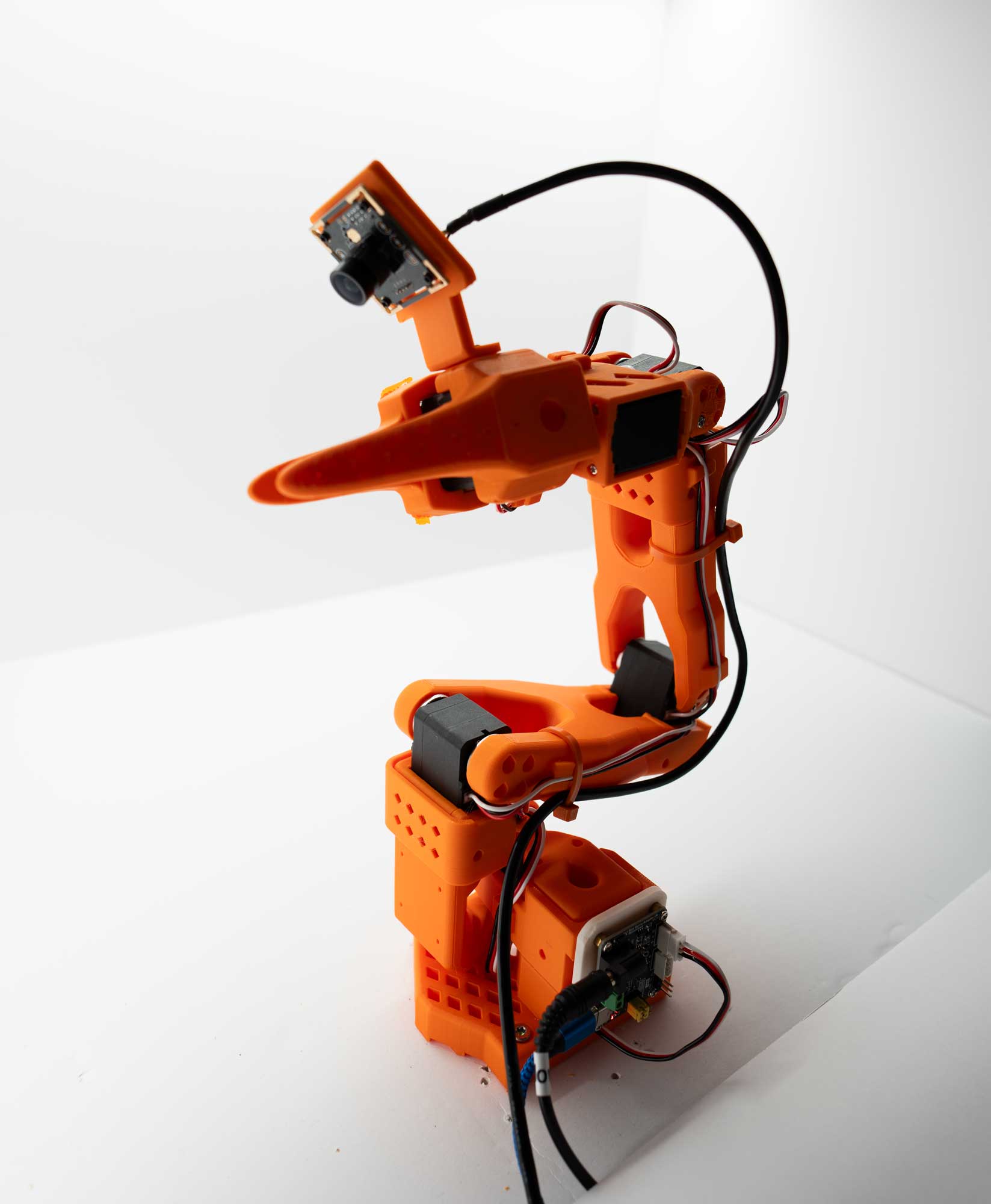
SO-101 Robot, also known as the “follower arm”.#
The typical kit also includes a teleoperation arm, which is used to control either simulated robots or the “follower” arm.
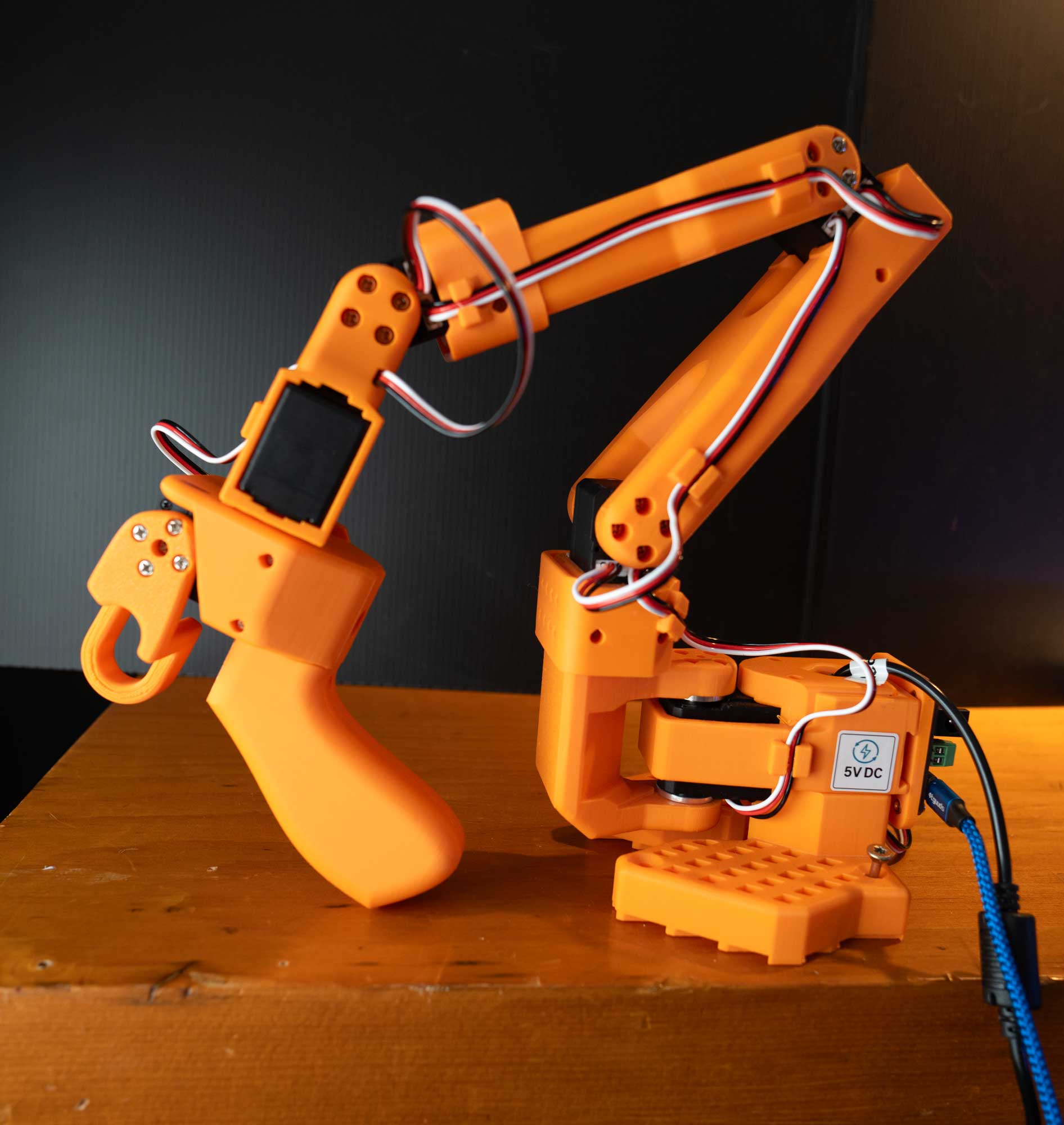
SO-101 Teleoperation Arm, also known as the “leader arm” or “teleop arm”. Notice the gripper on the end of the arm for your hand to manipulate the robot.#
Joint Configuration#
The SO-101 has six joints:
Base (J1): Rotation around vertical axis
Shoulder (J2): First arm segment elevation
Elbow (J3): Second arm segment elevation
Wrist Pitch (J4): Wrist up/down rotation
Wrist Roll (J5): Wrist rotation around arm axis
Gripper (J6): Parallel jaw gripper
Why SO-101?#
The SO-101 is ideal for this learning path because:
Accessible: Affordable for education and research
Well-documented: Strong community support
LeRobot integration: First-class support in the LeRobot ecosystem
Sim-ready: Accurate simulation models available
The LeRobot Project#
LeRobot is an open-source library from Hugging Face which includes tools for data collection, training, robot control, and evaluation of robot policies.
Community Datasets#
LeRobot hosts community-contributed datasets on the Hugging Face Hub with the LeRobot Dataset Format.
Thousands of robot demonstrations
Multiple robot platforms
Various manipulation tasks
Standardized formats for interoperability
Why LeRobot for This Course#
LeRobot is the foundation of this course for several practical reasons:
Seamless Data Flow With Hugging Face Hub#
Getting data into and out of the system is straightforward:
# Example command

# Push your collected dataset to the Hub
hf upload ${HF_USER}/my_robot_dataset ./datasets/my_robot_dataset

# Pull datasets for training or co-training
hf download lerobot/community_dataset
This Hub integration means you can share datasets with collaborators, version your data, and access community contributions with minimal friction.
Post-Training Pipeline#
LeRobot wraps established training pipelines (including NVIDIA Isaac GR00T, SmolVLA, and more):
# Example command
# Fine-tune a policy on your data
python lerobot/scripts/train.py \
    --policy.type=gr00t \
    --dataset.repo_id=${HF_USER}/my_dataset
You spend time on your task, not on infrastructure.
Real Robot Evaluation#
The same framework used for data collection handles policy deployment:
# Example command
# Evaluate a trained policy on the real robot
lerobot-eval \
    --robot.type=so101_follower \
    --robot.port=$ROBOT_PORT \
    --policy_path ${HF_USER}/my_trained_policy
This closes the loop: collect data → train → deploy → evaluate → iterate. All within one system.
Community Resources#
Dataset Visualizer#
LeRobot provides an interactive dataset visualizer on Hugging Face Spaces:
Use this tool to explore any LeRobot dataset on the Hub. You can scrub through episodes, view camera feeds, and inspect action/state trajectories—useful for debugging data quality issues or understanding what a dataset contains before training.
Documentation#
Examples and Tutorials#
Community notebooks and examples
Community Channels#
Hugging Face Discord
GitHub Discussions
Community forums
Hugging Face Hub Integration#
LeRobot leverages the Hugging Face Hub for:
Dataset Sharing#
# Example command
# Download a community dataset
hf download lerobot/so101_pickplace
Model Sharing#
# Example command
# Download a pre-trained model
hf download lerobot/groot_so101_vial_pickup
Experiment Tracking#
Integration with Weights & Biases and other experiment tracking tools.
How We Used Hugging Face in This Course#
1. Dataset format for gathering demonstrations
We used the LeRobot dataset format for all teleoperation data. Episodes are stored with observations (e.g. camera images), robot state, and actions in a consistent schema. Recording is done with lerobot_agent (or lerobot_record on real hardware) using --repo_id and --repo_root so that data lands in the correct structure for training and for upload to the Hub.
2. Sharing datasets
Datasets were pushed to the Hugging Face Hub so they could be reused for training, shared with others, and versioned. We used --dataset.repo_id=${HF_USER}/dataset_name and --dataset.push_to_hub=true when recording, or hf upload for existing local datasets. The LeRobot Dataset Visualizer on the Hub was used to inspect episodes and verify quality before training.
3. Merging datasets for co-training (sim + real, sim + Cosmos)
For co-training we combined multiple data sources into a single training dataset. Sim + real: we merged simulation teleop datasets with real-robot teleop datasets (e.g. so101_teleop_vials_rack_left with so101_teleop_vials_rack_left_real_50) so the policy could learn from both. Sim + Cosmos: we combined base sim data with Cosmos-augmented synthetic data. Merging was done via the Hub (download multiple repos, merge locally) or by pointing the training script at a single merged repo so that one run could use sim, real, and augmented data together.
4. Sharing evaluations
Evaluation results and policy checkpoints were shared via the Hub. Trained models were uploaded (e.g. as GR00T checkpoints or LeRobot policy repos) so others could reproduce evaluations or run the same policy in sim and on the real robot. Links to specific datasets and model repos were used in this learning path to align everyone on the same baselines and co-trained models.
Key Takeaways#
SO-101 is an accessible, well-supported robot for learning sim-to-real
LeRobot provides open-source tools, datasets, and models
The Hugging Face community offers ongoing support and resources
You’re joining a growing community of robot learners and practitioners
What’s Next?#
Next, Building the Workspace walks through assembling and lighting the physical lightbox and task props. After that, Calibrating the SO-101 covers power-on and calibration, and Operating the SO-101 covers teleoperation and camera setup.