


Sizing Methodology#
Before deploying NVIDIA virtual GPU (vGPU) technology, conducting a proof of concept (POC) is highly recommended. This initial phase allows you to gain insights into user workflows, assess GPU resource requirements, and gather feedback to optimize configuration settings for optimal performance and scalability. Benchmarking examples provided in subsequent sections of this guide offer valuable insights for sizing deployments.
User behavior varies significantly and plays a pivotal role in determining the appropriate GPU and vGPU profile sizes. Typically, recommendations are categorized into three user types: light, medium, and heavy, based on their workflow demands and data/model sizes. For instance, heavy users handle advanced graphics and larger datasets, while light and medium users require less intensive graphics and work with smaller models.
The following sections delve into methodologies and considerations for sizing deployments, ensuring alignment with user requirements and performance expectations.
vGPU Profiles#
NVIDIA vGPU software enables the partitioning or fractionalization of an NVIDIA data center GPU. These virtual GPU resources are allocated to virtual machines (VMs) via vGPU profiles in the hypervisor management console.
vGPU profiles determine the allocation of GPU frame buffer to VMs, significantly impacting total cost of ownership, scalability, stability, and performance in VDI environments.
Each vGPU profile features a specific frame buffer size, supports multiple display heads, and offers maximum resolutions. These profiles are categorized into different series, each optimized for various classes of workloads. A profile is a combination of a vGPU type (such as A, B, Q) and a vGPU size (the amount of GPU memory in gigabytes). Further details and a list of available vGPU profiles across all license levels are provided in the table below.
vGPU Type |
Optimal Workload |
|---|---|
Q-profile [1] |
Virtual workstations for creative and technical professionals who require the performance and features of Quadro technology |
B-profile |
Virtual desktops for business professionals and knowledge workers |
A-profile |
App streaming or session-based solutions for virtual applications users |
Note
Avoid using 1A, 2A, and 4A vGPU profiles for vApps, as they are not suitable and may lead to misconfigurations.
For more information regarding vGPU types, please refer to the vGPU software user guide.
Choosing the appropriate vGPU profile for deployment is crucial as it dictates the number of vGPU-backed VMs that can be deployed.
Two types of deployment configurations are supported:
Homogeneous vGPU: A configuration where a physical GPU is fractionalized into vGPUs that have the same amounts of frame buffers. When MIG is disabled, all vGPUs hosted on a physical GPU must have the same profile size (same frame buffer size), but are allowed to have different vGPU profiles (for example, 2Q & 2B can be hosted on the same physical GPU). Example Homogeneous vGPU Configuration for NVIDIA RTX PRO 4500 Blackwell Server Edition illustrates some valid configurations for homogeneous vGPU on an RTX PRO 4500 Blackwell Server Edition GPU.
Heterogeneous vGPU: A configuration that allows a physical GPU to support vGPUs with different vGPU profile sizes (different amounts of frame buffer) simultaneously. This configuration allows for more flexible and efficient use of GPU resources, as different VMs can have different GPU requirements. Example Heterogeneous vGPU Configuration for NVIDIA RTX PRO 4500 Blackwell Server Edition illustrates some valid configurations for heterogeneous vGPU on an RTX PRO 4500 Blackwell Server Edition GPU. This feature was introduced in vGPU 17.0.
When MIG is enabled on supported Blackwell GPUs, each MIG slice can be configured independently in homogeneous or heterogeneous mode. See Figure 5 for an example configuration.
Example Homogeneous vGPU Configuration for NVIDIA RTX PRO 4500 Blackwell Server Edition#
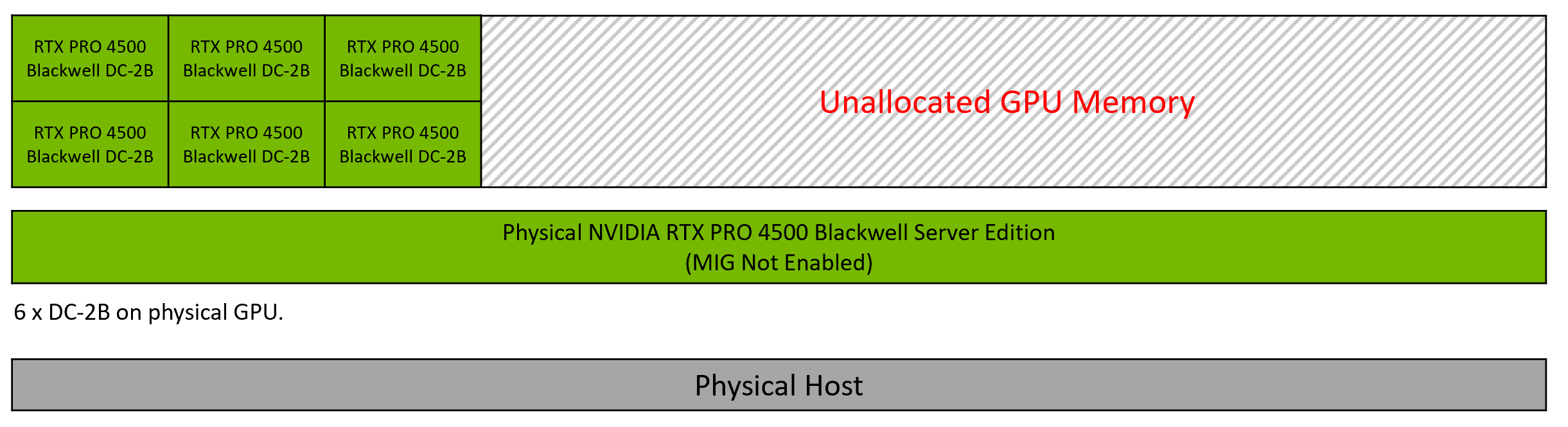
Figure 3 Example Homogeneous vGPU Configurations for NVIDIA RTX PRO 4500 Blackwell Server Edition#
Figure 3 shows an example configuration in which MIG is not enabled, so the NVIDIA RTX PRO 4500 Blackwell Server Edition GPU is configured in homogeneous mode. In this configuration, the GPU hosts six DC-2B vGPU profiles.
Example Heterogeneous vGPU Configuration for NVIDIA RTX PRO 4500 Blackwell Server Edition#
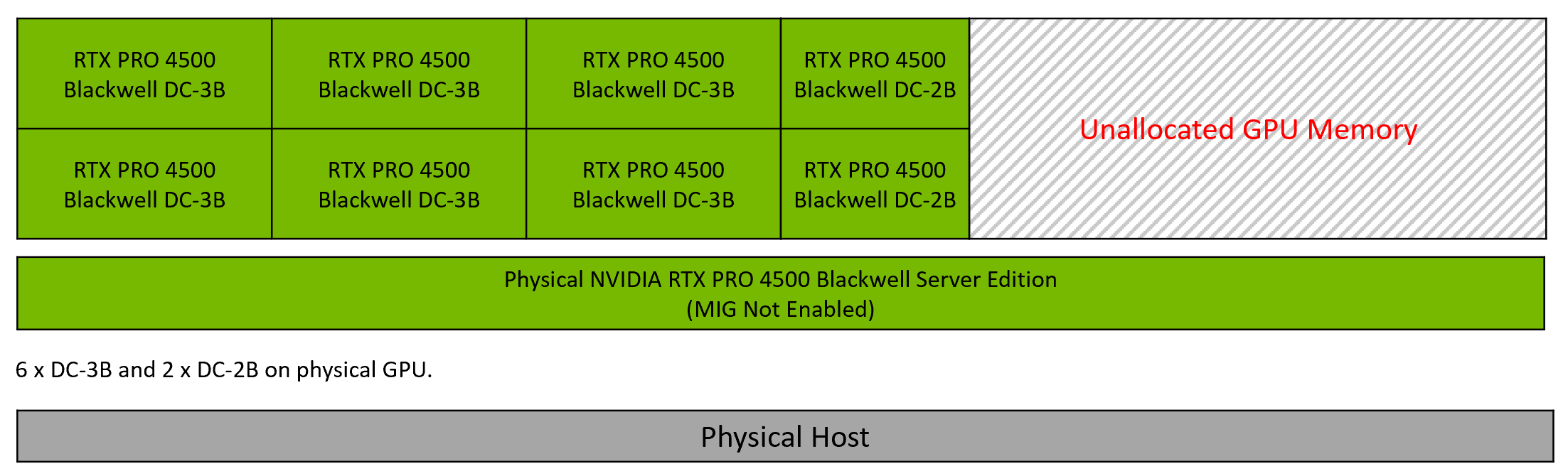
Figure 4 Example Heterogeneous vGPU Configurations for NVIDIA RTX PRO 4500 Blackwell Server Edition#
Figure 4 shows an example configuration in which MIG is not enabled, so the NVIDIA RTX PRO 4500 Blackwell Server Edition GPU is configured in heterogeneous mode. In this configuration, the GPU hosts six DC-3B profiles and two DC-2B profiles.
Example MIG-Backed vGPU Configuration Showing Homogeneous and Heterogeneous Modes per MIG Slice on NVIDIA RTX PRO 4500 Blackwell Server Edition#
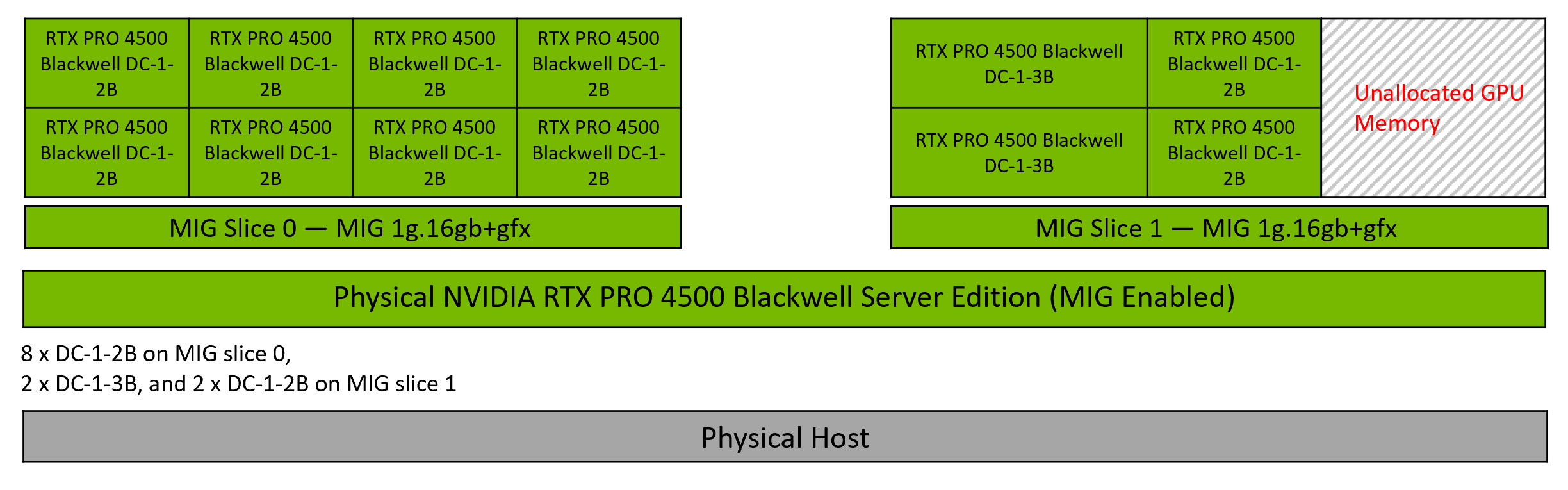
Figure 5 Example MIG-Backed vGPU Configuration Showing Homogeneous and Heterogeneous Modes per MIG Slice on NVIDIA RTX PRO 4500 Blackwell Server Edition#
Figure 5 shows a mixed MIG-backed vGPU configuration in which two MIG 1g.16gb+gfx slices on a single NVIDIA RTX PRO 4500 Blackwell Server Edition GPU host different profile combinations:
MIG Slice 0 is configured in homogeneous mode and hosts eight DC-1-2B profiles.
MIG Slice 1 is configured in heterogeneous mode and hosts two DC-1-3B profiles and two DC-1-2B profiles.
Heterogeneous vGPU allows support of different vGPU types (A, B, and Q series) as well as different vGPU sizes on the same physical GPU. For example, an A16 with heterogeneous vGPU can host A16-3B and A16-2A vGPU instances. However, the maximum number of vGPU instances of a given size that can be supported is the closest power-of-2 to the number of instances with homogeneous vGPU.
In the below example, we see that an A16 GPU with 64 GB of GPU memory (16x4) can support:
5 instances of the A16-3B profile with a homogeneous vGPU configuration per card
4 instances of the A16-3B profile with a heterogeneous vGPU configuration per card
Virtual GPU Type |
Frame Buffer (MB) |
Maximum vGPUs per GPU with Homogeneous vGPU |
Maximum vGPUs per GPU with Heterogeneous vGPU |
|---|---|---|---|
A16-3B |
3072 |
5 |
4 |
For more information, refer to Valid Time-Sliced Virtual GPU Configurations on a Single GPU.
The following diagram shows the supported placements for each size of vGPU on a GPU with a total of 16 GB of frame buffer with heterogeneous vGPU configurations:
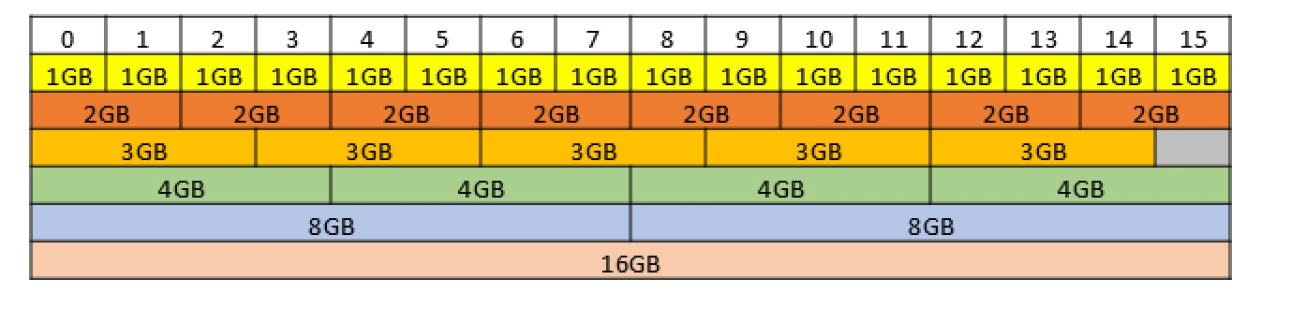
Figure 6 vGPU Placements for GPUs with 16 GB Frame Buffer with Heterogeneous vGPU Configuration#
For more details, refer to vGPU Placements for GPUs.
Note
Multi-session desktops require careful consideration of GPU memory. We suggest selecting a large vGPU profile size based on the results of POC testing. Conducting POCs is crucial for identifying the appropriate vGPU profile size, addressing potential bottlenecks, and ensuring that the deployed solution meets the desired performance criteria.