

DICOM Transcoding with nvImageCodec#
This example demonstrates how to transcode DICOM series using nvImageCodec’s utility functions:
HTJ2K (High-Throughput JPEG 2000) - Modern GPU-accelerated compression
Multi-frame (Enhanced) DICOM - Consolidate series into single file
HTJ2K offers lossless compression with ~2-3x size reduction and GPU-accelerated decoding, making it ideal for medical imaging archives and PACS systems.
nvImageCodec provides utility functions in nvidia.nvimgcodec.tools.dicom for common DICOM operations:
transcode_datasets_to_htj2k()- Convert to HTJ2K compressionconvert_to_enhanced_dicom()- Create multi-frame DICOM files
Load DICOM Series#
First, let’s load a DICOM series that we’ll use for transcoding examples.
[1]:
import os
import glob
import time
import tempfile
import pydicom
from pathlib import Path

# Path to DICOM series
resources_dir = os.getenv("PYNVIMGCODEC_EXAMPLES_RESOURCES_DIR", "../assets/images")
dicom_series_dir = os.path.join(resources_dir, "DICOM/MRI/Knee/DICOMS/STU00001/SER00001")

# Get all DICOM files in the series
dicom_files = sorted(glob.glob(os.path.join(dicom_series_dir, "*.dcm")))

print(f"Found {len(dicom_files)} DICOM files")
print(f"First file: {os.path.basename(dicom_files[0])}")
print(f"Last file: {os.path.basename(dicom_files[-1])}")

# Load the DICOM series
print(f"\nLoading {len(dicom_files)} DICOM files...")
start_time = time.time()
dicom_series = [pydicom.dcmread(f) for f in dicom_files]
load_time = time.time() - start_time

# Display basic information
first_ds = dicom_series[0]
print(f"✓ Loaded {len(dicom_series)} files in {load_time:.3f}s")
print(f"\nModality: {first_ds.Modality}")
print(f"Transfer Syntax: {first_ds.file_meta.TransferSyntaxUID.name}")
print(f"Image Size: {first_ds.Rows} x {first_ds.Columns}")
print(f"Series Length: {len(dicom_series)} slices")
Found 38 DICOM files
First file: IMG00001.dcm
Last file: IMG00038.dcm

Loading 38 DICOM files...
✓ Loaded 38 files in 0.021s

Modality: MR
Transfer Syntax: Implicit VR Little Endian
Image Size: 234 x 256
Series Length: 38 slices
Transcode to HTJ2K with transcode_datasets_to_htj2k()#
The original DICOM files use uncompressed pixel data, which is inefficient for storage. Let’s transcode them to HTJ2K (High-Throughput JPEG 2000):
Benefits of HTJ2K:#
Lossless compression - No quality loss
Better compression - ~2-3x smaller files
GPU-accelerated - Fast decoding on GPU
DICOM standard - Official transfer syntax
The transcode_datasets_to_htj2k() function handles all the complexity:
Automatically detects source transfer syntax
Batch processes for efficiency
Preserves all DICOM metadata
Returns transcoded datasets ready to save
[2]:
from nvidia.nvimgcodec.tools.dicom.convert_htj2k import transcode_datasets_to_htj2k

# Transcode to HTJ2K
print("Transcoding to HTJ2K...")
print(f"Processing {len(dicom_series)} DICOM files\n")

start_time = time.time()
htj2k_datasets = transcode_datasets_to_htj2k(
    datasets=dicom_series,
    num_resolutions=6,          # Wavelet decomposition levels
    code_block_size=(64, 64),   # Code block size
    progression_order="RPCL",   # Resolution-Position-Component-Layer
    max_batch_size=256          # Batch size for GPU operations
)
transcode_time = time.time() - start_time

print(f"✓ Transcoded {len(htj2k_datasets)} files in {transcode_time:.3f}s")
print(f"  Average: {transcode_time/len(htj2k_datasets)*1000:.2f} ms/file")

# Verify the transcoding
print(f"\nOriginal Transfer Syntax: {dicom_series[0].file_meta.TransferSyntaxUID.name}")
print(f"New Transfer Syntax: {htj2k_datasets[0].file_meta.TransferSyntaxUID.name}")
Transcoding to HTJ2K...
Processing 38 DICOM files

✓ Transcoded 38 files in 0.062s
  Average: 1.64 ms/file

Original Transfer Syntax: High-Throughput JPEG 2000 with RPCL Options Image Compression (Lossless Only)
New Transfer Syntax: High-Throughput JPEG 2000 with RPCL Options Image Compression (Lossless Only)
Compare File Sizes#
Let’s save the HTJ2K files temporarily to compare compression ratios. We use a context manager for automatic cleanup:
[3]:
# Use TemporaryDirectory for automatic cleanup
with tempfile.TemporaryDirectory(prefix="dicom_htj2k_") as htj2k_dir:
    print(f"Saving HTJ2K files to temporary directory...")

    # Save transcoded files
    htj2k_files = []
    for i, ds in enumerate(htj2k_datasets):
        output_file = os.path.join(htj2k_dir, f"htj2k_{i:03d}.dcm")
        ds.save_as(output_file, write_like_original=False)
        htj2k_files.append(output_file)

    # Calculate compression statistics
    original_size = sum(os.path.getsize(f) for f in dicom_files)
    compressed_size = sum(os.path.getsize(f) for f in htj2k_files)
    compression_ratio = (1 - compressed_size / original_size) * 100

    print(f"\n{'='*70}")
    print("Compression Results")
    print('='*70)
    print(f"Original size:    {original_size / 1024:.1f} KB ({original_size / (1024**2):.2f} MB)")
    print(f"Compressed size:  {compressed_size / 1024:.1f} KB ({compressed_size / (1024**2):.2f} MB)")
    print(f"Space saved:      {compression_ratio:.1f}%")
    print(f"\n✓ Saved {len(htj2k_files)} HTJ2K files")
Saving HTJ2K files to temporary directory...

======================================================================
Compression Results
======================================================================
Original size:    4506.4 KB (4.40 MB)
Compressed size:  1881.9 KB (1.84 MB)
Space saved:      58.2%

✓ Saved 38 HTJ2K files
Decode with pydicom Plugin#
The HTJ2K datasets can be decoded using the pydicom plugin for GPU acceleration:
[4]:
from nvidia.nvimgcodec.tools.dicom import pydicom_plugin
import matplotlib.pyplot as plt

# Register the plugin for GPU acceleration
pydicom_plugin.register()

# Decode an HTJ2K DICOM dataset (in memory, no file needed)
middle_slice = htj2k_datasets[len(htj2k_datasets) // 2]
print(f"Transfer Syntax: {middle_slice.file_meta.TransferSyntaxUID.name}")
print(f"Pixel Array Shape: {middle_slice.pixel_array.shape}")
print(f"Pixel Array dtype: {middle_slice.pixel_array.dtype}")

# Display the image
plt.figure(figsize=(6, 6))
plt.imshow(middle_slice.pixel_array, cmap="gray")
plt.title("HTJ2K DICOM - GPU Decoded via nvImageCodec")
plt.axis('off')
plt.tight_layout()
plt.show()

print("\n✓ GPU-accelerated decoding works seamlessly!")
Transfer Syntax: High-Throughput JPEG 2000 with RPCL Options Image Compression (Lossless Only)
Pixel Array Shape: (234, 256)
Pixel Array dtype: uint16
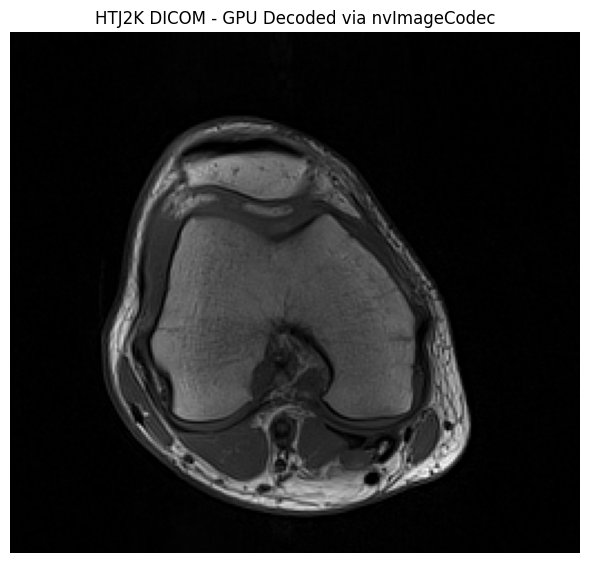
✓ GPU-accelerated decoding works seamlessly!
Create Multi-Frame DICOM with convert_to_enhanced_dicom()#
Instead of having 38 individual DICOM files, we can consolidate them into a single multi-frame (Enhanced) DICOM file.
Benefits of Multi-Frame DICOM:#
Single file instead of hundreds of files
Better organization with structured metadata
More efficient I/O operations
Standards-compliant (DICOM Part 3)
The convert_to_enhanced_dicom() function:
Uses
highdicomfor standards-compliant conversionSupports CT, MR, and PT modalities
Can apply HTJ2K compression simultaneously - no need to transcode first!
Validates series consistency automatically
Note: Enhanced DICOM conversion requires certain standard attributes (like StudyTime, SeriesTime). If your datasets are missing these, we’ll add them automatically before conversion.
In this example, we’ll convert the original uncompressed datasets directly to multi-frame with HTJ2K compression in one step.
[5]:
from nvidia.nvimgcodec.tools.dicom.convert_multiframe import convert_to_enhanced_dicom
from datetime import datetime

print("Converting to Enhanced Multi-Frame DICOM with HTJ2K compression...")
print(f"Input: {len(dicom_series)} single-frame uncompressed files")
print(f"Output: 1 multi-frame Enhanced DICOM file with HTJ2K compression\n")

start_time = time.time()
enhanced_datasets = convert_to_enhanced_dicom(
    series_datasets=[dicom_series],  # List of series (we have one series)
    transfer_syntax_uid="1.2.840.10008.1.2.4.202",  # HTJ2K with RPCL
    num_resolutions=6,
    code_block_size=(64, 64),
    progression_order="RPCL"
)
convert_time = time.time() - start_time

print(f"✓ Converted in {convert_time:.3f}s")

# Verify the result
assert len(enhanced_datasets) == 1, f"Expected 1 multi-frame dataset, got {len(enhanced_datasets)}"
print(f"\n✓ Successfully created 1 multi-frame dataset")
enhanced_ds = enhanced_datasets[0]
print(f"\nNumber of frames: {enhanced_ds.NumberOfFrames}")
print(f"Transfer Syntax: {enhanced_ds.file_meta.TransferSyntaxUID.name}")
print(f"SOP Class: {enhanced_ds.SOPClassUID.name}")
Converting to Enhanced Multi-Frame DICOM with HTJ2K compression...
Input: 38 single-frame uncompressed files
Output: 1 multi-frame Enhanced DICOM file with HTJ2K compression

✓ Converted in 0.385s

✓ Successfully created 1 multi-frame dataset

Number of frames: 38
Transfer Syntax: High-Throughput JPEG 2000 with RPCL Options Image Compression (Lossless Only)
SOP Class: Legacy Converted Enhanced MR Image Storage
Save and Compare Multi-Frame DICOM#
Let’s save the multi-frame DICOM and compare with the original uncompressed series.
This shows the combined benefit of:
Multi-frame consolidation: 38 files → 1 file
HTJ2K compression: ~2-3x size reduction
[6]:
# Use TemporaryDirectory for automatic cleanup
with tempfile.TemporaryDirectory(prefix="dicom_multiframe_") as multiframe_dir:
    multiframe_file = os.path.join(multiframe_dir, "enhanced_multiframe.dcm")

    # Save the multi-frame DICOM
    enhanced_ds.save_as(multiframe_file, write_like_original=False)
    multiframe_size = os.path.getsize(multiframe_file)

    print(f"Saved multi-frame DICOM")
    print(f"Original series:      {len(dicom_files)} files, {sum(os.path.getsize(f) for f in dicom_files) / (1024**2):.2f} MB total")
    print(f"Enhanced multi-frame: 1 file, {multiframe_size / (1024**2):.2f} MB")
    print(f"\nCompression ratio: {(1 - multiframe_size / sum(os.path.getsize(f) for f in dicom_files)) * 100:.1f}% smaller")
Saved multi-frame DICOM
Original series:      38 files, 4.40 MB total
Enhanced multi-frame: 1 file, 1.80 MB

Compression ratio: 59.2% smaller
Decode Multi-Frame DICOM#
The pydicom plugin automatically handles multi-frame DICOM decoding:
[7]:
# Decode the enhanced DICOM (directly from memory, no file needed)
print(f"Enhanced DICOM in memory")
print(f"Transfer Syntax: {enhanced_ds.file_meta.TransferSyntaxUID.name}")

num_frames = enhanced_ds.NumberOfFrames
print(f"Number of frames: {num_frames}")

# Decode all frames (GPU-accelerated)
start_time = time.time()
pixel_array = enhanced_ds.pixel_array
print(f"Pixel array shape: {pixel_array.shape}")
decode_time = time.time() - start_time

print(f"✓ Decoded in {decode_time:.3f}s ({decode_time/num_frames*1000:.2f} ms/frame)")

print(f"\nPixel array shape: {pixel_array.shape}")
print(f"Pixel array dtype: {pixel_array.dtype}")

# Display middle slice
middle_frame = pixel_array.shape[0] // 2
plt.figure(figsize=(6, 6))
plt.imshow(pixel_array[middle_frame], cmap="gray")
plt.title(f"Enhanced DICOM - Frame {middle_frame+1}/{num_frames}")
plt.axis('off')
plt.tight_layout()
plt.show()
Enhanced DICOM in memory
Transfer Syntax: High-Throughput JPEG 2000 with RPCL Options Image Compression (Lossless Only)
Number of frames: 38
Pixel array shape: (38, 234, 256)
✓ Decoded in 0.044s (1.17 ms/frame)

Pixel array shape: (38, 234, 256)
Pixel array dtype: uint16
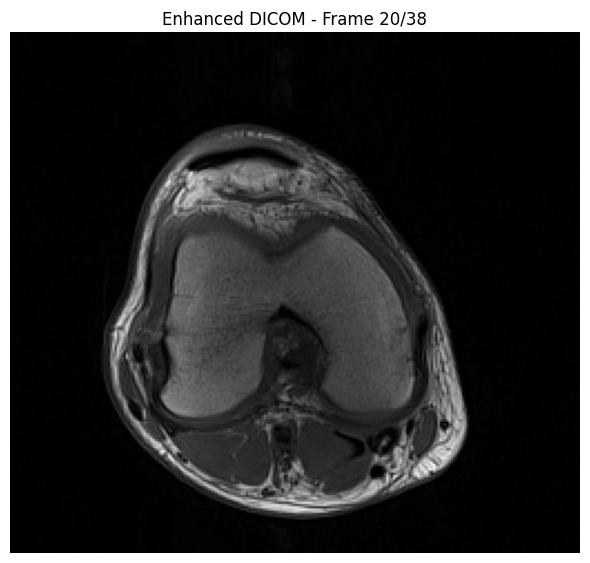
Verify Data Integrity#
Let’s verify that the multi-frame data matches the original:
[8]:
import numpy as np

# Load original data
print("Verifying data integrity...")
# Sort dicom_series by spatial position to match the order used by convert_to_enhanced_dicom.
# The converter sorts frames along the slice-stack normal before building the enhanced file,
# so we apply the same sort here to ensure frame-by-frame comparison is valid.
def _spatial_sort_key(ds):
    import numpy as _np
    if hasattr(ds, 'ImagePositionPatient') and hasattr(ds, 'ImageOrientationPatient'):
        iop = _np.array(list(ds.ImageOrientationPatient), dtype=float).reshape(2, 3)
        normal = _np.cross(iop[0], iop[1])
        return float(_np.dot(_np.array(list(ds.ImagePositionPatient), dtype=float), normal))
    return float(getattr(ds, 'InstanceNumber', 0))

sorted_series = sorted(dicom_series, key=_spatial_sort_key)
original_pixels = np.stack([ds.pixel_array for ds in sorted_series], axis=0)

# Get enhanced dataset pixels
enhanced_pixels = enhanced_ds.pixel_array

print(f"\nOriginal shape:  {original_pixels.shape}")
print(f"Enhanced shape:  {enhanced_pixels.shape}")

assert enhanced_pixels.shape == original_pixels.shape, f"\n⚠ Shape mismatch - enhanced data has different dimensions"
# Check if arrays are equal
assert np.array_equal(original_pixels, enhanced_pixels), f"\n⚠ Enhanced data is not identical to original."
Verifying data integrity...

Original shape:  (38, 234, 256)
Enhanced shape:  (38, 234, 256)