

Advanced Multi-image: SubIFDs and IFD Offsets#
This notebook demonstrates advanced TIFF features for working with complex multi-image files:
SubIFDs (Sub Image File Directories): Access embedded images like thumbnails or reduced-resolution pyramid levels
IFD offsets: Walk multi-image TIFF chains and select images by their TIFF directory offsets
Lazy parsing: Read one image’s metadata at a time without parsing the whole file
These features are particularly useful for:
Pyramidal TIFFs (whole-slide imaging, geospatial)
OME-TIFF (microscopy with multiple resolution levels)
Large multi-page TIFFs where you want to process images incrementally
Setup#
[1]:
import os
import numpy as np
from matplotlib import pyplot as plt
from nvidia import nvimgcodec
[2]:
resources_dir = os.getenv("PYNVIMGCODEC_EXAMPLES_RESOURCES_DIR", "../assets/images/")

# Use GPU_ONLY backend (some OME-TIFF image features are not supported with libtiff yet)
decoder = nvimgcodec.Decoder(backends=[nvimgcodec.BackendKind.GPU_ONLY])
unchanged_tiff_params = nvimgcodec.DecodeParams(color_spec=nvimgcodec.ColorSpec.UNCHANGED)
Part 1: SubIFD Access (Thumbnails)#
SubIFDs are additional Image File Directories embedded within a TIFF page. Common uses include:
Thumbnails for quick preview
Reduced resolution levels for pyramidal images
Mask or alpha channels
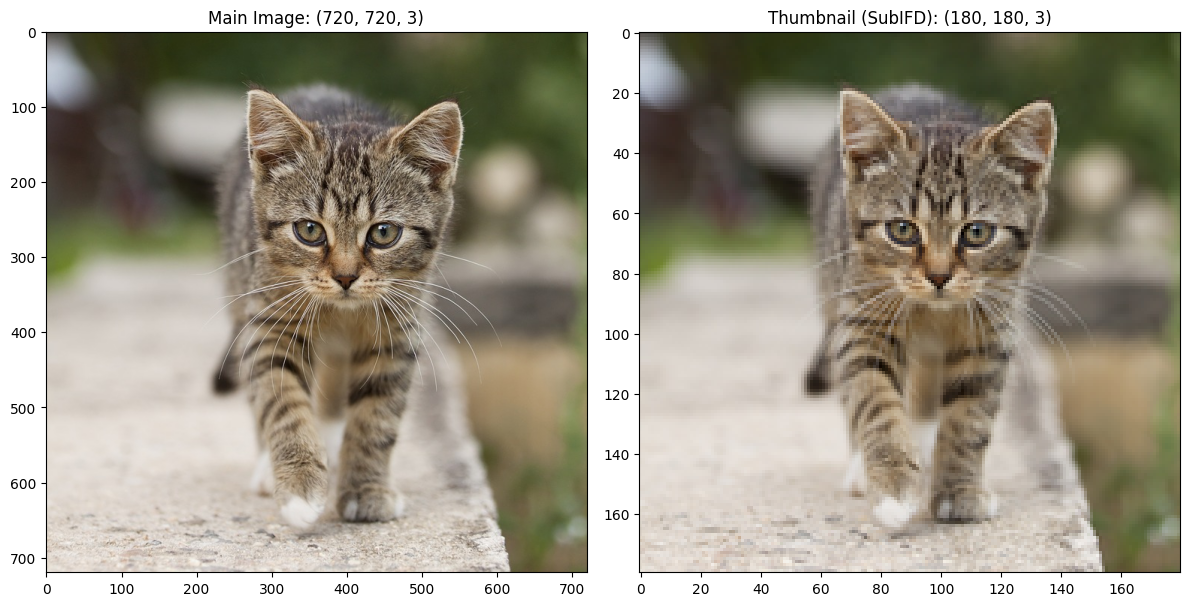
You can access SubIFD offsets directly via the subifd_offsets property on any CodeStream, then use get_sub_code_stream(bitstream_offset=...) on the root CodeStream to access the SubIFD image.
[3]:
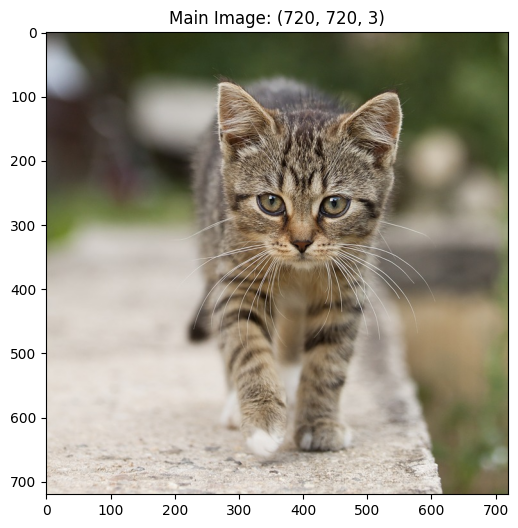
# Load a TIFF with a thumbnail SubIFD
cat_path = os.path.join(resources_dir, "cat_with_thumbnail.tiff")
cs = nvimgcodec.CodeStream(cat_path)

print(f"Main image: {cs.width}x{cs.height}, {cs.num_channels} channels")
print(f"Number of images (main IFDs): {cs.num_images}")
Main image: 720x720, 3 channels
Number of images (main IFDs): 1
[4]:
# Decode the main image
main_img = decoder.decode(cs)

plt.figure(figsize=(6, 6))
plt.title(f"Main Image: {main_img.shape}")
plt.imshow(main_img.cpu())
[4]:
<matplotlib.image.AxesImage at 0x7f8e1c643ec0>
[5]:
# Get SubIFD offsets directly from the CodeStream
subifd_offsets = cs.subifd_offsets
print(f"SubIFD offsets: {subifd_offsets}")

# Access the thumbnail using its offset
thumb_cs = cs.get_sub_code_stream(bitstream_offset=subifd_offsets[0])
print(f"Thumbnail: {thumb_cs.width}x{thumb_cs.height}, {thumb_cs.num_channels} channels")
SubIFD offsets: [1555488]
Thumbnail: 180x180, 3 channels
[6]:
# Decode the thumbnail
thumb_img = decoder.decode(thumb_cs)

# Compare main image and thumbnail side by side
fig, axes = plt.subplots(1, 2, figsize=(12, 6))

axes[0].imshow(main_img.cpu())
axes[0].set_title(f"Main Image: {main_img.shape}")

axes[1].imshow(thumb_img.cpu())
axes[1].set_title(f"Thumbnail (SubIFD): {thumb_img.shape}")

plt.tight_layout()
Part 2: Lazy Parsing and Metadata Semantics#
On the root CodeStream, num_images and the root IFD/SubIFD offset properties (ifd_offset, next_ifd_offset, subifd_offsets) describe the whole file, so reading any of them parses the entire root IFD chain. First-image metadata such as width and height stays lazy — it is resolved through the first image without walking later IFDs.
To work with very large or incomplete files, read per-image metadata from views starting at get_sub_code_stream(image_idx=0) (or any later index), which parses the root IFD chain only up to that index.
[7]:
ome_path = os.path.join(resources_dir, "retina_large.ome.tiff")
ome_cs = nvimgcodec.CodeStream(ome_path)

# A one-image view parses only its IFD.
first = ome_cs.get_sub_code_stream(0)
print(f"first image     : {first.width} x {first.height}")
print(f"  ifd_offset      = {first.ifd_offset}")
print(f"  next_ifd_offset = {first.next_ifd_offset}")   # image 1's offset, or None at the end
print(f"  subifd_offsets  = {first.subifd_offsets}")

# Pick any image by index.
img5 = ome_cs.get_sub_code_stream(image_idx=5)
print(f"image 5         : {img5.width} x {img5.height}, num_images (view) = {img5.num_images}")

# num_images on the root walks the whole chain.
print(f"num_images (root, full walk): {ome_cs.num_images}")
first image     : 2048 x 1567
  ifd_offset      = 8
  next_ifd_offset = 50450
  subifd_offsets  = [65593096, 87752301]
image 5         : 2048 x 1567, num_images (view) = 1
num_images (root, full walk): 192
Part 3: IFD Offset Traversal#
To visit every image without reading num_images (or any workload which benefits from explicit control over IFD traversal), chain by offset: start at get_sub_code_stream(0), then feed each view’s next_ifd_offset into the next get_sub_code_stream(bitstream_offset=...) until it returns None.
Just as with image_idx, bitstream_offset selects a single IFD. These two fields cannot be combined; a non-empty/non-zero bitstream_offset cannot have a non-zero image_idx.
[8]:
# Load a large OME-TIFF with many images
ome_path = os.path.join(resources_dir, "retina_large.ome.tiff")
ome_cs = nvimgcodec.CodeStream(ome_path)
[9]:
# Walk the IFD chain lazily: start from a one-image view at a given index and follow next_ifd_offset.
# We never touch root-level metadata (ome_cs.num_images / ome_cs.ifd_offset / ...),
# which would parse the entire root chain up front. Traversal is done manually.
MAX_IMAGES = 5
substreams = []

# Note that we restrict scope to the a sub code stream to avoid triggering a full parse
substream = ome_cs.get_sub_code_stream(0)
while len(substreams) < MAX_IMAGES:
    substreams.append(substream)
    print(f"image {len(substreams) - 1}: [{substream.width} x {substream.height}]")

    next_offset = substream.next_ifd_offset
    if next_offset is None:  # reached the last IFD in the chain
        break
    substream = ome_cs.get_sub_code_stream(bitstream_offset=next_offset)
image 0: [2048 x 1567]
image 1: [2048 x 1567]
image 2: [2048 x 1567]
image 3: [2048 x 1567]
image 4: [2048 x 1567]
Part 4: SubIFDs in OME-TIFF (Pyramid Levels)#
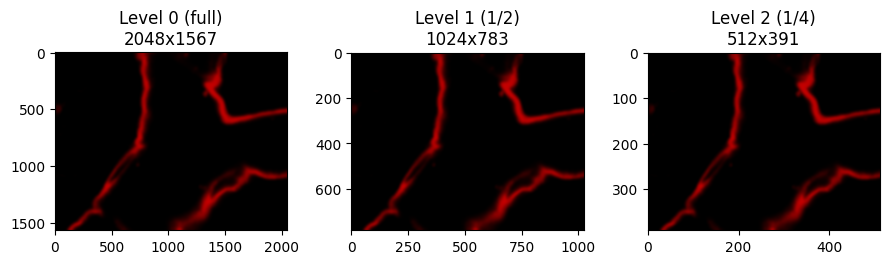
OME-TIFF files often contain multiple resolution levels stored as SubIFDs. Each main image may have SubIFDs containing downsampled versions (e.g., 1/2, 1/4 resolution).
This is useful for:
Quick thumbnail generation
Progressive loading in viewers
Memory-efficient processing at lower resolutions
We’ll examine image 31 from the Z-stack, which has clearly visible retinal structures. The subifd_offsets property makes it easy to discover and access pyramid levels.
[10]:
# Get SubIFD offsets for a representative main IFD
# We use image_idx=31 which has more visible content than the first slice
IMAGE_IDX = 31

selected_ifd = ome_cs.get_sub_code_stream(image_idx=IMAGE_IDX)

# Use subifd_offsets property to get pyramid level offsets
pyramid_offsets = selected_ifd.subifd_offsets

print(f"Image {IMAGE_IDX} has {len(pyramid_offsets)} SubIFDs (pyramid levels)")
print(f"SubIFD offsets: {pyramid_offsets}")

# Build pyramid level info
print(f"\nPyramid levels for Z-slice {IMAGE_IDX}:")
print(f"  Level 0 (full): {selected_ifd.width}x{selected_ifd.height}")

for i, offset in enumerate(pyramid_offsets):
    level_cs = ome_cs.get_sub_code_stream(bitstream_offset=offset)
    print(f"  Level {i+1} (1/{2**(i+1)}): {level_cs.width}x{level_cs.height}")
Image 31 has 2 SubIFDs (pyramid levels)
SubIFD offsets: [71428925, 89622101]

Pyramid levels for Z-slice 31:
  Level 0 (full): 2048x1567
  Level 1 (1/2): 1024x783
  Level 2 (1/4): 512x391
[11]:
# Decode and display all pyramid levels
num_levels = 1 + len(pyramid_offsets)  # Main IFD + SubIFDs
fig, axes = plt.subplots(1, num_levels, figsize=(3 * num_levels, 3))

# Decode main IFD (Level 0)
img = decoder.decode(selected_ifd, params=unchanged_tiff_params)
axes[0].imshow(img.cpu(), cmap='gray')
axes[0].set_title(f"Level 0 (full)\n{img.shape[1]}x{img.shape[0]}")

# Decode SubIFDs (Level 1, 2, ...) using root-derived offset views
for i, offset in enumerate(pyramid_offsets):
    level_cs = ome_cs.get_sub_code_stream(bitstream_offset=offset)
    img = decoder.decode(level_cs, params=unchanged_tiff_params)

    axes[i + 1].imshow(img.cpu(), cmap='gray')
    axes[i + 1].set_title(f"Level {i + 1} (1/{2**(i+1)})\n{img.shape[1]}x{img.shape[0]}")

plt.tight_layout()
[ ]: