

Creating a Manager-Based Base Environment
Environments bring together different aspects of the simulation such as
the scene, observations and actions spaces, reset events etc. to create a
coherent interface for various applications. In Isaac Lab, manager-based environments are
implemented as envs.ManagerBasedEnv and envs.ManagerBasedRLEnv classes.
The two classes are very similar, but envs.ManagerBasedRLEnv is useful for
reinforcement learning tasks and contains rewards, terminations, curriculum
and command generation. The envs.ManagerBasedEnv class is useful for
traditional robot control and doesn’t contain rewards and terminations.
In this tutorial, we will look at the base class envs.ManagerBasedEnv and its
corresponding configuration class envs.ManagerBasedEnvCfg for the manager-based workflow.
We will use the
cartpole environment from earlier to illustrate the different components
in creating a new envs.ManagerBasedEnv environment.
The Code
The tutorial corresponds to the create_cartpole_base_env script in the scripts/tutorials/03_envs
directory.
The Code Explained
The base class envs.ManagerBasedEnv wraps around many intricacies of the simulation interaction
and provides a simple interface for the user to run the simulation and interact with it. It
is composed of the following components:
scene.InteractiveScene- The scene that is used for the simulation.managers.ActionManager- The manager that handles actions.managers.ObservationManager- The manager that handles observations.managers.EventManager- The manager that schedules operations (such as domain randomization) at specified simulation events. For instance, at startup, on resets, or periodic intervals.
By configuring these components, the user can create different variations of the same environment
with minimal effort. In this tutorial, we will go through the different components of the
envs.ManagerBasedEnv class and how to configure them to create a new environment.
Designing the scene
The first step in creating a new environment is to configure its scene. For the cartpole environment, we will be using the scene from the previous tutorial. Thus, we omit the scene configuration here. For more details on how to configure a scene, see Using the Interactive Scene.
Defining actions
In the previous tutorial, we directly input the action to the cartpole using
the assets.Articulation.set_joint_effort_target method. In this tutorial, we will
use the managers.ActionManager to handle the actions.
The action manager can comprise of multiple managers.ActionTerm. Each action term
is responsible for applying control over a specific aspect of the environment. For instance,
for robotic arm, we can have two action terms — one for controlling the joints of the arm,
and the other for controlling the gripper. This composition allows the user to define
different control schemes for different aspects of the environment.
In the cartpole environment, we want to control the force applied to the cart to balance the pole. Thus, we will create an action term that controls the force applied to the cart.
Defining observations
While the scene defines the state of the environment, the observations define the states
that are observable by the agent. These observations are used by the agent to make decisions
on what actions to take. In Isaac Lab, the observations are computed by the
managers.ObservationManager class.
Similar to the action manager, the observation manager can comprise of multiple observation terms. These are further grouped into observation groups which are used to define different observation spaces for the environment. For instance, for hierarchical control, we may want to define two observation groups — one for the low level controller and the other for the high level controller. It is assumed that all the observation terms in a group have the same dimensions.
For this tutorial, we will only define one observation group named "policy". While not completely
prescriptive, this group is a necessary requirement for various wrappers in Isaac Lab.
We define a group by inheriting from the managers.ObservationGroupCfg class. This class
collects different observation terms and help define common properties for the group, such
as enabling noise corruption or concatenating the observations into a single tensor.
The individual terms are defined by inheriting from the managers.ObservationTermCfg class.
This class takes in the managers.ObservationTermCfg.func that specifies the function or
callable class that computes the observation for that term. It includes other parameters for
defining the noise model, clipping, scaling, etc. However, we leave these parameters to their
default values for this tutorial.
Defining events
At this point, we have defined the scene, actions and observations for the cartpole environment. The general idea for all these components is to define the configuration classes and then pass them to the corresponding managers. The event manager is no different.
The managers.EventManager class is responsible for events corresponding to changes
in the simulation state. This includes resetting (or randomizing) the scene, randomizing physical
properties (such as mass, friction, etc.), and varying visual properties (such as colors, textures, etc.).
Each of these are specified through the managers.EventTermCfg class, which
takes in the managers.EventTermCfg.func that specifies the function or callable
class that performs the event.
Additionally, it expects the mode of the event. The mode specifies when the event term should be applied.
It is possible to specify your own mode. For this, you’ll need to adapt the ~envs.ManagerBasedEnv class.
However, out of the box, Isaac Lab provides three commonly used modes:
"startup"- Event that takes place only once at environment startup."reset"- Event that occurs on environment termination and reset."interval"- Event that are executed at a given interval, i.e., periodically after a certain number of steps.
For this example, we define events that randomize the pole’s mass on startup. This is done only once since this operation is expensive and we don’t want to do it on every reset. We also create an event to randomize the initial joint state of the cartpole and the pole at every reset.
Tying it all together
Having defined the scene and manager configurations, we can now define the environment configuration
through the envs.ManagerBasedEnvCfg class. This class takes in the scene, action, observation and
event configurations.
In addition to these, it also takes in the envs.ManagerBasedEnvCfg.sim which defines the simulation parameters such as the timestep, gravity, etc. This is initialized to the default values, but can be modified as needed. We recommend doing so by defining the __post_init__ method in the
envs.ManagerBasedEnvCfg class, which is called after the configuration is initialized.
Running the simulation
Lastly, we revisit the simulation execution loop. This is now much simpler since we have
abstracted away most of the details into the environment configuration. We only need to
call the envs.ManagerBasedEnv.reset method to reset the environment and envs.ManagerBasedEnv.step
method to step the environment. Both these functions return the observation and an info dictionary
which may contain additional information provided by the environment. These can be used by an
agent for decision-making.
The envs.ManagerBasedEnv class does not have any notion of terminations since that concept is
specific for episodic tasks. Thus, the user is responsible for defining the termination condition
for the environment. In this tutorial, we reset the simulation at regular intervals.
An important thing to note above is that the entire simulation loop is wrapped inside the
torch.inference_mode context manager. This is because the environment uses PyTorch
operations under-the-hood and we want to ensure that the simulation is not slowed down by
the overhead of PyTorch’s autograd engine and gradients are not computed for the simulation
operations.
The Code Execution
To run the base environment made in this tutorial, you can use the following command:
This should open a stage with a ground plane, light source, and cartpoles. The simulation should be
playing with random actions on the cartpole. Additionally, it opens a UI window on the bottom
right corner of the screen named "Isaac Lab". This window contains different UI elements that
can be used for debugging and visualization.
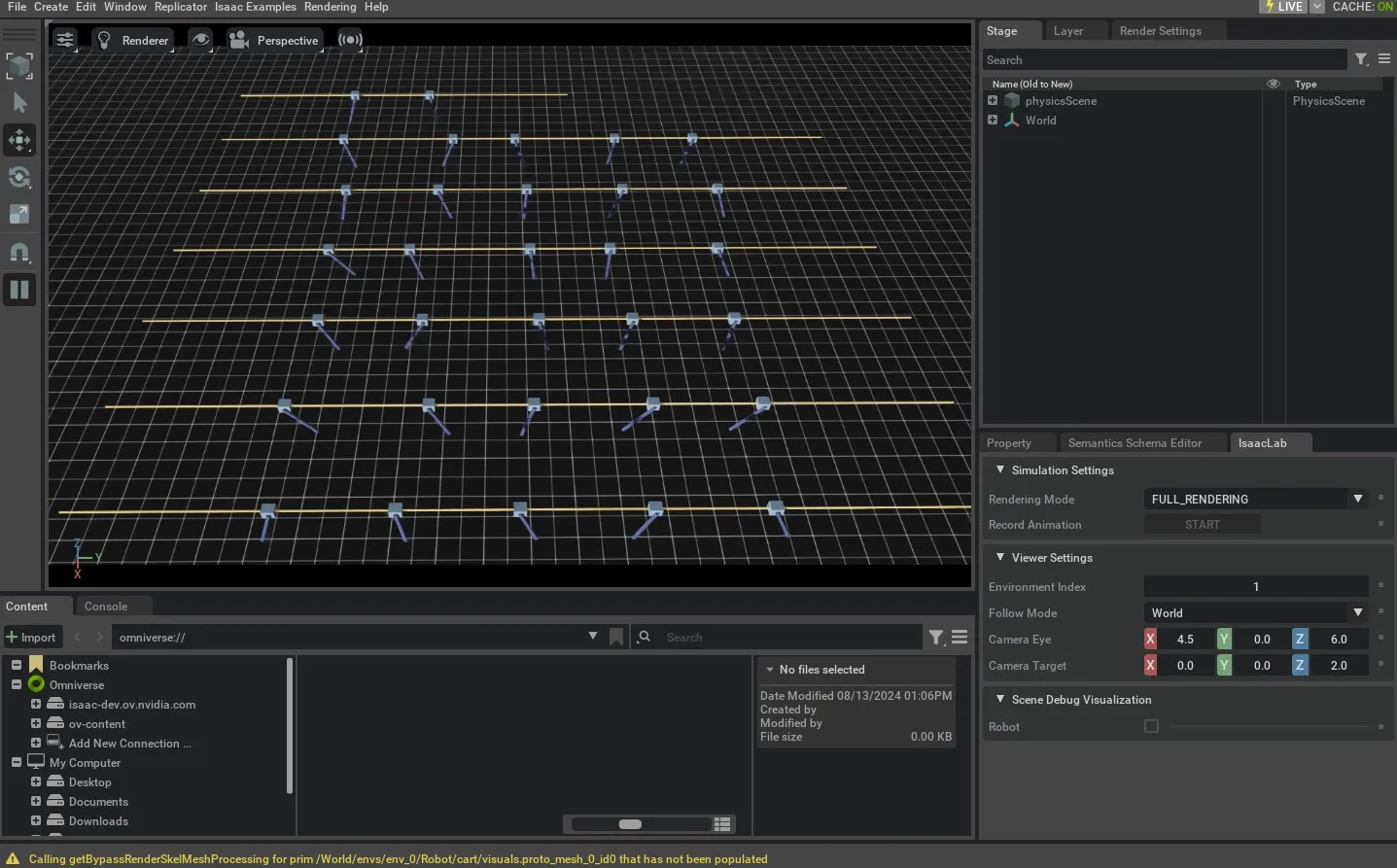
To stop the simulation, you can either close the window, or press Ctrl+C in the terminal where you
started the simulation.
In this tutorial, we learned about the different managers that help define a base environment. We
include more examples of defining the base environment in the scripts/tutorials/03_envs
directory. For completeness, they can be run using the following commands:
In the following tutorial, we will look at the envs.ManagerBasedRLEnv class and how to use it
to create a Markovian Decision Process (MDP).