Skip to navigation

Contact Sensor

View as Markdown
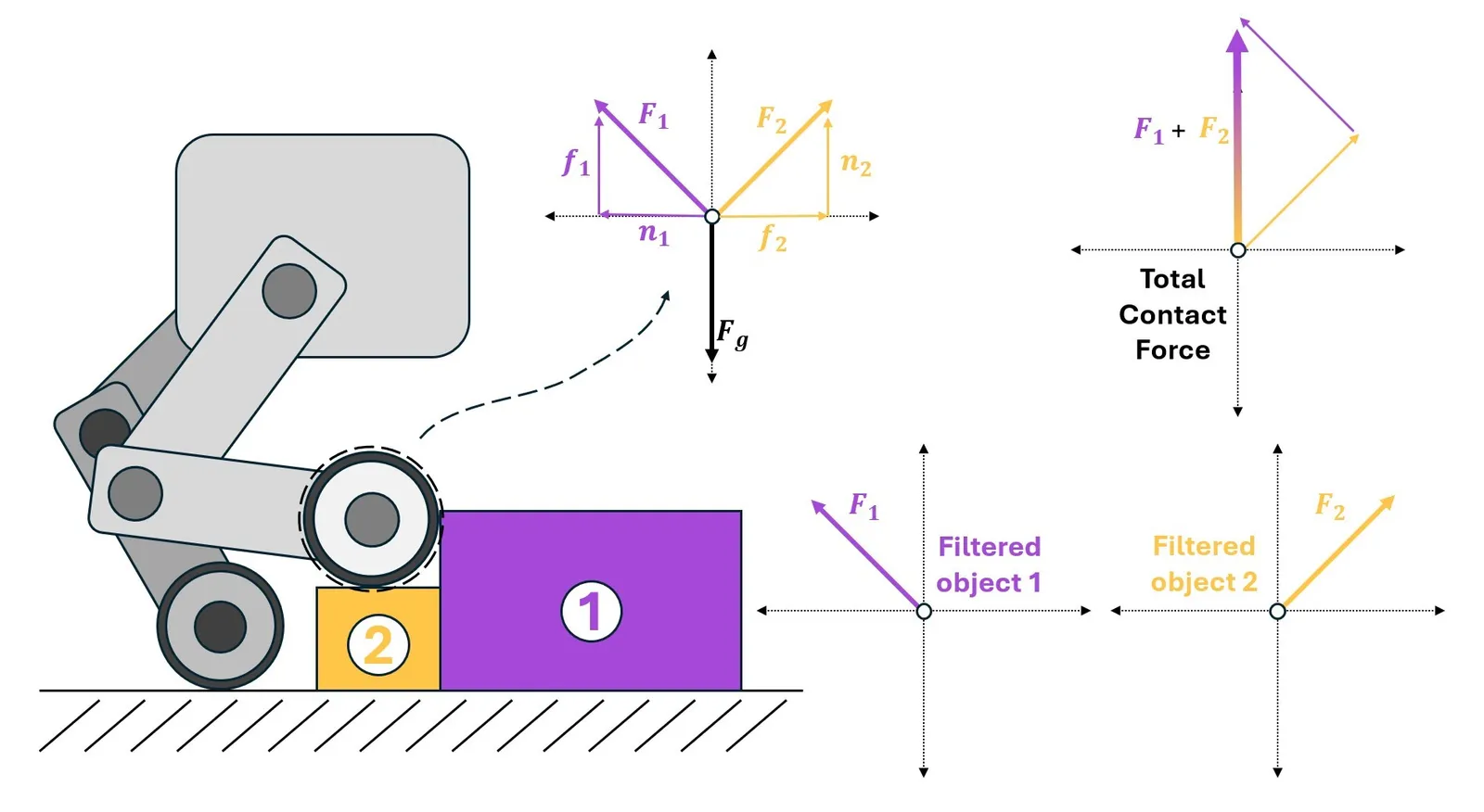
A contact sensor with filtering

The contact sensor is designed to return the net contact force acting on a given ridgid body. The sensor is written to behave as a physical object, and so the “scope” of the contact sensor is limited to the body (or bodies) that defines it. There are multiple ways to define this scope, depending on your need to filter the forces coming from the contact.

By default, the reported force is the total contact force, but your application may only care about contact forces due to specific objects. Retrieving contact forces from specific objects requires filtering, and this can only be done in a “many-to-one” way. A multi-legged robot that needs filterable contact information for its feet would require one sensor per foot to be defined in the environment, but a robotic hand with contact sensors on the tips of each finger can be defined with a single sensor.

Consider a simple environment with an Anymal Quadruped and a block

@configclass
class ContactSensorSceneCfg(InteractiveSceneCfg):
"""Design the scene with sensors on the robot."""
# ground plane
ground = AssetBaseCfg(prim_path="/World/defaultGroundPlane", spawn=sim_utils.GroundPlaneCfg())
# lights
dome_light = AssetBaseCfg(
prim_path="/World/Light", spawn=sim_utils.DomeLightCfg(intensity=3000.0, color=(0.75, 0.75, 0.75))
)
# robot
robot = ANYMAL_C_CFG.replace(prim_path="{ENV_REGEX_NS}/Robot")
# Rigid Object
cube = RigidObjectCfg(
prim_path="{ENV_REGEX_NS}/Cube",
spawn=sim_utils.CuboidCfg(
size=(0.5, 0.5, 0.1),
rigid_props=sim_utils.RigidBodyPropertiesCfg(),
mass_props=sim_utils.MassPropertiesCfg(mass=100.0),
collision_props=sim_utils.CollisionPropertiesCfg(),
physics_material=sim_utils.RigidBodyMaterialCfg(static_friction=1.0),
visual_material=sim_utils.PreviewSurfaceCfg(diffuse_color=(0.0, 1.0, 0.0), metallic=0.2),
),
init_state=RigidObjectCfg.InitialStateCfg(pos=(0.5, 0.5, 0.05)),
)
contact_forces_LF = ContactSensorCfg(
prim_path="{ENV_REGEX_NS}/Robot/LF_FOOT",
update_period=0.0,
history_length=6,
debug_vis=True,
filter_prim_paths_expr=["{ENV_REGEX_NS}/Cube"],
)
contact_forces_RF = ContactSensorCfg(
prim_path="{ENV_REGEX_NS}/Robot/RF_FOOT",
update_period=0.0,
history_length=6,
debug_vis=True,
filter_prim_paths_expr=["{ENV_REGEX_NS}/Cube"],
)
contact_forces_H = ContactSensorCfg(
prim_path="{ENV_REGEX_NS}/Robot/.*H_FOOT",
update_period=0.0,
history_length=6,
debug_vis=True,
)

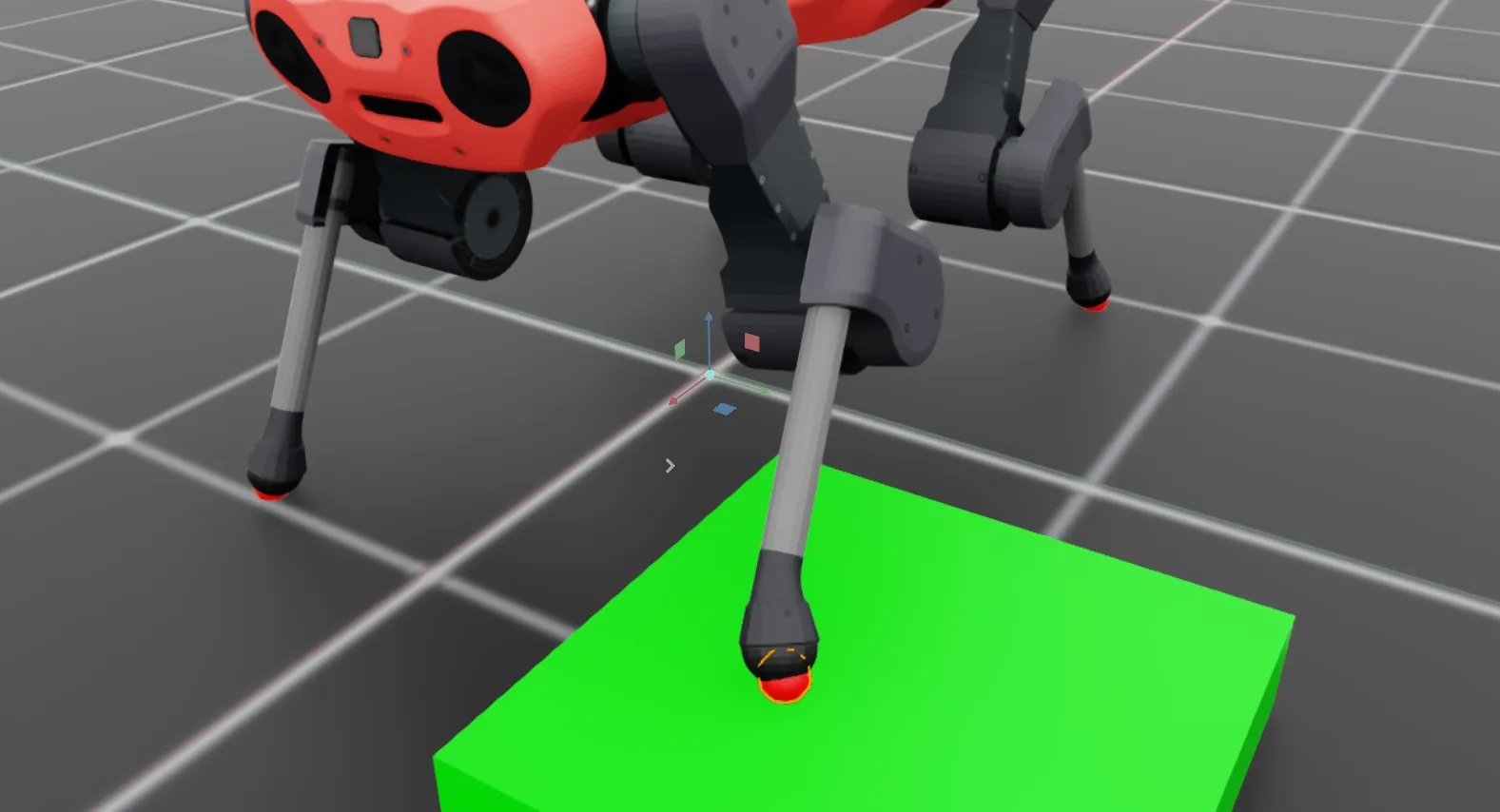
We define the sensors on the feet of the robot in two different ways. The front feet are independent sensors (one sensor body per foot) and the “Cube” is placed under the left foot. The hind feet are defined as a single sensor with multiple bodies.

We can then run the scene and print the data from the sensors

def run_simulator(sim: sim_utils.SimulationContext, scene: InteractiveScene):
.
.
.
# Simulate physics
while simulation_app.is_running():
.
.
.
# print information from the sensors
print("-------------------------------")
print(scene["contact_forces_LF"])
print("Received force matrix of: ", scene["contact_forces_LF"].data.force_matrix_w)
print("Received contact force of: ", scene["contact_forces_LF"].data.net_forces_w)
print("-------------------------------")
print(scene["contact_forces_RF"])
print("Received force matrix of: ", scene["contact_forces_RF"].data.force_matrix_w)
print("Received contact force of: ", scene["contact_forces_RF"].data.net_forces_w)
print("-------------------------------")
print(scene["contact_forces_H"])
print("Received force matrix of: ", scene["contact_forces_H"].data.force_matrix_w)
print("Received contact force of: ", scene["contact_forces_H"].data.net_forces_w)

Here, we print both the net contact force and the filtered force matrix for each contact sensor defined in the scene. The front left and front right feet report the following

-------------------------------
Contact sensor @ '/World/envs/env_.*/Robot/LF_FOOT':
view type : <class 'omni.physics.tensors.impl.api.RigidBodyView'>
update period (s) : 0.0
number of bodies : 1
body names : ['LF_FOOT']
Received force matrix of: tensor([[[[-1.3923e-05, 1.5727e-04, 1.1032e+02]]]], device='cuda:0')
Received contact force of: tensor([[[-1.3923e-05, 1.5727e-04, 1.1032e+02]]], device='cuda:0')
-------------------------------
Contact sensor @ '/World/envs/env_.*/Robot/RF_FOOT':
view type : <class 'omni.physics.tensors.impl.api.RigidBodyView'>
update period (s) : 0.0
number of bodies : 1
body names : ['RF_FOOT']
Received force matrix of: tensor([[[[0., 0., 0.]]]], device='cuda:0')
Received contact force of: tensor([[[1.3529e-05, 0.0000e+00, 1.0069e+02]]], device='cuda:0')
The contact sensor visualization

Notice that even with filtering, both sensors report the net contact force acting on the foot. However, the “force matrix” on the right foot is zero because that foot isn’t in contact with the filtered body, /World/envs/env_.*/Cube. Now, checkout the data coming from the hind feet!

-------------------------------
Contact sensor @ '/World/envs/env_.*/Robot/.*H_FOOT':
view type : <class 'omni.physics.tensors.impl.api.RigidBodyView'>
update period (s) : 0.0
number of bodies : 2
body names : ['LH_FOOT', 'RH_FOOT']
Received force matrix of: None
Received contact force of: tensor([[[9.7227e-06, 0.0000e+00, 7.2364e+01],
[2.4322e-05, 0.0000e+00, 1.8102e+02]]], device='cuda:0')

In this case, the contact sensor has two bodies: the left and right hind feet. When the force matrix is queried, the result is None because this is a many body sensor, and presently Isaac Lab only supports “many to one” contact force filtering. Unlike the single body contact sensor, the reported force tensor has multiple entries, with each “row” corresponding to the contact force on a single body of the sensor (matching the ordering at construction).

# Copyright (c) 2022-2025, The Isaac Lab Project Developers (https://github.com/isaac-sim/IsaacLab/blob/main/CONTRIBUTORS.md).
# All rights reserved.
#
# SPDX-License-Identifier: BSD-3-Clause
"""Launch Isaac Sim Simulator first."""
import argparse
from isaaclab.app import AppLauncher
# add argparse arguments
parser = argparse.ArgumentParser(description="Example on using the contact sensor.")
parser.add_argument("--num_envs", type=int, default=1, help="Number of environments to spawn.")
# append AppLauncher cli args
AppLauncher.add_app_launcher_args(parser)
# parse the arguments
args_cli = parser.parse_args()
# launch omniverse app
app_launcher = AppLauncher(args_cli)
simulation_app = app_launcher.app
"""Rest everything follows."""
import torch
import isaaclab.sim as sim_utils
from isaaclab.assets import AssetBaseCfg, RigidObjectCfg
from isaaclab.scene import InteractiveScene, InteractiveSceneCfg
from isaaclab.sensors import ContactSensorCfg
from isaaclab.utils import configclass
##
# Pre-defined configs
##
from isaaclab_assets.robots.anymal import ANYMAL_C_CFG # isort: skip
@configclass
class ContactSensorSceneCfg(InteractiveSceneCfg):
"""Design the scene with sensors on the robot."""
# ground plane
ground = AssetBaseCfg(prim_path="/World/defaultGroundPlane", spawn=sim_utils.GroundPlaneCfg())
# lights
dome_light = AssetBaseCfg(
prim_path="/World/Light", spawn=sim_utils.DomeLightCfg(intensity=3000.0, color=(0.75, 0.75, 0.75))
)
# robot
robot = ANYMAL_C_CFG.replace(prim_path="{ENV_REGEX_NS}/Robot")
# Rigid Object
cube = RigidObjectCfg(
prim_path="{ENV_REGEX_NS}/Cube",
spawn=sim_utils.CuboidCfg(
size=(0.5, 0.5, 0.1),
rigid_props=sim_utils.RigidBodyPropertiesCfg(),
mass_props=sim_utils.MassPropertiesCfg(mass=100.0),
collision_props=sim_utils.CollisionPropertiesCfg(),
physics_material=sim_utils.RigidBodyMaterialCfg(static_friction=1.0),
visual_material=sim_utils.PreviewSurfaceCfg(diffuse_color=(0.0, 1.0, 0.0), metallic=0.2),
),
init_state=RigidObjectCfg.InitialStateCfg(pos=(0.5, 0.5, 0.05)),
)
contact_forces_LF = ContactSensorCfg(
prim_path="{ENV_REGEX_NS}/Robot/LF_FOOT",
update_period=0.0,
history_length=6,
debug_vis=True,
filter_prim_paths_expr=["{ENV_REGEX_NS}/Cube"],
)
contact_forces_RF = ContactSensorCfg(
prim_path="{ENV_REGEX_NS}/Robot/RF_FOOT",
update_period=0.0,
history_length=6,
debug_vis=True,
filter_prim_paths_expr=["{ENV_REGEX_NS}/Cube"],
)
contact_forces_H = ContactSensorCfg(
prim_path="{ENV_REGEX_NS}/Robot/.*H_FOOT",
update_period=0.0,
history_length=6,
debug_vis=True,
)
def run_simulator(sim: sim_utils.SimulationContext, scene: InteractiveScene):
"""Run the simulator."""
# Define simulation stepping
sim_dt = sim.get_physics_dt()
sim_time = 0.0
count = 0
# Simulate physics
while simulation_app.is_running():
if count % 500 == 0:
# reset counter
count = 0
# reset the scene entities
# root state
# we offset the root state by the origin since the states are written in simulation world frame
# if this is not done, then the robots will be spawned at the (0, 0, 0) of the simulation world
root_state = scene["robot"].data.default_root_state.clone()
root_state[:, :3] += scene.env_origins
scene["robot"].write_root_pose_to_sim(root_state[:, :7])
scene["robot"].write_root_velocity_to_sim(root_state[:, 7:])
# set joint positions with some noise
joint_pos, joint_vel = (
scene["robot"].data.default_joint_pos.clone(),
scene["robot"].data.default_joint_vel.clone(),
)
joint_pos += torch.rand_like(joint_pos) * 0.1
scene["robot"].write_joint_state_to_sim(joint_pos, joint_vel)
# clear internal buffers
scene.reset()
print("[INFO]: Resetting robot state...")
# Apply default actions to the robot
# -- generate actions/commands
targets = scene["robot"].data.default_joint_pos
# -- apply action to the robot
scene["robot"].set_joint_position_target(targets)
# -- write data to sim
scene.write_data_to_sim()
# perform step
sim.step()
# update sim-time
sim_time += sim_dt
count += 1
# update buffers
scene.update(sim_dt)
# print information from the sensors
print("-------------------------------")
print(scene["contact_forces_LF"])
print("Received force matrix of: ", scene["contact_forces_LF"].data.force_matrix_w)
print("Received contact force of: ", scene["contact_forces_LF"].data.net_forces_w)
print("-------------------------------")
print(scene["contact_forces_RF"])
print("Received force matrix of: ", scene["contact_forces_RF"].data.force_matrix_w)
print("Received contact force of: ", scene["contact_forces_RF"].data.net_forces_w)
print("-------------------------------")
print(scene["contact_forces_H"])
print("Received force matrix of: ", scene["contact_forces_H"].data.force_matrix_w)
print("Received contact force of: ", scene["contact_forces_H"].data.net_forces_w)
def main():
"""Main function."""
# Initialize the simulation context
sim_cfg = sim_utils.SimulationCfg(dt=0.005, device=args_cli.device)
sim = sim_utils.SimulationContext(sim_cfg)
# Set main camera
sim.set_camera_view(eye=[3.5, 3.5, 3.5], target=[0.0, 0.0, 0.0])
# design scene
scene_cfg = ContactSensorSceneCfg(num_envs=args_cli.num_envs, env_spacing=2.0)
scene = InteractiveScene(scene_cfg)
# Play the simulator
sim.reset()
# Now we are ready!
print("[INFO]: Setup complete...")
# Run the simulator
run_simulator(sim, scene)
if __name__ == "__main__":
# run the main function
main()
# close sim app
simulation_app.close()