Skip to navigation

Frame Transformer

View as Markdown
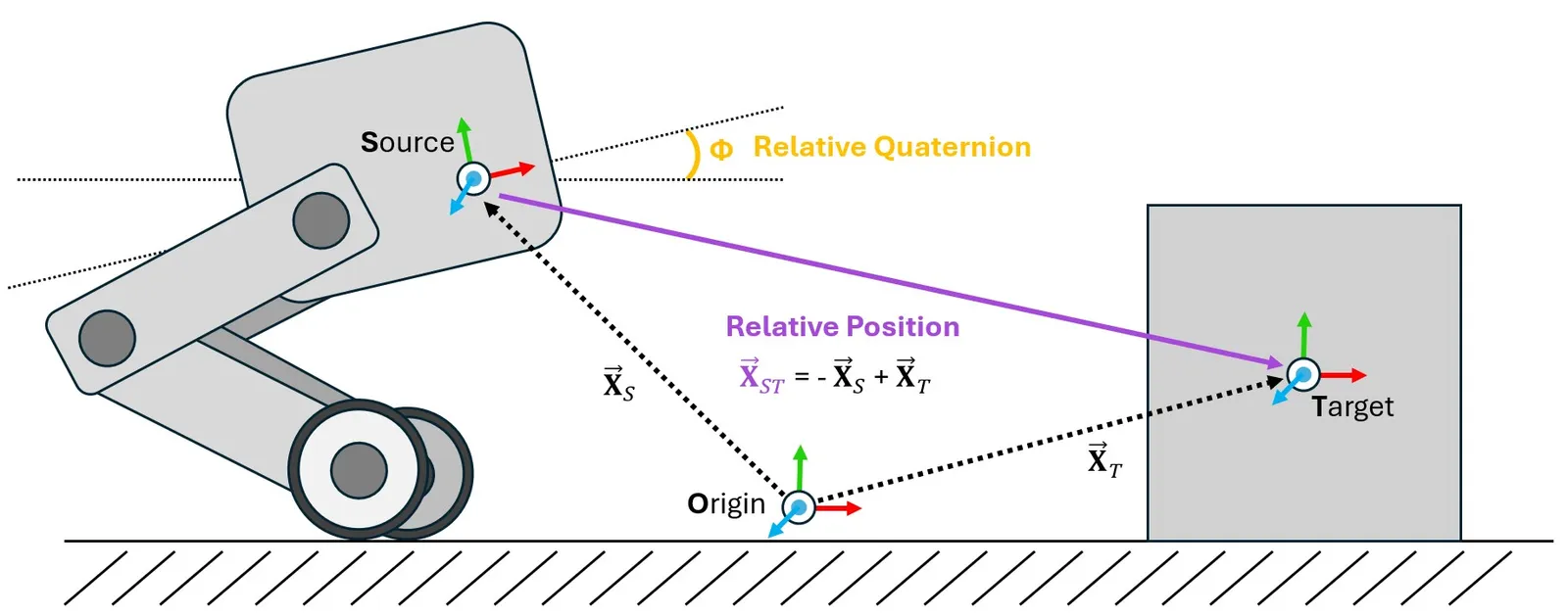
A diagram outlining the basic geometry of frame transformations

Do YOU want to know where things are relative to other things at a glance? Then the frame transformer is the sensor for you!*

One of the most common operations that needs to be performed within a physics simulation is the frame transformation: rewriting a vector or quaternion in the basis of an arbitrary euclidean coordinate system. There are many ways to accomplish this within Isaac and USD, but these methods can be cumbersome to implement within Isaac Lab’s GPU based simulation and cloned environments. To mitigate this problem, we have designed the Frame Transformer Sensor, that tracks and calculate the relative frame transformations for rigid bodies of interest to the scene.

The sensory is minimally defined by a source frame and a list of target frames. These definitions take the form of a prim path (for the source) and list of regex capable prim paths the rigid bodies to be tracked (for the targets).

@configclass
class FrameTransformerSensorSceneCfg(InteractiveSceneCfg):
"""Design the scene with sensors on the robot."""
# ground plane
ground = AssetBaseCfg(prim_path="/World/defaultGroundPlane", spawn=sim_utils.GroundPlaneCfg())
# lights
dome_light = AssetBaseCfg(
prim_path="/World/Light", spawn=sim_utils.DomeLightCfg(intensity=3000.0, color=(0.75, 0.75, 0.75))
)
# robot
robot = ANYMAL_C_CFG.replace(prim_path="{ENV_REGEX_NS}/Robot")
# Rigid Object
cube = RigidObjectCfg(
prim_path="{ENV_REGEX_NS}/Cube",
spawn=sim_utils.CuboidCfg(
size=(1, 1, 1),
rigid_props=sim_utils.RigidBodyPropertiesCfg(),
mass_props=sim_utils.MassPropertiesCfg(mass=100.0),
collision_props=sim_utils.CollisionPropertiesCfg(),
physics_material=sim_utils.RigidBodyMaterialCfg(static_friction=1.0),
visual_material=sim_utils.PreviewSurfaceCfg(diffuse_color=(0.0, 1.0, 0.0), metallic=0.2),
),
init_state=RigidObjectCfg.InitialStateCfg(pos=(5, 0, 0.5)),
)
specific_transforms = FrameTransformerCfg(
prim_path="{ENV_REGEX_NS}/Robot/base",
target_frames=[
FrameTransformerCfg.FrameCfg(prim_path="{ENV_REGEX_NS}/Robot/LF_FOOT"),
FrameTransformerCfg.FrameCfg(prim_path="{ENV_REGEX_NS}/Robot/RF_FOOT"),
],
debug_vis=True,
)
cube_transform = FrameTransformerCfg(
prim_path="{ENV_REGEX_NS}/Robot/base",
target_frames=[FrameTransformerCfg.FrameCfg(prim_path="{ENV_REGEX_NS}/Cube")],
debug_vis=False,
)
robot_transforms = FrameTransformerCfg(
prim_path="{ENV_REGEX_NS}/Robot/base",
target_frames=[FrameTransformerCfg.FrameCfg(prim_path="{ENV_REGEX_NS}/Robot/.*")],
debug_vis=False,
)

We can now run the scene and query the sensor for data

def run_simulator(sim: sim_utils.SimulationContext, scene: InteractiveScene):
.
.
.
# Simulate physics
while simulation_app.is_running():
.
.
.
# print information from the sensors
print("-------------------------------")
print(scene["specific_transforms"])
print("relative transforms:", scene["specific_transforms"].data.target_pos_source)
print("relative orientations:", scene["specific_transforms"].data.target_quat_source)
print("-------------------------------")
print(scene["cube_transform"])
print("relative transform:", scene["cube_transform"].data.target_pos_source)
print("-------------------------------")
print(scene["robot_transforms"])
print("relative transforms:", scene["robot_transforms"].data.target_pos_source)

Let’s take a look at the result for tracking specific objects. First, we can take a look at the data coming from the sensors on the feet

-------------------------------
FrameTransformer @ '/World/envs/env_.*/Robot/base':
tracked body frames: ['base', 'LF_FOOT', 'RF_FOOT']
number of envs: 1
source body frame: base
target frames (count: ['LF_FOOT', 'RF_FOOT']): 2
relative transforms: tensor([[[ 0.4658, 0.3085, -0.4840],
[ 0.4487, -0.2959, -0.4828]]], device='cuda:0')
relative orientations: tensor([[[ 0.9623, 0.0072, -0.2717, -0.0020],
[ 0.9639, 0.0052, -0.2663, -0.0014]]], device='cuda:0')
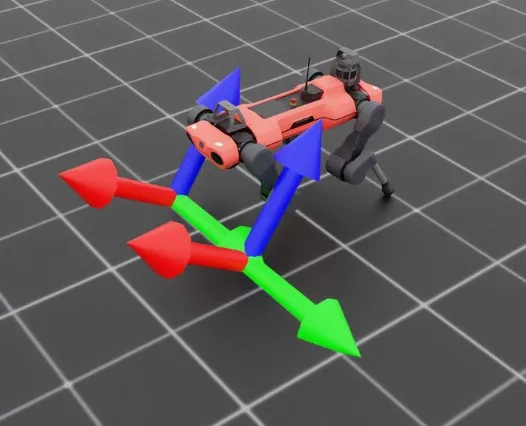
The frame transformer visualizer

By activating the visualizer, we can see that the frames of the feet are rotated “upward” slightly. We can also see the explicit relative positions and rotations by querying the sensor for data, which returns these values as a list with the same order as the tracked frames. This becomes even more apparent if we examine the transforms specified by regex.

-------------------------------
FrameTransformer @ '/World/envs/env_.*/Robot/base':
tracked body frames: ['base', 'LF_FOOT', 'LF_HIP', 'LF_SHANK', 'LF_THIGH', 'LH_FOOT', 'LH_HIP', 'LH_SHANK', 'LH_THIGH', 'RF_FOOT', 'RF_HIP', 'RF_SHANK', 'RF_THIGH', 'RH_FOOT', 'RH_HIP', 'RH_SHANK', 'RH_THIGH', 'base']
number of envs: 1
source body frame: base
target frames (count: ['LF_FOOT', 'LF_HIP', 'LF_SHANK', 'LF_THIGH', 'LH_FOOT', 'LH_HIP', 'LH_SHANK', 'LH_THIGH', 'RF_FOOT', 'RF_HIP', 'RF_SHANK', 'RF_THIGH', 'RH_FOOT', 'RH_HIP', 'RH_SHANK', 'RH_THIGH', 'base']): 17
relative transforms: tensor([[[ 4.6581e-01, 3.0846e-01, -4.8398e-01],
[ 2.9990e-01, 1.0400e-01, -1.7062e-09],
[ 2.1409e-01, 2.9177e-01, -2.4214e-01],
[ 3.5980e-01, 1.8780e-01, 1.2608e-03],
[-4.8813e-01, 3.0973e-01, -4.5927e-01],
[-2.9990e-01, 1.0400e-01, 2.7044e-09],
[-2.1495e-01, 2.9264e-01, -2.4198e-01],
[-3.5980e-01, 1.8780e-01, 1.5582e-03],
[ 4.4871e-01, -2.9593e-01, -4.8277e-01],
[ 2.9990e-01, -1.0400e-01, -2.7057e-09],
[ 1.9971e-01, -2.8554e-01, -2.3778e-01],
[ 3.5980e-01, -1.8781e-01, -9.1049e-04],
[-5.0090e-01, -2.9095e-01, -4.5746e-01],
[-2.9990e-01, -1.0400e-01, 6.3592e-09],
[-2.1860e-01, -2.8251e-01, -2.5163e-01],
[-3.5980e-01, -1.8779e-01, -1.8792e-03],
[ 0.0000e+00, 0.0000e+00, 0.0000e+00]]], device='cuda:0')

Here, the sensor is tracking all rigid body children of Robot/base, but this expression is inclusive, meaning that the source body itself is also a target. This can be seen both by examining the source and target list, where base appears twice, and also in the returned data, where the sensor returns the relative transform to itself, (0, 0, 0).

# Copyright (c) 2022-2025, The Isaac Lab Project Developers (https://github.com/isaac-sim/IsaacLab/blob/main/CONTRIBUTORS.md).
# All rights reserved.
#
# SPDX-License-Identifier: BSD-3-Clause
import argparse
from isaaclab.app import AppLauncher
# add argparse arguments
parser = argparse.ArgumentParser(description="Example on using the frame transformer sensor.")
parser.add_argument("--num_envs", type=int, default=1, help="Number of environments to spawn.")
# append AppLauncher cli args
AppLauncher.add_app_launcher_args(parser)
# parse the arguments
args_cli = parser.parse_args()
# launch omniverse app
app_launcher = AppLauncher(args_cli)
simulation_app = app_launcher.app
"""Rest everything follows."""
import torch
import isaaclab.sim as sim_utils
from isaaclab.assets import AssetBaseCfg, RigidObjectCfg
from isaaclab.scene import InteractiveScene, InteractiveSceneCfg
from isaaclab.sensors import FrameTransformerCfg
from isaaclab.utils import configclass
##
# Pre-defined configs
##
from isaaclab_assets.robots.anymal import ANYMAL_C_CFG # isort: skip
@configclass
class FrameTransformerSensorSceneCfg(InteractiveSceneCfg):
"""Design the scene with sensors on the robot."""
# ground plane
ground = AssetBaseCfg(prim_path="/World/defaultGroundPlane", spawn=sim_utils.GroundPlaneCfg())
# lights
dome_light = AssetBaseCfg(
prim_path="/World/Light", spawn=sim_utils.DomeLightCfg(intensity=3000.0, color=(0.75, 0.75, 0.75))
)
# robot
robot = ANYMAL_C_CFG.replace(prim_path="{ENV_REGEX_NS}/Robot")
# Rigid Object
cube = RigidObjectCfg(
prim_path="{ENV_REGEX_NS}/Cube",
spawn=sim_utils.CuboidCfg(
size=(1, 1, 1),
rigid_props=sim_utils.RigidBodyPropertiesCfg(),
mass_props=sim_utils.MassPropertiesCfg(mass=100.0),
collision_props=sim_utils.CollisionPropertiesCfg(),
physics_material=sim_utils.RigidBodyMaterialCfg(static_friction=1.0),
visual_material=sim_utils.PreviewSurfaceCfg(diffuse_color=(0.0, 1.0, 0.0), metallic=0.2),
),
init_state=RigidObjectCfg.InitialStateCfg(pos=(5, 0, 0.5)),
)
specific_transforms = FrameTransformerCfg(
prim_path="{ENV_REGEX_NS}/Robot/base",
target_frames=[
FrameTransformerCfg.FrameCfg(prim_path="{ENV_REGEX_NS}/Robot/LF_FOOT"),
FrameTransformerCfg.FrameCfg(prim_path="{ENV_REGEX_NS}/Robot/RF_FOOT"),
],
debug_vis=True,
)
cube_transform = FrameTransformerCfg(
prim_path="{ENV_REGEX_NS}/Robot/base",
target_frames=[FrameTransformerCfg.FrameCfg(prim_path="{ENV_REGEX_NS}/Cube")],
debug_vis=False,
)
robot_transforms = FrameTransformerCfg(
prim_path="{ENV_REGEX_NS}/Robot/base",
target_frames=[FrameTransformerCfg.FrameCfg(prim_path="{ENV_REGEX_NS}/Robot/.*")],
debug_vis=False,
)
def run_simulator(sim: sim_utils.SimulationContext, scene: InteractiveScene):
"""Run the simulator."""
# Define simulation stepping
sim_dt = sim.get_physics_dt()
sim_time = 0.0
count = 0
# Simulate physics
while simulation_app.is_running():
if count % 500 == 0:
# reset counter
count = 0
# reset the scene entities
# root state
# we offset the root state by the origin since the states are written in simulation world frame
# if this is not done, then the robots will be spawned at the (0, 0, 0) of the simulation world
root_state = scene["robot"].data.default_root_state.clone()
root_state[:, :3] += scene.env_origins
scene["robot"].write_root_pose_to_sim(root_state[:, :7])
scene["robot"].write_root_velocity_to_sim(root_state[:, 7:])
# set joint positions with some noise
joint_pos, joint_vel = (
scene["robot"].data.default_joint_pos.clone(),
scene["robot"].data.default_joint_vel.clone(),
)
joint_pos += torch.rand_like(joint_pos) * 0.1
scene["robot"].write_joint_state_to_sim(joint_pos, joint_vel)
# clear internal buffers
scene.reset()
print("[INFO]: Resetting robot state...")
# Apply default actions to the robot
# -- generate actions/commands
targets = scene["robot"].data.default_joint_pos
# -- apply action to the robot
scene["robot"].set_joint_position_target(targets)
# -- write data to sim
scene.write_data_to_sim()
# perform step
sim.step()
# update sim-time
sim_time += sim_dt
count += 1
# update buffers
scene.update(sim_dt)
# print information from the sensors
print("-------------------------------")
print(scene["specific_transforms"])
print("relative transforms:", scene["specific_transforms"].data.target_pos_source)
print("relative orientations:", scene["specific_transforms"].data.target_quat_source)
print("-------------------------------")
print(scene["cube_transform"])
print("relative transform:", scene["cube_transform"].data.target_pos_source)
print("-------------------------------")
print(scene["robot_transforms"])
print("relative transforms:", scene["robot_transforms"].data.target_pos_source)
def main():
"""Main function."""
# Initialize the simulation context
sim_cfg = sim_utils.SimulationCfg(dt=0.005, device=args_cli.device)
sim = sim_utils.SimulationContext(sim_cfg)
# Set main camera
sim.set_camera_view(eye=[3.5, 3.5, 3.5], target=[0.0, 0.0, 0.0])
# design scene
scene_cfg = FrameTransformerSensorSceneCfg(num_envs=args_cli.num_envs, env_spacing=2.0)
scene = InteractiveScene(scene_cfg)
# Play the simulator
sim.reset()
# Now we are ready!
print("[INFO]: Setup complete...")
# Run the simulator
run_simulator(sim, scene)
if __name__ == "__main__":
# run the main function
main()
# close sim app
simulation_app.close()