Skip to navigation

Registering an Environment

View as Markdown

In the previous tutorial, we learned how to create a custom cartpole environment. We manually created an instance of the environment by importing the environment class and its configuration class.

# create environment configuration
env_cfg = CartpoleEnvCfg()
env_cfg.scene.num_envs = args_cli.num_envs
env_cfg.sim.device = args_cli.device
# setup RL environment
env = ManagerBasedRLEnv(cfg=env_cfg)

While straightforward, this approach is not scalable as we have a large suite of environments. In this tutorial, we will show how to use the gymnasium.register method to register environments with the gymnasium registry. This allows us to create the environment through the gymnasium.make function.

from isaaclab_tasks.utils import parse_env_cfg
# PLACEHOLDER: Extension template (do not remove this comment)
def main():
"""Random actions agent with Isaac Lab environment."""
# create environment configuration
env_cfg = parse_env_cfg(
args_cli.task, device=args_cli.device, num_envs=args_cli.num_envs, use_fabric=not args_cli.disable_fabric
)
# create environment

The Code

The tutorial corresponds to the random_agent.py script in the scripts/environments directory.

# Copyright (c) 2022-2025, The Isaac Lab Project Developers (https://github.com/isaac-sim/IsaacLab/blob/main/CONTRIBUTORS.md).
# All rights reserved.
#
# SPDX-License-Identifier: BSD-3-Clause
"""Script to an environment with random action agent."""
"""Launch Isaac Sim Simulator first."""
import argparse
from isaaclab.app import AppLauncher
# add argparse arguments
parser = argparse.ArgumentParser(description="Random agent for Isaac Lab environments.")
parser.add_argument(
"--disable_fabric", action="store_true", default=False, help="Disable fabric and use USD I/O operations."
)
parser.add_argument("--num_envs", type=int, default=None, help="Number of environments to simulate.")
parser.add_argument("--task", type=str, default=None, help="Name of the task.")
# append AppLauncher cli args
AppLauncher.add_app_launcher_args(parser)
# parse the arguments
args_cli = parser.parse_args()
# launch omniverse app
app_launcher = AppLauncher(args_cli)
simulation_app = app_launcher.app
"""Rest everything follows."""
import gymnasium as gym
import torch
import isaaclab_tasks # noqa: F401
from isaaclab_tasks.utils import parse_env_cfg
# PLACEHOLDER: Extension template (do not remove this comment)
def main():
"""Random actions agent with Isaac Lab environment."""
# create environment configuration
env_cfg = parse_env_cfg(
args_cli.task, device=args_cli.device, num_envs=args_cli.num_envs, use_fabric=not args_cli.disable_fabric
)
# create environment
env = gym.make(args_cli.task, cfg=env_cfg)
# print info (this is vectorized environment)
print(f"[INFO]: Gym observation space: {env.observation_space}")
print(f"[INFO]: Gym action space: {env.action_space}")
# reset environment
env.reset()
# simulate environment
while simulation_app.is_running():
# run everything in inference mode
with torch.inference_mode():
# sample actions from -1 to 1
actions = 2 * torch.rand(env.action_space.shape, device=env.unwrapped.device) - 1
# apply actions
env.step(actions)
# close the simulator
env.close()
if __name__ == "__main__":
# run the main function
main()
# close sim app
simulation_app.close()

The Code Explained

The envs.ManagerBasedRLEnv class inherits from the gymnasium.Env class to follow a standard interface. However, unlike the traditional Gym environments, the envs.ManagerBasedRLEnv implements a vectorized environment. This means that multiple environment instances are running simultaneously in the same process, and all the data is returned in a batched fashion.

Similarly, the envs.DirectRLEnv class also inherits from the gymnasium.Env class for the direct workflow. For envs.DirectMARLEnv, although it does not inherit from Gymnasium, it can be registered and created in the same way.

Using the gym registry

To register an environment, we use the gymnasium.register method. This method takes in the environment name, the entry point to the environment class, and the entry point to the environment configuration class.

The gymnasium registry is a global registry. Hence, it is important to ensure that the environment names are unique. Otherwise, the registry will throw an error when registering the environment.

Manager-Based Environments

For manager-based environments, the following shows the registration call for the cartpole environment in the isaaclab_tasks.manager_based.classic.cartpole sub-package:

import gymnasium as gym
from . import agents
##
# Register Gym environments.
##
gym.register(
id="Isaac-Cartpole-v0",
entry_point="isaaclab.envs:ManagerBasedRLEnv",
disable_env_checker=True,
kwargs={
"env_cfg_entry_point": f"{__name__}.cartpole_env_cfg:CartpoleEnvCfg",
"rl_games_cfg_entry_point": f"{agents.__name__}:rl_games_ppo_cfg.yaml",
"rsl_rl_cfg_entry_point": f"{agents.__name__}.rsl_rl_ppo_cfg:CartpolePPORunnerCfg",
"skrl_cfg_entry_point": f"{agents.__name__}:skrl_ppo_cfg.yaml",
"sb3_cfg_entry_point": f"{agents.__name__}:sb3_ppo_cfg.yaml",
},
)
gym.register(
id="Isaac-Cartpole-RGB-v0",
entry_point="isaaclab.envs:ManagerBasedRLEnv",
disable_env_checker=True,
kwargs={
"env_cfg_entry_point": f"{__name__}.cartpole_camera_env_cfg:CartpoleRGBCameraEnvCfg",
"rl_games_cfg_entry_point": f"{agents.__name__}:rl_games_camera_ppo_cfg.yaml",
},
)
gym.register(
id="Isaac-Cartpole-Depth-v0",
entry_point="isaaclab.envs:ManagerBasedRLEnv",
disable_env_checker=True,
kwargs={
"env_cfg_entry_point": f"{__name__}.cartpole_camera_env_cfg:CartpoleDepthCameraEnvCfg",
"rl_games_cfg_entry_point": f"{agents.__name__}:rl_games_camera_ppo_cfg.yaml",
},
)
gym.register(
id="Isaac-Cartpole-RGB-ResNet18-v0",
entry_point="isaaclab.envs:ManagerBasedRLEnv",
disable_env_checker=True,
kwargs={
"env_cfg_entry_point": f"{__name__}.cartpole_camera_env_cfg:CartpoleResNet18CameraEnvCfg",
"rl_games_cfg_entry_point": f"{agents.__name__}:rl_games_feature_ppo_cfg.yaml",
},
)
gym.register(
id="Isaac-Cartpole-RGB-TheiaTiny-v0",
entry_point="isaaclab.envs:ManagerBasedRLEnv",
disable_env_checker=True,
kwargs={
"env_cfg_entry_point": f"{__name__}.cartpole_camera_env_cfg:CartpoleTheiaTinyCameraEnvCfg",
"rl_games_cfg_entry_point": f"{agents.__name__}:rl_games_feature_ppo_cfg.yaml",
},
)

The id argument is the name of the environment. As a convention, we name all the environments with the prefix Isaac- to make it easier to search for them in the registry. The name of the environment is typically followed by the name of the task, and then the name of the robot. For instance, for legged locomotion with ANYmal C on flat terrain, the environment is called Isaac-Velocity-Flat-Anymal-C-v0. The version number v<N> is typically used to specify different variations of the same environment. Otherwise, the names of the environments can become too long and difficult to read.

The entry_point argument is the entry point to the environment class. The entry point is a string of the form <module>:<class>. In the case of the cartpole environment, the entry point is isaaclab.envs:ManagerBasedRLEnv. The entry point is used to import the environment class when creating the environment instance.

The env_cfg_entry_point argument specifies the default configuration for the environment. The default configuration is loaded using the isaaclab_tasks.utils.parse_env_cfg function. It is then passed to the gymnasium.make function to create the environment instance. The configuration entry point can be both a YAML file or a python configuration class.

Direct Environments

For direct-based environments, the environment registration follows a similar pattern. Instead of registering the environment’s entry point as the ~isaaclab.envs.ManagerBasedRLEnv class, we register the environment’s entry point as the implementation class of the environment. Additionally, we add the suffix -Direct to the environment name to differentiate it from the manager-based environments.

As an example, the following shows the registration call for the cartpole environment in the isaaclab_tasks.direct.cartpole sub-package:

import gymnasium as gym
from . import agents
##
# Register Gym environments.
##
gym.register(
id="Isaac-Cartpole-Direct-v0",
entry_point=f"{__name__}.cartpole_env:CartpoleEnv",
disable_env_checker=True,
kwargs={
"env_cfg_entry_point": f"{__name__}.cartpole_env:CartpoleEnvCfg",
"rl_games_cfg_entry_point": f"{agents.__name__}:rl_games_ppo_cfg.yaml",
"rsl_rl_cfg_entry_point": f"{agents.__name__}.rsl_rl_ppo_cfg:CartpolePPORunnerCfg",
"skrl_cfg_entry_point": f"{agents.__name__}:skrl_ppo_cfg.yaml",
"sb3_cfg_entry_point": f"{agents.__name__}:sb3_ppo_cfg.yaml",
},
)
gym.register(

Creating the environment

To inform the gym registry with all the environments provided by the isaaclab_tasks extension, we must import the module at the start of the script. This will execute the __init__.py file which iterates over all the sub-packages and registers their respective environments.

import isaaclab_tasks # noqa: F401

In this tutorial, the task name is read from the command line. The task name is used to parse the default configuration as well as to create the environment instance. In addition, other parsed command line arguments such as the number of environments, the simulation device, and whether to render, are used to override the default configuration.

# create environment configuration
env_cfg = parse_env_cfg(
args_cli.task, device=args_cli.device, num_envs=args_cli.num_envs, use_fabric=not args_cli.disable_fabric
)
# create environment
env = gym.make(args_cli.task, cfg=env_cfg)

Once creating the environment, the rest of the execution follows the standard resetting and stepping.

The Code Execution

Now that we have gone through the code, let’s run the script and see the result:

./isaaclab.sh -p scripts/environments/random_agent.py --task Isaac-Cartpole-v0 --num_envs 32

This should open a stage with everything similar to the Creating a Manager-Based RL Environment tutorial. To stop the simulation, you can either close the window, or press Ctrl+C in the terminal.
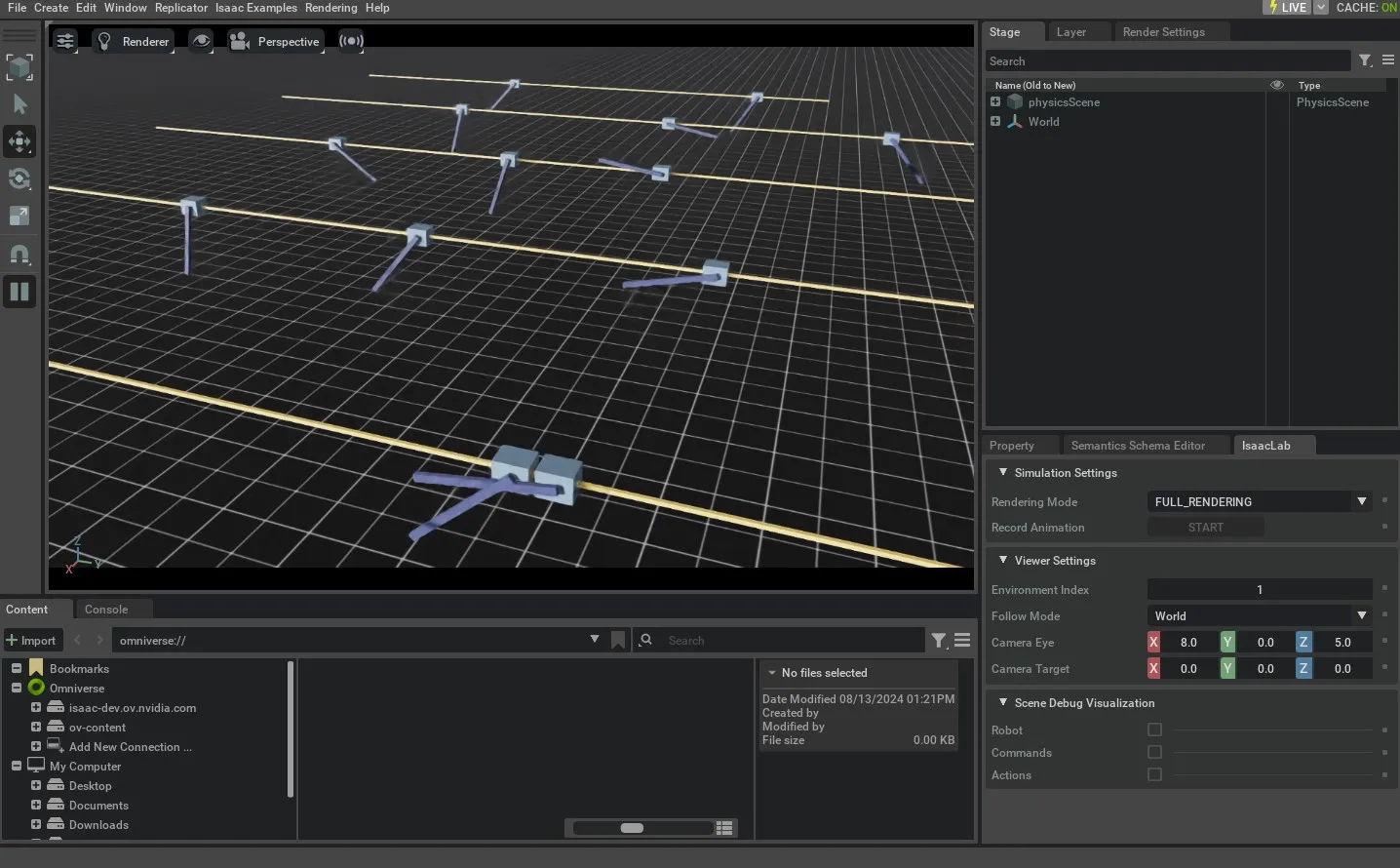
result of random_agent.py

In addition, you can also change the simulation device from GPU to CPU by setting the value of the --device flag explicitly:

./isaaclab.sh -p scripts/environments/random_agent.py --task Isaac-Cartpole-v0 --num_envs 32 --device cpu

With the --device cpu flag, the simulation will run on the CPU. This is useful for debugging the simulation. However, the simulation will run much slower than on the GPU.