

Using an operational space controller
Sometimes, controlling the end-effector pose of the robot using a differential IK controller is not sufficient. For example, we might want to enforce a very specific pose tracking error dynamics in the task space, actuate the robot with joint effort/torque commands, or apply a contact force at a specific direction while controlling the motion of the other directions (e.g., washing the surface of the table with a cloth). In such tasks, we can use an operational space controller (OSC).
References for the operational space control:
-
O Khatib. A unified approach for motion and force control of robot manipulators: The operational space formulation. IEEE Journal of Robotics and Automation, 3(1):43–53, 1987. URL http://dx.doi.org/10.1109/JRA.1987.1087068.
-
Robot Dynamics Lecture Notes by Marco Hutter (ETH Zurich). URL https://ethz.ch/content/dam/ethz/special-interest/mavt/robotics-n-intelligent-systems/rsl-dam/documents/RobotDynamics2017/RD_HS2017script.pdf
In this tutorial, we will learn how to use an OSC to control the robot.
We will use the controllers.OperationalSpaceController class to apply a constant force perpendicular to a
tilted wall surface while tracking a desired end-effector pose in all the other directions.
The Code
The tutorial corresponds to the run_osc.py script in the
scripts/tutorials/05_controllers directory.
Creating an Operational Space Controller
The ~controllers.OperationalSpaceController class computes the joint
efforts/torques for a robot to do simultaneous motion and force control in task space.
The reference frame of this task space could be an arbitrary coordinate frame in Euclidean space. By default,
it is the robot’s base frame. However, in certain cases, it could be easier to define target coordinates w.r.t. a
different frame. In such cases, the pose of this task reference frame, w.r.t. to the robot’s base frame, should be
provided in the set_command method’s current_task_frame_pose_b argument. For example, in this tutorial, it
makes sense to define the target commands w.r.t. a frame that is parallel to the wall surface, as the force control
direction would be then only nonzero in the z-axis of this frame. The target pose, which is set to have the same
orientation as the wall surface, is such a candidate and is used as the task frame in this tutorial. Therefore, all
the arguments to the ~controllers.OperationalSpaceControllerCfg should be set with this task reference frame
in mind.
For the motion control, the task space targets could be given as absolute (i.e., defined w.r.t. the robot base,
target_types: "pose_abs") or relative the the end-effector’s current pose (i.e., target_types: "pose_rel").
For the force control, the task space targets could be given as absolute (i.e., defined w.r.t. the robot base,
target_types: "force_abs"). If it is desired to apply pose and force control simultaneously, the target_types
should be a list such as ["pose_abs", "wrench_abs"] or ["pose_rel", "wrench_abs"].
The axes that the motion and force control will be applied can be specified using the motion_control_axes_task and
force_control_axes_task arguments, respectively. These lists should consist of 0/1 for all six axes (position and
rotation) and be complementary to each other (e.g., for the x-axis, if the motion_control_axes_task is 0, the
force_control_axes_task should be 1).
For the motion control axes, desired stiffness, and damping ratio values can be specified using the
motion_control_stiffness and motion_damping_ratio_task arguments, which can be a scalar (same value for all
axes) or a list of six scalars, one value corresponding to each axis. If desired, the stiffness and damping ratio
values could be a command parameter (e.g., to learn the values using RL or change them on the go). For this,
impedance_mode should be either "variable_kp" to include the stiffness values within the command or
"variable" to include both the stiffness and damping ratio values. In these cases, motion_stiffness_limits_task
and motion_damping_limits_task should be set as well, which puts bounds on the stiffness and damping ratio values.
For contact force control, it is possible to apply an open-loop force control by not setting the
contact_wrench_stiffness_task, or apply a closed-loop force control (with the feed-forward term) by setting
the desired stiffness values using the contact_wrench_stiffness_task argument, which can be a scalar or a list
of six scalars. Please note that, currently, only the linear part of the contact wrench (hence the first three
elements of the contact_wrench_stiffness_task) is considered in the closed-loop control, as the rotational part
cannot be measured with the contact sensors.
For the motion control, inertial_dynamics_decoupling should be set to True to use the robot’s inertia matrix
to decouple the desired accelerations in the task space. This is important for the motion control to be accurate,
especially for rapid movements. This inertial decoupling accounts for the coupling between all the six motion axes.
If desired, the inertial coupling between the translational and rotational axes could be ignored by setting the
partial_inertial_dynamics_decoupling to True.
If it is desired to include the gravity compensation in the operational space command, the gravity_compensation
should be set to True.
A final consideration regarding the operational space control is what to do with the null-space of redundant robots.
The null-space is the subspace of the joint space that does not affect the task space coordinates. If nothing is done
to control the null-space, the robot joints will float without moving the end-effector. This might be undesired (e.g.,
the robot joints might get close to their limits), and one might want to control the robot behaviour within its
null-space. One way to do is to set nullspace_control to "position" (by default it is "none") which
integrates a null-space PD controller to attract the robot joints to desired targets without affecting the task
space. The behaviour of this null-space controller can be defined using the nullspace_stiffness and
nullspace_damping_ratio arguments. Please note that theoretical decoupling of the null-space and task space
accelerations is only possible when inertial_dynamics_decoupling is set to True and
partial_inertial_dynamics_decoupling is set to False.
The included OSC implementation performs the computation in a batched format and uses PyTorch operations.
In this tutorial, we will use "pose_abs" for controlling the motion in all axes except the z-axis and
"wrench_abs" for controlling the force in the z-axis. Moreover, we will include the full inertia decoupling in
the motion control and not include the gravity compensation, as the gravity is disabled from the robot configuration.
We set the impedance mode to "variable_kp" to dynamically change the stiffness values
(motion_damping_ratio_task is set to 1: the kd values adapt according to kp values to maintain a critically
damped response). Finally, nullspace_control is set to use "position" where the joint set points are provided
to be the center of the joint position limits.
Updating the states of the robot
The OSC implementation is a computation-only class. Thus, it expects the user to provide the necessary information about the robot. This includes the robot’s Jacobian matrix, mass/inertia matrix, end-effector pose, velocity, contact force (all in the root frame), and finally, the joint positions and velocities. Moreover, the user should provide gravity compensation vector and null-space joint position targets if required.
Computing robot command
The OSC separates the operation of setting the desired command and computing the desired joint positions.
To set the desired command, the user should provide command vector, which includes the target commands
(i.e., in the order they appear in the target_types argument of the OSC configuration),
and the desired stiffness and damping ratio values if the impedance_mode is set to "variable_kp" or "variable".
They should be all in the same coordinate frame as the task frame (e.g., indicated with _task subscript) and
concatanated together.
In this tutorial, the desired wrench is already defined w.r.t. the task frame, and the desired pose is transformed to the task frame as the following:
The OSC command is set with the command vector in the task frame, the end-effector pose in the base frame, and the task (reference) frame pose in the base frame as the following. This information is needed, as the internal computations are done in the base frame.
The joint effort/torque values are computed using the provided robot states and the desired command as the following:
The computed joint effort/torque targets can then be applied on the robot.
The Code Execution
You can now run the script and see the result:
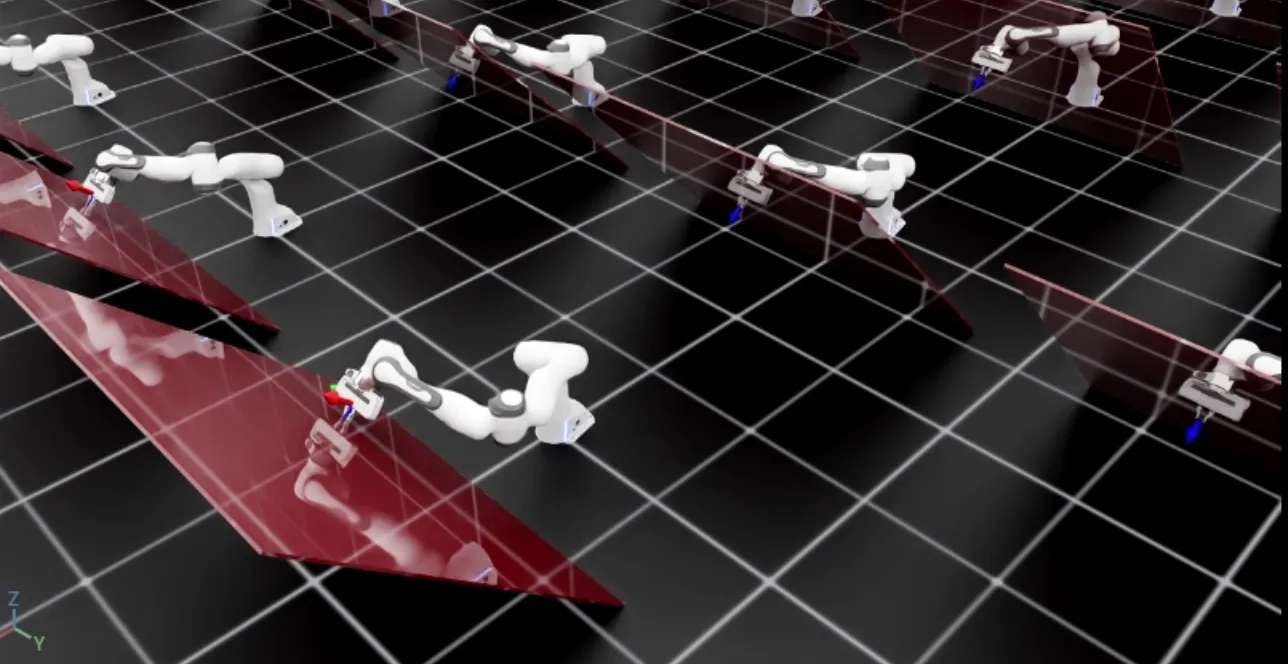
The script will start a simulation with 128 robots. The robots will be controlled using the OSC. The current and desired end-effector poses should be displayed using frame markers in addition to the red tilted wall. You should see that the robot reaches the desired pose while applying a constant force perpendicular to the wall surface.
To stop the simulation, you can either close the window or press Ctrl+C in the terminal.