


GCP Google Kubernetes Engine (GKE)#
Google Kubernetes Engine (GKE) is Google Cloud’s managed Kubernetes service for deploying, managing, and scaling containerized applications. This guide will walk you through setting up the cuDF for Apache Spark on a GKE cluster with GPU nodes.
At the end of this guide, the reader will be able to run a sample Apache Spark application that runs on NVIDIA GPUs in a GKE cluster.
Quick Start Summary#
For experienced users, here are the key steps:
Create a GKE cluster with GPU node pool
Verify GPU drivers are installed (GKE auto-installs them)
Build and push a Docker image with Spark + cuDF for Apache Spark to Artifact Registry
Install Spark Operator using Helm
Submit Spark applications using SparkApplication CRD
Estimated time: 30-45 minutes (including cluster creation)
Prerequisites#
A Google Cloud account with billing enabled
gcloud CLI installed and configured (run
gcloud initto configure)kubectl installed
gke-gcloud-auth-plugin installed (required for kubectl authentication)
Helm installed (required for Spark Operator)
Docker installed on your local machine
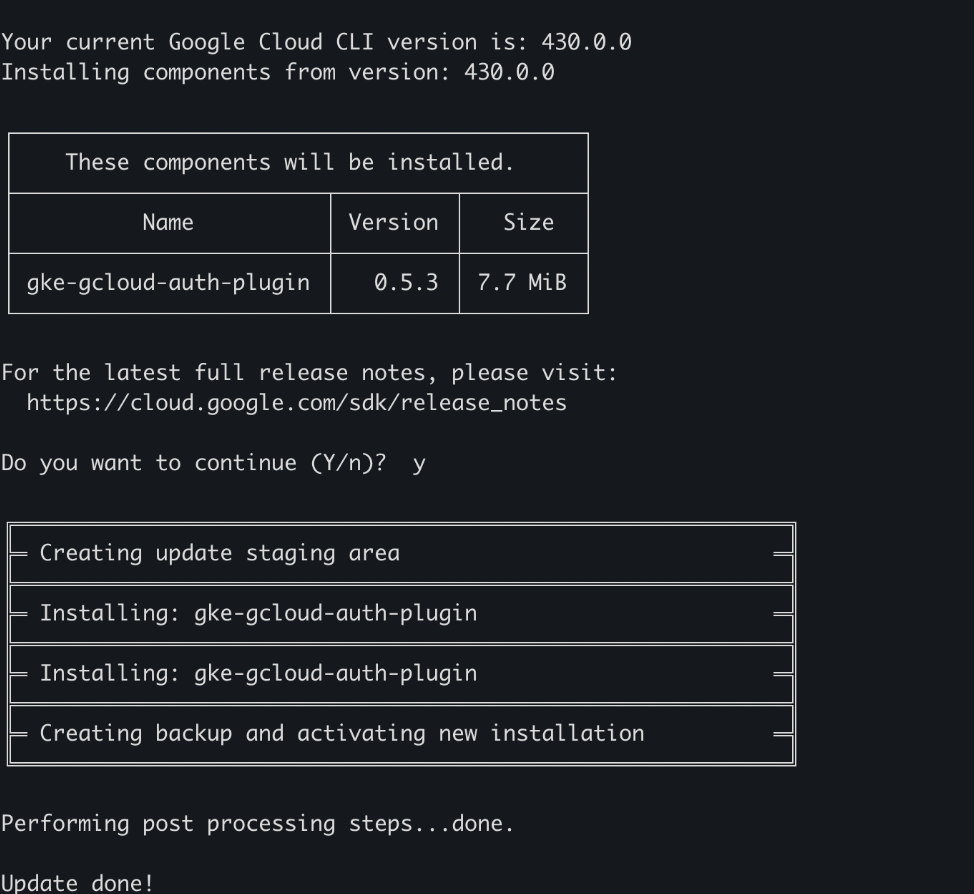
Install gke-gcloud-auth-plugin if you haven’t:
1gcloud components install gke-gcloud-auth-plugin
Enable Required APIs#
Before creating a GKE cluster, enable the required Google Cloud APIs:
1gcloud services enable container.googleapis.com
2gcloud services enable compute.googleapis.com
3gcloud services enable artifactregistry.googleapis.com
Create a GKE Cluster with GPU Nodes#
Set Up Environment Variables#
 1export PROJECT_ID=[Your GCP Project ID]
 2export ZONE=us-central1-a
 3export CLUSTER_NAME=spark-rapids-gke
 4
 5# Default node pool settings
 6export MACHINE_TYPE=n1-standard-4
 7export NUM_NODES=1
 8
 9# GPU node pool settings
10export GPU_MACHINE_TYPE=g2-standard-16
11export GPU_TYPE=nvidia-l4
12export GPU_COUNT=1
13export NUM_GPU_NODES=2
Create the GKE Cluster#
Create a GKE cluster with a default node pool:
1gcloud container clusters create $CLUSTER_NAME \
2    --project=$PROJECT_ID \
3    --zone=$ZONE \
4    --machine-type=$MACHINE_TYPE \
5    --num-nodes=$NUM_NODES
Add a GPU Node Pool#
Add a GPU node pool with NVIDIA L4 GPUs:
1gcloud container node-pools create gpu-pool \
2    --cluster=$CLUSTER_NAME \
3    --project=$PROJECT_ID \
4    --zone=$ZONE \
5    --machine-type=$GPU_MACHINE_TYPE \
6    --accelerator=type=$GPU_TYPE,count=$GPU_COUNT \
7    --num-nodes=$NUM_GPU_NODES
Note
To use different GPU types, update the environment variables accordingly:
NVIDIA L4:
GPU_MACHINE_TYPE=g2-standard-16,GPU_TYPE=nvidia-l4NVIDIA T4:
GPU_MACHINE_TYPE=n1-standard-8,GPU_TYPE=nvidia-tesla-t4
Get Cluster Credentials#
After the cluster is created, get the credentials to access it with kubectl:
1gcloud container clusters get-credentials $CLUSTER_NAME --zone=$ZONE --project=$PROJECT_ID

Verify GPU Availability#
GKE automatically installs NVIDIA GPU drivers via the nvidia-gpu-device-plugin DaemonSet. Verify GPUs are available:
1# Check GPU device plugin pods
2kubectl get pods -n kube-system | grep nvidia
3
4# Verify GPU resources on nodes
5kubectl get nodes -o=custom-columns='NAME:.metadata.name,GPU:.status.allocatable.nvidia\.com/gpu'
You should see output like:

Docker Image Preparation#
Build the cuDF for Apache Spark Docker Image#
Create a working directory and download Apache Spark:
1mkdir spark-rapids-gke && cd spark-rapids-gke
2
3# Download Spark 3.5.0 (check https://nvidia.github.io/cudf-spark/docs/download.html for supported versions)
4wget https://archive.apache.org/dist/spark/spark-3.5.0/spark-3.5.0-bin-hadoop3.tgz
5tar xzf spark-3.5.0-bin-hadoop3.tgz
6mv spark-3.5.0-bin-hadoop3 spark
Download the cuDF for Apache Spark jar and GPU discovery script:
1# Download cuDF for Apache Spark jar (check https://nvidia.github.io/cudf-spark/docs/download.html for latest version)
2wget https://repo1.maven.org/maven2/com/nvidia/rapids-4-spark_2.12/26.04.2/rapids-4-spark_2.12-26.04.2-cuda12.jar
3
4# Download GPU discovery script
5wget https://raw.githubusercontent.com/apache/spark/master/examples/src/main/scripts/getGpusResources.sh
6chmod +x getGpusResources.sh
Download the Dockerfile:
Download
Dockerfile.cudato your working directory.The current directory structure should look like:
1$ ls
2Dockerfile.cuda  getGpusResources.sh  rapids-4-spark_2.12-26.04.2-cuda12.jar  spark
Build and push the Docker image to Google Artifact Registry:
 1export REGION=us-central1
 2
 3# Create an Artifact Registry repository (if not exists)
 4gcloud artifacts repositories create spark-rapids \
 5    --repository-format=docker \
 6    --location=$REGION \
 7    --project=$PROJECT_ID
 8
 9# Configure Docker to use gcloud credentials
10gcloud auth configure-docker ${REGION}-docker.pkg.dev --quiet
11
12# Build the image
13export IMAGE_NAME=${REGION}-docker.pkg.dev/${PROJECT_ID}/spark-rapids/spark-rapids:26.04.2-cuda12
14docker build -t $IMAGE_NAME -f Dockerfile.cuda .
15
16# Push the image
17docker push $IMAGE_NAME
Note
Google Container Registry (GCR) is deprecated. Use Artifact Registry instead with the format:
REGION-docker.pkg.dev/PROJECT_ID/REPOSITORY/IMAGE:TAG
Install Spark Operator#
The Spark Operator simplifies managing Spark applications on Kubernetes. Install it using Helm:
 1# Add the Spark Operator Helm repository (Kubeflow maintained)
 2helm repo add spark-operator https://kubeflow.github.io/spark-operator
 3helm repo update
 4
 5# Install the Spark Operator
 6helm install spark-operator spark-operator/spark-operator \
 7    --namespace spark-operator \
 8    --create-namespace \
 9    --set webhook.enable=true \
10    --set sparkJobNamespace=default
Verify the Spark Operator is running:
1kubectl get pods -n spark-operator
You should see pods like spark-operator-controller-xxx and spark-operator-webhook-xxx in Running state.
Create a service account for Spark:
1kubectl create serviceaccount spark
2kubectl create clusterrolebinding spark-role --clusterrole=edit --serviceaccount=default:spark --namespace=default
Running Spark Applications#
Submitting a Spark Application using Spark Operator#
Create and submit a SparkApplication to run the built-in SparkPi example with GPU acceleration:
 1cat <<EOF | kubectl apply -f -
 2apiVersion: sparkoperator.k8s.io/v1beta2
 3kind: SparkApplication
 4metadata:
 5  name: spark-rapids-pi
 6  namespace: default
 7spec:
 8  type: Scala
 9  mode: cluster
10  image: "${IMAGE_NAME}"
11  imagePullPolicy: Always
12  mainClass: org.apache.spark.examples.SparkPi
13  mainApplicationFile: "local:///opt/spark/examples/jars/spark-examples_2.12-3.5.0.jar"
14  arguments:
15    - "1000"
16  sparkVersion: "3.5.0"
17  sparkConf:
18    "spark.plugins": "com.nvidia.spark.SQLPlugin"
19    "spark.executor.resource.gpu.amount": "1"
20    "spark.executor.resource.gpu.vendor": "nvidia.com"
21    "spark.executor.resource.gpu.discoveryScript": "/opt/sparkRapidsPlugin/getGpusResources.sh"
22    "spark.task.resource.gpu.amount": "1"
23    "spark.executor.memory": "4g"
24    "spark.rapids.memory.pinnedPool.size": "2g"
25    "spark.executor.memoryOverhead": "3g"
26    "spark.executor.extraClassPath": "/opt/sparkRapidsPlugin/rapids-4-spark_2.12-26.04.2-cuda12.jar"
27    "spark.driver.extraClassPath": "/opt/sparkRapidsPlugin/rapids-4-spark_2.12-26.04.2-cuda12.jar"
28  driver:
29    cores: 1
30    memory: "1g"
31    serviceAccount: spark
32  executor:
33    cores: 1
34    instances: 1
35    memory: "4g"
36    gpu:
37      name: "nvidia.com/gpu"
38      quantity: 1
39EOF
Check the application status:
1# Watch the application status
2kubectl get sparkapplication spark-rapids-pi -w
3
4# View detailed status
5kubectl describe sparkapplication spark-rapids-pi
View the driver logs:
1kubectl logs spark-rapids-pi-driver
You should see output similar to Pi is roughly 3.14... indicating the job ran successfully.
To verify GPU acceleration is enabled, check for RAPIDS-related messages in the logs:
1kubectl logs spark-rapids-pi-driver | grep -i "rapids\|gpu"
You should see output similar to taskResourceAssignments Map(gpu -> [name: gpu, addresses: 0].

Delete the application when done:
1kubectl delete sparkapplication spark-rapids-pi
Access Spark UI#
To access the Spark driver UI while a job is running:
1kubectl port-forward spark-rapids-pi-driver 4040:4040
Then open a web browser to http://localhost:4040.
Configuring Spark Event Logs#
To enable Spark event logging for post-job analysis, add the following to your SparkApplication:
1sparkConf:
2  "spark.eventLog.enabled": "true"
3  "spark.eventLog.dir": "gs://YOUR_BUCKET/spark-events"
You can then use the Spark History Server to view completed jobs.
Troubleshooting#
gke-gcloud-auth-plugin Not Found#
If you see the error gke-gcloud-auth-plugin was not found or is not executable:
gcloud components install gke-gcloud-auth-plugin
Pod Timeout Issue#
When running GPU Spark jobs on GKE, you may encounter the following error:
The executor with ID XXX was not found in the cluster at the polling time
which is after the accepted detect delta time (30000 ms) configured by
`spark.kubernetes.executor.missingPodDetectDelta`.
The executor may have been deleted but the driver missed the deletion event.
This issue occurs because GPU initialization and resource allocation can take longer than the default timeout. To resolve this, increase the spark.kubernetes.executor.missingPodDetectDelta configuration:
sparkConf:
  "spark.kubernetes.executor.missingPodDetectDelta": "120000"
Docker Push Authentication Error#
If you see Unauthenticated request when pushing to Artifact Registry:
# Re-authenticate Docker with Artifact Registry
gcloud auth configure-docker ${REGION}-docker.pkg.dev --quiet

# Ensure you're not using sudo (which runs as root with different credentials)
# If you need to use Docker without sudo, add your user to the docker group:
sudo usermod -aG docker $USER
# Then log out and log back in
GPU Not Detected#
If GPUs aren’t being detected:
Verify that the NVIDIA GPU device plugin is running:
kubectl get pods -n kube-system | grep nvidia
Check if the GPU resource is available on the node:
kubectl get nodes -o=custom-columns='NAME:.metadata.name,GPU:.status.allocatable.nvidia\.com/gpu'
Ensure the GPU discovery script has execute permissions in your Docker image.
ClassNotFoundException for SQLPlugin#
If you see ClassNotFoundException: com.nvidia.spark.SQLPlugin:
Ensure the cuDF for Apache Spark jar is correctly placed in the Docker image at
/opt/sparkRapidsPlugin/Verify that
spark.executor.extraClassPathandspark.driver.extraClassPathpoint to the correct jar location and filename
Cleaning Up#
To delete the GKE cluster and associated resources:
1# Delete the Spark Operator
2helm uninstall spark-operator -n spark-operator
3kubectl delete namespace spark-operator
4
5# Delete the GKE cluster
6gcloud container clusters delete $CLUSTER_NAME --zone=$ZONE --quiet
7
8# Optionally, delete the Artifact Registry repository
9gcloud artifacts repositories delete spark-rapids --location=$REGION --quiet