


Logging#
Aerial CUDA-Accelerated RAN follows the best practices of Kubernetes (https://kubernetes.io/docs/concepts/cluster-administration/logging/) for implementing logging.
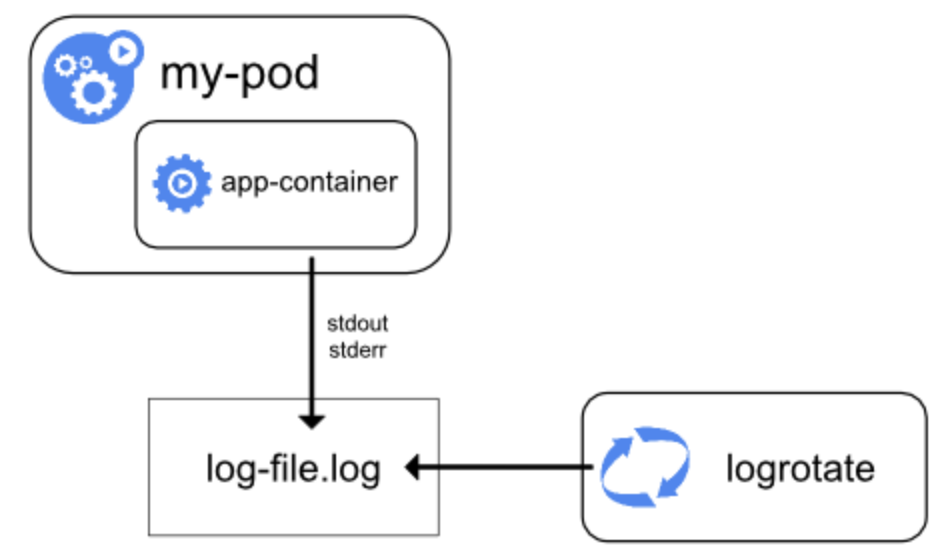
The cuphycontroller application outputs log messages, where the log level is less than or equal to the warning level, directly to stdout using the logging at the node level pattern:
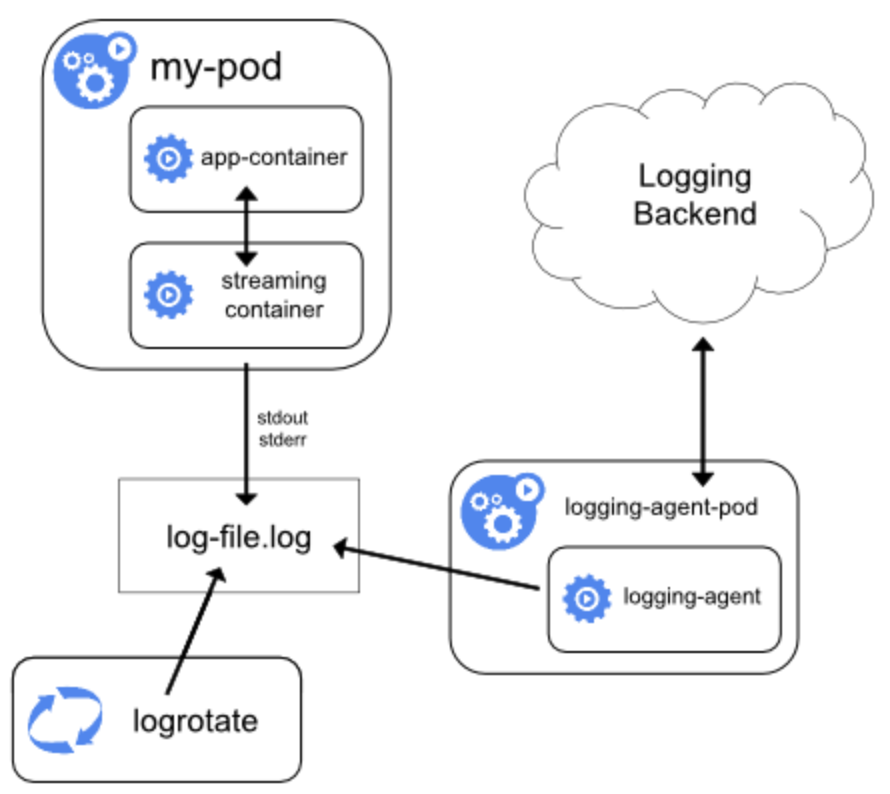
For high performance logs, Aerial uses background threads to offload the I/O bottleneck from the real-time threads. Log messages, where level is less than or equal to the nvlog.shm_log_level cuphycontroller YAML configuration parameter, are processed in background threads. The logger outputs can be retrieved using the streaming sidecar pattern with logs written directly to the local disk:
nvlog Message Format#
Each nvlog message is a string of the form “[Tag Name] Msg” prefixed with the following space-separated fields:
Timestamp
Log level
Thread Name
Log event code string
The fields are further described herein:
Timestamp is HH:MM:SS.us, for example, 20:58:09.036299
Log level is:
FAT - Fatal
ERR - Error
CON - Console
WRN - Warning
INF - Info
DBG - Debug
VER - Verbose
Thread Name is the name of the thread that has generated the log message.
Log event code string is a string that indicates the category of event that has occurred. This field only presents in FAT or ERR level logs.
An example of CON to VER level nvlog message is:
12:34:45.849421 CON msg_processing 0 [SCF.PHY] on_config_request: cell_id=3 numTLVs=68 state=0
Here is an example of an nvlog message at FAT or ERR level with Event Code AERIAL_CUPHY_EVENT:
11:41:09.567600 ERR 104402 0 [AERIAL_CUPHY_EVENT] [CUPHY] Number of batches for batched copy is 20, but current max. specified is 20.
Event Codes#
The following is the list of event codes (refer to aerial_event_code.h). The event strings match the event code names, minus the AERIAL_.
| AERIAL_SUCCESS             = 0,
| AERIAL_INVALID_PARAM_EVENT = 1,
| AERIAL_INTERNAL_EVENT      = 2,
| AERIAL_CUDA_API_EVENT      = 3,
| AERIAL_DPDK_API_EVENT      = 4,
| AERIAL_THREAD_API_EVENT    = 5,
| AERIAL_CLOCK_API_EVENT     = 6,
| AERIAL_NVIPC_API_EVENT     = 7,
| AERIAL_ORAN_FH_EVENT       = 8,
| AERIAL_CUPHYDRV_API_EVENT  = 9,
| AERIAL_INPUT_OUTPUT_EVENT  = 10,
| AERIAL_MEMORY_EVENT        = 11,
| AERIAL_YAML_PARSER_EVENT   = 12,
| AERIAL_NVLOG_EVENT         = 13,
| AERIAL_CONFIG_EVENT        = 14,
| AERIAL_FAPI_EVENT          = 15,
| AERIAL_NO_SUPPORT_EVENT    = 16,
| AERIAL_SYSTEM_API_EVENT    = 17,
| AERIAL_L2ADAPTER_EVENT     = 18,
| AERIAL_RU_EMULATOR_EVENT   = 19,
| AERIAL_CUDA_KERNEL_EVENT   = 20,
| AERIAL_CUPHY_API_EVENT     = 21,
| AERIAL_DOCA_API_EVENT      = 22,
| AERIAL_CUPHY_EVENT         = 23,
| AERIAL_CUPHYOAM_EVENT      = 24,
| AERIAL_CUMAC_EVENT         = 25,
| AERIAL_TEST_CUMAC_EVENT    = 26,
| AERIAL_TESTBENCH_EVENT     = 27,
| AERIAL_CUMAC_CP_EVENT      = 28,
| AERIAL_TEST_MAC_EVENT      = 29,
| AERIAL_PYAERIAL_EVENT      = 30,
| AERIAL_PTP_ERROR_EVENT     = 31,
nvlog Levels#
Nvlog supports the following log levels: Fatal, Error, Console, Warning, Info, Debug, and Verbose.
A Fatal log message results in process termination. For other log levels, the process continues execution. A typical deployment sends Fatal, Error, and Console levels to stdout. Console level is for printing something that is neither a warning nor an error, but you want to print to stdout.
nvlog Configuration#
nvlog#
This YAML container contains parameters related to nvlog configuration, see nvlog_config.yaml.
name#
Used to create the shared memory log file. Shared memory handle is /dev/shm/${name}.log and temp logfile is named /tmp/${name}.log.
primary#
In all processes logging to the same file, set the first starting porcess to be primary, set others to be secondary.
shm_log_level#
Sets the log level threshold for the high performance shared memory logger. Log messages with a level at or below this threshold are sent to the shared memory logger.
Log levels: 0 - NONE, 1 - FATAL, 2 - ERROR, 3 - CONSOLE, 4 - WARNING, 5 - INFO, 6 - DEBUG, 7 - VERBOSE
Setting the log level to LOG_NONE means no logs are sent to the shared memory logger.
console_log_level#
Sets the log level threshold for printing to the console. Log messages with a level at or below this threshold are printed to stdout.
max_file_size_bits#
Define the rotating log file /var/log/aerial/${name}.log size. Size = 2 ^ bits.
shm_cache_size_bits#
Define the SHM cache file /dev/shm/${name}.log size. Size = 2 ^ bits.
log_buf_size#
Max log string length of one time call of the nvlog API.
max_threads#
The maximum number of threads that are using nvlog all together.
save_to_file#
Whether to copy and save the SHM cache log to a rotating log file under /var/log/aerial/ folder.
cpu_core_id#
CPU core ID for the background log saving thread. -1 means the core is not pinned.
prefix_opts#
bit5 - thread_id bit4 - sequence number bit3 - log level bit2 - module type bit1 - date bit0 - time stamp
Refer to nvlog.h for more details.