

Blob Downloader
Blob Downloader
Blob downloader is AIStore’s facility for downloading large remote objects (BLOBs) using concurrent range-reads. Instead of pulling a 10–100+ GiB object with a single sequential stream, blob downloader:
- splits the object into chunks (configurable chunk size),
- fetches those chunks in parallel from the remote backend (configurable number of workers),
- writes them directly into AIStore’s chunked object layout so all target disks are writing in parallel, effectively aggregating the full disk write bandwidth of the node.
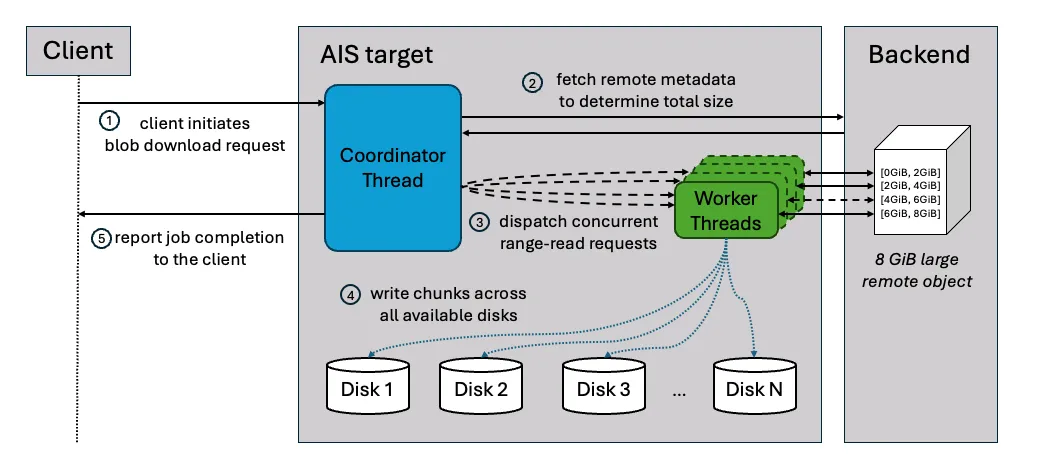
The result is that, beyond a certain object size, blob downloader can deliver much higher throughput than a regular cold GET. In our internal benchmarks, a 4 GiB S3 object fetched with blob downloader was up to 4× faster than a monolithic cold GET.
Blob downloader is also load‑aware: it consults AIStore’s internal load advisors to avoid overcommitting memory or disks, backing off when the node is under pressure and running at full speed when the system has headroom.
Blob downloader uses pessimistic, per-object concurrency control. The caller must hold the object’s exclusive write lock before renewal and transfers ownership with the call. A registered xaction holds the lock for its entire lifecycle and releases it exactly once after successful finalization, runtime-error cleanup, or abort cleanup. If renewal does not register an xaction, renewal releases the lock before returning.
Background callers (single-object job, prefetch) qualify an object without holding the write lock, so blob downloader re-checks it once the lock is taken:
- if the object is now present in-cluster (for instance, via concurrent GET), there is nothing to do - unless a latest-version check is requested;
- if it is present and the latest version is requested, blob downloader re-reads remote metadata and downloads using the current size and version if they changed.
For objects above a certain threshold, blob downloader can be transparently used by prefetch - as a performance-optimized alternative to a regular remote (“cold”) GET. At critical memory pressure, prefetch uses regular cold GET instead of starting blob downloader. Prefetch also falls back when resource admission rejects blob downloader, the object cannot fit within the manifest chunk limit, or the object’s remote size is zero; other start failures are reported.
A client-facing streaming admission rejected for resource pressure or insufficient memory budget returns HTTP 429 (too many requests) before object headers or body are written; pressure detected after a job starts is reported as an xaction error.
For a deeper dive into the internals and detailed benchmarks, see the blog post.
Usage
AIStore exposes blob download functionality through three distinct interfaces, each suited to different use cases.
- Single object blob-download job – explicitly start a blob-download job for one or more objects.
- Prefetch + blob-threshold – route large objects in the prefetch job through blob downloader.
- Streaming GET – stream a large object from blob downloader while it is being cached in AIS.
1. Single object blob-download job
Use this when you want direct control over which/how objects are fetched with blob downloader.
Help and options:
Examples:
-
Single large object
-
Multiple objects in one job
2. Prefetch with blob-threshold
prefetch is AIStore’s multi‑object “warm‑up” job for remote buckets. A positive threshold below 1MiB is first raised to 1MiB. Prefetch then selects the fetch path as follows:
- With bucket auto-chunking enabled, objects ≥ max(
--blob-threshold,chunks.objsize_limit) are fetched via blob downloader. - With auto-chunking disabled, objects ≥
--blob-thresholdare fetched via blob downloader (parallel range‑reads, chunked writes). - Objects below the applicable threshold are fetched with the normal cold GET path.
This lets you get the large‑object gains of blob downloader by just tuning prefetch’s knobs.
Example:
Key prefetch options:
--blob-threshold SIZE: enable blob downloader at this size (also bounded bychunks.objsize_limitwhen auto-chunking is enabled).--blob-chunk-size SIZE: chunk size when bucket auto-chunking is disabled; otherwisechunks.chunk_sizeapplies.--prefix/--list/--template: scope which objects are prefetched.
3. Streaming GET (Python SDK Only)
In addition to CLI jobs, blob downloader can be used to stream large objects while they are concurrently downloaded in the cluster. This is useful when you want to feed data directly into an application (for example, model loading or preprocessing) and still keep a copy in AIS.
Size limits
Each interface applies its own minimum object size:
Notes:
- prefetch rejects a negative
--blob-threshold; positive values below 1MiB are raised to 1MiB (with a warning); - rarely, if the object’s remote version shrinks before prefetch rechecks it under write-lock, blob downloader may still be engaged (and process it below the threshold);
- once its regular (non-blob) work is done, prefetch waits up to 32 minutes for pending blob downloads; on timeout, it aborts both itself and the downloads that are still running.
Selecting an effective blob-threshold for prefetch
The ideal --blob-threshold depends on your cluster (CPU, disks, network), backend (S3/GCS/…), and object size distribution.
Running full prefetch experiments for many candidate values can easily take hours, so instead we recommend using a shorter single‑object blob-download benchmark to pick a good starting point and then using that value directly in your prefetch job.
To do this in practice, compare cold GET vs. blob-download on a single object:
-
Pick a representative large remote object in your bucket (for example, a model shard or big archive).
-
Evict it from AIStore to ensure a cold path:
-
Measure cold GET time for that object:
-
Measure blob-download time for the same object:
-
Repeat the above for a few object sizes (for example: 64 MiB, 256 MiB, 1 GiB, 4 GiB) until you see a pattern:
- Below some size, cold GET is as fast or faster (blob overhead dominates).
- Above that size, blob-download is consistently faster.
The crossover size where blob-download wins is your blob-threshold for prefetch: use that size as --blob-threshold when you run your real ais prefetch job. This single‑object comparison gives you a quick, reasonable approximation.
In our internal 1.56 TiB S3 benchmark, applying this method led us to a threshold of about 256 MiB. This value provided the best trade‑off for that specific cluster and workload and delivered roughly 2.3× faster end‑to‑end prefetch compared to a pure cold‑GET baseline.