For AI agents: a documentation index is available at the root level at /llms.txt and /llms-full.txt. Append /llms.txt to any URL for a page-level index, or .md for the markdown version of any page.
Blog
DocsAPI Reference
DocsAPI Reference
    • AIStore
    • Documentation
  • Core Documentation
    • In-depth Overview
    • Terminology and core abstractions
    • Getting Started
    • Networking model
    • Buckets: design, operations, namespaces, and system buckets
    • Observability overview
    • CLI overview
    • Production deployment
    • Technical Blog
  • APIs, SDKs, and Compatibility
    • Go API
    • Python SDK
    • PyPI package
    • Python SDK reference guide
    • PyTorch integration
    • TensorFlow integration
    • HTTP API reference
    • curl examples
    • Easy URL
    • S3 compatibility
    • s3cmd quick start
    • Presigned S3 requests
    • Boto3 support
  • Command-Line Interface
    • CLI overview
    • ais help
    • CLI reference guide
    • Bucket operations
    • Cluster and remote-cluster management
    • Storage and mountpath management
    • Monitoring and ais show
    • Downloads
    • Jobs
    • Authentication and access control
    • Configuration via CLI
    • ETL CLI
    • Distributed shuffle CLI
    • ML / get-batch CLI
    • GCP credentials
    • TLS certificate management
  • Storage and Data Management
    • Storage services
    • Buckets: design, operations, namespaces, and system buckets
    • Native Bucket Inventory (NBI)
    • Backend providers
    • On-disk layout
    • Virtual directories
    • System files
    • Evicting remote buckets and cached data
  • Cluster Operations
    • Node lifecycle: maintenance, shutdown, decommission
    • Global rebalance
    • Resilver
    • AIS in Containerized Environments
    • Highly available control plane
    • Information Center (IC)
    • Out-of-band updates
    • Troubleshooting
  • Configuration and Security
    • Configuration
    • Environment variables
    • Feature flags
    • AuthN and access control
    • Authentication validation
    • HTTPS and certificates
    • Switching a cluster to HTTPS
  • ETL and Advanced Workflows
    • ETL overview
    • ETL CLI docs
    • ETL Python SDK examples
    • Custom transformers
    • ETL Python webserver SDK
    • ETL Go webserver package
    • Archives: read, write, and list
    • Distributed shuffle (dsort)
    • Initial sharding utility (ishard)
    • Downloader
    • Blob Downloader
    • Batch object retrieval (get-batch)
    • Batch operations
    • Tools and utilities
    • Extended actions (xactions)
  • Observability, Monitoring, and Performance
    • Observability overview
    • Monitoring with CLI
    • Logs
    • Prometheus integration
    • Metrics reference
    • Grafana dashboards
    • Kubernetes monitoring
    • Distributed tracing
    • Monitoring get-batch
    • AIS load generator (aisloader)
    • Benchmarking AIStore
    • Performance tuning and testing
    • Performance monitoring via CLI
    • Rate limiting
    • Checksumming
    • Filesystem Health Checker (FSHC)
    • Traffic patterns
  • Networking
    • Networking: multi-homing, network separation, IPv6
    • HTTPS configuration
    • Switching to HTTPS
    • Idle connections
    • MessagePack protocol
  • Deployment
    • AIStore on Kubernetes
    • Kubernetes Operator
    • Ansible playbooks
    • Helm charts
    • Deployment monitoring
    • Docker
  • Developer Resources
    • Development guide
    • aisnode command line
    • Build tags
  • Object and Bucket Naming
    • Unicode and special symbols in object and bucket names
    • Extremely long object names
Blog
NVIDIANVIDIA
Developer-friendly docs for your API
Privacy Policy | Your Privacy Choices | Terms of Service | Accessibility | Corporate Policies | Product Security | Contact

Copyright © 2026, NVIDIA Corporation.

LogoLogoAIStore
On this page
  • Control Plane: internal machinery to process asynchronous operations
  • Information Center (IC) Design
Cluster Operations

Information Center (IC)

||View as Markdown|
Previous

Highly available control plane

Next

Out-of-band updates

Control Plane: internal machinery to process asynchronous operations

AIStore supports running several asynchronous operations, that are triggered either by a user request (e.g., download, transformations, etc.) or as a result of internal cluster events (e.g., rebalance, LRU, etc.), hereby referred to as eXtended actions or xactions. These operations utilize the cluster resources and take many seconds, sometimes minutes or hours to complete their execution. They also require constant monitoring through their life-cycle (i.e., starting through termination).

For efficient monitoring of extended actions, AIStore employs what we call Information Center (IC) - a group of proxies that “own” all the currently running (as well as already finished) xactions in the cluster. IC continuously monitors them by coordinating with other proxies and targets.

In the following sections, we will briefly look into the design choices and operation of IC.

Information Center (IC) Design

IC is a group of up to 3 (or configured) AIStore gateways aka AIS proxies (henceforth referred to as proxies).

IC members maintain an in-memory table to store the information about all the asynchronous batch operations being monitored. This table is reliably replicated on each of the following events:

  • Proxy joins IC
  • xaction started
  • xaction finished
  • IC member crashes or gets administratively removed

The diagram below shows a high-level flow of asynchronous operations in the presence of IC, and the different steps involved.
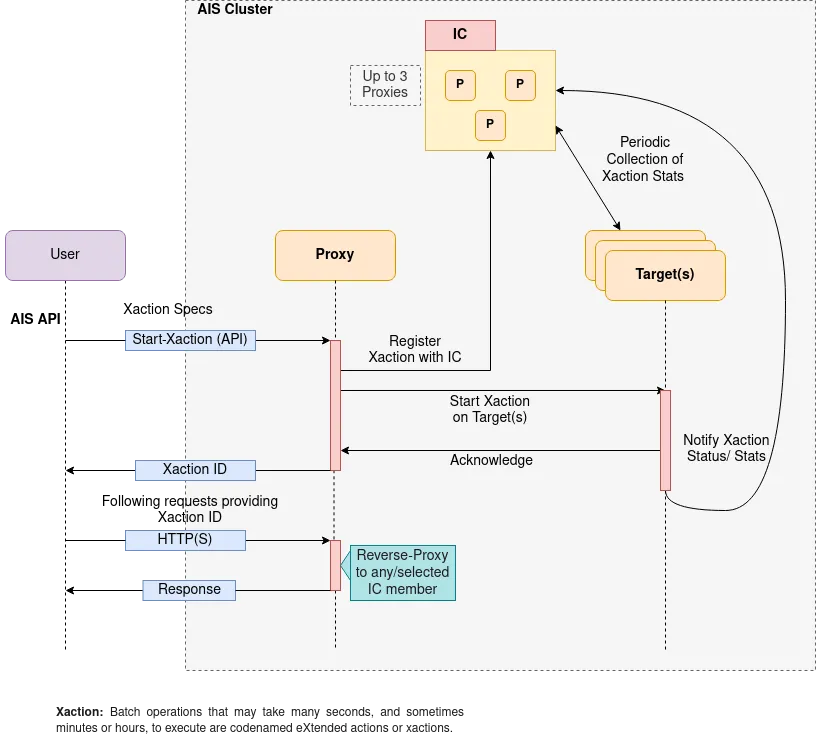
aistore-ic-flow

When an xaction such as list-objects is triggered by a user, AIStore internally performs the following steps:

  1. User makes an API call to start a given xaction (say, list-objects1).
  2. A proxy that got the request (can be any proxy in the cluster) generates a unique xaction ID and registers the xaction with all the IC members.
  3. The proxy then starts the xaction by broadcasting the request to all the targets which run the xaction.
  4. Once every target in the cluster acknowledges the request, the proxy responds back to the user with a unique UUID.
  5. The user then includes the provided xaction ID in the following requests, which may include checking the status of xaction, or fetching results, etc.
  6. A proxy on receiving a follow-up request with xaction ID, reverse-proxies to any/selected IC member.
  7. In the background, IC members track the xaction by periodically probing the targets running the xaction and listening to the notification sent by the targets.