

Shard Index
Shard index lets AIS locate and read archived files in TAR objects by offset, avoiding a sequential archive scan.
Use it when a bucket stores dataset TARs and clients repeatedly fetch individual archived files via archpath, for example training samples in GetBatch or regular object GET requests.
The same client request works with or without an index; the difference is the target-side read path:
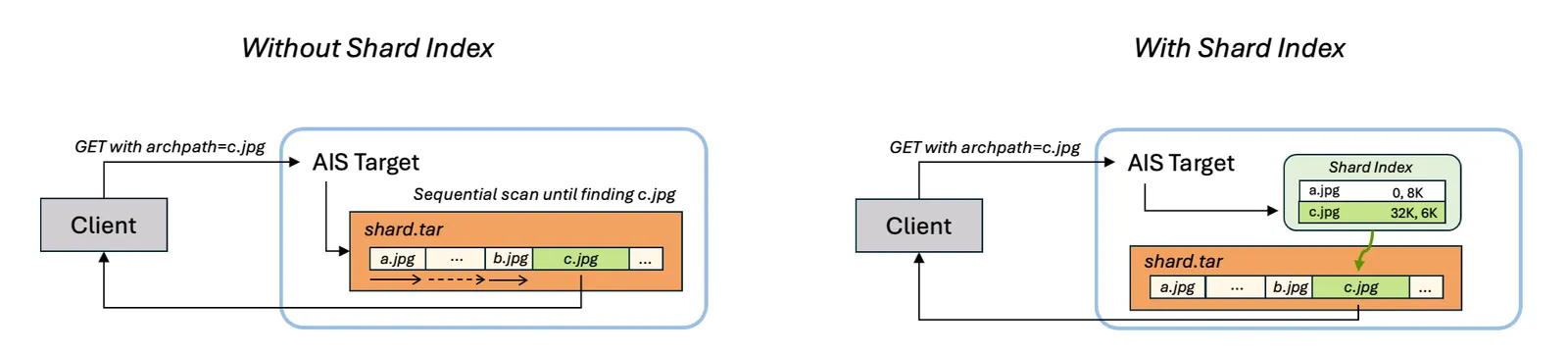
Table of Contents
- Motivation
- Quick start
- How it works
- Shard Index V2
- Build indexes
- Read indexed shards
- Summarize coverage
- Staleness and cleanup
Motivation
Without a shard index, reading samples/000123.jpg from shard-000042.tar requires archive traversal: AIS must sequentially scan through the TAR object until it finds the requested archived file.
With a shard index, AIS loads compact metadata for shard-000042.tar, finds the archived file’s offset and size, seeks directly to it, and reads only the requested bytes.
This matters most when:
- each TAR object contains many small files
- each request needs only a few files from each TAR object
- the same TAR objects are read repeatedly
- requests use regular object GET or GetBatch with
archpath
Quick start
Create or upload TAR objects, build indexes, check coverage, and read archived files normally:
How it works
A shard index is the associated metadata stored in the system bucket; it makes the source TAR searchable without changing the TAR itself. In summary output, only TAR objects with valid indexes are counted as shards.
For each indexed TAR object, AIS stores:
- archived file names
- byte offsets and sizes inside the TAR
- source object size
- source object checksum
Indexes are stored in the AIS system bucket:
The read path is transparent:
- A client requests an archived file using
archpath. - AIS checks whether the source TAR has a valid shard index.
- If the index is valid, AIS reads the archived file by direct offset lookup.
- If no valid index is available, AIS falls back to the normal archive traversal path.
The client request does not change when an index exists. The index is a performance feature, not a separate data-access API.
Shard Index V2
In v5.1, AIS introduced the second version of shard-index on-disk and in-memory representation. The feature works exactly the same from the outside - the same APIs work transparently and CLI requests do not change. But indexes are faster to load and in-memory footprint is an order-of-magnitude smaller.
Motivation
Version 1 retained the packed index and also decoded every entry into a hash map. Archived-file names already referenced the packed payload without copying, but the map still stored one key and one offset/size value per archived file.
That (design) is suboptimal for the common workload. A given GetBatch request typically selects only a few members from a shard. Yet there’s a high cost to materialize the entire shard index map - only to discard it shortly thereafter. Across concurrent reads and large datasets, that proportional memory churn creates avoidable garbage-collection pressure.
What changed
On-disk format: The v2 payload layout is byte-identical to v1: same fields, same order, and same uvarint encoding. Apart from the version byte, the only format change is that the xxHash64 at
[3..10]covers the preamble kind plus payload, rather than the payload alone. A v2 target can validate an intact v1 index, but cannot binary-search it because v1 did not guarantee entry order; it therefore reports the index stale and rebuilds it.
Version 2 keeps each archived-file name, TAR offset, and size in the packed payload. On load, AIS validates the payload and builds only the offset table. A lookup binary-searches names in place and decodes the offset and size only for the matching entry.
The logarithmic lookup is a deliberate tradeoff. The read path normally performs one lookup per requested archpath, while replacing the decoded map with one four-byte offset per archived file substantially reduces the loaded index’s auxiliary memory.
Two implementation details reinforce the same design:
- AIS computes the exact encoded length and writes the packed representation once, without append growth. Repeated saves return the immutable bytes without rebuilding the index.
- Eligible packed and offset buffers are recycled through size-classed pools. This reduces steady-state allocation and GC work after indexes are released; pooling does not change their logical size or lifetime.
Upgrading
Indexes written by v4.5 through v5.0 carry metadata version 1. A v5.1 target classifies an intact v1 index as stale, not corrupted, and falls back to normal archive traversal. Reads continue to work, but they are not accelerated until the index is rebuilt.
NOTE:
As of the time of this writing, we are working to provide on-demand rebuild - scenarios including: any new write (PUT, cold GET, copy, etc.) into a given indexed bucket and old v1 index, both.
Rebuild existing indexes in the usual way:
Use the normal verification path for this upgrade. Do not specify --skip-verify: that option trusts an existing index marker without loading the index, and can therefore skip a v1 index that still needs rebuilding.
A summary that is the first operation to verify a v1 index reports it in the STALE column:
Once a read has already detected the old version and cleared its index marker, a subsequent summary reports that shard as NOT INDEXED instead. Both states mean that the shard needs rebuilding.
Micro-benchmarks
The following unit-level results were measured on an Intel Core i7-11850H. They exercise index load and lookup only, not end-to-end GET or GetBatch:
The allocation result measures steady-state allocation traffic, not the resident size of a loaded index: v2 still retains the packed bytes and a four-byte offset per entry. The reduction comes from eliminating the map and reusing eligible buffers, directly reducing GC work under repeated concurrent loads.
For this benchmark’s entry sizes, the 10K case was large enough for size-class pooling to matter. This is not a fixed entry-count boundary; pool selection depends on requested buffer size. Smaller indexes already fit the existing page-sized memory slabs.
Lookup improvements are deliberately modest. Binary search over packed names replaces a map probe; the principal gain comes from never constructing the map. Misses improve somewhat more because no offset/size entry needs to be decoded.
Build indexes
Use ais bucket shard-index build to build indexes for TAR objects in a bucket:
ais job start shard-index (or ais start shard-index) is equivalent to ais bucket shard-index build and accepts the same arguments and flags.
Common forms:
The build job:
- walks the selected bucket/prefix
- skips non-TAR objects
- builds one index per TAR object
- verifies existing indexes unless
--skip-verifyis used - rebuilds stale or invalid indexes
- with
--cache, also loads existing and newly built indexes into memory
Monitor running and completed indexing jobs with:
Fast reruns
--skip-verify is a fast rerun mode:
When this option is set, AIS trusts source objects that already say they have a shard index and skips loading the stored index to verify staleness. Use it only when you know the indexed TAR objects have not changed.
Warm the in-memory cache
--cache loads existing and newly built indexes into memory, so the first archpath reads do not pay for loading them:
Caching depends on available memory. Cached indexes will be evicted when idle (not used for considerable time) or under memory pressure.
--cache and --skip-verify are independent, with one exception. Loading an existing index into memory verifies it, so a stale or corrupt index found that way gets rebuilt even with --skip-verify. --skip-verify still applies to indexes that are not admitted to the cache.
Read indexed shards
Shard indexes are used automatically by regular GET and GetBatch when the request specifies archpath.
Regular GET
Use regular object GET with --archpath:
Or use the archive convenience form:
The equivalent HTTP request is a normal object GET with the archpath query parameter:
GetBatch
GetBatch uses the same archpath field per input object:
With valid shard indexes, each archived-file lookup becomes direct random access into its TAR object. Without indexes, the same request still works, but AIS must scan the archive to locate each archpath.
Summarize coverage
Use ais bucket shard-index summary to see how many local TAR objects are indexed:
Columns:
To print progress while the summary job is running:
To start the summary asynchronously and poll by job ID:
The summary command reports local in-cluster TAR objects. It is intended to answer: “How many TAR objects in this bucket/prefix are already usable as indexed shards?”
Staleness and cleanup
Each index records the source TAR object’s size and checksum at build time.
When AIS loads an index, it compares that recorded metadata with the current source object metadata:
- if size and checksum still match, the index is valid
- if either changed, the index is stale
- if the index object cannot be decoded, the index is invalid
Staleness most commonly happens when a TAR object is overwritten after its index was built.
The normal build path verifies existing indexes and rebuilds stale or invalid ones on a best-effort basis. If a TAR object is busy or cannot be read, AIS skips it and continues. The read path will not use a stale index; it falls back to archive traversal if a valid index is not available.
When a source object that has a shard index is removed, AIS removes the corresponding index object from .sys-shardidx as part of the same cleanup path. Space cleanup can also remove stale internal system-bucket entries.