

ETL overview
ETL — Extract, Transform, Load — is a core workflow in data pipelines:
- Extract data from various formats and sources
- Transform it into a unified format optimized for compute (e.g., deep learning)
- Load the result into a new destination
The AIStore ETL (AIS ETL) subsystem is designed from the ground up to execute all three stages of the ETL process locally. AIStore and any of its supported backends can serve as both the source for extraction and the destination for loading. Unlike traditional ETL pipelines that extract data out of storage, transform it externally, and push it back, AIStore deploys custom transformation logic directly on the nodes that store the data. This drastically reduces data movement, improves performance, and eliminates infrastructure overhead.
Overview
Most ETL workflows pull data out of object storage into client machines or dedicated servers for preprocessing, augmentation, or custom transformations. This model lacks scalability and often results in significant performance degradation due to unnecessary data movement. Unlike other open-source and cloud ETL tools, AIStore performs transformations on the same machines where your data lives, minimizing redundant transfers and exploiting data locality.
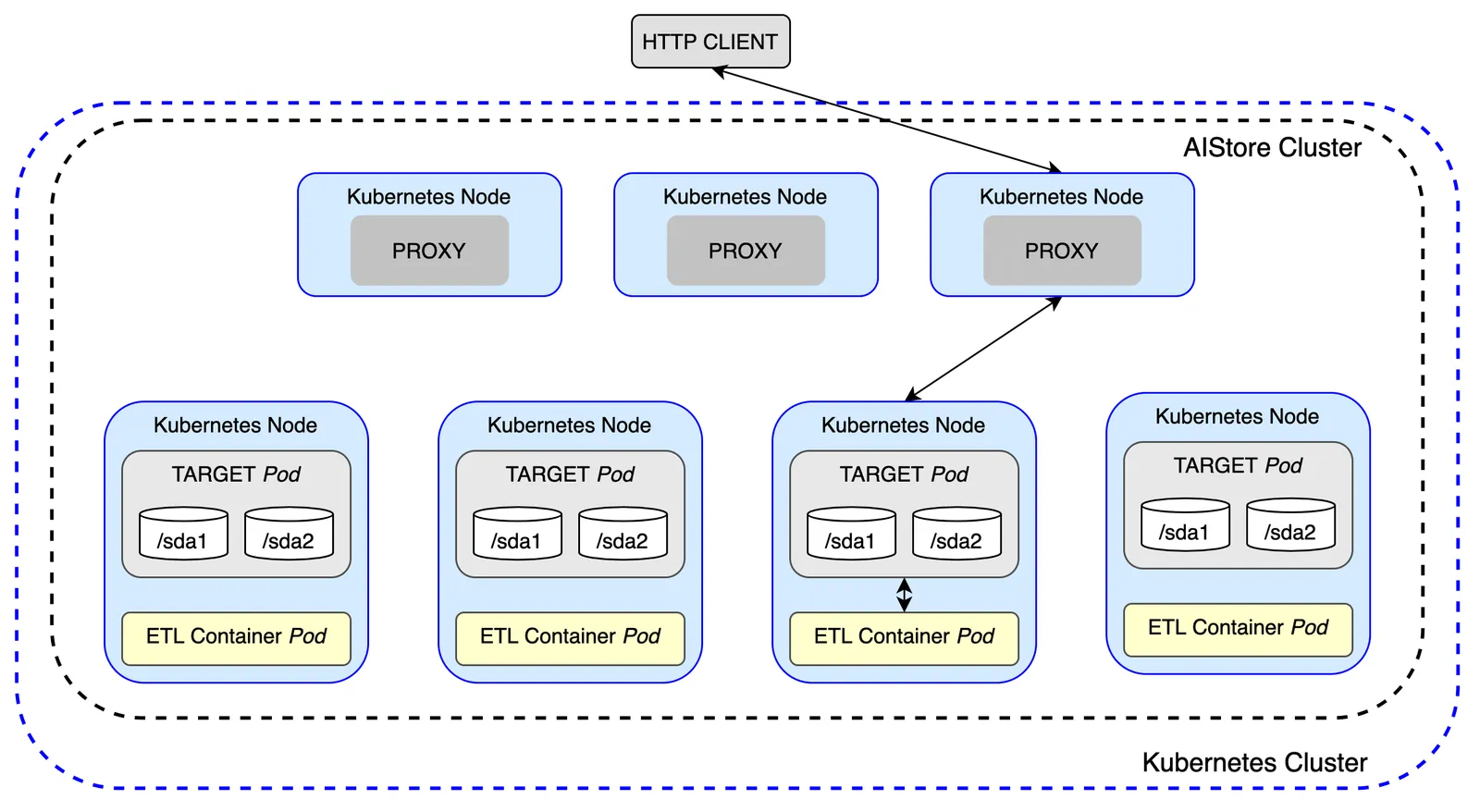
Based on a user-defined specification, each AIS target launches its own ETL container—a web server responsible for transforming data—co-located on the same node as the target. Each container is scoped to handle only the data stored on its respective target. This data-local design eliminates unnecessary network transfers (egress costs), improves performance, and enables seamless, horizontal scalability.
The following figure illustrates a cluster of 3 AIS proxies (gateways) and 4 storage targets, with each target running user-defined ETL in parallel:
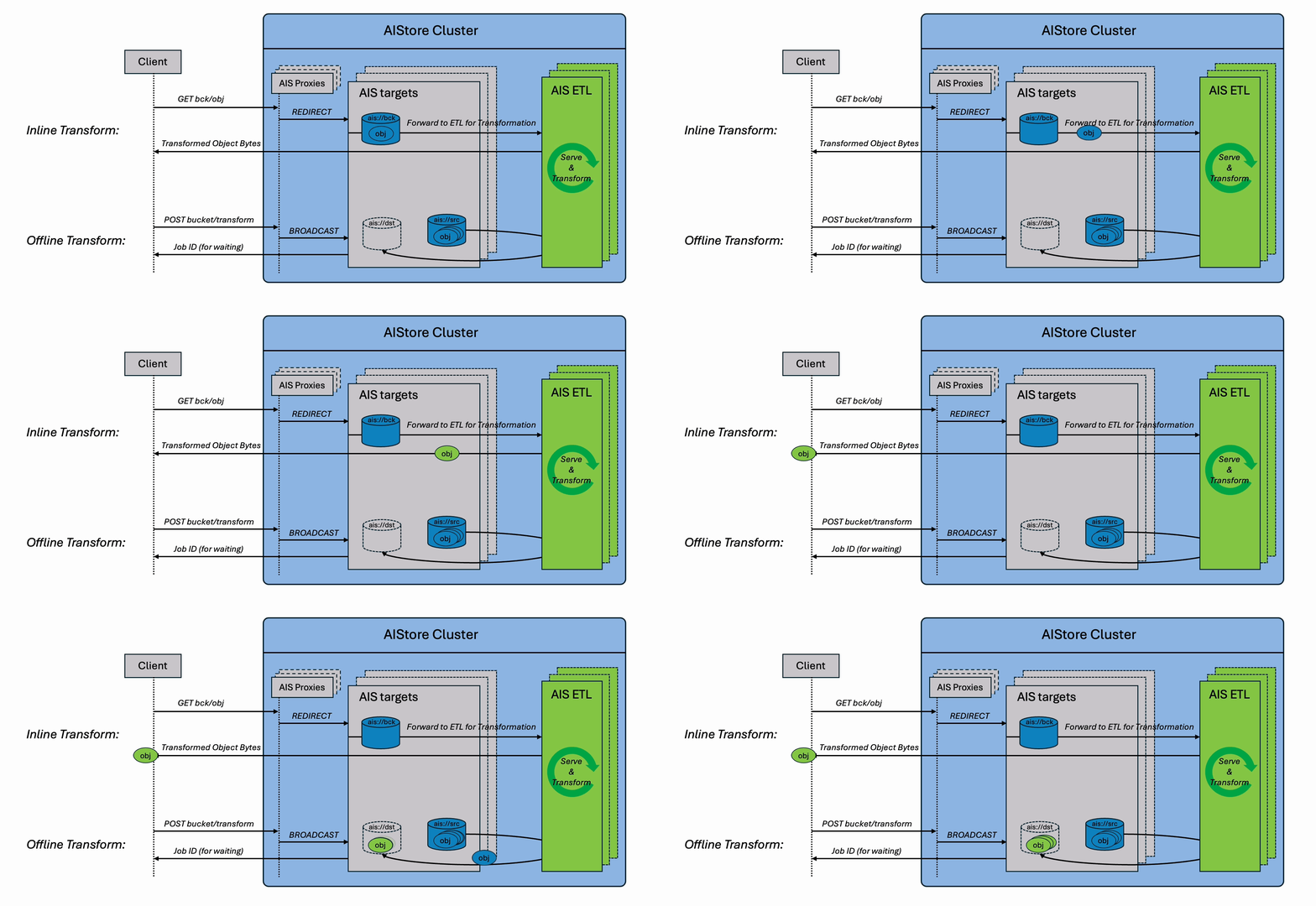
It supports both inline transformations (real-time processing via GET requests) and offline batch transformations (bucket-to-bucket), delivering massive performance gains over traditional client-side ETL workflows.
Note: AIStore ETL requires Kubernetes.
Table of Contents
- Quick Start
- AIS ETL Webserver Framework
- Initializing an ETL
- Configuration Options
- ETL Pod Lifecycle
- Advanced Approach: Build a Container Image from Scratch
- API Reference
- ETL Name Specifications
- References
Quick Start
To begin using ETLs in AIStore, deploy AIStore on a Kubernetes cluster using an ETL-enabled aisnode build. ETL is excluded from the default build and image.
Official releases publish both versioned aistorage/aisnode images with the -etl suffix and aistorage/aisnode:latest-etl. Pin the versioned image matching your AIS release for production deployments. When building from source, add etl to the build tags, for example:
With the AIS Kubernetes Operator, set spec.nodeImage to the ETL image. With the Helm chart, set nodeImage.tag to the corresponding -etl tag.
There are several deployment options, each suited for different purposes:
-
AIStore Development with Local Kubernetes:
- Folder: deploy/dev/k8s
- Intended for: AIStore development using local Kubernetes.
- How to use: Run a local Kubernetes cluster and deploy an AIS cluster on it using the carefully documented steps available here.
- Documentation: README
-
Production Deployment with Kubernetes:
- Folder: deploy/prod/k8s
- Intended for: Production use
- How to use: Utilize the Dockerfiles in this folder to build AIS images for production deployment. For this purpose, there is a separate dedicated repository that contains corresponding tools, scripts, and documentation.
- Documentation: AIS/K8s Operator and Deployment Playbooks
To verify that your deployment is correctly set up, execute the following CLI command:
If you receive an empty response without any errors, your AIStore cluster is now ready to run ETL tasks.
Note: Unlike most AIStore features that are available immediately via a single command, ETL requires an initialization step where the transformation logic is defined and plugged into the system.
Inline ETL Transformation
ETL inline transform involves transforming datasets on the fly, where the data is read, transformed, and streamed directly to the requesting clients. You can think of inline transformation as a variant of GET object operation, except the object content is passed through a user-defined transformation before being returned.
To follow this and subsequent examples, make sure you have the AIS CLI installed on your system.
ETL Args
ETL Args is an optional feature supported only in inline ETL operations to pass additional parameters or metadata into your ETL transformation at runtime.
Think of ETL Args as a way to dynamically customize how a specific object is transformed, without needing to modify the ETL container or re-deploy the ETL. This feature is used to dynamically adjust transformation behavior—e.g., format, filters, parameters, or user-defined options.
Sample Command with --args:
Offline ETL Transformation
Offline ETL generates a new bucket as the output, where each object is transformed and stored for future access. Think of this as an enhanced version of the Bucket Copy operation—except every object is passed through a user-defined transformation during the copy.
Unlike inline ETL, which transforms data in real time on each request, offline ETL is ideal for bulk processing and long-term reuse.
This example walks through converting audio files (e.g., .flac, .mp3) to .wav using the FFmpeg transformer, with control over audio channels and sampling rate.
Example: Convert Audio Files to WAV
Object Inspection
Object inspection applies an ETL to a bucket or object group without writing transformed results. It is useful for validation jobs where the ETL logic either accepts the object or raises an error. After the job completes, use ETL error reporting to see exactly which objects failed.
Python SDK:
Go API:
Single-Object Transformation
Single-object Transformation allows you to transform one object at a time between any two buckets. It’s similar to a regular copy operation, but with an ETL transformation applied in-flight. This is ideal for quick, ad-hoc conversions where creating an entire new bucket isn’t necessary.
Compared to inline ETL (which returns the result directly to the client), this operation stores the transformed result back to a destination bucket for future use.
Example: Apply MD5 Transformation During Copy
This approach is lightweight, flexible, and avoids the overhead of launching a full offline ETL job. It’s well-suited for transforming one or a few objects as part of a scripted workflow or user-driven action.
Note: there are two ways to run ETL initialization and transformation:
AIS ETL Webserver Framework
AIS ETL is language- and framework-agnostic. You can deploy any custom web server as your transformation container. However, implementing a production-ready ETL service involves more than just defining a transformation function. Your server must also:
- Perform health checks
- Communicate with AIStore targets
- Parse
etl args(runtime parameters for transformation behavior) - Support
direct putoptimization - Handle HTTP/WebSocket protocols with concurrency control
Design choices typically depend on your workload—object size, volume, throughput needs, and whether your service is synchronous or async.
To streamline this, we offer a prebuilt AIS ETL Webserver Framework in:
These SDKs abstract the boilerplate and protocol handling, so you can focus purely on your transformation logic. The Python framework is fully integrated with the AIStore Python SDK, allowing you to deploy ETLs directly from code without building a new container.
Initializing an ETL
ETL initialization in AIStore defines how your transformation logic is deployed, configured, and executed. This step launches a containerized ETL service that integrates with AIStore targets to handle object transformations.
Initialize an ETL using a runtime spec. For Python-only ETLs, a separate init_class approach is available through the Python SDK.
Using init
The init API is available through both the AIS CLI and the Python SDK. It requires a pre-built container image that runs an ETL web server to process incoming data.
Prerequisites
You must have a container image prepared before using init. This image must run an ETL web server responsible for:
- Health checks
- Receiving and transforming data
- Communicating with AIStore targets
You can build this server using the AIS ETL Webserver Framework or create your own. For reference, see the sample transformers.
Runtime Specification
The init API uses a runtime YAML specification to define the ETL’s configuration, including communication method, timeouts, support for direct writes, and resource limits. AIStore validates the complete specification before initialization. A valid specification must:
- identify the ETL with a valid name, either in the specification or via the CLI
--nameoverride; - select the container image that runs the ETL service; and
- use a supported communication method; WebSocket communication also requires direct put support.
Example etl_spec.yaml:
Initialize the ETL:
Using init_class (Python SDK Only)
init_class is a simplified method to initialize pure Python-based ETLs—no need for container images. It is only available through the Python SDK and is supported on Python 3.10 through 3.14.
This approach is ideal when:
- You want to deploy transformations quickly without containerization
- Your ETL logic depends only on Python and PyPI packages
Example:
Testing the ETL:
Configuration Options
When initializing an ETL using the init API, several configuration parameters can be set to optimize behavior and performance. These options control how data is passed between AIStore targets and ETL containers, how responses are handled, and how the system reacts to delays or failures. Understanding and tuning these options allows users to better match ETL behavior to their specific workloads.
All the following options can be included in your ETL spec (YAML) during initialization.
Communication Mechanisms
AIS currently supports three distinct target-to-container communication mechanisms to facilitate inline or offline transformation.
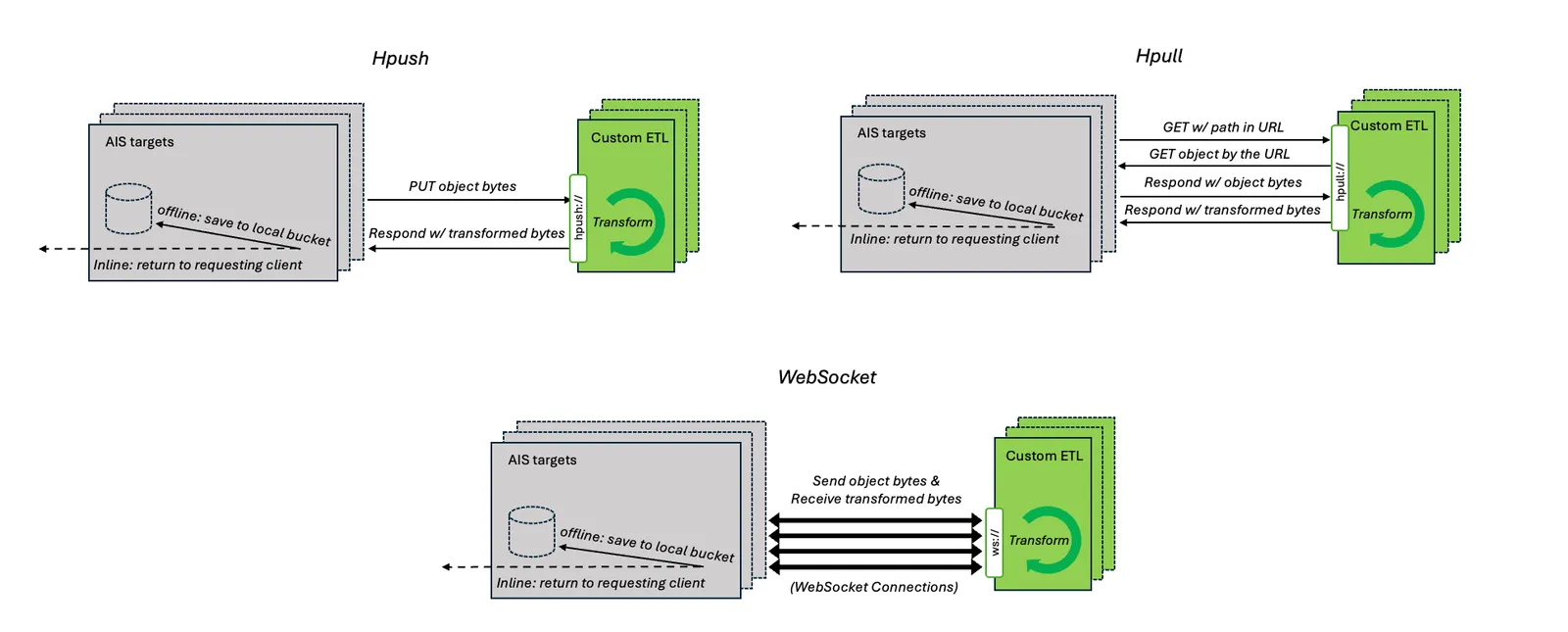
Users can choose and specify any of the following:
ETL container will have
AIS_TARGET_URLenvironment variable set to the URL of its corresponding target. To make a request for a given object it is required to add<bucket-name>/<object-name>toAIS_TARGET_URL, eg.requests.get(env("AIS_TARGET_URL") + "/" + bucket_name + "/" + object_name).
Direct Put Optimization
Applicable only to bucket-to-bucket offline transformations.
In bucket-to-bucket offline transformations, the destination target for a transformed object may differ from the original target. By default, the ETL container sends the transformed data back to the original target, which then forwards it to the destination. The direct put optimization streamlines this flow by allowing the ETL container to send the transformed object directly to the destination target. Our stress tests across multiple transformation types consistently show a 3 - 5x performance improvement with direct put enabled.
The ETL container will have the
DIRECT_PUTenvironment variable set to"true"or"false"accordingly.
The destination address is provided based on the communication mechanism in use:
Timeouts
ETL initialization supports two configurable timeout settings to ensure robust and predictable behavior during container startup and object transformation.
Initialization Timeout (init_timeout)
Specifies the maximum time allowed for the ETL container to start and become ready.
Default: 5m (5 minutes)
If the container fails to initialize within this period, the ETL setup will be aborted.
Object Processing Timeout (obj_timeout)
Defines the maximum time permitted to transform a single object.
Default: 45s (45 seconds)
If a transformation exceeds this duration, the operation will be terminated and logged as a failure.
Resource Limits
ETL containers support standard Kubernetes resource limits to control CPU and memory consumption. Setting appropriate resource limits ensures predictable performance and prevents ETL containers from overwhelming cluster nodes, especially during intensive transformation workloads.
Resource Configuration:
Resource limits can be specified in your ETL spec using the standard Kubernetes resources field:
Usage Notes:
memory.requestssets the minimum memory needed for ETL container schedulingmemory.limitsprevents containers from using excessive memory during heavy transformationscpu.requestsguarantees CPU allocation for consistent transformation performancecpu.limitscontrols maximum CPU usage to avoid impacting other containers
If no resource limits are specified, ETL containers can use all available memory and CPU on the node, unless the cluster has other restrictions in place.
ETL Pod Lifecycle
ETL follows a structured lifecycle to enhance observability. The lifecycle consists of three stages: Initializing, Running, and Aborted. This design prevents ETL from consuming resources when not in use while maintaining visibility into failures.
Lifecycle Stages & Transitions
1. Initializing Stage
The ETL enters this stage when created via an Init requests. The system provisions the required Kubernetes resources, including pods and services.
- Success: Transitions to
Runningstage. - Failure (Pod Initialization Error/Timeout): Transitions to
Abortedstage.
2. Running Stage
The ETL is actively processing requests and remains in this stage unless Aborted manually or due to an error.
- User Sends Stop ETL: Transitions to
Abortedstage with error messageuser abort. - Runtime Error: Transitions to
Abortedstage.
3. Aborted Stage
The ETL is inactive but retains metadata, allowing for future restarts. Upon entering the Aborted state, AIStore automatically cleans up all associated Kubernetes resources (pods, services) across all targets.
- User Sends Restart ETL: Transitions to
Initializingstage. - User Sends Delete ETL: Permanently removes the ETL instance and its metadata from AIStore.
Advanced Approach: Build a Container Image from Scratch
To initialize an ETL using the init API, you must provide a container image that runs your transformation logic. The easiest and most maintainable path is to extend an existing AIS ETL Web Server. These prebuilt server frameworks handle the core logic—such as health checks, protocol handling, and request routing—so you can focus solely on the transformation function.
However, if you need full control, you can also build your own ETL web server from scratch. For reference, we provide minimal yet functional implementations in both Python and Go:
The quickstart guide walks through:
- Implementing a custom transformation class
- Containerizing your ETL server
- Deploying it in a Kubernetes environment
- Initializing the ETL via the AIS CLI or Python SDK
API Reference
This section describes how to interact with ETLs via RESTful API.
G- denotes a (hostname:port) address of a gateway (any gateway in a given AIS cluster)
ETL name specifications
Every initialized ETL has a unique user-defined ETL_NAME associated with it, used for running transforms/computation on data or stopping the ETL.
When initializing an ETL, assign a valid and unique user-defined ETL_NAME in the runtime specification or with the --name CLI parameter.
Below are specifications for a valid ETL_NAME:
- Must start and end with a lowercase alphabet (‘a’ to ‘z’) or a number (‘1’ to ‘9’).
- Can contain lowercase alphabets, numbers, or hyphen (’-’).
- Should have a length greater than 5 and less than 33.
- Shouldn’t contain special characters except for hyphen (no capitals or underscore).
References
- For technical blogs with in-depth background and working real-life examples, see:
- For a quick CLI introduction and reference, see ETL CLI
- For initializing ETLs with AIStore Python SDK, see: