

Backend providers
Introduction
Terminology first:
Backend Provider is a designed-in backend interface abstraction and, simultaneously, an API-supported option that allows to delineate between “remote” and “local” buckets with respect to a given AIS cluster.
AIStore natively integrates with multiple backend providers:
Native integration, in turn, implies:
- utilizing vendor’s SDK libraries to operate on the respective remote backends;
- providing unified namespace (where, e.g., two same-name buckets from different backends can co-exist with no conflicts);
- on-the-fly populating AIS own bucket metadata with the properties of remote buckets.
The last bullet deserves a little more explanation. First, there’s a piece of cluster-wide metadata that we call BMD. Like every other type of metadata, BMD is versioned, checksummed, and replicated - the process that is carried out by the currently elected primary.
BMD contains all bucket definitions and per-bucket configurable management policies - local and remote.
Here’s what happens upon the very first (read or write or list, etc.) access to a remote bucket that is not yet in the BMD:
- Behind the scenes, AIS will try to confirm the bucket’s existence and accessibility.
- If confirmed, AIS will atomically add the bucket to the BMD (along with its remote properties).
- Once all of the above is set and done, AIS will go ahead to perform that original (read or write or list, etc.) operation
There are advanced-usage type options to skip Steps 1. and 2. above - see e.g.
LisObjsMsg flags
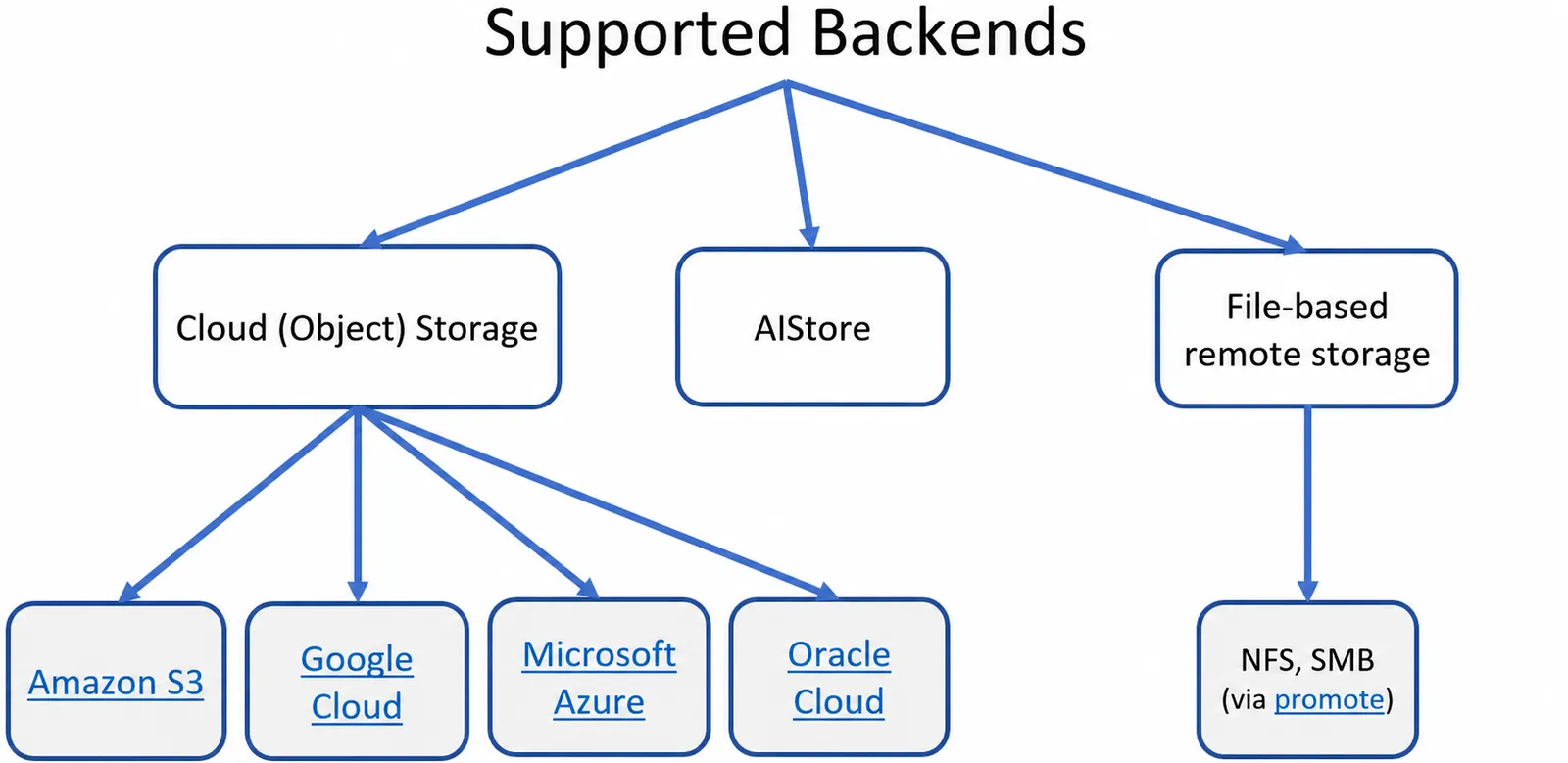
The full taxonomy of the supported backends is shown below (and note that AIS supports itself on the back as well):
For types of supported buckets (AIS, Cloud, remote AIS, etc.), bucket identity, properties, lifecycle, and associated policies, storage services and usage examples, see the comprehensive:
And further:
Remote AIS cluster
In addition to the listed above 3rd party Cloud storages, any given pair of AIS clusters can be organized in a way where one cluster would be providing fully-accessible backend to another.
Terminology:
Example working with remote AIS cluster (as well as easy-to-use scripts) can be found in the README for developers.
Unified Global Namespace
Examples first. The following two commands attach and then show remote cluster at the addressmy.remote.ais:51080:
Notice two aspects of this:
- user-defined aliasing whereby a user can assign an arbitrary name (aka alias) to a given remote cluster
- the remote cluster does not have to be online at attachment time; offline or currently not reachable clusters are shown as follows:
Notice the difference between the first and the second lines in the printout above: while both clusters appear to be currently offline (see the rightmost column), the first one was accessible at some earlier time and therefore we do show that it has (in this example) 10 storage nodes and other details.
To detach any of the previously configured association, simply run:
Configuration-wise, the following two examples specify a single-URL and multi-URL attachments that can be also be configured prior to runtime (or can be added at runtime via the ais remote attach CLI as shown above):
-
Example: single URL
-
Example: multiple URL
Multiple remote URLs can be provided for the same typical reasons that include fault tolerance. However, once connected we will rely on the remote cluster map to retry upon connection errors and load balance.
For more usage examples, please see:
And one more comment:
You can run ais cluster remote-attach and/or ais show remote-cluster CLI to refresh remote configuration: check availability and reload remote cluster maps.
In other words, repeating the same ais cluster remote-attach command will have the side effect of refreshing all the currently configured attachments.
Or, use ais show remote-cluster CLI for the same exact purpose.
Cloud object storage
Cloud-based object storage include:
aws- Amazon S3azure- Microsoft Azure Blob Storagegcp- Google Cloud Storageoci- Oracle Cloud Storage
In each case, we use the vendor’s own SDK/API to provide transparent access to Cloud storage with the additional capability of persistently caching all read data in the AIStore’s remote buckets.
The term “persistent caching” is used to indicate much more than what’s conventionally understood as “caching”: irrespectively of its origin and source, all data inside an AIStore cluster is end-to-end checksummed and protected by the storage services configured both globally and on a per bucket basis. For instance, both remote buckets and ais buckets can be erasure coded, etc.
Notwithstanding, remote buckets will often serve as a fast cache or a fast tier in front of a given 3rd party Cloud storage.
Note that AIS provides multiple easy ways to populate its remote buckets, including - but not limited to - conventional on-demand, self-populating, dubbed cold GET.
Read deadlines (v5.2): Cloud object readers used by cold GET, prefetch, blob download, and other operations enforce a minimum transfer rate by default: 64 KiB/s, averaged over each window (
timeout.send_file_time). Each range read has its own window. See Minimum transfer rate for terminology, coverage, and tuning.
Example: accessing Cloud storage via remote AIS
There are, essentially, two different capabilities:
- attach other AIS clusters
- redirect AIS bucket to read, write, and otherwise operate on a different bucket
Here’s a quick and commented example where we access (e.g.) s3://data indirectly, via another bucket called ais://nnn.
Notice that the cluster that contains ais://nnn does no necessarily has to have AWS credentials to access s3://data.
Step 1: show remote cluster
Step 2: list s3://data directly via remote cluster
Step 3: redirect “local” ais://nnn to Cloud-based s3://data via remote AIS cluster
Note that attached clusters have (human-readable) aliases that often may be easier to use, e.g.:
In other words, actual cluster UUID (A9A78a_cSc above) and its alias (remais) can be used interchangibly.