For AI agents: a documentation index is available at the root level at /llms.txt and /llms-full.txt. Append /llms.txt to any URL for a page-level index, or .md for the markdown version of any page.
Blog
DocsAPI Reference
DocsAPI Reference
    • AIStore
    • Documentation
  • Core Documentation
    • In-depth Overview
    • Terminology and core abstractions
    • Getting Started
    • Networking model
    • Buckets: design, operations, namespaces, and system buckets
    • Observability overview
    • CLI overview
    • Production deployment
    • Technical Blog
  • APIs, SDKs, and Compatibility
    • Go API
    • Python SDK
    • PyPI package
    • Python SDK reference guide
    • PyTorch integration
    • TensorFlow integration
    • HTTP API reference
    • curl examples
    • Easy URL
    • S3 compatibility
    • s3cmd quick start
    • Presigned S3 requests
    • Boto3 support
  • Command-Line Interface
    • CLI overview
    • ais help
    • CLI reference guide
    • Bucket operations
    • Cluster and remote-cluster management
    • Storage and mountpath management
    • Monitoring and ais show
    • Downloads
    • Jobs
    • Authentication and access control
    • Configuration via CLI
    • ETL CLI
    • Distributed shuffle CLI
    • ML / get-batch CLI
    • GCP credentials
    • TLS certificate management
  • Storage and Data Management
    • Storage services
    • Buckets: design, operations, namespaces, and system buckets
    • Native Bucket Inventory (NBI)
    • Backend providers
    • On-disk layout
    • Virtual directories
    • System files
    • Evicting remote buckets and cached data
  • Cluster Operations
    • Node lifecycle: maintenance, shutdown, decommission
    • Global rebalance
    • Resilver
    • AIS in Containerized Environments
    • Highly available control plane
    • Information Center (IC)
    • Out-of-band updates
    • Troubleshooting
  • Configuration and Security
    • Configuration
    • Environment variables
    • Feature flags
    • AuthN and access control
    • Authentication validation
    • HTTPS and certificates
    • Switching a cluster to HTTPS
  • ETL and Advanced Workflows
    • ETL overview
    • ETL CLI docs
    • ETL Python SDK examples
    • Custom transformers
    • ETL Python webserver SDK
    • ETL Go webserver package
    • Archives: read, write, and list
    • Distributed shuffle (dsort)
    • Initial sharding utility (ishard)
    • Downloader
    • Blob Downloader
    • Batch object retrieval (get-batch)
    • Batch operations
    • Tools and utilities
    • Extended actions (xactions)
  • Observability, Monitoring, and Performance
    • Observability overview
    • Monitoring with CLI
    • Logs
    • Prometheus integration
    • Metrics reference
    • Grafana dashboards
    • Kubernetes monitoring
    • Distributed tracing
    • Monitoring get-batch
    • AIS load generator (aisloader)
    • Benchmarking AIStore
    • Performance tuning and testing
    • Performance monitoring via CLI
    • Rate limiting
    • Checksumming
    • Filesystem Health Checker (FSHC)
    • Traffic patterns
  • Networking
    • Networking: multi-homing, network separation, IPv6
    • HTTPS configuration
    • Switching to HTTPS
    • Idle connections
    • MessagePack protocol
  • Deployment
    • AIStore on Kubernetes
    • Kubernetes Operator
    • Ansible playbooks
    • Helm charts
    • Deployment monitoring
    • Docker
  • Developer Resources
    • Development guide
    • aisnode command line
    • Build tags
  • Object and Bucket Naming
    • Unicode and special symbols in object and bucket names
    • Extremely long object names
Blog
NVIDIANVIDIA
Developer-friendly docs for your API
Privacy Policy | Your Privacy Choices | Terms of Service | Accessibility | Corporate Policies | Product Security | Contact

Copyright © 2026, NVIDIA Corporation.

LogoLogoAIStore
On this page
  • Example
  • Content types
  • References
  • System Files
Storage and Data Management

On-disk layout

||View as Markdown|
Previous

Backend providers

Next

Virtual directories

AIStore’s on-disk layout supports multiple remote backends, configurable namespaces, and AIS-to-AIS caching with full data recovery capabilities.

Here’s a simplified drawing depicting two providers, AIS and AWS, and two buckets, ABC and XYZ, respectively. In the picture, mpath is a single mountpath - a single disk or a volume formatted with a local filesystem of choice, and a local directory (mpath/):
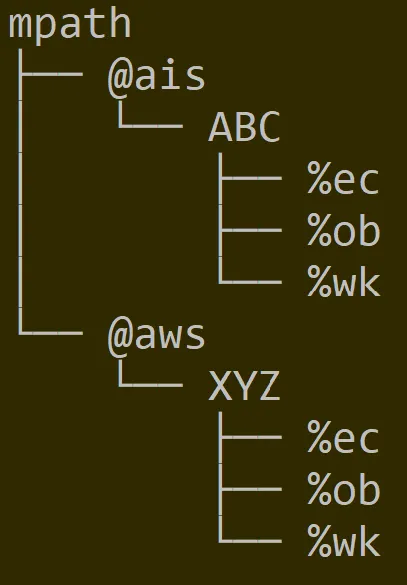
on-disk hierarchy

Further, each bucket would have a unified structure with several system directories (e.g., %ec that stores erasure coded content) and, of course, user data under %ob (“object”) locations.

Needless to say, the same exact structure reproduces itself across all AIS storage nodes, and all data drives of each clustered node.

With namespaces, the picture becomes only slightly more complicated. The following shows two AIS buckets, DEF and GHJ, under their respective user-defined namespaces called #namespace-local and #namespace-remote. Unlike a local namespace of this cluster, the remote one would have to be prefixed with UUID - to uniquely identify another AIStore cluster hosting GHJ (in this example) and from where this bucket’s content will be replicated or cached, on-demand or via Prefetch API and similar.
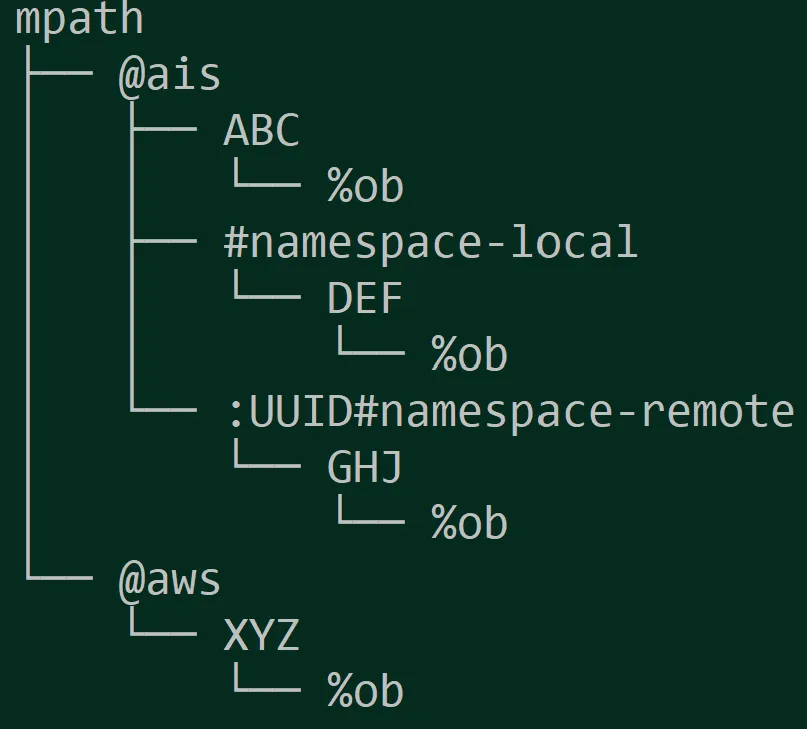
on-disk hierarchy with namespaces

Example

Say, we have an gs://llm-data bucket, and an object “images/dog.jpeg” in it. Given two different bucket’s namespaces, the respective FQNs inside AIStore may look like:

/vdi/@gcp/#prod/llm-data/%ob/images/dog.jpeg
and
/vdh/@gcp/#dev/llm-data/%ob/images/dog.jpeg

where:

ComponentExample 1Example 2Meaning
Mountpath/vdi/vdhPhysical (mounted) device
ProvidergcpgcpBackend provider
Namespace#prod#devAccount, profile, or user-defined alias
Bucketllm-datallm-dataBucket name
Content type%ob%obContent kind: objects, EC slices, chunks, manifests
Objectimages/dog.jpegimages/dog.jpegObject name (preserves virtual directory structure)

Content types

Within each bucket directory, AIS organizes content by type:

MarkerConstantContent
%obfs.ObjCTObject data
%wkfs.WorkCTWork/temporary files
%ecfs.ECSliceCTErasure-coded slices
%mtfs.ECMetaCTErasure-coded metadata
%chfs.ChunkCTChunked object data
%utfs.ChunkMetaCTChunked object metadata
%dsfs.DsortFileCTDistributed sort files
%dwfs.DsortWorkCTDistributed sort work

See the source for the most updated enumeration.

References

For the purposes of full disclosure and/or in-depth review, following are initial references into AIS sources that also handle on-disk representation of object metadata:

  • local object metadata (LOM)

and AIS control structures:

  • bucket metadata (BMD)
  • cluster map (Smap)

System Files

In addition to user data, AIStore stores, maintains, and utilizes itself a relatively small number of system files that serve a variety of different purposes. Full description of the AIStore persistence would not be complete without listing those files (and their respective purposes) - for details, please refer to:

  • System Files