

Authentication validation
AIStore (AIS) supports authentication and authorization with JSON Web Tokens(JWT). These tokens can be issued from the first party AuthN service OR compatible 3rd party OAuth services. This doc covers how AIS validates requests based on their included tokens.
For details on configuring auth in K8s, see the AIS K8s Operator README.
For an end-to-end example of setting up Keycloak with AIS in K8s, see the auth deployment guide in the ais-k8s repo.
Table of Contents
- General Purpose Auth Support
- Token Requirements
- Authentication Flow
- Token Validation Configuration
- Authentication Boundaries
General Purpose Auth Support
AIS uses JWT to both authenticate and authorize API requests. Compatible JWTs contain all the information AIS needs to determine if a request can succeed. Rather than authenticating a user with a role and using that role to lookup authorized actions, AIS validates the claims provided in the JWT itself. This minimizes the latency impact of the token verification as AIS does not have to query any service to validate user access for a specific request.
While we do provide our own authN service, many users may prefer to use an existing or more feature-rich authentication and authorization solution. AIS itself does not have any special requirement for the AIStore AuthN service, but only that a compatible JWT is provided for validation (see below). This allows for full compatibility with existing auth services.
Token Requirements
AIS JWT tokens for authentication and authorization can be provided by any service.
AIS must be configured to trust tokens generated by that service and the tokens must contain the required AIS claims.
Tokens must use a supported signing method: [HS256, HS384, HS512] (HMAC) or [RS256, RS384, RS512] (RSA).
See below for signature verification configuration.
JWT tokens for AIS must include the following standard claims to be considered valid:
sub(subject): Identifies the authenticated user or serviceexp(expiration): Token expiration timestamp; expired tokens are automatically rejected
The following standard claims are required depending on AIS config (see Token Validation Configuration):
iss(issuer): Identifies the token issuer (only required for OIDC validation, seeauth.oidc.allowed_iss)aud(audience): Target audience for the token, validated againstauth.required_claims.aud
AIS uses a few extra custom claims to validate access for specific API calls. These are subject to change as we improve AIS auth capabilities.
admin— Total admin access, supersedes all other claimsclusters— List of AIS clusters, permission applies cluster-widebuckets— List of buckets to access with scoped permissions
Example token claim format:
The admin claim is the simplest option.
If admin is true, all permissions are granted for clusters trusting the token issuer.
For the clusters claim, the ID must match the cluster’s UUID if set.
If the cluster ID is left empty, the claim permissions will be applied to any cluster trusting the issuer.
For the buckets claim, the cluster ID must also be provided along with the bucket info.
Permissions attached to each of these will be valid only for that bucket.
For permissions to grant, see the list of permissions in the authN doc and the values in api/apc/access.go. Add the bit flags together to combine permissions.
Authentication Flow
When authentication is enabled, incoming HTTP requests are validated before processing:
- Tokens are extracted from request headers:
Authorization: Bearer <token>(standard) orX-Amz-Security-Token(AWS SDK compatibility) - The proxy validates the token signature using either static credentials or OIDC lookup (see Signature Verification)
- Token claims (
subject,issuer,audience,expiration) are verified according to cluster configuration - Custom AIS claims (
admin,clusters,buckets) are compared against the request to validate user access to the resource specified by the API call - Starting in v5.1, if
auth.intra_cluster.request_authis set, the redirect URL is signed for targets to validate (see Authentication Boundaries)
Token Validation Configuration
Authentication is controlled via the auth section of the cluster configuration.
To require authentication for protected client requests, set auth.client_auth_required to true.
Required Claims
To set claims that must be present in all tokens, you can add them to auth.required_claims.
Currently, the only supported value is auth.required_claims.aud to verify the configured value matches the issued token audience.
Signature Verification
AIS supports two mutually exclusive approaches to signature verification, configured via auth.signature or auth.oidc:
Static Credentials
Static credential validation uses a fixed shared secret or public key configured directly in the cluster config:
- HMAC (symmetric): Configure
auth.signature.method(e.g., “HS256”) andauth.signature.keywith a shared secret- The same secret must be used by the token issuer to sign tokens and by AIS to verify them
- Suitable for integration with the first-party AuthN service or controlled token issuers
- RSA (asymmetric): Configure
auth.signature.method(e.g., “RS256”) andauth.signature.keywith an RSA public key- AIS validates tokens using the public key; tokens are signed by the issuer using the corresponding private key
- More secure for scenarios where the signing key cannot be safely shared with AIS
OIDC Lookup
OIDC validation enables dynamic public key discovery from trusted OIDC compatible providers.
To enable, configure auth.oidc.allowed_iss with a list of trusted issuer URLs (e.g., ["https://keycloak.svc.cluster.local:8543/realms/aistore"]).
These URLs must use HTTPS and must exactly match the iss claim in tokens issued by that provider (including scheme, host, port, and path).
Optionally, configure auth.oidc.issuer_ca_bundle to provide custom CA certificates for issuer TLS validation.
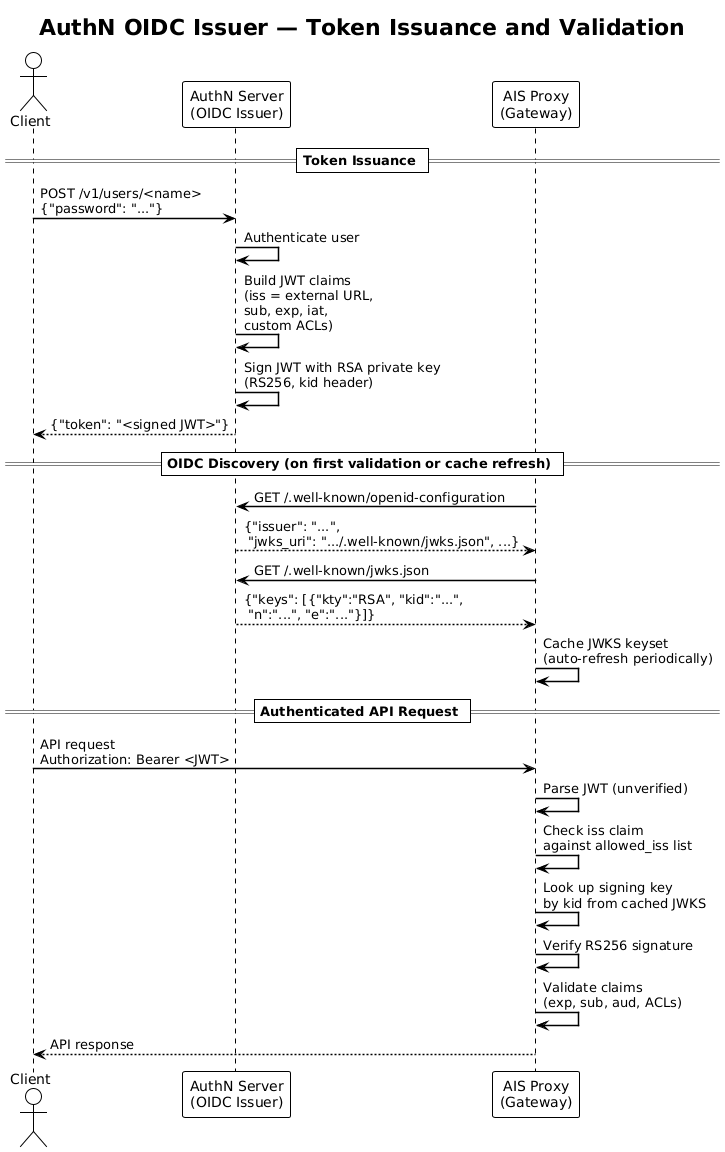
Token verification via OIDC discovery follows this flow:
- The AIS proxy queries each configured allowed issuer’s
/.well-known/openid-configurationendpoint - The discovery document returns a
jwks_uripointing to the issuer’s public key set - The proxy fetches the JWKS from the
jwks_uriand caches the keys (with automatic periodic refresh) - When validating a token, the proxy checks the
issclaim against the allowed issuer list and uses the issuer’s public key (identified bykidheader) to verify the signature
See the diagram below for an example of how this flow works with the AuthN service:
Authentication Boundaries
The auth section controls three separate security boundaries:
These settings are independent. For example, an operator can pre-stage either intra-cluster policy without requiring JWT/OIDC authentication from clients.
Targets do not validate client tokens as only proxies do. Consequently, whenever either
auth.client_auth_required or auth.intra_cluster.request_auth is set, a target rejects
direct public-listener access to buckets, objects, and the node-control API
(GET /v1/daemon) with 403. Node control reaches a target through the proxy’s
/v1/reverse/daemon endpoint, which enforces SHOW-CLUSTER for GET and ADMIN for
PUT/POST/DELETE before relaying the request over intra-control.
Proxy mediation is not data-plane authentication
Requiring proxy mediation narrows the scope of direct target access; it does not
authenticate a redirected request. A proxy stamps each redirect with a marker - the
pid and utm query parameters - and, without intra-cluster request signing, a target
cannot distinguish that marker from one supplied by a client.
The two settings protect distinct boundaries. Their four combinations have the following steady-state behavior:
A brief transition window follows both a change to intra_cluster.request_auth and a
node’s completion of cluster startup. During this window - bounded by a few multiples
of the control-plane operation timeout - an unsigned marker is still accepted. This
allows the setting to be toggled without any downtime.
An unsigned marker is forgeable and, once present, admits object reads and mutations.
Thus, with client_auth_required enabled and intra_cluster.request_auth disabled,
authentication and authorization are enforced at the proxy, including for object
requests, but are not independently enforced at the target.
Deployments that require authenticated client access to remain enforced across proxy-to-target redirects must enable both settings. During the v5.0 bridge, or when intra-cluster signing cannot be enabled, target public listeners must not be exposed to untrusted client networks.
The request-authentication window settings apply only to
auth.intra_cluster.request_auth:
auth.intra_cluster.ttl: TTL for request signatures;0smeans no expirationauth.intra_cluster.nonce_window: tolerated clock skew between nodesauth.intra_cluster.rotation_grace: time to accept old and new signing keys during rotation
In v5.1, nodes use per-node Ed25519 keys distributed through cluster metadata to
sign and verify protected intra-cluster requests. Node-join authentication is
also enforced only when auth.intra_cluster.node_join_secret_path is nonempty.
Footnotes
-
With
S3-Redirect-Rebuild, an unmarked public S3 request is accepted for any verb. Configuration validation rejects this feature whenever either setting requires proxy mediation. ↩