


4.17. Virtual Memory Management#
In the CUDA programming model, memory allocation calls (such as
cudaMalloc()) return a memory address in GPU memory.
The address can be used with any CUDA API or inside a device
kernel.
Developers can enable peer device access to that memory
allocations by using cudaEnablePeerAccess. By doing so,
kernels on different devices can access the same data. However,
all past and future user allocations are also mapped to the target peer device.
This can lead to users unintentionally paying a runtime cost for
mapping all cudaMalloc allocations to peer devices. In most
situations, applications communicate by sharing only a few allocations with
another device. It is usually not necessary to map all allocations to all
devices. In addition, extending this approach to multi-node settings becomes
inherently difficult.
CUDA provides a virtual memory management (VMM) API to give developers explicit, low-level control over this process.
Virtual memory allocation, a complex process managed by the operating system and the Memory Management Unit (MMU), works in two key stages. First, the OS reserves a contiguous range of virtual addresses for a program without assigning any physical memory. Then, when the program attempts to use that memory for the first time, the OS commits the virtual addresses, assigning physical storage to the virtual pages as needed.
CUDA’s VMM API brings a similar concept to GPU memory management by allowing developers to explicitly reserve a virtual address range and then later map it to physical GPU memory. With VMM, applications can specifically choose certain allocations to be accessible by other devices.
The VMM API lets complex applications manage memory more efficiently across multiple GPUs (and CPU cores). By enabling manual control over memory reservation, mapping, and access permissions, the VMM API enables advanced techniques like fine-grained data sharing, zero-copy transfers, and custom memory allocators. The CUDA VMM API exposes fine-grained control to the user for managing the GPU memory in applications.
Developers can benefit from the VMM API in several key ways:
Fine-grained control over virtual and physical memory management, allowing allocation and mapping of non-contiguous physical memory chunks to contiguous virtual address spaces. This helps reduce GPU memory fragmentation and improve memory utilization, especially for large workloads like deep neural network training.
Efficient memory allocation and deallocation by separating the reservation of virtual address space from the physical memory allocation. Developers can reserve large virtual memory regions and map physical memory on demand without costly memory copies or reallocations, leading to performance improvements in dynamic data structures and variable-sized memory allocations.
The ability to grow GPU memory allocations dynamically without needing to copy and reallocate all data, similar to how
reallocorstd::vectorworks in CPU memory management. This supports more flexible and efficient GPU memory use patterns.Enhancements to developer productivity and application performance by providing low-level APIs that allow building sophisticated memory allocators and cache management systems, such as dynamically managing key-value caches in large language models, improving throughput and latency.
The CUDA VMM API is highly valuable in distributed multi-GPU settings as it enables efficient memory sharing and access across multiple GPUs. By decoupling virtual addresses from physical memory, the API allows developers to create a unified virtual address space where data can be dynamically mapped to different GPUs. This optimizes memory usage and reduces data transfer overhead. For instance, NVIDIA’s libraries like NCCL and NVSHMEM actively use VMM.
In summary, the CUDA VMM API gives developers advanced tools for fine-tuned, efficient, flexible, and scalable GPU memory management beyond traditional malloc-like abstractions, which is important for high-performance and large-memory applications
Note
The suite of APIs described in this section require a system that supports UVA. See The Virtual Memory Management APIs.
4.17.1. Preliminaries#
4.17.1.1. Definitions#
Fabric Memory: Fabric memory refers to memory that is accessible over a high-speed interconnect fabric such as NVIDIA’s NVLink and NVSwitch. This fabric provides a memory coherence and high-bandwidth communication layer between multiple GPUs or nodes, enabling them to share memory efficiently as if the memory is attached to a unified fabric rather than isolated on individual devices.
CUDA 12.4 and later have a VMM allocation handle type
CU_MEM_HANDLE_TYPE_FABRIC. On supported platforms and provided the NVIDIA
IMEX daemon is running, this allocation handle type enables sharing allocations
not only intra-node with any communication mechanism, e.g. MPI, but also inter-node.
This allows GPUs in a multi-node NVLink system to map the memory of all
other GPUs that are part of the same NVLink fabric even if they are in
different nodes.
Note
The fabric memory described here is address-centric: a peer’s physical memory is mapped into the local virtual address space and accessed with ordinary loads and stores. Compute fabric transport provides a complementary resource-centric model over the same NVLink fabric, moving data with asynchronous put, get, and reduction operations against a named logical endpoint rather than a mapped address. It reports an explicit per-operation completion status, so it suits large fabrics where fabric-error recovery is a concern.
Memory Handles: In VMM, handles are opaque identifiers that represent physical memory allocations. These handles are central to managing memory in the low-level CUDA VMM API. They enable flexible control over physical memory objects that can be mapped into virtual address spaces. A handle uniquely identifies a physical memory allocation. Handles serve as an abstract reference to memory resources without exposing direct pointers. Handles allow operations like exporting and importing memory across processes or devices, facilitating memory sharing and virtualization.
IMEX Channels: The name IMEX stands for internode memory exchange and is part of NVIDIA’s solution for GPU-to-GPU communication across different nodes. IMEX channels are a GPU driver feature that provides user-based memory isolation in multi-user or multi-node environments within an IMEX domain. IMEX channels serve as a security and isolation mechanism.
IMEX channels are directly related to the fabric handle and has to be enabled in multi-node GPU communication. When a GPU allocates memory and wants to make it accessible to a GPU on a different node, it first needs to export a handle to that memory. The IMEX channel is used during this export process to generate a secure fabric handle that can only be imported by a remote process with the correct channel access.
Unicast Memory Access: Unicast memory access in the context of VMM API refers to the controlled, direct mapping and access of physical memory to a unique virtual address range by a specific device or process. Instead of broadcasting access to multiple devices, unicast memory access means that a particular GPU device is granted explicit read/write permissions to a reserved virtual address range that maps to a physical memory allocation.
Multicast Memory Access: Multicast memory access in the context of the VMM API refers to the capability for a single physical memory allocation or region to be mapped simultaneously to multiple devices’ virtual address spaces using a multicast mechanism. This allows data to be efficiently shared in a one-to-many fashion across multiple GPUs, reducing redundant data transfers and improving communication efficiency. NVIDIA’s CUDA VMM API supports creating a multicast object that binds together physical memory allocations from multiple devices.
4.17.1.2. Query for Support#
Applications should query if features are supported before attempting to use them, as their availability can vary depending on the GPU architecture, driver version, and specific software libraries being used. The following sections detail how to programmatically check for the necessary support.
VMM Support Before attempting to use VMM APIs, applications must ensure that the devices they want to use support CUDA virtual memory management. The following code sample shows querying for VMM support:
int deviceSupportsVmm;
CUresult result = cuDeviceGetAttribute(&deviceSupportsVmm, CU_DEVICE_ATTRIBUTE_VIRTUAL_MEMORY_MANAGEMENT_SUPPORTED, device);
if (deviceSupportsVmm != 0) {
    // `device` supports Virtual Memory Management
}
Fabric Memory Support: Before attempting to use fabric memory, applications must ensure that the devices they want to use support fabric memory. The following code sample shows querying for fabric memory support:
int deviceSupportsFabricMem;
CUresult result = cuDeviceGetAttribute(&deviceSupportsFabricMem, CU_DEVICE_ATTRIBUTE_HANDLE_TYPE_FABRIC_SUPPORTED, device);
if (deviceSupportsFabricMem != 0) {
    // `device` supports Fabric Memory
}
Aside from using CU_MEM_HANDLE_TYPE_FABRIC as the handle type and not
requiring OS native mechanisms for inter-process communication to exchange
shareable handles, there is no difference in using fabric memory compared to
other allocation handle types.
IMEX Channels Support
Within an IMEX domain, IMEX channels enable secure memory sharing in
multi-user environments. The NVIDIA driver implements this by creating a
character device, nvidia-caps-imex-channels. To use fabric handle-based
sharing, users should verify two things:
First, applications must verify that this device exists under /proc/devices:
# cat /proc/devices | grep nvidia
195 nvidia
195 nvidiactl
234 nvidia-caps-imex-channels
509 nvidia-nvswitch

The nvidia-caps-imex-channels device should have a major number (e.g., 234).
Second, for two CUDA processes (an exporter and an importer) to share memory, they must both have access to the same IMEX channel file. These files, such as /dev/nvidia-caps-imex-channels/channel0, are nodes that represent individual IMEX channels. System administrators must create these files, for example, using the mknod() command.
# mknod /dev/nvidia-caps-imex-channels/channelN c <major_number> 0

This command creates channelN using the major number obtained from
/proc/devices.
Note
By default, the driver can create channel0 if the NVreg_CreateImexChannel0 module parameter is specified.
Multicast Object Support: Before attempting to use multicast objects, applications must ensure that the devices they want to use support them. The following code sample shows querying for multicast object support:
int deviceSupportsMultiCast;
CUresult result = cuDeviceGetAttribute(&deviceSupportsMultiCast, CU_DEVICE_ATTRIBUTE_MULTICAST_SUPPORTED, device);
if (deviceSupportsMultiCast != 0) {
    // `device` supports Multicast Objects
}
4.17.2. API Overview#
The VMM API provides developers with granular control over virtual memory management. VMM, being a very low-level API, requires use of the CUDA Driver API directly. This versatile API can be used in both single-node and multi-node environments.
To use VMM effectively, developers must have a solid grasp of a few key concepts in memory management:
Knowledge of the operating system’s virtual memory fundamentals, including how it handles pages and address spaces
An understanding of memory hierarchy and hardware characteristics is necessary
Familiarity with inter-process communication (IPC) methods, such as sockets or message passing,
A basic knowledge of security for memory access rights

Figure 55 VMM Usage Overview. This diagram outlines the series of steps required for VMM utilization. The process begins by evaluating the environmental setup. Based on this assessment, the user must make a critical initial decision: whether to utilize fabric memory handles or OS-specific handles. A distinct series of subsequent steps must be taken based on the initial handle choice. However, the final memory management operations—specifically mapping, reserving, and setting access rights of the allocated memory—are identical, regardless of the type of handle that was selected.#
The VMM API workflow involves a sequence of steps for memory management, with a key focus on sharing memory between different devices or processes. Initially, a developer must allocate physical memory on the source device. To facilitate sharing, the VMM API utilizes handles to convey necessary information to the target device or process. The user must export a handle for sharing, which can be either an OS-specific handle or a fabric-specific handle. OS-specific handles are limited to inter-process communication on a single node, while fabric-specific handles offer greater versatility and can be used in both single-node and multi-node environments. It’s important to note that using fabric-specific handles requires the enablement of IMEX channels.
Once the handle is exported, it must be shared with the receiving process or processes using an inter-process communication protocol, with the choice of method left to the developer. The receiving process then uses the VMM API to import the handle. After the handle has been successfully exported, shared, and imported, both the source and target processes must reserve virtual address space where the allocated physical memory will be mapped. The final step is to set the memory access rights for each device, ensuring proper permissions are established. This entire process, including both handle approaches, is further detailed in the accompanying figure.
4.17.3. Unicast Memory Sharing#
Sharing GPU memory can happen on one machine with multiple GPUs or across a network of machines. The process follows these steps:
Allocate and Export: A CUDA program on one GPU allocates memory and gets a sharable handle for it.
Share and Import: The handle is then sent to other programs on the node using IPC, MPI, or NCCL etc. In the receiving GPUs, the CUDA driver imports the handle and creates the necessary memory objects.
Reserve and Map: The driver creates a mapping from the program’s Virtual Address (VA) to the GPU’s Physical Address (PA) to its network Fabric Address (FA).
Access Rights: Setting access rights for the allocation.
Releasing the Memory: Freeing all allocations when program ends its execution.
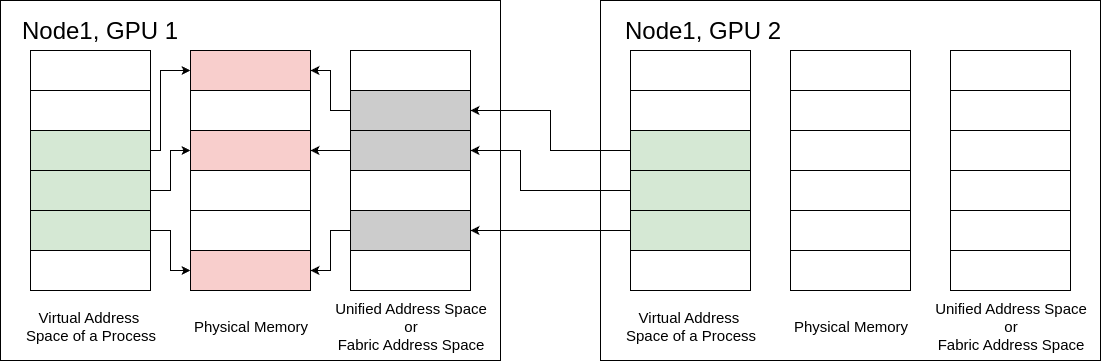
Figure 56 Unicast Memory Sharing Example#
4.17.3.1. Allocate and Export#
Allocating Physical Memory
The first step in memory allocation using virtual memory management APIs is to
create a physical memory chunk that will provide a backing for the allocation.
In order to allocate physical memory, applications must use the
cuMemCreate API. The allocation created by this function does not have any
device or host mappings. The function argument
CUmemGenericAllocationHandle describes the properties of the memory to
allocate such as the location of the allocation, if the allocation is going to
be shared to another process (or graphics APIs), or the physical
attributes of the memory to be allocated. Users must ensure the requested
allocation’s size is aligned to appropriate granularity. Information
regarding an allocation’s granularity requirements can be queried using
cuMemGetAllocationGranularity.
CUmemGenericAllocationHandle allocatePhysicalMemory(int device, size_t size) {
    CUmemAllocationHandleType handleType = CU_MEM_HANDLE_TYPE_POSIX_FILE_DESCRIPTOR;
    CUmemAllocationProp prop = {};
    prop.type = CU_MEM_ALLOCATION_TYPE_PINNED;
    prop.location.type = CU_MEM_LOCATION_TYPE_DEVICE;
    prop.location.id = device;
    prop.requestedHandleType = handleType;

    size_t granularity = 0;
    cuMemGetAllocationGranularity(&granularity, &prop, CU_MEM_ALLOC_GRANULARITY_MINIMUM);

    // Ensure size matches granularity requirements for the allocation
    size_t padded_size = ROUND_UP(size, granularity);

    // Allocate physical memory
    CUmemGenericAllocationHandle allocHandle;
    cuMemCreate(&allocHandle, padded_size, &prop, 0);

    return allocHandle;
}
CUmemGenericAllocationHandle allocatePhysicalMemory(int device, size_t size) {
    CUmemAllocationHandleType handleType = CU_MEM_HANDLE_TYPE_FABRIC;
    CUmemAllocationProp prop = {};
    prop.type = CU_MEM_ALLOCATION_TYPE_PINNED;
    prop.location.type = CU_MEM_LOCATION_TYPE_DEVICE;
    prop.location.id = device;
    prop.requestedHandleType = handleType;

    size_t granularity = 0;
    cuMemGetAllocationGranularity(&granularity, &prop, CU_MEM_ALLOC_GRANULARITY_MINIMUM);

    // Ensure size matches granularity requirements for the allocation
    size_t padded_size = ROUND_UP(size, granularity);

    // Allocate physical memory
    CUmemGenericAllocationHandle allocHandle;
    cuMemCreate(&allocHandle, padded_size, &prop, 0);

    return allocHandle;
}
Note
The memory allocated by cuMemCreate is referenced by the
CUmemGenericAllocationHandle it returns. Note that this reference is
not a pointer and its memory is not accessible yet.
Note
Properties of the allocation handle can be queried using
cuMemGetAllocationPropertiesFromHandle.
Allocating Device Memory in a Locality Domain
To allocate device memory in a specific locality domain, set CUmemAllocationProp::location.type to CU_MEM_LOCATION_TYPE_DEVICE_LOCALITY_DOMAIN. Set both members of CUmemAllocationProp::location.localized: deviceId identifies the GPU, and localityDomainId identifies a valid locality domain on that GPU. Query the number of valid locality domains with cuDeviceGetAttribute and CU_DEVICE_ATTRIBUTE_LOCALITY_DOMAIN_COUNT.
The allocation size must be a multiple of the minimum granularity returned for the localized allocation properties:
CUmemAllocationProp prop {};
prop.type = CU_MEM_ALLOCATION_TYPE_PINNED;
prop.location.type = CU_MEM_LOCATION_TYPE_DEVICE_LOCALITY_DOMAIN;
prop.location.localized.deviceId = device;
prop.location.localized.localityDomainId = localityDomainId;

size_t granularity = 0;
cuMemGetAllocationGranularity(&granularity, &prop, CU_MEM_ALLOC_GRANULARITY_MINIMUM);
size_t alignedSize = ((size + granularity - 1) / granularity) * granularity;

CUmemGenericAllocationHandle allocationHandle {};
cuMemCreate(&allocationHandle, alignedSize, &prop, 0);
The returned handle is used with the same reserve, map, access-control, and release APIs as other VMM allocations.
On a device with one locality domain, requesting locality domain 0 is equivalent to a full-device allocation created with CU_MEM_LOCATION_TYPE_DEVICE; the resulting allocation reports its location type as CU_MEM_LOCATION_TYPE_DEVICE.
See Locality Domains for the overall programming model.
CUmemAllocationHandleType handleType = CU_MEM_HANDLE_TYPE_POSIX_FILE_DESCRIPTOR;
CUmemGenericAllocationHandle handle = allocatePhysicalMemory(0, 1<<21);
int fd;
cuMemExportToShareableHandle(&fd, handle, handleType, 0);
CUmemAllocationHandleType handleType = CU_MEM_HANDLE_TYPE_FABRIC;
CUmemGenericAllocationHandle handle = allocatePhysicalMemory(0, 1<<21);
CUmemFabricHandle fh;
cuMemExportToShareableHandle(&fh, handle, handleType, 0);
Note
OS-specific handles require all processes to be part of the same OS.
Note
Fabric-specific handles require IMEX channels to be enabled by sysadmin.
The memMapIpcDrv sample can be used as an example for using IPC with VMM allocations.
4.17.3.3. Reserve and Map#
Reserving a Virtual Address Range
Since notions of address and memory are distinct in VMM,
applications must carve out an address range that can hold the
memory allocations made by cuMemCreate. The address range reserved must be
at least as large as the sum of the sizes of all the physical memory
allocations the user plans to place in them.
Applications can reserve a virtual address range by passing appropriate
parameters to cuMemAddressReserve. The address range obtained will not
have any device or host physical memory associated with it. The reserved
virtual address range can be mapped to memory chunks belonging to any device
in the system, thus providing the application a continuous VA range backed and
mapped by memory belonging to different devices. Applications are expected to
return the virtual address range back to CUDA using cuMemAddressFree.
Users must ensure that the entire VA range is unmapped before calling
cuMemAddressFree. These functions are conceptually similar to mmap and munmap
on Linux or VirtualAlloc and VirtualFree on Windows. The following
code snippet illustrates the usage for the function:
CUdeviceptr ptr;
// `ptr` holds the returned start of virtual address range reserved.
CUresult result = cuMemAddressReserve(&ptr, size, 0, 0, 0); // alignment = 0 for default alignment
Mapping Memory
The allocated physical memory and the carved out virtual address space from
the previous two sections represent the memory and address distinction
introduced by the VMM APIs. For the allocated memory to
be usable, the user must map the memory to the address space. The
address range obtained from cuMemAddressReserve and the physical
allocation obtained from cuMemCreate or cuMemImportFromShareableHandle
must be associated with each other by using cuMemMap.
Users can associate allocations from multiple devices to reside in contiguous
virtual address ranges as long as they have carved out enough address space.
To decouple the physical allocation and the address range, users must
unmap the address of the mapping with cuMemUnmap. Users can map and
unmap memory to the same address range as many times as they want, so long as
they ensure that they don’t attempt to create mappings on VA range
reservations that are already mapped. The following code snippet illustrates
the usage for the function:
CUdeviceptr ptr;
// `ptr`: address in the address range previously reserved by cuMemAddressReserve.
// `allocHandle`: CUmemGenericAllocationHandle obtained by a previous call to cuMemCreate.
CUresult result = cuMemMap(ptr, size, 0, allocHandle, 0);
4.17.3.4. Access Rights#
CUDA’s virtual memory management APIs enable applications to explicitly protect
their VA ranges with access control mechanisms. Mapping the allocation to a
region of the address range using cuMemMap does not make the address
accessible, and would result in a program crash if accessed by a CUDA kernel.
Users must specifically select access control using the cuMemSetAccess
function on source and accessing devices. This allows or restricts access for
specific devices to a mapped address range. The following code snippet
illustrates the usage for the function:
void setAccessOnDevice(int device, CUdeviceptr ptr, size_t size) {
    CUmemAccessDesc accessDesc = {};
    accessDesc.location.type = CU_MEM_LOCATION_TYPE_DEVICE;
    accessDesc.location.id = device;
    accessDesc.flags = CU_MEM_ACCESS_FLAGS_PROT_READWRITE;

    // Make the address accessible
    cuMemSetAccess(ptr, size, &accessDesc, 1);
}
The access control mechanism exposed with VMM allows
users to be explicit about which allocations they want to share with other
peer devices on the system. As specified earlier, cudaEnablePeerAccess
forces all prior and future allocations made with cudaMalloc to be mapped to the
target peer device. This can be convenient in many cases as user doesn’t have
to worry about tracking the mapping state of every allocation to every device
in the system. But
this approach has performance implications.
With access control at allocation granularity, VMM
allows peer mappings with minimal overhead.
The vectorAddMMAP sample
can be used as an example for using the Virtual
Memory Management APIs.
4.17.3.5. Releasing the Memory#
To release the allocated memory and address space, both the source and target
processes should use cuMemUnmap, cuMemRelease, and cuMemAddressFree
functions in that order. The cuMemUnmap function un-maps a previously
mapped memory region from an address range, effectively detaching the physical
memory from the reserved virtual address space. Next, cuMemRelease
deallocates the physical memory that was previously created, returning it to
the system. Finally, cuMemAddressFree frees a virtual address range that
was previously reserved, making it available for future use. This specific
order ensures a clean and complete deallocation of both the physical memory and
the virtual address space.
cuMemUnmap(ptr, size);
cuMemRelease(handle);
cuMemAddressFree(ptr, size);
Note
In the OS-specific case, the exported handle must be closed using
fclose.
This step is not applicable to the fabric-based case.
4.17.4. Multicast Memory Sharing#
The Multicast Object Management APIs provide a way for the application to create multicast objects and, in combination with the Virtual Memory Management APIs described above, allow applications to leverage NVLink SHARP on supported NVLink connected GPUs connected with NVSwitch. NVLink SHARP allows CUDA applications to leverage in-fabric computing to accelerate operations like broadcast and reductions between GPUs connected with NVSwitch. For this to work, multiple NVLink connected GPUs form a multicast team and each GPU from the team backs up a multicast object with physical memory. So a multicast team of N GPUs has N physical replicas of a multicast object, each local to one participating GPU. The multimem PTX instructions using mappings of multicast objects work with all replicas of the multicast object.
To work with multicast objects, an application needs to
Query multicast support.
Create a multicast handle with
cuMulticastCreate.Share the multicast handle with all processes that control a GPU which should participate in a multicast team. This works with
cuMemExportToShareableHandleas described above.Add all GPUs that should participate in the multicast team with
cuMulticastAddDevice.For each participating GPU, bind physical memory allocated with
cuMemCreateas described above to the multicast handle. All devices need to be added to the multicast team before binding memory on any device.Reserve an address range, map the multicast handle and set access rights as described above for regular unicast mappings. Unicast and multicast mappings to the same physical memory are possible. See the Virtual Aliasing Support section on how to ensure consistency between multiple mappings to the same physical memory.
Use the multimem PTX instructions with the multicast mappings.
The multi_node_p2p example in the Multi GPU Programming Models GitHub
repository contains a complete example using fabric memory including multicast objects to leverage NVLink SHARP. Please note that this example is
for developers of libraries like NCCL or NVSHMEM. It shows how higher-level programming models like NVSHMEM work internally within a (multi-node)
NVLink domain. Application developers generally should use the higher-level MPI, NCCL, or NVSHMEM interfaces instead of this API.
Note
The multicast sharing described here maps a multicast object into each device’s virtual
address space and operates on it with multimem instructions — the address-centric
model. Compute fabric transport provides a
resource-centric counterpart, the multicast logical endpoint, which serves a
multicast team over the NVLink fabric without mapping the object into a local address
space. It reports an explicit per-operation completion status, so it suits large fabrics
where fabric-error recovery is a concern.
4.17.4.1. Allocating Multicast Objects#
Multicast objects can be created with cuMulticastCreate:
CUmemGenericAllocationHandle createMCHandle(int numDevices, size_t size) {
    CUmemAllocationProp mcProp = {};
    mcProp.numDevices = numDevices;
    mcProp.handleTypes = CU_MEM_HANDLE_TYPE_FABRIC; // or on single node CU_MEM_HANDLE_TYPE_POSIX_FILE_DESCRIPTOR

    size_t granularity = 0;
    cuMulticastGetGranularity(&granularity, &mcProp, CU_MEM_ALLOC_GRANULARITY_MINIMUM);

    // Ensure size matches granularity requirements for the allocation
    size_t padded_size = ROUND_UP(size, granularity);

    mcProp.size = padded_size;

    // Create Multicast Object this has no devices and no physical memory associated yet
    CUmemGenericAllocationHandle mcHandle;
    cuMulticastCreate(&mcHandle, &mcProp);

    return mcHandle;
}
4.17.4.2. Add Devices to Multicast Objects#
Devices can be added to a multicast team with cuMulticastAddDevice:
cuMulticastAddDevice(&mcHandle, device);
This step needs to be completed on all processes controlling devices that participate in a multicast team before memory on any device is bound to the multicast object.
4.17.4.3. Bind Memory to Multicast Objects#
After a multicast object has been created and all participating devices have been added to the multicast object it needs to be backed with
physical memory allocated with cuMemCreate for each device:
cuMulticastBindMem(mcHandle, mcOffset, memHandle, memOffset, size, 0 /*flags*/);
4.17.4.4. Use Multicast Mappings#
To use multicast mappings in CUDA C++, it is necessary to use the multimem PTX instructions with inline PTX:
__global__ void all_reduce_norm_barrier_kernel(float* l2_norm,
                                               float* partial_l2_norm_mc,
                                               unsigned int* arrival_counter_uc, unsigned int* arrival_counter_mc,
                                               const unsigned int expected_count) {
    assert( 1 == blockDim.x * blockDim.y * blockDim.z * gridDim.x * gridDim.y * gridDim.z );
    float l2_norm_sum = 0.0;
#if __CUDA_ARCH__ >= 900

    // atomic reduction to all replicas
    // this can be conceptually thought of as __threadfence_system(); atomicAdd_system(arrival_counter_mc, 1);
    cuda::ptx::multimem_red(cuda::ptx::release_t, cuda::ptx::scope_sys_t, cuda::ptx::op_add_t, arrival_counter_mc, n);

    // Need a fence between Multicast (mc) and Unicast (uc) access to the same memory `arrival_counter_uc` and `arrival_counter_mc`:
    // - fence.proxy instructions establish an ordering between memory accesses that may happen through different proxies
    // - Value .alias of the .proxykind qualifier refers to memory accesses performed using virtually aliased addresses to the same memory location.
    // from https://docs.nvidia.com/cuda/parallel-thread-execution/#parallel-synchronization-and-communication-instructions-membar
    cuda::ptx::fence_proxy_alias();

    // spin wait with acquire ordering on UC mapping till all peers have arrived in this iteration
    // Note: all ranks need to reach another barrier after this kernel, such that it is not possible for the barrier to be unblocked by an
    // arrival of a rank for the next iteration if some other rank is slow.
    cuda::atomic_ref<unsigned int,cuda::thread_scope_system> ac(arrival_counter_uc);
    while (expected_count > ac.load(cuda::memory_order_acquire));

    // Atomic load reduction from all replicas. It does not provide ordering so it can be relaxed.
    asm volatile ("multimem.ld_reduce.relaxed.sys.global.add.f32 %0, [%1];" : "=f"(l2_norm_sum) : "l"(partial_l2_norm_mc) : "memory");

#else
    #error "ERROR: multimem instructions require compute capability 9.0 or larger."
#endif

    *l2_norm = std::sqrt(l2_norm_sum);
}
4.17.5. Advanced Configuration#
4.17.5.1. Memory Type#
VMM also provides a mechanism for applications to allocate special types of memory that
certain devices may support. With cuMemCreate,
applications can specify memory type requirements using the
CUmemAllocationProp::allocFlags to opt-in to specific memory features.
Applications must ensure that the requested memory type is supported by
the device.
4.17.5.2. Compressible Memory#
Compressible memory can be used to accelerate accesses to data with
unstructured sparsity and other compressible data patterns. Compression can
save DRAM bandwidth, L2 read bandwidth, and L2 capacity depending on the data.
Applications that want to allocate compressible memory on
devices that support compute data compression can do so by setting
CUmemAllocationProp::allocFlags::compressionType to
CU_MEM_ALLOCATION_COMP_GENERIC. Users must query if device supports
Compute Data Compression by using
CU_DEVICE_ATTRIBUTE_GENERIC_COMPRESSION_SUPPORTED. The following code
snippet illustrates querying compressible memory support using
cuDeviceGetAttribute.
int compressionSupported = 0;
cuDeviceGetAttribute(&compressionSupported, CU_DEVICE_ATTRIBUTE_GENERIC_COMPRESSION_SUPPORTED, device);
On devices that support compute data compression, users must opt in at allocation time as shown below:
prop.allocFlags.compressionType = CU_MEM_ALLOCATION_COMP_GENERIC;
For a variety of reasons such as limited hardware resources, the allocation may not
have compression attributes. To verify that the flags worked, users should
query the properties of the allocated memory using
cuMemGetAllocationPropertiesFromHandle.
CUmemAllocationProp allocationProp = {};
cuMemGetAllocationPropertiesFromHandle(&allocationProp, allocationHandle);

if (allocationProp.allocFlags.compressionType == CU_MEM_ALLOCATION_COMP_GENERIC)
{
    // Obtained compressible memory allocation
}
4.17.5.3. Virtual Aliasing Support#
The virtual memory management APIs provide a way to create multiple virtual
memory mappings or “proxies” to the same allocation using multiple calls to
cuMemMap with different virtual addresses. This is called virtual aliasing.
Unless otherwise noted in the PTX ISA, writes to one proxy of the allocation
are considered inconsistent and incoherent with any other proxy of the same
memory until the writing device operation (grid launch, memcpy, memset, and so
on) completes. Grids present on the GPU prior to a writing device operation
but reading after the writing device operation completes are also considered
to have inconsistent and incoherent proxies.
For example, the following snippet is considered undefined, assuming device pointers A and B are virtual aliases of the same memory allocation:
__global__ void foo(char *A, char *B) {
  *A = 0x1;
  printf("%d\n", *B);    // Undefined behavior!  *B can take on either
// the previous value or some value in-between.
}
The following is defined behavior, assuming these two kernels are ordered monotonically (by streams or events).
__global__ void foo1(char *A) {
  *A = 0x1;
}

__global__ void foo2(char *B) {
  printf("%d\n", *B);    // *B == *A == 0x1 assuming foo2 waits for foo1
// to complete before launching
}

cudaMemcpyAsync(B, input, size, stream1);    // Aliases are allowed at
// operation boundaries
foo1<<<1,1,0,stream1>>>(A);                  // allowing foo1 to access A.
cudaEventRecord(event, stream1);
cudaStreamWaitEvent(stream2, event);
foo2<<<1,1,0,stream2>>>(B);
cudaStreamWaitEvent(stream3, event);
cudaMemcpyAsync(output, B, size, stream3);  // Both launches of foo2 and
                                            // cudaMemcpy (which both
                                            // read) wait for foo1 (which writes)
                                            // to complete before proceeding
If accessing the same allocation through different “proxies” is required in the
same kernel, a fence.proxy.alias can be used between the two accesses. The
above example can thus be made legal with inline PTX assembly:
__global__ void foo(char *A, char *B) {
  *A = 0x1;
  cuda::ptx::fence_proxy_alias();
  printf("%d\n", *B);    // *B == *A == 0x1
}
4.17.5.4. OS-Specific Handle Details for IPC#
With cuMemCreate, users can indicate at
allocation time that they have earmarked a particular allocation for inter-process communication
or graphics interop purposes. Applications can do this
by setting CUmemAllocationProp::requestedHandleTypes to a
platform-specific field. On Windows, when
CUmemAllocationProp::requestedHandleTypes is set to
CU_MEM_HANDLE_TYPE_WIN32 applications must also specify an
LPSECURITYATTRIBUTES attribute in
CUmemAllocationProp::win32HandleMetaData. This security attribute defines
the scope of which exported allocations may be transferred to other processes.
Users must ensure they query for support of the requested handle type before
attempting to export memory allocated with cuMemCreate. The following
code snippet illustrates query for handle type support in a platform-specific
way.
int deviceSupportsIpcHandle;
#if defined(__linux__)
    cuDeviceGetAttribute(&deviceSupportsIpcHandle, CU_DEVICE_ATTRIBUTE_HANDLE_TYPE_POSIX_FILE_DESCRIPTOR_SUPPORTED, device));
#else
    cuDeviceGetAttribute(&deviceSupportsIpcHandle, CU_DEVICE_ATTRIBUTE_HANDLE_TYPE_WIN32_HANDLE_SUPPORTED, device));
#endif
Users should set the CUmemAllocationProp::requestedHandleTypes appropriately as shown below:
#if defined(__linux__)
    prop.requestedHandleTypes = CU_MEM_HANDLE_TYPE_POSIX_FILE_DESCRIPTOR;
#else
    prop.requestedHandleTypes = CU_MEM_HANDLE_TYPE_WIN32;
    prop.win32HandleMetaData = // Windows specific LPSECURITYATTRIBUTES attribute.
#endif