

Integration Guide
The Safety Core turns perception output into a safety decision and sends that decision to a PLC. It checks every handoff on the way, watches the health of its own inputs, and puts every decision maker into a latched safe state when it can no longer trust what it receives.
This guide is for integrators: people who connect their own perception, write their own decision maker or event source, or run the Safety Core without the reference launcher. To run the reference applications, use the Deployment Guide.
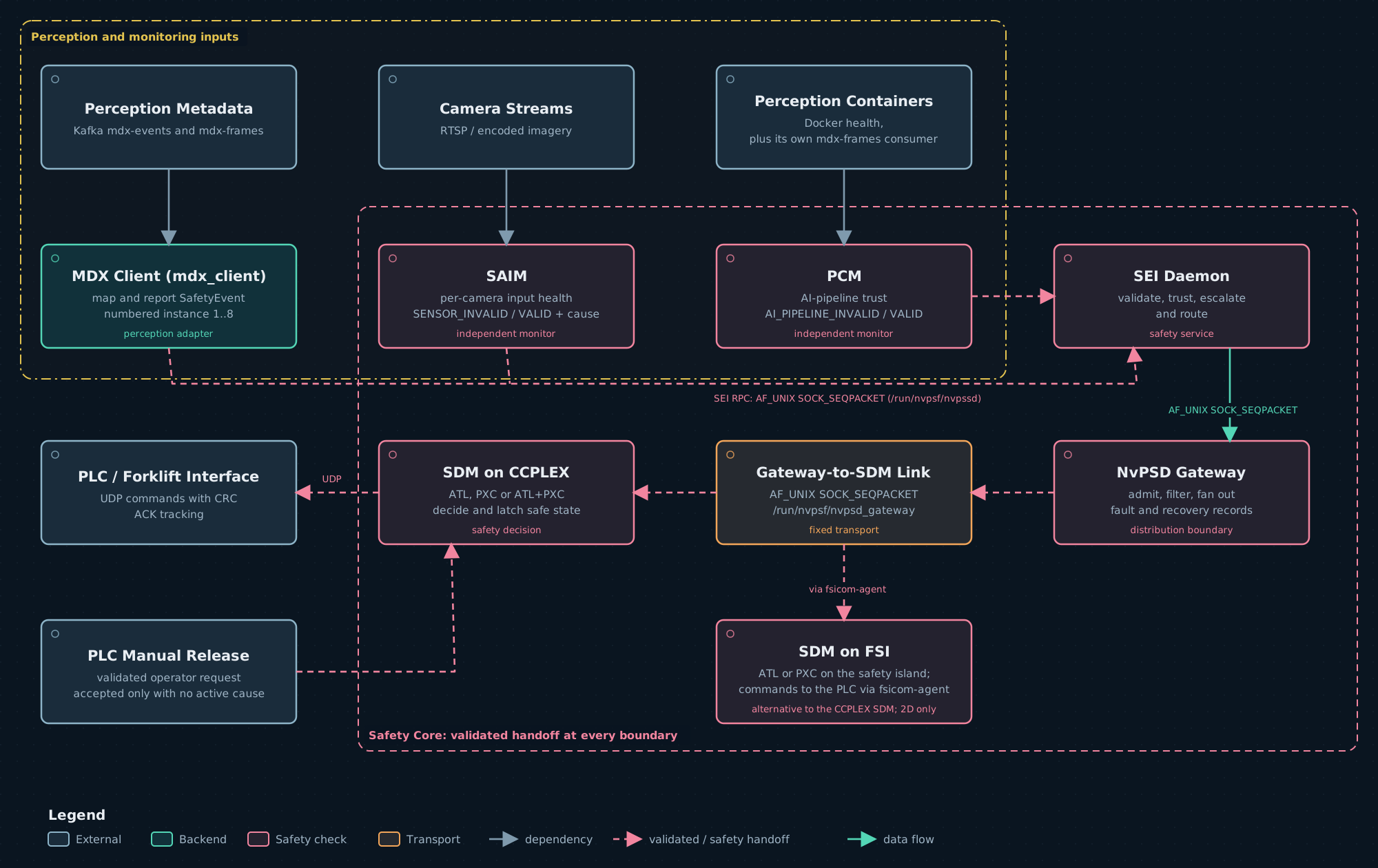
Components
The components, their binaries and their roles are listed in Safety Core Components, with a page and an architecture diagram for each.
Paths, package names, binaries and log lines use older short names: pss for the SEI, psd for
the gateway and decision side, psb for the SBB, and psf for the Safety Core as a whole. For
example, the gateway logs as PSD-Gateway and the SEI’s audit records start with PSS_.
Data path
One safety event travels through these stages:
How the perception messages map to safety events is described on Event Mapping Configuration. What makes an SDM latch, and how it is released, is described in the safe-state model.
The SEI daemon, the gateway and the MDX client write their records through the SBB to syslog. The SBB is not in the data path; see Logs for where each log lands.
Where each process runs
Platforms
Container or host
The Safety Core can be started in three ways. The container’s options are on
Container options, and the launcher’s on
launch_hoisa.sh.
Under --runtime docker the launcher starts the SDMs, or fsicom-agent, on the host as root,
with the primary group of the container user nvidia, so the NvPSD Gateway in the container
accepts them. See Shared process group.
With a plain docker run, every Safety Core process except fsicom-agent runs in the container
by default, so no Safety Core link crosses the container boundary. The container needs:
- Docker socket. Mount the host’s
/var/run/docker.sock, so PCM can check the perception containers from inside the container. - Network. The container uses the host network (
--network=host), so the SDM-to-PLC UDP link and the Kafka connection behave as on the host. - Files. Mount each configuration file over the path the container reads it from. The
monitor modes must match
required_safety_monitorandrequired_perception_monitorin thenvpss.confthe container reads.
A Safety Core process on the host that connects to the container, such as fsicom-agent or an SDM
next to a container started with --sdm-external, needs two things more:
- Sockets. All Safety Core sockets live in
/run/nvpsf. Bind-mount that host directory into the container (-v /run/nvpsf:/run/nvpsf), so the process on the host and the processes in the container reach the same sockets. - One group. The process must run with the container user’s primary group. See Shared process group.
fsicom-agent always runs on the host: it talks to the FSI through NvFsiCom, which needs the FSI
channel in the host’s device tree and the NvFsiCom daemon running on the host.
2D and 3D deployments
deploymentMode in nvpss.conf is mandatory and states the topology. It is not inferred from
which files are present.
The file formats are on Sensor files. The keys are on SEI Configuration.
Transports
Every link inside the Safety Core is an AF_UNIX SOCK_SEQPACKET socket in /run/nvpsf. None of
them can be switched to UDP or TCP. Only the links to the outside world use the network.
Notes on the AF_UNIX links:
- Directory.
/run/nvpsfmust exist before any server starts; no binary creates it. The runtime package creates it with mode1777at install and on every boot, and the launchers check it; see Install. - Socket mode. Each server sets its socket to
0660after binding. The parent directory protects nothing, so access control is the credential check. - Second instance. A server that finds a live server already listening on its path refuses to
start and prints
nvpsf_transport: bind(<path>) refused -- a LIVE server is already listening on this path. A stale socket left by a crash is removed and reused. - Buffers. The ends of link 6 request socket buffers for 516 decision packets. The kernel limits must allow them; see Kernel socket buffers.
Shared process group
Every Safety Core process must run with the same primary group. On every AF_UNIX link, the
server reads each client’s credentials with SO_PEERCRED and compares the client’s group with its
own getgid(). On links 5 and 6 the client also checks the server the same way. The peer’s
primary group must match exactly; having the group as a supplementary group is not enough. The
rule covers nvpss_daemon, nvpsd_gateway, mdx_client, safety_monitor,
nv_perception_monitor, every SDM, fsicom-agent, and every process you add.
There is no dedicated Safety Core group. Each process requires its own primary group of its peers, so the rule holds when every process runs with the same primary group, whichever it is.
The container user’s group ID is assigned when the image is built. Read it from the image, or from a running container:
For a process you start yourself
Start the process with the primary group of the processes it connects to. Next to processes that run as root on the host, start it as root. Next to the container, start it as root with the container user’s group ID as its primary group, keeping root’s user ID and supplementary groups:
<container-gid> is the number printed by the id command above. The container must also mount
the host’s /run/nvpsf, so that the process on the host sees the container’s sockets. The
SDM on FSI procedure starts fsicom-agent this way,
and launch_hoisa.sh --runtime docker starts its SDMs and fsicom-agent the same way. Docker
must not use user-namespace remapping or rootless mode: the host then sees the container’s group
IDs shifted, and no host process can share them.
Host accounts with the container’s group
When a process on the host connects to the container, /run/nvpsf is shared with the host, and
the container user’s group ID is the only credential the sockets check. A host account that can
run with that group ID can then connect to the Safety Core sockets, or stand in for a Safety Core
server whose socket is not bound, for example before the NvPSD Gateway starts or after it exits.
That is an account whose primary group has that ID, or a member of a host group with that ID, who
can switch to it with newgrp or sg. An SDM or fsicom-agent on the host would then accept
such a process as its gateway. A host account with the container user’s user ID owns the socket
files on the host and can delete them, so that processes connecting or reconnecting afterwards
cannot reach the Safety Core, and the decision makers then hold their safe state.
launch_hoisa.sh --runtime docker prints a warning at every control-plane start when either ID is
used on the host; see Host processes and the container’s group.
To check a host yourself:
<container-uid> is printed by docker exec <container-name> id -u nvidia. Each command prints
nothing when no host group or account uses the ID. Keep such accounts off the host, or run every
Safety Core process in the container without the /run/nvpsf mount, so that no socket is shared
with the host.
What a mismatch looks like
A mismatched process is refused. This is the safe direction: it cannot register, so an SDM holds its safe output and latches on lost freshness and gateway heartbeat, and a required monitor that never registers is reported lost to every SDM. The refusing end prints both group ids to standard error:
followed by one of:
The gateway logs the group it requires at start-up, in a syslog record whose data reads
PSD-Gateway: peer credential allowlistrequiredPrimaryGid=<gid>; search for
requiredPrimaryGid=. To compare it with the running processes:
Integration Guide pages
The Reference section holds the full option and key lists: Launcher, SEI Configuration, Sensor files, Event Mapping Configuration and Causes and Records.