

SIL — 3D Perception
Deploy Halos SIL with 3D perception (Sparse4D multi-view fusion + BEV tracking).
Halos SIL 3D requires VSS Warehouse 3.3 with the 3D Vision AI Profile (MODE=3d) as its perception backend. Deploy it as in Deploy AI Perception, with the 3D overrides of Step 3, before proceeding with Halos SIL deployment.
For 2D perception (simpler setup), see SIL — 2D Perception instead.
The Halos services (safety-core, comm-layer, isaac-sim, forklift-controller) and the Isaac Sim launch are identical to 2D. 3D changes the VSS perception side — the app, its DeepStream timing config, and the behavior-analytics proximity settings — plus two Safety Core configuration lines in the profile: on a 3D feed the Safety Core runs deploymentMode = 3D for every PSF_APP.
There is no separate 3D deployment profile. 3D runs on the same sil profile as 2D (deployments/profiles/sil.env); the deploy commands below are the 2D ones. What changes is the VSS Warehouse app deployed alongside it, and the two Safety Core 3D lines in sil.env (Step 4).
2D vs 3D
Older 3D guidance prescribed keeping SEI enabled — that was validated on Isaac Sim 5.1. On Isaac Sim 6.1 keep SEI off (same as 2D): PSF still doesn’t consume the SEI sim-time, so system (wall-clock) timestamps remain the correct choice. There is also no manual RTSP patch on Isaac Sim 6.1 — it self-hosts RTSP in-process, one server per camera.
Prerequisites
See Prerequisites for hardware and software requirements.
Additional 3D requirements:
- Familiarity with the VSS Warehouse Blueprint - 3D Vision AI Profile
- Understanding of Sparse4D 3D multi-camera detection
Step 1: Download Packages
Follow Step 1 in SIL — 2D Perception to clone the Halos Outside-In Safety repository and download the SIL data. The same repo and SIL data are used for both 2D and 3D.
3D needs no extra download. Perception downloads its Sparse4D model into <vss_data>/models/sparse4d/ before it builds the TensorRT engine: with DATASET_TYPE=synthetic that is RN50 v2.3 (nvidia/tao/sparse4d_rn50:deployable_v2.3), with real RN50 v3.0, both public in the nvidia org. The download uses NGC_CLI_API_KEY.
Step 2: 3D Calibration Dataset (Custom Scenes Only)
The loading-dock test scene needs nothing here. VSS 3.3 ships <wh_ops>/warehouse-3d-app/calibration/sample-data/warehouse-loading-dock-3cams-synthetic/ with the BEV group bev-sensor-1 and the top-level roi-id-1 / tripwire-id-1, under the same dataset name as the 2D one. Use it as the reference for the format, and follow this step only for a scene of your own.
A 3D calibration needs BEV sensor grouping and world-coordinate ROI / tripwire definitions. A scene that already has a 2D calibration converts structurally (adding fields), not by re-computation. Do this before the VSS deploy so 3D behavior analytics loads the ROIs / tripwires at startup. <name> is the dataset name, the same for both apps:
Start from the 2D calibration.json and add the following.
2.1 Per Sensor — a BEV group
group.name (bev-sensor-1) binds the three cameras into one BEV fusion group — every sensor in the group shares it.
2.2 Per Sensor — a region entry in place
2.3 Top-level rois and tripwires
ROIs and tripwires are defined in world coordinates, which are shared between 2D and 3D for the same physical scene — copy the roiCoordinates, wire, and direction values straight from the 2D calibration. Keep the ids matching nvpss.conf (roi-id-1, tripwire-id-1) and the object types matching the ATL event map (restrict Person, confine Forklift):
The ids (roi-id-1, tripwire-id-1) must match the rule_ids in the ATL event mapping (event_mapping_atl.pb.txt, packaged in the PSF image), or the Safety Core cannot map the events (EVENT_0…EVENT_5) and no MUTE/UNMUTE is produced. For the calibration schema, see the VSS calibration documentation.
2.4 Copy the BEV Floorplan Image
2.5 Verify
Then set SAMPLE_VIDEO_DATASET="<name>" in overrides.env (Step 3.1) and put the scene’s videos under <vss_data>/videos/<name>/. The calibration file must exist before up: for a missing calibration.json Docker creates a directory in its place and perception emits nothing.
Step 3: Deploy VSS Warehouse (3D Profile)
Deploy VSS Warehouse 3.3 as in Deploy AI Perception, or with the VSS repository’s vss-build-vision-ai skill (warehouse profile, 3D mode). The release, the nvcr.io login, the app data and the data directories are those of SIL — 2D Perception, Step 2. Apply the overrides below before docker compose up — if perception builds its TensorRT engine with the wrong config, it has to build it again.
3.1 overrides.env Overrides
Set the 2D values of SIL — 2D Perception (2.1) in <wh_ops>/overrides.env, with these two changed:
DATASET_TYPE=synthetic already ships and picks the Sparse4D bundle for synthetic scenes.
SAMPLE_VIDEO_DATASET stays "warehouse-loading-dock-3cams-synthetic": the 3D app ships its BEV
calibration under the same name.
3.2 DeepStream Config
File: <wh_ops>/warehouse-3d-app/deepstream/configs/ds-main-config.txt
Disable SEI extraction in [source-list] (the app config ships it enabled):
Set the timing keys in [streammux]:
Section placement matters — DeepStream reads each key only from its own section: low-latency-mode belongs to [source-list], the timing keys to [streammux]. Leave num-sources, latency, and batch-size to the shipped config (derived from NUM_STREAMS at startup).
Why these differ from a latency-first default: Sparse4D multi-view inference is heavier than 2D per-camera detection, so a batch takes longer to complete. The looser batched-push-timeout and low-latency-mode=0 let the muxer wait long enough to assemble a complete 3-camera batch instead of pushing partial batches (which produce gaps or zero Kafka output); sync-inputs-ntp=0 keeps the muxer from stalling on the Isaac RTSP feed’s timing.
This override replaces the old inSimulationMode=true step. VSS 3.2.0 guidance added an inSimulationMode entry to vss-behavior-analytics-config.json so behavior analytics would accept Isaac Sim’s synthetic timestamps. VSS 3.2.1 and later retire that flag — synthetic data is admitted by keying off system (wall-clock) timestamps instead (SEI extraction off + attach-sys-ts-as-ntp=1, above). If this override is missing, behavior analytics silently drops every synthetic frame as STALE: all containers look healthy but you get zero ROI / tripwire events, so the Safety Core never sees a crossing and the MUTE/UNMUTE chain never fires.
3.3 Perception Model Config
File: <wh_ops>/warehouse-3d-app/deepstream/configs/config.yaml
The configurator sets num_sensors from NUM_STREAMS, and the other two keys ship with these
values — nothing to edit here.
gpu_postprocess: False keeps Sparse4D post-processing on the CPU so it does not contend with inference on the GPU. If raising num_torch_threads does not buy you enough post-process throughput, set it to True to move that stage onto the GPU instead.
3.4 Behavior Analytics (pxc / both only)
File: <wh_ops>/warehouse-3d-app/vss-behavior-analytics/configs/vss-behavior-analytics-config.json
The shipped 3D config pairs only the humanoid robots with Person, within 2 m, so a forklift never
produces a proximity event and the Halos tiers (REDUCE up to 3.5 m) would be cut off:
proximityDetectionThresholdships as2and must be at least everydistance_threshold_metersin the proximity mapping (3.5 m): above it mdx-client drops the whole rule group, STOP included, without a log line.proximityDetectionCenterClassesships withoutForklift.
3.5 VST Config
File: <wh_ops>/warehouse-3d-app/vst/configs/vst_config.json
rtsp_streaming_over_tcp: true— ingest Isaac’s self-hosted RTSP over TCP. UDP ingest can stall RTP delivery silently (see Isaac Sim Streaming).use_sensor_ntp_time: false— pair withattach-sys-ts-as-ntp=1so VST and DeepStream agree on wall-clock arrival time.bbox_tolerance_ms: 100— widen the metadata-to-frame match window to reduce bbox flicker at the lower 3D frame rate.
3.6 Wait for the TensorRT Engine
Start VSS Warehouse and wait for the Sparse4D model download and TensorRT engine build (first startup: about 5 min on an L40S). Poll vss-rtvi-cv until all 3 cameras report a non-zero FPS:
Expect ~15 FPS, the same as 2D. What matters is that all 3 sources report non-zero FPS; a source stuck at 0.00000 isn’t arriving.
Then confirm the Safety Core event seam has data (mdx-events, the same topic as 2D):
Do not proceed to Halos SIL until both signals fire: 3 cameras at FPS > 0, and mdx-events has data.
Step 4: Configure Halos SIL Environment
Required settings — the 2D ones, plus the two Safety Core 3D lines:
With the 2D nvpss.conf on a 3D feed, mdx-client drops every event
(Dropping event: sensor not in sensor_config, so it has no pipelineID: bev-sensor-1) and no
decision is made. With the two lines, the Safety Core runs deploymentMode = 3D with fusion off:
the BEV app reports the three cameras as one sensor, bev-sensor-1, which
configs/sensor_group_config.conf declares as group 4 of the cameras in sensor_config.conf.
PSF_IMAGE (the PSF 1.4 Safety Core image) and ISAAC_SIM_IMAGE are pre-set; the 1.3 image does
not run these configurations. Both monitors ship skip, as in
SIL — 2D Perception; to run one active, set its required_* key to 1 in
nvpss_bev.conf.
4.1 Safety App (PSF_APP)
-
pxcandbothare SIL-only and run on the 3D feed, with the behavior-analytics change of Step 3.4. The proximity mappingclosed-loop-testing/safety-core/configs/proximity_event_mapping.pb.txtscoresForklift×Personcentre to centre: STOP ≤ 2 m, REDUCE ≤ 3.5 m, asEVENT_12/13/14(EVENT_0..11are ATL’s). -
bothneeds the override file and a port of its own for proximity. Set both next toPSF_APPinsil.env:The Safety Core then runs the image’s
--app atl,pxc: one gateway, one daemon, one mdx_client, and both decision makers, each on its own--sdm-config. ATL sends toCOMM_UDP_PORTand proximity toCOMM_UDP_PORT_PXC, and the comm-layer listens on both. -
The truck’s reaction is the robot’s
proximity:block inrobots.yaml(reduce_speed,stop_hold_s,reduce_hold_s,stale_s). A STOP holdsstop_hold_spast the last packet asking for one; silence keeps the last level;stale_s(10 s) with no message at all stops the truck with faultpsf_link_stale.
Step 5: Deploy Halos SIL
Services started: safety-core, comm-layer, isaac-sim, forklift-controller — the same stack as 2D.
Step 6: Run Test Scenario
The Isaac Sim launch is identical to 2D:
For script usage details and additional options, see Execution Script.
What happens:
- Loads the warehouse scene (20×20 m)
- Spawns the forklift from the fleet file (
robots.yaml) and 3 digital humans - Initializes the ROS2 Action Graph for the forklift
- Runs the forklift waypoint sequence
- Starts RTSP streaming — Isaac 6.1 self-hosts one RTSP server per camera (
8554/camera,8555/camera_01,8556/camera_02). See RTSP Multi-Camera Graph for the graph that builds them. - Registers 3 cameras with VST once the render is warm (
--enable-vstdeletes existing sensors, then adds the Isaac cameras)
First-run note: after launching, Isaac Sim stdout goes quiet for ~5-10 min while RT shaders compile. This is normal (shaders are cached afterwards). Do not gate on a shader-log string — gate on the Isaac→VSS stream handoff completing (3 cameras at FPS > 0 on vss-rtvi-cv).
Step 7: Monitor Safety Commands
The log paths use MDX_DATA_DIR from your sil.env. From deployments/, load it into your shell first (re-run it in each terminal you monitor from):
Monitor the OPC server log:
Expected output:
🟢 MUTE (ALLOW OPERATION): Forklift in trailer, no humans detected (allow loading)
🟡 UNMUTE (PREVENT OPERATION): Human detected or forklift exiting (alarm active)
💓 HEARTBEAT: Periodic keep-alive (every 5s) — confirms the PSF→comm-layer link is healthy
Monitor PSF:
Expected output:
EVENT_0 / EVENT_1: tripwire crossings reported by perception (forklift OUT / IN the trailer).
DecisionRequest: the PSF decision-maker is invoked — it produces the corresponding MUTE/UNMUTE command shown in the OPC log above.
Proximity (pxc / both): EVENT_12 (no violation), EVENT_13 (REDUCE tier) and
EVENT_14 (STOP tier) appear in pss.log, the comm-layer logs each decision with the pair and
its separation, and the forklift-controller logs every change of the level it applies:
Step 8: View Camera Streams
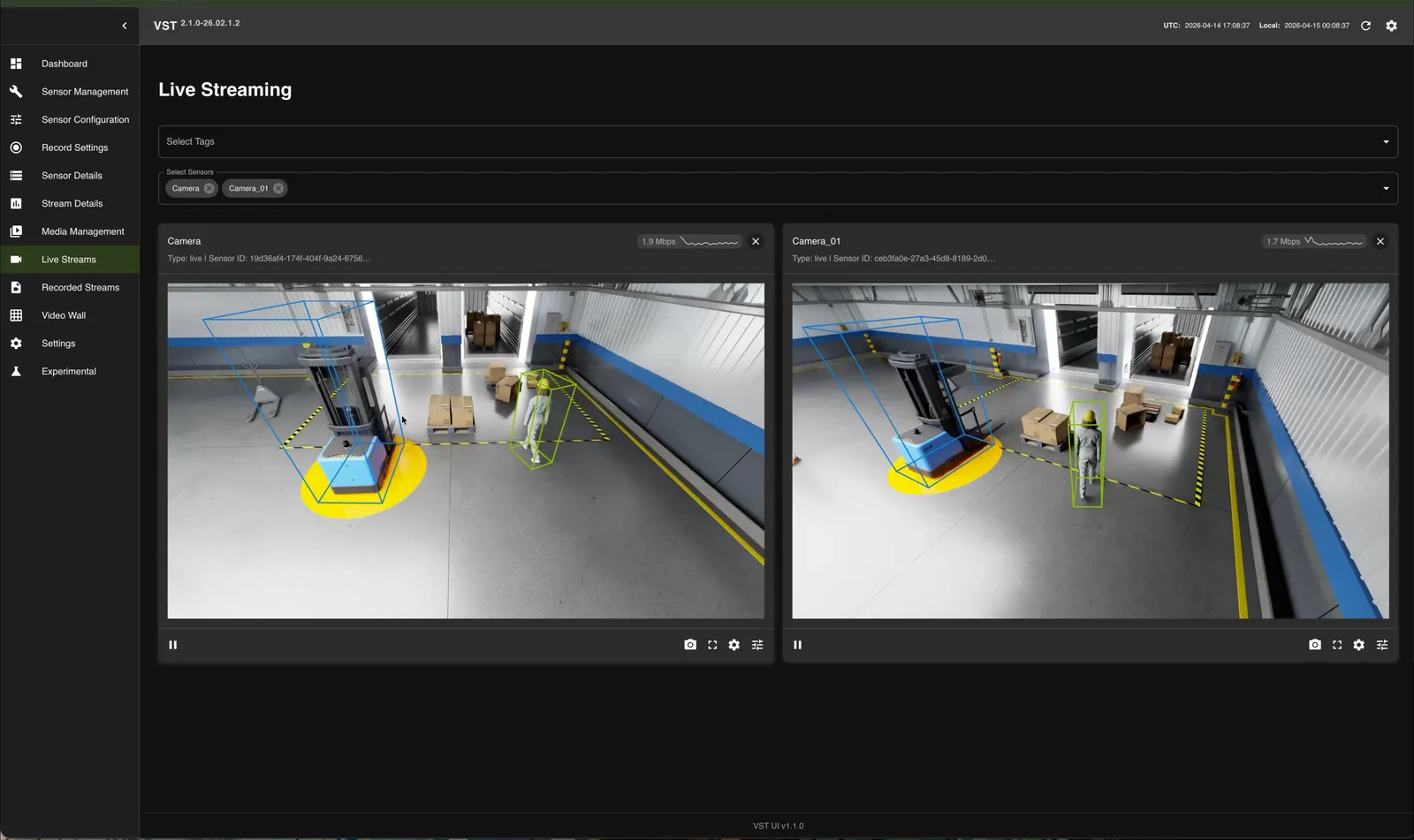
VST UI — http://<HOST_IP>:30888/vst/
Navigate to Live Streams to view camera feeds with 3D detection overlays:
Navigate to Video Wall, enable overlay, and check Include Floor Plan in Analytics Overlay Settings to view the top-down BEV visualization with detected objects on the warehouse floorplan:
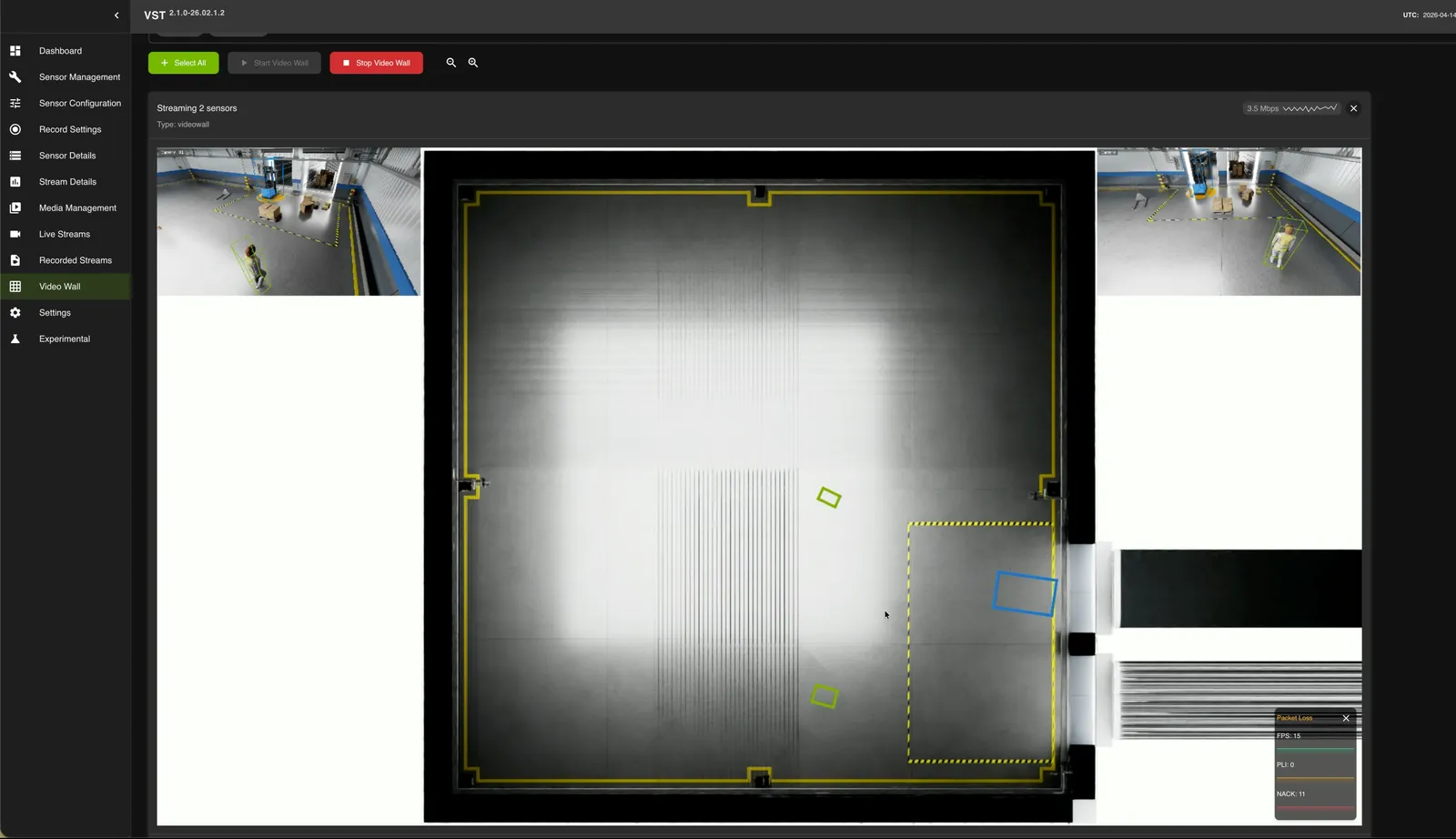
For details on configuring the Video Wall overlay and Floor Plan, see Playback overlay on Video Wall.
Cleanup and Restart
Restart the Scenario (Live Stack)
To relaunch the Isaac scenario on an already-running stack, use the wrapper — it pauses VST stream processing for the boot window (so the fresh RTSP mounts don’t hit the cold-start “no caps” race), then resumes it once the streams are live:
Reset to a Fresh Deployment
When a stack misbehaves in ways a restart doesn’t fix, return it to the clean first-bring-up state without paying the TensorRT/shader rebuild. Stop the scenario and the Halos stack, tear VSS down with down -v (it drops the VST sensor database volume; the models and the TensorRT engine live under VSS_DATA_DIR/models/ and are kept), redeploy VSS, then clear Redis before relaunching:
Keep VSS_DATA_DIR/models/ and the isaac-cache/ shader dirs — rebuilding them costs several minutes each.
Full Cleanup
docker volume prune -f removes every dangling volume on the host, not only this
stack’s. With the VSS stack down that includes the VST sensor database. Skip it unless
you want that reset, or remove the specific volumes instead.
Switching between 2D and 3D requires a full teardown of both stacks. Do not just restart containers — port conflicts and CUDA errors will occur.
Troubleshooting
Kafka mdx-events Topic Empty
The most common 3D issue. Verify sync-inputs-ntp=0 in the [streammux] section of ds-main-config.txt — with NTP input-sync on, the muxer stalls on the Isaac RTSP feed and produces zero Kafka output. Also confirm batched-push-timeout=75000 and low-latency-mode=0 (in [source-list]).
DeepStream Stuck at ≤2/3 Active Sources
For 3D this is not healthy — Sparse4D fuses all 3 views (num_sensors: 3), so 2/3 corrupts the BEV. A camera stuck at 0 FPS after re-registration is usually a stale-identity zombie source bin (VST minted a new sensor uuid on restart; DeepStream kept the old one). Purge the stale source and add the live uuid — the procedure is in Recovering a camera stuck at 0 FPS.
No Decisions on the 3D Feed
pss.log full of Dropping event: sensor not in sensor_config ... bev-sensor-1 means the Safety
Core still runs the 2D nvpss.conf. Set PSF_NVPSS_CONFIG_SRC and
PSF_SENSOR_PIPELINES_CONFIG_SRC (Step 4) and recreate safety-core. This applies to every
PSF_APP, atl included.
0 Detections
Check that perception downloaded its model (<vss_data>/models/sparse4d/) and that
NGC_CLI_API_KEY was exported when VSS started: the download needs the key.
No Forklift × Person Proximity Events (pxc / both)
Behavior analytics still ships proximityDetectionThreshold 2 without Forklift as a center
class. Apply Step 3.4 and recreate vss-behavior-analytics.
0 ROIs Loaded by Behavior Analytics
The calibration.json is missing the top-level rois array, or the container needs to be recreated (not just restarted) to pick up the newly bind-mounted calibration.
0 Behavior-Analytics Events (Frames Dropped as STALE)
The DeepStream SEI / system-timestamp override (Step 3.2) isn’t applied. With SEI extraction left on (or attach-sys-ts-as-ntp unset), PSF keys off Isaac’s sim-time and drops every synthetic frame as STALE, so mdx-behavior stays empty even though all containers are healthy. Set SEI off + attach-sys-ts-as-ntp=1 and recreate the affected containers. Since VSS 3.2.1 this is what replaces the retired inSimulationMode=true behavior-analytics flag.
Bounding Box Flickering on VST
Set bbox_tolerance_ms: 100 in vst_config.json. The default tolerance of 0 ms causes metadata-to-frame matching misses.
Safety Indicator Flickering (Multi-Machine)
If multiple SIL systems run on the same network, each must use a unique ROS_DOMAIN_ID (0-232) in deployments/profiles/sil.env. Verify with:
Should show Publisher count: 1.
Safety Core (PSF) Cannot Connect to Kafka
VSS Warehouse (Kafka) must be running before Halos SIL:
Known Issues
Upstream Isaac Sim and VST issues affect the stream path; their status on Isaac Sim 6.1 and the workarounds are in Isaac Sim Streaming. They are not specific to 3D.
Next Steps
- SIL Architecture — System architecture and data flow
- Isaac Sim Configuration — Isaac Sim configuration
- Isaac Sim Action Graphs — Forklift control details
- VSS Warehouse 3D Profile Customization — Adding cameras, custom scenes
- Sparse4D Configuration — Tuning 3D perception
- VSS Configurator — Sensor source configuration