Skip to navigation

VSS Configurator

View as Markdown

The VSS Configurator is a unified configuration management service that provides two main components:

ComponentPurpose
Profile Configuration ManagerAutomatically adjusts application settings based on hardware profiles (GPU type) and deployment modes (2D/3D)
Sensor Configuration ManagerManages camera/sensor configurations, calibration data, and sensor mappings for blueprints

Profile Configuration Manager

Overview

The Profile Configuration Manager automatically adjusts application settings based on hardware profiles (GPU type) and deployment modes (2D/3D).

To enable the Profile Configuration Manager, you must set:

ENABLE_PROFILE_CONFIGURATOR=true

By default, the Profile Configurator is disabled (ENABLE_PROFILE_CONFIGURATOR=false). When enabled, it runs before the API server starts and adjusts configuration files based on your GPU hardware profile.

Architecture:
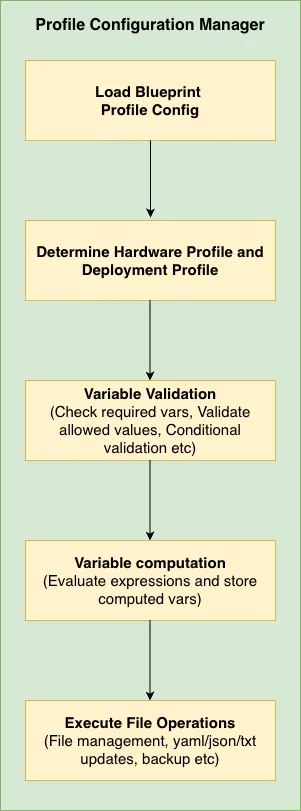
Profile Configuration Manager Architecture

Key Features:

  • Detects your GPU type (H100, GB300, L40S, RTXPRO6000BW, RTXPRO6000BW-SE, RTXPRO4500BW, IGX-THOR, DGX-SPARK).
  • Adjusts settings based on 2D or 3D deployment mode
  • Updates YAML, JSON, and text configuration files
  • Validates that your environment is configured correctly

When you need it:

  • Deploying to different GPU hardware
  • Switching between 2D and 3D modes
  • Ensuring configurations match hardware capabilities

Execution Flow:

  1. Load Environment Variables - Read HARDWARE_PROFILE, MODE, etc.
  2. Select Profile - Use the requested hardware profile if provided; unknown profile names are preserved and can still use commons configuration
  3. Validate Environment - Check env vars have valid values
  4. Execute Prerequisites - Run pre-processing operations (e.g., count files)
  5. Compute Variables - Calculate final_stream_count, timeouts, etc.
  6. Execute File Operations - Update YAML, JSON, text files

Quick Start

Minimal working example - Copy this and modify for your GPU:

# blueprint_config.yml
# Shared rules for ALL GPUs
commons:
variables:
2d:
- final_stream_count: "min(${NUM_STREAMS}, ${max_streams_supported})"
3d:
- final_stream_count: "min(${NUM_STREAMS}, ${max_streams_supported})"
file_operations:
2d:
- operation_type: "yaml_update"
target_file: "${DS_CONFIG_DIR}/config.yaml"
updates:
num_sensors: ${final_stream_count}
3d:
- operation_type: "yaml_update"
target_file: "${DS_CONFIG_DIR}/config.yaml"
updates:
num_sensors: ${final_stream_count}
# GPU-specific settings
H100:
2d:
max_streams_supported: 61
3d:
max_streams_supported: 19
GB300:
2d:
max_streams_supported: 161
3d:
max_streams_supported: 71

What happens:

  1. User sets HARDWARE_PROFILE=GB300, MODE=3d, and NUM_STREAMS=80
  2. Configurator looks up GB300’s 3D limit: max_streams_supported=71
  3. Computes: final_stream_count = min(80, 71) = 71
  4. Updates config.yaml with num_sensors: 71

That’s it! The GB300 GPU won’t be overloaded because the system automatically capped the streams.

Core Concepts

Two-Part Structure: Commons + Profiles

SectionPurposeAnalogy
commonsShared rules for ALL GPUsCompany-wide policies
H100, GB300, L40S, RTXPRO6000BW, RTXPRO6000BW-SE, RTXPRO4500BW, IGX-THOR, DGX-SPARKGPU-specific overrides/limitsDepartment-specific rules

How they work together:

commons:
variables:
3d:
- final_stream_count: "min(${NUM_STREAMS}, ${max_streams_supported})"
# ↑ This formula works for ANY GPU
H100:
3d:
max_streams_supported: 19 # H100's limit
# Uses commons formula → final_stream_count = min(NUM_STREAMS, 19)
GB300:
3d:
max_streams_supported: 71 # GB300's limit
# Uses commons formula → final_stream_count = min(NUM_STREAMS, 71)

The same formula produces different results based on each GPU’s capabilities.

Deployment Modes

The warehouse configuration has separate rules for each deployment mode:

ModeUse CaseResource Usage
2d2D Warehouse Blueprint (tracking, detection)Lower GPU load → more streams
3d3D Warehouse Blueprint (depth, positioning)Higher GPU load → fewer streams
mv3dtMulti-view 3D tracking with BEV fusionCapacity is defined independently per hardware profile

Example: The shipped GB300 profile supports 161 streams in 2D mode but 71 in 3D mode.

Inheritance Model

By default, Hardware profiles inherit from commons and can add their own rules:

Key point: Profile-specific settings are APPENDED to commons, not replaced (unless you explicitly disable inheritance).

commons is shared metadata and shared behavior. It is not a selectable hardware profile.

If HARDWARE_PROFILE is not present in the profile configuration file, the Configurator preserves the requested hardware profile name and runs with common configuration only. This is useful for deployments where the shared commons sections are enough for the selected mode. Commons-only operation works only when all referenced values can resolve without profile-specific variables, or when the configuration provides a fallback variable such as effective_max_streams_supported.

Required Environment Variables

The following environment variables must be set to use the Profile Configuration Manager:

VariableDefaultPossible ValuesDescription
ENABLE_PROFILE_CONFIGURATORfalsetrue, false| Must be set to true to activate the Profile Configurator. | true: Run profile configurator before starting API server, adjusts config files based on detected GPU | false: Skip profile configuration entirely (default)
HARDWARE_PROFILEdefaultWarehouse: H100, GB300, L40S, RTXPRO6000BW, RTXPRO6000BW-SE, RTXPRO4500BW, IGX-THOR, DGX-SPARK. Developer NIM env files also use OTHER.GPU slug matching a blueprint_config.yml hardware block (warehouse) or hw-<HARDWARE_PROFILE>.env (developer NIMs). Unknown slugs do not load those files.
MODE3d2d, 3d, mv3dt| Deployment mode for Warehouse Blueprint. | 2d: 2D tracking and detection | 3d: depth-aware tracking and positioning | mv3dt: multi-view 3D tracking with BEV fusion
NUM_STREAMS(user-defined)Non-negative integer| Desired number of video streams for profile formulas such as final_stream_count = min(${NUM_STREAMS}, ${max_streams_supported}). | The Sensor Configuration Manager also reads this value when SENSOR_INFO_SOURCE=nvstreamer: it is the expected camera count to wait for before VST registration (0 = wait for a stable non-empty list instead).

Optional Environment Variables

VariableDefaultPossible ValuesDescription
PROFILE_CONFIG_FILEgpu_configs_generic.yamlValid file pathPath to the hardware profile configuration YAML file containing GPU profiles and commons
RECOMPUTE_BEV_CENTERS_ENABLEDfalsetrue, false| Enable BEV group recomputation in mount mode for 3D and MV3DT profile operations. | With SENSOR_INFO_SOURCE=file, camera names come from SENSOR_FILE_PATH; other sources use retained video filename stems. | false: Use existing BEV groups from the calibration file.
ENABLE_SENSOR_CONFIGURATORtruetrue, false| Controls whether the Sensor Configuration Manager API server starts after the optional profile configuration step. | true: Start the API server and sensor mapping flow | false: Exit after profile configuration completes
DEPLOYMENT_MODES_ENABLEDtruetrue, false| Controls whether profile config uses mode-specific sections. | true: Read MODE and use nested 2d or 3d sections under commons and hardware profiles | false: Use mode-less profile configuration directly under the hardware profile, with direct or default commons lists. See Mode-less profile YAML.
LOG_LEVELINFODEBUG, INFO, WARN, ERROR| Logging verbosity level. | DEBUG: Detailed diagnostic information including variable substitutions | INFO: General operational messages | WARN: Warning messages for potential issues | ERROR: Error messages only
PROFILE_CONFIG_READY_FILE/tmp/profile_config_readyValid file path| Marker file path indicating profile configuration completed successfully. | Used by /readyz endpoint for Kubernetes readiness checks. | Created when profile configuration finishes successfully.
PORT5000Any valid port numberHTTP port used when the Sensor Configuration Manager API server starts
Mode-less profile YAML

When DEPLOYMENT_MODES_ENABLED=false, omit nested 2d / 3d keys. Commons lists can sit directly under commons or under commons.default. Hardware settings sit directly under the profile name:

commons:
variables:
- final_stream_count: "min(${NUM_STREAMS}, ${max_streams_supported})"
file_operations:
- operation_type: "yaml_update"
target_file: "${DS_CONFIG_DIR}/config.yaml"
updates:
num_sensors: ${final_stream_count}
H100:
max_streams_supported: 61

MODE is ignored in this layout. Warehouse blueprints keep DEPLOYMENT_MODES_ENABLED=true.

Configuration Reference

Config File Schema

Full Schema

The blueprint_config.yml file has this structure:

commons:
prerequisites: # Runs before variables, after validation (optional)
2d:
- operation_type: "file_management"
# ... operations that generate variables
3d:
- operation_type: "file_management"
variable_validation:
2d:
- variable: "VAR_NAME"
allowed_values: ["value1", "value2"]
3d:
- variable: "VAR_NAME"
allowed_patterns: ["pattern*"]
variables:
2d:
- variable_name: "expression"
3d:
- variable_name: "expression"
file_operations:
2d:
- operation_type: "..."
backup: true|false # Optional, default: true
3d:
- operation_type: "..."
HARDWARE_PROFILE:
2d:
max_streams_supported: <integer>
use_commons:
variable_validation: true|false|2d|3d
variables: true|false|2d|3d
file_operations: true|false|2d|3d
variable_validation:
- variable: "VAR_NAME"
variables:
- variable_name: "expression"
file_operations:
- operation_type: "..."
3d:
# Same structure as 2d
Field Reference

max_streams_supported

Type: Integer Required: Yes (for each deployment mode) Purpose: Maximum concurrent streams this GPU can handle

CUSTOM_GPU:
2d:
max_streams_supported: 9
3d:
max_streams_supported: 3

This value becomes available as ${max_streams_supported} in variable expressions. To add a new hardware profile (e.g. a new GPU), add a profile block with max_streams_supported for each mode; the profile automatically inherits all commons rules unless use_commons is set to false.

Refer to RT-DETR Real-Time Performance for 2D profile, 2D profile with Agents, and Sparse4D Real-Time Performance for 3D profile for more details on the max streams supported for a particular GPU. If GPU is not found in list, then increase the streams gradually to find the optimal number of streams that can be used.

Hardware Profiles Reference

The following hardware profiles are defined in blueprint_config.yml. Names and max_streams_supported values must match the config file.

Profile2D max streams3D max streamsMV3DT max streamsNotes
H100611961Stream limits only; inherits commons.
GB30016171—Stream limits only; inherits commons.
L40S28923Stream limits only; inherits commons.
RTXPRO6000BW522139Stream limits only; inherits commons.
RTXPRO6000BW-SE472039RTX PRO 6000 Blackwell Server Edition.
RTXPRO4500BW209—Stream limits only; inherits commons.
IGX-THOR987Extra file operations (DeepStream / VST).
DGX-SPARK777Extra file operations; image tags must contain sbsa.

use_commons

Type: Object Required: No (defaults to true for all) Purpose: Control inheritance from commons section

use_commons:
variable_validation: true|false|"2d"|"3d"
variables: true|false|"2d"|"3d"
file_operations: true|false|"2d"|"3d"

Values:

  • true (default): Use commons for current mode (2d or 3d)
  • false: Don’t use commons, only profile-specific
  • "2d" or "3d": Use commons from specified mode regardless of current mode

variables

Type: List of key-value dictionaries Required: No Purpose: Define computed values

variables:
- timeout_multiplier: "2"
- adjusted_timeout: "${timeout_multiplier} * 25000"

Variables are evaluated top-to-bottom, so later ones can reference earlier ones.

file_operations

Type: List of operation objects Required: No Purpose: Define config file modifications

See Operation Types Reference for details.

prerequisites

Type: List of operation objects Required: No Purpose: Operations that run BEFORE variable processing

Prerequisites are useful when you need to dynamically generate variables based on file system state. For example, counting video files before deciding stream limits.

commons:
prerequisites:
2d:
- operation_type: "file_management"
target_directories:
- "${VSS_DATA_DIR}/videos/warehouse-2d-app"
file_management:
action: "file_count"
parameters:
pattern: "*.mp4"
output_variable: "available_video_count"
variables:
2d:
# Now we can use the count from prerequisites
- final_stream_count: "min(${NUM_STREAMS}, ${available_video_count})"

Execution order: Validation -> Prerequisites -> Variables -> File Operations


Operation Types Reference

Choose the operation type by file format:

File TypeOperationTypical use
.yaml, .ymlyaml_updateKubernetes configs, application settings
.jsonjson_updateVST configs, API settings; optional array_kv_updates for JSON arrays
.txt, .conf, .cfgtext_config_updateDeepStream configs, INI-style files
(any text)text_replaceScripts, compose files, or other text where YAML/JSON parsers are too rigid
(any)file_managementKeep only N files in a directory, or count files (prerequisites)
Common Options (All Operations)

All file operations support these options:

backup - Automatic file backup

Type: Boolean Default: true Purpose: Create a timestamped backup before modifying the file

- operation_type: "yaml_update"
target_file: "${DS_CONFIG_DIR}/config.yaml"
backup: true # Creates: config.backup_20240115_143022.yaml
updates:
# ...
- operation_type: "json_update"
target_file: "${VST_CONFIG_DIR}/settings.json"
backup: false # No backup created (use with caution!)
updates:
# ...

Backup filename format: {original_name}.backup_{YYYYMMDD_HHMMSS}{extension}

enabled - Skip an operation without removing it from the YAML

Type: Boolean or ${VAR} after substitution Default: true (key omitted means enabled) Purpose: Run or skip a prerequisite or file operation. Warehouse keep_count uses enabled: false to leave sample videos in place. Values are substituted from computed variables, so enabled: "${trim_sample_videos}" works when that variable evaluates to true or false.

- operation_type: "file_management"
enabled: false # skipped entirely
target_directories:
- "${VSS_DATA_DIR}/videos/${SAMPLE_VIDEO_DATASET}"
file_management:
action: "keep_count"
parameters:
count: ${final_stream_count}
pattern: "*.mp4"
- operation_type: "file_management"
enabled: "${trim_sample_videos}" # skip when SENSOR_INFO_SOURCE=file, for example
target_directories:
- "${VSS_DATA_DIR}/videos/${SAMPLE_VIDEO_DATASET}"
file_management:
action: "keep_count"
parameters:
count: ${final_stream_count}
pattern: "*.mp4"

1. yaml_update

Updates values in YAML files while preserving structure.

- operation_type: "yaml_update"
target_file: "${DS_CONFIG_DIR}/config.yaml"
backup: true # Optional, default: true
updates:
num_sensors: ${final_stream_count}
enable_debug: false
nested.config.batch_size: 4 # Dot notation for nested keys

Before:

num_sensors: 1
enable_debug: true
nested:
config:
batch_size: 1

After:

num_sensors: 4
enable_debug: false
nested:
config:
batch_size: 4
2. text_config_update

Updates key-value pairs in text files (.txt, .conf, .cfg).

- operation_type: "text_config_update"
target_file: "${DS_CONFIG_DIR}/ds-main-config.txt"
backup: true # Optional, default: true
updates:
num-source-bins: "0"
max-batch-size: "${final_stream_count}"
batched-push-timeout: "50000"

Supported formats: key=value, key: value, key value

3. json_update

Updates values in JSON files with nested object support.

- operation_type: "json_update"
target_file: "${VST_CONFIG_DIR}/vst-config.json"
backup: true # Optional, default: true
updates:
data.nv_streamer_sync_file_count: ${final_stream_count}
overlay.enable_overlay_skip_frame: true

Before:

{
"data": {
"nv_streamer_sync_file_count": 1
},
"overlay": {
"enable_overlay_skip_frame": false
}
}

After:

{
"data": {
"nv_streamer_sync_file_count": 4
},
"overlay": {
"enable_overlay_skip_frame": true
}
}

Writes preserve the original indent style and whether the file ended with a newline.

array_kv_updates - Patch objects inside a JSON array by matching a field (dot notation in updates cannot target array elements). Used in warehouse configs to set Kafka vs Redis sourceType / sinkType on app[] entries.

- operation_type: "json_update"
target_file: "${VSS_APPS_DIR}/.../vss-behavior-analytics-config.json"
backup: true
array_kv_updates:
- list_key: app
match_field: name
updates:
- match: sourceType
set_key: value
set_value: "${warehouse_source_sink_type}"
- match: sinkType
set_key: value
set_value: "${warehouse_source_sink_type}"
FieldRequiredDescription
list_keyYesTop-level key whose value is a list of objects
match_fieldNoField to match on each element (default name)
updates[].matchYesValue of match_field to select an item
updates[].set_keyNoField to set on the matched item (default value)
updates[].set_valueYesNew value; supports ${VAR} substitution

You can combine updates (dot-notation keys) and array_kv_updates on the same json_update operation.

When a computed variable evaluates to a Python list or None, json_update writes a JSON array or null (for example kafka.brokers). See Typed list and null values.

4. text_replace

Ordered text edits on any file. Use when structured YAML/JSON parsers are too rigid (shell scripts, compose fragments, mixed text).

- operation_type: "text_replace"
target_file: "${DS_CONFIG_DIR}/ds-start.sh"
backup: true # Optional, default: true
operations:
- action: "replace"
pattern: "PLACEHOLDER"
replacement: "${final_stream_count}"
regex: false # Optional, default: false
count: 0 # Optional, 0 = replace all
- action: "comment_line"
pattern: "debug-dump"
marker: "# " # Optional, default: "# "
- action: "insert_after"
pattern: "export PATH"
lines:
- "export NUM_STREAMS=${final_stream_count}"
- action: "append_lines"
lines:
- "# generated by vss-configurator"
ActionKeysDescription
replacepattern, replacement, optional regex, countLiteral or regex find-and-replace (count: 0 means all)
comment_linepattern, optional regex, markerPrefix matching lines with a comment marker (default # )
insert_afterpattern, lines, optional regexInsert one or more lines after the first matching line
append_lineslinesAppend lines at the end of the file

Environment variables in pattern, replacement, and lines are substituted before the edit runs.

5. file_management

Manages files in directories. Supports two actions: keep_count and file_count.

Action: keep_count - Keep only N files, remove the rest

- operation_type: "file_management"
target_directories:
- "${VSS_DATA_DIR}/videos/warehouse-2d-app"
file_management:
action: "keep_count"
parameters:
count: ${final_stream_count}
pattern: "*.mp4"

Use case: If you can only process 4 streams, keep only 4 sample video files:

  • Before: 10 video files
  • After (count=4): 4 video files (first 4 alphabetically kept, rest removed)

When keep_count removes video files, each removed filename without its extension is treated as a sensor ID. If CALIBRATION_DIR_MOUNT_PATH and CALIBRATION_FILE_NAME point to calibration.json, matching sensors are removed from sensors, ROI sensors lists are filtered, and ROIs with no remaining sensors are dropped. After stream-count changes, verify the filtered calibration.json before relying on downstream calibration, ROI, or BEV behavior.

Action: file_count - Count files and store result in a variable

- operation_type: "file_management"
target_directories:
- "${VSS_DATA_DIR}/videos/warehouse-2d-app"
- "${VSS_DATA_DIR}/videos/warehouse-3d-app"
file_management:
action: "file_count"
parameters:
pattern: "*.mp4"
output_variable: "total_video_count"

Use case: Dynamically determine how many video files are available, then use that count in variable calculations.

Parameters:

ParameterRequiredDescription
actionYeskeep_count or file_count
parameters.countFor keep_countNumber of files to keep
parameters.patternNoGlob pattern (default: * for file_count, *.mp4 for keep_count)
output_variableFor file_countVariable name to store the count result

Note: file_count is typically used in the prerequisites section so the count is available for variable calculations


Variable System Reference

Declaration Syntax

Variables are declared as a list of single-key dictionaries:

variables:
- final_stream_count: "min(${NUM_STREAMS}, ${max_streams_supported})"
- batch_size: "max(1, ${final_stream_count})"
- timeout: "${batch_size} * 10000"

Evaluation order: Top to bottom. Later variables can reference earlier ones.

Environment Variable Substitution

Use ${VAR_NAME} to reference environment variables:

variables:
- stream_count: "${NUM_STREAMS}" # Direct reference
- config_path: "${DS_CONFIG_DIR}/configs" # Concatenation
- limited: "min(${NUM_STREAMS}, 4)" # In expressions
Supported Functions
FunctionDescriptionExample
min(a, b, ...)Returns minimum valuemin(${NUM_STREAMS}, 4)
max(a, b, ...)Returns maximum valuemax(1, ${count})
abs(x)Absolute valueabs(${diff})
round(x)Round to nearest integerround(${ratio})
int(x)Convert to integerint(${value})
float(x)Convert to floatfloat(${value})
Supported Operators
OperatorDescriptionExample
+Addition${NUM_STREAMS} + 1
-Subtraction${MAX_COUNT} - 2
*Multiplication${BATCH_SIZE} * 1000
/Division${TOTAL} / ${COUNT}
//Floor division${TOTAL} // 2
%Modulo${NUM} % 10
**Exponentiation2 ** 8
Conditional Expressions (If-Else)

Python-style ternary expressions:

variables:
- batch_size: "4 if ${num_cameras} > 10 else 2"

Syntax: value_if_true if condition else value_if_false

Comparison operators: >, <, >=, <=, ==, !=

Logical operators: and, or, not

Examples:

# Simple condition
- quality_mode: "high if ${gpu_memory} >= 16 else standard"
# Multiple conditions (AND)
- enable_hq: "true if ${gpu_memory} >= 16 and ${num_cameras} < 20 else false"
# Multiple conditions (OR)
- use_fallback: "true if ${mode} == 'legacy' or ${compatibility} == 'true' else false"
# Nested (if-elif-else)
- quality: "high if ${batch_size} >= 4 else medium if ${batch_size} >= 2 else low"
Typed list and null values

Most computed variables are stored as strings. If an expression evaluates to a list or None, the Configurator keeps that typed value and json_update can write a JSON array or null.

commons:
variables:
2d:
- warehouse_source_sink_type: '"kafka" if "${STREAM_TYPE}" == "kafka" else "redisStream"'
- vss_video_analytics_kafka_brokers: '["localhost:9092"] if "${STREAM_TYPE}" == "kafka" else None'
file_operations:
2d:
- operation_type: "json_update"
target_file: "${VSS_APPS_DIR}/services/analytics/video-analytics-api/configs/vss-video-analytics-api-config.json"
updates:
kafka.brokers: "${vss_video_analytics_kafka_brokers}"

Use a single ${VAR} as the entire update value so the typed object is applied. Concatenating a typed variable into a larger string falls back to string substitution.


Validation Reference

Basic Validation

allowed_values - Exact match against a list:

- variable: NIM
allowed_values: ["none", "local", "remote"]
error_message: "NIM must be one of: none, local, remote"

allowed_patterns - Wildcard match (* = any characters, ? = single character):

- variable: COMPOSE_PROFILES
allowed_patterns:
- "bp_wh_kafka*"
- "bp_wh_redis*"

disallowed_values - Block specific values:

- variable: MODE
disallowed_values: ["deprecated", "legacy", "test"]

disallowed_patterns - Block values matching patterns:

- variable: CONFIG_PATH
disallowed_patterns:
- "/tmp/*"
- "*/test/*"

regex - Regular expression match:

- variable: STREAM_ID
regex: "^stream_[0-9]{3}$"
error_message: "STREAM_ID must be in format stream_XXX (3 digits)"
Validation Options

required - Skip validation if variable is not set:

- variable: OPTIONAL_VAR
required: false
allowed_values: ["a", "b"]

error_message - Custom error message:

- variable: NIM
allowed_values: ["none", "local", "remote"]
error_message: "NIM configuration error: Check your environment settings."
Conditional Validation

Apply validation only when a condition is met:

- variable: API_KEY
condition:
variable: ENV
equals: "production"
regex: "^[A-Za-z0-9]{32}$"
error_message: "Production API_KEY must be 32 alphanumeric characters"

Condition operators:

OperatorDescriptionExample
equalsExact matchequals: "production"
not_equalsNot equalnot_equals: "test"
inIn listin: ["prod", "staging"]
not_inNot in listnot_in: ["dev", "test"]
matchesWildcard matchmatches: "prod_*"
regexRegex matchregex: "^v[0-9]+$"
is_setVariable existsis_set: true
Advanced Validation

Compound conditions (AND/OR):

# AND - all conditions must be true
- variable: COMPOSE_PROFILES
condition:
and:
- variable: MODE
equals: "2d"
- variable: STREAM_TYPE
equals: "kafka"
allowed_patterns:
- "bp_wh_kafka_2d*"
# OR - at least one condition must be true
- variable: CONFIG_PATH
condition:
or:
- variable: ENV
equals: "production"
- variable: ENV
equals: "staging"
disallowed_patterns:
- "/tmp/*"

Trigger-based validation (when_equals + validate_conditions):

Use this to validate OTHER variables when THIS variable has a specific value:

# When dataset is "nv-warehouse-4cams", validate that MODE=2d and NUM_STREAMS=4
- variable: SAMPLE_VIDEO_DATASET
when_equals: "nv-warehouse-4cams"
validate_conditions:
and:
- variable: MODE
equals: "2d"
- variable: NUM_STREAMS
equals: "4"
error_message: "Dataset nv-warehouse-4cams requires MODE=2d and NUM_STREAMS=4"

Logic:

  • IF SAMPLE_VIDEO_DATASET = "nv-warehouse-4cams" → check the conditions
  • IF SAMPLE_VIDEO_DATASET is anything else → skip this validation

Comparison: condition vs when_equals:

PatternUse CaseLogic
condition + allowed_valuesValidate THIS variable when OTHER conditions metIF (conditions) THEN validate this variable
when_equals + validate_conditionsValidate OTHER variables when THIS has specific valueIF (this = value) THEN validate other variables

Examples & Best Practices

Complete Examples

Example 1: Minimal Profile (Most Common)

Just specify stream limits; inherit everything else:

H100:
2d:
max_streams_supported: 61
3d:
max_streams_supported: 19

“I’m an H100. I can handle 61 streams in 2D and 19 in 3D. Use all standard rules from commons.”

Example 2: Profile with Extra Operations

Inherit commons but add GPU-specific operations:

IGX-THOR:
2d:
max_streams_supported: 9
file_operations:
- operation_type: "text_config_update"
target_file: "${DS_CONFIG_DIR}/ds-main-config.txt"
updates:
drop-on-latency: "1"
msg-conv-msg2p-lib: /opt/nvidia/deepstream/deepstream/lib/libnvds_msgconv.so
compute-hw: "2"
low-latency-mode: "0"
# ... ds-main-redis-config.txt, ds-nvdcf-accuracy-tracker-config.yml
3d:
max_streams_supported: 8
file_operations:
# These APPEND to commons.file_operations.3d
- operation_type: "text_config_update"
target_file: "${DS_CONFIG_DIR}/ds-main-config.txt"
updates:
batched-push-timeout: "67000"
low-latency-mode: "0"
- operation_type: "yaml_update"
target_file: "${DS_CONFIG_DIR}/config.yaml"
backup: true
updates:
interval: "1"
- operation_type: "json_update"
target_file: "${MDX_SAMPLE_APPS_DIR}/vst/3d/vst/configs/vst_config_kafka.json"
updates:
overlay.enable_overlay_skip_frame: true
- operation_type: "json_update"
target_file: "${MDX_SAMPLE_APPS_DIR}/vst/3d/vst/configs/vst_config_redis.json"
updates:
overlay.enable_overlay_skip_frame: true

“I’m an IGX-THOR. Use commons rules, BUT add extra config changes for 2D (DeepStream/VPI) and 3D (timeouts, VST overlay).”

Execution order:

  1. Commons file operations run first
  2. IGX-THOR specific operations run after
Example 3: Profile with Custom Variables

Add calculated variables for a less powerful GPU:

CUSTOM_GPU:
3d:
max_streams_supported: 2
variables:
# Appended to commons variables
- timeout_multiplier: "2"
- adjusted_timeout: "${timeout_multiplier} * 25000"
file_operations:
- operation_type: "text_config_update"
target_file: "${DS_CONFIG_DIR}/ds-main-config.txt"
updates:
batched-push-timeout: "${adjusted_timeout}"

“I’m a CUSTOM_GPU (slower GPU). I need 2× longer timeouts.”

Example 4: Complete Override

Completely custom behavior, ignoring commons:

EXPERIMENTAL_GPU:
2d:
max_streams_supported: 8
use_commons:
variables: false
file_operations: false
variables:
- custom_count: "min(${NUM_STREAMS}, 8)"
- custom_batch: "${custom_count} * 2"
file_operations:
- operation_type: "yaml_update"
target_file: "${DS_CONFIG_DIR}/experimental.yaml"
updates:
streams: ${custom_count}
batch_size: ${custom_batch}

“I’m experimental hardware. Ignore all commons; I define everything myself.”

Example 5: Using Prerequisites and File Count

Dynamic configuration based on available files:

commons:
prerequisites:
2d:
# Count how many video files are available
- operation_type: "file_management"
target_directories:
- "${VSS_DATA_DIR}/videos/warehouse-2d-app"
file_management:
action: "file_count"
parameters:
pattern: "*.mp4"
output_variable: "available_video_count"
3d:
- operation_type: "file_management"
target_directories:
- "${VSS_DATA_DIR}/videos/warehouse-3d-app"
file_management:
action: "file_count"
parameters:
pattern: "*.mp4"
output_variable: "available_video_count"
variables:
2d:
# Can't use more streams than we have videos
- final_stream_count: "min(${NUM_STREAMS}, ${available_video_count}, ${max_streams_supported})"
3d:
- final_stream_count: "min(${NUM_STREAMS}, ${available_video_count}, ${max_streams_supported})"
file_operations:
2d:
- operation_type: "yaml_update"
target_file: "${DS_CONFIG_DIR}/config.yaml"
backup: true # Keep backup before modifying
updates:
num_sensors: ${final_stream_count}
H100:
2d:
max_streams_supported: 61
3d:
max_streams_supported: 19

“Count available videos first, then limit streams to the minimum of: user request, available videos, and GPU capacity.”

Example 6: Full Configuration File

A complete blueprint_config.yml showing all features:

# Shared rules for all GPUs
commons:
variable_validation:
2d:
- variable: NIM
required: false
allowed_values: ["none", "local", "remote"]
error_message: "NIM must be: none, local, or remote"
3d:
- variable: NIM
required: false
allowed_values: ["none", "local", "remote"]
variables:
2d:
- final_stream_count: "min(${NUM_STREAMS}, ${max_streams_supported})"
- batch_size: "4 if ${final_stream_count} > 10 else 2"
3d:
- final_stream_count: "min(${NUM_STREAMS}, ${max_streams_supported})"
- batch_size: "2 if ${final_stream_count} > 6 else 1"
file_operations:
2d:
- operation_type: "yaml_update"
target_file: "${DS_CONFIG_DIR}/config.yaml"
updates:
num_sensors: ${final_stream_count}
batch_size: ${batch_size}
- operation_type: "file_management"
target_directories:
- "${VSS_DATA_DIR}/videos/warehouse-2d-app"
file_management:
action: "keep_count"
parameters:
count: ${final_stream_count}
pattern: "*.mp4"
3d:
- operation_type: "yaml_update"
target_file: "${DS_CONFIG_DIR}/config.yaml"
updates:
num_sensors: ${final_stream_count}
batch_size: ${batch_size}
# Hardware profiles
H100:
2d:
max_streams_supported: 61
3d:
max_streams_supported: 19
mv3dt:
max_streams_supported: 61
GB300:
2d:
max_streams_supported: 161
3d:
max_streams_supported: 71
L40S:
2d:
max_streams_supported: 28
3d:
max_streams_supported: 9
mv3dt:
max_streams_supported: 23
RTXPRO6000BW:
2d:
max_streams_supported: 52
3d:
max_streams_supported: 21
mv3dt:
max_streams_supported: 39
RTXPRO6000BW-SE:
2d:
max_streams_supported: 47
3d:
max_streams_supported: 20
mv3dt:
max_streams_supported: 39
RTXPRO4500BW:
2d:
max_streams_supported: 20
3d:
max_streams_supported: 9
IGX-THOR:
2d:
max_streams_supported: 9
file_operations:
- operation_type: "text_config_update"
target_file: "${DS_CONFIG_DIR}/ds-main-config.txt"
updates:
drop-on-latency: "1"
msg-conv-msg2p-lib: /opt/nvidia/deepstream/deepstream/lib/libnvds_msgconv.so
compute-hw: "2"
low-latency-mode: "0"
- operation_type: "text_config_update"
target_file: "${DS_CONFIG_DIR}/ds-main-redis-config.txt"
updates:
drop-on-latency: "1"
msg-conv-msg2p-lib: /opt/nvidia/deepstream/deepstream/lib/libnvds_msgconv.so
compute-hw: "2"
low-latency-mode: "0"
- operation_type: "yaml_update"
target_file: "${DS_CONFIG_DIR}/ds-nvdcf-accuracy-tracker-config.yml"
backup: true
updates:
TargetManagement.maxTargetsPerStream: 50
VisualTracker.visualTrackerType: 2
VisualTracker.vpiBackend4DcfTracker: 2
3d:
max_streams_supported: 8
file_operations:
- operation_type: "text_config_update"
target_file: "${DS_CONFIG_DIR}/ds-main-config.txt"
updates:
batched-push-timeout: "67000"
low-latency-mode: "0"
- operation_type: "text_config_update"
target_file: "${DS_CONFIG_DIR}/ds-main-redis-config.txt"
updates:
batched-push-timeout: "67000"
low-latency-mode: "0"
- operation_type: "yaml_update"
target_file: "${DS_CONFIG_DIR}/config.yaml"
backup: true
updates:
interval: "1"
- operation_type: "json_update"
target_file: "${MDX_SAMPLE_APPS_DIR}/vst/3d/vst/configs/vst_config_kafka.json"
updates:
overlay.enable_overlay_skip_frame: true
- operation_type: "json_update"
target_file: "${MDX_SAMPLE_APPS_DIR}/vst/3d/vst/configs/vst_config_redis.json"
updates:
overlay.enable_overlay_skip_frame: true
DGX-SPARK:
2d:
max_streams_supported: 7
file_operations:
- operation_type: "text_config_update"
target_file: "${DS_CONFIG_DIR}/ds-main-config.txt"
updates:
msg-conv-msg2p-lib: /opt/nvidia/deepstream/deepstream/lib/libnvds_msgconv.so
- operation_type: "text_config_update"
target_file: "${DS_CONFIG_DIR}/ds-main-redis-config.txt"
updates:
msg-conv-msg2p-lib: /opt/nvidia/deepstream/deepstream/lib/libnvds_msgconv.so
3d:
max_streams_supported: 7
file_operations:
- operation_type: "text_config_update"
target_file: "${DS_CONFIG_DIR}/ds-main-config.txt"
updates:
batched-push-timeout: "67000"
- operation_type: "text_config_update"
target_file: "${DS_CONFIG_DIR}/ds-main-redis-config.txt"
updates:
batched-push-timeout: "67000"
- operation_type: "yaml_update"
target_file: "${DS_CONFIG_DIR}/config.yaml"
backup: true
updates:
interval: "1"
- operation_type: "json_update"
target_file: "${MDX_SAMPLE_APPS_DIR}/vst/3d/vst/configs/vst_config_kafka.json"
updates:
overlay.enable_overlay_skip_frame: true
- operation_type: "json_update"
target_file: "${MDX_SAMPLE_APPS_DIR}/vst/3d/vst/configs/vst_config_redis.json"
updates:
overlay.enable_overlay_skip_frame: true

Adding a New Hardware Profile

You do not always need to add a profile for hardware that is not in the predefined list (H100, GB300, L40S, etc.). If the shared commons configuration can resolve all variables for the selected mode, the Configurator preserves the requested HARDWARE_PROFILE value and applies commons-only configuration.

Add a profile in blueprint_config.yml when the hardware needs profile-specific values, such as stream limits, timeouts, or file updates. Commons-only custom hardware also needs either no profile-specific variable references, or fallback variables such as effective_max_streams_supported. If commons validation restricts HARDWARE_PROFILE to an allowed list, update that validation before using a new custom value.

Steps:

  1. Add a profile block only if needed in blueprint_config.yml under the hardware profiles section. Use a clear, unique name (e.g. MY-GPU, CUSTOM-EDGE) that you will set in HARDWARE_PROFILE.

  2. Define stream limits for each mode. At minimum, set max_streams_supported for 2d and 3d. The configurator will inherit all commons rules (variables, file_operations, validation) unless you override them.

  3. Optional: Add profile-specific variables or file_operations if this hardware needs different timeouts, config keys, or file updates than the commons.

  4. Optional: If the new profile name must be accepted by validation, add it to the HARDWARE_PROFILE allowed_values in the commons.variable_validation section for both 2d and 3d.

Minimal new hardware (stream limits only):

# In blueprint_config.yml - add alongside H100, GB300, etc.
MY-GPU:
2d:
max_streams_supported: 6
3d:
max_streams_supported: 4

Then set HARDWARE_PROFILE=MY-GPU when deploying. Commons will apply; stream count will be capped to 6 (2D) or 4 (3D).

New hardware with custom config updates:

CUSTOM-EDGE:
2d:
max_streams_supported: 4
3d:
max_streams_supported: 3
variables:
- timeout_multiplier: "2"
- adjusted_timeout: "${timeout_multiplier} * 25000"
file_operations:
- operation_type: "text_config_update"
target_file: "${DS_CONFIG_DIR}/ds-main-config.txt"
updates:
batched-push-timeout: "${adjusted_timeout}"
- operation_type: "text_config_update"
target_file: "${DS_CONFIG_DIR}/ds-main-redis-config.txt"
updates:
batched-push-timeout: "${adjusted_timeout}"

Here the profile inherits commons and adds longer timeouts and extra file updates for 3D mode. Ensure CUSTOM-EDGE is added to allowed_values for HARDWARE_PROFILE in commons.variable_validation if you use validation.

Best Practices

  1. Use Commons for Shared Logic

    Put common calculations and operations in the commons section. Most profiles should only specify max_streams_supported.

  2. Keep Profiles Simple

    A minimal profile is better:

    H100:
    2d:
    max_streams_supported: 61
    3d:
    max_streams_supported: 19
  3. Use Variables for Computed Values

    Don’t hardcode values that depend on hardware:

    # Good - adapts to hardware
    num_sensors: ${final_stream_count}
    # Bad - hardcoded
    num_sensors: 4
  4. Validate Early

    Use variable validation to catch errors before they cause runtime failures.

  5. Use Meaningful Names

    Choose descriptive variable names:

    # Good
    - final_stream_count: "min(${NUM_STREAMS}, ${max_streams_supported})"
    # Bad
    - x: "min(${NUM_STREAMS}, ${max_streams_supported})"
  6. Keep Conditionals Simple

    Prefer simple conditions over deeply nested ternaries:

    # Good - readable
    - quality: "high if ${streams} <= 4 else standard"
    # Avoid - hard to read
    - quality: "ultra if ${a} > 10 else high if ${b} > 5 and ${c} < 3 else medium if ${d} else low"
  7. Document Custom Configurations

    Add comments explaining why profile-specific overrides are needed:

    CUSTOM_GPU:
    3d:
    max_streams_supported: 2
    variables:
    # CUSTOM_GPU needs longer timeouts due to slower processing
    - timeout_multiplier: "2"
  8. Test All Modes

    Ensure your config works for both 2d and 3d modes on each hardware profile.


Troubleshooting

Common Errors

“Variable not found” or empty value

ERROR - Variable ${final_stream_count} not found

Causes:

  • Variable name typo
  • Variable defined after it’s used (evaluation order matters)
  • Variable defined in different mode section

Fix: Check spelling and ensure variables are defined before use:

variables:
- final_stream_count: "..." # Define first
- batch_size: "${final_stream_count}" # Then use

“Validation failed”

ERROR - Validation failed: NIM must be one of: none, local, remote

Cause: Environment variable has invalid value.

Fix: Check your environment variable:

echo $NIM # Should be: none, local, or remote

“File not found” or “Permission denied”

ERROR - Cannot update file: /opt/configs/config.yaml

Causes:

  • Path doesn’t exist
  • Environment variable in path is not set
  • Permission issues

Fix: Verify the path and environment variables:

echo $DS_CONFIG_DIR # Check the variable is set
ls -la $DS_CONFIG_DIR/config.yaml # Check file exists

“Hardware profile not found, using common configurations only”

WARNING - Hardware profile: UNKNOWN_GPU not found in GPU configurations: [...]. Using common configurations only

Cause: HARDWARE_PROFILE does not match a top-level hardware profile in the profile configuration file.

Fix: If commons-only behavior is intended, make sure all commons variables and file operations can resolve without profile-specific values, or provide fallbacks such as effective_max_streams_supported. If the hardware needs profile-specific limits or file updates, add a profile block and update any HARDWARE_PROFILE validation rules that restrict allowed values.

echo $HARDWARE_PROFILE

“Variable from file_count not available”

ERROR - Variable ${available_video_count} not found

Cause: The file_count operation is in file_operations instead of prerequisites.

Fix: Move file_count to prerequisites so it runs before variable processing:

commons:
prerequisites: # ← Correct location
2d:
- operation_type: "file_management"
file_management:
action: "file_count"
output_variable: "available_video_count"
variables:
2d:
- final_count: "${available_video_count}" # Now available

“Backup file not created”

Causes:

  • backup: false is explicitly set
  • Permission issues in the target directory
  • Target file doesn’t exist (nothing to backup)

Fix: Check your operation has backup: true (or omit it, since true is the default):

- operation_type: "yaml_update"
target_file: "${DS_CONFIG_DIR}/config.yaml"
backup: true # Explicit, or just remove this line
updates:
# ...
Debugging Tips
  1. Check environment variables first:

    echo "HARDWARE_PROFILE=$HARDWARE_PROFILE"
    echo "MODE=$MODE"
    echo "NUM_STREAMS=$NUM_STREAMS"
  2. Use simple profiles to isolate issues:

    DEBUG_GPU:
    2d:
    max_streams_supported: 4
    3d:
    max_streams_supported: 4
  3. Check variable evaluation order:

    Variables are processed top-to-bottom. A variable can only reference variables defined above it.

  4. Verify file paths exist:

    Before running the configurator, check that target files exist at the expected paths.

  5. Review the execution flow:

    Remember: Validation → Prerequisites → Variables → File Operations

    • If validation fails, prerequisites, variables, and file operations will not run
    • If prerequisites fail, variables and file operations will not run
    • Variables from file_count are only available if defined in prerequisites

Sensor Configuration Manager

Overview

The Sensor Configuration Manager handles camera/sensor configurations for blueprint deployments. It runs as a background service alongside the Profile Configurator.

What it does:

  • Fetches sensor information from various sources (Sensor Bridge, NVStreamer, or file)
  • Fetches calibration data from various sources (API, upload, or file mount)
  • Creates sensor mappings with RTSP URLs, groups, and regions
  • Registers sensors with VMS
  • Publishes sensor configuration events to message brokers (Kafka/Redis)

Architecture:
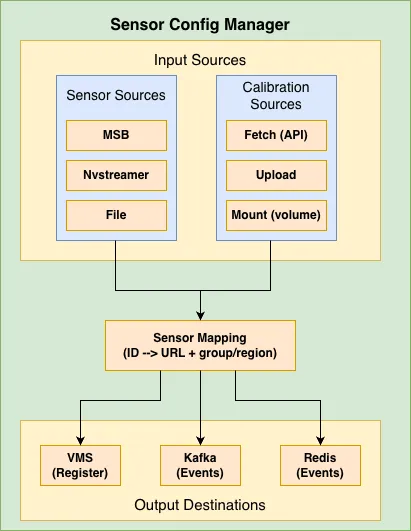
Sensor Configuration Manager Architecture

Core Concepts

Sensor Information Sources

The manager can fetch sensor information from these sources:

SourceEnvironment VariableDescription
msbSENSOR_INFO_SOURCE=msbMetropolis Sensor Bridge - fetches RTSP URLs from sensor bridge service
nvstreamerSENSOR_INFO_SOURCE=nvstreamerNVStreamer - fetches streams from NVIDIA streaming service with validation. Waits for a complete stream list before VST registration (see NUM_STREAMS below).
fileSENSOR_INFO_SOURCE=fileJSON file - reads sensor definitions from a mounted file
not_requiredSENSOR_INFO_SOURCE=not_requiredSkip sensor fetch, mapping, VMS add, broker publish, and startup calibration processing. Calibration HTTP endpoints remain available when ENABLE_CALIBRATION_PROCESS=true, but no sensor mapping is generated unless one was already loaded from disk. /cameras and /groups return 503 until a mapping exists.

Calibration Modes

Calibration data contains camera parameters (intrinsic/extrinsic) needed for warehouse blueprint.

ModeEnvironment VariableDescription
fetchCALIBRATION_MODE=fetchPeriodically fetches calibration from an API endpoint (default)
uploadCALIBRATION_MODE=uploadAccepts calibration data via POST to /calibration endpoint
mountCALIBRATION_MODE=mountReads calibration from a volume-mounted file

Sensor Mapping

The sensor mapping connects:

  • Sensor ID/Name - Unique identifier for the camera
  • RTSP URL - Stream URL for the camera
  • Group ID - Logical grouping of cameras
  • Region - Physical location/area

Example mapping:

{
"sensors": {
"camera-01": {
"name": "camera-01",
"url": "rtsp://<IP_address:port>/stream1",
"group_id": "entrance-group",
"region": "building-A"
},
"camera-02": {
"name": "camera-02",
"url": "rtsp://<IP_address:port>/stream1",
"group_id": "parking-group",
"region": "building-B"
}
}
}

Configuration Reference

This section provides a comprehensive reference for all environment variables used by the Sensor Configuration Manager.

This reference lists environment variables read by the VSS Configurator service source code. Deployment and profile-config variables such as BP_PROFILE, STREAM_TYPE, COMPOSE_PROFILES, VSS_APPS_DIR, and VSS_DATA_DIR are inputs to the warehouse deployment and profile configuration files. They are documented in the Warehouse Quickstart and profile examples, and are not Sensor Configuration Manager runtime knobs unless a profile configuration file references them.

General Settings

VariableDefaultPossible ValuesDescription
ENABLE_PROFILE_CONFIGURATORfalsetrue, false| Starts the Profile Configuration Manager before the API server. | When true, /readyz checks only the profile-config marker file.
ENABLE_SENSOR_CONFIGURATORtruetrue, false| Starts the Sensor Configuration Manager API server after the optional profile configuration step. | When false, the container exits after profile configuration.
LOG_LEVELINFODEBUG, INFO, WARN, ERROR| Logging verbosity level. | DEBUG: Detailed diagnostic information | INFO: General operational messages | WARN: Warning messages for potential issues | ERROR: Error messages only
PORT5000Any valid port numberHTTP port for the Flask API server
MODE3d2d, 3d, mv3dt| Deployment mode for Warehouse Blueprint. | 2d: 2D tracking and detection | 3d: depth-aware tracking and positioning | mv3dt: multi-view 3D tracking with BEV fusion

Calibration Settings

VariableDefaultPossible ValuesDescription
ENABLE_CALIBRATION_PROCESStruetrue, false| Master switch for calibration processing. | true: Enable calibration data processing and sensor mapping | false: Disable calibration endpoints and processing
CALIBRATION_MODEfetchfetch, upload, mount| How calibration data is obtained. | fetch: Calls API endpoint on startup, retries every GET_CALIBRATION_DELAY seconds until successful, saves fetched data locally for persistence | upload: Accepts data via POST to /calibration endpoint | mount: Reads from the volume-mounted file at ${CALIBRATION_DIR_MOUNT_PATH}/${CALIBRATION_FILE_NAME} on startup
CALIBRATION_API_ENDPOINT(empty)Valid HTTP/HTTPS URL| API endpoint URL for fetching calibration data. | Required when CALIBRATION_MODE=fetch | Example: http://config-service:8080/api/calibration
CALIBRATION_API_TIMEOUT30Positive integer (seconds)Timeout in seconds for calibration API requests
GET_CALIBRATION_DELAY30Positive integer (seconds)| Delay between calibration fetch retry attempts. | Used when API is unavailable or file not found (upload mode)
CALIBRATION_DIR_MOUNT_PATH/usr/src/app/calibration_storeValid directory pathDirectory path where calibration files are stored
CALIBRATION_FILE_NAMEcalibration.jsonValid filenameName of the calibration JSON file
CHECK_SENSOR_IN_CALIBRATION_FILEfalsetrue, false| Deployment compatibility variable retained in some environments. | The current service source does not read this variable; sensor/calibration mismatches are handled by the sensor mapping flow.

Uploading Calibration Data (upload mode):

curl -X POST http://localhost:5000/calibration \
-H "Content-Type: application/json" \
-d @calibration.json

Mount Mode Volume Example:

-v /host/path/calibration.json:/usr/src/app/calibration_store/calibration.json

Sensor Source Settings

VariableDefaultPossible ValuesDescription
SENSOR_INFO_SOURCEmsbmsb, nvstreamer, file, not_required| Source for sensor/camera information. | msb: Metropolis Sensor Bridge - fetches RTSP URLs from sensor bridge service | nvstreamer: NVStreamer - fetches streams from NVIDIA streaming service with validation | file: JSON file - reads sensor definitions from mounted JSON file | not_required: Skip sensor fetch, mapping, VMS add, broker publish, and startup calibration processing. HTTP endpoints still run; mapping-dependent routes return 503 unless a persisted mapping was loaded.
SENSOR_BRIDGE_HTTP_ENDPOINThttp://localhost:8000/mtmc/urlsValid HTTP URL| HTTP endpoint for Metropolis Sensor Bridge. | Used when SENSOR_INFO_SOURCE=msb
SENSOR_BRIDGE_RTSP_SERVICE_NAME(empty)Hostname or IP| Override hostname/IP in RTSP URLs from sensor bridge. | Useful when sensor bridge returns internal IPs that need translation
SENSOR_FILE_PATH${CALIBRATION_DIR_MOUNT_PATH}/sensors.jsonValid file path| Path to sensors JSON file. | Used when SENSOR_INFO_SOURCE=file

Sensor File Format (for file mode):

{
"sensors": [
{
"camera_name": "camera-01",
"rtsp_url": "rtsp://<IP_address:port>/stream1",
"group_id": "entrance-group",
"region": "building-A"
},
{
"camera_name": "camera-02",
"rtsp_url": "rtsp://<IP_address:port>/stream1"
}
]
}

Required fields: camera_name, rtsp_url

Optional fields: group_id, region (can also be obtained from calibration data)

When SENSOR_INFO_SOURCE=file, the RTSP URLs provided in the sensor info source file must be accessible from the machine where VSS is deployed. If the RTSP streams originate from remote machines, ensure those streams are discoverable by VIOS.

NVStreamer Settings

The defaults in this table are the Sensor Configuration Manager’s standalone application fallbacks. The shipped VSS Compose deployment overrides both endpoint variables with http://${NVSTREAMER_IP}:${NVSTREAMER_HTTP_PORT}/api/v1/sensor/...; the NVStreamer service defaults NVSTREAMER_HTTP_PORT to 31000.

VariableDefaultPossible ValuesDescription
NVSTREAMER_STREAMS_ENDPOINThttp://localhost:30000/api/v1/live/streamsValid HTTP URL| NVStreamer API endpoint for listing available streams. | Used when SENSOR_INFO_SOURCE=nvstreamer
NVSTREAMER_SENSOR_STATUS_ENDPOINThttp://localhost:30000/api/v1/sensor/statusValid HTTP URL| NVStreamer API endpoint for checking stream status. | Used to validate streams are online before adding
NUM_STREAMS0Non-negative integer| Expected NVStreamer camera count when SENSOR_INFO_SOURCE=nvstreamer. | > 0: Poll until the live stream list has at least this many entries before registering with VST. | 0: Wait until a non-empty list stays the same size across two consecutive polls. | Same variable as the Profile Configuration Manager stream cap.
NVSTREAMER_STREAMS_ENDPOINT_TIMEOUT120Positive integer (seconds)| After NVStreamer returns a non-empty but incomplete list, keep polling for this many seconds. Then proceed with the list collected so far and log a warning. | Unreachable, non-200, or empty responses retry indefinitely and do not consume this timer. Poll interval is 5 seconds.
NVSTREAMER_STREAM_VALIDATION_MAX_RETRIES50Positive integer| Maximum number of retry attempts for stream validation. | Each stream is validated to be online before adding to mapping
NVSTREAMER_STREAM_VALIDATION_RETRY_DELAY5Positive integer (seconds)Delay between stream validation retry attempts

VMS Integration Settings

VariableDefaultPossible ValuesDescription
CALL_SENSOR_ADD_APItruetrue, false| Enable automatic sensor registration with VMS. | true: Register each sensor with VMS via API call | false: Skip VMS registration
VST_CAMERA_ADD_ENDPOINThttp://vms-vms-svc:30000/api/v1/sensor/addValid HTTP URL| VMS API endpoint for sensor registration. | Sensors are registered with name, URL, and tags (region|group_id)
VST_CAMERA_ADD_TIMEOUT15Positive integer (seconds)Request timeout for VMS sensor registration. Keep this above expected ingress/VST cold-add latency so client timeouts do not create 499s while VST continues processing.

Sensor Registration Details:

Each sensor is registered with the VMS containing:

  • Sensor name: Unique identifier for the camera
  • RTSP URL: Stream URL for the camera
  • Tags: Combined region and group_id in format region|group_id

The add call retries until success. A client timeout or HTTP 499 can occur while VST is still processing a slow add; the next retry may then see HTTP 400 with Sensor exists already for the same RTSP URL, which the Configurator treats as success. A same-name / different-URL collision (User given name is invalid or already exists) is a real conflict and continues to retry.

Message Broker Settings

Common Settings:

VariableDefaultPossible ValuesDescription
MESSAGE_BROKER_TYPEkafkakafka, redis| Type of message broker for publishing sensor events. | kafka: Use Apache Kafka for event streaming | redis: Use Redis Streams for event streaming
SEND_CONFIG_TO_SDRtruetrue, false| Enable sending sensor configuration events to message broker. | true: Publish sensor config events after mapping is created | false: Skip message broker publishing

Kafka Settings:

VariableDefaultPossible ValuesDescription
WDM_KFK_BOOTSTRAP_URL(empty)Comma-separated host:port list| Kafka bootstrap servers. | Required when MESSAGE_BROKER_TYPE=kafka | Example: kafka:9092 or kafka1:9092,kafka2:9092
WDM_KFK_TOPIC(empty)Valid Kafka topic name| Kafka topic for publishing sensor configuration events. | Example: sensor.config
WDM_KFK_MSG_KEYsensorStringKafka message key for sensor configuration messages
WDM_WL_ID_FIELDcamera_idString| Field name for sensor/camera ID in message payload. | Used in both Kafka and Redis message formats
WDM_WL_EVENT_FIELDeventString| Field name for event data in message payload. | Used in both Kafka and Redis message formats

Redis Settings:

VariableDefaultPossible ValuesDescription
WDM_REDIS_HOSTlocalhostHostname or IPRedis server hostname or IP address
WDM_REDIS_PORT6379Valid port numberRedis server port
REDIS_DB00-15| Redis database number. | Redis supports databases 0-15 by default
WDM_REDIS_STREAM_NAMEsensorString| Redis stream name for publishing sensor configuration events. | Example: sensor.config
WDM_REDIS_MSG_KEYsensor.idStringField name/key used in Redis stream messages

Redis Duplicator Settings:

VariableDefaultPossible ValuesDescription
ENABLE_REDIS_DUPLICATOR_THREADfalsetrue, false| Enable Redis event duplication thread. | true: Read events from source topic and duplicate to CV and PN26 topics | false: Disable event duplication
REDIS_SOURCE_TOPICvst.eventString| Source Redis stream to read events from. | Events from this stream are duplicated to target topics
REDIS_TARGET_TOPIC_CVvst.event.cvString| Target Redis stream for CV (Computer Vision) events. | Camera names get CV_SUFFIX appended
REDIS_TARGET_TOPIC_PN26vst.event.pn26String| Target Redis stream for PN26 events. | Camera names get PN_SUFFIX appended

How Redis Duplicator Works:

  1. Reads events from the source stream (e.g., vst.event)
  2. For CV target topic: appends CV_SUFFIX to camera names (e.g., camera-01 → camera-01-cv)
  3. For PN26 target topic: appends PN_SUFFIX to camera names (or uses original if empty)
  4. Publishes modified events to both target streams simultaneously

Naming/Suffix Settings

VariableDefaultPossible ValuesDescription
CV_SUFFIX-cvString| Suffix appended to camera names for CV (Computer Vision) pipeline. | Example: camera-01 becomes camera-01-cv
PN_SUFFIX(empty)String| Suffix appended to camera names for PN26 pipeline. | Empty by default (no suffix added)

Config Message Metadata Settings

VariableDefaultPossible ValuesDescription
CONFIG_TOPIC_PREFIXmdx-bevString| Topic prefix included in Kafka and Redis config message metadata. | Used by downstream services for topic naming
CONFIG_TOPIC_PARTITION10Positive integer| Topic partition count included in Kafka and Redis config message metadata. | Used by downstream services for partitioning

Video Upload Settings

VariableDefaultPossible ValuesDescription
ENABLE_NVSTREAMER_VIDEO_UPLOADfalsetrue, false| Upload videos from VIDEO_SOURCE_DIR to NVStreamer before sensor data processing. | The upload status is exposed by GET /video-upload-status.
ENABLE_VMS_VIDEO_UPLOADfalsetrue, false| Upload videos from VIDEO_SOURCE_DIR to VMS before sensor data processing. | Can be enabled independently or together with NVStreamer upload.
VIDEO_SOURCE_DIR(empty)Valid directory pathDirectory containing videos to upload when either video upload switch is enabled
VIDEO_UPLOAD_TIMEOUT300Positive integer (seconds)Timeout used for individual video upload requests
VIDEO_UPLOAD_DELAY0Non-negative integer (seconds)Delay between video upload attempts
NVSTREAMER_UPLOAD_BASE_URLhttp://localhost:30000Valid HTTP URLBase URL for NVStreamer video upload; the service posts to /api/v1/storage/file under this base URL
VMS_UPLOAD_BASE_URLhttp://localhost:30888Valid HTTP URLBase URL for VMS video upload. Each file is sent with PUT to {base}/vst/api/v1/storage/file/{file_name}/{iso8601_timestamp} (Content-Type video/mp4 or video/x-matroska for .mp4 / .mkv).

NVSTREAMER_UPLOAD_BASE_URL is not overridden by the shipped Configurator Compose file. When you enable ENABLE_NVSTREAMER_VIDEO_UPLOAD, set it explicitly to an NVStreamer address reachable from the Configurator container; do not rely on the standalone fallback for a Compose deployment.

Examples

Example 1: Upload Mode with Redis

Gets sensor/RTSP URLs from the Metropolis Sensor Bridge (MSB) and accepts calibration via POST to /calibration (upload mode). Publishes sensor configuration events to Redis; use when you have an external sensor bridge and want to upload calibration manually.

docker run -d \
--name vss-configurator \
-p 5000:5000 \
-e CALIBRATION_MODE=upload \
-e SENSOR_INFO_SOURCE=msb \
-e SENSOR_BRIDGE_HTTP_ENDPOINT=http://sensor-bridge:8000/mtmc/urls \
-e MESSAGE_BROKER_TYPE=redis \
-e WDM_REDIS_HOST=redis \
-e WDM_REDIS_PORT=6379 \
-e WDM_REDIS_STREAM_NAME=sensor.config \
vss-configurator
# Upload calibration data
curl -X POST http://localhost:5000/calibration \
-H "Content-Type: application/json" \
-d @calibration.json

Example 2: NVStreamer Source with VMS

The Profile Configuration Manager optionally recomputes BEV groups before sensor discovery for 3D and MV3DT deployments in mount mode. The Sensor Configuration Manager then reads the stream list from NVStreamer, builds the sensor mapping from calibration, registers each sensor with VMS, and sends the configuration to SDR. This matches warehouse blueprint deployments such as bp-configurator-2d, bp-configurator-3d, and bp-configurator-mv3dt.

docker run -d \
--name vss-configurator \
-p 5000:5000 \
-e CALIBRATION_MODE=mount \
-e SENSOR_INFO_SOURCE=nvstreamer \
-e NVSTREAMER_STREAMS_ENDPOINT=http://localhost:31000/api/v1/sensor/streams \
-e NVSTREAMER_SENSOR_STATUS_ENDPOINT=http://localhost:31000/api/v1/sensor/status \
-e NUM_STREAMS=4 \
-e CALL_SENSOR_ADD_API=true \
-e VST_CAMERA_ADD_ENDPOINT=http://localhost:30888/vst/api/v1/sensor/add \
-v /opt/calibration:/usr/src/app/calibration_store \
vss-configurator

Example 3: File-based Sensors

Uses a static sensor list from a JSON file at SENSOR_FILE_PATH and calibration from a mounted volume (mount mode). Publishes sensor configuration events to Kafka; for environments where sensor metadata is file-driven rather than from MSB or NVStreamer.

docker run -d \
--name vss-configurator \
-p 5000:5000 \
-e CALIBRATION_MODE=mount \
-e SENSOR_INFO_SOURCE=file \
-e SENSOR_FILE_PATH=/usr/src/app/calibration_store/sensors.json \
-e MESSAGE_BROKER_TYPE=kafka \
-e WDM_KFK_BOOTSTRAP_URL=kafka:9092 \
-e WDM_KFK_TOPIC=sensor.config \
-v /opt/config:/usr/src/app/calibration_store \
vss-configurator

Example 4: Docker Compose (Complete)

Runs the full VSS Configurator: profile configurator (GPU/mode), NVStreamer as sensor source, calibration from a mount, VMS registration, and Kafka for sensor events. Single compose file with all integration points (profile config, sensor mapping, SDR, VST add API, message broker) for a complete deployment.

version: '3.8'
services:
vss-configurator:
image: vss-configurator:latest
ports:
- "5001:5001"
environment:
# Profile Configurator
ENABLE_PROFILE_CONFIGURATOR: "true"
HARDWARE_PROFILE: "CUSTOM_GPU"
MODE: "3d"
# Calibration
CALIBRATION_MODE: "mount"
CALIBRATION_DIR_MOUNT_PATH: /opt/data
CALIBRATION_FILE_NAME: calibration.json
# Sensor Source
SENSOR_INFO_SOURCE: "nvstreamer"
NVSTREAMER_STREAMS_ENDPOINT: "http://localhost:31000/api/v1/sensor/streams"
NVSTREAMER_SENSOR_STATUS_ENDPOINT: "http://localhost:31000/api/v1/sensor/status"
# VMS Integration
CALL_SENSOR_ADD_API: "true"
VST_CAMERA_ADD_ENDPOINT: "http://localhost:30888/vst/api/v1/sensor/add"
# Message Broker
MESSAGE_BROKER_TYPE: "kafka"
WDM_KFK_BOOTSTRAP_URL: "localhost:9092"
WDM_KFK_TOPIC: "mdx-notification"
# Application Configuration
PORT: "5001"
volumes:
- ./config:/app/config
- ./calibration:/usr/src/app/calibration_store
depends_on:
- kafka
- nvstreamer
- sdr
- vms

Troubleshooting

Sensor Manager Issues

“Calibration file not found”

ERROR - Calibration file not found at /usr/src/app/calibration_store/calibration.json

Causes:

  • Calibration file doesn’t exist at the specified path
  • Volume mount is incorrect
  • API endpoint is unreachable (fetch mode)

Fix:

# Check the file exists
ls -la /usr/src/app/calibration_store/
# For fetch mode, verify API endpoint
curl http://config-api:8080/calibration

“Sensor mapping not created yet”

ERROR - Sensor mapping not created yet. Please wait till valid calibration file is added.

Cause: Calibration data hasn’t been received/processed yet.

Fix: Wait for calibration to be fetched, or upload it manually:

curl -X POST http://localhost:5000/calibration \
-H "Content-Type: application/json" \
-d @calibration.json

“Sensor not found in calibration file”

WARNING - camera-01 from sensor bridge output is not present in calibration file

Cause: Sensor exists in MSB/NVStreamer but not in calibration data.

Fix: Ensure the calibration file and the selected sensor source use the same sensor IDs. Check sensor mapping logs for any skipped sensors or calibration mismatches.

“Error connecting to Kafka/Redis”

ERROR - Error sending message via kafka: NoBrokersAvailable

Causes:

  • Kafka/Redis server is not running
  • Incorrect host/port configuration
  • Network connectivity issues

Fix:

# Test Kafka connectivity
nc -zv kafka 9092
# Test Redis connectivity
redis-cli -h redis ping

API Reference

The VSS Configurator exposes the following REST API endpoints:

Calibration Endpoints

POST /calibration

Upload calibration data (upload mode) or receive warning (fetch mode).

Request:

curl -X POST http://localhost:5000/calibration \
-H "Content-Type: application/json" \
-d '{
"sensors": [...],
"calibrationType": "intrinsic_extrinsic",
"calibration_data": {...}
}'

Response (Upload Mode - Success):

{
"status": "success",
"message": "Calibration File added"
}

Response (Fetch Mode - Warning):

{
"status": "warning",
"message": "Calibration mode is set to 'fetch'. Data will be fetched from http://api.example.com/calibration. Upload ignored."
}

Status Codes:

  • 200 OK - Success or warning
  • 400 Bad Request - Invalid calibration data
  • 503 Service Unavailable - Calibration process disabled
GET /download

Download the current calibration file.

Request:

curl -O http://localhost:5000/download

Response: Binary file download (calibration.json)

Status Codes:

  • 200 OK - File downloaded
  • 404 Not Found - No calibration file available
  • 500 Internal Server Error - Error sending file
  • 503 Service Unavailable - Calibration process disabled

Sensor Endpoints

GET /cameras

Get list of all configured sensor/camera information.

Request:

curl http://localhost:5000/cameras

Response:

[
"camera-001|entrance-group|rtsp://<IP_address:port>/stream1",
"camera-002|parking-group|rtsp://<IP_address:port>/stream1"
]

Status Codes:

  • 200 OK - Success
  • 503 Service Unavailable - Sensor mapping not created yet
  • 500 Internal Server Error - Error retrieving sensor list
GET /groups

Get list of all sensor group names.

Request:

curl http://localhost:5000/groups

Response:

[
"building-A|entrance-group",
"building-B|parking-group"
]

Status Codes:

  • 200 OK - Success
  • 503 Service Unavailable - Sensor mapping not created yet or calibration disabled
  • 500 Internal Server Error - Error retrieving group list

Health Endpoints

GET /healthz

Liveness probe - checks if the service is running.

Request:

curl http://localhost:5000/healthz

Response:

{
"status": "healthy"
}

Status Codes:

  • 200 OK - Service is healthy
GET /readyz

Readiness probe - checks the profile-config readiness marker state.

Request:

curl http://localhost:5000/readyz

Response (Ready):

{
"status": "ready",
"message": "Profile configuration completed successfully"
}

Response (Not Ready):

{
"status": "not_ready",
"message": "Profile configuration is pending or failed"
}

Status Codes:

  • 200 OK - Profile-config readiness marker exists, or profile configuration is disabled
  • 503 Service Unavailable - Profile-config readiness marker is missing while profile configuration is enabled

Note: If ENABLE_PROFILE_CONFIGURATOR=false, this endpoint always returns ready.

Scope: /readyz only reflects whether the profile-config marker file exists when profile configuration is enabled. It does not prove calibration processing, sensor mapping, SDR/message broker publish, VMS sensor registration, BEV center recompute, Redis duplication, or video upload completion. Use logs, /cameras, broker or VMS checks, and /video-upload-status as appropriate for those workflows.

GET /video-upload-status

Reports the current NVStreamer and/or VMS video upload state. This endpoint is useful for callers that need to wait until configured videos are uploaded before continuing.

Request:

curl http://localhost:5000/video-upload-status

Response (Completed):

{
"status": "completed",
"message": "All videos uploaded successfully (4 total)",
"uploaded_count": 4,
"ready": true
}

Response (Pending):

{
"status": "in_progress",
"message": "Uploading all videos to NVStreamer",
"uploaded_count": 0,
"ready": false
}

Response (Failed):

{
"status": "failed",
"message": "Video upload to NVStreamer failed",
"uploaded_count": 0,
"error": "Invalid video source directory",
"ready": false
}

Response (Disabled):

{
"status": "disabled",
"message": "Video upload is not enabled (ENABLE_NVSTREAMER_VIDEO_UPLOAD and ENABLE_VMS_VIDEO_UPLOAD=false)",
"uploaded_count": 0,
"ready": false
}

Status Values:

  • completed - Upload finished; ready is true
  • failed - Upload failed; response includes error
  • in_progress - Upload is currently running
  • not_started - Upload is enabled but has not started yet
  • disabled - Both video upload features are disabled

Response Fields:

  • status - One of completed, failed, in_progress, not_started, or disabled
  • message - Human-readable status detail
  • uploaded_count - Number of videos uploaded so far
  • ready - True only when upload status is completed
  • error - Optional error detail for failed uploads

Status Codes:

  • 200 OK - Video upload completed
  • 503 Service Unavailable - Video upload is pending, in progress, or failed
  • 404 Not Found - Video upload is disabled

API Usage Examples

Check Service Health
# Liveness check
curl http://localhost:5000/healthz
# Readiness check (waits for profile config)
curl http://localhost:5000/readyz
Upload and Verify Calibration
# Upload calibration
curl -X POST http://localhost:5000/calibration \
-H "Content-Type: application/json" \
-d @calibration.json
# Verify by downloading
curl -O http://localhost:5000/download
# Check cameras are registered
curl http://localhost:5000/cameras
Kubernetes Probes Configuration
livenessProbe:
httpGet:
path: /healthz
port: 5000
initialDelaySeconds: 30
periodSeconds: 30
readinessProbe:
httpGet:
path: /readyz
port: 5000
initialDelaySeconds: 10
periodSeconds: 10

Sample Use Case

For an example of how the VSS Configurator is used in the Warehouse Operations Blueprint, see VSS Configurator for the Warehouse Blueprint. The guide covers profile and sensor configuration flow, configuration inputs, file changes, and hardware-specific overrides.