

Agent Overview
The VSS Agent (Video Search Summarization Agent) is an AI-powered agent for video analytics. It generates incident reports, answers queries about video content, and provides video search capabilities.
Architecture
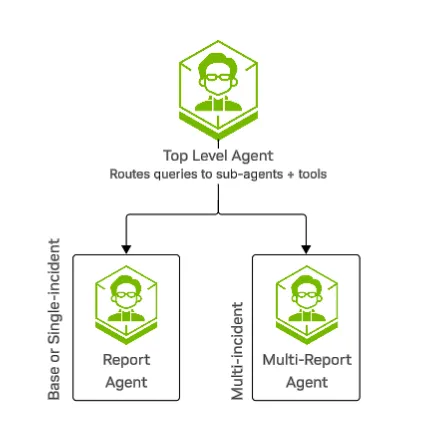
Operational Modes
The VSS Agent supports two operational modes based on deployment configuration:
Video Analytics MCP Mode
Used by production blueprint deployments (Warehouse, Smart Cities).
- Connects to Video Analytics MCP server for incident data
- Queries Elasticsearch for incidents and sensor metadata
- Generates reports based on detected incidents
- Supports multi-incident queries and analytics
Requirements: Video Analytics pipeline, Elasticsearch, VST
Direct Video Analysis Mode
Used by developer profiles for standalone operation without a full blueprint deployment.
- Analyzes uploaded videos directly without an incident database
- Uses Cosmos VLM for video understanding
- Generates reports based on video content analysis
- Ideal for development, testing, and custom video analysis
Requirements: VST, Cosmos VLM (NIM endpoint)
Four developer profiles are available:
- dev-profile-base: Basic video upload and analysis
- dev-profile-lvs: Video summarization with interactive prompts
- dev-profile-search: Semantic video search with embeddings
- dev-profile-alerts: Real-time VLM alerts or VLM verification of CV-generated incidents
See Agent Profiles for detailed profile descriptions
Agents
Top Agent
The top-level agent analyzes the user query and directs it to the appropriate sub-agent or directly executes tools (sensor list, snapshots, etc.).
- Report Agent: Generates a report for a single incident.
- Multi-Report Agent: Answers questions about multiple incidents.
Report Agent
The report agent generates a detailed report for a single incident. It operates in two modes:
Video Analytics MCP Mode (Blueprint deployments):
- Fetches incident data from the Video Analytics MCP server
- Retrieves video clips and snapshots from VST
- Analyzes video content using the Cosmos VLM
- Generates a structured report with findings
Direct Video Analysis Mode (Developer profiles):
- Accepts uploaded videos directly via VST
- Analyzes video content using the Cosmos VLM
- Generates a video analysis report with timestamped observations
- Retrieves video clips and snapshots from VST to include in the report
Multi-Report Agent
The multi-report agent handles queries about multiple incidents (Video Analytics MCP mode only):
- Fetches incidents matching the query criteria
- Formats incident summaries with video/image URLs
- Generates charts and visualizations
- Returns a formatted list of incidents
Default Models
Capabilities
Query Sensors
Generate Incident Report
List Incidents
Metrics/Occupancy Counts
Snapshots
Camera_01 is an example sensor name. The actual sensor names depend on your deployment
and can be discovered by asking the agent “What sensors are available?”
Related Documentation
- VSS Agent API - VSS Agent API endpoints
- Video Analytics MCP Server - Video Analytics tools reference
- Agent Profiles - Available profiles and blueprints
- Agent Configuration - Configuration reference
- Agent Evaluation - Evaluation framework and metrics
- Agent Skills - Reusable agent skills for coding agents
Known Issues
-
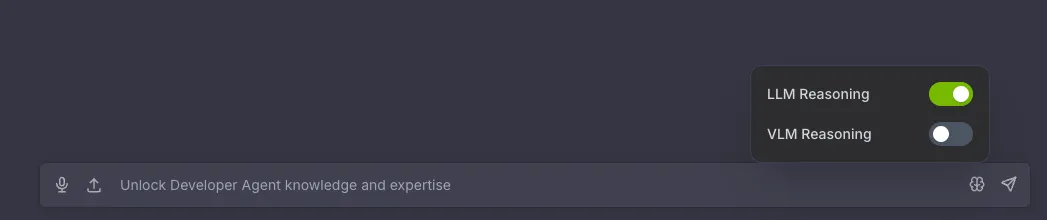
By default, the agent uses thinking off for faster response, switching to on for complicated queries.
-
When conversation is long, agent may generate incorrect URL links, causing videos, screenshots, or other media to fail to display or download properly. If you notice this issue, start a new chat from the left panel.
-
Sometimes the agent may enter a loop and error out after reaching the recursion limit. If you encounter this issue, click Regenerate response to try again. If the issue persists, start a new chat from the left panel.
-
Generating multiple reports in a single query is not supported in this release.