

Alerting Service
This page documents the Alerting Service as it is configured for the Warehouse Blueprint. For the full microservice reference (deployment, APIs, scaling, observability), see Alerts Microservice.
Overview
The Warehouse Blueprint exposes the Alerting Service in two operating modes:
-
Alert Verification — second-pass VLM analysis of a candidate event produced upstream (typically by the Behavior Analytics microservice or by another CV pipeline). The service is given a short clip plus event metadata and returns a verdict that confirms or rejects the candidate alert.
-
Real-Time Alerts — continuous VLM-based monitoring of a live RTSP stream. The service applies one or more “always-on” rules to every incoming camera, splits the stream into chunks, and emits an alert on every chunk that the VLM classifies as a violation.
Both modes share the same Alert Bridge (output normalization + delivery) and the same prompt-tuning workflow described on page Prompt Tuning.
The five reference use cases shipped with the Warehouse Blueprint are:
The remaining sections walk through each use case, then describe how the Alert Bridge normalizes their output and how to author or tune your own prompts.
The five use cases below all run on the Cosmos3 Nano Reasoner general-purpose model; no task-specific fine-tuning is included in the Warehouse Blueprint. Out of the box, accuracy is governed entirely by prompt design and the per-rule VLM parameters (chunk duration, sampling FPS, input resolution). If the general model does not meet your accuracy targets for a particular use case, a light round of targeted fine-tuning of Cosmos3 Nano Reasoner is the recommended next step.
Alert Verification
Alert Verification consumes candidate events (nv.Incident /
nv.Behavior) over Kafka or HTTP and re-evaluates them with a VLM. The
service:
- Selects the prompt for the alert
categoryfromalert_type_config.json. - Resolves the corresponding video clip from VIOS using the event’s
sensorId,timestamp, andendfields. - Sends the clip plus the rendered prompt to the configured VLM backend.
- Parses the VLM response into a verdict (
confirmed/rejected/unverified) and writes the enriched event to Elasticsearch and, optionally, to a downstream Kafka topic.
The Warehouse Blueprint ships one verification use case out of the box: Near Miss.
Near Miss
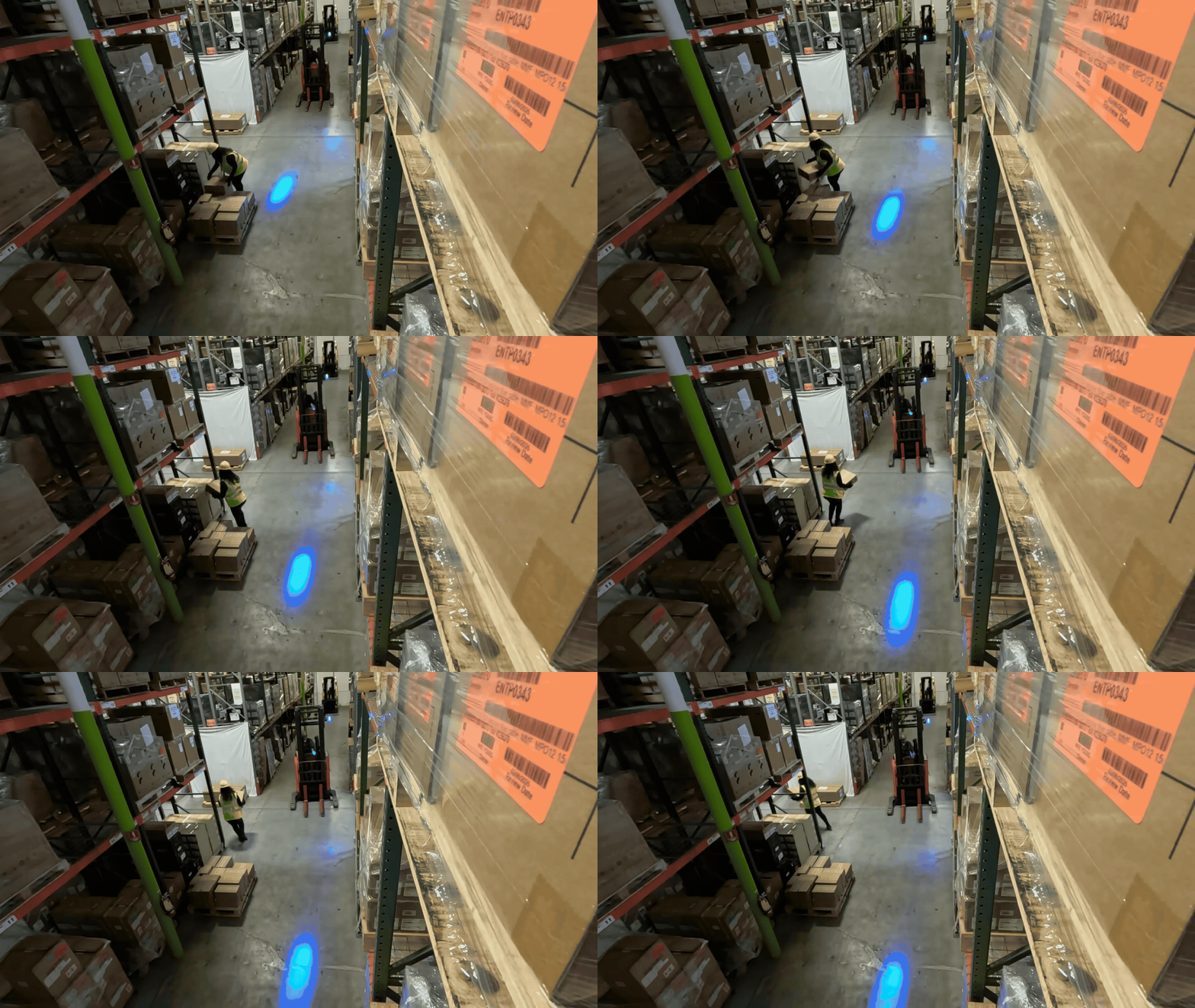
Use case. Behavior Analytics raises a candidate proximity violation
incident whenever a tracked pedestrian and a tracked forklift come within a
configured proximity threshold. Many of these candidates are routine
aisle-sharing events — workers and forklifts pass each other every minute
in normal warehouse operations. The verification prompt asks Cosmos
Reason 2 to apply a geometric “freeze test”: if the pedestrian had stood
still, would the forklift have driven through their position? Only events
that pass the freeze test are confirmed as Near Misses; the rest are
rejected so the downstream alert feed is not flooded with non-events.
Live configuration. The rule lives in alert_type_config.json,
which is loaded into the Alerts Microservice at startup and stored in
RedisJSON for runtime access. The output_category field renames the
internal proximity violation category to Near Miss Violation for
all downstream consumers (Elasticsearch, UI, Kafka).
alert_type_config.json — structure
In the deployed file, the system and user fields are single
JSON strings with embedded \n newline escapes. The two following
blocks below show those same strings rendered with real newlines for
readability.
System prompt:
User prompt:
Prompt structure. The user prompt locks the VLM into the strict classification table below; the system prompt enforces the freeze test, forbids speculation on occluded figures, and requires description/classification consistency.
The VLM is required to emit a single JSON object with keys
prediction_class_id, prediction_label, prediction_answer, and
video_description. The Alert Bridge maps prediction_class_id →
verdict (0 → confirmed, 1 → rejected); see
Alert Bridge.
VLM invocation parameters. Verification uses the VLM client defaults
declared in the top-level vlm section of the Alerts Microservice
config.yml (model, max_tokens, sampling, temperature …). To
override one or more of those defaults for a specific alert type, add a
vlm_params block alongside prompts in the same alerts[] entry
of alert_type_config.json:
alert_type_config.json — per-alert-type VLM override
Only the keys shown above are recognised inside vlm_params; any other
key is ignored. The decisive setting is temperature: 0.0 for deterministic re-runs of the same clip.
Real-Time Alerts
Real-Time Alerts run continuously against a live RTSP stream. The Alerting Service registers each rule with the RTVI VLM microservice, which:
- Pulls the live stream, splits it into
chunk_duration-second video chunks, and samples frames at the configured rate / resolution. - Calls the configured VLM with the rule’s
system_prompt+promptagainst each chunk. - Publishes one alert per chunk that the VLM classifies as a violation
(
prediction_class_id == 0) to a configurable Kafka topic, innv.Incidentform.
In the Warehouse Blueprint, these rules are deployed via the always-on
mechanism: rules are declared once in realtime-config.yml and are
fanned out automatically to every camera that VST exposes (one
/api/v1/realtime/always-on registration per camera_streaming
event, one rule per camera). The live_stream_url field is filled in
from the camera event’s camera_url,so do not set it in the YAML.
The Warehouse Blueprint ships four real-time use cases:
All four rules use the cosmos3-nano-reasoner model with
temperature: 0.0, max_tokens: 4096, FPS-based chunking at 1
frame/second, and no chunk overlap. All four rules use the same 6-second chunk duration because RT-VLM permits one decode configuration per live stream.
The four rules below reproduce the rule definitions from the live
realtime-config.yml file. Each rule is a self-contained entry under
always_on_rules:. The following header excerpt documents how the service
receives that file.
realtime-config.yml — file header
In the Warehouse Compose profile,
VLM_AS_VERIFIER_CONFIG_FILE_REALTIME selects the host rules file. Compose
mounts and processes it into /app/runtime/realtime-config.yml, then sets
ALWAYS_ON_RULES_CONFIG to that container path.
Damaged / Unstable / Falling Boxes
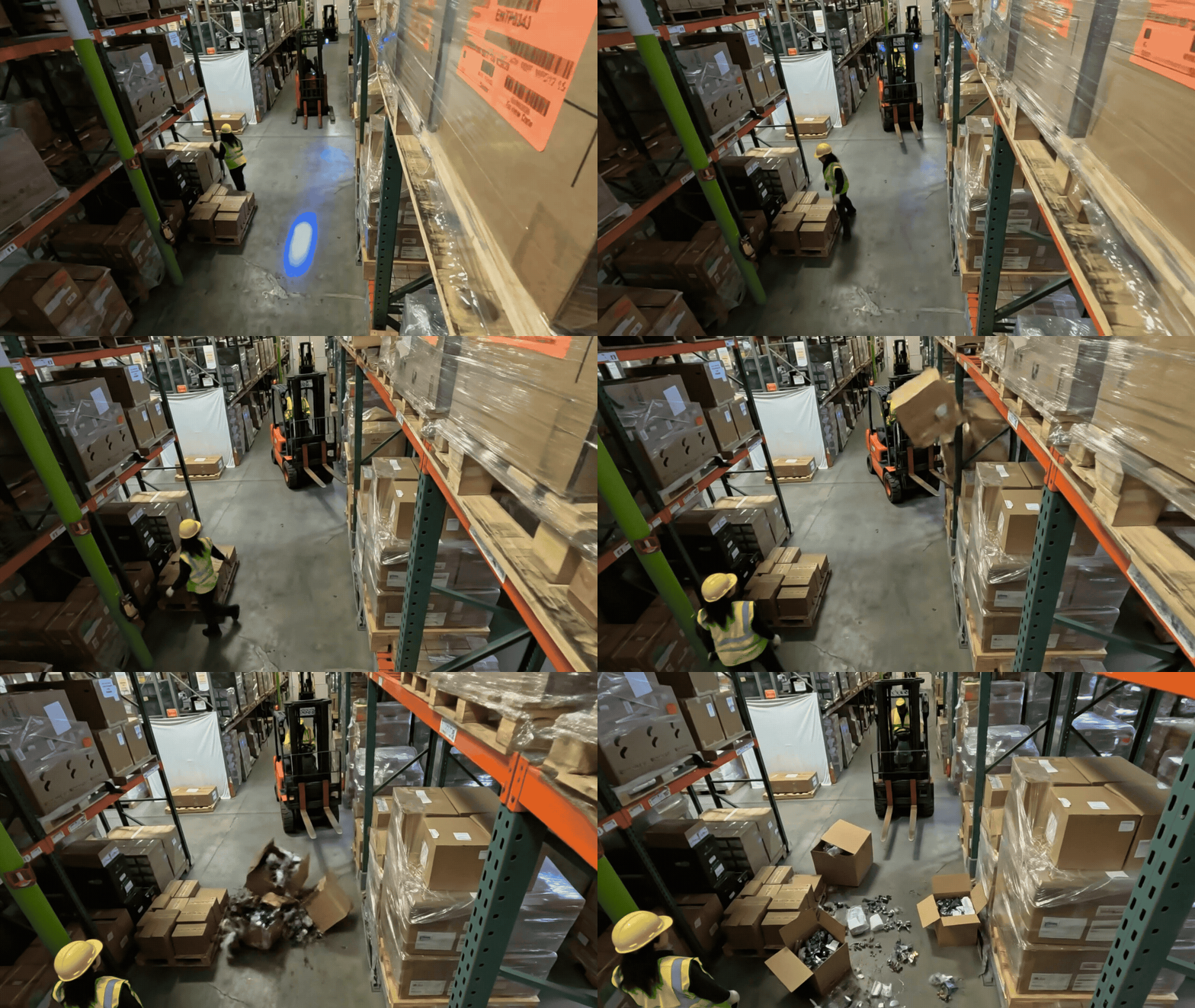
Use case. Continuous monitoring for load-quality issues on every visible load, such boxes and pallets. The rule fires on four buckets:
- Damaged — visible tear, rip, crush, puncture, dent, soggy/stained box, contents exposed; lower-layer crushed under upper.
- Falling / Fallen — cargo mid-fall, tipping, or on the floor in a scatter pattern traceable to a specific pallet, rack, or fork.
- Spilling — liquid/granular/items leaking from a container; wet floor traced to a leaking package.
- Unstable — stack past vertical, overhanging the pallet edge, smaller crushed under larger, or actively teetering.
Intact tall stacks, untidy/dusty loads, empty boxes, plastic-wrapped loads, and stray cardboard with no source load are explicitly not flagged.
Live configuration. The rule lives in realtime-config.yml under
the top-level always_on_rules list. The structure below shows the
rule shape; the prompts and parameters are detailed in the blocks that
follow.
realtime-config.yml — load_quality, structure
In the deployed file, the system_prompt and prompt fields are
single double-quoted YAML scalars with embedded \n newline escapes.
The two scrollable blocks below show those same strings rendered with
real newlines for readability — they are the full, byte-equivalent
prompts shipped today.
System prompt:
Prompt:
Prompt summary. The prompt requires the VLM to inspect transported
loads as carefully as static stacks (subtle damage often hides on
forklift forks), drops the flag on hedge words (“appears”, “seems”,
“could”), and treats occluded / distant / blurred loads as compliant. For
ID 0 the video_description must name the specific load and the
concrete defect.
VLM invocation parameters:
Pathway Obstructions
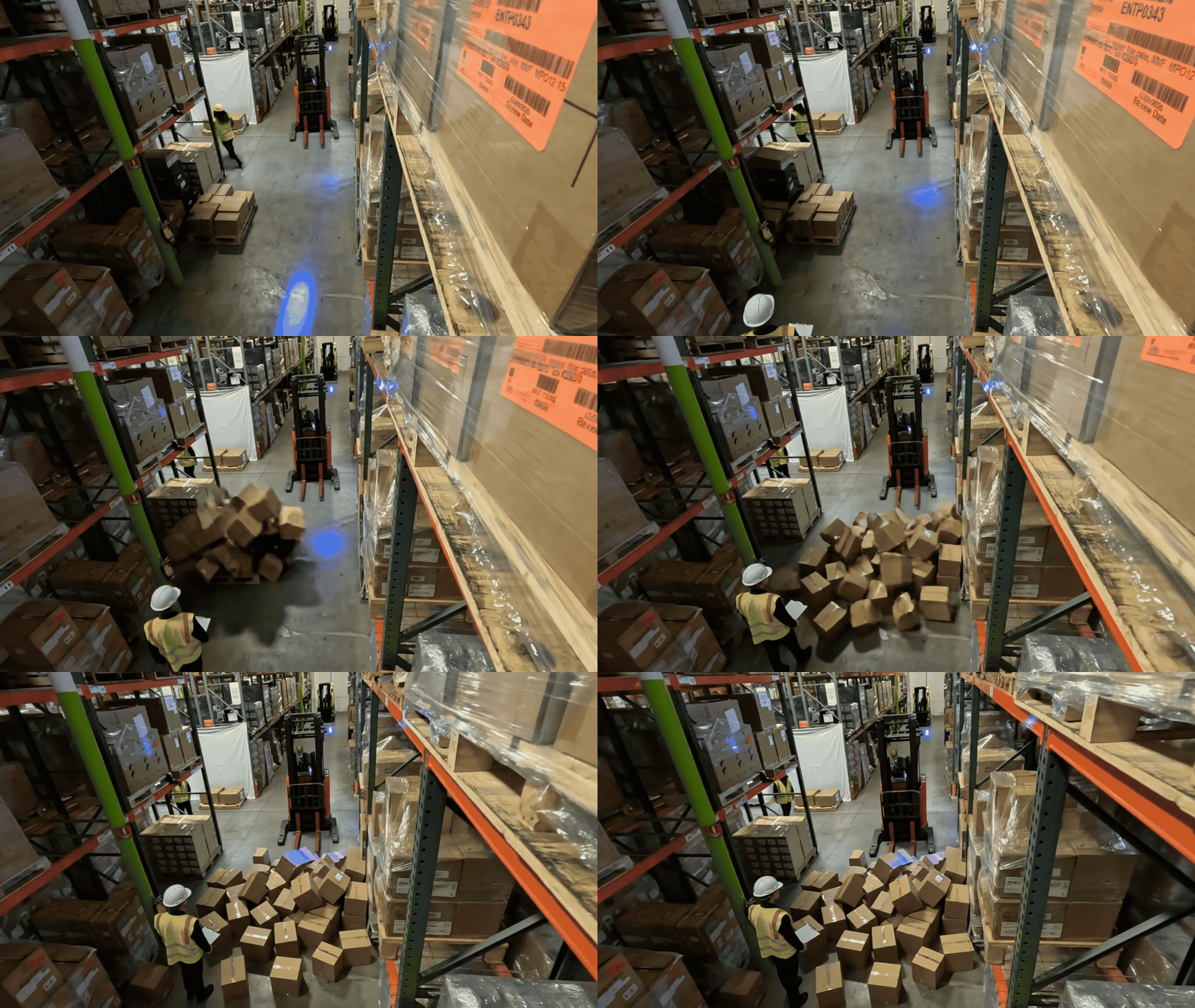
Use case. Continuous monitoring of every visible aisle, walkway, forklift travel lane, dock-door approach, and ramp for any object resting on the active travel floor. The rule covers five buckets:
- F — fallen / spilled load.
- D — debris / loose material (cardboard piles, packaging scraps, plastic wrap, broken pallet pieces, stray loose boxes).
- C — cables / cords / hoses lying across the pathway floor.
- L — liquid spills (puddle, streak, wet patch).
- E — misplaced equipment (ladders, hand-trucks, dollies, pallet jacks, empty pallets, trash bins, toolbox carts, scaffolding, abandoned forklifts).
The defining test is presence on the active travel floor — an object does not need to fully block traffic to be a violation. A ladder or cable a worker can step around is still flagged.
Live configuration. The rule lives in realtime-config.yml under
the top-level always_on_rules list. The structure below shows the
rule shape; the prompts and parameters are detailed in the blocks that
follow.
realtime-config.yml — pathway_obstruction, structure
In the deployed file, the system_prompt and prompt fields are
single double-quoted YAML scalars with embedded \n newline escapes.
The two scrollable blocks below show those same strings rendered with
real newlines for readability — they are the full, byte-equivalent
prompts shipped today.
System prompt:
Prompt:
Prompt summary. The prompt explicitly forbids hedge-word
downgrades (“appears coiled”, “near the edge”, “does not obstruct
movement”) and requires the video_description to name the specific
obstruction and its position on the pathway. People walking and equipment
actively in use are excluded; static clutter at the very edges of the
floor that does not encroach on the travel lane is excluded.
VLM invocation parameters:
Spillover
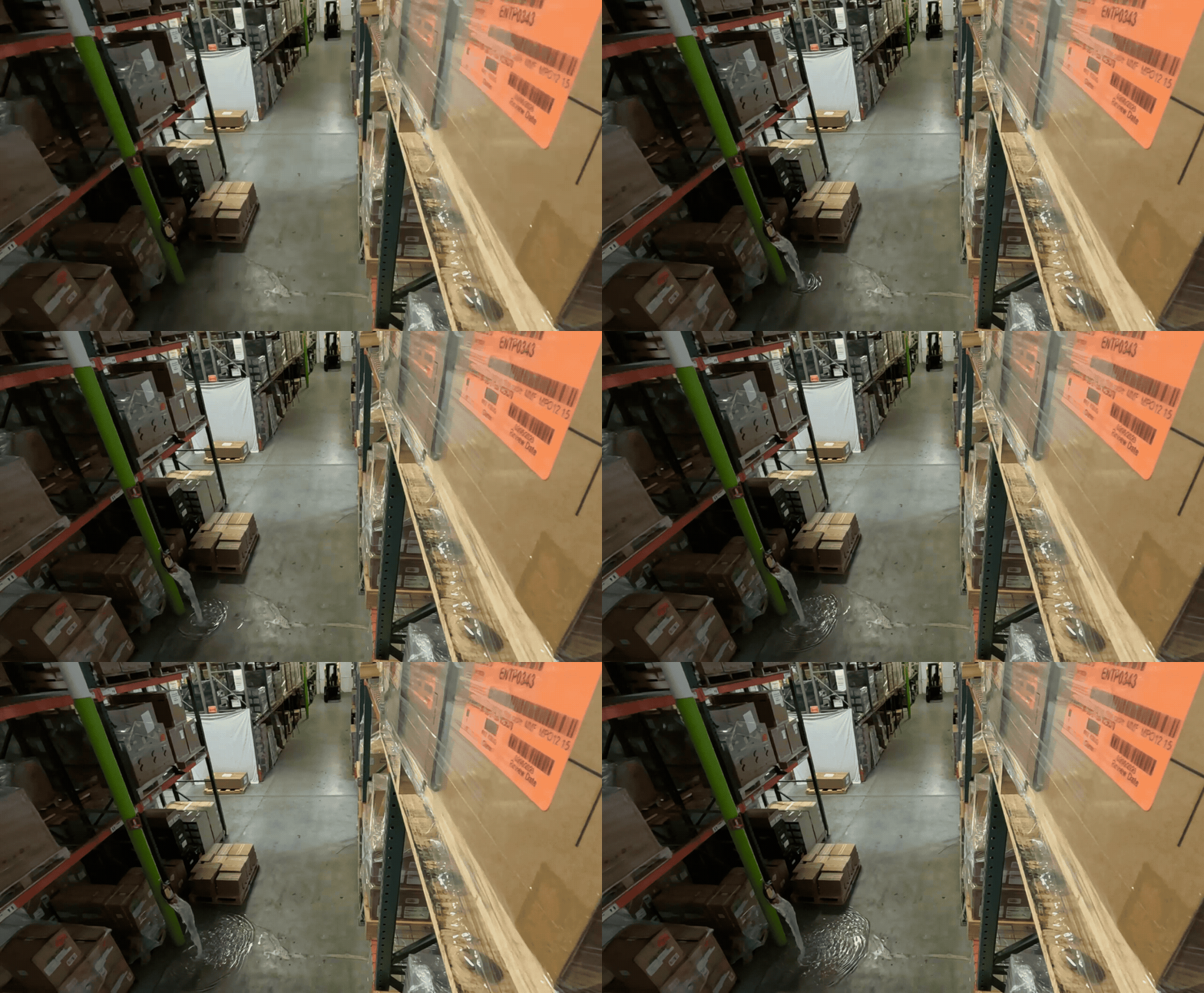
Use case. Continuous monitoring of the floor for spilled contents together with a plausible source container. The rule fires on five buckets:
- L — liquid (puddle, streak, pool, drip trail, dark wet ring).
- G — granular / powder (pellets, grain, sand, fragments scattered from a torn bag/sack).
- I — items-out-of-container (small parts, packets, cans, bottles, produce strewn outside their box / pallet / bin).
- F — dropped / spilled load from a forklift, hand-truck, pallet, or shelf.
- D — leaking damaged package (torn / crushed / punctured box, drum, or sack with contents escaping).
Subtle, small, or partial spills count. Damaged cardboard with no contents escaping, wet patches with no plausible source, intact sealed containers, and reflections / shadows / floor coatings are explicitly not flagged.
Live configuration. The rule lives in realtime-config.yml under
the top-level always_on_rules list. The structure below shows the
rule shape; the prompts and parameters are detailed in the blocks that
follow.
realtime-config.yml — spillover, structure
In the deployed file, the system_prompt and prompt fields are
single double-quoted YAML scalars with embedded \n newline escapes.
The two scrollable blocks below show those same strings rendered with
real newlines for readability — they are the full, byte-equivalent
prompts shipped today.
System prompt:
Prompt:
Prompt summary. For ID 0 the video_description must name the
source container and the spilled material. Hedge words drop the flag.
VLM invocation parameters:
PPE Violation
Use case. Continuous monitoring that every clearly visible worker — foreground, background, on foot, and on equipment — is wearing the two required PPE items on their outer layer:
- H — a rigid hard hat (any color: yellow, white, blue, red, green, orange, black). Soft caps, beanies, baseball caps, hair-covers do not count.
- V — a high-vis garment (fluorescent color and/or reflective stripes — vest, jacket, coverall, jumpsuit). A high-vis coverall satisfies the requirement on its own.
Forklift / pallet-jack drivers are inspected the same way as workers on foot. People behind glass walls or on monitors are skipped.

Live configuration. The rule lives in realtime-config.yml under
the top-level always_on_rules list. The structure below shows the
rule shape; the prompts and parameters are detailed in the blocks that
follow.
realtime-config.yml — ppe, structure
In the deployed file, the system_prompt and prompt fields are
single double-quoted YAML scalars with embedded \n newline escapes.
The two scrollable blocks below show those same strings rendered with
real newlines for readability — they are the full, byte-equivalent
prompts shipped today.
System prompt:
Prompt:
Prompt summary. The prompt explicitly disallows group statements
(“all workers wear…”) and requires the model to count workers and
describe each worker’s head and torso individually. It enforces
description/classification consistency: if the description names any
worker missing either item, the model must output ID 0.
VLM invocation parameters:
Alert Bridge
The Alert Bridge is the parsing layer that sits between the VLM and the rest of the system. When you author a custom prompt, what you actually have to design is the shape of the VLM’s reply — and that shape is what the Alert Bridge knows how to parse. This section catalogues every reply format the Alert Bridge supports today, so you can pick the right one (or register a compatible one) when you write your own prompts.
The parser is selected per deployment via the vlm.response_format
key in config.yml (and overridden per call by the same field on a
RealtimeAlertRequest or per alert type in
alert_type_config.json). The accepted values are:
The verdict the Alert Bridge stores at info.verdict is the same
across all formats — see Verdict vocabulary.
Format 1 — Cosmos Reason (think + verdict)
The Cosmos Reason parser tries three strategies in order and
accepts the first one that matches. This is what the Alert Bridge uses
when response_format is cosmos-reason (or cr1 / cr2),
and it’s what auto falls back to whenever the model name contains
cosmos-reason1, cosmos-reason2, or cosmos-reason3.
Strategy A — answer-tagged (preferred):
Strategy B — bare verdict after </think>:
Strategy C — verdict only (no reasoning, no tags):
In all three strategies, {VERDICT_TOKEN} is case-insensitive and
must be exactly one of YES, NO, A, or B. Anything
else (including prose like Answer: YES or YES. The video shows…)
fails validation and the event is recorded with
verdict = verification-failed.
Verdict mapping:
The full reasoning text (between <think> and </think>, when
present) is captured to info.reasoning on the output event. For
strategy C it is the empty string.
Example replies:
Closing the prompt — to elicit this format, end your prompt with a
literal output template. The shipped collision prompt uses the
strategy-B form:
For latency-critical screening you can ask the VLM to emit just the
bare verdict (strategy C); set enable_reasoning: false and tell
the model to “Reply with exactly one word: YES or NO”.
Format 2 — JSON object
Used by every Real-Time rule shipped with the Warehouse Blueprint
(ppe, load_quality, pathway_obstruction, spillover) and
by the proximity violation verification prompt. It is the
recommended format for new prompts because:
- Verdict and free-form description live in the same payload.
- The verdict field, value mapping, and reasoning field are all configurable — you can adapt the parser to the schema your prompt emits without touching code.
- Markdown code fences are tolerated: if a Cosmos VLM wraps its JSON
output in a triple-backtick
jsonblock, the wrapper is stripped before parsing.
Wire shape — default (matches the Warehouse Blueprint prompts):
With the default json_parser config the Alert Bridge:
- Reads
prediction_answeras the verdict. - Maps
"Yes"→confirmed,"No"→rejected. - Reads
video_description(or, if absent,reasoning,thinking, orexplanation) as the free-form text and stores it ininfo.reasoning. - Flattens every other key (
prediction_class_id,prediction_label, anything else you add) intoinfo.<key>on the output event.
Configuring the parser — override any of the three knobs under
vlm.json_parser in config.yml to match your prompt’s schema:
Example — nested boolean verdict (cookbook-style prompt):
This config matches a VLM reply such as:
Verdict mapping:
Closing the prompt — to elicit this format with the default config, end your prompt with the exact-keys block used by every shipped rule:
If the model also emits a reasoning trace (enable_reasoning: true),
the parser strips a <think>…</think> envelope and the surrounding
markdown fences automatically before reading the JSON, so you can ask
for both <think>…</think> reasoning and a JSON output in the same
prompt.
Format 3 — Free-form description
Used when the VLM is not a Cosmos Reason model and you only want a description, not a verdict — typical for Phi-3-Vision, Qwen-VL, GPT-4-Vision, or any other captioning-style backend.
Wire shape: any non-empty free-form text, from a single sentence to multi-paragraph prose.
Validation: the only requirement is that the reply is non-empty
after str.strip().
What is captured:
info.description— the full reply text.info.verdict— set by the orchestrator, not by the parser (typicallyverification-failedbecause no verdict could be extracted).info.reasoning— empty.
When to use: when downstream consumers only need a textual explanation (e.g. Elasticsearch full-text search) and the prompt itself does not need to drive a confirm / reject decision. For verdict-driven flows, use Format 1 or Format 2 instead.
Format 4 — Custom parser
For replies that don’t fit any built-in format — XML, key-value pairs, proprietary structures, multi-shot outputs, etc. — register a callable at startup:
Then set vlm.response_format: "xml" in config.yml. The parser
must return a VLMResponse whose verdict value the serializer
recognises (YES / NO / A / B, case-insensitive) — or
None for description-only replies.
The custom name must not collide with the built-in formats
(auto, cosmos-reason, cr1, cr2, json, other);
register_parser raises ValueError on collision.
Auto-detection
When vlm.response_format is auto (the default), the parser is
selected from the configured vlm.model string:
Auto-detection does not pick the JSON parser — JSON output is
opt-in via response_format: "json". This is intentional: the JSON
parser has a configurable schema, so the deployment must declare which
schema it is using.
Verdict vocabulary
Whichever output format you choose, the Alert Bridge emits one of the
verdict strings below at info.verdict on the output event. This is
also the value used for the alert_bridge_events_total{verdict}
metric.
What ends up on the output event
After parsing, the Alert Bridge attaches an info block to the
original event and writes it to every configured sink (Elasticsearch,
Kafka mdx-vlm-incidents / mdx-vlm-alerts, Redis Streams,
WebSocket). Fields originally present on the input event are
preserved.
Any additional keys you include in a Format 2 (JSON) reply are
flattened into this info block automatically — adding e.g. a
confidence key to your prompt’s JSON output makes
info.confidence appear on every emitted event.
For the full request / response shapes and a deep dive into the underlying APIs, see Alerts Microservice.
Prompt Tuning
The five reference prompts shipped with the Warehouse Blueprint cover the most common safety scenarios, but every site has its own vocabulary (PPE colors, layout, equipment names) and its own definition of what counts as a violation. Rather than hand-writing every new prompt, we recommend using a general-purpose reasoning LLM (Claude, ChatGPT, Gemini, etc.) as a “prompt author”: you describe the use case, hand it the Alert Bridge output contract, and ask it to draft a prompt in the same shape as the reference ones.
The pattern is the same one demonstrated in the Cosmos Cookbook recipe Worker Safety in a Classical Warehouse with Cosmos Reason 2 — treat the VLM as an “expert inspector” with a strict classification table, then encode that table directly into the prompt. This page adds one extra step in front of that recipe: use an authoring LLM to generate the inspector persona + classification table from your use case description, instead of writing them by hand.
Why tune prompts
- Accuracy. A prompt that explicitly enumerates positive criteria (“a worker without a hard hat or high-vis vest”) and negative criteria (“ignore people behind glass walls or on monitors”) cuts false-positive rates by an order of magnitude vs. a generic “is anyone unsafe?” prompt.
- Site-specific vocabulary. Different facilities use different colors, equipment, signage, and layouts. The shipped prompts assume the most common conventions; you’ll often need to swap in your own vocabulary.
- New use cases. The five reference prompts cover Near Miss, Load Quality, Pathway Obstruction, Spillover, and PPE. Anything else — unauthorized entry, smoking detection, ladder safety, hot-work checks — needs a new prompt.
- Output format alignment. Whatever you produce must parse against
one of the formats documented in Alert Bridge.
An LLM-authored prompt that asks for the wrong output shape is
worse than no prompt at all — every event will land with
verdict = verification-failed.
The “Prompt-as-Code” workflow
Authoring a new alert prompt is a four-step loop:
- Define the use case. Write a short brief: what counts as a violation, what does not, and what edge cases exist.
- Pick the output format. Choose from
Alert Bridge —
Format 1 — Cosmos Reason (think + verdict) for simple
verdict-only flows, or
Format 2 — JSON object (recommended) for
real-time alerts that need a
video_descriptionto ride along. - Generate the prompt with an LLM. Hand the use case brief, the output format, and the closest reference prompt to a reasoning LLM. Have it draft the inspector persona, the classification table, and the output template.
- Test, iterate, deploy. Run the prompt against a labeled clip
set, look at what the model gets wrong, refine the negative
constraints, and repeat. Deploy by adding the entry to
alert_type_config.json(verification) orrealtime-config.yml(real-time).
Step 1 — Write the use case brief
A good brief answers six questions in plain language:
Steal the scene context and worker definition verbatim from
whichever reference prompt is closest to your use case (ppe is the
nearest match for any worker-behavior alert). Re-using these
boilerplate sections keeps your prompts mutually consistent and
removes a class of subtle mistakes (e.g. forgetting to exclude people
on monitors).
Step 2 — Pick the output format
Make this decision before generating the prompt: it determines the shape of the closing block the LLM must produce.
Step 3 — Generate the prompt with an LLM
Give the authoring LLM all four pieces below in a single message. Any reasoning LLM (Claude 3.5 Sonnet, GPT-5, Gemini 2.5 Pro, etc.) will produce a usable first draft.
(a) The use case brief — your answers from Step 1.
(b) The output contract — copy verbatim from Alert Bridge. For a real-time JSON prompt:
(c) The closest reference prompt — paste the full system + user prompt from one of the shipped use cases. PPE is the closest reference for any worker-behavior alert; Spillover for any “spilled material” alert; Pathway Obstruction for any “object on the floor” alert.
(d) The drafting instruction — this is the message that turns the LLM into the prompt author:
The LLM will respond with a system + user prompt pair you can drop
straight into alert_type_config.json (verification) or
realtime-config.yml always_on_params (real-time).
Anatomy of the prompt the LLM should produce
Use this as a checklist when reviewing the LLM’s draft. Every shipped prompt has all of these pieces:
Step 4 — Test, iterate, deploy
- Run the draft prompt against a labeled clip set (10-50 clips,
half positive, half negative). Use the same VLM model
(
nim_nvidia_cosmos3-nano-reasoner_bf16-finalfor the shipped profiles). - Look at every miss. For false positives, identify which
negative cue was missing or under-emphasized; add it to the
NOT A VIOLATION (1)list. For false negatives, sharpen the relevantVIOLATION (0)bucket — usually by adding concrete examples or removing hedge words. - Tighten the description. The shipped prompts require the
video_descriptionto name the specific cue (“name the source container AND the spilled material”, “name the specific load and the concrete defect”). This is a force-multiplier — descriptions that have to identify a specific object are far less likely to hallucinate. - Hand the failure cases back to the authoring LLM with the same four-piece prompt format and ask for a revised draft. Repeat 2-3 times.
- Deploy. For a verification rule, add an entry to
alert_type_config.jsonalerts[]and restart the Alerts microservice. For a real-time rule, append toalways_on_rulesinrealtime-config.ymland restart RTVI VLM.
Best practices and pitfalls
- Keep the verdict enum tight. Two labels, period. Multi-class
prompts (4+ labels) drift much faster and require Format 2 with a
custom
verdict_mapping. - Avoid ambiguous adjectives. “Dangerous”, “messy”, “improper” produce drift across days. Prefer measurable cues — a specific object visible on the floor, a missing item of PPE, a specific trajectory.
- Make the model name what it sees. Every shipped prompt requires the description to name a specific object or worker. This single rule cuts hallucination dramatically.
- Cap the token budget. Aim for ≤ 4000 tokens of system + user prompt; the shipped prompts are 1500-3500 tokens. Longer prompts trade VLM throughput for marginal accuracy gains.
- Don’t invent labels. The classification table’s labels must be reproduced byte-for-byte by the model. Any drift breaks Elasticsearch dashboards and the UI.
- Reference dataset definitions when you have them. When a public dataset already encodes the visual ground truth (as the Safe / Unsafe Behaviours dataset does for forklift overload, vest detection, and walkway compliance), copy the table straight into the user prompt instead of paraphrasing it.
References
- Worker Safety in a Classical Warehouse with Cosmos Reason 2 — Cosmos Cookbook recipe demonstrating the “expert-inspector” prompt strategy with strict classification tables and JSON output. The closest external reference for the Step-3 LLM-authoring workflow.
- Alerts Microservice — full Alerts Microservice reference (deployment, APIs, concurrency, observability).
- Alert Verification Workflow — Alert Verification agent workflow.
- Real-Time Alert Workflow — Real-Time Alert agent workflow.
- NvSchema —
nv.Incidentandnv.Behaviorschemas. - Real-Time VLM — RTVI VLM microservice.