

Blueprint Deep Dive
Introduction
Smart City Blueprint is an application of the VSS 3.3 framework to address video analytics for traffic analytics and smart city use cases at scale. It is designed to monitor traffic in a city and generate valuable real time insights to aid traffic engineering efforts. The blueprint consumes video input from multiple traffic cameras, detects vehicles and analyzes this metadata to produce alerts, metrics and reports that can be critical to traffic management in cities. The list of functionality supported includes:
-
Live camera views from traffic cameras
-
Metrics:
- Road segment speeds
- Directional speeds
- Flowrate
-
Alert detection including support for collisions, stalled vehicles and wrong way driving. The blueprint uses a two-level architecture for alerts, in which CV (computer vision) and behavior analytics are combined with vision language models to support scale and accuracy simultaneously.
-
Alert reports generated using agents
-
A natural language user interface, driven by agents, for querying the system
Microservice Based architecture
The Smart City Blueprint uses the canonical VSS 3.3 architecture: microservices integrated over a message bus, combined with agents that serve user requests and interaction. The high-level architecture is shown in the figure below.
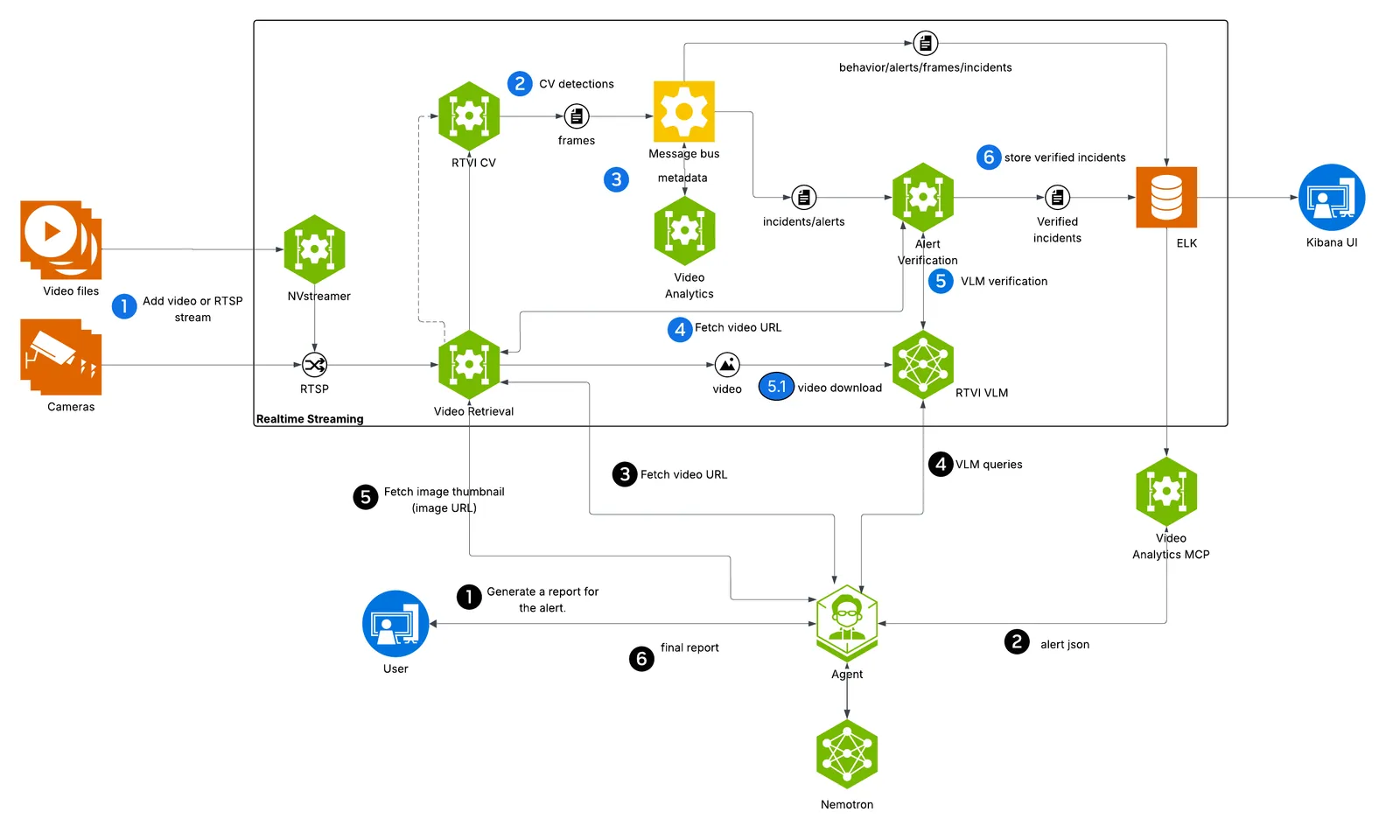
At a high level, the blueprint architecture divides into a realtime streaming component and an agentic component. The realtime streaming component ingests camera feeds and processes them through a combination of computer vision, streaming analytics and vision language model (VLM) based techniques. The agentic component interprets and executes user requests exposed through a UI.
The microservices are deployed as containers using Docker Compose. In line with the overall VSS design, the Smart City Blueprint provides a granular, flexible and scalable architecture that supports bespoke traffic and smart city use cases through the choice of relevant microservices, appropriate configuration, prompt tuning, and model fine tuning or replacement.
The various microservices used are now reviewed along with the salient configuration details appropriate for the blueprint.
Real Time Video Intelligence CV (RTVI CV)
This RTVI CV microservice takes streaming video inputs, performs inference and tracking, and sends metadata to the Behavior Analytics microservice using the nvschema-defined schema. For more information about the RTVI CV microservice, refer to the Real Time Video Intelligence CV (RTVI CV) Microservice page.
Model Used
The RTVI CV microservice supports two models out of the box for object detection used in the smart city blueprint: RT-DETR and Mask Grounding DINO:
-
RT-DETR is vision transformer based. The blueprint ships a checkpoint of the model fine tuned for traffic use cases. Further fine-tuning can be performed using the recipe in Model Fine Tuning.
-
Mask Grounding DINO (mG-DINO) is an open world detection model available through NVIDIA TAO, which can also be fine tuned using that recipe.
RT-DETR has lower computational requirements than mG-DINO, so it supports a larger stream count; it is the model the Smart City overlay selects by default (MODEL_NAME_2D=RTDETR).
Refer to Deployment Options for how to switch models, and to the RTVI CV microservice documentation for parameters such as precision, detection frequency and prompting.
Tracking
Tracking enables frame-to-frame association of detected objects. By default, the Smart City Blueprint uses the NvDCF Accuracy 2D multi-object tracker through RTVI CV. For detailed tracking configuration, refer to the RTVI CV microservice documentation.
Refer to the “Customization of Microservice” section in the RTVI CV microservice documentation for detailed configuration information.
Behavior Analytics
Behavior Analytics microservice provides spatio-temporal analysis of object movement using metadata output from the RTVI CV microservice. Output of the microservice includes alerts and metrics generated based on micro-batch processing of streaming metadata received over kafka.
Generated types of alerts include:
- vehicle collision
- vehicle stalling
- wrong way driving
These are accessible over APIs (polling) or kafka.
Salient configuration parameters for behavior analytics include:
-
Alert thresholds for each alert type can be tuned in the behavior analytics configuration file. For speed violations, the
mphThresholdparameter sets the speed limit (default 90 mph). For vehicle stalling,mphThreshold(default 5 mph) andtimeIntervalSecThreshold(default 120 seconds) control how slow and for how long a vehicle must be stationary before triggering an alert. -
Vehicle classes to monitor are specified via
anomalyClassesparameter, which by default includes Car, Truck, Bus, Motorcycle, Bicycle, Scooter, and Emergency Vehicle. -
Per-sensor overrides allow customizing thresholds for specific camera locations. For example, a highway camera may use a different speed limit than the default.
-
Road network configuration (
roadNetwork.enable) is required for wrong-way driving detection, withosmQueryPlacespecifying the geographic area for map-matching.
Alert Verification
Alerts generated through behavior analytics are verified through VLMs based on their ability to identify anomalies of interest by analyzing a collection of frames from the video based on an alert specific prompt. Refer to the Alerts Microservice documentation for more information.
Configuration options for the microservice for Smart City Blueprint are listed below:
-
per alert prompt: alert verification prompt defined for collision alert using template prompting support in the alert verification MS to specify object ID of the colliding vehicles as captured in the overlay video. Modify this prompt as needed for specific verification model, and also use it as an example to similarly define for other alerts
-
vlm invocation parameters: FPS at which frames need to be selected for verification (set to 4), or alternatively the number of frames used for alert verification, resolution at which VLM inference is performed (760x430) are set by default based on the VLM fine tuned checkpoint included in the release; the user must verify and modify these as needed.
-
selection of video snippet from within the alert segment is made to correspond to the last 15 seconds; note that in combination with VLM invocation parameters settings, the number of visual tokens processed by the VLM for each invocation gets set. This needs to be modified based on any fine tuning performed on the provided VLM, or separate choice of VLM made
Video IO & Storage Microservice
The Video IO & Storage (VIOS) microservice, available as part of VSS 3.3, enables camera discovery, video ingestion, streaming, storage and replay. The Smart City Blueprint uses VIOS for interfacing with city/traffic cameras at scale, thereby providing a dependable, standardized mechanism by which downstream microservices can consume the camera streams.
View the Video IO & Storage (VIOS) microservice docs page for more details. There are various configuration options available for the VIOS microservice, some of which have been tuned for the Smart City blueprint. Configurations you may want to modify are listed below. All paths are relative to the repository root.
-
In
deploy/docker/services/vios/configs/vst_config.jsonyou can modify thealways_recordingvalue underdatato enable/disable the default recording state for all streams added. By default, this is enabled and will record all streams added. -
In
deploy/docker/services/vios/configs/vst_storage.jsonyou can modify thetotal_video_storage_size_MBvalue to adjust the maximum space video recordings will take up. The shipped default is100000, that is 100 GB, which sits comfortably inside the 1 TB minimum disk in the Prerequisites. Raise it only after confirming the disk can hold the new value alongside container images and Elasticsearch indices. To estimate how much you need, see the Storage Calculation section of the VIOS docs. -
In
deploy/docker/services/vios/configs/rtsp_streams.jsonyou can enable/disable automatically adding streams from NVStreamer. By default, this is enabled and will add the first 100 streams available in your NVStreamer instance. -
In
deploy/docker/developer-profiles/dev-profile-alerts/overrides.envyou can modify the host-published ports of the various VIOS services if they collide with something else on your host.
Agents
The Smart City Blueprint incorporates an agentic AI system that provides natural language interaction capabilities for querying traffic data, generating incident reports, and retrieving visual information from sensors.
Agent Capabilities and Features
The Agent provides the following key capabilities:
Supported Query Types
The agent supports natural language queries for traffic incident management and sensor operations:
- Sensor Discovery: “What sensors are available?”
- Incident Listing: “List last 5 incidents for
<sensor>” or “Retrieve all incidents in the last 24 hours” - Location-Based Queries: “List incidents in city
<city>” or “Show incidents at<intersection>” - Detailed Reports: “Generate a report for incident
<id>” or “Report for last incident at<sensor>” - Sensor Snapshots: “Take a snapshot of sensor
<sensor>” - Multi-Step Operations: “1. List last 5 incidents for
<sensor>; 2. Generate report for the second one” - Pagination: “Show the next 20 incidents”
The agent automatically handles temporal expressions (e.g., “last 5 minutes”, “past 24 hours”), location type classification (sensor vs. intersection vs. city), and maintains context for follow-up queries.
Core Features
- Natural Language Understanding: Interprets queries without structured syntax, intelligently routes to appropriate sub-agents, handles temporal expressions and location-based queries with automatic source type classification (sensor, intersection, city), maintains conversation context for follow-ups
- Incident Reporting: Generates both multi-incident summaries and detailed single-incident reports with video analysis, snapshots, environmental conditions, and vehicle descriptions using configurable templates
- Video Analytics Integration: Retrieves incident data via MCP service, leverages Vision Language Models (VLMs) to analyze road conditions, lighting, weather, and vehicle types from video segments
- Video Storage Integration: Interfaces with VST MCP service for video/image URLs with configurable retry logic and automatic overlay configuration
- Observability: Distributed tracing via Phoenix endpoint, project-based telemetry, and health check endpoints
Agent Configuration and Environment Variables
The agent is configured through a YAML file that defines the general settings, function groups, individual functions, LLMs, and workflow behavior. The configuration file is organized into several key sections:
- General: Frontend settings (FastAPI), object stores, telemetry, and health endpoints
- Function Groups: MCP client connections to Video Analytics and Video Storage microservices
- Functions: Individual tool definitions for video understanding, report generation, chart creation, sensor operations, and sub-agents
- LLMs: Configuration for the primary reasoning LLM and the VLM, both referenced through the
LLM_NAMEandVLM_NAMEenvironment variables rather than hard-coded model IDs - Workflow: Top-level agent orchestration with routing logic, retry settings, and iteration limits
Models Used
These are the values the profile sets for LLM_NAME and VLM_NAME. Because the config references the variables, overriding either variable changes the model the agent uses without editing the YAML.
- Primary LLM: NVIDIA Nemotron 3.5 Lightning (
nvidia/nemotron-3.5-lightning-30b-a3b) - Used for natural language understanding, query routing, and orchestrating sub-agents. It runs as a local NIM, reachable on the Compose network ashttp://vss-llm-nim:8000and published on host port30081. - Vision Language Model (VLM): NVIDIA Cosmos3 Nano Reasoner (
nim_nvidia_cosmos3-nano-reasoner_bf16-final) - Used for video understanding and analyzing traffic incidents from video segments. It is served through RT-VLM on host port8018.
The configuration file is at deploy/docker/industry-profiles/smartcities/vss-agent/configs/config.yml in the blueprint repository.
The configuration relies on several environment variables that must be set during deployment. For the complete explanation of the agent configuration YAML file and environment variables, please refer to: VSS Agent Configuration.
Customization and Extension
The agent configuration is designed to be flexible and extensible. Key customization areas include:
- Prompt Customization: Modify workflow system prompts to change query routing logic, add new patterns, or adjust response formatting
- VLM Prompt Engineering: Tune video analysis prompts for different road scenarios, information extraction requirements, or report formats
- Model Selection: Swap LLMs and VLMs via environment variables to use different base models or adjust model parameters
- Tool Addition: Extend agent capabilities by adding new MCP clients, custom data processing functions, or external API integrations
For comprehensive customization guidance, refer to: VSS Agent Customization.