

Known Limitations
This section aligns with PRD and current release constraints, providing transparency about known limitations.
Perception
Truncated Bounding Box
In the 2D Blueprint, if an object is partially visible due to occlusion or being outside the camera’s field of view, the detected bounding box from the perception model can be truncated. The midpoint on the lower edge of the bounding box is used to approximate the object’s location, which is then used for various downstream analytics computations such as proximity detection. If the bounding box is truncated, the accuracy of location-related analytics can be impacted.
For example, in the image below, the person on the right has a truncated bounding box because they are partially outside the camera’s field of view. This can affect the accuracy of proximity detection between the two individuals.
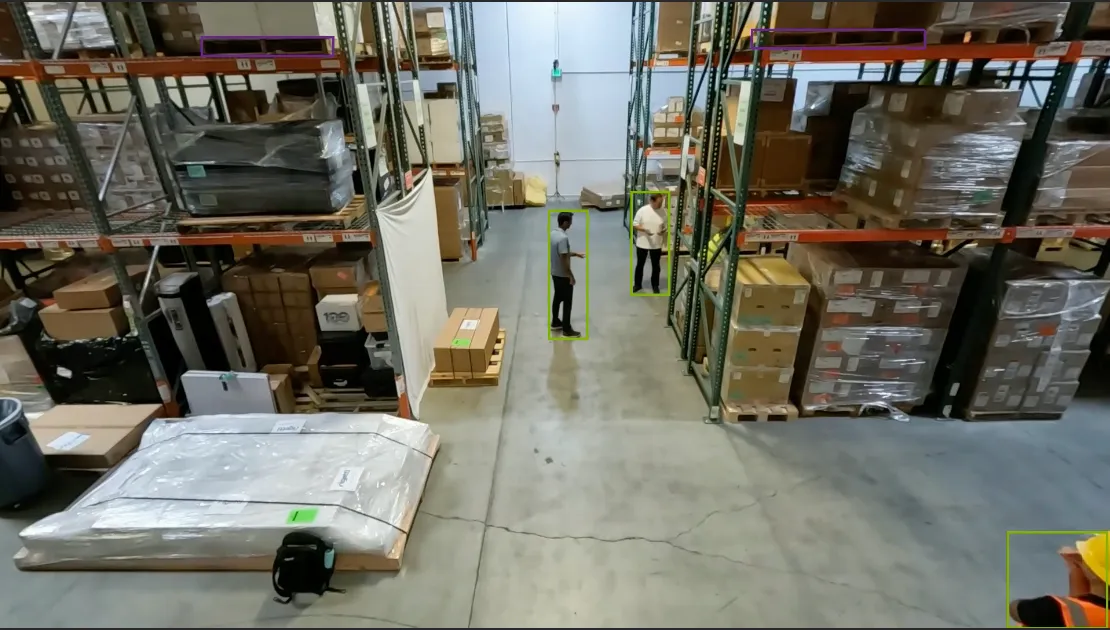
More advanced techniques will be included in future releases to address similar issues.
False Object Detections in MV3DT
The MV3DT Vision AI Profile may exhibit the following detection and tracking issues:
- Tracker ID switches: When people move close together, a tracker ID may switch from one person to another. IDs may also become associated with different objects across camera views.
- Tracking loss: Previously tracked objects may lose their tracks while still visible.
- False detections: Bounding boxes may appear on background structures or empty areas where no target object is present.
- Detached or oversized bounding boxes: Boxes may be offset from their objects, float above them, or extend substantially beyond their dimensions.
- Duplicate bounding boxes: Multiple boxes, sometimes with different tracker IDs, may appear on the same object.
- Unstable bounding boxes: Boxes may flicker or change inconsistently between frames.
- Missed detections: Visible people or vehicles may have no bounding box.
Appearance ReID gallery and GPU
- The Milvus gallery is not durable storage. Warehouse Compose has no named volumes for etcd, MinIO, or Milvus, so
docker compose restartkeeps appearance memory, anddocker compose down(or recreating those containers) empties it until newmdx-rawembeddings are ingested. Standalone named volumes survivedocker compose downunless you pass-v. Helm usesemptyDirfor those backends, so the gallery is cleared when the pods are recreated, not on a process restart inside a running pod. - Re-association applies to Person only (
operateOnClassIds: [0]). - Helm files three GPU claims (perception, stream processing,
reid-embed) against two physical cards. Without GPU time-slicing, first install can deadlock: the init Job needs a GPU to export CLIP-ReID while other pods already hold both cards. Enable time-slicing or stage models out of band as described in the warehouse-mv3dt-app Helm README.
Helm Deployment
VST Software Mode Without a GPU Can Affect Overlays and the Video Wall
Use a dedicated GPU for VIOS streamprocessing in the Warehouse 2D, 3D, and MV3DT Helm charts. Do not use software mode: it can cause video bounding-box overlay (VBO) misalignment and video-wall failures.
Keep hardware video processing enabled and allocate one GPU to streamprocessing:
RTVI-CV retains its own GPU allocation.
GPU Sharing
If there are not enough physical GPUs for dedicated allocations, configure GPU sharing before deployment while keeping hardware video processing enabled.
Multi-Instance GPU (MIG) provides memory and fault isolation on supported hardware; GPU time-slicing shares GPU access without that isolation. Choose based on your hardware and workload requirements, including VIOS video encode/decode support in the selected MIG profile. See the MIG and time-slicing comparison.
GPU time-slicing can be used with the Warehouse Blueprint’s 2D, 3D, MV3DT and 2D with Agents profiles.
For ConfigMap and device-plugin configuration examples, see NVIDIA GPU time-slicing configuration. Two shared allocations allow RTVI-CV and VIOS alone to share one physical GPU. Additional GPU workloads, such as ReID or in-cluster RT-VLM, require additional shared allocations and sufficient GPU memory.
VLM Verification of Incidents
When a person is inside a forklift, the interaction may be incorrectly classified as a near-miss alert.
Agents
See Agent Known Issues for agent limitations.
Alert Verification
RTX PRO 4500: Dropped Live VLM Results
With MODE=2d and BP_PROFILE=bp_wh, RTVI-VLM running on a single RTX PRO 4500 Blackwell GPU may drop video chunks and result messages when the live workload saturates that GPU. This can cause missing VLM responses and alerts even while the container reports healthy. Logs may show Live decoder backlog exceeded or Kafka async send queue is full.
To reduce load, remove or comment out unneeded rule blocks under always_on_rules in $VSS_APPS_DIR/industry-profiles/warehouse-operations/vlm-as-verifier/realtime-config.yml, keeping at least one rule, then redeploy the stack. Removed rules will no longer generate alerts.
VLM Connectivity Errors
While running the Warehouse Blueprint 2D Vision AI with Agents Profile, you may sometimes see the following error in mdx-vlm-incidents:
VLM analysis error: cannot access local variable 'response_content' where it is not associated with a value
This can occur when there is a connectivity issue with the VLM service.
Camera Calibration with Auto Calibration
The following are known limitations when using the Auto Calibration service.
Floor Map and Scale Factor Requirement
Auto Calibration currently requires the user to provide a floor map and a proper scaleFactor.
Auto Calibration uses these inputs to scale the global coordinate system to meters.
Behavior analytics assumes the global coordinate system is
in meters and computes distance-related properties, such as proximity violation, based on it.
If the scaleFactor is not provided or is improper with respect to the floor map,
the computed distance-related properties can be affected.
In future releases, Auto Calibration will remove the requirement to provide both a floor map and scaleFactor.
AMC requires detected person movement
The tracklet-based AMC method calibrates cameras from detected person movements in input videos. It requires sufficient people moving through different areas of each camera’s view; footage without enough person movement is unsuitable for AMC.
This requirement does not apply to VGGT. For multi-camera calibration with VGGT support installed, users can choose whether to run AMC or VGGT first; VGGT does not require a successful AMC run.
Tripwires Limited to Two Points
The Auto Calibration UI supports only a two-point tripwire: a start point and an end point. Users cannot add intermediate vertices to create a polyline. UI annotations represent a single line segment, and the raw exported calibration stores only wire.p1 and wire.p2. Polyline tripwire authoring and export are currently unsupported.
Brev Launchable
The following limitations apply when running the Warehouse Blueprint via the Brev Launchable:
- Local LLM — Local LLM deployment has not been tested or verified on Brev. Use a remote LLM when running the 2D with Agent profile.