

Safety AI Monitor (SAIM)
The Safety AI Monitor (SAIM, safety_monitor) judges whether each camera’s video can be
trusted. It reads the same RTSP streams as the perception pipeline, compares every frame with a
baseline learned for that camera, and reports a per-camera verdict, SENSOR_INVALID or
SENSOR_VALID, to the SEI daemon. SEI uses the verdicts to mark events from an untrusted
camera, and the SDMs use them for their all-sensors-failed check.
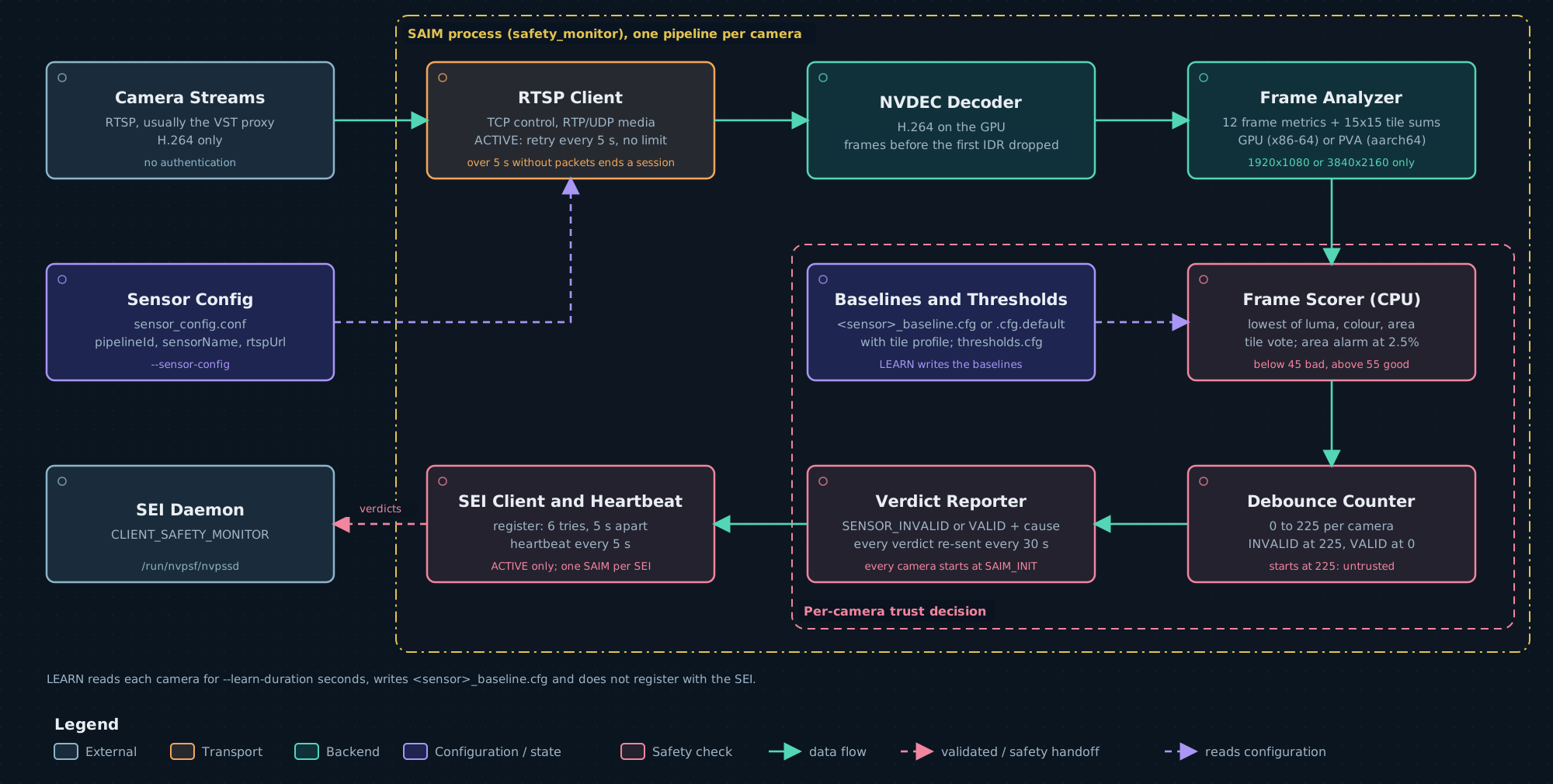
SAIM is required by default. The shipped nvpss.conf sets required_safety_monitor = 1. When a
required SAIM never registers, or is lost after registering, SEI raises a SW_FAIL with cause 15
and every SDM latches its safe state. Set the key to 0 only for a deployment without SAIM, and
then start the launchers with --saim-mode skip; see
SEI configuration.
Under the Docker runtime SAIM runs inside the Safety Core container. Under --runtime host it
runs on the host.
Modes
Both launchers select the mode with --saim-mode learn|active|skip; skip does not start SAIM.
launch_hoisa.sh --mode is a deprecated alias for --saim-mode. The Perception Monitor has its
own --pcm-mode. When the launchers start the control plane, required_safety_monitor in
nvpss.conf must be 1 for --saim-mode active and 0 for learn or skip. A learning SAIM
stops when its baselines are written and never switches to ACTIVE. See
Monitor modes.
Command line
SAIM has no --help and no baseline-directory option: it reads and writes baselines in its
working directory, and the launchers change into the baseline directory before they start it.
An unknown argument prints Error: unknown argument: <arg> and exits 1. SAIM exits 0 only when
every camera’s pipeline ended without error.
Inputs
SAIM reads the cameras from sensor_config.conf: one line per camera with pipelineId,
sensorName and rtspUrl. The format and limits are in
Sensor files.
What SAIM checks
SAIM computes 12 image metrics on every frame: histogram mean and variance, RMS contrast, edge density, entropy, Laplacian variance (sharpness), the mean and variance of the two colour channels, and saturation mean and variance. It also measures each tile of a 15×15 grid over the frame. The GPU or PVA only measures; the scoring runs on the CPU and gives three scores from 0 to 100:
- Brightness and structure, from the brightness, contrast, edge, entropy and sharpness metrics, and colour, from the colour metrics. Each metric is scored against the camera’s baseline, but a change counts only as far as the tiles agree on it beyond chance. A forklift or a crowd that changes a few tiles therefore does not lower these scores; a change across the whole lens does.
- Area, from still tiles that have newly turned black or white, lost fine detail, or gained colour noise compared with the baseline, for about 5 s. Tiles with movement are skipped. With the default thresholds the area score reaches the low threshold, 45, when about 2.5% of the frame is affected, and 0 at about 4.5%.
The frame score is the lowest of the three.
Because the baseline captures how that camera normally looks, a sustained low score points to problems such as:
- out-of-distribution frames whose image statistics leave the learned range;
- a blocked or partly covered lens, including a covered area of a few percent of the frame;
- fogging or condensation;
- loss of focus;
- abnormal brightness, contrast or colour.
SAIM also reports a lost stream, dropped video packets and its own analysis failures.
To check these responses on a test deployment, inject camera faults with SAIM distortion injection.
The analysis runs on the GPU on x86-64 and on the PVA on aarch64. The backend is fixed when SAIM is built. Both backends need CUDA and NVDEC, and both give the same verdicts.
Baselines
The shipped defaults describe the reference scene only. A site with other cameras or another scene must run LEARN; see Custom deployment.
Thresholds
ACTIVE reads thresholds.cfg. The launchers pass /opt/nvidia/psf/bin/thresholds.cfg, and
the container launcher refuses to start SAIM when that file is missing.
launch_hoisa.sh --threshold-config <file> replaces it.
The shipped file holds the built-in defaults. When the file is missing or fails validation,
SAIM logs WARNING: threshold config <path> is missing or invalid; using built-in defaults for
each camera and continues.
Verdicts and timing
SAIM reports two verdicts per camera, each with a cause. The cause values are listed in Causes and records.
Debounce. Each camera keeps a counter from 0 to counter_max (225). A frame scoring below
45 raises it, by more the worse the frame; a frame scoring above 55 lowers it; scores from 45 to
55 leave it unchanged. SENSOR_INVALID is reported when the counter reaches 225 and the frame is
bad; SENSOR_VALID when it reaches 0 and the frame is good. With the default thresholds:
The counter starts at 225 when a stream connects, so a camera becomes trusted only after a run of good frames.
Re-assertion. SAIM re-sends every camera’s current verdict, with its cause, every 30 s.
Camera failures
GPU selection
SAIM selects the GPU only through --gpu. Without it, camera i runs on GPU i modulo the
number of visible GPUs. SAIM does not read CUDA_VISIBLE_DEVICES itself, but CUDA applies it:
--gpu is an index among the GPUs that CUDA_VISIBLE_DEVICES leaves visible. An index out of
range exits with Error: --gpu <N> is out of range (0-<max>).
Registration and supervision
SAIM registers once, at startup. When the SEI daemon restarts, SAIM keeps running but does not register again, so the new daemon reports it as never registered when the budget runs out. Restart SAIM after restarting the SEI daemon.
Seeing the verdicts
SAIM writes to standard output and standard error, not to syslog. The launchers send both to
/var/log/psf/saim.log; the container launcher also copies them to the container output
(docker logs).
- SAIM logs most
SENSOR_INVALIDhand-offs on standard error, as[<sensor>] SENSOR_INVALID handed to reporter (<reason>). It writes no line when a camera becomesSENSOR_VALIDor when the frame score makes itSENSOR_INVALID. - Progress lines such as the mode banner and
Notice: baseline …go to standard output, which SAIM does not flush. Under the launchers they can appear late or out of order relative to the standard-error lines. - For per-camera state changes, read the SDM log: each reference SDM logs
safety-sensor health change pipelineID=<id> state=FAILED|RECOVERED cause=<n>for the cameras in its reviewed set. A camera atSAIM_INITis not logged as failed.