Skip to navigation

Perception Container Monitor (PCM)

View as Markdown

The Perception Container Monitor (PCM, nv_perception_monitor) judges whether the AI perception pipeline can be trusted. It checks the perception containers through the Docker Engine and the perception data on the Kafka topic mdx-frames, and reports one verdict for the whole pipeline, AI_PIPELINE_VALID or AI_PIPELINE_INVALID, to the SEI daemon.
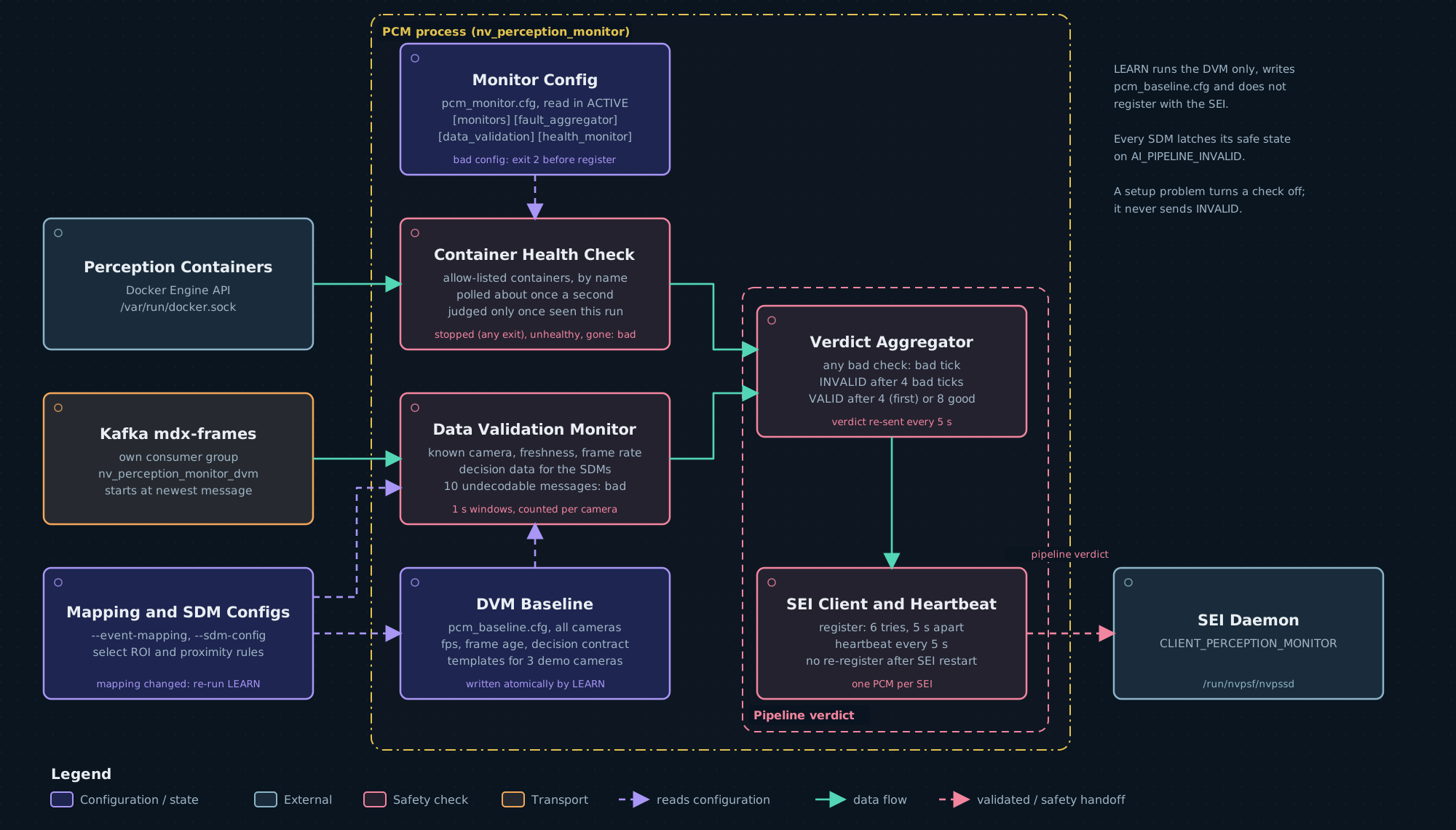
PCM process: a container health check over the Docker socket and a data validation monitor on mdx-frames feed a verdict aggregator, which reports AI_PIPELINE_INVALID or AI_PIPELINE_VALID to the SEI through the SEI client

PCM is part of the safety decision. It is required by default:

  • The shipped nvpss.conf sets required_perception_monitor = 1. When a required PCM never registers, or is lost after registering, SEI raises a SW_FAIL with cause 17 and every SDM latches its safe state. See Registration and supervision.
  • Every reference SDM latches its safe state on AI_PIPELINE_INVALID. See Effect on the safety decision.

Set required_perception_monitor = 0 only for a deployment that runs no ACTIVE PCM; see SEI configuration and Launchers.

PCM sends AI_PIPELINE_INVALID only for a fault it has seen in the containers or in the data. A setup problem, such as Docker or Kafka being unreachable or a missing baseline, is logged and turns the affected check off. See Faults and setup problems.

Modes

ModeWhat PCM does
LEARNRuns only the Data Validation Monitor (DVM). It reads mdx-frames for --learn-duration seconds, writes one baseline file, pcm_baseline.cfg, for all the cameras it saw, and exits. It does not read pcm_monitor.cfg, does not register with SEI and sends no verdict.
ACTIVEThe default. Reads pcm_monitor.cfg, registers with SEI, sends heartbeats, runs the enabled checks about once a second and reports the pipeline verdict.

LEARN never switches to ACTIVE. Run them as separate invocations, with the same baseline location and the same decision inputs (--event-mapping and --sdm-config).

Command line

OptionDefaultMeaning
--mode <mode>ACTIVELEARN or ACTIVE, in either case.
--learn-duration <seconds>300LEARN observation time, 1–3600. Ignored in ACTIVE.
--baseline-config <path>$PCM_BASELINE_CONFIG, else /opt/nvidia/psf/bin/pcm_baseline/pcm_baseline.cfgSelects the baseline directory. See Baselines.
--kafka-broker <host:port>localhost:9092Kafka broker the DVM reads mdx-frames from. The format is not checked.
--event-mapping <file>noneThe event mapping the SDMs use. PCM derives the decision data it checks from it; see Decision data contract. Give it at most once.
--sdm-config <file>noneAn SDM configuration whose event bindings select the mapping rules to check. Repeat it for each SDM, up to 24. Requires --event-mapping.
-h, --help—Print usage and exit 0.
Environment variableMeaning
PCM_MONITOR_CONFIGPath of the monitor configuration that ACTIVE reads. Default /opt/nvidia/psf/bin/pcm_monitor.cfg.
PCM_BASELINE_CONFIGBaseline path, used when --baseline-config is not given.

An empty environment variable counts as unset.

Exit statusWhen
0ACTIVE stopped by SIGINT or SIGTERM; LEARN ran its full duration and wrote a baseline; --help.
1ACTIVE could not register with SEI or start its heartbeat, or one of its checks stopped (monitor thread stopped unexpectedly; exiting to trigger safe state). LEARN was stopped early, saw no frames, or did not write a baseline.
2A bad command line, a pcm_monitor.cfg error in ACTIVE, or an event mapping or SDM configuration PCM cannot use. A command-line error also prints the usage.

Checks

In ACTIVE, PCM runs up to two checks; the [monitors] section of pcm_monitor.cfg turns each on or off. Each check gives one result about once a second: good, bad or off. Off means the check has no result, because of a setup problem or because there is nothing to judge yet. Only a bad result can lead to AI_PIPELINE_INVALID.

Container health

About once a second PCM inspects each container named in the allow-list (monitor_container in [health_monitor]) by its exact name, through the Docker Engine API on /var/run/docker.sock. It does not list other containers and does not run the docker command.

A listed container is judged only after PCM has seen it in this run. A container that has never been present is not judged: PCM logs it once, startup_grace_ms after start, and checks it from the moment it appears.

A container PCM has seenResult
No longer existsBad
Not running, with any exit code, including 0Bad
Paused, restarting or dead, even while Docker also reports it runningBad
Docker health check unhealthyBad
Docker health check starting, for less than container_startup_grace_ms since PCM first saw it startingNot judged
Docker health check starting for longer, or starting again after a faultBad
Running, with health healthy or without a health checkGood

The result of one poll is bad when any container is bad. Otherwise it is off while no listed container has been seen, or while any container is still starting within its grace. Otherwise it is good. A container that faulted stays bad while its health check is starting, and gets no new grace: it recovers only when it is running and healthy, or running without a health check.

When the Docker socket cannot be reached, or the Docker API returns an error or an incomplete reply for any container, the check is off for that poll. PCM logs the change once and resumes when Docker answers. A Docker failure does not restart a container’s starting grace. PCM also logs each container fault, recovery and late appearance once.

The shipped allow-list names the continuous producers of the reference warehouse deployment: vss-vios-nvstreamer, vss-vios-streamprocessing, vss-rtvi-cv, vss-behavior-analytics and kafka. List only services that must run all the time: a one-shot job that exits is a fault. Replace vss-vios-nvstreamer with the service that supplies your video.

When the perception containers run on another host, they never appear on the local Docker socket, so the check stays off. Turn container_health off there, and point the DVM at the remote broker with --kafka-broker.

Data Validation Monitor (DVM)

The DVM reads mdx-frames with its own Kafka consumer group, nv_perception_monitor_dvm, starting at the newest message. It checks each frame against the baseline of the camera that sent it, named by the frame’s sensorId. It counts frames per camera over 1-second windows and gives one result per window.

Each frame. A frame is bad when:

CheckThe frame is bad whenApplies with
Unknown cameraIts sensorId is not in the baseline. Every frame from such a camera is bad.Every baseline
Observation freshnessIts timestamp is missing or unusable, older than the camera’s learned max_frame_age_ms, or more than 2 s ahead of PCM’s own clock.A baseline learned from timestamped frames
Decision dataA field that a configured SDM decision depends on is missing or invalid. See Decision data contract.A baseline learned with an event mapping

PCM compares frame timestamps with its own wall clock, so the perception host and the PCM host must keep their clocks in step.

Each window. The window result is bad when any of these holds:

  • One camera’s bad frames reach bad_frames_percent of that camera’s frames in the window. The comparison is inclusive and rounds up: with 25, 8 bad frames out of 30 make the window bad, and 7 do not. Each camera is counted on its own, so healthy cameras cannot hide another camera’s bad frames.
  • A camera that was already sending before the window began delivers fewer fresh frames than half its learned expected_fps. A fresh frame is within the freshness limits and has a later timestamp than that camera’s previous fresh frame; repeated or reordered timestamps do not count. This rule also catches every camera stopping at once while Kafka still answers. PCM logs a low frame rate line for each such window. A camera that keeps at least half its learned rate passes this rule; the freshness and decision-data checks still apply to its frames.
  • Undecodable data was received in the window (see the next table).

Otherwise the window is good once at least one baseline camera has sent a frame in this run, and off before that. A baseline camera that has never sent a frame is not judged: PCM logs it once, startup_grace_ms after start, and checks it from its first frame. The window that holds a camera’s first frame is not rate-checked.

Kafka and decoding.

SituationResult
The consumer cannot be created, or a receive failsOff until usable frames arrive again, including the first window after they return. PCM recreates the consumer about once a second.
A message larger than 8192 bytesThe Kafka library reports it as a failed receive, so the same as above.
10 consecutive messages cannot be decodedBad from the tenth message until a decoded frame arrives. A window that received such data stays bad even if decoded frames follow in it, and silence or a later connection error does not clear it. Fewer than 10 in a row are tolerated.
No messages, and no errorNot a source problem. Cameras that were sending fail the frame-rate rule.

Decision data contract

The DVM checks the frame fields that the configured SDMs act on. PCM builds this contract at start from --event-mapping and --sdm-config:

  1. From each SDM configuration it reads only the event bindings. An ATL configuration has exactly the six keys forklift_entered, forklift_exited, person_entered, person_exited, roi_violation and roi_cleared. A PXC configuration has pair_groups (default humanoid_person, forklift_person, transporter_person) and the <group>_normal, <group>_reduce and <group>_stop keys of each selected group. Every value is EVENT_0 to EVENT_23.
  2. It selects the mapping rules whose output_event an SDM configuration binds. Without --sdm-config it selects every rule in the mapping and logs a warning.
  3. It turns each selected rule into a contract entry:
Selected ruleContract entryWhat ACTIVE requires in each frame
message_source: "mdx-frames", alert_type: "roi"An ROI rule: rule ID, object class, and restricted or confinedFor every ROI whose ID matches the rule (ignoring case, or the rule ID followed by : and a suffix) and whose type is the rule’s class: the matching flag, restrictedAreaViolation or confinedAreaViolation, is present and is true or false. Unless the rule is restricted and the flag is false, the ROI lists at least one object ID. Each ID is a decimal number, appears once in the ROI, and names exactly one object of the rule’s class in the frame.
message_source: "mdx-frames", alert_type: "social_distancing"A pair rule: the two classes, in either order, and the largest distance_threshold_meters among its rulesThe frame carries socialDistancing metadata with a finite threshold above 0, a detection count of 0 or more, and proximityViolation set to true or false, false exactly when the count is 0. The threshold is not below the pair’s distance. When both classes are in the frame, every object of either class has a decimal ID, finite coordinates, and an ID that no other object with coordinates uses.
message_source: "mdx-events", alert_type: "tripwire"NoneNot checked. PCM logs that tripwire rules use mdx-events, which it does not read.

PCM stops at start with exit status 2 and DVM decision contract: <reason> when:

InputProblem
Options--sdm-config without --event-mapping, or more than 24 SDM configurations.
SDM configurationIt cannot be read or is empty; a line has no =; a key is empty, repeated, or not one of the binding keys above; it has more than 32 keys; a value is not EVENT_0 to EVENT_23, or repeats an event.
SDM configurations togetherTwo of them bind the same event.
Event mappingIt cannot be decoded; it has no rules or more than 4096; a rule’s output_event is not EVENT_0 to EVENT_23; an event that an SDM binds has no rule.
Selected ruleIt is not one of the three kinds above, for example an object_presence rule. An ROI rule has no concrete rule_id or class (any is refused), or has both or neither violation filter. A proximity rule uses any as a class, has an ROI filter or social_distancing_violation, has proximity_violation: true without a positive distance_threshold_meters, or has false with one. A class pair has no true rule.

Without --event-mapping, PCM logs a warning that starts with DVM: no current event mapping. LEARN then records no contract, and ACTIVE uses the contract stored in each baseline as it is, without checking it against the SDMs.

With --event-mapping, ACTIVE does not use a baseline record whose stored contract differs from the current one, and logs DVM: decision mapping changed for <camera>. Learn again whenever the event mapping or the SDM configurations change.

What PCM does not check

  • Bounding boxes, detection confidence, object speed, and which object classes or how many objects are in the scene. bad_objects_percent is required in the configuration but has no effect.
  • Tripwire events on mdx-events.
  • A camera that has never sent a frame in this run. It is only logged, after startup_grace_ms.
  • A container that has never been present in this run, or a container that is not in the allow-list.
  • Consistency between redundant sensors, detection uncertainty, and model consistency.
  • Image quality. SAIM checks each camera’s video; see Safety AI Monitor (SAIM).

Faults and setup problems

PCM seesResult
A seen container gone, stopped, paused, restarting, dead, unhealthy, or starting past its graceContainer check bad
Frames from a camera that is not in the baselineDVM bad
A camera that was sending drops below half its learned rate, or stopsDVM bad
Stale, future or unusable timestamps, or invalid decision dataDVM bad once a camera reaches bad_frames_percent
10 consecutive undecodable messagesDVM bad until decoded frames return
No valid monitor_container entryContainer check off for the run
Docker socket unreachable, or a Docker API errorContainer check off until Docker answers
A listed container never presentLogged after startup_grace_ms; checked once it appears
Kafka consumer or receive failure, or an oversized messageDVM off until frames arrive
No usable baseline, an invalid pcm_baseline.cfg, or baselines that do not match the current decision contractDVM off for the run
A baseline camera that never sendsLogged after startup_grace_ms
A check that stops reporting for longer than max_report_age_msLogged as stuck; no AI_PIPELINE_VALID until it reports again
Both checks off from the startPCM stays registered and sends heartbeats, but never judges the pipeline, so it sends no verdict
Both checks off after a verdictPCM keeps re-sending its last verdict every verdict_resend_ms. With no check reporting, it cannot change that verdict
A pcm_monitor.cfg errorACTIVE exits 2 before it registers

A setup problem never sends AI_PIPELINE_INVALID. Before its first verdict PCM sends nothing, so with both checks off from the start it never sends a verdict and no SDM latches for it. After its first verdict PCM keeps re-sending the last one, also when its checks turn off: a standing AI_PIPELINE_VALID does not show that anything is still being checked. A check that is off does not hold back AI_PIPELINE_VALID while the other check is good. While the pipeline is INVALID, a check that turns off blocks recovery until it reports good again.

After every deployment change, check that the pipeline -> VALID (first status) line in pcm.log shows health=ok dvm=ok, and that none of the missing-input and source-error warnings in Logs appear, as in Check that it is working.

Verdict aggregation

An evaluator combines the latest result of each enabled check once a second. Each evaluation is a tick:

TickWhenCounters
BadAny check’s latest result is bad. A bad result keeps counting on later ticks until that check reports again or becomes stuck.Bad count up by one; good count back to 0.
GoodNo check is bad; every check whose latest result is good has reported again since the previous tick, and at least one has; every enabled check has reported at least once; no check is stuck or owes a good result.Good count up by one; bad count back to 0.
HeldAnything else, for example every check off, or a good check that has not reported again.Bad count back to 0; good count unchanged.
  • A check that is off contributes nothing.
  • A check that has not reported for longer than max_report_age_ms is stuck. Before its first report this is timed from start. PCM logs it, ignores its result, and counts no good ticks until it reports again. Being stuck never sends AI_PIPELINE_INVALID by itself.
  • While the pipeline is INVALID, a check that stops contributing, because it goes off or stuck, owes a good result: good ticks do not resume until it reports good again. Losing sight of the pipeline does not prove that the fault cleared.

The pipeline starts in STARTING:

FromToWhenShipped value
STARTING or VALIDINVALIDbad_ticks_to_invalid bad ticks in a row4
STARTINGVALIDThe good count reaches initial_valid_ms divided by 1000, rounded up4000 ms: 4 ticks
INVALIDVALIDThe good count reaches good_ticks_to_valid. Held ticks pause the count; a bad tick resets it.8

Counts are evaluator ticks, not exact elapsed time: the phases of the container poll, the DVM window and the tick add to the delay.

Sending.

  • In STARTING PCM sends nothing.
  • The first VALID or INVALID is always sent, even when SEI already holds that verdict. A restarted PCM therefore republishes its state: its first AI_PIPELINE_VALID clears an AI_PIPELINE_INVALID that a previous PCM left in SEI. A latched SDM still needs an operator release.
  • A change is sent on the tick that makes it.
  • An unchanged verdict is sent again verdict_resend_ms after the last successful send: 5000 ms in the shipped file and when the key is missing. A re-send never makes a new judgement.
  • A failed send is logged and retried on the next tick. It does not move the re-send deadline.
  • Each verdict is an AI_PIPELINE_INVALID or AI_PIPELINE_VALID event with cause 0 (CAUSE_NONE), pipeline ID 0 and confidence 1.0.

Configuration

ACTIVE reads pcm_monitor.cfg once at start, before it registers with SEI, from $PCM_MONITOR_CONFIG or /opt/nvidia/psf/bin/pcm_monitor.cfg. LEARN does not read it. Nothing is reloaded while PCM runs: edit the file and restart PCM.

The shipped file, without its comments:

[monitors]
container_health = true
data_validation = true
[fault_aggregator]
bad_ticks_to_invalid = 4
good_ticks_to_valid = 8
max_report_age_ms = 4000
initial_valid_ms = 4000
verdict_resend_ms = 5000
[data_validation]
bad_objects_percent = 25
bad_frames_percent = 25
startup_grace_ms = 10000
[health_monitor]
container_startup_grace_ms = 30000
monitor_container = vss-vios-nvstreamer
monitor_container = vss-vios-streamprocessing
monitor_container = vss-rtvi-cv
monitor_container = vss-behavior-analytics
monitor_container = kafka
SectionKeyRequiredValuesShippedWhen missing
[monitors]container_healthNotrue/false, 1/0, yes/no, on/off, in any casetruetrue
[monitors]data_validationNoAs abovetruetrue
[fault_aggregator]bad_ticks_to_invalidYes1–21474836474ACTIVE stops
[fault_aggregator]good_ticks_to_validYes1–21474836478ACTIVE stops
[fault_aggregator]max_report_age_msNo1–2147483647 ms40004000, with a warning
[fault_aggregator]initial_valid_msNo1–2147483647 ms40004000, with a warning
[fault_aggregator]verdict_resend_msNo1–2147483647 ms50005000, with a warning
[data_validation]bad_frames_percentYes, when data_validation is on1–10025ACTIVE stops
[data_validation]bad_objects_percentYes, when data_validation is on1–10025ACTIVE stops. The value has no effect.
[data_validation]startup_grace_msNo1–2147483647 ms1000010000, with a warning. It also applies to listed containers that are not present.
[health_monitor]container_startup_grace_msNo1–2147483647 ms3000030000, with a warning
[health_monitor]monitor_containerAt least one, when container_health is onAn exact container name of up to 256 characters from A–Z a–z 0–9 . _ -. Repeat the key for each container.5 namesContainer check off

ACTIVE stops at start when pcm_monitor.cfg has no [fault_aggregator] counts, or no [data_validation] percentages while data_validation is on. Before you start ACTIVE with your own copy of the file, copy both sections from the packaged pcm_monitor.cfg into it.

Lines that start with # are comments. A comment after a value on the same line is not supported: it becomes part of the value.

SituationResult
The file is missing or unreadableACTIVE stops: cannot read PCM monitor config
[fault_aggregator] or [data_validation] appears twiceACTIVE stops: duplicate [<section>] section at line <n>
A line without = in [fault_aggregator] or [data_validation]ACTIVE stops: malformed [<section>] setting at line <n>
An unknown key, or a repeated required key, in those two sectionsACTIVE stops: unknown or duplicate [<section>] key at line <n>
A required value that is out of range, signed, fractional, or followed by other textACTIVE stops: <key> at line <n> must be an integer in 1..<max>
A required count is missingACTIVE stops: [fault_aggregator] requires bad_ticks_to_invalid and good_ticks_to_valid
A percentage is missing while data_validation is onACTIVE stops: enabled DVM requires bad_objects_percent and bad_frames_percent in [data_validation]
Both checks are offACTIVE stops: both monitors disabled in [monitors]; enable container_health and/or data_validation
An optional millisecond key is missingWarning <key> not set in [<section>]; using the built-in default <n>
An optional millisecond key is invalid or repeatedWarning <key> at line <n> must appear once, as a positive whole number of milliseconds; using the built-in default <n>
An unknown key, a line without =, or an unrecognised value in [monitors]Ignored. The value stays true, so container_health = false # remote leaves the check on.
A [health_monitor] line without =, with an unknown key, or with an empty, invalid or repeated nameThat line is skipped with a warning; the other entries are used.
An unknown sectionIgnored

The numeric ranges only prevent overflow; they are not safety limits. Choose the counts within the deployment’s fault-response and recovery budget. Very small values are accepted and behave literally: a max_report_age_ms below one second marks normal reporting as stuck, so PCM never sends AI_PIPELINE_VALID.

Baselines

The DVM needs a baseline that LEARN recorded from the running pipeline.

Location

PCM finds the baseline path in this order, in both modes:

  1. --baseline-config <path>
  2. PCM_BASELINE_CONFIG
  3. /opt/nvidia/psf/bin/pcm_baseline/pcm_baseline.cfg

Only the directory part of the path is used, and the baseline file in it is always named pcm_baseline.cfg. /data/pcm/site.cfg selects /data/pcm. /data/pcm without a trailing slash selects /data. A name without / selects the working directory.

When PCM uses a directory other than /opt/nvidia/psf/bin, and that folder holds pcm_*_baseline.cfg or pcm_baseline.cfg files, ACTIVE logs that they are ignored.

What ACTIVE loads

  1. When the directory holds pcm_baseline.cfg, ACTIVE uses only that file. When it is not a regular file or is invalid, data validation is off, and PCM falls back to no other file. PCM logs DVM: invalid or unreadable baseline camera set <path>.
  2. Only when there is no pcm_baseline.cfg, ACTIVE reads every per-camera file pcm_<camera>_baseline.cfg and every template pcm_<camera>_baseline.cfg.default in the directory. A template is used only when the matching file without .default cannot be opened. A readable file that is malformed is skipped and is not replaced by its template.
  3. With --event-mapping, ACTIVE drops every record whose contract differs from the current one.
  4. When no camera is left, data validation is off.

A per-camera file without schema_version = 2 holds only known_sensor and expected_fps. It gives the unknown-camera and frame-rate checks only, and PCM logs a warning for it.

Reference baselines

The Debian package and the container image install three templates in /opt/nvidia/psf/bin/pcm_baseline/: pcm_Camera_baseline.cfg.default, pcm_Camera_01_baseline.cfg.default and pcm_Camera_02_baseline.cfg.default. They describe the three cameras Camera, Camera_01 and Camera_02 of the reference loading-dock dataset at about 29.9 frames per second, with max_frame_age_ms = 2000. Their decision contract is that of ATL zone 1 with the forklift–person PXC pair: proximity_event_mapping.pb.txt, atl_sdm_zone1.conf and pxc_sdm_forklift.conf. It has one ROI rule, roi-id-1 person restricted, and one pair, forklift person at 2 m.

  • With other camera names, every frame comes from an unknown camera, and the DVM reports bad.
  • With another decision contract given through --event-mapping, for example ATL alone or PXC alone, ACTIVE drops all three templates and runs with data validation off.
  • For any other cameras or SDM profile, run LEARN. After a successful LEARN, ACTIVE reads only the new pcm_baseline.cfg; the templates stay on disk but are not read.

LEARN

LEARN observes mdx-frames for --learn-duration seconds and records, for each camera:

ValueHow LEARN sets it
expected_fpsThe median rate of fresh frames over the 1-second windows that follow the camera’s first frame.
max_frame_age_ms4 × the 99th-percentile frame age + 1000 ms, and at least 2000 ms. 0, which turns the freshness check off, when the frames carry no timestamps.
Decision contractThe contract from --event-mapping and --sdm-config.
proximity_thresholdThe median socialDistancing threshold seen, when the contract has pair rules.

LEARN writes nothing, leaves the existing baseline unchanged, and exits 1 when:

  • it is stopped before its duration ends (LEARN stopped before its <n> s duration; ...);
  • it sees no frames, or it sees 10 consecutive undecodable messages at any time;
  • a camera has fewer than 2 windows at or above half its median rate, or has more than one window, and more than one in 20 of its windows, below that;
  • a camera ID contains a control character or =, or two camera IDs give the same file name once every character other than letters, digits, ., _ and - is replaced by _ and the name is cut to 128 characters;
  • 25% or more of a camera’s frames fail the decision contract;
  • the contract is set and the frames carry no timestamps, or only some frames carry usable timestamps;
  • the 1st-percentile frame age is more than 2 s ahead of PCM’s clock, or the 99th-percentile age is above 14 750 ms;
  • the contract has pair rules and no socialDistancing threshold is seen, or the median threshold is below a pair’s distance. PCM logs no reason for these two cases;
  • the directory cannot be opened or flushed, or pcm_baseline.cfg exists and is not a regular file.

The write is atomic. LEARN writes every camera into a hidden temporary file in the same directory, flushes it, and renames it over pcm_baseline.cfg. Until the rename, ACTIVE sees the previous file. LEARN never writes or deletes per-camera files or templates. The baseline directory must exist, must be writable by PCM, and must not be a symbolic link.

Run LEARN while the pipeline is healthy. Learn again after you change cameras, the scene, the event mapping or the SDM configurations.

File format

LEARN writes pcm_baseline.cfg like this. Do not edit it by hand.

PCM_BASELINE_SET_V1
cameras = 3
# PCM decision-data baseline; generated by --mode LEARN
[dvm_baseline]
schema_version = 2
known_sensor = Camera
expected_fps = 29.910269192422732
max_frame_age_ms = 2000
decision_contract = 1
proximity_required = 1
proximity_threshold = 4
pair_rule = forklift person 2
roi_rule = roi-id-1 person restricted
[dvm_baseline]
...
KeyMeaning
known_sensorThe camera’s sensorId, matched exactly.
expected_fpsLearned frame rate, above 0 and up to 10000.
max_frame_age_msFreshness limit, 0–60000. 0 turns the freshness check off.
decision_contract1 when learned with an event mapping.
proximity_required1 exactly when the record has pair rules.
proximity_thresholdLearned analytics range; at least every pair’s distance.
roi_rule<rule_id> <class> restricted or <rule_id> <class> confined.
pair_rule<class> <class> <distance>.

ACTIVE rejects the whole file when the header or the camera count is wrong, any record is invalid or repeats a camera, or the records hold different contracts.

Registration and supervision

ItemBehaviour
Client typeCLIENT_PERCEPTION_MONITOR (4) on /run/nvpsf/nvpssd. PCM must run with the same primary group as the SEI daemon; see Shared process group.
RegistrationOnce, at ACTIVE start, after the configuration and the decision contract are read. Up to 6 attempts, 5 s apart; each failure logs PSS registration failed, retry <n>/5 in 5s. Then PCM logs Failed to register with PSS daemon after 6 attempts. Exiting. and exits 1.
HeartbeatEvery 5 s. A failed send logs Heartbeat send failed. SEI treats PCM as stale 6.5 s after its last heartbeat and drops its verdicts while it is stale.
Single instanceSEI refuses a second PCM (REGISTER_CLIENT: duplicate singleton client type rejected). The second process exits 1 after its retries.
Never registeredWhen required_perception_monitor = 1 and no PCM has registered within the heartbeat budget, SEI raises SW_FAIL cause 17 with reason never_registered. The budget is 6.5 s plus 5 s for each of max_hb_failures − 1 misses: about 4.2 minutes with the shipped max_hb_failures = 50.
Lost after registeringA crash, an exit, heartbeat exhaustion or a protocol error raises the same SW_FAIL cause 17. It clears only when a PCM registers and sends heartbeats again.
Clean stopOn SIGINT or SIGTERM, PCM stops its checks and its heartbeat, unregisters (Terminated PSS client registration) and exits 0. SEI reports PCM lost, as above.
SEI daemon restartPCM does not register again. It keeps running, logs Heartbeat send failed every 5 s, and its verdict sends fail and are retried. A required PCM is then reported never_registered when the new daemon’s budget runs out. Restart PCM after restarting the SEI daemon.
PCM restartThe new PCM starts in STARTING and sends its first verdict even when SEI already holds it; see Verdict aggregation.

Effect on the safety decision

SEI keeps one AI-pipeline trust flag for the whole pipeline. AI_PIPELINE_INVALID sets it and AI_PIPELINE_VALID clears it; it is not cleared when PCM is lost. While it is set, SEI marks every event untrusted (isTrustedSource = false) and re-sends AI_PIPELINE_INVALID with every status no-op. SEI accepts these verdicts only from CLIENT_PERCEPTION_MONITOR with a fresh heartbeat. See Safety Event Integrator (SEI).

Every reference SDM, on the CCPLEX and on the FSI, handles the verdict the same way:

  • AI_PIPELINE_INVALID, unless STALE, latches the safe state and sends the safe hold at once. The SDM logs ... AI pipeline reported INVALID; entering safe hold.
  • Events marked untrusted are logged and not used for decisions.
  • AI_PIPELINE_VALID clears the condition only. A release request is denied while the condition is active, and the latch stays until an operator releases it. See Safe-state model.
  • An SDM starts with the condition clear and relearns a standing AI_PIPELINE_INVALID from the SEI’s re-sends within one status interval.

Launchers

Both launchers run PCM; their options are in Launcher. From PCM’s side:

  • --pcm-mode learn|active|skip selects PCM’s mode, independently of SAIM. When the launcher starts the SEI daemon, required_perception_monitor must be 1 for active and 0 for learn or skip, or the launcher stops before it starts anything.
  • Under launch_hoisa.sh with the Docker runtime, PCM runs inside the Safety Core container, with the host’s Docker socket mounted. With --runtime host it runs on the host, as root in ACTIVE.
  • The launchers pass --baseline-config <dir>/pcm_baseline.cfg, set PCM_MONITOR_CONFIG, add --kafka-broker when one is given. For the ATL and PXC application combinations they also add --event-mapping and, when the launcher reads SDM configurations, one --sdm-config for each, in both modes.
  • Under the Docker runtime, ACTIVE PCM reads the configuration packaged in the image unless you pass --pcm-config <file> or set PCM_MONITOR_CONFIG. The launcher then mounts that file into the container read-only.
  • PCM writes to /var/log/psf/pcm.log. When ACTIVE PCM exits, the launcher stops the Safety Core.

Logs

Every PCM line has the form [YYYY-MM-DD HH:MM:SS.mmm] [PCM][<level>] <message>, in local time, with level INFO, WARNING or ERR. INFO goes to standard output; WARNING and ERR go to standard error. DVM messages start with DVM: . Lines from the Kafka and SEI client libraries keep their own format. In the DVM warnings about unknown cameras and decision-data faults, every character of a camera ID other than letters, digits, ., _ and - is printed as _.

To see the latest verdict:

grep -E 'AI_PIPELINE_(VALID|INVALID)' /var/log/psf/pcm.log | tail -n 1
LevelMessageMeaning
INFOnv_perception_monitor starting mode=<mode> baseline=<path>PCM started.
INFOsettings: bad_ticks_to_invalid=<n> good_ticks_to_valid=<n> initial_valid_ms=<n> max_report_age_ms=<n> bad_objects_percent=<n> bad_frames_percent=<n> startup_grace_ms=<n>The settings ACTIVE uses.
INFORegistered with PSS daemon as CLIENT_PERCEPTION_MONITOR, clientId=<n>Registration succeeded.
INFOchecks: container_health=<state> data_validation=<state>Which checks run: on (<n> container(s) listed), on (<n> baseline camera(s)), off (no valid monitor_container entries), off (no baseline) or off (disabled in [monitors]).
WARNINGnothing is being checked (causes above); PCM stays registered with PSS but sends no VALID/INVALIDBoth checks are off.
INFOfault aggregator started (tick=1000ms, ...)The aggregation settings in effect, including verdict resend <n> ms.
INFO or ERRpipeline -> VALID or pipeline -> INVALID, then (first status) for the first verdict, then (health=<h> dvm=<d> consecBad=<n> consecGood=<n>)The judged state changed. Each check is ok, bad, off, stuck or disabled.
INFO or ERR-> AI_PIPELINE_VALID or -> AI_PIPELINE_INVALID active=[<checks>], with (re-sent, unchanged) on a re-sendA verdict was sent to SEI. active lists the checks that were bad on that tick: health, dvm.
ERRNvPSSReportSafetyEvent failed (type=<n>); will retryA send failed; it is retried on the next tick.
ERRHeartbeat send failedSEI did not take a heartbeat.
WARNING<check> check has not reported for <n> ms (max_report_age_ms=<n>); it is ignored, and PCM cannot send VALID until it reports againA check is stuck. <check> is container-health or data-validation.
WARNING<check> check has no verdict while the pipeline is INVALID; staying INVALID until it reports good againThe check owes a good result.
WARNINGcontainer '<name>' <cause>A container fault. <cause> is is gone (seen earlier in this run), is paused, is restarting, is dead, not running (status=<status>, exit code <n>), unhealthy (Docker HEALTHCHECK), health is still starting after the startup grace or is still starting; awaiting healthy after a fault.
INFOcontainer '<name>' is healthy againThe fault cleared.
WARNINGnot checking <n> listed container(s) that are not present: <names> (checked once they appear)Listed containers never present.
WARNINGDocker socket unreachable; container health is NOT checked until Docker answers againThe container check is off. Docker API error; ... is the same for an API error.
WARNINGno valid monitor_container entries in <path>The container check is off for the run.
INFODVM: baseline loaded, cameras=<n>, decision-data profiles=<n> (from <dir>)ACTIVE loaded a baseline.
WARNINGDVM: no PCM baseline found in <dir> (camera-set bundle or legacy per-camera files); data validation is OFF. Run --mode LEARN or install the reference baselinesNo usable baseline remains: none is installed, or it is unreadable, corrupt, or learned for another decision contract. The warnings logged just before it give the cause. The DVM is off.
WARNINGDVM: decision mapping changed for <camera>; baseline not used, re-run LEARNThe record does not match the current decision contract.
WARNINGDVM: frames from camera '<id>' which is not in the PCM baseline; its frames count as bad (run --mode LEARN to add it)An unknown camera. Logged once for each of up to 16 IDs.
WARNINGDVM: low frame rate: camera <id> got <n> frame(s) in <ms>ms (expected ~<x>, min <y>)A frame-rate fault, logged for every bad window.
WARNINGDVM: decision-data fault: camera=<id> reason=<reason> (per-camera bad-frame voting and fault debounce apply)A bad frame, logged once per camera and reason. <reason> is observation-age, roi-violation-value, roi-object-reference, proximity-metadata-missing, proximity-metadata-invalid, proximity-range-too-small, proximity-object-id, proximity-coordinate or proximity-duplicate-id.
WARNINGDVM: <n> baseline camera(s) have sent no frames since start: <ids> (not validated until frames arrive)Baseline cameras not seen yet.
WARNINGDVM: Kafka source unavailable (consumer create/receive failed); data checks are off until usable frames arrive again, unless a received-data fault is already pendingThe DVM is off.
WARNINGDVM: mdx-frames: 10 consecutive undecodable messages; reporting a data faultThe DVM is bad until decoded frames return.
INFODVM: baseline: published <n> camera(s) in <dir>/pcm_baseline.cfg; bbox/confidence/occupancy are not fault baselinesLEARN wrote the baseline.
WARNINGDVM: baseline write skipped: <reason>LEARN refused to write; see LEARN.
ERRmonitor thread stopped unexpectedly; exiting to trigger safe stateACTIVE exits 1, and SEI reports PCM lost.
INFOnv_perception_monitor exit (<n>)PCM exited with that status.