

Sensor Input Processing Pipeline (SIPP)
SIPP is the data generation unit of Safety Core. It processes sensor inputs to find
safety-relevant conditions and reports them downstream to SEI. Safety Core does not include a
SIPP: it consumes the output of a perception pipeline that you deploy, through an adapter that
reports SafetyEvents to the SEI daemon.
Architecture
SIPP has two logical parts:
- Physical sensors monitor the environment. The most common are cameras (image streams). Others include temperature, pressure, flow-rate and smoke-density sensors.
- A software framework processes the sensor data against defined safety conditions. It may use deep learning or conventional algorithms.
Reference SIPP. The Deploy AI Perception page uses the NVIDIA VSS Warehouse Blueprint (NVIDIA Metropolis). It detects objects such as people and forklifts in the camera streams and publishes tripwire, region-of-interest (ROI) and proximity alerts.
Hardware acceleration. On Tegra, a SIPP may use these engines:
On x86-64, a discrete GPU (dGPU) typically drives the SIPP; CPU-based implementations also exist.
Connecting a SIPP to Safety Core
Perception contract
A perception backend that replaces VSS must meet this contract for the MDX client to use it.
The topic names are fixed. Which alert becomes which safety event is set by the event mapping; see Event mapping configuration.
MDX client
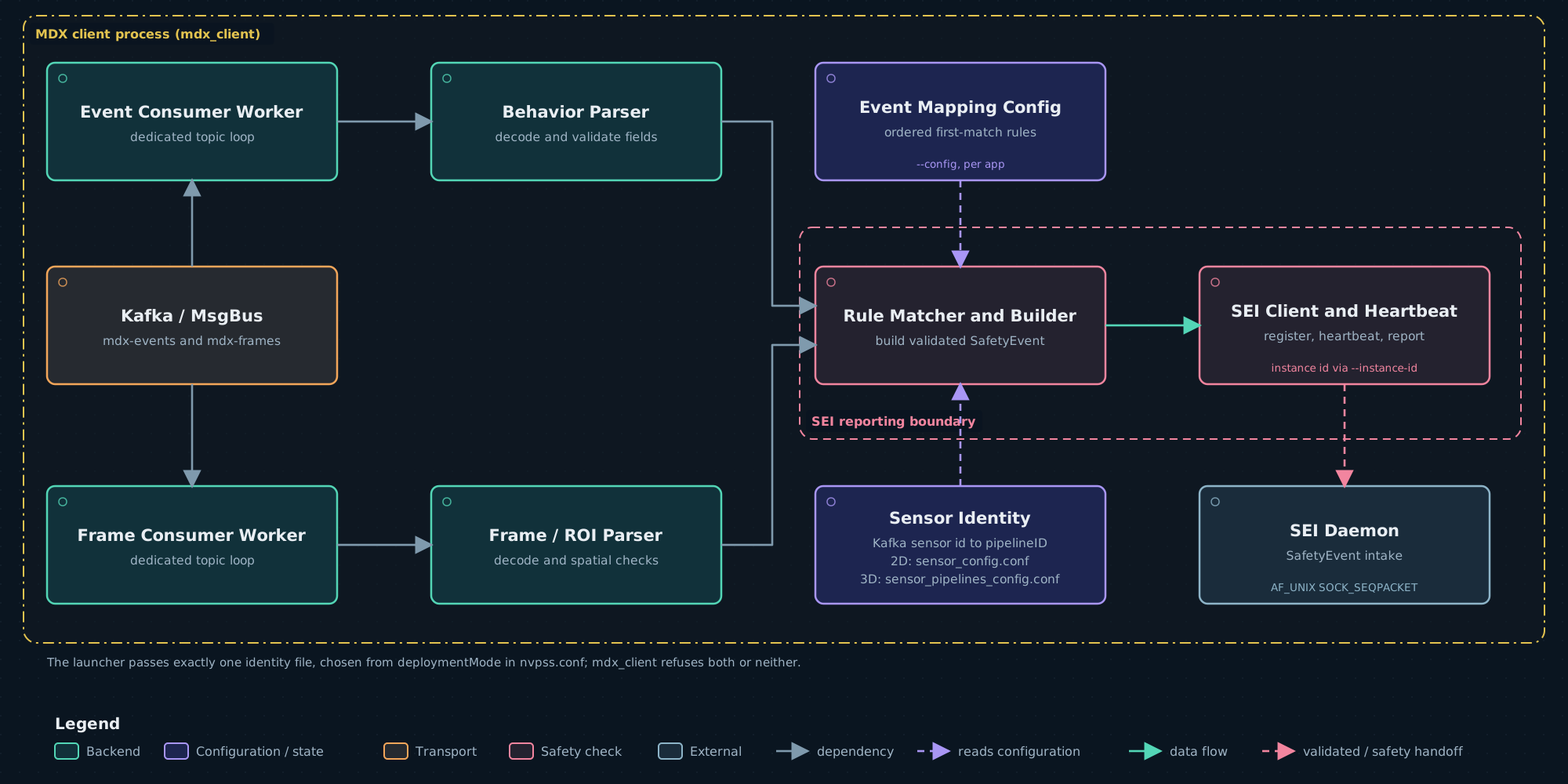
The MDX client (mdx_client) is the reference SIPP-to-SEI adapter. It reads the perception
contract from Kafka, matches each alert against the event-mapping rules, and reports each match
to the SEI daemon as a SafetyEvent. It is installed at
/opt/nvidia/psf/apps/mdx-client/mdx_client. The launchers start one MDX client: inside the
Safety Core container under the Docker runtime, on the host under --runtime host.
Command line
Every command-line error prints a message and the usage, and exits 1. Giving both identity
files prints
error: -s/--sensor-config and -g/--sensor-pipelines-config are mutually exclusive; giving
neither prints error: a sensor identity file is required.
Rule matching
The MDX client loads the event mapping at startup. It tries the binary format first, then the
text format. It exits 1 with No rules in config or load failed when the file cannot be read,
holds no rules, or contains a rule that fails validation (Invalid event mapping rule or
Rejected unsafe event mapping rule). The rule output_event is not checked: an unknown name is
reported as EVENT_UNKNOWN, which no SDM subscribes to.
For each alert the rules are tried in file order and the first match is reported. An alert that matches no rule is ignored. The rule format is in Event mapping configuration.
A reported SafetyEvent carries:
Severity is not part of a reported event; the SEI daemon assigns it.
Sensor identity
The MDX client turns the Kafka sensor identity into a pipelineId with one identity file:
The formats are in Sensor files. The launchers read
deploymentMode from nvpss.conf and pass exactly one file:
- the 2D file given with
--sensor-config, or - in 3D,
/opt/nvidia/psf/bin/sensor_pipelines_config.conf. The container launcher refuses to start when that file is not readable. Under the Docker runtime this is the file inside the container image;launch_hoisa.shdoes not mount its--sensor-pipelines-configfile into the container.
An alert from a sensor that is not in the identity file is dropped and logged as
Dropping event: sensor not in sensor_config, so it has no pipelineID: <name> (in 3D,
sensor_pipelines_config). Add the sensor to the file, or correct the name the producer emits.
Instances
Both launchers run one MDX client as instance 1. The shipped nvpss.conf sets
required_mdx_instances = 1, so instance 1 must register; if it never does, SEI raises cause 18
with reason never_registered after the heartbeat budget (about 4.2 minutes with the shipped
max_hb_failures = 50). See
Safety Event Integrator (SEI).
Registration and heartbeat
The MDX client registers with the SEI daemon on /run/nvpsf/nvpssd as CLIENT_MDX, once, with
no retry; a failure exits 1. It must run with the same primary group as the SEI daemon; see
Shared process group. It then sends a heartbeat every 5 s.
After 10 consecutive failed heartbeats it logs
PSS heartbeat ACK failure limit reached — PSS presumed dead, exiting and exits with status 0.
The launchers stop the stack when any process they started exits.
Failure behaviour
The MDX client starts reading each topic at the newest message, so messages published before it started are not read. Loss of the perception data stream is detected by the Perception Container Monitor, not by the MDX client; see Perception Container Monitor (PCM).
Logs
The MDX client writes to syslog with the tag nv_mdx_client; see
Safety Black Box (SBB) for where that lands.