
Add Machine Perception#
You’ve proved that the application can control the correct scene object. Control is not enough. To make the attic useful to a future robot, the scene must also produce structured observations that do not depend on human color recognition.
What you are learning: ovrtx exposes camera annotation outputs and nonvisual sensor outputs from the same OpenUSD scene. Skills separate label authoring, output selection, readback, interpretation, and browser orchestration so the agent can combine them correctly.
Why this matters for a robot-ready scene: A robot does not experience a beauty render as an artist does. Perception software needs machine-readable identity and measurable spatial evidence, with clear contracts for how those observations were produced. Semantic output and lidar let the same digital scene support recognition, localization, synthetic-data validation, and sensor testing.
Your 3D skills at work: AOV and lookdev experience becomes ground-truth output design. Material and ray-tracing knowledge becomes sensor-return visibility. Taxonomy, masking, compositing, and render-debugging skills help you detect labels, surfaces, or outputs that would silently give a perception model bad evidence.
Machine Perception: Semantics + Lidar#
How a robot application turns raw output into meaning. Step through the slides, then make the 3D decisions that specify and build the observations below.
Mission 3.a — Add Machine-Readable Perception#
1. Inspect — Define Meaning That Survives Appearance#
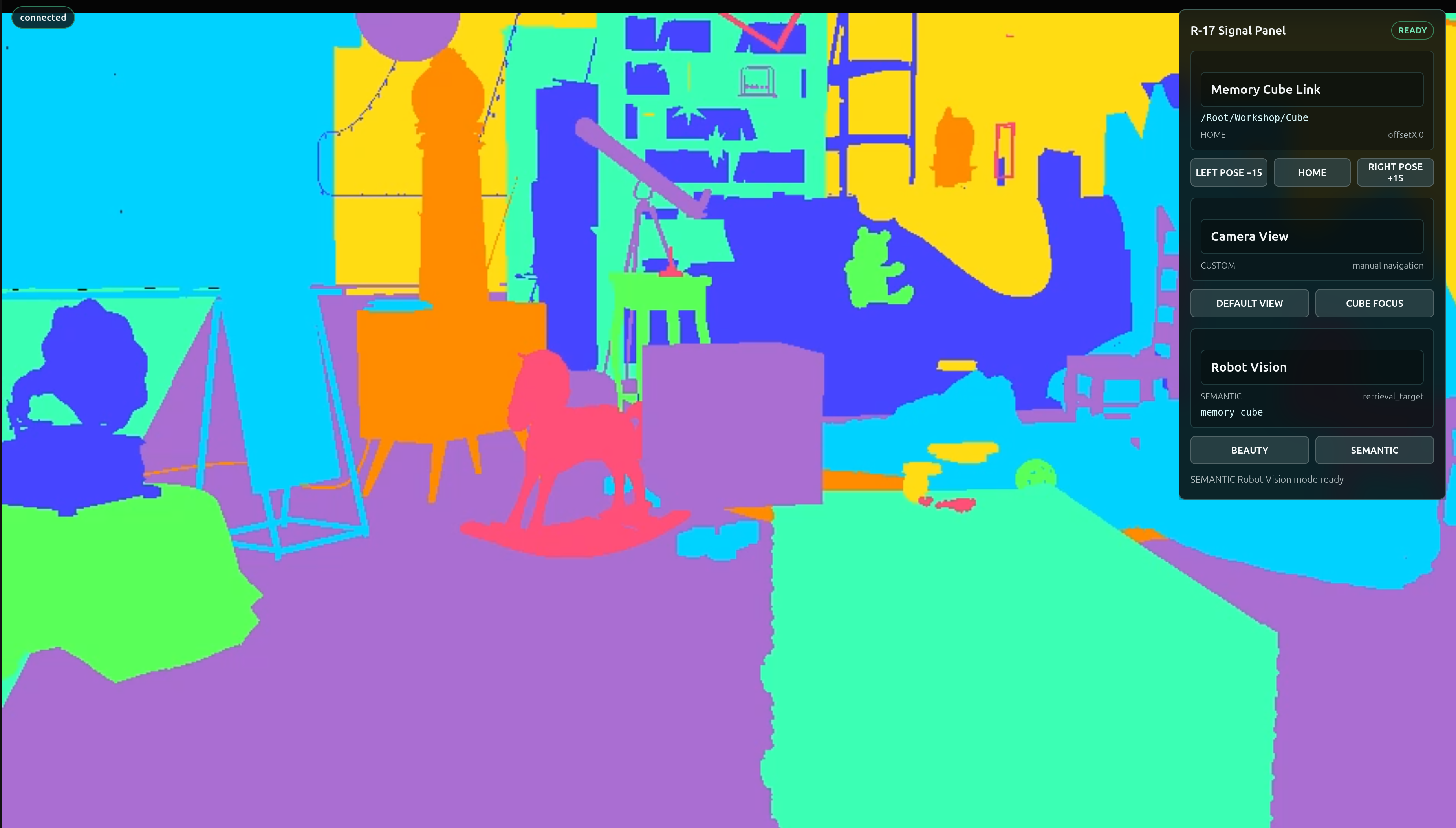
Humans see a glowing cyan cube. A robot application needs per-pixel IDs connected to semantic meaning.
Physical-AI translation: In film and games, mattes, cryptomattes, object IDs, and render passes isolate visual elements for downstream work. Here that same discipline creates ground truth: every pixel can carry a stable class and object identity that perception systems can train against or validate.
An AOV is one requested render output, such as beauty color, depth, or semantic IDs. This step adds a semantic AOV to the existing camera RenderProduct.
Find the Skill Chain#
Start with the hero skill semantic-labels. It authors SemanticsAPI metadata; it does not create a display-ready image by itself.
Skill or reference |
Job in the workflow |
|---|---|
|
Add class and label meaning in a non-destructive override layer; each object gets a semantic ID. |
|
Request the semantic image and ID-map RenderVars. |
|
Map the outputs returned by |
Viewer |
Colorize and select the streamed display mode without creating a second stream. |
This is another workflow, not one magic skill. The current pinned ovrtx skill and the actual runtime output keys are the source of truth; do not guess an AOV name from memory. The agent will run the provided focused semantic-view check before returning control.
Your lookdev, matte, and compositing experience is essential here. You already know that color, lighting, material, and helper effects can change without changing the object. That production distinction becomes the difference between trustworthy ground truth and a label that silently teaches a perception system the wrong identity.
3. Build — Add Your Taxonomy to the Mission Brief#
Tip
Make It Yours: Open the Prompt Builder, choose the Ray Trace Your Way to a Better Life session, and select Mission 3.a - Add Semantic Perception. Add your taxonomy decisions to Context and Done when, then review the complete contract before copying it.
Show a finished prompt
Goal:      Add Robot Vision to the Attic Portal: per-object candy-color ovrtx semantic
           segmentation, with BEAUTY and SEMANTIC controls in the existing R-17 Signal
           Panel.
Skills:    Read the installed ovrtx semantic-labels, camera-outputs-rt2,
           reading-render-output, and stepping-and-rendering skills. Use semantic-labels
           as the hero. Read
           ~/RTXViewport/skills/omniverse-realtime-viewer/SKILL.md and only its
           stage-loading, aov-switching, streaming-messages, viewer-control-patterns,
           viewer-feedback-status, and validation references.
Context:   Extend ~/RTXViewport/Attic_Portal. Before implementing, read
           ~/RTXViewport/ATTIC_PORTAL_STARTER.md and follow the detailed Robot Vision
           contract at
           ~/RTXViewport/Attic_Portal_Starter_Kit/Attic_Portal_Starter_Kit/ROBOT_VISION_CONTRACT.md.
           Reuse the starter snippets referenced there. Do not modify
           ~/RTXViewport/Attic_Nvidia.
Done when: The Robot Vision contract is satisfied; BEAUTY displays LdrColor; SEMANTIC
           displays candy-colored ovrtx SemanticSegmentation from the same camera and
           stream; /Root/Geometry/* objects have distinct labels; /Root/Workshop/Cube maps
           to retrieval_target / memory_cube; renderer_owner_count remains 1; protected
           source hashes are unchanged; and the agent reports changed files, output keys,
           browser URL, restart command, and concise validation evidence. Return control without
           waiting for my browser interaction.
4. Verify — Approve the Ground Truth#
Switch between BEAUTY and SEMANTIC. Confirm that appearance changes do not change the authored identity, visual helpers are not mistaken for the target, and the cube resolves to the class and label in your brief. The semantic image provides per-pixel IDs, the ID map connects them to meaning, the server colorizes them, and ovstream delivers the display-ready frame; React does not invent or reinterpret the taxonomy.
If the colors look convincing but the ID map or labels disagree with your brief, reject the result. In physical AI, a pleasing visualization is not a substitute for correct ground truth.
Mission 3.b — Commission Lidar Coverage#
1. Inspect — Treat Returns as Evidence, Not an Effect#
Semantic vision tells a robot application what a surface means. Lidar supplies structured 3D returns it can measure.
Physical-AI translation: A lighting or lookdev artist already reasons about how rays meet geometry and materials; a VFX artist already diagnoses missing intersections and unstable samples. Lidar uses that spatial judgment for a different output. Your task is to make sure the sensor can see the right surfaces and that the application reports usable evidence, not merely a convincing picture.
Find the Sensor Skills#
The authoring hero is nonvisual-materials - it teaches the agent how to give scene surfaces the sensor-return metadata that makes them visible to lidar. The lidar skills are read for validation only:
configuring-lidar-sensorsto confirm the authored sensor and itsPointCloudoutput.reading-sensor-pointcloudsto mapPointCloudtensors and respectCounts.interpreting-lidar-pointcloudsto understand coordinates, validity, frames, and units.stepping-and-renderingto produce a current sensor result.
Why author materials at all? RTX lidar returns come from renderable USD geometry, not PhysX collision or rigid-body schemas - so the agent must never add physics schemas just to make a prim “visible” to the sensor. Instead, every scene Material prim that lacks a sensor-return label needs default-preserving metadata so its surface returns hits. The agent queries the protected stage read-only, then authors labels only in viewer-owned R17_Lidar.usda under both supported prefixes - omni:simready:nonvisual and inputs:nonvisual (each with base/coating/attributes = none) - and never overrides an existing source label or saves the protected scene. Labels belong on Material prims, not Mesh prims, and lidarNonvisualMaterialCount reports how many the agent authored.
The sensor definition is authored once. LIDAR ON/OFF controls whether the application steps and reads the lidar RenderProduct; it does not mutate output-defining sensor attributes every time you click. The agent will run the provided focused lidar check before returning control.
Your lighting, lookdev, blocking, and ray-tracing experience helps you see the failure cases that a point count hides: occlusion, blind spots, the wrong sensor frame, missing return materials, and geometry that is visible to a camera but irrelevant to the task. The sensor API can return data; your spatial judgment decides whether it observes what matters.
3. Build — Add Your Coverage Judgment to the Mission Brief#
Tip
Make It Yours: Open the Prompt Builder, choose the Ray Trace Your Way to a Better Life session, and select Mission 3.b - Commission Lidar Coverage. Add your coverage decisions to Context and Done when, then review the complete contract before copying it.
Show a finished prompt
Goal:      Add the prepared R-17 Lidar Link to the Attic Portal.
Skills:    Read the ovrtx nonvisual-materials skill for sensor-return material authoring.
           Read configuring-lidar-sensors, reading-sensor-pointclouds,
           interpreting-lidar-pointclouds, and stepping-and-rendering for validation only.
           Read the Attic Portal starter recipe:
           ~/RTXViewport/ATTIC_PORTAL_STARTER.md#r-17-lidar-link.
Context:   Reuse the starter Lidar implementation from
           ~/RTXViewport/Attic_Portal_Starter_Kit. Compose R17_Lidar.usda above the
           protected attic scene. Add LIDAR ON/OFF to the existing R-17 Signal Panel using
           the existing request-correlated r17-command-v1 sender and r17-state-v1
           subscription. Keep one renderer, one camera RenderProduct, one stream, and one
           WebRTC connection. The Lidar preview must render inside the existing Lidar inset,
           follow the active camera, and use validated point cloud data, not a fake scene
           recolor. Lidar scene-return requirement: RTX Lidar visibility comes from
           renderable USD geometry, not PhysX collision or rigid-body schemas. Do not add
           physics schemas merely to make prims visible. Query the protected stage read-only
           for Material prims. For each material without an existing nonvisual base label,
           author default-preserving sensor-return metadata only in viewer-owned
           R17_Lidar.usda under both supported prefixes: omni:simready:nonvisual
           base/coating/attributes = none and inputs:nonvisual base/coating/attributes =
           none. Labels belong on Material prims, not Mesh prims. Never override an existing
           source nonvisual label and never save the protected scene. Publish and validate
           lidarNonvisualMaterialCount.
Done when: LIDAR ON reports READY with finite nonzero validPointCount and nearestRange; the
           inset shows stable camera-framed Lidar points for the scene; R17_Lidar.usda
           contains both nonvisual material prefixes for every discovered unlabeled material;
           lidarNonvisualMaterialCount is positive and matches the authored material set;
           LIDAR OFF reports DISABLED and clears stale telemetry; repeated toggles do not
           recreate the renderer or stream; source scene files are unchanged; and the agent
           reports changed files, material-label count, browser URL, restart command, and
           concise validation evidence.
4. Verify — Approve the Sensor Evidence#
Turn lidar on and judge the result against the coverage brief you authored. A nonzero point count is necessary but not sufficient: the returns must be current, finite, expressed in the expected frame, and cover the task surfaces you identified. Counts bounds the delivered entries, Flags identifies valid returns, Coordinates locates them, and Intensity describes processed reflection strength.
Confirm that the server interprets the mapped ovrtx output and sends compact evidence such as validPointCount and nearestRange through ovstream; React should display that evidence rather than process every raw point. Turn lidar off and confirm stale telemetry clears while the camera stream remains live. If the inset looks impressive but the evidence misses your required surface or frame, revise the brief and reject the result.
Validate: The Scene Is Ready for Exploration#
This is a digital-twin integration test, not a physical-robot safety certification. Each check proves one software contract that a future physical-AI system would depend on. Exercise the console you built:
Select HOME → LEFT POSE −15 → LEFT POSE −15 → RIGHT POSE +15 → HOME. Confirm the panel always reports
/Root/Workshop/Cube, replaying LEFT produces the same transform, and HOME restores the complete recorded pose.Switch DEFAULT VIEW → CUBE FOCUS, then orbit once. Confirm both presets work, navigation stays responsive, and the server changes
activeViewtoCUSTOMafter manual navigation. Return to DEFAULT VIEW and confirm it restores the startup preset.Switch BEAUTY → SEMANTIC. Confirm the cube’s semantic label is
memory_cubeand the browser still uses the same stream.Switch LIDAR ON. Confirm a finite nonzero valid point count appears without interrupting the camera frame loop.
Switch LIDAR OFF. Confirm sensor telemetry clears while the viewport stays live.
Confirm the source attic hashes remain unchanged and all new cameras, semantics, and sensors live in viewer-owned layers.
Each proof maps to something a physical-AI team depends on:
Provided proof |
Why a physical-AI team cares |
|---|---|
Repeating LEFT reaches the same target and HOME restores the pose. |
Networks retry commands; idempotent desired states prevent cumulative drift. |
DEFAULT and CUBE FOCUS are reproducible while navigation remains available. |
Authored sensor and inspection viewpoints must be repeatable without blocking operator awareness. |
SEMANTIC resolves the cube as |
Synthetic-data generation and model evaluation require a stable taxonomy tied to the correct object. |
Lidar reports finite valid returns without starving the camera loop. |
Multiple virtual sensors share a finite compute and frame-time budget. |
Lidar OFF clears telemetry. |
Robots and operators must not mistake stale sensor evidence for current state. |
New work lives in viewer-owned layers. |
A digital twin needs a protected source of truth plus reproducible experiment and application layers. |
If a check fails, name the first boundary to inspect:
Symptom |
First boundary |
|---|---|
Button changes locally but no server status arrives |
React command → |
Command is acknowledged but the cube does not move |
application queue → renderer-owner transform write |
Focus status changes but view does not |
camera preset → active camera write → next |
Semantic mode is blank or random |
RenderVar name/format → ID map → server colorization |
Lidar is ON but count stays empty |
sensor RenderProduct step → PointCloud map → Counts/Flags |
Server state is correct but panel is stale |
|
The scene now provides stable identity, controlled observation, and measurable perception outputs. Next, turn one repeatable workflow into a reusable skill in Create Your Own Agent Skill.