
SimReady or Not, Here Comes Gravity: OpenUSD for Simulation#
Welcome
Welcome back to the NVIDIA Physical AI Agent Bootcamp. In this course you’ll take on Operation Attic Containment — Commission the Physical Scene: integrate ovphysx into the Attic Portal you built in Session 1, run a first drop test, inspect simulation readiness with a targeted SimReady report, apply and visualize the required corrections, prove the result with runtime physics evidence, and begin packaging the workflow as a reusable agent skill.
Pre-Mission Prep: Open the Containment Scene#
This course continues in the same Attic Portal you built in Course 1, so the streamed ovrtx viewer should already be running. You won’t rebuild the application here - you’ll load this course’s scene into the viewer you already have.
Tip
New here? This course extends the R-17 interface from Course 1: Ray Trace Your Way to a Better Life - the streamed ovrtx viewport with its camera, robot-vision, and Lidar controls. Course 2 assumes you already built that portal, so we recommend completing Course 1 first. If you haven’t, start there and return once your portal is running.
With the portal running, ask your agent to load this course’s containment scene into it:
Goal:      Open the Course 2 containment scene in the Attic Portal that is already running.
Skills:    Use the Realtime Viewer stage-loading and validation references.
Context:   The Session 1 Attic Portal is already running with one ovrtx renderer, one
           ovstream provider, and one browser connection. Load the provided
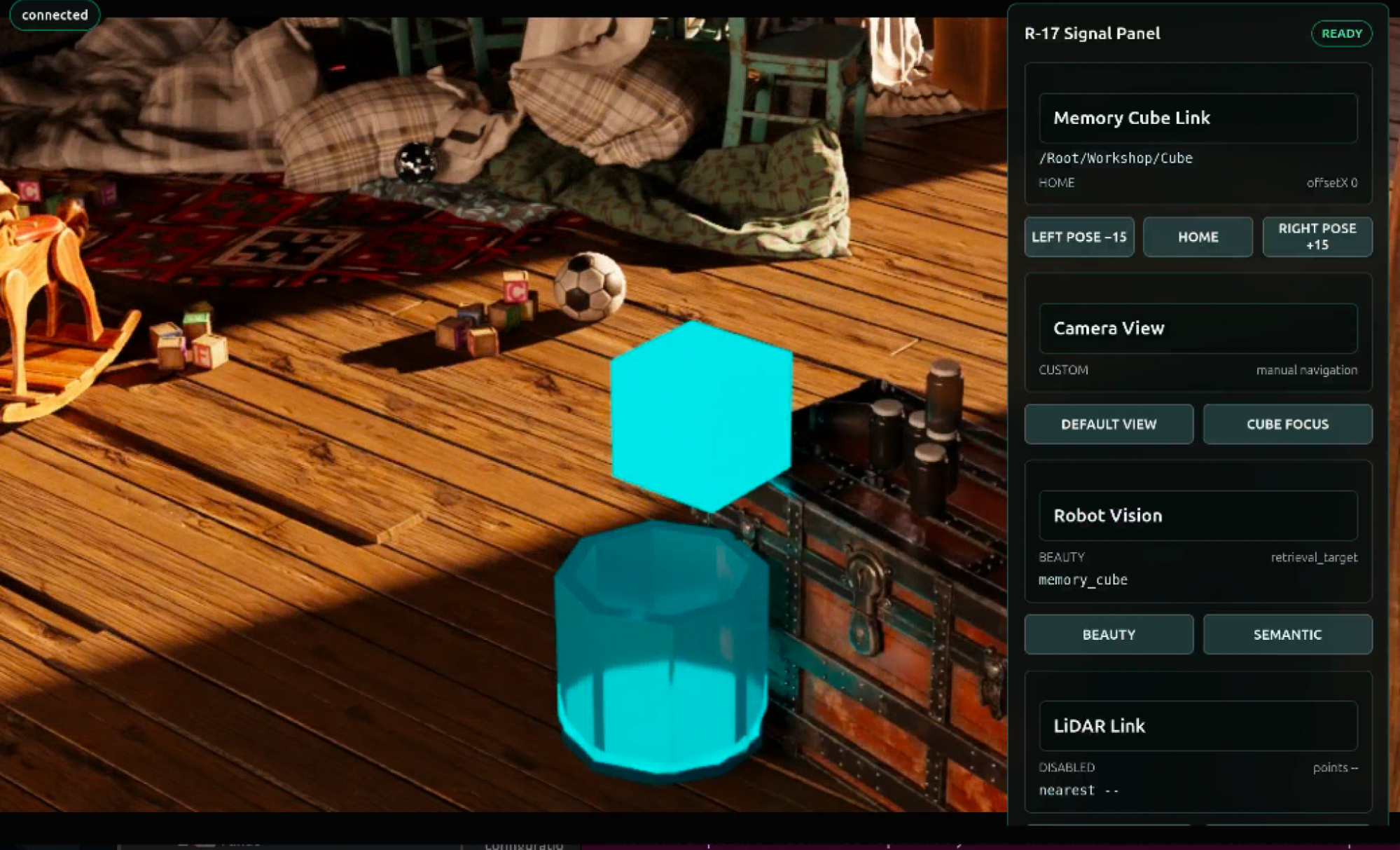
           OldAttic_Mission_2.usda scene - the glowing Memory Cube above the open-topped
           C-9 containment pod. Keep every USD source file read-only, reuse the single
           renderer, stream, and browser connection, and do not create backup scenes.
Done when: The viewport shows the containment pod beneath the Memory Cube, the browser
           still streams from one renderer over one connection, and the reported scene
           path is OldAttic_Mission_2.usda.
Confirm the correct scene is up by locating the containment pod beneath the cube.
Case File: Operation Attic Containment — Commission the Physical Scene#
The story: You are once again the agentic engineer on call for the Museum of Lost Things. In Session 1, you brought the attic’s remote inspection portal online and prepared the scene for machine perception. The museum now wants the Old Attic ready for a future physical-AI retrieval workflow involving the glowing Memory Cube - but deployment should not begin until the digital twin can represent and prove the physics of that task.
The museum has delivered Containment Pod C-9, an open-topped vessel designed to receive the Memory Cube. It appears in the remote portal as OpenUSD content, but it has not yet been proven as a simulation asset. You are commissioning the environment and evidence a robotics team could later use for training and testing; appearance alone cannot establish whether the objects will participate correctly in simulation.
The problem: The portal can render and stream the containment scene, but the deployment team has not proved which objects participate in physics, whether their collision representations preserve the intended task, or whether the rehearsal behaves consistently. Those claims need inspectable asset evidence and repeatable runtime proof before a future robotics workflow can trust the scene.
Your mission: Integrate ovphysx into the existing Attic Portal, use the first drop test to observe the scene’s current physical state, inspect simulation readiness through a targeted SimReady report, apply and visualize the required corrections, and prove the result through runtime physics evidence. Finally, add direct physics picking and begin packaging the workflow as a reusable skill. Your scene-assembly, FX, proxy-modeling, and validation instincts are what turn visible assets into a trustworthy physical environment.
You’ll work through a structured build, then extend the containment system on your own.
Learning Objectives
By the end of this course, you’ll be able to:
Explain how OpenUSD,
ovphysx,ovrtx,ovstream, and SimReady Foundation divide the work in a browser-streamed physics application.Integrate real-time physics into an existing browser-streamed OpenUSD application and use rigid-body counts and runtime behavior to judge whether a scene participates in physics.
Run a targeted SimReady validation report and apply the required corrections without overwriting protected source assets.
Prove physical behavior with collider overlays, before-and-after drop-test evidence, and a persistent OVD report with runtime telemetry - not a rendered picture.
Interact with objects under physics authority through mouse picking, and begin packaging the validated workflow as a reusable agent skill.
Key Ingredients#
OpenUSD - describes the world: hierarchy, transforms, representations, schemas, and layer ownership.
ovphysx- an open-source, USD-native physics library that simulates physical behavior (rigid bodies, colliders, contact, and scene-level gravity).ovrtx- renders the current OpenUSD state; it does not solve contact.ovstream- carries video, commands, input, and application status; it does not callovphysxorovrtxdirectly.SimReady Foundation - provides inspectable asset contracts and validation rules that turn “physics is broken” into named, versioned requirements.
Agent skills - version-specific procedures the agent reads to connect physics, validate, conform, compose, and simulate correctly.
Your Prompt Contract#
Every mission brief uses the same four fields.
Goal:      <the outcome this mission step needs>
Skills:    <the exact local skill or focused guidance the agent should read>
Context:   <the application, assets, state, paths, and facts it must not guess>
Done when: <the observable evidence that proves this step worked>
Goal states what must become true. Skills route the agent to current procedures. Context protects the facts and boundaries it cannot infer. Done when defines proof before implementation begins.
Your expertise loop: This course supplies each tested Goal and Skills route. You inspect the 3D problem, make one bounded design or review decision, and send the resulting Expert Brief into Context and Done when using the Prompt Builder.
Important
Review-before-run is the core habit this course builds. Read and understand the generated diff, then run only after the code makes sense to you.
Two Ways to Work#
Every build card asks you to make a decision first, then gives you two paths:
Build it yourself - fill in the
ContextandDone whenin your own words, using your Expert Brief. This is where the learning happens.Check or unblock - expand the Show a finished prompt dropdown to compare against a tested prompt if you get stuck. Treat it as a way to check your work or recover, not the default.
Before You Start#
Tip
This course builds directly on the Attic Portal from Course 1. We recommend completing Course 1 first so the streamed ovrtx viewport is already running when you start here.
Provided assets: the protected
OldAttic_Mission_2.usdacontainment scene (with the Memory Cube and C-9 pod) and the candidateC9_ContainmentPod.usda.Prerequisites: completion of Course 1, which builds the Attic Portal this course extends.
Your AI agent: if you haven’t already, follow Initialize Your AI Agent to start the agent and point it at the skills.
Download Course Materials#
Download the assets, starter code, and NVIDIA agent skills used in this course:
Course materials: Download the course bundle (
ovlibraries_physicalai.zip)
Warning
The course bundle is roughly 5 GB. You don’t have to download it to complete this course - you can work through every mission with assets you already have. Grab the bundle only if you want the exact starter assets, code, and agent skills used here.
In This Course#
Work through the pages in order:
Connect ovphysx and Run the First Drop Test - add a physics rehearsal probe and read the first piece of runtime evidence.
Inspect What the Scene Is Missing - run a targeted SimReady report from the portal.
Apply the Simulation-Ready Corrections - route report findings into guarded, visualized fixes.
Prove the Physical Rehearsal - author a
PhysicsSceneand rerun the drop test for runtime proof.Pick Up the Physical World - add physics picking and begin packaging a reusable skill.
Knowledge Check - check your understanding of the core concepts.
Review - mission debrief and what comes next.