

Connect ovphysx and Run the First Drop Test#
Mission connection: A future robotics workflow cannot be trained or tested from a static viewport. Before deployment, the team needs a real-time physics rehearsal that can release the Memory Cube, observe its motion, and measure whether it contacts C-9 and the support surfaces as intended. Your FX simulation and cache-troubleshooting experience transfers directly: you know that a motionless frame is a symptom, not a diagnosis, and how to separate a live solver from a scene with no usable bodies.
What Changes in the Application#
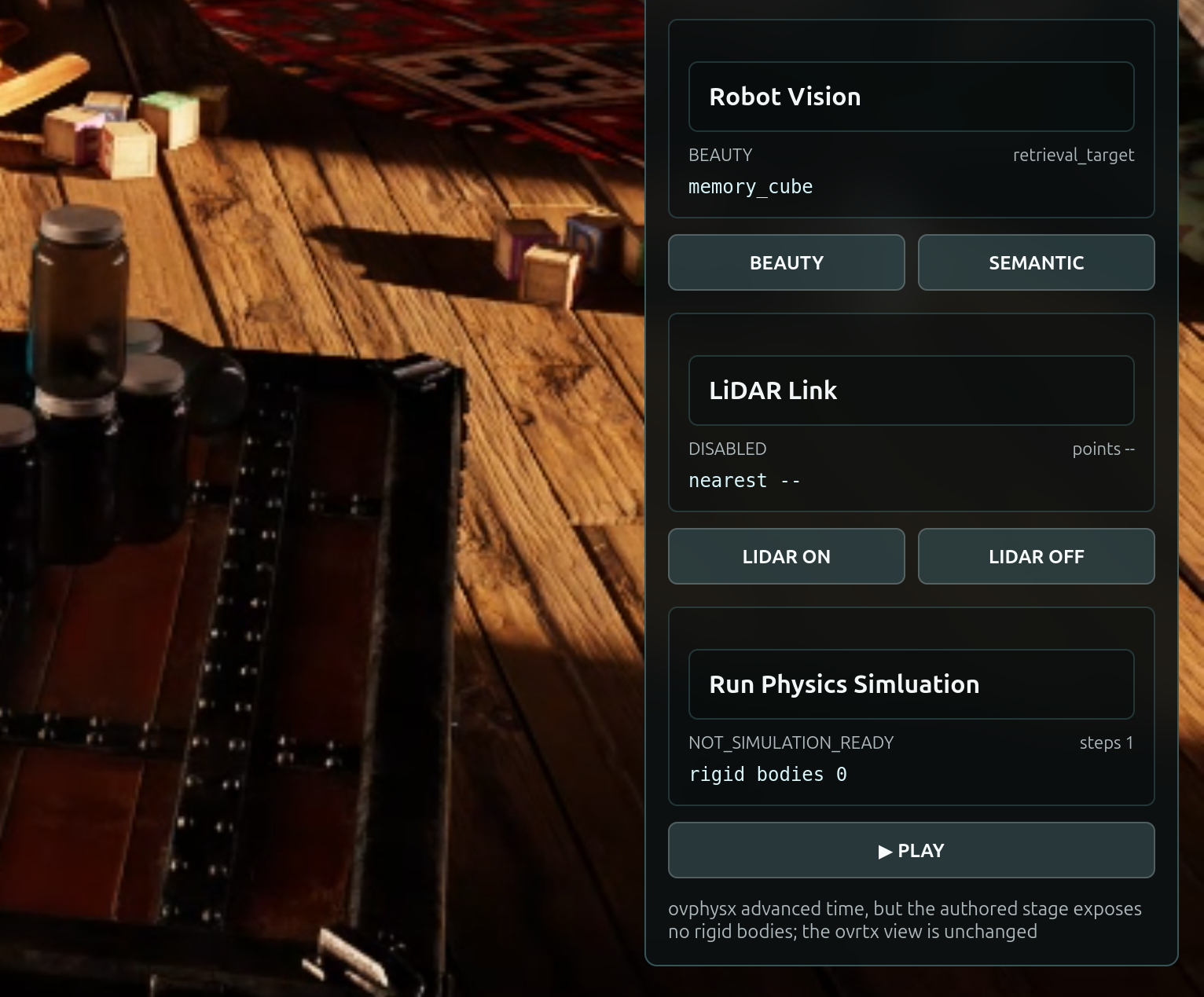
Mission 1 introduces a new Physics Rehearsal section in the existing Signal Panel (the panel titles it Run Physics Simluation). It includes:
a PLAY drop test control;
simulation status;
simulation time;
fixed timestep;
step count; and
rigid-body count.
The application initializes ovphysx and connects it to the existing sole simulation and render owner loop. It does not create another renderer, stream, React provider, or browser connection.
Decide Before You Build#
Your call — what proves a live solver on an empty scene? By design, once you build the probe the drop test will report rigidBodyCount: 0. Before you build, decide the one runtime signal that separates “physics is connected” from “the scene has usable bodies.” A frozen frame alone cannot tell you which is true.
Author your brief. The tested mission owns the probe architecture; your job is to add the observable evidence you would trust. This is your first brief, so author just the Done when line yourself and leave the rest on the tested route. A worked example you can adapt:
Done when (your addition): stepCount increases and elapsedTime rises on Play while
                           rigidBodyCount stays 0 - a live solver stepping an empty scene.
Carry that decision into the Prompt Builder below, then judge the agent’s result against it.
Mission Brief 1 — Add the ovphysx Simulation Probe#
Tip
Make It Yours: Open the Prompt Builder, choose the SimReady or Not, Here Comes Gravity session, and select Mission 1 - Run the ovphysx Simulation Probe. Before you run it, separate what the viewport proves from the physical claims that still need evidence, choose the scene-intent risk Mission 1 must expose, and send those decisions into Context and Done when. If you get stuck, use the provided default to check your work.
Show a finished prompt
Goal:      Extend the cumulative Session 1 Attic Portal with an ovphysx simulation probe for Mission 1. Add a panel section titled exactly "Run Physics Simluation" with a Play button. On Play, load the physical stage into ovphysx, advance it by a fixed simulation step, and expose simulation state for a future renderer handoff. Preserve the teaching outcome: ovphysx runs, but the current authored scene has no usable rigid bodies, so the rendered scene must not move.
Skills:    Read ~/SimReadyPhysics/skills/omniverse-realtime-viewer/SKILL.md, then its focused guidance at references/streaming-messages/README.md, references/viewer-control-patterns/README.md, references/viewer-feedback-status/README.md, references/dependencies/README.md, and references/validation.md. Follow the installed ovphysx API contract: import ovrtx before ovphysx; use PhysX.add_usd(), wait for the load, step with a fixed dt, query RIGID_BODY_POSE state, and release the runtime cleanly.
Context:   ~/SimReadyPhysics/PreWork has already restored the checkpoint_3 app, opened OldAttic_Mission_2.usda, and preflighted ovphysx. Work in ~/SimReadyPhysics/Attic_Portal without rerunning PreWork or checkpoint_00. Preserve the existing camera, robot-vision, and Lidar features. Use the existing r17-command-v1/r17-state-v1 protocol and run physics on the renderer-owner thread. Keep all USD files read-only: add no physics schemas, renderer pose bridge, or backup scene files.
Done when: The frontend builds; the panel visibly contains "Run Physics Simluation" and a "▶ PLAY" button; clicking Play performs a real ovphysx stage load and fixed-time step; state.json reports runtimeInstalled=true, stepCount>=1, elapsedTime>0, rigidBodyCount=0, status="NOT_SIMULATION_READY", bridgeReady=false, renderer_owner_count=1, and the Mission 2 stage path; a browser smoke test captures r17-physics-probe.png; the Mission 2 USD SHA-256 is identical before and after; the running app preserves the complete checkpoint_3 camera, robot-vision, and Lidar capabilities.
Run the First Drop Test#
Now that the probe is built, run it.
Tip
Predict first: Before you press PLAY, restate what your Done when predicted - what rigidBodyCount will be and whether the scene should move - then compare it to the panel.
Select PLAY in the Signal Panel of your Attic Portal and watch the scene. Nothing moves. The panel reports:
rigidBodyCount: 0
This is the first piece of engineering evidence. The viewport is functioning and ovphysx is now connected, but the loaded rehearsal currently contains no objects registered as rigid bodies.
Validate: Physics Probe Connected#
Before you move on, confirm you can answer:
Is
ovphysxinstalled and stepping (runtimeInstalled=true,stepCount>=1,elapsedTime>0)?Does the scene still report
rigidBodyCount=0andstatus="NOT_SIMULATION_READY"?Did the app preserve one renderer owner and the Session 1 camera, robot-vision, and Lidar features?
When a Run Doesn’t Match#
If a check fails, find the first boundary to inspect:
Symptom |
First boundary |
|---|---|
No Run Physics Simluation section or PLAY button |
frontend did not build or restart - rerun the apply and reload the browser |
PLAY does nothing and |
|
|
wrong stage loaded - confirm the Mission 2 stage path; the teaching outcome needs a scene with no usable bodies |
With a live solver and a clear symptom, we’ll turn “physics is broken” into a structured report in Inspect What the Scene Is Missing.