Ray Trace Your Way to a Better Life: Omniverse Libraries, OpenUSD, Agents, and You#
The Attic Story#
Welcome to the NVIDIA Physical AI Agent Bootcamp. The first two courses follow one connected story at the Museum of Lost Things.
You’re the agentic engineer called in to recover a glowing Memory Cube from the Old Attic. In Operation Attic Signal — Commission the Scene, you’ll bring its browser-streamed RTX portal online and make the digital scene trustworthy enough for a future robot to identify, control, and perceive the cube without modifying the original attic.
In the next course, Operation Attic Containment — Commission the Physical Scene, you’ll add simulation readiness and physics evidence so a future robotics team can test how the cube and its containment pod behave before deployment.
Why This, Why You#
Physical AI needs people who know how worlds are built. A robot’s intelligence begins before a model makes its first prediction. Someone must define the world at the correct scale, organize its objects, establish coordinate frames, rig its sensors, describe what each object means, and decide what evidence can be trusted. These are not finishing touches around the AI system - they are the spatial foundation the system reasons from.
Robotics, autonomous vehicles, digital twins, perception models, and world models cannot be built by models and chips alone. A model can only learn from and act on the world it is given. If a hierarchy is wrong, a sensor is mounted in the wrong frame, or ground-truth labels are inconsistent, that error travels through the application, the model, the infrastructure, and ultimately the physical machine. That is why your 3D expertise is essential.
Your 3D skill |
What physical AI needs it to provide |
|---|---|
Scene hierarchy and naming |
Stable identities for objects, assemblies, environments, and action targets. |
Units, transforms, pivots, and coordinate frames |
Shared spatial truth for robot motion, sensors, objects, and world state. |
Cameras, lenses, and framing |
Calibrated virtual sensors with intentional placement, coverage, and repeatable observations. |
Geometry, materials, and lighting |
Trustworthy visual and sensor evidence for perception, testing, and synthetic data. |
Semantic labels and taxonomies |
Machine-readable meaning and ground truth for training and evaluation. |
OpenUSD layers and composition |
A canonical digital twin that many applications and experiments can extend safely. |
Render outputs and AOVs |
The observations engineers and models use to measure and understand the world. |
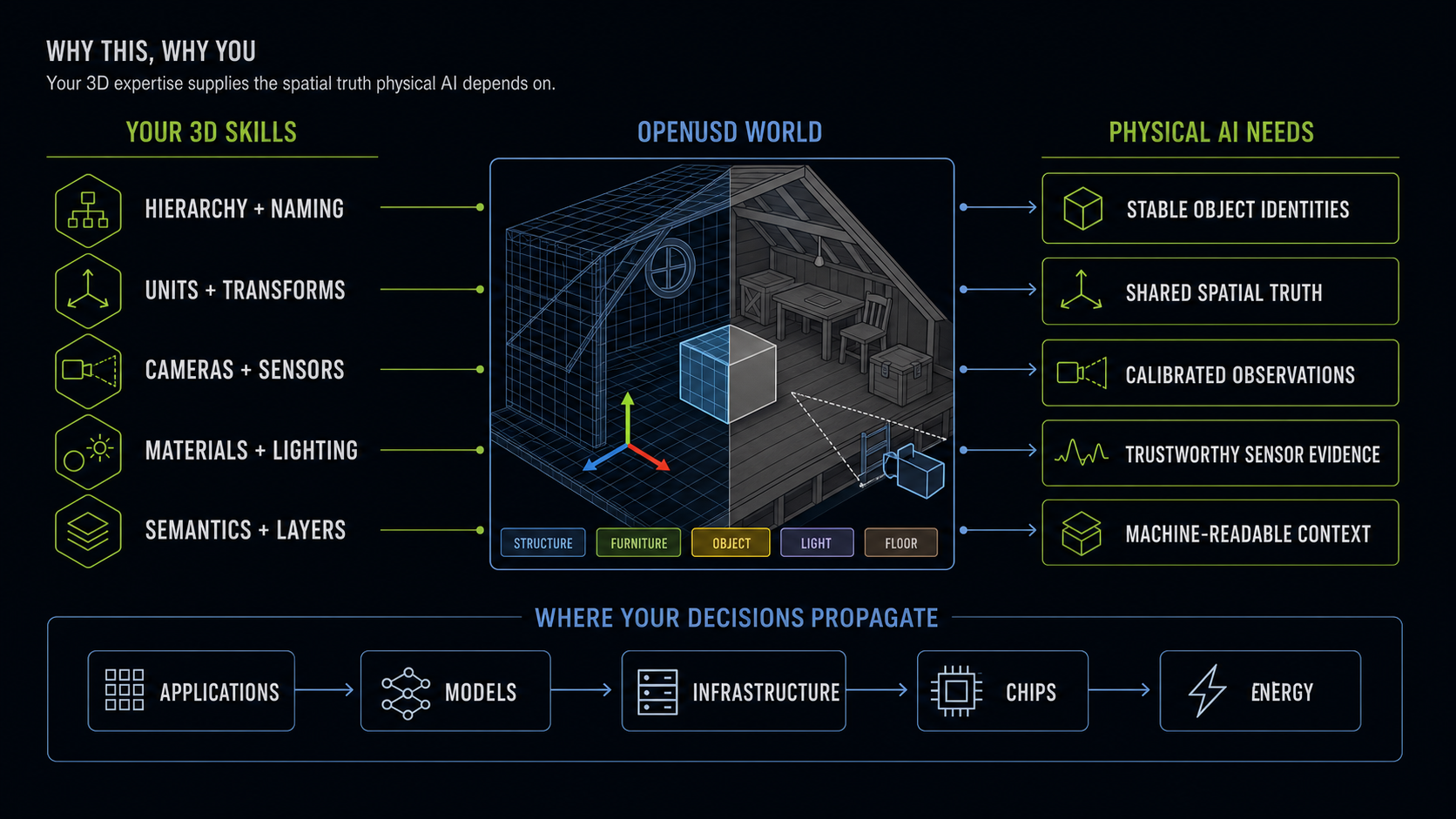
This expertise starts in the application and infrastructure layers of the five-layer AI cake, but it shapes the whole stack: models receive the observations you define, chips execute the rendering and sensor workloads you request, and energy use follows the scale of those decisions. OpenUSD gives your 3D knowledge a shared, structured form; ovrtx turns that world into RTX camera and sensor observations; ovstream makes those results operational in a connected application. Agents and skills accelerate the implementation - but they still need someone who understands what a correct world, sensor, transform, and result should be.
That is where you come in. Physical AI needs 3D practitioners who can build worlds coherent enough for machines to perceive, simulate, reason about, and act within. In this lab you are not decorating the world around a robot - you are defining the world the robot must learn to trust.
The Big Picture: RTX, OpenUSD, and Agents#
Your whole mission at a glance. Step through the slides, then jump into the build below.
Case File: Operation Attic Signal — Commission the Scene#
The story: You’re the agentic engineer on call for the Museum of Lost Things. A glowing Memory Cube has been misplaced in the Old Attic, and because the museum only stores its most long-lost items in this attic, the cube must be removed. The museum relies on robot assistance for these treacherous tasks, and your job is to commission the digital scene and its remote portal so a future robotics team can identify the target, inspect it from repeatable viewpoints, and evaluate machine-readable sensor evidence before a real robot is deployed.
The problem: The Memory Cube is easy for a person to recognize, but the attic is not yet ready for a robot. A robot-ready application needs stable identity, deterministic commands, repeatable sensor views, and machine-readable evidence before physical hardware enters the scene.
First, you’ll bring the Attic Portal online: an interactive RTX viewport streamed into your browser. Then you’ll turn the human observation “the glowing cyan cube” into a scene contract a future robot application can use - an exact OpenUSD prim, replay-safe commands, a repeatable camera, semantic labels, and lidar evidence.
Your mission: Turn the empty diagnostics panel beside the viewport into a robot-readiness console. You’ll prove that the application can resolve and move /Root/Workshop/Cube, create a nondestructive focus camera, expose semantic segmentation, and activate an ovrtx lidar sensor - all through the existing browser connection with Omniverse libraries and your agent.
You’ll work through a structured build, then extend the portal on your own.
Learning Objectives
By the end of this course, you’ll be able to:
Map how OpenUSD,
ovrtx,ovstream, the browser, your agent, and skills divide the work.Trace the render–stream–input lifecycle, following how a browser command travels through
ovstream, becomes queued application work, and reachesovrtx.Direct focused, source-backed
ovrtxskills to control transforms, camera outputs, semantic labels, and lidar data for version-specific APIs.Preserve the supplied scene by putting viewer cameras, semantics, and sensors in application-owned OpenUSD layers.
Launch a browser-streamed RTX viewer, extend it with robot-oriented controls and perception, and package the workflow as a reusable agent skill.
The What You’ll Build slide above previews these, and each mission page proves one of them.
Before You Start#
Tip
You can start fresh here - this course stands on its own and assumes no prior experience with the others.
Provided assets: the Old Attic scene (
~/RTXViewport/Attic_Nvidia/old_attic.usd), the prepared Attic Portal project (~/RTXViewport/Attic_Portal), and the Omniverse Realtime Viewer skill (~/RTXViewport/skills/omniverse-realtime-viewer).Prerequisites: basic comfort with a browser and a terminal. No graphics or RTX experience required.
Your AI agent: if you haven’t already, follow Initialize Your AI Agent to start the agent and point it at the skills.
Download Course Materials#
Download the assets, starter code, and NVIDIA agent skills used in this course:
Course materials: Download the course bundle (
ovlibraries_physicalai.zip)
Warning
The course bundle is roughly 5 GB. You don’t have to download it to complete this course - you can work through every mission with assets you already have. Grab the bundle only if you want the exact starter assets, code, and agent skills used here.
Key Ingredients#
ovrtx- a lightweight C and Python SDK for Omniverse RTX that loads the OpenUSD stage and produces real-time, physically accurate rendering and sensor output inside the server application.ovstream- a streaming library that carries server-rendered frames to the browser and native input back to the application.OpenUSD - the open framework that describes and composes the attic, including its hierarchy, materials, cameras, and prim identities.
The browser - displays the video stream and collects your controls; it does not render the USD scene.
Agent skills - version-specific procedures that give your agent the reliable route.
AGENTS.mdgives context; eachSKILL.mdpoints the agent at real source code.
Your Prompt Contract#
Every mission brief uses the same four fields, so you learn a repeatable habit rather than memorizing specific strings.
Goal:      <what should be true after this step>
Skills:    <which source-backed procedures the agent should read>
Context:   <the application, scene, current state, and constraints>
Done when: <observable evidence that proves the work is complete>
You don’t have to know all four fields up front. Start with what you already know - often the Goal and the Done when that will prove it - and fill in as much Context as you can. You don’t need to name the right skills yourself: this course supplies each mission’s Goal and the Skills route to the source-backed procedures the agent should read. Your job is to sharpen the Context the agent should not guess and the Done when that is your test contract, then compare the agent’s result against that proof.
This course supplies the mission and the tested implementation route. You supply the 3D judgment that makes the result useful. Every mission follows the same loop:
Inspect - examine the scene, output, or production problem through the lens of your own discipline.
Specify - decide the 3D judgment this mission needs and shape it in the Prompt Builder.
Build - inject your answers into the prompt’s
ContextandDone when, then direct the agent to implement it with the supplied skills.Verify - approve or reject the result against the evidence you defined, not merely whether the code ran.
Course mission + library skills + your specification
                         ↓
                  agent implementation
                         ↓
              your evidence-based approval
The Prompt Builder does not generate the entire prompt. Goal and Skills remain the reliable course contract; your decisions strengthen Context and Done when. Commit at least one Context or Done when decision of your own before you build - that judgment is the point of the course. Use the finished prompt to check your work or to unblock yourself if you get stuck, not as the default.
Important
Review-before-run is the core habit this course builds. Read and understand the generated diff, then run only after the code makes sense to you.
Note
Different AI coding agents and models work at different speeds, so how long a prompt takes to finish - and how many steps it runs - will vary. A longer wait doesn’t mean something is wrong. Judge each result against your Done when evidence, not the clock.
Two Ways to Work#
Every build card gives you two paths:
Make the mission yours - open the Prompt Builder, answer its questions, and review how your 3D decisions change
ContextandDone when. This is where the learning happens.Check or unblock - if you get stuck, expand the Show a finished prompt dropdown to compare against a tested prompt. Treat it as a way to check your work or recover, not the default path.
Your Route#
Mission |
Inspect and specify |
Build and verify |
|---|---|---|
1.a Attic Portal |
Decide which evidence distinguishes a live viewport from a robot-ready world. |
Launch the portal, then verify the runtime path and your chosen commissioning evidence. |
2.b Cube Link |
Select the stable prim and define a replay-safe transform contract. |
Build the controls, then prove they always reach the same authored targets. |
2.c Cube Focus |
Define framing, motion-envelope coverage, context, and rejection criteria. |
Author the nondestructive camera preset, then approve or revise its observation. |
3.a Semantic Perception |
Define which authored identities and labels must survive appearance changes. |
Build the semantic view, then verify its IDs and taxonomy. |
3.b Lidar Coverage |
Decide which task surfaces the sensor must observe and what counts as credible evidence. |
Build the sensor link, then inspect coverage and telemetry rather than accepting a visual effect. |
Part 4 Your Skill |
Turn one production-quality rule into NEVER GUESS, REQUIRE, and PROVE guidance. |
Create the skill, then forward-test whether another agent can repeat your quality bar. |
While each brief runs, review the plan and prepare the acceptance checks you’ll hold the result to. If a build fails, revise the brief and try the step again.
In This Course#
Work through the pages in order:
Open the Attic Portal - launch the browser-streamed RTX viewport and trace the render–stream–input lifecycle.
Establish the Cube Link - give a future robot application a reliable prim identity, replay-safe pose controls, and a focus camera.
Add Machine Perception - add semantic segmentation and a lidar sensor from the same scene.
Create Your Own Agent Skill - package a repeatable workflow for your open-build exploration.
Knowledge Check - check your understanding of the core concepts.
Review - recap, references, and what comes next.