Open the Attic Portal#
What you are learning: Start with the product a developer actually wants. The browser will display and control an RTX experience, but the rendering and OpenUSD work stay on the server.
Mission: Prepare the Old Attic as a live, inspectable environment for a future robot application. Your first proof is the complete path from the supplied OpenUSD scene to responsive browser pixels.
Why this matters for a robot-ready scene: Before a robotics team can commission behaviors or sensors, it needs a dependable way to inspect the same composed world the machine will use. A live viewport proves that scene composition, camera state, rendering, streaming, and input all agree; a still image cannot prove that runtime path.
Your 3D skills at work: Scene assembly tells you whether the correct assets, hierarchy, materials, scale, and camera context survived composition. Real-time, VFX, and pipeline experience helps you recognize the difference between a beautiful frame and a healthy render loop - exactly the judgment needed to commission a physical-AI application.
Portal Pulse: From USD Scene to Live Pixels#
How this page’s lifecycle fits together. Step through the slides, then start the build below.
Mission 1.a — Commission the Attic Portal#
1. Inspect — Separate Live Pixels From Trusted World Evidence#
Note
Need the files first? Download the assets, starter code, and agent skills from the Download Course Materials section on the course Overview, then use the local paths listed below.
You’ll direct your agent to create the Attic Portal from the Old Attic OpenUSD scene, run the portal’s diagnostic check, and launch it. This USD scene is our own prepared file; you’ll orchestrate with your agent to call the skills each library needs to build the server, the React application, and the page layout, then connect them to the scene.
To give the agent the recipe it needs, use NVIDIA’s Omniverse Realtime Viewer skill. This packaged skill teaches the agent the right guidance for ovrtx rendering, ovstream delivery, browser input, and validation. The skill is not the renderer and it is not a ready-made application - it teaches the agent how the pieces work together, then steps away once the portal is built.
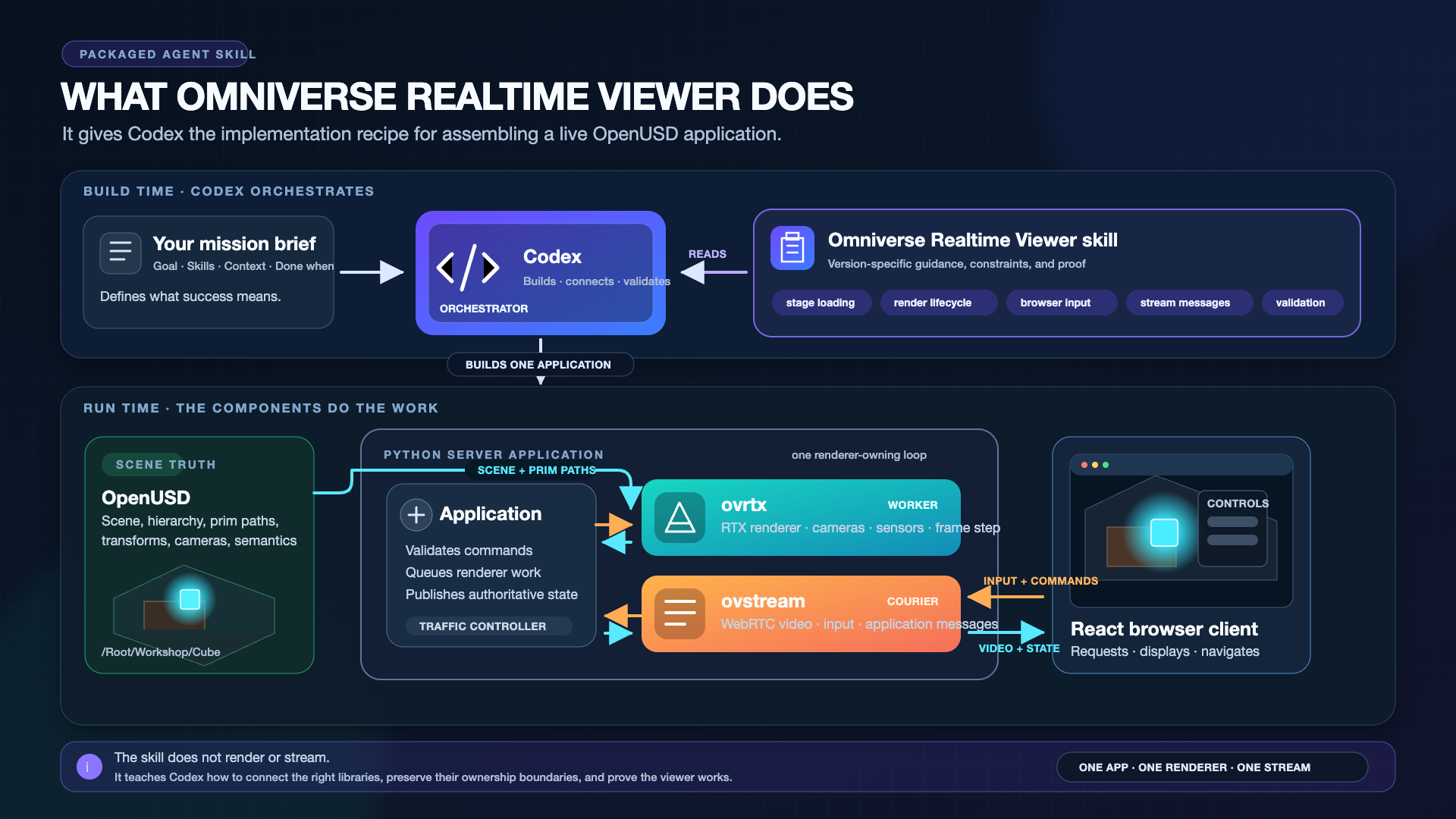
The skill does not know the museum mission or what makes this scene useful for robotics. Your prompt must explicitly ask the agent to compose two regions in the React app: the streamed viewport and an empty diagnostics panel beside it. “Empty” means the panel has a title and MODULE NOT INSTALLED status, but no live controls or invented telemetry. You’ll build it out one capability at a time in the next two missions.
The course files are located at:
Realtime Viewer skill:
~/RTXViewport/skills/omniverse-realtime-viewerOld Attic scene:
~/RTXViewport/Attic_Nvidia/old_attic.usdPortal project the agent will create:
~/RTXViewport/Attic_Portal
Before building, inspect the distinction you will need to approve. A responsive viewport proves that OpenUSD, ovrtx, ovstream, and the browser share a healthy runtime path. It does not, by itself, prove that scene units, axes, object identities, or camera frames are correct for a future robot application. Scene assembly and production-review experience are what let you recognize that difference.
2. Specify — Produce Your Portal Commissioning Brief#
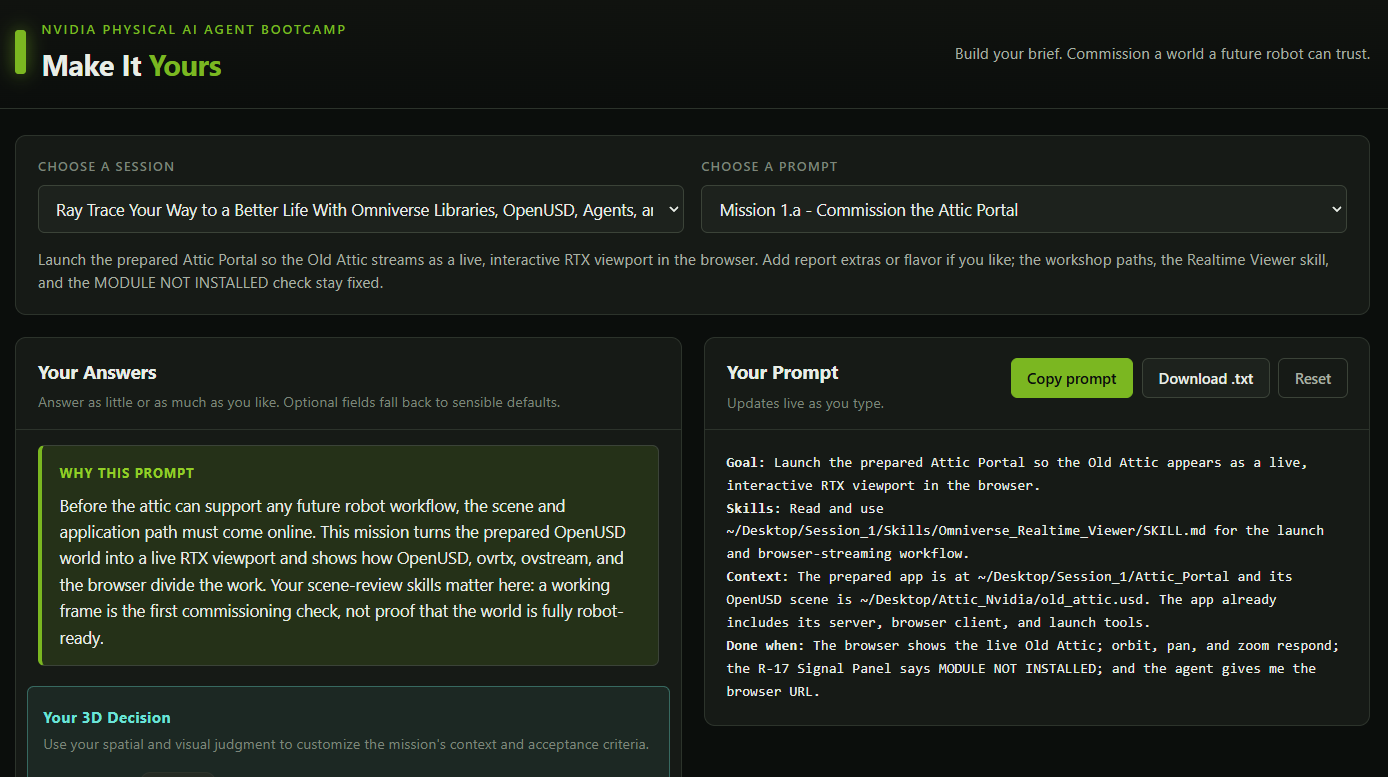
Decide the evidence you would require before treating a rendered world as trustworthy. Open the Prompt Builder, choose the Ray Trace Your Way to a Better Life session, and select Mission 1.a - Commission the Attic Portal. Turn that decision into an addition for Context and an observable addition for Done when. The tested mission still owns the launch architecture; your answers tell the agent which world-quality evidence matters to you. If you want to move quickly, leave the optional fields blank and continue with the tested prompt below.
3. Build — Launch the Portal#
Tip
Make It Yours: Open the Prompt Builder, choose the Ray Trace Your Way to a Better Life session, and select Mission 1.a - Commission the Attic Portal. Add your Context and Done when decisions to the generated prompt, review the complete contract, and copy your version.
Show a finished prompt
Goal:      Launch the prepared Attic Portal so the Old Attic appears as a live,
           interactive RTX viewport in the browser.
Skills:    Read and use ~/RTXViewport/skills/omniverse-realtime-viewer/SKILL.md
           for the launch and browser-streaming workflow.
Context:   The prepared app is at ~/RTXViewport/Attic_Portal and its OpenUSD scene
           is ~/RTXViewport/Attic_Nvidia/old_attic.usd. The app already includes its server,
           browser client, and launch tools.
Done when: The browser shows the live Old Attic; orbit, pan, and zoom respond; the R-17
           Signal Panel says MODULE NOT INSTALLED; and the agent gives me the browser URL.
4. Verify — Prove the Portal Pulse#
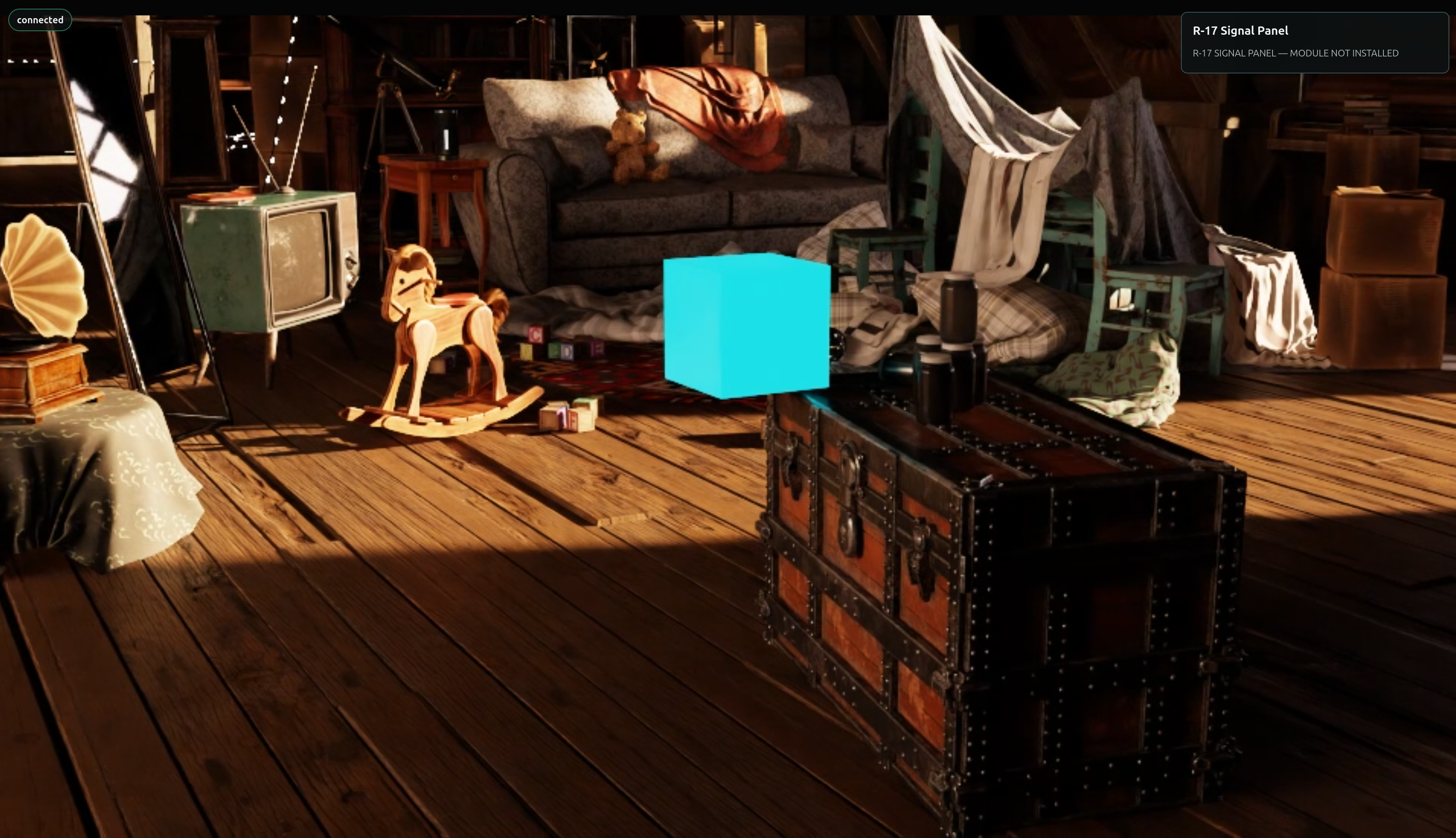
When the browser opens, inspect the result as a commissioning review rather than accepting the first frame. Orbit, pan, and zoom once each. Every gesture should travel through the complete loop:
Browser input → ovstream → application queue → active Camera
              → ovrtx steps the RenderProduct → LdrColor
              → ovstream video → Browser
The agent and skills guided the build. At runtime, OpenUSD describes the world, ovrtx renders it, ovstream transports input and frames, and the browser displays the result. Compare the live portal with both the provided checks and the brief you defined. If your evidence is missing, revise the brief; do not redefine success as “a window opened.”
Validate: Attic Portal Online#
Your portal is ready only when all of these are true:
The browser shows the attic - not a blank video element or static screenshot.
Orbit, pan, and zoom each produce a newly rendered view.
Server health becomes ready after the first valid rendered-and-converted frame.
The browser shows the expected Signal Panel — MODULE NOT INSTALLED placeholder for the next mission.
With the portal live, we’ll give the Memory Cube a reliable machine identity and command route in Establish the Cube Link.