

ImageHistogram#
Overview#
The image histogram operator calculates the histogram of a grayscale image, where the histogram represents the frequency distribution of pixel intensity values. The operator accepts parameters for the start and end of the intensity range and the number of bins, allowing for greater flexibility in analyzing different segments of an image’s intensity values.
Input Image |
Output (histogram) |
|---|---|
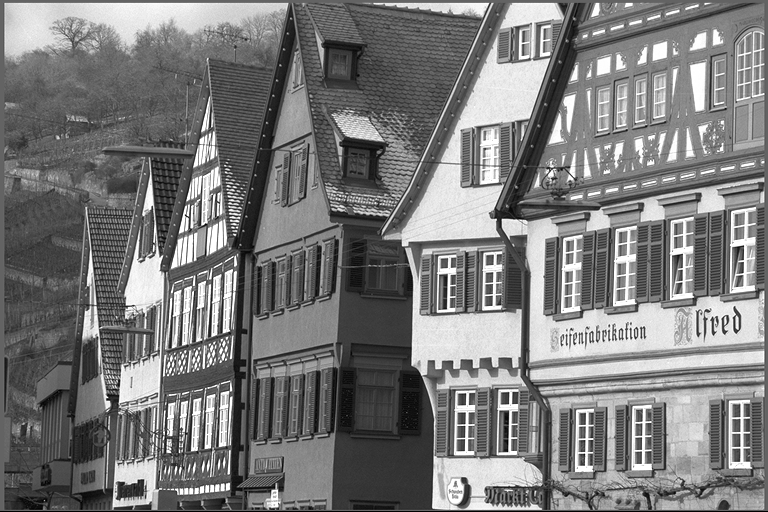
|
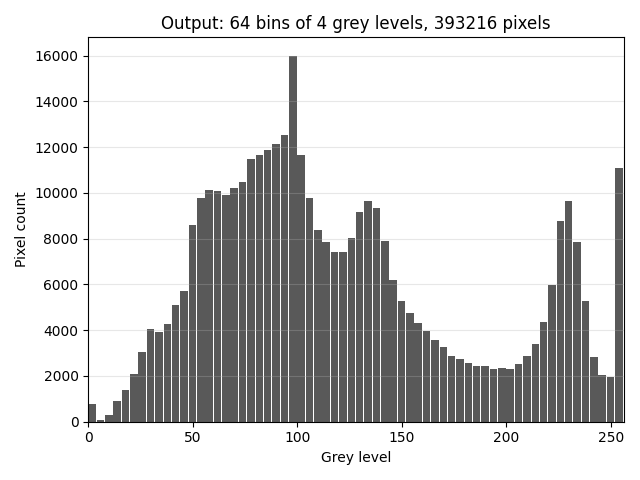
|
ImageHistogram Parameters: range 0–256, 64 bins.
Algorithm Description#
The algorithm partitions the distribution into a number of bins and counts the number of each pixel value within the bins. A pixel with intensity i will result in incrementing histogram bin bi where,
Implementation Details#
Parameters#
Input data type: u8 or u16.
Start: The lower bound of the pixel intensity range to consider for the histogram.
End: The upper bound of the pixel intensity range to consider for the histogram.
NumBins: The number of bins to divide the intensity range into.
Output data type: u32 or s32.
Dataflow Configuration#
1 RasterDataflow is used to split the whole image into tiles with size 128x128 and transfer them from DRAM into VMEM one by one.
1 SequenceDataflow is used to transfer the final histogram bins result from VMEM to DRAM at the end of the VPU execution.
Buffer Allocation#
5 VMEM buffers are needed,
1 input buffer with double buffering for each tile of the input image pixel intensity.
1 histogram buffer for the output of the histogram operation.
1 output buffer for the final histogram bins result.
1 buffer whose role depends on the input data type: for u16 a valid buffer holding the per-pixel validation value, for u8 a 256-entry accumulator that the 32-way sub-histograms are drained into.
1 mask buffer for checking pixel location in the horizonal direction of the input image.
Kernel Implementation#
The u16 path computes a bin index per pixel. For each pixel intensity,
Check whether it is inside the range of [start, end).
Store the validation value in the valid buffer.
Mask off if it is outside the image width in the horizonal direction.
Store the validation value in the valid buffer.
Optional step to handle the case that image width is not multiple of tile width.
Calculate the bin index according to the pixel intensity value.
Note
Since PVA uses fixed-point for the bin index calculation to achieve better performance, the final histogram bins result might not match in some corner cases (e.g., range of (end - start) and numBins with some kinds of odd value) with CPU and CUDA because they perform floating point calculations. It is better to use a well defined set of values for range of (end - start) and numBins like the power of 2 to avoid the mismatch.
Execute the histogram operation with the bin index and the validation value.
If one pixel intensity is invalid, set the bin index with value 0 to handle the out-of-range case.
- The specific VPU intrinsics used in the kernel is the histogram
vhist_simple_*. The sources of this instruction are indices and weights for weighted histogram. The indexed entries are updated by adding the corresponding weights. For input data type u16, because of the VMEM capacity, 16-way histogram
vhist_simple_16wis used with the bin number ranging in [1, 2048], 8-way histogramvhist_simple_8wis used with the bin number ranging in [2049, 4096], 4-way histogramvhist_simple_4wis used with the bin number ranging in [4097, 8192] and 2-way histogramvhist_simple_2wis used with the bin ranging in [8193, 16384].
Note
Since the K-way histogram can achieve up to K histogram updates per cycle, use the bin number ranging in [1, 2048] to get the best performance, the implementation of kernels for the bin number ranging in [2049, 16384] is a tradeoff between functionality and performance (which can support larger bin number but with worse performance).
- The specific VPU intrinsics used in the kernel is the histogram
Reduce the output of the histogram operation to get the final histogram bins result.
The parallelism granularity of the reduction kernel is according to the previous histogram operation.
The u8 path histograms the intensity directly, so it needs neither a per-pixel range check nor a
per-pixel bin index. Each tile is counted into a 256-entry, 32-way sub-histogram with
vhist_simple_32h, a full vector of samples per issue, weighted only by the column mask on the
last tile column. The sub-histograms are folded into the accumulator periodically, because an int16
counter cannot hold a whole image. Samples outside [start, end) land in accumulator entries that the
projection never reads, and the bin index is applied once per frame when those entries are projected
onto the output bins, which is what keeps the u8 drain cost independent of numBins. The projection
uses a fixed-point bin calculation too, so the note on corner-case mismatches in step 3 also applies to u8.
Performance#
Execution Time is the average time required to execute the operator on a single VPU core.
Note that each PVA contains two VPU cores, which can operate in parallel to process two streams simultaneously, or reduce execution time by approximately half by splitting the workload between the two cores.
Total Power represents the average total power consumed by the module when the operator is executed concurrently on both VPU cores.
Idle power is approximately 7.6 W on Jetson AGX Orin and 11.8 W on Jetson AGX Thor when the PVA is not processing data.
For detailed information on interpreting the performance table below and understanding the benchmarking setup, see Performance Benchmark.
Image Size |
Data Type |
Range (Start/End) |
Bins |
Execution Time |
Submit Latency |
Total Power |
|---|---|---|---|---|---|---|
1920x1080 |
U8 |
0/256 |
64 |
0.102ms |
0.003ms |
13.829W |
1920x1080 |
U8 |
0/256 |
128 |
0.104ms |
0.003ms |
13.831W |
1920x1080 |
U8 |
0/256 |
256 |
0.104ms |
0.003ms |
13.831W |
1920x1080 |
U16 |
0/65536 |
64 |
0.345ms |
0.003ms |
13.21W |
1920x1080 |
U16 |
0/65536 |
128 |
0.346ms |
0.003ms |
13.211W |
1920x1080 |
U16 |
0/65536 |
2048 |
0.363ms |
0.003ms |
12.714W |
1920x1080 |
U16 |
0/65536 |
4096 |
0.825ms |
0.003ms |
11.11W |
1920x1080 |
U16 |
0/65536 |
8192 |
1.427ms |
0.003ms |
10.307W |
1920x1080 |
U16 |
0/65536 |
16384 |
2.577ms |
0.003ms |
10.209W |
Image Size |
Data Type |
Range (Start/End) |
Bins |
Execution Time |
Submit Latency |
Total Power |
|---|---|---|---|---|---|---|
1920x1080 |
U8 |
0/256 |
64 |
0.109ms |
0.002ms |
17.783W |
1920x1080 |
U8 |
0/256 |
128 |
0.112ms |
0.002ms |
17.287W |
1920x1080 |
U8 |
0/256 |
256 |
0.116ms |
0.002ms |
13.843W |
1920x1080 |
U16 |
0/65536 |
64 |
0.370ms |
0.002ms |
13.843W |
1920x1080 |
U16 |
0/65536 |
128 |
0.373ms |
0.002ms |
13.944W |
1920x1080 |
U16 |
0/65536 |
2048 |
0.428ms |
0.002ms |
15.664W |
1920x1080 |
U16 |
0/65536 |
4096 |
0.981ms |
0.002ms |
12.843W |
1920x1080 |
U16 |
0/65536 |
8192 |
1.729ms |
0.002ms |
13.459W |
1920x1080 |
U16 |
0/65536 |
16384 |
3.185ms |
0.002ms |
13.357W |