

TemplateMatching#
Overview#
Template matching is a technique in computer vision used to identify and locate a template image within a larger image. The process involves sliding the template image across the target image and comparing the template to the overlapping image region. It is widely used in various applications, including object detection, image recognition, and tracking. The effectiveness of template matching relies on the choice of matching methods and the characteristics of the images involved.
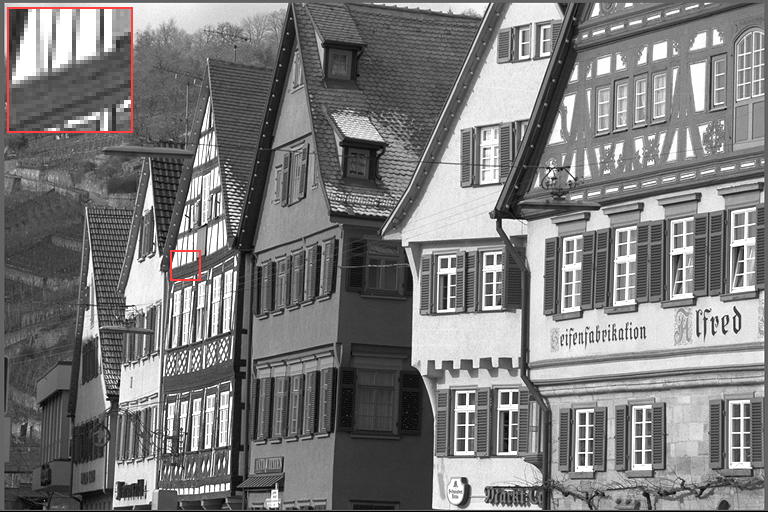
Input (template at top left, source outlined) |
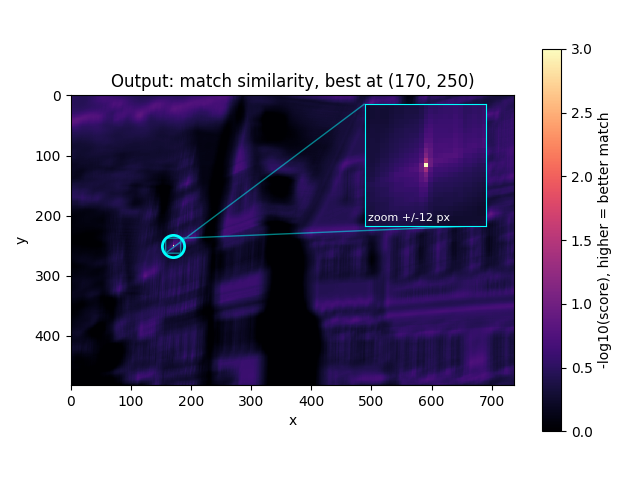
Output (score map) |
|---|---|
|
|
TemplateMatching Parameters: a 31×31 template cut from the image. The output is −log10 of the normalized SSD score; the best match is the brightest point, circled and zoomed in the inset.
Reference Implementation#
The reference implementation of this template matching algorithm computes the normalized sum of squared differences (SSD), the metric OpenCV exposes as TM_SQDIFF_NORMED.
The algorithm computes the normalized SSD for every possible location of the template inside the source image.
The location with the lowest score is chosen as the best matching location between source and template image, and an exact match scores zero.
The normalized SSD is calculated as follows:
where:
\(T(x′,y′)\) refers to the template image.
\(I(x+x′,y+y′)\) refers to the source image.
\(x′\) and \(y′\) are the pixel coordinates inside the template image.
More information can be found in [1] and [2].
The kernel does not evaluate that sum directly. It expands the squared difference into three terms, \(D = E_T + E_I - 2C\). \(E_T = \sum T^2\) is the energy of the template, \(E_I = \sum I^2\) the energy of the image window under it, and \(C = \sum T \cdot I\) the cross correlation of the two. \(E_T\) is one value for the whole submit. \(E_I\) takes \(\lceil w/2 \rceil\) taps per image row, and after that one subtraction per score. \(C\) takes \(\lceil w/4 \rceil \times (h/2 + 1)\) taps for every two output rows. A wider template costs more in both \(E_I\) and \(C\); a taller one costs more only in \(C\). Figure 1 compares the two forms.
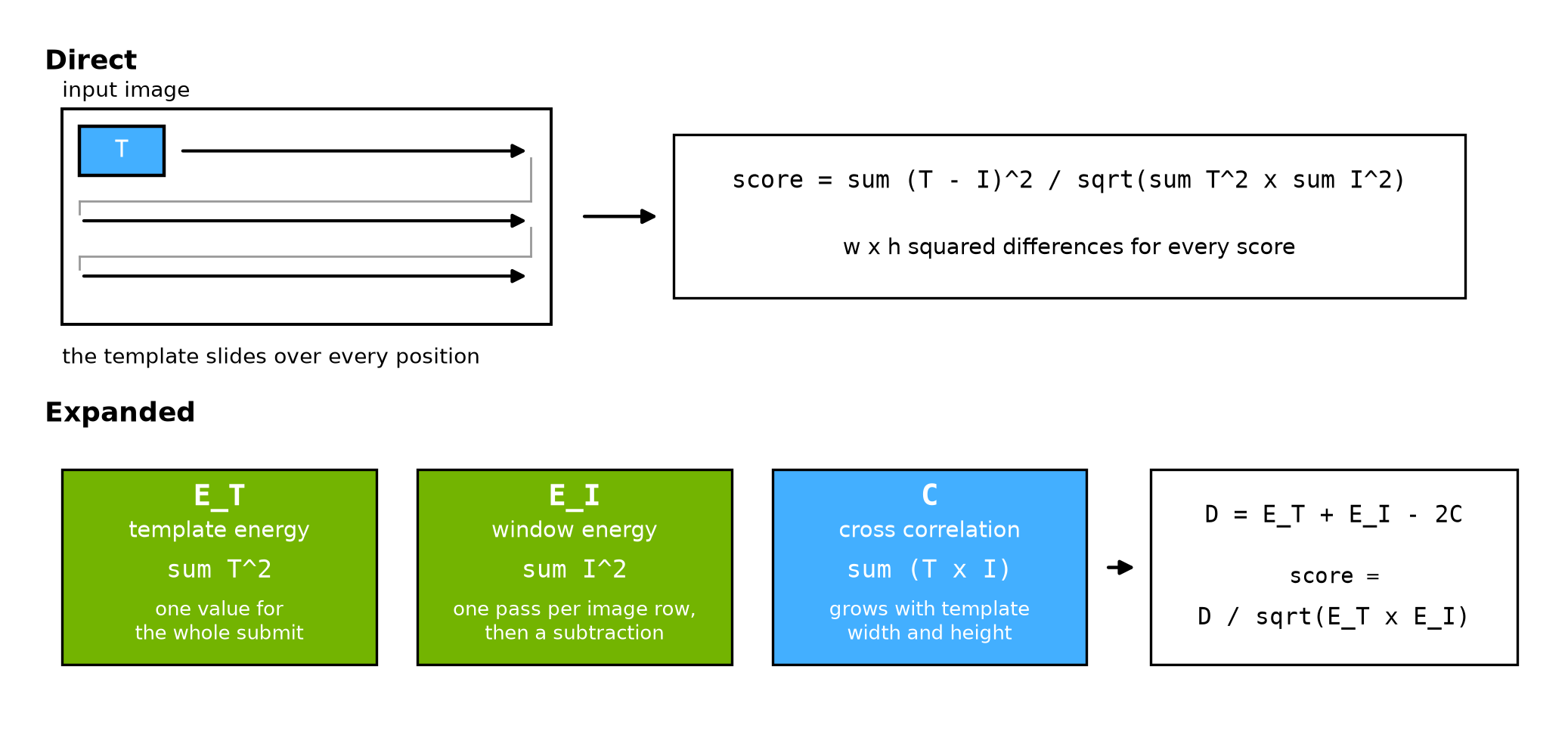
Figure 1: The Same Score Computed Directly and From Three Terms#
Implementation Details#
One device implementation serves every supported template size.
The device sources are template_matching_top.c and template_matching_knl.c.
Limitations#
The supported ranges of the template matching parameters are listed as following:
If the input image has a resolution \(W \times H\), then \(W >= 94\) and \(H >= 94\).
If the template image has a resolution \(w \times h\), then \(0 < w <= 31\) and \(0 < h <= 31\).
The input image and the template are
U8, and the output score matrix isF32.If the input image has a resolution \(W \times H\) and template image has a resolution \(w \times h\), then the size of the output score matrix is \((W - w + 1) \times (H - h + 1)\).
The score is computed only over translations of the template, so matching is neither rotation- nor scale-invariant. A rotated or resized instance of the template is not detected.
A tensor outside these ranges is rejected at create time.
Dataflow Configuration#
2 RasterDataFlow (RDF) and 1 SequenceDataFlow (SQDF) are needed:
1 input RDF is used to split the input image into tiles and transfer them with halo from DRAM into VMEM. It uses full replication, so one transfer places the same tile in superbank A and superbank B.
1 output RDF is used to transfer the score tiles from VMEM to DRAM with double buffering.
1 SQDF is used to transfer the template from DRAM to VMEM one time, for the setup pass.
The tile arena is always \(256 \times 32\), and the tile height is always 32, even because one correlation pass produces two output rows. The tile width is chosen per request from 256, 128 and 64 columns, widest first, subject to two RasterDataFlow rules: the tile may not exceed the ROI, and the padding the DMA synthesises for the right-most tile of a row may not exceed 255 columns. The narrowest candidate is the smallest score matrix a valid request can produce, so the choice always succeeds. The chosen width reaches the kernel as a chunk count, rounded up to the unroll factor of the score loop; the surplus chunks compute into the arena and are discarded by the output transfer tile. The input ROI is the score matrix itself, so no transfer is ever asked to read outside the image.
A score at \((x, y)\) reads the image window \([x, x + w) \times [y, y + h)\).
A tile therefore reads \(w - 1\) columns and \(h - 1\) rows past its own edge.
The RDF halo is the same on both sides, so that much is also transferred before the tile.
Those leading rows and columns are skipped, which is why the tile origin sits at (haloX, haloY) inside the buffer.
The required \(w - 1\) is rounded up to an even value, giving haloX, because dvuchar_load_perm forces its address even.
An even template width therefore transfers one column that is never read, and an odd width transfers none, as Figure 2 shows.
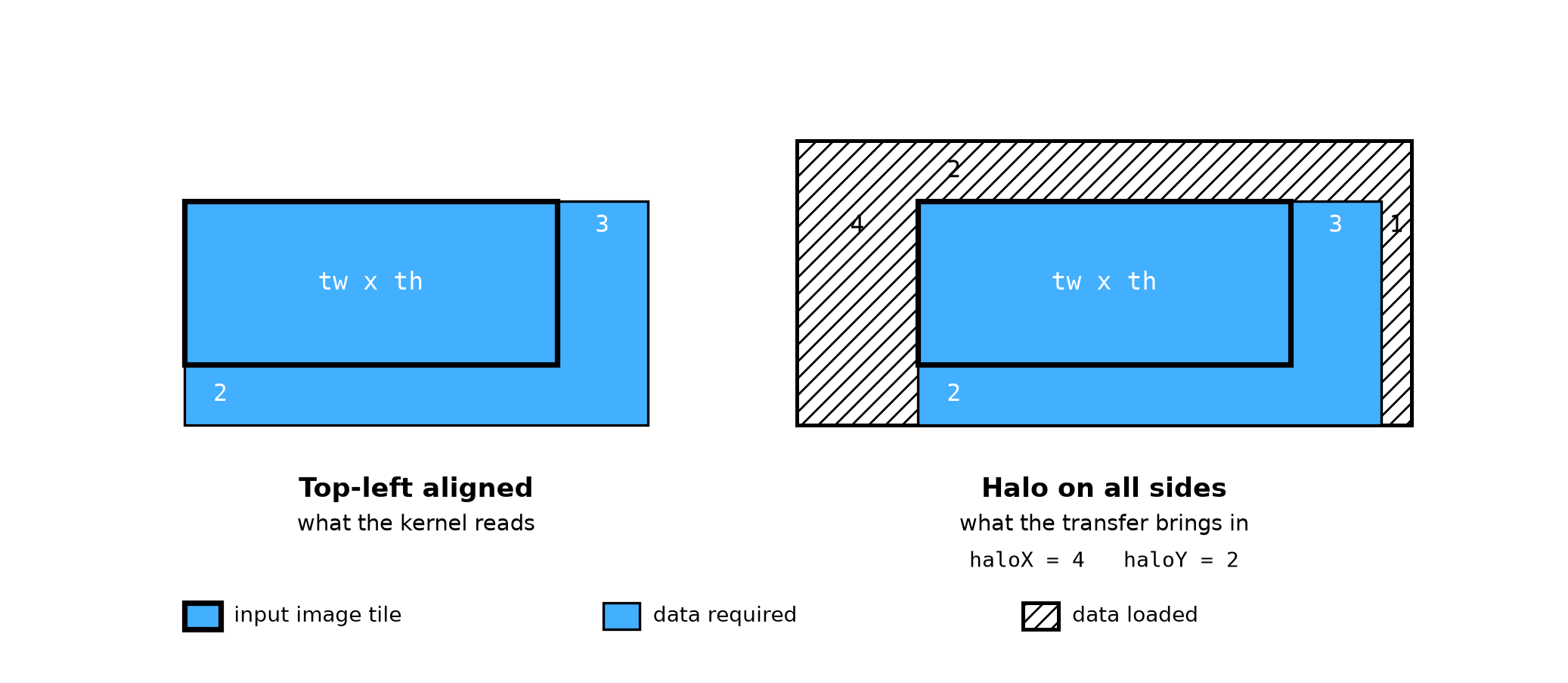
Figure 2: Halo Setting of the Input Image RDF with Template Size = 4 x 3#
Buffer Allocation#
9 VMEM buffers are needed:
Input buffers:
srcTileAin superbank A andsrcTileBin superbank B hold the two copies of the image tile, both double-buffered.tmplStagein superbank A holds the transferred template.Intermediate buffers:
vRingin superbank B holds the vertical sums,corrScratchin superbank B holds the two correlation rows of one pass, andcoefBlocksin superbank C holds the packed coefficients.permTableandalgoParamsin superbank A hold the load pattern and the geometry.Output buffers:
outTilein superbank C holds the score tile, double-buffered.
The transfer writes only \(w \times h\) bytes of tmplStage.
The rest of that buffer has to read as zero, because three things read past the template:
the energy sum reads the whole buffer, with no mask;
the coefficient packing reads a row that is always zero, in place of template row \(-1\);
a one-row template reads the rows its extra tap pair covers.
Kernel Implementation#
A setup pass runs once per submit, before the tile loop starts. It squares and sums the staged template to get \(E_T\). It then packs the template into the 16-byte coefficient records that the correlation reads.
\(E_I\) is computed in two passes. The horizontal pass sums the squares of \(w\) neighbouring pixels, for every pixel of a tile row. The vertical pass keeps a running total of those row sums down the tile. The energy of an \(h\) row window is then the difference between two of those totals. The total before the first tile row is zero, so the first output row needs no special case. Both passes read the image alone: the template enters only as the window size, so \(E_I\) does not depend on the template contents. The running sums are held in a ring of \(h + 2\) rows. That is how many stay in use while the next row is being produced, as Figure 3 shows.
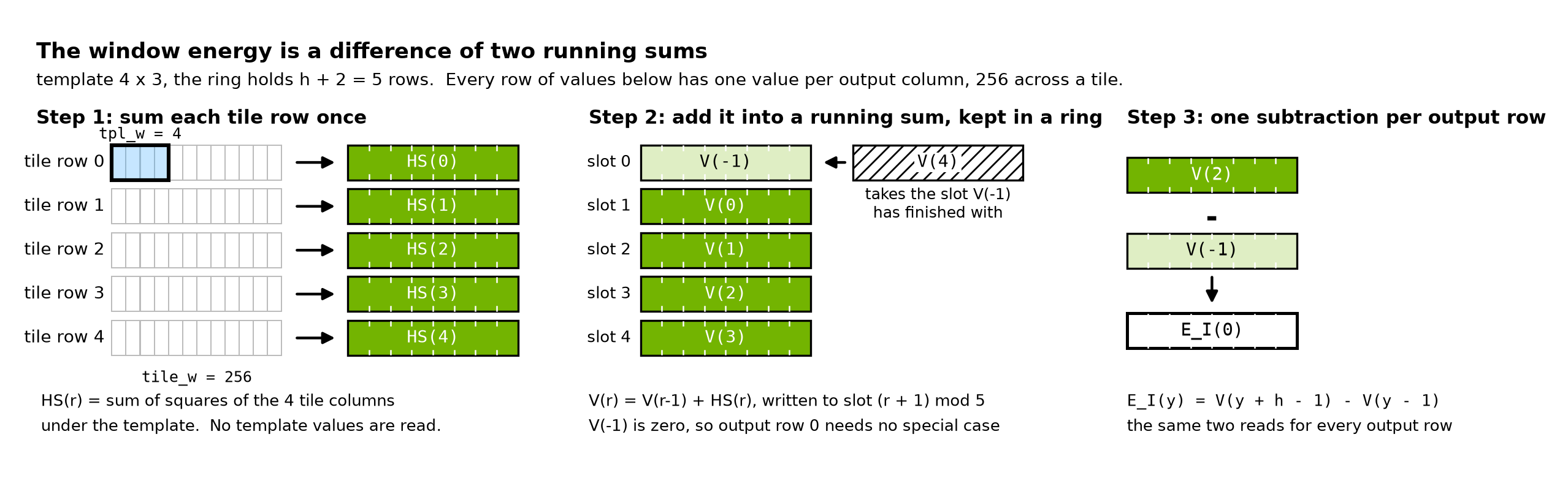
Figure 3: Window Energy From Two Reads of One Running Sum, Template 4 x 3#
\(C\) is computed with the vfilt4x2x2 family, in the U8 form vfilt4x2x2_bbh.
One instruction covers 4 template columns by 2 template rows, for 32 output columns at once, and updates two accumulators.
Each accumulator has its own set of coefficients: set 0 lines the template up with the first tile row of the pair, set 1 with the second.
That is 4 template columns by 2 sets by 2 tile rows by 32 output columns, or 512 multiply-accumulates per instruction.
A wider template is split into \(\lceil w/4 \rceil\) column groups, each with its own instruction.
The 32 columns are one chunk of the tile, so the whole sequence repeats once per chunk: 8 times across a 256-column tile, 4 times across a narrower one.
Each coefficient record holds both sets, the same template rows twice, one row apart.
That is what lets a single instruction add to the score of one output row and of the row below it.
Each instruction makes three reads, one from each superbank.
The even image row comes from superbank A, the odd image row from superbank B, and the coefficient record from superbank C.
Figure 4 follows one pair of instructions through both accumulators, with \(T(r)\) standing for 4 columns of template row \(r\).
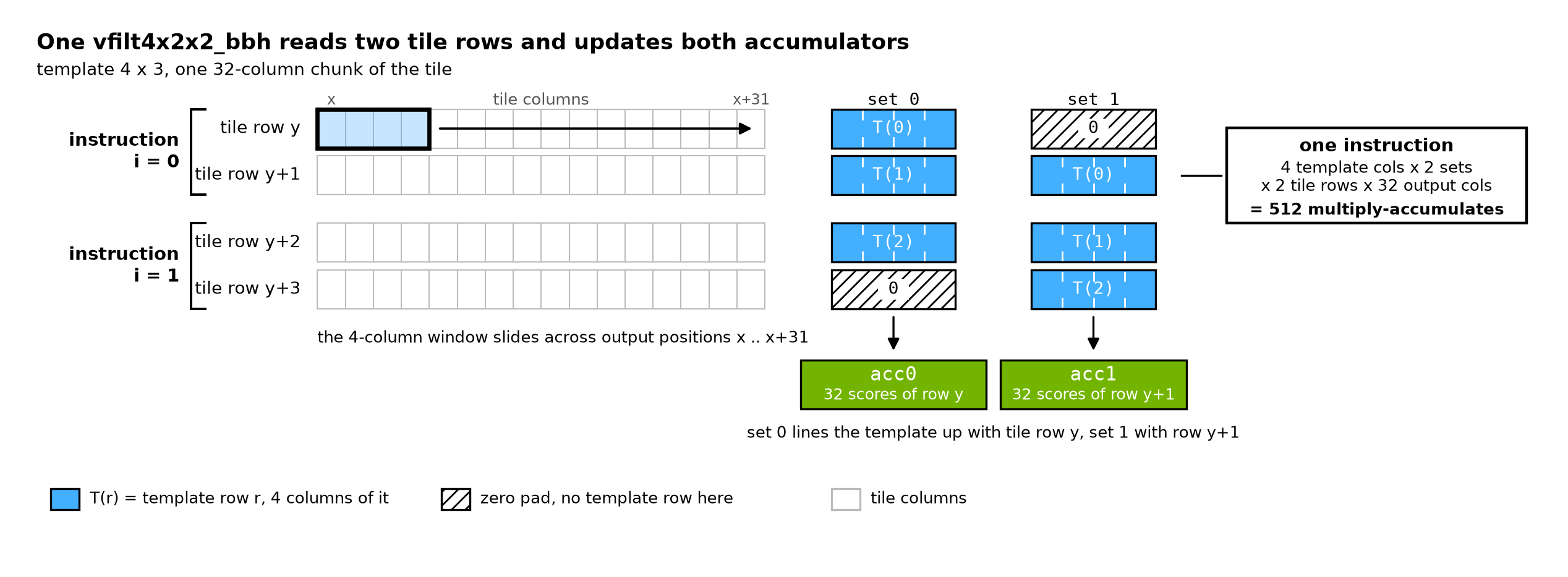
Figure 4: A Pair of Correlation Instructions Covering Template 4 x 3#
The score stage then combines the three terms and normalizes them.
It writes the F32 scores into outTile, which the output RDF transfers to DRAM one tile at a time.
Performance#
Execution Time is the average time required to execute the operator on a single VPU core.
Note that each PVA contains two VPU cores, which can operate in parallel to process two streams simultaneously, or reduce execution time by approximately half by splitting the workload between the two cores.
Total Power represents the average total power consumed by the module when the operator is executed concurrently on both VPU cores.
Idle power is approximately 7.6 W on Jetson AGX Orin and 11.8 W on Jetson AGX Thor when the PVA is not processing data.
For detailed information on interpreting the performance table below and understanding the benchmarking setup, see Performance Benchmark.
Image Size |
Data Type |
Template Size |
Execution Time |
Submit Latency |
Total Power |
|---|---|---|---|---|---|
1920x1080 |
U8 |
3x3 |
5.249ms |
0.007ms |
10.209W |
1920x1080 |
U8 |
5x5 |
6.869ms |
0.008ms |
10.008W |
1920x1080 |
U8 |
11x11 |
11.426ms |
0.008ms |
10.008W |
Image Size |
Data Type |
Template Size |
Execution Time |
Submit Latency |
Total Power |
|---|---|---|---|---|---|
1920x1080 |
U8 |
3x3 |
5.911ms |
0.004ms |
13.357W |
1920x1080 |
U8 |
5x5 |
7.736ms |
0.004ms |
13.247W |
1920x1080 |
U8 |
11x11 |
12.870ms |
0.004ms |
13.651W |
Reference#
NVIDIA VPI Documentation: https://docs.nvidia.com/vpi/algo_template_matching.html