

AIStore + HuggingFace: Distributed Downloads for Large-Scale Machine Learning
AIStore + HuggingFace: Distributed Downloads for Large-Scale Machine Learning
Machine learning teams increasingly rely on large datasets from HuggingFace to power their models. But traditional download tools struggle with terabyte-scale datasets containing thousands of files, creating bottlenecks that slow development cycles.
This post introduces AIStore’s new HuggingFace download integration, which enables efficient downloads of large datasets with parallel batch jobs.
Table of contents
- Background
- CLI Integration: Simplified Workflows
- Download Optimizations
- Complete Walkthrough: NonverbalTTS Dataset
- Next Steps
- Conclusion
Background
Sequential downloads create significant bottlenecks when dealing with complex datasets that have hundreds of thousands of files distributed across multiple directories.
AIStore addresses this by parallelizing downloads within each target using multiple workers (one per mountpath), batching jobs based on file size, and collecting file metadata in parallel. This approach leverages the network throughput from each individual target to the HuggingFace servers.
CLI Integration: Simplified Workflows
Prerequisites
The following examples assume an active AIStore cluster. If the destination buckets (e.g., ais://datasets, ais://models) don’t exist, they will be created automatically with default properties.
AIStore’s CLI includes HuggingFace-specific flags for the ais download command that handle distributed operations behind the scenes.
Basic Download Commands
Authentication and Configuration
Progress Monitoring
Download Optimizations
The system uses some key techniques to improve download performance:
Job Batching: Size-Based Distribution
Job batching categorizes files based on configurable size thresholds:
Files are categorized into two groups:
- Large files (above blob threshold): Get individual download jobs for maximum parallelism
- Small files (below threshold): Batched together to reduce overhead
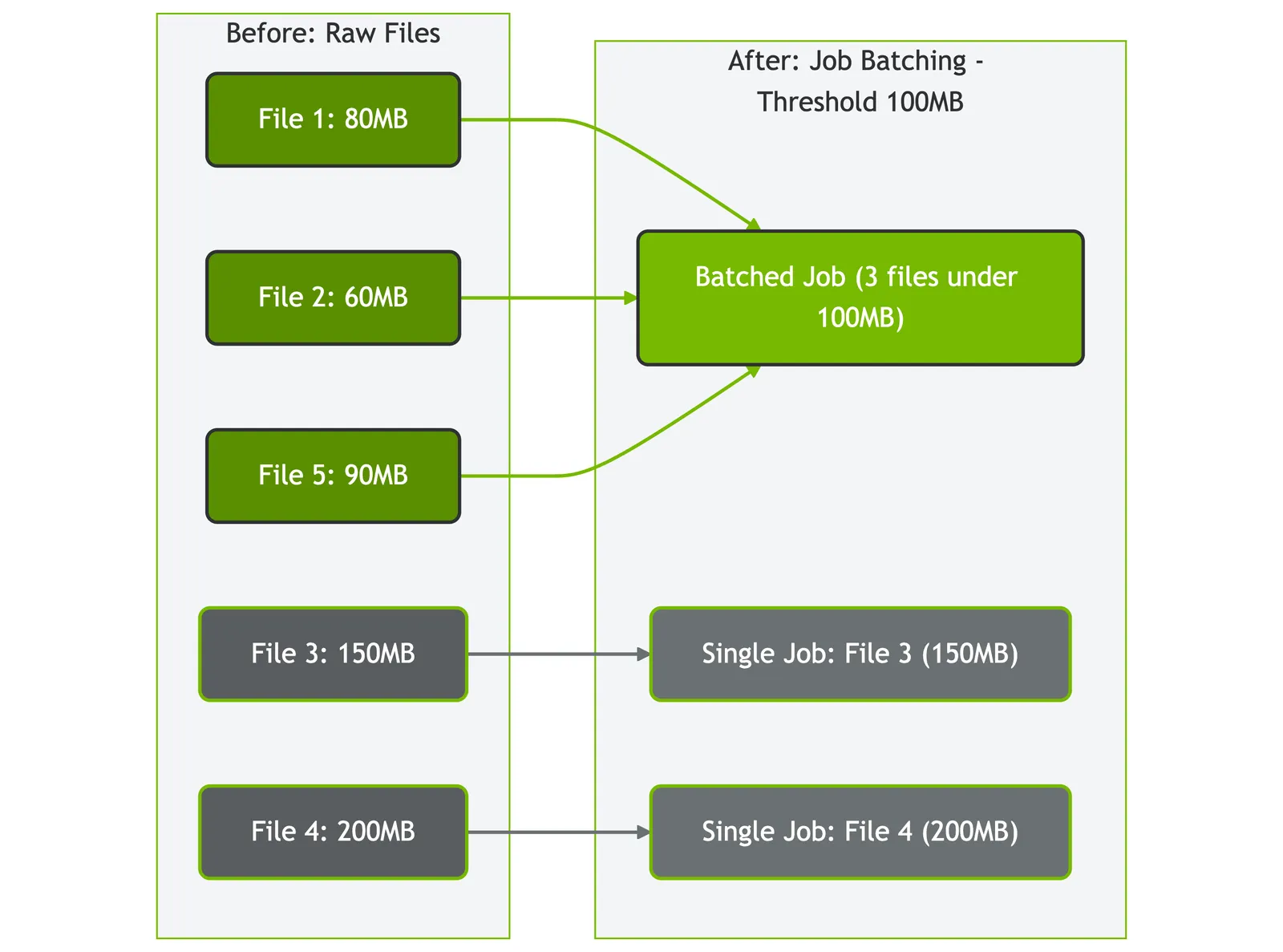 Figure: How AIStore batches files based on size threshold (100MB in this example)
Concurrent Metadata Collection
Before downloading files, AIStore makes parallel HEAD requests to the HuggingFace API to collect file metadata (like file sizes) concurrently rather than sequentially. This reduces setup time for datasets with many files.
Complete Walkthrough: NonverbalTTS Dataset
Let’s walk through an example downloading a machine learning dataset and processing it with ETL operations:
Walkthrough Prerequisites
For this walkthrough, we’ll create and use three buckets:
ais://deepvs- for the initial dataset downloadais://ml-dataset- for ETL-processed filesais://ml-dataset-parsed- for the final parsed dataset
If these buckets don’t exist, they will be created automatically with default properties.
Step 1: Download Dataset with Configurable Job Batching
Step 2: Monitor Distributed Job Execution
Step 3: Verify Download Completion
Options for Using Downloaded Data
At this point, you have several options:
- Use directly: Work with the downloaded files as-is if they meet your requirements
- Transform with ETL: Apply preprocessing for format conversion, file organization, or data standardization
- Custom processing: Use your own tools for data preparation
Why transform? HuggingFace datasets often have complex paths or formats that benefit from standardization. This walkthrough demonstrates ETL transformations for file organization (consistent naming) and format conversion (Parquet → JSON for framework compatibility).
Step 4: Initialize ETL Transformers
Note: ETL operations require AIStore to be deployed on Kubernetes. See ETL documentation for deployment requirements and setup instructions.
Before applying transformations, initialize the required ETL containers:
Step 5: Preprocessing using ETL
Step 6: ML Pipeline Integration
AIStore integrates seamlessly with popular ML frameworks. Here’s how to use the processed dataset in your training pipeline:
Option A: Direct SDK Usage (Simple)
Option B: PyTorch Integration (Recommended for ML Training)
Next Steps
The HuggingFace integration opens up some practical areas for expansion:
Download and Transform API: AIStore supports combining download and ETL transformation in a single API call, eliminating the two-step process shown in the walkthrough. This allows downloading HuggingFace datasets with immediate transformation (e.g., Parquet → JSON) in one operation. CLI integration for this functionality is in development.
Additional Dataset Formats: Beyond the current Parquet support, HuggingFace datasets are available in multiple formats that teams commonly need:
- JSON format - Direct JSON downloads for frameworks requiring this format
- CSV format - For traditional data processing workflows
- WebDataset format - For large-scale ML pipelines using WebDataset
Conclusion
AIStore’s HuggingFace integration addresses common dataset download bottlenecks in machine learning workflows. Job batching and concurrent metadata collection enable efficient, parallel downloads of terabyte-scale datasets that would otherwise overwhelm traditional tools. Once stored in AIStore, teams can leverage local ETL operations to transform and prepare data without additional network transfers. This approach provides a streamlined path from raw downloads to training-ready datasets, eliminating the typical download-wait-process cycle that slows ML development.
References:
AIStore Core Documentation
- AIStore GitHub
- AIStore Blog
- AIStore Downloader Documentation
- AIStore Python SDK
- AIStore PyTorch Integration - High-performance data loading for ML training
ETL (Extract, Transform, Load) Resources
- ETL Documentation - Comprehensive guide to AIStore ETL capabilities and Kubernetes deployment
- ETL CLI Reference - Command-line interface for ETL operations
- Batch-Rename Transformer - File organization and renaming
- Parquet Parser Transformer - Parquet to JSON conversion
- AIStore Kubernetes Deployment - Production Kubernetes deployment tools and documentation
External Resources