

Single-Object Copy/Transform Capability
Single-Object Copy/Transform Capability
In version 3.30, AIStore introduced a lightweight, flexible API to copy or transform a single object between buckets. It provides a simpler alternative to existing batch-style operations, ideal for fast, one-off object copy or transformation without the overhead of a full-scale job.
Notably, both the source and destination can be the local AIStore cluster or any of its remote backends (e.g., s3://src/a => gs://dest/b), making this feature especially useful for ad-hoc workflows and lightweight data preparation.
In this post, we’ll walk through the design and internal workflow that make this capability possible. We’ll also demonstrate how to use it with various supported clients, and compare it with existing copy mechanisms in AIStore to help you choose the right one for your use case.
Features Highlight
AIStore supports a variety of copy-object features, including bucket copy and multi-object copy. However, these operations are designed as batch jobs that involve a more complex setup across the cluster to ensure all storage targets are ready and connected. While cluster-wide coordination ensures job can be executed or aborted seamlessly, it introduces noticeable overhead upfront — an unnecessary cost when the operation doesn’t require participation from all storage targets.
In contrast, the newly introduced single-object copy operation takes a simpler and more lightweight approach. It directly transfers the object from the source to the destination target in a single, synchronous step - bypassing the need for cluster-wide coordination and setup.
This direct transmission approach also allows the single-object copy operation to bypass the client entirely, offloading the responsibility of handling the object exchange. Unlike a GET-and-PUT sequence for copying, the client never needs to fetch or upload the object. The data moves entirely within the cluster, directly from the source to the destination target - all the client does is send the command. This becomes especially beneficial as object size increases, reducing client-side overhead and network usage.
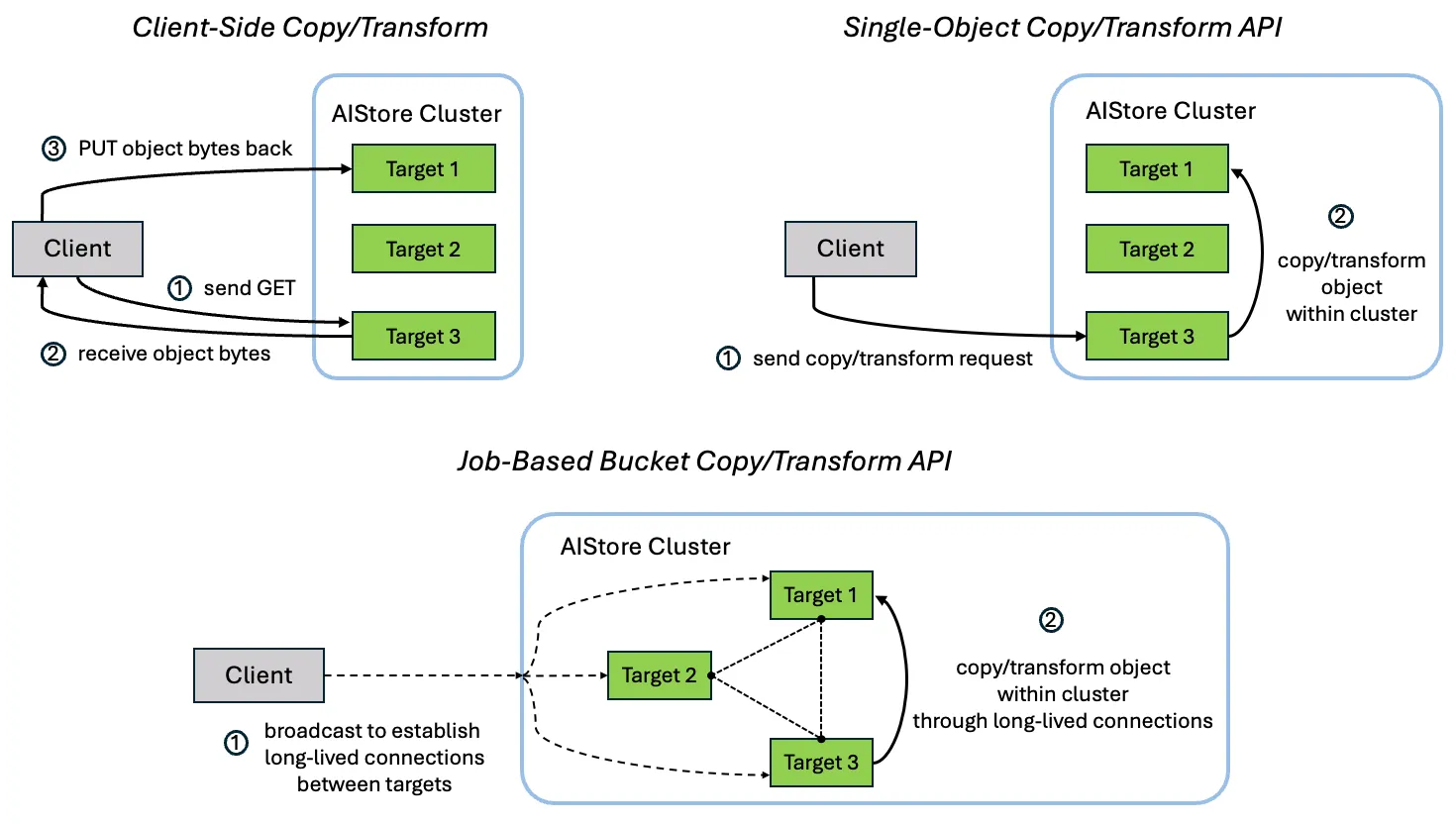
Additionally, the single-object copy workflow integrates seamlessly with ETL transformations. When an ETL is specified in the request’s parameter, the source target streams the object bytes to a local ETL container for transformation. Once processed, the transformed bytes are forwarded directly to the destination target — again, without routing through the client.
For more details on the direct put optimization, please refer to this documentation.
Usage
AIStore CLI
Here’s a quick example of how to use the single-object copy feature with the CLI:
Using the feature with ETL transformation is just as straightforward. It follows the standard ais etl command pattern: specify the subcommand (object), provide the ETL name, and pass in the arguments.
Here’s an example that computes an object’s MD5 hash via single-object transformation:
AIStore Python SDK
The Python SDK provides an intuitive interface for using the single-object copy API.
To apply an ETL transformation as part of the copy operation, simply pass an ETLConfig to the copy() method. The SDK automatically handles the required parameter population:
S3 Client
The single-object copy feature is also accessible via any S3-compatible client. For example, using s3cmd, you can copy objects between buckets without any changes to your existing S3-based workflows.
First, install s3cmd and configure it to connect to your AIStore cluster by following the S3 client configuration guide.
Once configured, here’s how you can perform a simple object copy:
Performance Comparison
To better understand when to use the single-object copy API versus the job-based copy bucket mechanism, we ran a set of performance benchmarks across varying object sizes and workloads.
This scenario focuses on copying just one object at a time. We evaluated the three supported approaches across different object sizes.
- Client-Side Copy: The simplest method. It retrieves the object with a GET, then re-upload it to the destination using PUT. The client handles the full object payload.
- Single-Object Copy API: Performs a direct, in-cluster transfer from source to destination, bypassing the client entirely.
- Job-Type Copy Bucket API: Launches a cluster-wide job to move the object, even when there’s only one object involved.
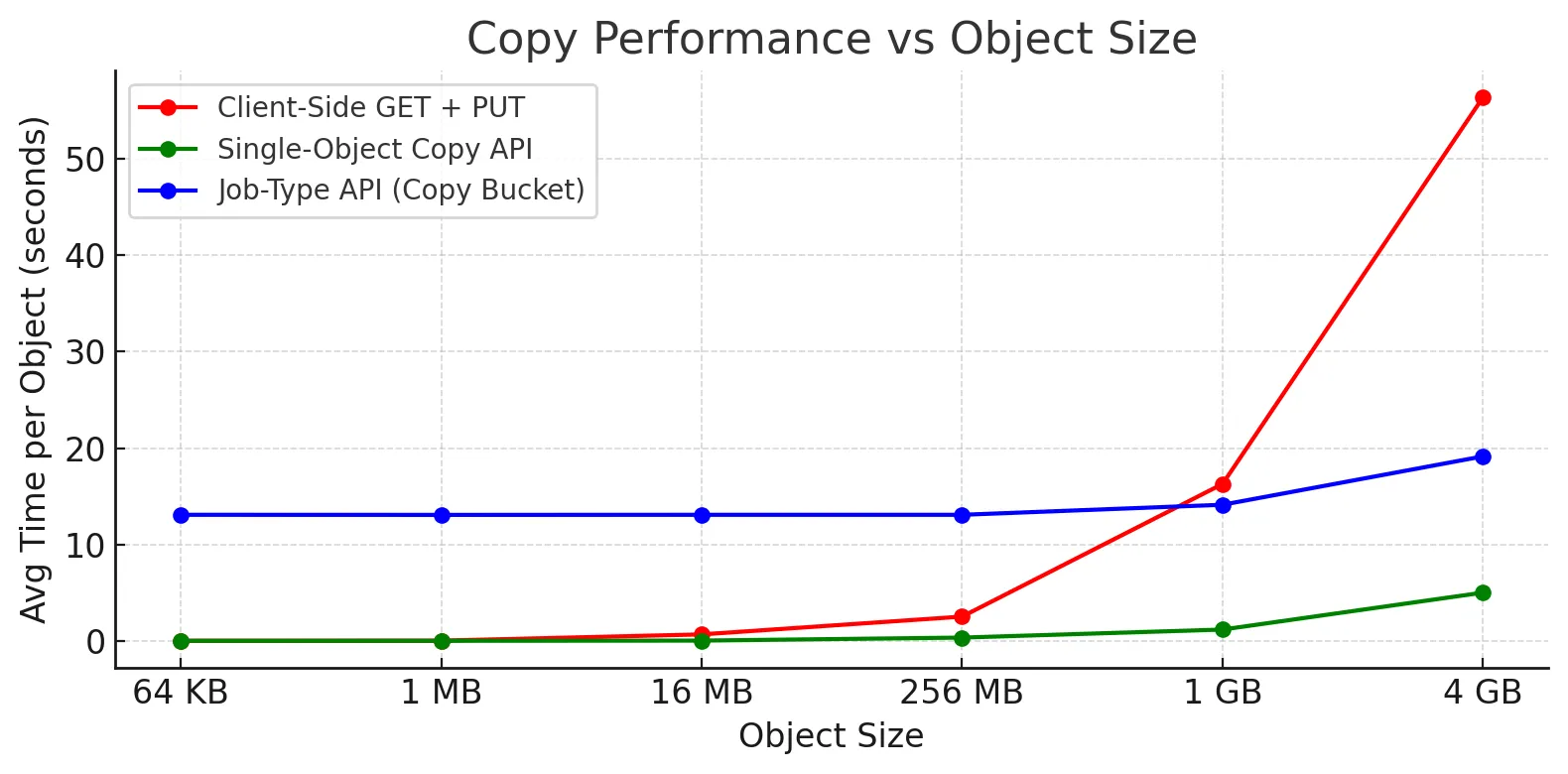
As expected, the single-object copy API significantly outperforms the client-side method, especially as object size increases. Involving the client introduces unnecessary latency — effectively pulling data out of and back into the cluster. The job-type API introduces coordination overhead that isn’t justified for single-object transfers.
Note: The relative performance order remains consistent even when an ETL transformation is applied during the copy. In each case, the transformation just adds one extra network step between the target and its ETL container. We ran the same tests with ETL included and confirmed that performance ranking across the three approaches did not change.
Conclusion
The single-object copy API is a fast, low-overhead solution tailored for one-off object transfers. Whether you’re moving data between internal buckets or bridging between cloud backends, it delivers consistent performance without the setup cost of a full job. It’s the ideal choice for lightweight workflows and ad-hoc object manipulation where efficiency matters.