


Tiling Optimization#
Tiling optimization enables cross-kernel tiled inference. This technique leverages on-chip caching for continuous kernels in addition to kernel-level tiling. It can significantly enhance performance on platforms constrained by memory bandwidth.
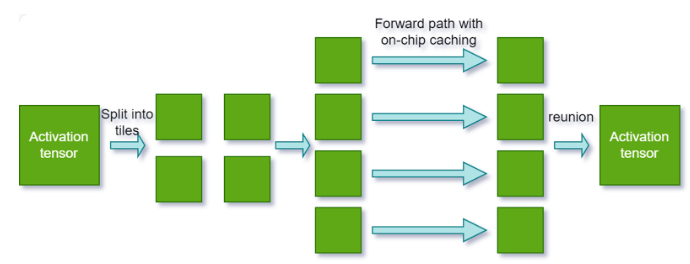
To activate tiling optimization, perform the following steps:
Set the tiling optimization level. Use the following API to specify the duration TensorRT should dedicate to searching for a more effective tiling solution that could improve performance:
builderConfig->setTilingOptimizationLevel(level)
The optimization level is set to
0by default, which means TensorRT will not perform any tiling optimization.Increasing the level enables TensorRT to explore various strategies and larger search spaces for enhanced performance. However, note that this can significantly increase the engine build time.
Configure the L2 cache limit for tiling. Use the following API to provide TensorRT with an estimate of the L2 cache resources that can be allocated for the current engine during runtime:
builderConfig->setL2LimitForTiling()
This API is a hint to tell TensorRT how much L2 cache resources can be considered dedicated to the current TensorRT engine in the runtime. This will help TensorRT apply a better tiling solution for multiple tasks concurrently running on one GPU. Note that the usage of the L2 cache depends on the workload and heuristic; TensorRT cannot apply this limit for all layers.
TensorRT manages the default value.
Multi-Device Inference (Preview Feature)#
The multi-device inference preview feature scales TensorRT inference across multiple GPUs. Use it when models exceed single-GPU memory or when parallel execution reduces latency for memory-bound workloads.
Multi-device provides two capabilities:
DistCollective – Distributed collective operations (
AllReduce,AllGather,Broadcast,Reduce,ReduceScatter) using NVIDIA NCCL. Requires Ampere (SM 80) or later.Multi-device attention – Attention layers with context parallelism that split the key-value sequence across GPUs. BF16 and FP16 only. Requires Blackwell (SM 100) or later.
For operator-level API details, refer to the DistCollective and Attention sections in the TensorRT Operator documentation.
For more information, refer to the sampleDistCollective sample.
Setup#
Enable the multi-device preview feature in the builder config.
config->setPreviewFeature(PreviewFeature::kMULTIDEVICE_RUNTIME_10_16, true);
config.set_preview_feature(trt.PreviewFeature.MULTIDEVICE_RUNTIME_10_16, True)
Configure layers for multi-device after adding them to the network.
For
DistCollectivelayers, set the number of ranks:collectiveLayer->setNbRanks(numGpus);
collective_layer.num_ranks = num_gpus
For multi-device attention, set the number of ranks:
attention->setNbRanks(numGpus);
attention.num_ranks = num_gpus
Initialize a NCCL communicator with
ncclCommInitRankorncclCommInitAlland set it on the execution context before inference.context->setCommunicator(ncclComm);
context.set_communicator(nccl_comm)
Execute inference on all ranks with synchronized enqueueV3 (C++) or
execute_async_v3(Python) calls. All participating ranks must call the execution method concurrently because NCCL collective operations block until every rank has participated. If any rank fails to issue its execution call, the other ranks will hang indefinitely.// Each rank calls enqueueV3 on its own CUDA stream context->enqueueV3(stream);
# Each rank calls execute_async_v3 on its own CUDA stream
context.execute_async_v3(stream_ptr)
Each rank must load the same engine, allocate its own input/output buffers, and use its own
IExecutionContextand CUDA stream. Use standard CUDA synchronization (cudaStreamSynchronizeor CUDA events) to wait for completion on each rank.
Platform Support#
Architecture |
OS |
CUDA |
|---|---|---|
x86_64 |
|
12.9, 13.2 |
AArch64 |
Ubuntu 22.04 |
13.2 |
Special purpose builds (automotive, RTX, Coverity, DLA) do not support multi-device.
GPU requirements:
DistCollective: Ampere (SM 80) and laterMulti-device attention: Blackwell (SM 100) and later
Feature Compatibility#
Feature |
Supported |
Notes |
|---|---|---|
DLA |
No |
|
Ragged Tensor |
No |
|
Weight stripped engine |
No |
|
Refittable weights |
No |
|
Weight streaming |
Yes |
Rank-local: each rank streams its own sharded weights independently. |
Safety build |
No |
|
Strongly typed |
Yes |
|
Precisions |
Partial |
|
Timing cache |
Yes |
|
CUDA graphs |
Yes |
|
Quantization |
Yes |