


Overhead of Shape Change and Optimization Profile Switching#
After the IExecutionContext switches to a new optimization profile or the shapes of the input bindings change, TensorRT must recompute the tensor shapes throughout the network and recompute the resources needed by some tactics for the new shapes before the next inference can start. That means the first enqueueV3() call after a shape/profile change can be longer than the subsequent enqueueV3() calls.
Optimizing Layer Performance#
The following descriptions detail how you can optimize the listed layers.
Gather: Use an axis of 0 to maximize the performance of a Gather layer. There are no fusions available for a Gather layer.
Reduce: To get the maximum performance out of a Reduce layer, perform the reduction across the last dimensions (tail reduce). This allows optimal memory to read/write patterns through sequential memory locations. If doing common reduction operations, express the reduction in a way that will be fused to a single operation.
RNN: Loop-based API provides a much more flexible mechanism for using general layers within recurrence. The
ILoopLayerrecurrence enables a rich set of automatic loop optimizations, including loop fusion, unrolling, and loop-invariant code motion, to name a few. For example, significant performance gains are often obtained when multiple instances of the same MatrixMultiply layer are properly combined to maximize machine utilization after loop unrolling along the sequence dimension. This works best if you can avoid a MatrixMultiply layer with a recurrent data dependence along the sequence dimension.Shuffle: Shuffle operations equivalent to identity operations on the underlying data are omitted if the input tensor is only used in the shuffle layer and the input and output tensors of this layer are not input and output tensors of the network. TensorRT does not execute additional kernels or memory copies for such operations.
TopK: To get the maximum performance out of a TopK layer, use small values of
K, reducing the last dimension of data to allow optimal sequential memory access. Reductions along multiple dimensions at once can be simulated using a Shuffle layer to reshape the data and then appropriately reinterpret the index values.
For more information about layers, refer to the TensorRT Operator documentation.
Optimizing for Tensor Cores#
Tensor Core is a key technology for delivering high-performance inference on NVIDIA GPUs. In TensorRT, Tensor Core operations are supported by all compute-intensive layers: MatrixMultiply, Convolution, and Deconvolution.
Tensor Core layers tend to achieve better performance if the I/O tensor dimensions are aligned to a certain minimum granularity:
The alignment requirement is on the I/O channel dimension in the Convolution and Deconvolution layers.
In the MatrixMultiply layer, the alignment requirement is on matrix dimensions
KandNin a MatrixMultiply that isM x KtimesK x N.
The following table captures the suggested tensor dimension alignment for better Tensor Core performance.
Tensor Core Operation Type |
Suggested Tensor Dimension Alignment in Elements |
|---|---|
TF32 |
4 |
FP16 |
8 for dense math, 16 for sparse math |
INT8 |
32 |
When using Tensor Core implementations in cases where these requirements are unmet, TensorRT implicitly pads the tensors to the nearest multiple of alignment, rounding up the dimensions in the model definition instead to allow for extra capacity in the model without increasing computation or memory traffic.
TensorRT always uses the fastest implementation for a layer, and thus, in some cases, it cannot use a Tensor Core implementation even if it is available.
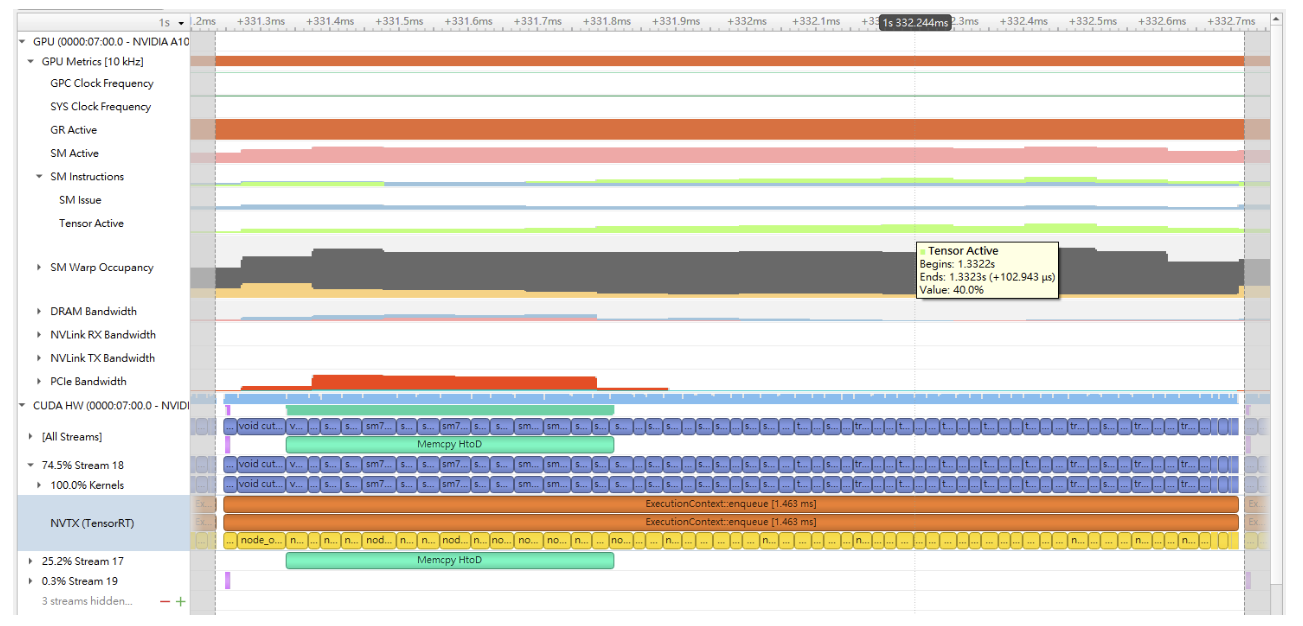
To check if Tensor Core is used for a layer, run Nsight Systems with the --gpu-metrics-device all flag while profiling the TensorRT application. The Tensor Core usage rate can be found in the profiling result in the Nsight Systems user interface under the SM instructions/Tensor Active row. Refer to the CUDA Profiling Tools for more information about using Nsight Systems to profile TensorRT applications.
It is impractical to expect a CUDA kernel to reach 100% Tensor Core usage since there are other overheads such as DRAM reads/writes, instruction stalls, other computation units The more computation-intensive an operation is, the higher the Tensor Core usage rate the CUDA kernel can achieve.
The following image is an example of Nsight Systems profiling.
Optimizing Plugins#
TensorRT provides a mechanism for registering custom plugins that perform layer operations. After a plugin creator is registered, you can search the registry to find the creator and add the corresponding plugin object to the network during serialization/deserialization.
After the plugin library is loaded, all TensorRT plugins are automatically registered. For more information about custom plugins, refer to Extending TensorRT With Custom Layers.
Plugin performance depends on the CUDA code performing the plugin operation. Standard CUDA Best Practices apply. When developing plugins, starting with simple standalone CUDA applications that perform the plugin operation and verify correctness can be helpful. The plugin program can then be extended with performance measurements, more unit testing, and alternate implementations. After the code is working and optimized, it can be integrated as a plugin into TensorRT.
Supporting as many formats as possible in the plugin is important to get the best performance possible. This removes the need for internal reformat operations during the execution of the network. Refer to the Extending TensorRT With Custom Layers section for examples.
Optimizing Python Performance#
Most of the same performance considerations apply when using the Python API. When building engines, the builder optimization phase will normally be the performance bottleneck, not API calls to construct the network. Inference time should be nearly identical between the Python API and C++ API.
Setting up the input buffers in the Python API involves using pycuda or another CUDA Python library, like cupy, to transfer the data from the host to device memory. The details of how this works will depend on where the host data comes from. Internally, pycuda supports the Python Buffer Protocol, allowing efficient access to memory regions. This means that if the input data is available in a suitable format in numpy arrays or another type with support for the buffer protocol, it allows efficient access and transfer to the GPU. For even better performance, allocate a page-locked buffer using pycuda and write your final preprocessed input.
For more information about using the Python API, refer to the Python API documentation.