


Optimizing TensorRT Performance#
The following sections focus on the general inference flow on GPUs and some general strategies to improve performance. These ideas apply to most CUDA programmers but cannot be as obvious to developers from other backgrounds.
What You Will Learn
How batching, CUDA graphs, and multi-streaming improve throughput
How the TensorRT layer fusion and pointwise fusion work, and which patterns are supported
How to optimize specific layer types and target Tensor Core acceleration
Advanced techniques for deterministic tactic selection, Python performance, and accuracy/performance tradeoffs
How to reduce engine build time with timing caches and builder optimization levels
See also
- Performance Benchmarking
Establish a measurement baseline before applying these optimizations so you can quantify the impact of each change.
Batching#
The most important optimization is to compute as many results in parallel as possible using batching. In TensorRT, a batch is a collection of inputs that can all be processed uniformly. Each instance in the batch has the same shape and flows through the network similarly. Therefore, each instance can be trivially computed in parallel.
Each network layer will have some overhead and synchronization required to compute forward inference. By computing more results in parallel, this overhead is paid off more efficiently. In addition, many layers are performance-limited by the smallest dimension in the input. If the batch size is one or small, this size can often be the performance-limiting dimension. For example, the fully connected layer with V inputs and K outputs can be implemented for one batch instance as a matrix multiplied by a 1xV matrix with a VxK weight matrix. If N instances are batched, this becomes an NxV multiplied by the VxK matrix. The vector-matrix multiplier becomes a matrix-matrix multiplier, which is much more efficient.
Larger batch sizes are almost always more efficient on the GPU. Extremely large batches, such as N > 2^16, can sometimes require extended index computation and should be avoided if possible. But generally, increasing the batch size improves total throughput. In addition, when the network contains MatrixMultiply layers, batch sizes of multiples of 32 tend to have the best performance for FP16 and INT8 inference because of the utilization of Tensor Cores if the hardware supports them.
On NVIDIA Ada Lovelace or later GPUs, decreasing the batch size can improve the throughput significantly if the smaller batch sizes help the GPU cache the input/output values in the L2 cache. Therefore, various batch sizes should be tried to find the batch size that provides optimal performance.
Sometimes, batching inference work is impossible due to the application’s organization. In some common applications, such as a server that makes inferences per request, it is possible to implement opportunistic batching. For each incoming request, wait for a time T. If other requests come in, batch them together. Otherwise, continue with a single-instance inference. This strategy adds fixed latency to each request but can greatly improve the system’s maximum throughput.
The NVIDIA Triton Inference Server provides a simple way to enable dynamic batching with TensorRT engines.
Using Batching
The batch dimension is part of the tensor dimensions, and you can specify the range of the batch sizes and the batch size to optimize the engine by adding optimization profiles. For more information, refer to the Working with Dynamic Shapes section.
Inference with CUDA Graphs#
The CPU has to launch every CUDA kernel that an inference fans out, and each launch costs roughly 5-15 microseconds of host time. For models with many small kernels, that launch overhead can exceed the actual GPU work and become the bottleneck (the Enqueue-Bound Workloads and CUDA Graphs section in the benchmarking chapter explains how to detect this). CUDA Graphs collapse the entire sequence of kernels into a single launchable object, so the host pays the per-launch cost once at capture time, then reuses the recorded graph on every subsequent inference.
The TensorRT runtime supports CUDA graph capture out of the box, but capture has constraints you need to know before you wire it into your inference loop. The subsections below cover them in order.
Using CUDA Graphs with TensorRT Execution Context - the C++ and Python recipes for capturing an
enqueueV3()call as a graph and replaying it throughcudaGraphLaunch.Limitations of CUDA Graphs - operators and patterns that fail capture (loops, conditionals, data-dependent shapes), the two-phase shape-update protocol, and why you should keep one execution context per captured graph.
Concurrent CUDA Activities with CUDA Graph Capture - using auxiliary streams, the
cudaStreamNonBlockingflag, and the async CUDA APIs (cudaMemcpyAsync) so other GPU work does not break the capture.
Using CUDA Graphs with TensorRT Execution Context#
The TensorRT enqueueV3() method supports CUDA graph capture for models requiring no mid-pipeline CPU interaction. For example:
 1// Call enqueueV3() once after an input shape change to update internal state.
 2context->enqueueV3(stream);
 3
 4// Capture a CUDA graph instance
 5cudaGraph_t graph;
 6cudaGraphExec_t instance;
 7cudaStreamBeginCapture(stream, cudaStreamCaptureModeGlobal);
 8context->enqueueV3(stream);
 9cudaStreamEndCapture(stream, &graph);
10cudaGraphInstantiate(&instance, graph, 0);
11
12// To run inferences, launch the graph instead of calling enqueueV3().
13for (int i = 0; i < iterations; ++i) {
14    cudaGraphLaunch(instance, stream);
15    cudaStreamSynchronize(stream);
16}
 1from cuda import cudart
 2err, stream = cudart.cudaStreamCreate()
 3
 4# Call execute_async_v3() once after an input shape change to update internal state.
 5context.execute_async_v3(stream);
 6
 7# Capture a CUDA graph instance
 8cudaStreamBeginCapture(stream, cudart.cudaStreamCaptureModeGlobal)
 9context.execute_async_v3(stream)
10err, graph = cudart.cudaStreamEndCapture(stream)
11err, instance = cudart.cudaGraphInstantiate(graph, 0)
12
13# To run inferences, launch the graph instead of calling execute_async_v3().
14for i in range(iterations):
15    cudart.cudaGraphLaunch(instance, stream)
16    cudart.cudaStreamSynchronize(stream)
Limitations of CUDA Graphs#
CUDA graphs cannot handle some operations, so graph capturing can fail if the execution context contains such operations. Typical deep learning operators unsupported by CUDA graphs include loops, conditionals, and layers requiring data-dependent shapes. In these cases, cudaStreamEndCapture() will return cudaErrorStreamCapture* errors, indicating that the graph capturing has failed, but the context can continue to be used for normal inference without CUDA graphs. Refer to the CUDA Programming Guide to learn more about the limitations of CUDA graphs.
Also, when capturing a graph, it is important to account for the two-phase execution strategy used in the presence of dynamic shapes.
Update the model’s internal state to account for any changes in input size.
Stream work to the GPU.
The first phase requires no per-invocation work for models where input size is fixed at build time. Otherwise, if the input sizes have changed since the last invocation, some work can be required to update derived properties.
The first phase of work is not designed to be captured, and even if the capture is successful, it can increase model execution time. Therefore, after changing the shapes of inputs or the values of shape tensors, call enqueueV3() once to flush deferred updates before capturing the graph.
Danger
Graphs captured with TensorRT are specific to the input size and the state of the execution context. Modifying the context from which the graph was captured will result in undefined behavior when executing the graph. In particular, if the application is providing its memory for activations using createExecutionContextWithoutDeviceMemory(), the memory address is also captured as part of the graph. Locations of input and output buffers are also captured as part of the graph.
Therefore, the best practice is to use one execution context per captured graph and to share memory across the contexts with createExecutionContextWithoutDeviceMemory().
trtexec allows you to check whether the TensorRT engine you built is compatible with CUDA graph capture. For more information, refer to the trtexec section.
Concurrent CUDA Activities with CUDA Graph Capture#
Launching a CUDA kernel on the CUDA legacy default stream or calling synchronous CUDA APIs like cudaMemcpy() while capturing a CUDA graph fails because these CUDA activities implicitly synchronize the CUDA streams used by TensorRT execution contexts.
To avoid breaking the CUDA graph capture, ensure other CUDA kernels are launched on non-default CUDA streams and use the asynchronous version of CUDA APIs, like cudaMemcpyAsync().
Alternatively, a CUDA stream can be created with the cudaStreamNonBlocking flag to capture the CUDA graph for an execution context. If the execution context uses auxiliary streams, make sure you also call the setAuxStreams() API using streams created with the cudaStreamNonBlocking flag. Refer to the Within-Inference Multi-Streaming section about how to set auxiliary streams in TensorRT execution contexts.
Inference with Multiple CUDA Streams#
A CUDA stream is a queue of GPU work that executes in order, but work in different streams can overlap whenever the hardware has spare compute, memory bandwidth, or copy engines. TensorRT exposes that latent parallelism in two complementary ways. You can split the work within a single inference across auxiliary streams to drive its latency down, and you can run multiple inferences across their own streams to drive aggregate throughput up. The two techniques also stack, so a server can run several execution contexts in parallel with each context itself fanning work across auxiliary streams.
The tradeoff in both cases is contention. Concurrent streams share SMs, register files, L2, and DRAM bandwidth, so kernels TensorRT picked while profiling against a fully available GPU may no longer be optimal at runtime. The third subsection below addresses that.
Within-Inference Multi-Streaming - split the layers of one engine across auxiliary streams to lower single-inference latency when one inference does not saturate the GPU.
Cross-Inference Multi-Streaming - run multiple execution contexts on their own streams to raise aggregate throughput when you can keep the GPU fed with independent requests.
Limiting Compute Resources - tell the builder to profile against a smaller share of the GPU so the tactics it picks remain optimal under the contention that concurrent streams introduce.
Note
Multi-streaming is orthogonal to CUDA Graphs. Streams give you parallelism between work; CUDA graphs reduce the per-launch overhead of that work. Enqueue-bound workloads usually want both.
Within-Inference Multi-Streaming#
In general, CUDA programming streams are a way of organizing asynchronous work. Asynchronous commands put into a stream are guaranteed to run in sequence but can execute out of order concerning other streams. In particular, asynchronous commands in two streams can be scheduled to run concurrently (subject to hardware limitations).
In the context of TensorRT and inference, each layer of the optimized final network will require work on the GPU. However, not all layers can fully use the hardware’s computation capabilities. Scheduling requests in separate streams allows work to be scheduled immediately as the hardware becomes available without unnecessary synchronization. Even if only some layers can be overlapped, overall performance will improve.
Use the IBuilderConfig::setMaxAuxStreams() API to set the maximum number of auxiliary streams TensorRT can use to run multiple layers in parallel. The auxiliary streams contrast the “mainstream” provided in the enqueueV3() call. If enabled, TensorRT will run some layers on the auxiliary streams parallel to those running on the mainstream.
For example, to run the inference on at most eight streams (that is, seven auxiliary streams and one mainstream) in total:
1config->setMaxAuxStreams(7)
1config.max_aux_streams = 7
Note that this only sets the maximum number of auxiliary streams. However, TensorRT can use fewer auxiliary streams than this number if it determines that using more streams does not help.
To get the actual number of auxiliary streams that TensorRT uses for an engine, run the following:
1int32_t nbAuxStreams = engine->getNbAuxStreams()
1num_aux_streams = engine.num_aux_streams
When an execution context is created from the engine, TensorRT automatically creates the auxiliary streams needed to run the inference. However, you can also specify the auxiliary streams you would like TensorRT to use:
1int32_t nbAuxStreams = engine->getNbAuxStreams();
2std::vector<cudaStream_t> streams(nbAuxStreams);
3for (int32_t i = 0; i < nbAuxStreams; ++i)
4{
5    cudaStreamCreate(&streams[i]);
6}
7context->setAuxStreams(streams.data(), nbAuxStreams);
1from cuda import cudart
2num_aux_streams = engine.num_aux_streams
3streams = []
4for i in range(num_aux_streams):
5    err, stream = cudart.cudaStreamCreate()
6    streams.append(stream)
7context.set_aux_streams(streams)
TensorRT will always insert event synchronizations between the mainstream provided using enqueueV3() call and the auxiliary streams:
At the beginning of the
enqueueV3()call, TensorRT will ensure that all the auxiliary streams wait on the activities on the mainstream.At the end of the
enqueueV3()call, TensorRT will ensure that the mainstream waits for the activities on all the auxiliary streams.
Enabling auxiliary streams can increase memory consumption because some activation buffers can no longer be reused.
Cross-Inference Multi-Streaming#
In addition to the within-inference streaming, you can enable streaming between multiple execution contexts. For example, you can build an engine with multiple optimization profiles and create an execution context per profile. Then, call the enqueueV3() function of the execution contexts on different streams to allow them to run in parallel.
Running multiple concurrent streams often leads to several streams sharing compute resources simultaneously. This means the network can have fewer compute resources available during inference than when the TensorRT engine was optimized. This difference in resource availability can cause TensorRT to choose a suboptimal kernel for the actual runtime conditions. To mitigate this effect, you can limit the amount of available compute resources during engine creation to resemble actual runtime conditions more closely. This approach generally promotes throughput at the expense of latency. For more information, refer to the Limiting Compute Resources section.
It is also possible to use multiple host threads with streams. A common pattern is incoming requests dispatched to a pool of worker threads waiting for work. In this case, the pool of worker threads will each have one execution context and CUDA stream. Each thread will request work in its stream as the work becomes available. Each thread will synchronize with its stream to wait for results without blocking other worker threads.
Limiting Compute Resources#
Limiting the number of compute resources available to TensorRT during engine creation is beneficial when the reduced amount better represents the expected conditions during runtime. For example, when the GPU is expected to be performing additional work in parallel to the TensorRT engine or when the engine is expected to be run on a different GPU with fewer resources (note that the recommended approach is to build the engine on the GPU that will be used for inference, but this cannot always be feasible).
You can limit the number of available compute resources with the following steps:
Start the CUDA MPS control daemon.
nvidia-cuda-mps-control -dSet the number of computing resources to use with the
CUDA_MPS_ACTIVE_THREAD_PERCENTAGEenvironment variable. For example,export CUDA_MPS_ACTIVE_THREAD_PERCENTAGE=50.Build the network engine.
Stop the CUDA MPS control daemon.
echo quit | nvidia-cuda-mps-control
The resulting engine is optimized to the reduced number of compute cores (50% in this example) and provides better throughput when using similar conditions during inference. You are encouraged to experiment with different amounts of streams and different MPS values to determine the best performance for your network.
CUDA MPS can also be used as a fault-isolation boundary between tenants, with caveats. Refer to Cross-Context CUDA Error Isolation for the isolation-versus-throughput tradeoff and the recommended deployment pattern.
For more details about nvidia-cuda-mps-control, refer to the nvidia-cuda-mps-control documentation and the relevant GPU requirements.
Enabling Layer Fusion#
Layer fusion is one of the highest-leverage optimizations the TensorRT builder performs. When the builder recognizes a supported pattern (for example, a Convolution feeding a ReLU, or a chain of element-wise operations), it collapses those layers into a single optimized kernel. The fused kernel:
Eliminates kernel-launch overhead for every layer it absorbs (typically 5–15 µs per launch on the host), which can dominate runtime in enqueue-bound networks.
Avoids materializing intermediate tensors in DRAM, removing both the allocation pressure and the round-trip memory traffic between layers.
Unlocks specialized implementations (such as fused Conv+ReLU, fused Conv+Bias+Activation, or pointwise super-kernels) that no individual layer could use on its own.
Fusion happens automatically at build time (there is no runtime API to “turn it on”), but the patterns the builder is willing to fuse are constrained. The Layer Fusion Catalog page describes supported patterns, naming conventions, pointwise fusion, and Q/DQ fusion guidance.
Tip
To see exactly which fusions the builder applied to your network, set the ILogger callback to surface kINFO messages during the build, or run trtexec with --profilingVerbosity=detailed --dumpLayerInfo. Layers whose names contain a + (such as ip1 + relu1) or that are wrapped in fusedPointwiseNode(...) are the result of fusion.
Optimizing Layer Performance#
While Enabling Layer Fusion covers the optimizations TensorRT applies across layers, this section covers what makes individual layers themselves run well: both the choices you make when authoring the network and the hardware features the builder targets when it picks an implementation. The subsections below address the two highest-impact areas:
Optimizing for Tensor Cores - alignment and dimension rules for the GPU hardware path that delivers the largest speedups for MatrixMultiply, Convolution, and Deconvolution.
Optimizing Plugins - guidance for custom layers, where the kernel is your code and standard CUDA performance practices apply.
Before diving into the subsections, the following two lists capture the most common per-layer guidance. The first list is action items when authoring the network; the second is automatic optimizations to be aware of when reading profiles, but which require no action on your part.
When authoring your network
Gather: Use an axis of 0 to maximize the performance of a Gather layer. There are no fusions available for a Gather layer.
Reduce: To get the maximum performance out of a Reduce layer, perform the reduction across the last dimensions (tail reduce). This allows optimal memory to read/write patterns through sequential memory locations. If doing common reduction operations, express the reduction in a way that will be fused to a single operation.
TopK: To get the maximum performance out of a TopK layer, use small values of
K, reducing the last dimension of data to allow optimal sequential memory access. Reductions along multiple dimensions at once can be simulated using a Shuffle layer to reshape the data and then appropriately reinterpret the index values.
Automatic optimizations TensorRT applies
RNN: The loop-based API provides a much more flexible mechanism for using general layers within recurrence. The
ILoopLayerrecurrence enables a rich set of automatic loop optimizations, including loop fusion, unrolling, and loop-invariant code motion, to name a few. For example, significant performance gains are often obtained when multiple instances of the same MatrixMultiply layer are properly combined to maximize machine utilization after loop unrolling along the sequence dimension. This works best if you can avoid a MatrixMultiply layer with a recurrent data dependence along the sequence dimension.Shuffle: Shuffle operations equivalent to identity operations on the underlying data are omitted if the input tensor is only used in the shuffle layer and the input and output tensors of this layer are not input and output tensors of the network. TensorRT does not execute additional kernels or memory copies for such operations.
For complete per-layer reference material, refer to the TensorRT Operator documentation.
Optimizing for Tensor Cores#
Tensor Core is a key technology for delivering high-performance inference on NVIDIA GPUs. In TensorRT, Tensor Core operations are supported by all compute-intensive layers: MatrixMultiply, Convolution, and Deconvolution.
Tensor Core layers tend to achieve better performance if the I/O tensor dimensions are aligned to a certain minimum granularity:
The alignment requirement is on the I/O channel dimension in the Convolution and Deconvolution layers.
In the MatrixMultiply layer, the alignment requirement is on matrix dimensions
KandNin a MatrixMultiply that isM x KtimesK x N.
The following table captures the suggested tensor dimension alignment for better Tensor Core performance.
Tensor Core Operation Type |
Suggested Tensor Dimension Alignment in Elements |
|---|---|
TF32 |
4 |
FP16 |
8 for dense math, 16 for sparse math |
INT8 |
32 |
When using Tensor Core implementations in cases where these requirements are unmet, TensorRT implicitly pads the tensors to the nearest multiple of alignment, rounding up the dimensions in the model definition instead to allow for extra capacity in the model without increasing computation or memory traffic.
TensorRT always uses the fastest implementation for a layer, and thus, in some cases, it cannot use a Tensor Core implementation even if it is available.
To check if Tensor Core is used for a layer, run Nsight Systems with the --gpu-metrics-device all flag while profiling the TensorRT application. The Tensor Core usage rate can be found in the profiling result in the Nsight Systems user interface under the SM instructions/Tensor Active row. Refer to the CUDA Profiling Tools for more information about using Nsight Systems to profile TensorRT applications.
It is impractical to expect a CUDA kernel to reach 100% Tensor Core usage since there are other overheads such as DRAM reads/writes, instruction stalls, and other computation units. The more computation-intensive an operation is, the higher the Tensor Core usage rate the CUDA kernel can achieve.
Optimizing Plugins#
TensorRT provides a mechanism for registering custom plugins that perform layer operations. After a plugin creator is registered, you can search the registry to find the creator and add the corresponding plugin object to the network during serialization/deserialization.
After the plugin library is loaded, all TensorRT plugins are automatically registered. For more information about custom plugins, refer to Extending TensorRT With Custom Layers.
Plugin performance depends on the CUDA code performing the plugin operation. Standard CUDA Best Practices apply. When developing plugins, starting with simple standalone CUDA applications that perform the plugin operation and verify correctness can be helpful. The plugin program can then be extended with performance measurements, more unit testing, and alternate implementations. After the code is working and optimized, it can be integrated as a plugin into TensorRT.
Supporting as many formats as possible in the plugin is important to get the best performance possible. This removes the need for internal reformat operations during the execution of the network. Refer to the Extending TensorRT With Custom Layers section for examples.
Advancing Performance Optimization Techniques#
Once batching, CUDA graphs, multi-streaming, fusion, and per-layer tuning have taken your engine as far as the obvious knobs allow, a second tier of issues tends to surface. These are situational rather than universal: most networks will not hit all of them, but every production deployment hits at least one. This section collects the techniques that address them:
Overhead of Shape Change and Optimization Profile Switching - explains the one-time cost paid by the first
enqueueV3()call after a dynamic-shape change or profile switch. Important if your application’s tail latency matters or if you switch profiles frequently.Deterministic Tactic Selection - covers how to make the builder pick the same tactics across rebuilds (clock locking, more averaging iterations, timing-cache reuse). Important for A/B testing, regression triage, and any workflow where bit-for-bit reproducibility matters.
Optimizing Python Performance - addresses the Python-specific overheads around input buffer setup; inference itself is already on par with C++.
Tradeoffs Between Accuracy and Performance - the playbook for when reduced precision (FP16, BF16, FP8, INT8) or aggressive tactic selection has degraded accuracy. Covers per-layer precision overrides, calibration, the editable timing cache, and the precision-debug workflow.
Overhead of Shape Change and Optimization Profile Switching#
After the IExecutionContext switches to a new optimization profile or the shapes of the input bindings change, TensorRT must recompute the tensor shapes throughout the network and recompute the resources needed by some tactics for the new shapes before the next inference can start. That means the first enqueueV3() call after a shape/profile change can be longer than the subsequent enqueueV3() calls.
Deterministic Tactic Selection#
TensorRT runs through all the possible tactics in the engine-building phase and selects the fastest ones. Since the selection is based on the tactics’ latency measurements, TensorRT can select different tactics across different runs if some have similar latencies. As a result, different engines built from the same INetworkDefinition can behave slightly differently regarding output values and performance. You can inspect the selected tactics of an engine by using the engine inspector APIs or by turning on verbose logging while building the engine.
If deterministic tactic selection is desired, the following lists a few suggestions that can help improve the determinism of tactic selection.
Locking GPU Clock Frequency
By default, the GPU’s clock frequency is not locked, meaning that the GPU normally sits at the idle clock frequency and only boosts to the max clock frequency when there are active GPU workloads. However, there is a latency for the clock to be boosted from the idle frequency, and that can cause performance variations while TensorRT is running through the tactics and selecting the best ones, resulting in non-deterministic tactic selections.
Therefore, locking the GPU clock frequency before building a TensorRT engine can improve the determinism of tactic selection. Refer to the Hardware/Software Environment for Performance Measurements section for more information about how to lock and monitor the GPU clock and the factors that can affect GPU clock frequencies.
Increasing Average Timing Iterations
By default, TensorRT runs each tactic for at least four iterations and takes the average latency. You can increase the number of iterations by calling the setAvgTimingIterations() API:
1builderConfig->setAvgTimingIterations(8);
1builder_config.avg_timing_iterations = 8
Increasing the number of average timing iterations can improve the determinism of tactic selections, but the required engine-building time will become longer.
Using Timing Cache
Timing Cache records the latencies of each tactic for a specific layer configuration. The tactic latencies are reused if TensorRT encounters another layer with an identical configuration. Therefore, by reusing the same timing cache across multiple engine buildings runs with the same INetworkDefinition and builder config, you can make TensorRT select an identical set of tactics in the resulting engines.
Optimizing Python Performance#
Most of the same performance considerations apply when using the Python API. When building engines, the builder optimization phase will normally be the performance bottleneck, not API calls to construct the network. Inference time should be nearly identical between the Python API and C++ API.
Setting up the input buffers in the Python API involves using cuda-python (the official NVIDIA CUDA Python bindings) or another CUDA Python library, such as cupy, to transfer the data from the host to device memory. The details depend on where the host data comes from. Most modern Python tensor libraries (NumPy, CuPy, PyTorch, JAX) implement the Python Buffer Protocol or the CUDA array interface, which lets you pass their memory regions directly to cudaMemcpyAsync without intermediate copies. For the highest throughput, allocate a page-locked (pinned) host buffer with cudart.cudaMallocHost and write your final preprocessed input into that buffer before the host-to-device copy.
For more information about using the Python API, refer to the Python API documentation.
Tradeoffs Between Accuracy and Performance#
Depending on the builder configuration, TensorRT can execute a layer in FP32, FP16, BF16, FP8, or INT8 precision. By default, TensorRT chooses to run a layer in a precision that results in optimal performance. Sometimes, this can result in poor accuracy. Generally, running a higher-precision layer helps improve accuracy with some performance hits.
There are several steps that we can take to improve model accuracy:
Validate layer outputs:
Use Polygraphy to dump layer outputs and verify no NaNs or Infs. The
--validateoption can check for NaNs and Infs. Also, we can compare layer outputs with golden values from, such as ONNX runtime.For FP16 and BF16, a model might require retraining to ensure that intermediate layer output can be represented in FP16/BF16 precision without overflow or underflow.
For INT8, consider recalibrating with a more representative calibration data set. If your model comes from PyTorch, we also provide the NVIDIA Model Optimizer for PyTorch for QAT in the framework besides PTQ in TensorRT. You can try both approaches and choose the one with more accuracy.
Manipulate layer precision:
Sometimes, running a layer with a certain precision results in incorrect output. This can be due to inherent layer constraints (such as
LayerNormoutput should not be INT8) or model constraints (output gets diverged, resulting in poor accuracy).You can control layer execution precision and output precision.
An experimental debug precision tool can help automatically find layers to run with high precision.
Use the Editable Timing Cache to select a proper tactic.
When accuracy changes between two built engines for the same model, it might be due to a bad tactic being selected for a layer.
Use Editable Timing Cache to dump available tactics. Update the cache with a proper one.
Accuracy from run-to-run variation should not change; after the engine is built for a specific GPU, it should result in bit-accurate outputs in multiple runs. If not, file a TensorRT bug.
See also
- Working with Quantized Types
INT8, FP8, and FP4 quantization techniques and calibration workflows.
- Troubleshooting
Diagnosing accuracy issues and common error patterns.
Reducing Engine Build Time#
Every other section in this chapter has been about making inference faster. This one is about making the builder faster (the offline step that profiles each layer’s available tactics, picks the best one, and emits a serialized engine). Build time can range from seconds for small networks to tens of minutes (or longer) for large models with complex topology, and that cost shows up wherever builds happen often, such as in CI pipelines, model-iteration loops during development, fleet redeployments after a model update, and per-device builds when shipping to heterogeneous hardware.
There is a fundamental tradeoff to be aware of: the more time the builder spends searching, the better the tactics it can find, and therefore the faster the resulting engine runs. The two subsections below give you two distinct levers to tune that tradeoff:
Timing Cache - reuse tactic-timing measurements from previous builds so the builder does not re-profile layers it has already seen. Effectively free inference performance, since the cached timings represent the same exhaustive search the original build performed. Use this on every build pipeline you control.
Builder Optimization Level - reduce how much tactic search the builder performs in the first place. Trades inference performance for faster builds. Use this when you are iterating on a model and need quick feedback, and dial it back up before shipping the production engine.
The two compose well: a timing cache shared across CI runs cuts the cost of every build, and a lowered optimization level cuts the cost of any uncached layers during development.
Timing Cache#
TensorRT creates a layer-timing cache to reduce builder time and keep the layer-profiling information. The information it contains is specific to the targeted device, CUDA, TensorRT versions, and BuilderConfig parameters that can change the layer implementation, such as BuilderFlag::kTF32 or BuilderFlag::kREFIT.
The TensorRT builder skips profiling and reuses the cached result for the repeated layers if other layers have the same IO tensor configuration and layer parameters. If a timing query misses in the cache, the builder times the layer and updates the cache.
The timing cache can be serialized and deserialized. You can load a serialized cache from a buffer using IBuilderConfig::createTimingCache:
ITimingCache* cache =
 config->createTimingCache(cacheFile.data(), cacheFile.size());
cache = config.create_timing_cache(cache_file)
Setting the buffer size to 0 creates a new empty timing cache.
You then attach the cache to a builder configuration before building.
config->setTimingCache(*cache, false);
config.set_timing_cache(cache, ignore_mismatch=False)
Due to cache misses, the timing cache can be augmented with more information during the build. After the build, it can be serialized for use with another builder.
IHostMemory* serializedCache = cache->serialize();
serialized_cache = cache.serialize()
If a builder does not have a timing cache attached, it creates its temporary local cache and destroys it when it is done.
The compilation cache is part of the timing cache, which caches JIT-compiled code and will be serialized as part of the timing cache by default. It can be disabled by setting the BuildFlag.
config->setFlag(BuilderFlag::kDISABLE_COMPILATION_CACHE);
config.set_flag(trt.BuilderFlag.DISABLE_COMPILATION_CACHE)
Note
The timing cache supports the most frequently used layer types: Convolution, Deconvolution, Pooling, SoftMax, MatrixMultiply, ElementWise, Shuffle, and tensor memory layout conversion. More layer types will be added in future releases.
Builder Optimization Level#
Set the optimization level in the builder config to adjust how long TensorRT should spend searching for tactics with potentially better performance. By default, the optimization level is 3. Setting it to a smaller value results in much faster engine building time, but the engine’s performance can be worse. On the other hand, setting it to a larger value will increase the engine building time, but the resulting engine can perform better if TensorRT finds better tactics.
For example, to set the optimization level to 0 (the fastest):
1config->setBuilderOptimizationLevel(0);
1config.builder_optimization_level = 0
Tiling Optimization#
Tiling optimization enables cross-kernel tiled inference. This technique leverages on-chip caching for continuous kernels in addition to kernel-level tiling. It can significantly enhance performance on platforms constrained by memory bandwidth.
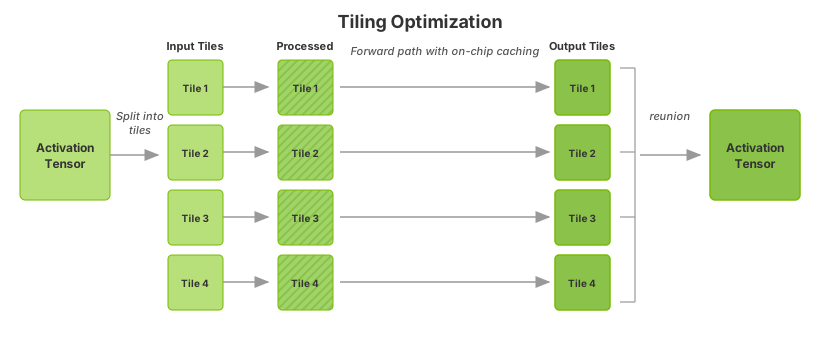
To activate tiling optimization, perform the following steps:
Set the tiling optimization level. Use the following API to specify the duration TensorRT should dedicate to searching for a more effective tiling solution that could improve performance:
builderConfig->setTilingOptimizationLevel(level)
builder_config.tiling_optimization_level = level
The optimization level is set to
0by default, which means TensorRT will not perform any tiling optimization.Increasing the level enables TensorRT to explore various strategies and larger search spaces for enhanced performance. However, note that this can significantly increase the engine build time.
Configure the L2 cache limit for tiling. Use the following API to provide TensorRT with an estimate of the L2 cache resources that can be allocated for the current engine during runtime:
builderConfig->setL2LimitForTiling()
builder_config.set_l2_limit_for_tiling()
This API is a hint to tell TensorRT how much L2 cache resources can be considered dedicated to the current TensorRT engine in the runtime. This will help TensorRT apply a better tiling solution for multiple tasks concurrently running on one GPU. Note that the usage of the L2 cache depends on the workload and heuristic; TensorRT cannot apply this limit for all layers.
TensorRT manages the default value.