


How TensorRT Works#
NVIDIA TensorRT is an SDK that takes a trained deep learning model and turns it into a fast, GPU-specific program for running inference (computing predictions on new inputs after training is complete). It does this in two phases:
A build phase in which a builder compiles your network and selects the fastest available kernel (a low-level GPU function) for each layer on your target GPU. The output is a serialized binary called an engine (also referred to as a plan file).
A runtime phase in which a runtime loads the engine into your application and executes it on the GPU.
This page explains the runtime-side concepts you need to build a correct, reliable application on top of TensorRT: what each TensorRT object is for, how long each one needs to live, how memory is allocated and reused, what is and is not thread-safe, what determinism guarantees you get, and which runtime library to ship.
What you’ll learn
Which TensorRT object owns which, and which ones must outlive the others.
Where TensorRT allocates host versus device memory, and how to control or override those allocations.
Which operations are thread-safe versus require one execution context per thread.
What the Lean Runtime and Dispatch Runtime trade off against the full runtime when you ship to production.
If you have not built your first engine yet, start with the Quick Start Guide and come back here when you are ready to embed TensorRT into a real application.
Object Lifetimes#
TensorRT uses a factory pattern where some objects create and own other objects. Understanding which object must outlive which is critical to avoiding crashes and undefined behavior, especially when you destroy a builder or runtime after the build phase completes.
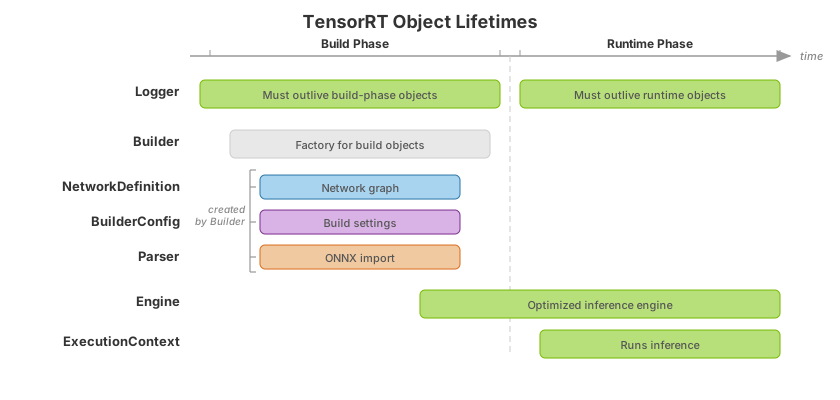
The TensorRT API is class-based, with some classes acting as factories for other classes. For objects owned by the user, the lifetime of a factory object must span the lifetime of objects it creates. For example, the NetworkDefinition and BuilderConfig classes are created from the Builder class. Objects of those classes should be destroyed before the Builder factory object.
An important exception to this rule is creating an engine from a builder. After creating an engine, you can destroy the builder, network, parser, and build config and continue using the engine.
Engine Deserialization and the Trust Boundary#
TensorRT engine files are artifacts that can be executed using a TensorRT runtime. A serialized engine contains your model graph, compiled CUDA tactics, plugin invocation pointers, and other state that IRuntime::deserializeCudaEngine instantiates inside your process. Deserializing an engine from an untrusted source is equivalent to executing untrusted native code on the GPU and host. The file format has no sandbox.
Treat engine files with the same level of care you would apply to binaries:
Deserialize only engines you built yourself, or engines received over a trusted, authenticated channel.
Never deserialize an engine file that arrived from a third party, the public internet, user uploads, or any source you do not control end-to-end.
For multi-tenant deployments, build engines on a trusted host and ship the serialized engine to the inference host over a signed, integrity-checked transport.
Cross-version compatibility (for example, the 8.x to 10.x and 10.x to 11.x version-compatibility paths) does not relax this requirement; the version-compatibility path is for your own engines built on older toolchains, not for accepting engines from third parties.
The per-page warnings at every deserializeCudaEngine / deserialize_cuda_engine call site in the rest of the documentation point back to this section.
Error Handling and Logging#
When creating TensorRT top-level interfaces (builder, runtime, or refitter), you must provide an implementation of the Logger interface (C++, Python). The logger is used for diagnostics and informational messages. Its verbosity level is configurable. Because the logger can pass back information at any point in the TensorRT lifetime, it must span any use of that interface in your application. The implementation must also be thread-safe because TensorRT can use worker threads internally.
An API call to an object will use the logger associated with the corresponding top-level interface. For example, in a call to ExecutionContext::enqueueV3(), the execution context was created from an engine created from a runtime, so TensorRT will use the logger associated with that runtime.
The primary method of error handling is the ErrorRecorder interface (C++, Python). You can implement this interface and attach it to an API object to receive errors associated with it. The recorder for an object is also passed to any objects it creates. For example, if you attach an error recorder to an engine and create an execution context from that engine, it uses the same recorder. If you then attach a new error recorder to the execution context, it receives only errors from that context. If an error is generated but no error recorder is found, it is emitted through the associated logger.
Caution
CUDA errors are generally asynchronous. When performing multiple inferences or other streams of CUDA work asynchronously in a single CUDA context, an asynchronous GPU error can be observed in a different execution context than the one that generated it.
The caution above describes how an asynchronous CUDA error generated by one
IExecutionContext can be observed inside another. A related but stricter
property of the CUDA runtime has stronger implications for multi-tenant
deployments. Certain critical CUDA errors are sticky. Once an asynchronous error has occurred on a device, subsequent CUDA calls on the same device and process continue to fail until the process is restarted or the device is reset. A single misbehaving execution context can therefore poison every other execution context that shares the same device in the same process, even contexts created from a different engine for a different tenant. The following mitigation tiers describe the options that are actually safe in production, ordered from least to most isolating.
Cross-Context CUDA Error Isolation#
The sticky-error model
When TensorRT encounters an asynchronous CUDA error during enqueueV3() or any
other call that dispatches GPU work, the error is reported through the
IErrorRecorder (or through the logger if no recorder is attached) and the C++
API typically returns an error code. The C++ failure does not clear the
underlying CUDA driver state. The next CUDA calls on the same device in the same process will continue to observe the same error or a derived one until the process exits or the device is reset.
Tier 0: in-process error handling (insufficient)
Wrapping inference calls by checking for error returns or calls to IErrorRecorder in a C++ try / catch (or a Python try / except) is the usual way to receive and handle errors from TensorRT C++ or Python APIs, but it is the wrong mental model for sticky CUDA errors. Catching a CudaError or a TensorRT exception does not clear the device-process error state. The next inference call from any IExecutionContext on the same device in the same process will continue to fail. Use IErrorRecorder to log and surface the failure. Do not use it as a recovery mechanism.
Tier 1: process-level isolation
The only safe software-only recovery is to terminate and restart the inference
process. A supervisor (systemd, a Kubernetes liveness probe, a Triton Inference
Server instance-group with worker restart, or any equivalent) should detect the crash and spawns a fresh process. The new process gets a clean CUDA driver state. Engines are deserialized again in the new process.
Note
cudaDeviceReset() may provide a fresh CUDA driver state without a full
process exit, but it typically invalidates deserialized engines. Validate
whether your deployment should prefer process restart over device reset.
Tier 2: CUDA MPS exclusive mode
CUDA Multi-Process Service (MPS) is documented in the CUDA MPS section of Optimizing TensorRT Performance as a throughput optimization that lets multiple TensorRT clients share a single GPU through a single MPS server. MPS can also be used as a fault-isolation boundary between tenants, but the boundary is weaker than it appears at first glance. MPS clients run as separate OS processes, so an uncaught process-level failure in one client is naturally contained at the OS level. The MPS server itself, however, is a single process, and a CUDA error that corrupts MPS-server-side state may affect every connected client.
Note
MPS fault isolation between clients depends on CUDA and MPS version. Validate whether sticky CUDA errors in one MPS client propagate to sibling clients through shared MPS-server state before relying on MPS for tenant isolation.
Tier 3: MIG partition (strongest isolation)
Multi-instance GPU (MIG), introduced in Architecture Overview as a throughput-and-partitioning feature, also provides the strongest available fault-isolation boundary on a single physical GPU. MIG partitions the GPU into hardware-isolated instances. Each instance has its own memory slice, its own compute slice, and its own error domain. A sticky CUDA error inside one MIG instance does not propagate to siblings. For workloads that require hard isolation between tenants, the recommended pattern is MIG plus one inference process per MIG instance. This combines process-level isolation (Tier 1) with hardware-level isolation and is the recommended deployment shape for high-trust-boundary multi-tenant inference. Refer to the MIG User Guide for the authoritative supported-hardware list and partitioning options.
Mitigation tier summary
Tier |
Safe? |
Mechanism |
When to use |
|---|---|---|---|
0: in-process error handling |
No |
|
Logging and diagnostics only. Not a recovery mechanism. |
1: process-level isolation |
Yes (software-only) |
Supervisor restarts the crashed process |
Single-tenant production. Default safe fallback. |
2: MPS exclusive mode |
Partial (validate for your stack) |
Each tenant is a separate MPS client |
Multi-tenant on a single GPU when MIG is unavailable. |
3: MIG partition |
Yes (hardware-only) |
Each tenant runs in a dedicated MIG instance |
Multi-tenant on the NVIDIA Ampere architecture or later with hard isolation requirements. |
Memory#
TensorRT uses considerable amounts of device memory (that is, memory directly accessible by the GPU) as opposed to the host memory attached to the CPU. Because device memory is often a constrained resource, it is important to understand how TensorRT uses it.
The Build Phase#
During the build, TensorRT allocates device memory for timing layer implementations. Some implementations can consume large amounts of temporary memory, especially with large tensors. You can control the maximum amount of temporary memory through the memory pool limits of the builder config. The workspace size defaults to the full size of the device’s global memory but can be restricted when necessary. If the builder finds applicable kernels that could not be run because of insufficient workspace, it emits a logging message indicating this.
Even with relatively little workspace, timing requires creating buffers for input, output, and weights. TensorRT handles the operating system (OS) returning out-of-memory for such allocations. On some platforms, the OS can successfully provide memory, and then the out-of-memory killer process observes that the system is low on memory and kills TensorRT. If this happens, free up as much system memory as possible before retrying. For production deployments that need to prevent OOM rather than recover from it, refer to Bounding TensorRT Memory in Production.
During the build phase, at least two copies of the weights are typically in host memory: those from the original network and those included as part of the engine as it is built. When TensorRT combines weights, such as convolution with batch normalization, additional temporary weight tensors are created. Some large ONNX networks consumed substantially more host (CPU) memory during build in TensorRT 11.1 than in TensorRT 11.0; TensorRT 11.2.1 fixed this regression for affected networks (refer to the TensorRT 11.2.1 release notes Fixed Issues and the TensorRT 11.1.0 release notes Known Issues). This affects builder-time memory only, not inference GPU memory or runtime performance. Monitor build-phase host memory with trtexec --monitorMemory (refer to Commonly Used Command-Line Flags) and ensure sufficient host RAM is available for large builds.
The Runtime Phase#
TensorRT uses relatively little host memory at runtime but can use considerable device memory.
An engine allocates device memory to store the model weights upon deserialization. Since the serialized engine has almost all the weights, its size approximates the amount of device memory the weights require.
TensorRT provides an API ICudaEngine::getEngineStat() to retrieve detailed statistics about the engine, including precise weight sizes. Using the EngineStat enum, you can query the following:
kTOTAL_WEIGHTS_SIZE: Returns the total size in bytes of all weights utilized by the engine.kSTRIPPED_WEIGHTS_SIZE: Returns the size in bytes of stripped weights for engines built with theBuilderFlag::kSTRIP_PLANflag.
Note that when the weight streaming feature (BuilderFlag::kWEIGHT_STREAMING) is enabled, weights might not be fully copied to the device. The total weight size returned by getEngineStat(kTOTAL_WEIGHTS_SIZE) reflects the sum of all weights used by the engine, which can differ from the actual allocated GPU memory for weights.
If querying kSTRIPPED_WEIGHTS_SIZE on a normal engine without stripping, the function returns -1 to indicate an invalid query.
This API enables programs to accurately monitor and manage weight memory usage within the engine beyond relying on the serialized engine alone.
An ExecutionContext uses two kinds of device memory:
Some layer implementations require persistent memory. For example, some convolution implementations use edge masks, and this state cannot be shared between contexts as weights are because its size depends on the layer input shape, which can vary across contexts. This memory is allocated to the creation of the execution context and lasts for its lifetime.
Enqueue memory is used to hold intermediate results while processing the network. This memory is used for intermediate tensors (activation memory) and for temporary storage required by layer implementations (scratch memory). The bound for scratch memory is controlled through
IBuilderConfig::setMemoryPoolLimit(). TensorRT optimizes memory usage in the following ways:Sharing a block of device memory across activations tensors with disjoint lifetimes
Allowing transient (scratch) tensors to occupy unused activation memory where feasible
Therefore, enqueue memory required by TensorRT is in the range of {total activation memory, total activation memory + max scratch memory}.
You can optionally create an execution context without enqueue memory using ICudaEngine::createExecutionContextWithoutDeviceMemory() and provide that memory for the duration of network execution. This allows you to share it between multiple contexts that are not running concurrently or for other uses while inference is not running. The amount of enqueue memory required is returned through ICudaEngine::getDeviceMemorySizeV2().
Information about the amount of persistent memory and scratch memory used by the execution context is emitted by the builder when building the network at severity kINFO. Examining the log, the messages look similar to the following:
[08/12/2021-17:39:11] [I] [TRT] Total Host Persistent Memory: 106528
[08/12/2021-17:39:11] [I] [TRT] Total Device Persistent Memory: 29785600
[08/12/2021-17:39:11] [I] [TRT] Max Scratch Memory: 9970688
By default, TensorRT allocates device memory directly from CUDA. However, you can attach an implementation of the TensorRT IGpuAllocator interface (C++, Python) to the builder or runtime and manage device memory yourself. This is useful if your application wants to control all GPU memory and sub-allocate to TensorRT instead of having TensorRT allocate directly from CUDA.
The CUDA infrastructure and the TensorRT device code also consume device memory. The amount of memory varies by platform, device, and TensorRT version. You can use cudaGetMemInfo to determine the total amount of device memory.
TensorRT measures the memory used before and after critical operations in the builder and runtime. These memory usage statistics are printed to the TensorRT information logger. For example:
[MemUsageChange] Init CUDA: CPU +535, GPU +0, now: CPU 547, GPU 1293 (MiB)
It indicates that memory use changes with CUDA initialization. CPU +535, GPU +0 is the increased amount of memory after running CUDA initialization. The content after now: is the CPU/GPU memory usage snapshot after CUDA initialization.
Note
In a multi-tenant situation, the reported memory use through cudaGetMemInfo and TensorRT is prone to race conditions, where a new allocation or free is done through a different process or thread. Because CUDA does not control memory on unified-memory devices, the results returned through cudaGetMemInfo can be inaccurate on these platforms.
The previous sections describe how TensorRT allocates memory internally. In a production deployment, you may also need to bound how much memory a single TensorRT process can consume, so that an oversized model does not impact other applications using the same device. Two layers of control are available. The first is in-process, through TensorRT memory-pool and allocator interfaces. The second is out-of-process, through OS-level resource limits. Production deployments typically apply both.
Bounding TensorRT Memory in Production#
In-process controls (build phase)
IBuilderConfig::setMemoryPoolLimit(MemoryPoolType, size_t) caps the per-pool scratch
memory the builder uses while timing kernels. The pools most relevant to production are:
kWORKSPACE: scratch memory shared by all layer implementations during kernel timing. The default is the full size of the device’s global memory, which is almost always wrong for production. It lets a single build saturate the device. In production builds, set an explicitkWORKSPACElimit viasetMemoryPoolLimitso the build phase respects a memory budget rather than the device’s physical maximum.kTACTIC_DRAMandkTACTIC_SHARED_MEMORY: pools used during tactic evaluation. Capping these reduces peak build-time footprint at the cost of disqualifying some tactics.kDLA_MANAGED_SRAM/kDLA_LOCAL_DRAM/kDLA_GLOBAL_DRAM: DLA-specific pools where DLA is supported for your platform and package. DLA support depends on platform and package; refer to Working with DLA.
If the builder finds applicable kernels that cannot run because of insufficient
workspace, it emits a logging message at kINFO indicating which kernel was skipped.
This is the existing behavior described in “The Build Phase” above.
setMemoryPoolLimit caps device-side scratch pools during build; it does not bound
host (CPU) RAM used for ONNX parsing, weight copies, or other builder-time allocations.
Some large ONNX builds consumed substantially more host memory in TensorRT 11.1 than
in TensorRT 11.0; TensorRT 11.2.1 fixed this regression for affected networks (refer
to the TensorRT 11.2.1 release notes Fixed Issues). Use
trtexec --monitorMemory to observe build-phase host usage (refer to
Commonly Used Command-Line Flags) and ensure sufficient host
RAM is available.
Note
When the workspace cap is exceeded at build time, the builder skips tactics that require more scratch memory and may select a slower implementation. Validate the failure mode for your model if you set aggressive caps.
In-process controls (runtime phase)
Supply enqueue memory with
ICudaEngine::createExecutionContext()paired withIExecutionContext::setDeviceMemoryV2(void *, int64_t)so the application owns the enqueue-memory buffer instead of TensorRT. Use this to share a single scratch buffer across non-concurrent execution contexts, or to allocate from a pre-reserved CUDA memory pool with a hard cap.IGpuAllocator(attached to the runtime or builder) routes all of the TensorRT device allocations through user code. A production-grade implementation can enforce a hard byte budget per process; sub-allocate from a pre-reserved pool to avoid CUDA driver fragmentation; emit telemetry on every allocation for capacity planning; and refuse allocations above a configurable watermark.ICudaEngine::getDeviceMemorySizeV2()returns the enqueue-memory requirement so a scheduler can decide whether the current device has headroom before creating another execution context.
Note
IGpuAllocator may not cover every allocation path (for example, some plugin
internal allocations or CUDA stream buffers). Audit your plugins and validate total
device memory with cudaMemGetInfo when hard ceilings are required.
OS-level limits (deployment)
In-process controls bound what TensorRT intends to allocate. They do not catch
allocations made by CUDA itself, by plugins that bypass IGpuAllocator, or by
third-party libraries linked into the same process. GPU memory is bounded by the device’s physical
capacity and is observable through cudaMemGetInfo. To bound GPU memory in a multi-tenant scenario, partition the
GPU at provisioning time (MIG partitions on supported hardware for hardware-isolated memory slices, or separate
MPS clients with dynamic execution resource provisioning
(for example CUDA_MPS_ACTIVE_THREAD_PERCENTAGE) to cap per-client context storage on hardware without MIG) or run
each tenant in a separate process with a custom IGpuAllocator that enforces a per-tenant ceiling.
Multi-tenant pattern
A production-grade multi-tenant deployment can layer three controls:
Per-engine workspace cap via
setMemoryPoolLimit(kWORKSPACE, N)so that no single engine can monopolize the build-time scratch pool.Per-process device-memory ceiling via a custom
IGpuAllocatorthat refuses allocations above a configurable watermark and emits a structured log on refusal.Per-tenant GPU partition via MPS or MIG on supported hardware so that one tenant cannot starve another’s GPU memory even if all the above fail open.
Note
kWORKSPACE limits apply during the build phase. Runtime enqueue memory is
bounded separately through getDeviceMemorySizeV2() and optional
setDeviceMemoryV2(). Size runtime buffers for the number of concurrent
execution contexts you run, not the build-time workspace cap.
CUDA Lazy Loading#
CUDA lazy loading is a CUDA feature that can significantly reduce the peak GPU and host memory usage of TensorRT and speed up TensorRT initialization with negligible (<1%) performance impact. The memory usage and time savings for initialization depend on the model, software stack, and GPU platform. Enable it using the environment variable CUDA_MODULE_LOADING=LAZY. For more information, refer to the NVIDIA CUDA documentation.
L2 Persistent Cache Management#
The NVIDIA Ampere architecture and later architectures support L2 cache persistence, a feature that allows prioritization of L2 cache lines for retention when a line is chosen for eviction. TensorRT uses this to retain cache activations, reducing DRAM traffic and power consumption.
Cache allocation is per-execution context, enabled using the context’s setPersistentCacheLimit method. The total persistent cache among all contexts (and other components using this feature) should not exceed cudaDeviceProp::persistingL2CacheMaxSize. For more information, refer to the NVIDIA CUDA Best Practices Guide.
Threading#
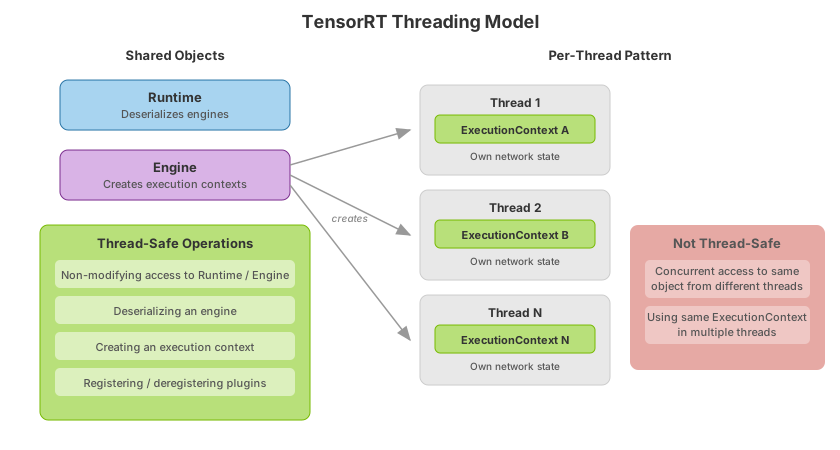
TensorRT objects are generally not thread-safe; the client must serialize access to objects from different threads.
The expected runtime concurrency model is that different threads operate in different execution contexts. The context contains the network state (activation values and so on) during execution, so using the same context concurrently from different threads results in undefined behavior.
To support this model, the following operations are thread-safe:
Nonmodifying operations on a runtime or engine.
Deserializing an engine from a TensorRT runtime.
Creating an execution context from an engine, including concurrent
ICudaEngine::createExecutionContext()calls from different threads on the same engine. Context creation does not need to be serialized across threads.Registering and deregistering plugins.
There are no thread-safety issues with using multiple builders in different threads; however, the builder uses timing to determine the fastest kernel for the parameters provided, and using multiple builders with the same GPU will perturb the timing and the TensorRT ability to construct optimal engines. There are no such issues using multiple threads to build with different GPUs.
The following table inverts the allowlist above: for each TensorRT interface, it
records whether instances can be safely shared across threads, what the required
isolation boundary is if they cannot, and the rationale (so production architects
know what they are protecting against, not just that protection is required).
Concurrent ICudaEngine::createExecutionContext() calls from multiple threads
on the same engine are thread-safe; the restrictions below apply to using an
IExecutionContext instance, not to creating one.
Interface |
Sharable across threads? |
Required isolation |
Rationale |
|---|---|---|---|
|
No |
One context per thread (canonical pattern). Multiple contexts from the same engine may run concurrently in different threads. |
Holds per-inference activation state (intermediate tensors, dynamic-shape selection, profile index). Concurrent use of the same context from two threads corrupts that state and is undefined behavior. |
|
Yes, with caveats |
Separate |
Builders use kernel timing to pick the fastest implementation. Two builders timing kernels on the same GPU perturb each other’s measurements and can produce suboptimal engines. Different GPUs are safe. |
|
No |
One |
Configuration state (flags, optimization profiles, calibrator pointer) is consumed during build. Sharing across concurrent builds produces undefined results. |
|
No |
One |
Network mutation during build is undefined behavior. |
|
No |
One |
Refit operations mutate engine weights; concurrent refit from two threads corrupts the engine. |
|
Yes (nonmodifying) |
None for nonmodifying operations (for example, |
Documented as thread-safe for the operations listed in the allowlist above. |
|
Yes (nonmodifying) |
None for nonmodifying operations (querying I/O bindings, creating contexts). Concurrent |
Engines are read-mostly after deserialization. Each thread that needs to do inference creates its own |
Plugin registry ( |
Yes |
None. |
Registry operations are explicitly called out in the allowlist; safe from concurrent threads. |
|
User responsibility |
The user’s allocator implementation must itself be thread-safe; TensorRT may call |
TensorRT does not synchronize allocator calls. If the allocator is shared by multiple contexts on the same device, the user must add locking. |
|
User responsibility, must be thread-safe |
The logger contract above already requires a thread-safe implementation. |
TensorRT may emit log messages from worker threads at any point during builder, runtime, or refitter use. |
Determinism#
The TensorRT builder uses timing to find the fastest kernel to implement a given layer. Timing kernels are subject to noise, such as other work running on the GPU and GPU clock speed fluctuations. Timing noise means the same implementation can be selected differently on successive builder runs.
Different implementations use different orders of floating point operations, resulting in small differences in the output. The impact of these differences on the final result is usually very small.
Configuration options that can result in different kernel selection include different input sizes, such as batch size, or a different optimization point for an input profile. Refer to the Working with Dynamic Shapes section for more information.
The Editable Timing Cache mechanism allows you to force the builder to pick a particular implementation for a given layer. Use this to ensure the builder picks the same kernels from run to run. For more information, refer to the Algorithm Selection and Reproducible Builds section.
After an engine has been built, except for IFillLayer and IScatterLayer, it is deterministic. Providing the same input in the same runtime environment produces the same output.
While TensorRT can maintain determinism for identical inputs across runs, determinism can be compromised when feeding the same input at different slots within a batch or when that input is batched with different neighbors, potentially leading to different outputs.
IFillLayer Determinism#
When IFillLayer is added to a network using the RANDOM_UNIFORM or RANDOM_NORMAL operations, the determinism guarantee above is no longer valid. On each invocation, these operations generate tensors based on the RNG state and then update the RNG state. This state is stored on a per-execution context basis. TensorRT supports distributive independence feature at build time (BuilderFlag::kDISTRIBUTIVE_INDEPENDENCE) to eliminate this difference with some constraints, refer to the Distributive Independence Determinism section.
IScatterLayer Determinism#
If IScatterLayer is added to a network, and the input tensor indices have duplicate entries, the determinism guarantee above is not valid for ScatterMode::kELEMENT and ScatterMode::kND modes, and one of the values from the input updates tensor will be picked arbitrarily.
Distributive Independence Determinism#
When BuilderFlag::kDISTRIBUTIVE_INDEPENDENCE is set and a layer documents axis i of an output as a distributive axis, TensorRT guarantees that the layer behaves exactly as if each evaluation across axis i was done using identical operations. That is, if some inputs are identical across the distributive axis, the corresponding outputs of these inputs are guaranteed to be identical.
TensorRT defines the concept of distributive axis as follows:
For
IMatrixMultiplyLayer: All axes that are not one of the vector or matrix dimensions are distributive axes.For layers that perform reduction: All non-reduction axes are distributive axes.
For layers that perform einsum: Let
nbe the leftmost reduction axis. The axes to the left ofnare distributive axes.
Note that the distributive independence feature has the following constraints:
With
BuilderFlag::kDISTRIBUTIVE_INDEPENDENCEenabled, multiple profiles are disabled because kernels in different profiles can be different, so the results can be slightly different.With
BuilderFlag::kDISTRIBUTIVE_INDEPENDENCEenabled, there might be a performance drop, especially for dynamic shapes cases.
Runtime Options#
TensorRT provides multiple runtime libraries to meet a variety of use cases. Use this comparison to choose a footprint before linking or importing:
Runtime |
Library / Python package |
When to use |
Trade-offs |
|---|---|---|---|
Full (default) |
|
Standard builds and maximum operator coverage |
Largest footprint; required unless you deliberately build for lean |
Lean |
|
Shipping version-compatible engines with a smaller runtime |
Fewer operator implementations; must enable version compatibility at build; can be slower |
Dispatch |
|
Loading lean runtimes across TensorRT versions with a small shim |
Smallest shim; maps APIs where possible; still depends on a lean runtime underneath |
C++ applications that run TensorRT engines should link against one of the following:
The default runtime is the main library (
libnvinfer.so/.dll).The lean runtime library (
libnvinfer_lean.so/.dll) is smaller than the default library and contains only the code necessary to run a version-compatible engine. It has some restrictions; primarily, some operator implementations are not supported.The dispatch runtime (
libnvinfer_dispatch.so/.dll) is a small shim library that can load a lean runtime and redirect calls. The dispatch runtime can load older versions of the lean runtime and, together with the appropriate configuration of the builder, can be used to provide compatibility between a newer version of TensorRT and an older plan file. Using the dispatch runtime is almost the same as manually loading the lean runtime. Still, it checks that APIs are implemented by the lean runtime loaded and performs some parameter mapping to support API changes where possible.
The lean runtime contains fewer operator implementations than the default runtime. Since TensorRT chooses operator implementations at build time, you must specify that the engine should be built for the lean runtime by enabling version compatibility. It can be slower than an engine built for the default runtime.
The lean runtime contains all the functionality of the dispatch runtime, and the default runtime contains all the functionality of the lean runtime.
TensorRT provides Python packages corresponding to each of the above libraries:
tensorrt
A Python package. It is the Python interface for the default runtime.
tensorrt_leanA Python package. It is the Python interface for the lean runtime.
tensorrt_dispatch
A Python package. It is the Python interface for the dispatch runtime.
Python applications that run TensorRT engines should import one of the above packages to load the appropriate library for their use case.
For details on ensuring engines work across TensorRT versions and GPU models, refer to Version Compatibility and Hardware Compatibility.
Compatibility#
By default, serialized engines are only guaranteed to work correctly when used with the same OS, CPU architectures, GPU models, and TensorRT versions used to serialize the engines. Refer to the Version Compatibility and Hardware Compatibility sections to relax the constraints on TensorRT versions and GPU models.