


Explicit Quantization#
When TensorRT detects Q/DQ layers in a network, it builds an engine using explicit quantization processing logic. The rest of this section describes how explicit quantization operates in more detail.
Use explicit quantization with Strong Typing. Precision-control build flags are not required and should not be specified.
Quantized Weights#
You can specify weights of Q/DQ models using a high-precision data type (FP32, FP16, or BF16) or a low-precision quantized type (INT8, FP8, INT4, or FP4). When TensorRT builds an engine, it quantizes high-precision weights using the IQuantizeLayer scale, which operates on the weights. The quantized (low-precision) weights are stored in the engine plan file. When using pre-quantized weights, an IDequantizeLayer is required between the weights and the linear operator that uses them.
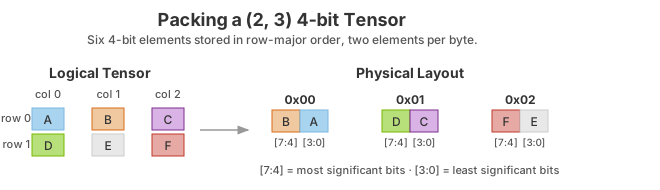
INT4 and FP4 quantized weights are stored by packing two elements per byte. The first element is stored in the 4 least significant bits, and the second is stored in the 4 most significant bits.
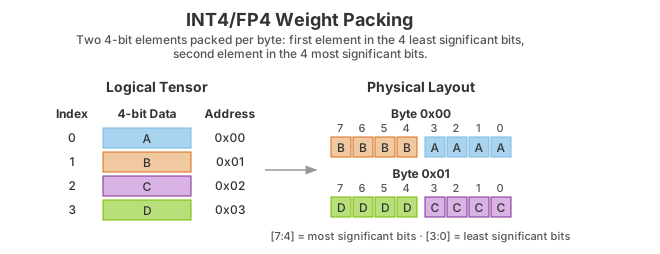
The following example illustrates this packing for a (2, 3) tensor.
ONNX Support#
When a model trained in PyTorch or TensorFlow using quantization-aware training (QAT) is exported to ONNX, each fake-quantization operation in the framework’s graph is exported as a pair of QuantizeLinear and DequantizeLinear ONNX operators. When TensorRT imports an ONNX model, the ONNX QuantizeLinear operator is imported as an IQuantizeLayer instance, and the ONNX DequantizeLinear operator is imported as an IDequantizeLayer instance.
ONNX introduced support for QuantizeLinear and DequantizeLinear in opset 10, and a quantization-axis attribute was added in opset 13 (required for per-channel quantization). PyTorch 1.8 introduced support for exporting PyTorch models to ONNX using opset 13.
ONNX opset 19 added four FP8 formats, of which TensorRT supports E4M3FN (also referred to as tensor (float8e4m3fn) in the ONNX operator schema). The latest PyTorch version (PyTorch 2.0) does not support FP8 formats, nor does it support exporting to ONNX using opset 19. To bridge the gap, TransformerEngine exports its FP quantization functions as custom ONNX Q/DQ operators that belong to the “trt” domain (TRT_FP8 QuantizeLinear and TRT_FP8 DequantizeLinear). TensorRT can parse both the custom operators and standard opset 19 Q/DQ operators. Note that TensorRT does not fully support opset 19, and other tools such as ONNX Runtime cannot parse the custom operators. ONNX opset 21 added support for the INT4 data type and block quantization, and ONNX opset 23 added support for the FP4E2M1 type.
Warning
The ONNX GEMM operator is an example that can be quantized per channel. PyTorch torch.nn.Linear layers are exported as an ONNX GEMM operator with (K, C) weights layout and the transB GEMM attribute enabled, which transposes the weights before performing the GEMM operation. TensorFlow, on the other hand, pre-transposes the weights (C, K) before ONNX export:
PyTorch: \(y=xW^{T}\)
TensorFlow: \(y=xW\)
TensorRT, therefore, transposes PyTorch weights. TensorRT quantizes the weights before they are transposed, so GEMM layers originating from ONNX QAT models that were exported from PyTorch use dimension 0 for per-channel quantization (axis K = 0), while models originating from TensorFlow use dimension 1 (axis K = 1).
TensorRT does not support pre-quantized ONNX models that use INT8 or FP8 quantized operators. Specifically, the following ONNX quantized operators are not supported and generate an import error when TensorRT encounters them while importing the ONNX model:
TensorRT Processing of Q/DQ Networks#
When TensorRT optimizes a network in Q/DQ mode, the optimization process is limited to optimizations that do not change the arithmetic correctness of the network. Bit-level accuracy is rarely possible because the order of floating-point operations can produce different results. For example, rewriting \({a}\ast s+b\ast s\) as \(\left(a+b \right)\ast s\) is a valid optimization. Allowing these differences is fundamental to backend optimization in general, and the same applies to converting a graph with Q/DQ layers to use quantized operations.
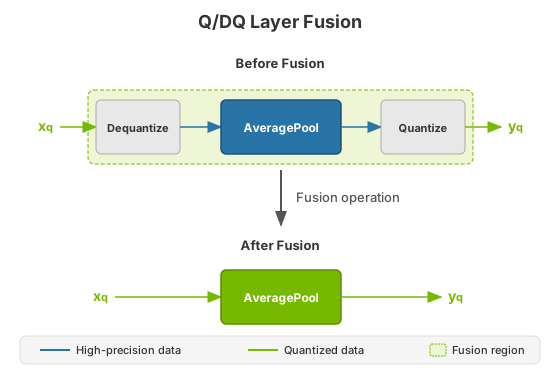
Q/DQ layers control the compute and data precision of a network. An IQuantizeLayer instance converts a high-precision floating-point tensor to a quantized tensor, and an IDequantizeLayer instance converts a quantized tensor back to a high-precision floating-point tensor. TensorRT expects a Q/DQ layer pair on each input of quantizable layers. Quantizable layers are deep-learning layers that can be converted to quantized layers by fusing with IQuantizeLayer and IDequantizeLayer instances. When TensorRT performs these fusions, it replaces the quantizable layers with quantized layers that operate on quantized data using compute operations suitable for quantized types.
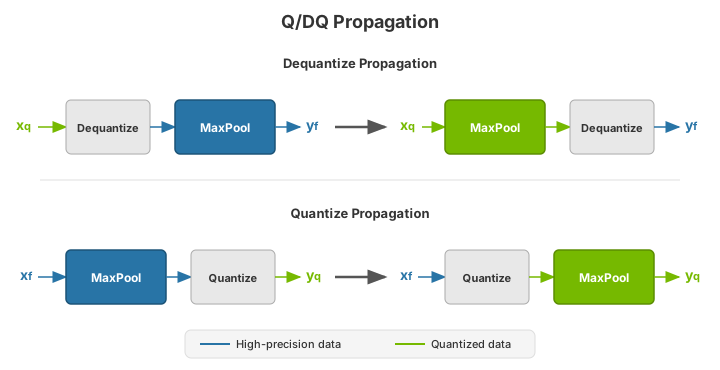
During network optimization, TensorRT moves Q/DQ layers in a process called Q/DQ propagation. The goal of propagation is to maximize the proportion of the graph that can be processed at low precision. To achieve this, TensorRT propagates Quantize nodes backward (so quantization happens as early as possible) and Dequantize nodes forward (so dequantization happens as late as possible). Quantize layers can swap places with layers that commute with quantization, and Dequantize layers can swap places with layers that commute with dequantization.
A layer \({Op}\) commutes with quantization if \({Q}\left(Op\left(x \right) \right)=={Op}\left(Q\left(x \right) \right)\)
Similarly, a layer \({Op}\) commutes with dequantization if \({Op}\left(DQ\left(x \right) \right)=={DQ}\left(Op\left(x \right) \right)\)
The following diagram illustrates Dequantize forward propagation and Quantize backward propagation. These are legal rewrites of the model because Max Pooling has an INT8 implementation and commutes with both Dequantize and Quantize.
To understand Max Pooling commutation, let us look at the output of the maximum-pooling operation applied to some arbitrary input. Max Pooling is applied to groups of input coefficients and outputs the coefficient with the maximum value. For group i composed of coefficients \(\left\{x_{0}..x_{m} \right\}\):
\(output_{i}:=max\left( \left\{ x_{0},x_{1},...x_{m} \right\} \right)=max\left( \left\{max\left( \left\{ max\left( \left\{ x_{0},x_{1} \right\} \right),x_{2} \right\} \right),...x_{3} \right\} \right)\)
It is, therefore, enough to look at two arbitrary coefficients without loss of generality (WLOG):
\(x_{j}=max\left( \left\{ x_{j},x_{k} \right\} \right)for\: x_{j}\ge x_{k}\)
For the quantization function \({Q}\left( a,scale,x_{max},x_{min} \right):=truncate\left( round\left( \frac{a}{scale} \right),x_{max},x_{min}\right) scale> 0\), note that (without providing proof and using simplified notation): \({Q}\left( x_{j},scale \right)\ge {Q}\left( x_{k},scale \right)for x_{j}\ge x_{k}\)
Therefore: \({max}\left( \left\{ {Q}\left( x_{j},scale \right),{Q}\left( x_{k},scale \right) \right\} \right)={Q}\left( x_{j},scale \right) for x_{j}\ge x_{k}\)
However, by definition: \({Q}\left( max\left( \left\{ x_{j},x_{k} \right\} \right),scale \right)={Q}\left( x_{j},scale \right) for x_{j}\ge x_{k}\)
Function \({max}\) commutes with quantization, and so does Max Pooling.
Similarly, for dequantization, function \({DQ}\left( a,scale \right):=a\ast scale\) with \({scale}> 0\) it can be shown that: \({max}\left( \left\{ {DQ}\left(x_{j},scale \right),{DQ}\left( x_{k},scale \right) \right\} \right)={DQ}\left( x_{j},scale \right)={DQ}\left( {max}\left( \left\{ x_{j},x_{k} \right\} \right),scale \right) for x_{j}\ge x_{k}\)
There is a distinction between how quantizable layers and commuting layers are processed. Both kinds of layers can be computed in INT8 or FP8, but quantizable layers also fuse with a Dequantize input and a Quantize output. For example, an AveragePooling layer (quantizable) does not commute with either Quantize or Dequantize, so it is quantized using Q/DQ fusion, as shown in the first diagram. This is in contrast to how Max Pooling (commuting) is quantized.
Weight-Only Quantization#
Weight-only quantization (WoQ) is an optimization useful when memory bandwidth limits the performance of GEMM operations or when GPU memory is scarce. In WoQ, GEMM weights are quantized to INT4 precision while the GEMM input data and compute operation remain in high precision. The TensorRT WoQ kernels read the 4-bit weights from memory and dequantize them before performing the dot product in high precision.
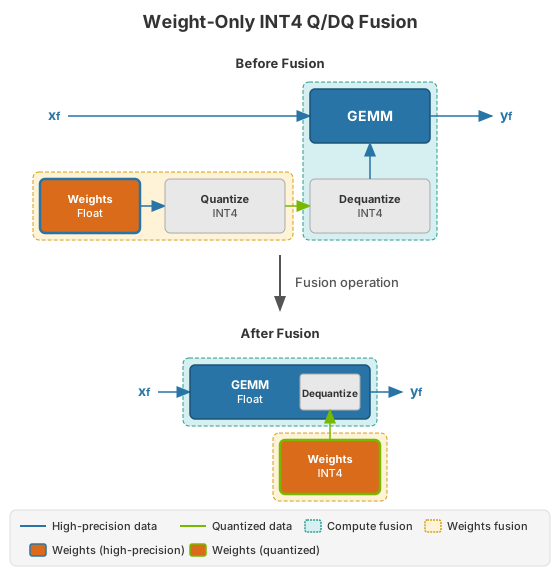
WoQ is available only for INT4 block quantization with GEMM layers. The GEMM data input is specified in high precision (FP32, FP16, or BF16), and the weights are quantized using Quantize and Dequantize layers as usual. TensorRT creates an engine with INT4 weights and a high-precision GEMM operation. The engine reads the low-precision weights and dequantizes them before performing the GEMM operation in high precision.
Q/DQ Layer-Placement Recommendations#
The placement of Q/DQ layers in a network affects performance and accuracy. Aggressive quantization can degrade model accuracy because quantization introduces error, but quantization also reduces latency. The following recommendations help you place Q/DQ layers effectively in your network.
Older devices might not have low-precision kernel implementations for all layers, and you can encounter a could not find any implementation error while building your engine. To resolve this, remove the Q/DQ nodes that quantize the failing layers.
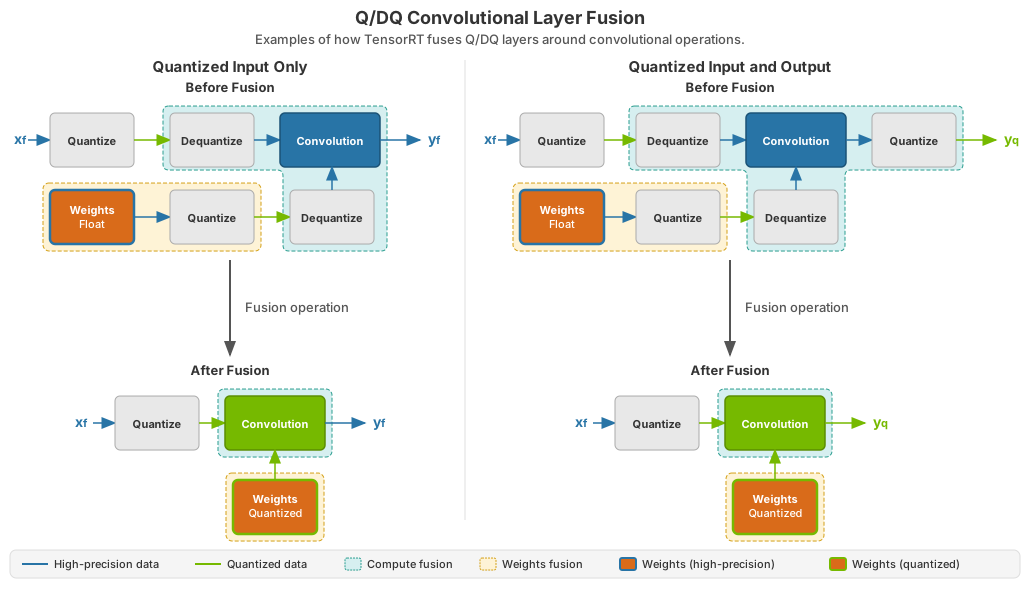
Quantize all inputs of weighted operations (Convolution, Transposed Convolution, and GEMM). Quantizing the weights and activations reduces bandwidth requirements and enables INT8 computation to accelerate bandwidth-limited and compute-limited layers.
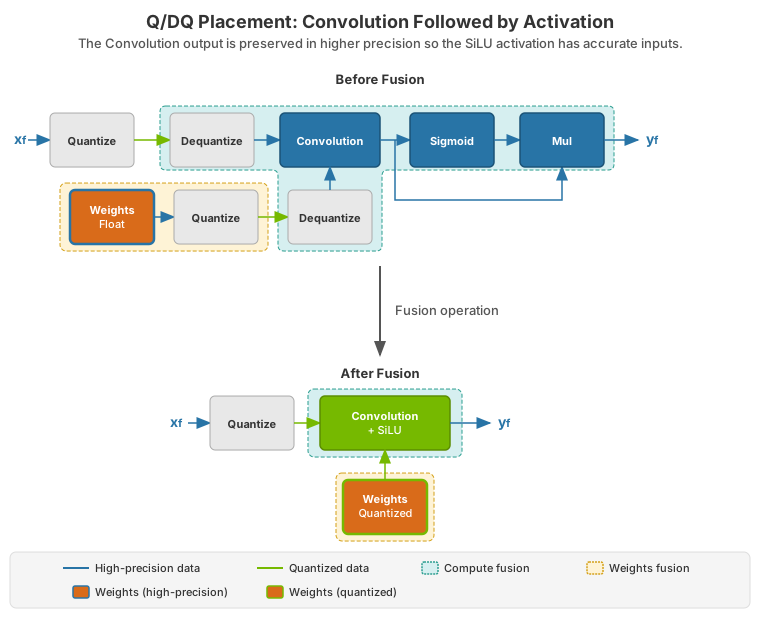
By default, do not quantize the outputs of weighted operations. It is sometimes useful to preserve the higher-precision dequantized output. For example, if the linear operation is followed by an activation function (SiLU, in the following diagram), the activation requires higher-precision input to produce acceptable accuracy.
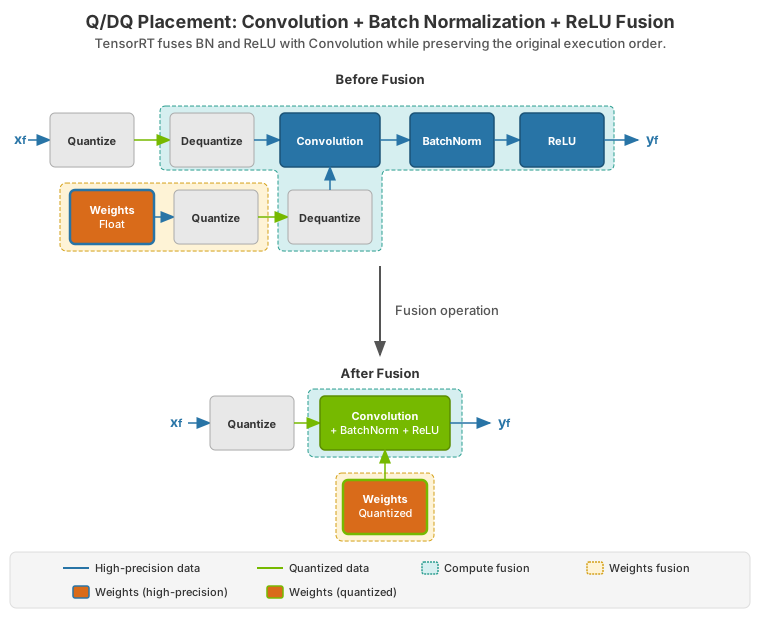
Do not simulate batch normalization and ReLU fusions in the training framework because TensorRT optimizations guarantee the preservation of these operations’ arithmetic semantics.
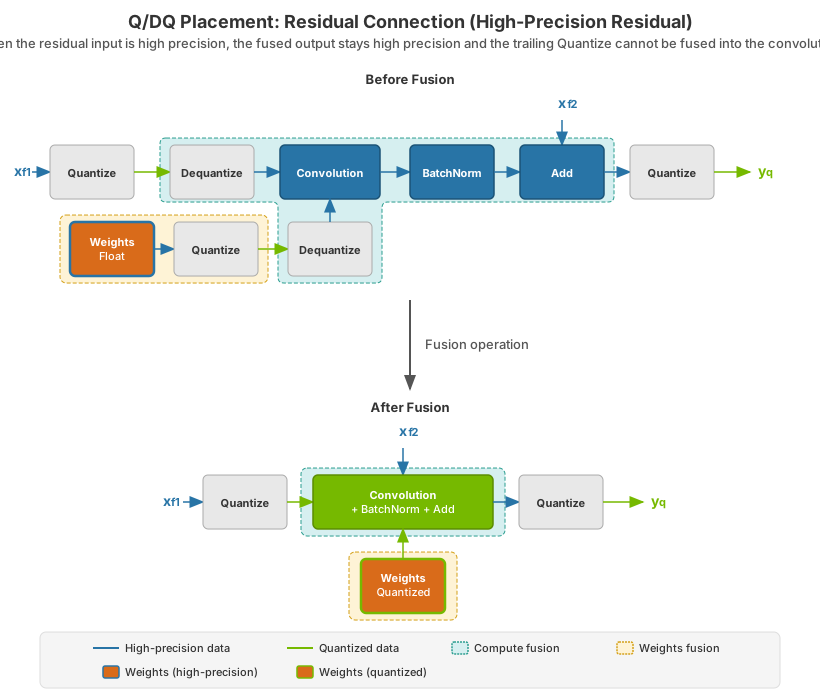
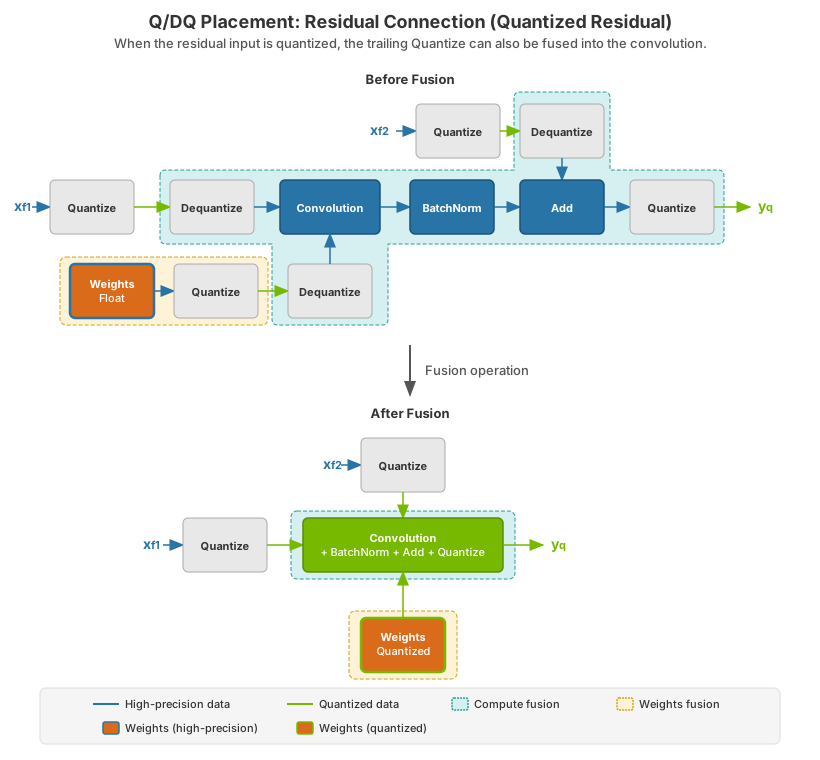
Quantize the residual input in skip connections. TensorRT can fuse element-wise addition following weighted layers, which is useful for models with skip connections like ResNet and EfficientNet. The precision of the first input to the element-wise addition layer determines the fusion output’s precision.
For example, in the following diagram, the precision of \(x_{f^{}}^{2}\) is high precision, so the output of the fused convolution is limited to high precision, and the trailing Q-layer cannot be fused with the convolution.
In contrast, when \(x_{f^{}}^{2}\) is quantized to INT8, as depicted in the following diagram, the output of the fused convolution is also INT8, and the trailing Q-layer is fused with the convolution.
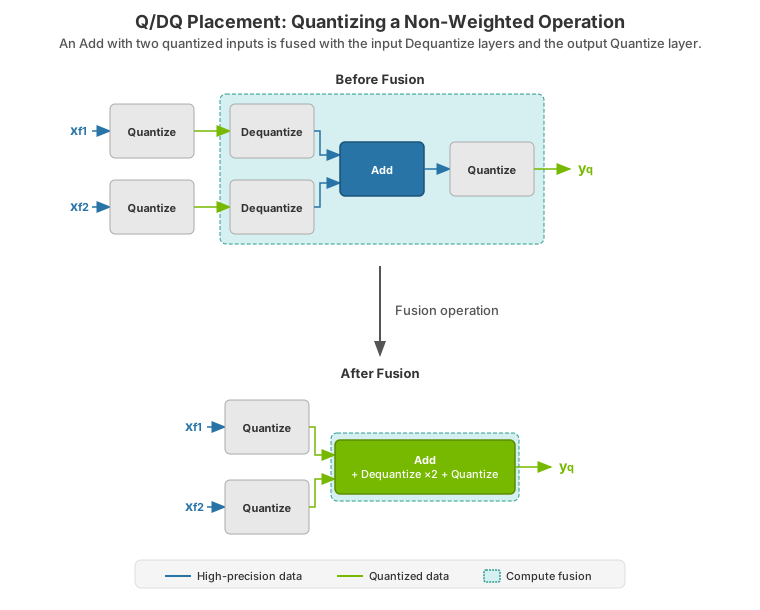
For extra performance, try quantizing layers that do not commute with Q/DQ. Currently, non-weighted layers with INT8 inputs also require INT8 outputs, so quantize both inputs and outputs.
Performance can decrease if TensorRT cannot fuse the operations with the surrounding Q/DQ layers, so be conservative when adding Q/DQ nodes and experiment with both accuracy and TensorRT performance in mind.
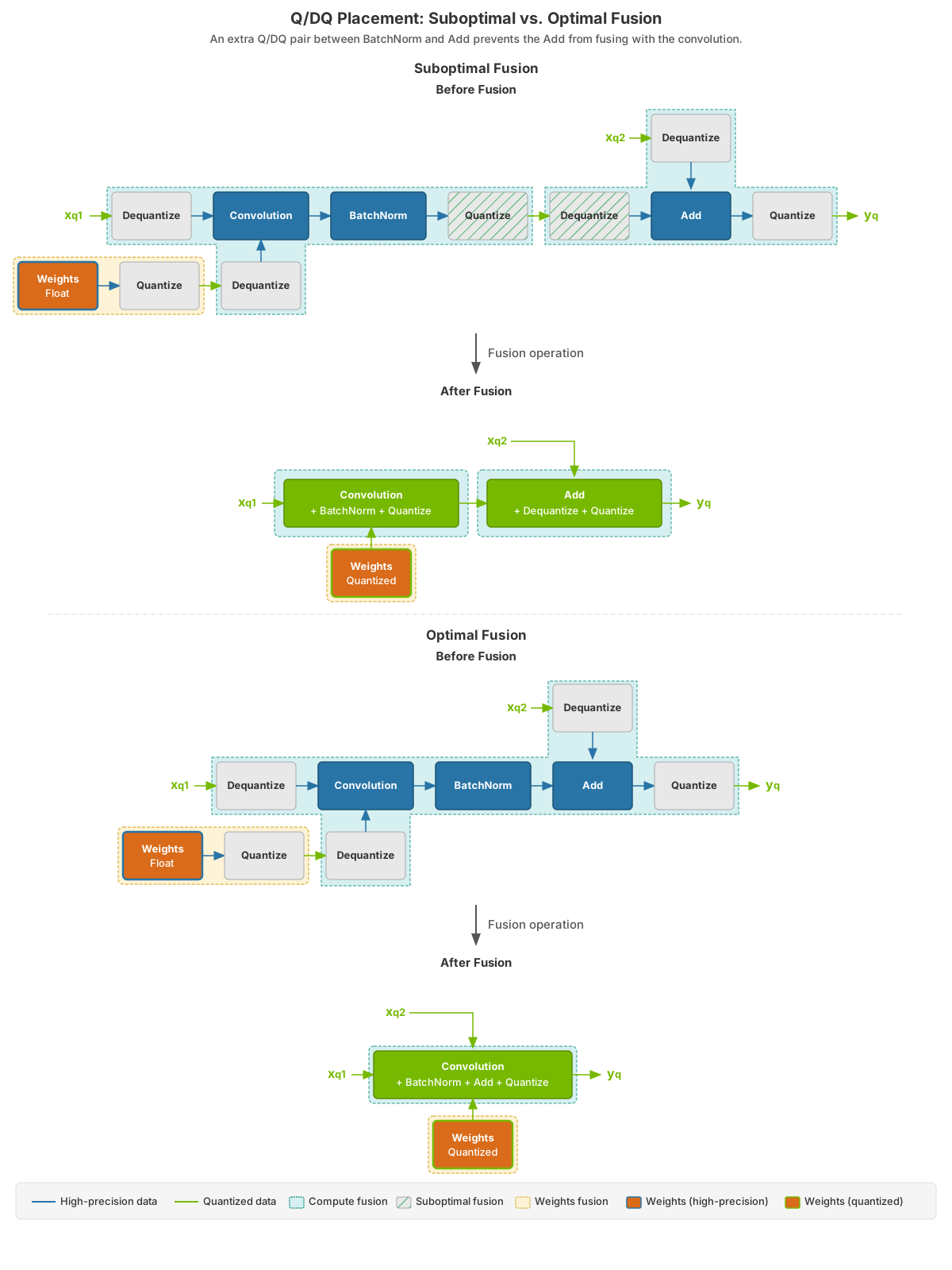
The following figure contrasts a suboptimal Q/DQ placement against an optimal one for a convolution followed by an element-wise addition.
Use per-tensor quantization for activations and per-channel quantization for weights. This configuration has been demonstrated empirically to lead to the best quantization accuracy.
Q/DQ Limitations#
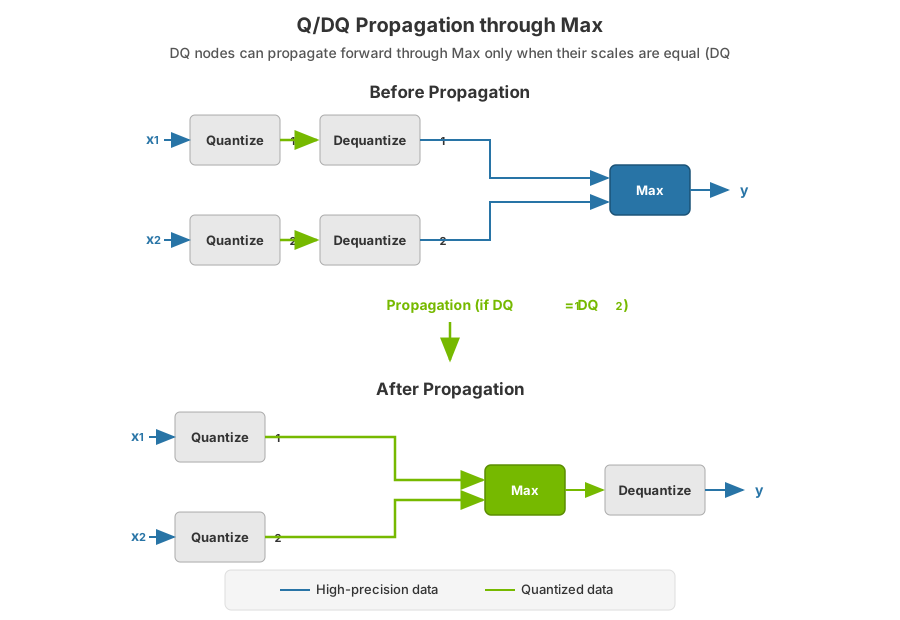
Some of the Q/DQ graph-rewrite optimizations that TensorRT performs compare the quantization scales of two or more Q/DQ layers and only apply the rewrite when those scales are equal. When building a refittable TensorRT engine, TensorRT will not apply these scale-dependent rewrites in cases where refitting Q/DQ scales could result in two scales changing from equal to not equal.
Q/DQ Interaction with Plugins#
Plugins extend the TensorRT capabilities by allowing the replacement of a group of layers with a custom and proprietary implementation. You can decide what functionality to include in the plugin and what to leave for TensorRT to handle.
The same applies to a TensorRT network with Q/DQ layers. When a plugin consumes quantized inputs (INT8/FP8) and generates quantized outputs, the input Dequantize and output Quantize nodes must be included in the plugin and removed from the network.
Consider a simple case of a sequential graph consisting of a single INT8 plugin (aptly named MyInt8Plugin) sandwiched between two convolution layers (ignoring weights quantization):

Figure 1 Blue arrows indicate FP32 activation tensors; green arrows indicate INT8 precision.#
When TensorRT optimizes this graph, it fuses the layers to the following graph (dashed teal regions indicate TensorRT fusions):

Figure 2 Blue arrows indicate FP32 activation tensors; green arrows indicate INT8 precision. The plugin-bound nodes are Dequantizeᵢ (input to MyInt8Plugin) and Quantizeₒ (output from MyInt8Plugin).#
In the fused graph above, the plugin consumes and generates FP32 inputs and outputs. Because the plugin MyInt8Plugin uses INT8 precision, you must manually integrate Dequantizeᵢ and Quantizeₒ into the plugin and then call setOutputType(kINT8) for that plugin layer. TensorRT then interprets the network as follows:

Figure 3 Blue arrows indicate FP32 activation tensors; green arrows indicate INT8 precision. Dequantizeᵢ and Quantizeₒ are folded into MyInt8Plugin (no separate plugin-bound Q/DQ boxes).#
Which it will fuse to:

Figure 4 Blue arrows indicate FP32 activation tensors; green arrows indicate INT8 precision. Dashed teal regions indicate TensorRT fusions.#
When manually fusing Dequantizeᵢ, you take the input quantization scale and give it to your plugin so it will know how to dequantize (if needed) the input. The same applies to using the scale from Quantizeₒ to quantize your plugin’s output.
QAT Networks Using TensorFlow#
You can use the TensorRT Model Optimizer to perform QAT in TensorFlow 2 Keras models following the NVIDIA QAT recipe. This leads to optimal model acceleration with TensorRT on NVIDIA GPUs and hardware accelerators.
TensorFlow 1 does not support per-channel quantization (PCQ), which is recommended for weights to preserve the model’s accuracy.
QAT Networks Using PyTorch#
PyTorch 1.8.0 and later supports exporting QuantizeLinear and DequantizeLinear ONNX operators with per-channel scales.
You can use the TensorRT Model Optimizer to calibrate INT8, perform QAT and PTQ for the various precisions that TensorRT supports, and export to ONNX.