


Fused Attention#
TensorRT supports two different methods to trigger Attention fusion:
Method 1 (recommended): Adding an attention operator to the network using
IAttentionAPI.Method 2: Constructing an attention graph using primitive
INetworklayers likeIMatrixMultiplyLayerandISoftMaxLayer.
Attention computes softmax(Q * Kᵀ ⊗ mask) * V, where:
Qis query embeddingKis key embeddingVis value embeddingsmaskcan be:A boolean mask indicating that the corresponding position is allowed to attend by Softmax.
An add mask offsetting
Q * Kᵀ
Note
TensorRT requires Q or K to be multiplied with \(attention scale\) or both Q and K to be multiplied with \(\sqrt{attention scale}\) before going into IAttention or the first Batched Matrix Multiply (BMM) IMatrixMultiplyLayer for numeric stability and performance reasons.
The shape of Q is [B, N_q, S_q, H], and the shapes of K and V are [B, N_kv, S_kv, H], where:
Bis batch sizeN_qandN_kvare the numbers of attention heads of the query and key/value, respectivelyS_qandS_kvare the sequence lengths of the query and key/value, respectively.His the head/hidden size
Multi-Head Attention (MHA, N_q == N_kv), Group-Query Attention (GQA, N_q % N_kv == 0) and Multi-Query Attention (MQA, N_kv == 1) fusion are all supported.
IO Form (Tensor Layout)#
By default, IAttention expects query, key, and value tensors in the padded layout (kPADDED_BHND) with shape [B, N, S, H]. TensorRT also supports a packed layout (kPACKED_NHD) in which all sequences in the batch are concatenated end-to-end without padding, with shape [totalTokens, N, H]. The layout is controlled independently for query and key/value using setQueryForm and setKeyValueForm.
When using the packed layout, you must provide cumulative token counts through setQueryLengths (for the query) and/or setKeyValueLengths (for the key/value). The tensor has shape [B + 1]: the first element must be 0 and the last element equals totalTokens, so the number of tokens for batch i is lengths[i + 1] - lengths[i].
When using the padded layout (kPADDED_BHND), setKeyValueLengths may optionally be used to specify per-batch key/value lengths with a tensor of shape [B]. Each element must not exceed the sequence-length dimension of the KV tensor; if not set, the full sequence-length dimension applies to every batch.
The packed layout removes padding overhead, which is especially beneficial for batches with widely varying sequence lengths.
Supported Attention Fusions#
We highly recommend tailoring your model to the restrictions in the following tables, so that Attention fusion happens. It is important because Attention fusion optimizes large sequence length cases by significantly reducing memory footprint from O(S^2) to O(S), where S is the sequence length. On top of that, it shares the common performance benefits of operator fusion, that is, reduced memory traffic, better hardware utilization, less kernel launch, and synchronization overhead.
Feature |
FP16 |
BF16 |
FP8 |
|---|---|---|---|
SM Version ( |
|
|
|
Head Size ( |
|
|
|
Sequence Length ( |
No restriction |
No restriction |
No restriction |
Quantization |
Not required |
Not required |
Specify Q/DQ layers following the Attention fusion pattern. |
IO Form |
|
|
|
Accumulation Precision ( |
FP32 |
FP32 |
FP32 |
Accumulation Precision ( |
FP32 |
FP32 |
FP32 |
Supported Mask Type |
1d or 2d vector or scalar |
1d or 2d vector or scalar |
1d or 2d vector or scalar |
Pointwise op |
Activation, Constant, Elementwise (including SiLU), Scale, and Unary |
Activation, Constant, Elementwise (including SiLU), Scale, and Unary |
Activation, Constant, Elementwise (including SiLU), Scale, and Unary |
Feature |
FP16 |
BF16 |
INT8 |
FP8 |
|---|---|---|---|---|
SM Version ( |
|
|
|
|
Head Size ( |
|
|
|
|
Sequence Length ( |
No restriction |
No restriction |
|
|
Quantization |
Not required |
Not required |
Specify Q/DQ layers in the Attention fusion pattern for FP8 and INT8. |
Specify Q/DQ layers in the Attention fusion pattern for FP8 and INT8. |
IO Form |
|
|
|
|
Accumulation Precision ( |
|
FP32 |
INT32 |
FP32 |
Accumulation Precision ( |
|
FP32 |
INT32 |
FP32 |
Supported Mask Type |
Any masking (such as Select operator in TensorRT) |
Any masking (such as Select operator in TensorRT) |
Any masking (such as Select operator in TensorRT) |
Any masking (such as Select operator in TensorRT) |
Pointwise op |
Activation, Constant, Elementwise (including SiLU), Pointwise (single input), Scale, and Unary |
Activation, Constant, Elementwise (including SiLU), Pointwise (single input), Scale, and Unary |
Activation, Constant, Elementwise (including SiLU), Pointwise (single input), Scale, and Unary |
Activation, Constant, Elementwise (including SiLU), Pointwise (single input), Scale, and Unary |
Note
FP8 fused Attention is expected to outperform FP16 fused Attention when the head size (H) ≥ 128 or the sequence length S_{q,kv} ≥ 128.
Note
Numerical issues in multi-head attention implementations
Attention implementations that use online softmax (for example, Flash Attention) can produce NaN outputs with certain attention masks.
The attention kernel guards against NaN values at critical computation points.
Multiply+Add to fused-multiply-add optimization is disabled where unsafe, consistent with other frameworks.
These mitigations may reduce performance by 2–3%, or up to 5–10% in worst cases.
Constructing a Fused Attention#
Method 1 (Recommended): Use IAttention API
IAttention offers a direct API to incorporate an attention to the network and trigger the Attention fusion in TensorRT. Refer to the IAttention Operator Documentation for more details.
IAttention by default assumes the attention should always use a fused kernel. If the added attention does not comply with the restrictions listed in the tables above, and thus a fused kernel cannot be utilized, the engine build will raise an error. If users want to allow IAttention to fallback to use non-fused kernels, users can set the IAttention to be decomposable by calling the method IAttention::setDecomposable.
To quantize an IAttention, Q/DQ pairs following Explicit Quantization rules must be used for all query, key and value inputs with another normalization quantize scale and a normalization quantize-to data type supplied to IAttention using IAttention::setNormalizationQuantizeScale and IAttention::setNormalizationQuantizeToType respectively. The normalization quantize scale and the normalization quantize-to data type have to match the data types of the Q/DQ pairs. The output of the IAttention can be quantized with an optional quantizer.
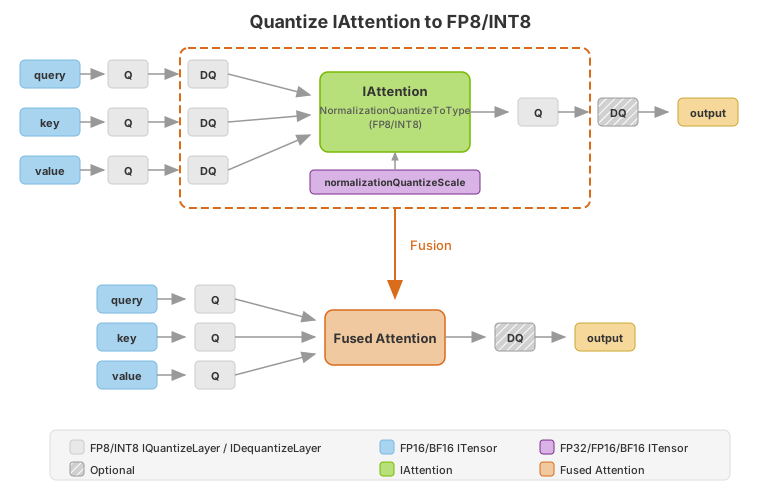
To apply masks with IAttention, use IAttention::setCausalKind with CausalMaskKind::kNONE, CausalMaskKind::kUPPER_LEFT, or CausalMaskKind::kLOWER_RIGHT for implicit causal masking, or IAttention::setMask for arbitrary masks (boolean or float), the legacy IAttention::setCausal(bool) helper is deprecated and now internally maps true to kUPPER_LEFT and false to kNONE.
To add a Sage Attention and trigger the fusion, follow the paradigm in the above figure and use IDynamicQuantizeLayer in place of IQuantizeLayer after query, key, value.
Method 2: Construct an Attention Graph with Primitive ``INetwork`` Layers
The following figures demonstrate how FP16, BF16, FP8, and INT8 attentions can be constructed to trigger Attention fusion. Batched MatMul uses IMatrixMultiplyLayer, Softmax uses ISoftMaxLayer and Q/DQ uses IQuantizeLayer and IDequantizeLayer.
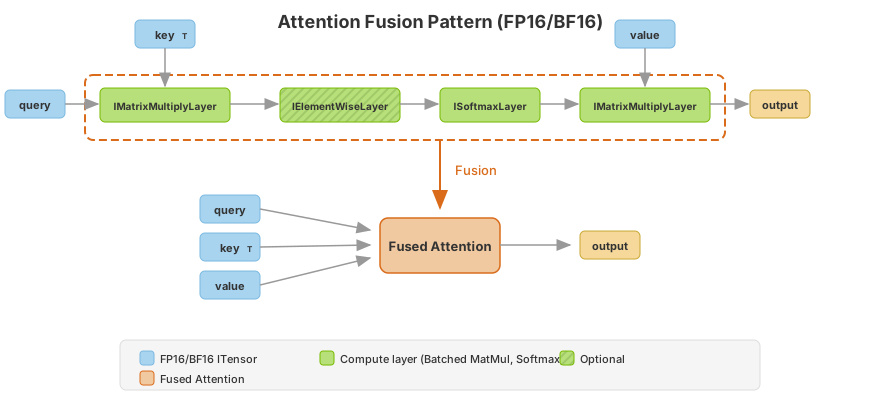
TensorRT chooses the accumulation precision by default based on the input types and performance considerations. To enforce a specific accumulation precision in a strongly typed network, cast the inputs to the desired type using ICastLayer. TensorRT recognizes this pattern and fuses the casts with the operation.
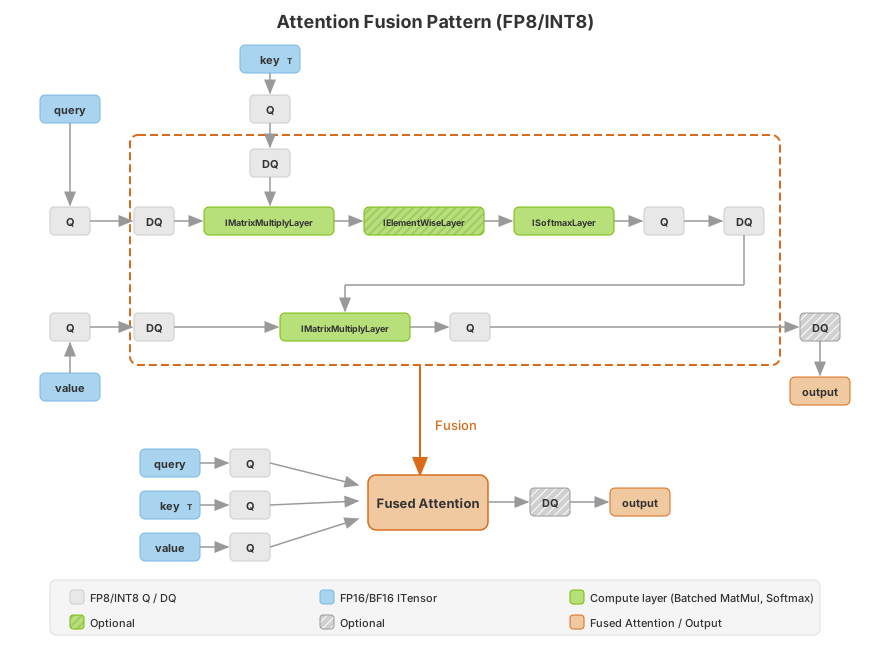
The Attention fusion captures common pointwise operators in series in Attention as mentioned in the pointwise operation list. It also covers Q/DQ fusion following Attention for certain quantization and architecture (such as FP16/BF16 to FP8/INT8 on the NVIDIA Ampere architecture).
For method 2, TensorRT can decide not to fuse an Attention graph into a single kernel based on performance evaluations or other constraints.
Example Workflow: Quantizing an ONNX Attention Model to FP8 with ModelOpt#
Assume you have an ONNX model, vit_base_patch8_224_Opset17.onnx, and calibration data, calib.npy, on your local machine.
Example Workflow: Quantize an ONNX Attention Model to FP8 with ModelOpt (details)
Install the TensorRT model optimizer.
pip3 install --no-cache-dir --extra-index-url https://pypi.nvidia.com nvidia-modelop
Quantize a model with TensorRT model optimizer. For more information, refer to these detailed instructions.
python3 -m modelopt.onnx.quantization \
 --onnx_path=vit_base_patch8_224_Opset17.onnx \
 --quantize_mode=<fp8|int8> \
 --calibration_data=calib.npy \
 --calibration_method=<max|entropy> \
 --output_path=vit_base_patch8_224_Opset17.quant.onnx
For example, to quantize the model using FP8 and entropy and store as vit_base_patch8_224_Opset17.quant.onnx, use:
python3 -m modelopt.onnx.quantization \
 --onnx_path=vit_base_patch8_224_Opset17.onnx \
 --quantize_mode=fp8 \
 --calibration_data=calib.npy \
 --calibration_method=entropy \
 --output_path=vit_base_patch8_224_Opset17.quant.onnx
Compile the quantized model with TensorRT.
trtexec --onnx=vit_base_patch8_224_Opset17.quant.onnx \
--saveEngine=vit_base_patch8_224_Opset17.engine \
--stronglyTyped --skipInference --profilingVerbosity=detailed
Run the quantized model with TensorRT.
trtexec --loadEngine=vit_base_patch8_224_Opset17.engine \
--useCudaGraph --noDataTransfers --useSpinWait
Add the following options if you want to check if Attention is fused. Attention should be fused if you find the
mhaop in theoutput.logfile.trtexec --loadEngine=vit_base_patch8_224_Opset17.engine \ --profilingVerbosity=detailed --dumpLayerInfo --skipInference &> output.log
Tip
There are two ways to set the accumulation data type to FP32:
Manually insert
ICastLayerto cast the attention inputs to FP32 before the GEMM. In a strongly typed network, TensorRT fuses the casts with the GEMM and produces a single kernel with FP16 inputs and FP32 accumulation.Convert your ONNX model using TensorRT Model Optimizer, which adds the Cast ops automatically.
If the Attention has a head size (
H) that is not a multiple of 16, for better performance do not add Q/DQ ops in the Attention to fall back to the FP16 or BF16 Attention.Compare Attention fusion performance of INT8 with FP8.
Example for Performance Improvement: Exploiting Sparsity in Attention Masks#
In limited cases, TensorRT can exploit block sparsity in attention masks to reduce the runtime of the attention computation. For example, an attention with a causal mask requires half the computation of a regular attention (since it only considers query tokens with index position in the sequence at or after a corresponding key token’s index, for example, q >= kv), therefore, TensorRT can achieve up to 2x speedup on the attention computation.
Example: Exploiting Sparsity in Attention Masks (details)
In ONNX, such as here is how you would express a causal mask for primitive op constructed attention.
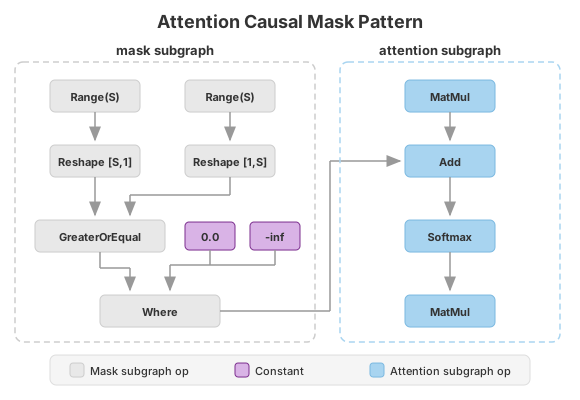
While the TensorRT overall approach to recognizing sparsity in masks is flexible, there are a few characteristics of this expression that must be present for TensorRT to consider such an optimization.
The mask is expressed using indices along the sequence length (that is, through the
Rangeop). A causal mask is written asq >= kv, therefore, we get the index, the sequence length, the query, key dimensions through theRangeops, and reshape them so they can be compared.The mask subgraph (that is, the subgraph of operations feeding into the
Add, starting with theWhere) must be expressed solely using pointwise operations, position expressions (such asTrilu,Range), orExpandoperations (or equivalentReshape,Tileoperations).Along the chain of operations from the
MatMulto theSoftmax, there must be exactly one operation doing masking, in this case theAdd. That operation with input dependent on the MatMulvInand outputvOutmust obey the property that at a point (q,kv) in the attention computation:If the mask is valid at that point,
vOut = vIn.If the mask is invalid at that point,
vOut = -inf.
The masking operation must be a
Where,Add, orSubtractoperation.
Example for Accuracy Improvement: Using FP32 Accumulation for FP16 Fused Attention#
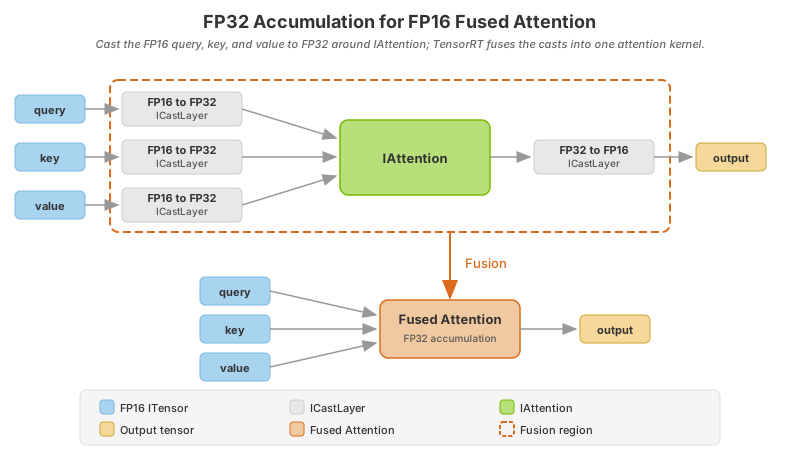
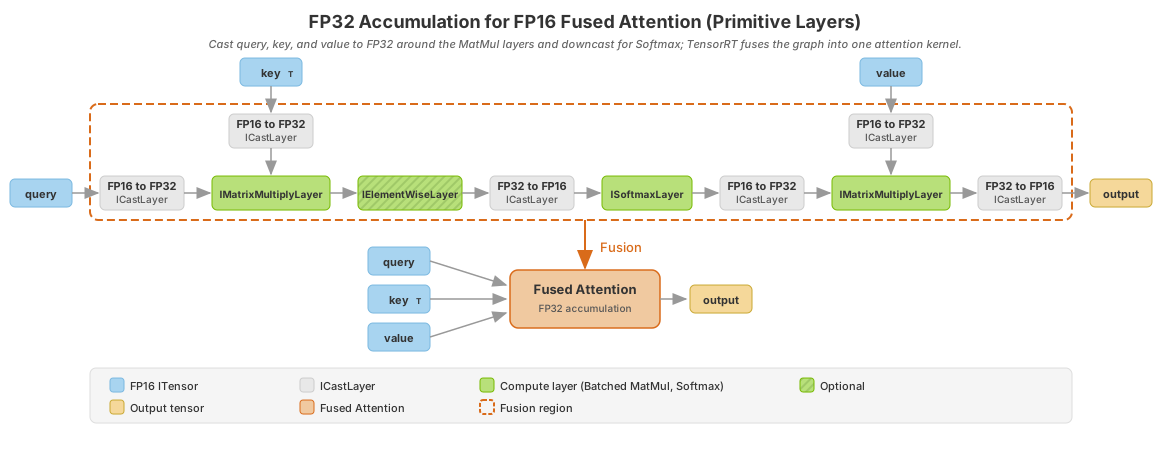
In strongly typed networks, you control accumulation precision through tensor types in the graph. To request wider accumulation (for example, FP32 products from FP16 inputs), cast the operands to the desired accumulation type with ICastLayer before the accumulating operation, then cast the result back to the output precision. TensorRT normally fuses that cast pattern with the operation, so you get FP32 accumulation without separate cast kernels at runtime.
Starting in TensorRT 11.3, FP16 fused attention supports that same pattern: set an FP32 accumulation type for better accuracy by upcasting to FP32. This feature can reduce performance compared to FP16 accumulation.
Note
This feature applies only to FP16 fused attention. Fused attention with other I/O data types already defaults to FP32 accumulation.
For the general precision-control model, including matrix multiply and convolution, refer to Control of Computational Precision.
Method 1 (Recommended): Use IAttention API
Add ICastLayer casts from FP16 to FP32 on the query, key, and value inputs of the IAttention, then cast the result back to FP16. TensorRT recognizes this pattern and fuses the casts into a single attention kernel that accumulates in FP32.
Method 2: Construct an Attention Graph with Primitive INetwork Layers
Insert ICastLayer casts from FP16 to FP32 on the query, key, and value inputs to the IMatrixMultiplyLayer operations, downcast to FP16 around ISoftmaxLayer, then cast the MatMul result back to FP16. TensorRT recognizes this pattern and fuses the graph into a single attention kernel that accumulates in FP32.
Example: Using Transformer-Oriented APIs#
The following examples demonstrate common attention layout patterns using IAttention (optionally combined with IKVCacheUpdateLayer and IRotaryEmbeddingLayer).
Example: Using Transformer-Oriented APIs (details)
Padded Format
 1ITensor* qInput = network->addInput("q", DataType::kHALF,
 2                         Dims4{-1, numQHeads, -1, headSize});
 3ITensor* kInput = network->addInput("k", DataType::kHALF,
 4                                    Dims4{-1, numKvHeads, -1, headSize});
 5ITensor* vInput = network->addInput("v", DataType::kHALF,
 6                                    Dims4{-1, numKvHeads, -1, headSize});
 7
 8ITensor* kCacheInput = network->addInput("kCache", DataType::kHALF,
 9                                          Dims4{-1, numKvHeads, kvCacheCapacity, headSize});
10ITensor* vCacheInput = network->addInput("vCache", DataType::kHALF,
11                                          Dims4{-1, numKvHeads, kvCacheCapacity, headSize});
12ITensor* ropeCosCache = network->addInput("ropeCosCache", DataType::kHALF,
13                                          Dims2{maxPositionEmbeddings, headSize / 2});
14ITensor* ropeSinCache = network->addInput("ropeSinCache", DataType::kHALF,
15                                          Dims2{maxPositionEmbeddings, headSize / 2});
16ITensor* positionIds = network->addInput("positionIds", DataType::kINT32,
17                                          Dims2{-1, -1});
18ITensor* kCacheIndices = network->addInput("kCacheIndices", DataType::kINT32,
19                                            Dims{1, {-1}});
20// Per-batch KV lengths: [B], each element is the number of valid KV tokens for that batch element
21ITensor* kvLengths = network->addInput("kvLengths", DataType::kINT32,
22                                        Dims{1, {-1}});
23
24// Apply RoPE to Q and K
25IRotaryEmbeddingLayer* ropeQ = network->addRotaryEmbedding(*qInput, *ropeCosCache, *ropeSinCache,
26                                                            false, 0);
27ropeQ->setInput(3, *positionIds);
28IRotaryEmbeddingLayer* ropeK = network->addRotaryEmbedding(*kInput, *ropeCosCache, *ropeSinCache,
29                                                            false, 0);
30ropeK->setInput(3, *positionIds);
31
32ITensor* ropeQTensor = ropeQ->getOutput(0);
33ITensor* ropeKTensor = ropeK->getOutput(0);
34
35// Update KV cache
36KVCacheMode kvCacheMode = KVCacheMode::kLINEAR;
37IKVCacheUpdateLayer* kCacheLayer = network->addKVCacheUpdate(*kCacheInput, *ropeKTensor,
38                                                              *kCacheIndices, kvCacheMode);
39IKVCacheUpdateLayer* vCacheLayer = network->addKVCacheUpdate(*vCacheInput, *vInput,
40                                                              *kCacheIndices, kvCacheMode);
41
42ITensor* kCacheOutput = kCacheLayer->getOutput(0);
43ITensor* vCacheOutput = vCacheLayer->getOutput(0);
44
45// Mark cache outputs
46kCacheOutput->setName("kCacheOutput");
47network->markOutput(*kCacheOutput);
48vCacheOutput->setName("vCacheOutput");
49network->markOutput(*vCacheOutput);
50
51// Scale Q
52float qkScale = 1.0f / std::sqrt(static_cast<float>(headSize));
53half_float::half scaleData{qkScale};
54IConstantLayer* scaleConst = network->addConstant(Dims4{1, 1, 1, 1},
55                                                  Weights{DataType::kHALF, &scaleData, 1});
56
57IElementWiseLayer* scaledQ = network->addElementWise(*ropeQTensor, *scaleConst->getOutput(0),
58                                                      ElementWiseOperation::kPROD);
59ITensor* scaledQTensor = scaledQ->getOutput(0);
60
61// Add attention layer using the full cache as KV input.
62// Use setKeyValueLengths to specify per-batch valid KV lengths instead of
63// slicing the cache to extract the present KV.
64IAttention* attention = network->addAttentionV2(*scaledQTensor, *kCacheOutput, *vCacheOutput,
65                                                AttentionNormalizationOp::kSOFTMAX,
66                                                CausalMaskKind::kNONE);
67attention->setKeyValueLengths(kvLengths);
68attention->setDecomposable(true);
69
70ITensor* attentionOutput = attention->getOutput(0);
71attentionOutput->setName("attentionOutput");
72network->markOutput(*attentionOutput);
 1q_input = network.add_input("q", trt.float16,
 2               (-1, num_q_heads, -1, head_size))
 3k_input = network.add_input("k", trt.float16,
 4                          (-1, num_kv_heads, -1, head_size))
 5v_input = network.add_input("v", trt.float16,
 6                          (-1, num_kv_heads, -1, head_size))
 7
 8k_cache_input = network.add_input("k_cache", trt.float16,
 9                                (-1, num_kv_heads, kv_cache_capacity, head_size))
10v_cache_input = network.add_input("v_cache", trt.float16,
11                                (-1, num_kv_heads, kv_cache_capacity, head_size))
12
13rope_cos_cache = network.add_input("rope_cos_cache", trt.float16,
14                                  (max_position_embeddings, head_size // 2))
15rope_sin_cache = network.add_input("rope_sin_cache", trt.float16,
16                                  (max_position_embeddings, head_size // 2))
17
18position_ids = network.add_input("position_ids", trt.int32, (-1, -1))
19kv_cache_indices = network.add_input("kv_cache_indices", trt.int32, (-1,))
20# Per-batch KV lengths: [B], each element is the number of valid KV tokens for that batch element
21kv_lengths = network.add_input("kv_lengths", trt.int32, (-1,))
22
23# Apply RoPE to Q and K
24rope_q = network.add_rotary_embedding(
25    q_input, rope_cos_cache, rope_sin_cache, False, 0)
26rope_q.set_input(3, position_ids)
27
28rope_k = network.add_rotary_embedding(
29    k_input, rope_cos_cache, rope_sin_cache, False, 0)
30rope_k.set_input(3, position_ids)
31
32rope_q_tensor = rope_q.get_output(0)
33rope_k_tensor = rope_k.get_output(0)
34
35# Update KV cache
36kv_cache_mode = trt.KVCacheMode.LINEAR
37k_cache_layer = network.add_kv_cache_update(k_cache_input,
38                                            rope_k_tensor,
39                                            kv_cache_indices,
40                                            kv_cache_mode)
41v_cache_layer = network.add_kv_cache_update(v_cache_input,
42                                            v_input,
43                                            kv_cache_indices,
44                                            kv_cache_mode)
45
46k_cache_output = k_cache_layer.get_output(0)
47v_cache_output = v_cache_layer.get_output(0)
48
49# Mark cache outputs
50k_cache_output.name = "k_cache_output"
51network.mark_output(k_cache_output)
52v_cache_output.name = "v_cache_output"
53network.mark_output(v_cache_output)
54
55# Scale Q
56qk_scale = 1.0 / (head_size**0.5)
57scale_const = network.add_constant((1, 1, 1, 1),
58                                  np.array([qk_scale],
59                                  dtype=np.float16))
60scaled_q = network.add_elementwise(rope_q_tensor,
61                                  scale_const.get_output(0),
62                                  trt.ElementWiseOperation.PROD)
63scaled_q_tensor = scaled_q.get_output(0)
64
65# Add attention layer using the full cache as KV input.
66# Use set_key_value_lengths to specify per-batch valid KV lengths instead of
67# slicing the cache to extract the present KV.
68attention = network.add_attention_v2(scaled_q_tensor, k_cache_output, v_cache_output,
69                                    trt.AttentionNormalizationOp.SOFTMAX,
70                                    trt.CausalMaskKind.NONE)
71attention.set_key_value_lengths(kv_lengths)
72attention.decomposable = True
73
74attention_output = attention.get_output(0)
75attention_output.name = "attention_output"
76network.mark_output(attention_output)
Packed (Ragged) Format
The following example shows how to use the packed (kPACKED_NHD) format with IAttention and IKVCacheUpdateLayer. In this format, all sequences in the batch are concatenated end-to-end without padding. This example pairs a packed query with a padded KV cache, the typical LLM decode pattern.
 1// Total tokens across all sequences in the batch
 2ITensor* qInput = network->addInput("q", DataType::kHALF,
 3                                     Dims3{-1, numQHeads, headSize});  // [totalTokens, N_q, H]
 4ITensor* kInput = network->addInput("k", DataType::kHALF,
 5                                     Dims3{-1, numKvHeads, headSize});  // [totalTokens, N_kv, H]
 6ITensor* vInput = network->addInput("v", DataType::kHALF,
 7                                     Dims3{-1, numKvHeads, headSize});  // [totalTokens, N_kv, H]
 8
 9ITensor* kCacheInput = network->addInput("kCache", DataType::kHALF,
10                                          Dims4{-1, numKvHeads, kvCacheCapacity, headSize});
11ITensor* vCacheInput = network->addInput("vCache", DataType::kHALF,
12                                          Dims4{-1, numKvHeads, kvCacheCapacity, headSize});
13ITensor* ropeCosCache = network->addInput("ropeCosCache", DataType::kHALF,
14                                           Dims2{maxPositionEmbeddings, headSize / 2});
15ITensor* ropeSinCache = network->addInput("ropeSinCache", DataType::kHALF,
16                                           Dims2{maxPositionEmbeddings, headSize / 2});
17ITensor* positionIds = network->addInput("positionIds", DataType::kINT32,
18                                          Dims{1, {-1}});  // [totalTokens]
19ITensor* kCacheIndices = network->addInput("kCacheIndices", DataType::kINT32,
20                                            Dims{1, {-1}});
21
22// Cumulative token counts: [B + 1], first element is 0, last element is totalTokens
23ITensor* queryLengths = network->addInput("queryLengths", DataType::kINT32,
24                                           Dims{1, {-1}});
25// Per-batch KV lengths: [B], each element is the number of valid KV tokens for that batch element
26ITensor* kvLengths = network->addInput("kvLengths", DataType::kINT32,
27                                        Dims{1, {-1}});
28
29// Apply RoPE to Q and K (RoPE works with both padded and packed inputs)
30IRotaryEmbeddingLayer* ropeQ = network->addRotaryEmbedding(*qInput, *ropeCosCache, *ropeSinCache,
31                                                            false, 0);
32ropeQ->setInput(3, *positionIds);
33IRotaryEmbeddingLayer* ropeK = network->addRotaryEmbedding(*kInput, *ropeCosCache, *ropeSinCache,
34                                                            false, 0);
35ropeK->setInput(3, *positionIds);
36
37ITensor* ropeQTensor = ropeQ->getOutput(0);
38ITensor* ropeKTensor = ropeK->getOutput(0);
39
40// Update KV cache with packed update form
41KVCacheMode kvCacheMode = KVCacheMode::kLINEAR;
42IKVCacheUpdateLayer* kCacheLayer = network->addKVCacheUpdate(*kCacheInput, *ropeKTensor,
43                                                              *kCacheIndices, kvCacheMode);
44kCacheLayer->setUpdateForm(AttentionIOForm::kPACKED_NHD);
45kCacheLayer->setUpdateLengths(queryLengths);
46
47IKVCacheUpdateLayer* vCacheLayer = network->addKVCacheUpdate(*vCacheInput, *vInput,
48                                                              *kCacheIndices, kvCacheMode);
49vCacheLayer->setUpdateForm(AttentionIOForm::kPACKED_NHD);
50vCacheLayer->setUpdateLengths(queryLengths);
51
52ITensor* kCacheOutput = kCacheLayer->getOutput(0);
53ITensor* vCacheOutput = vCacheLayer->getOutput(0);
54
55kCacheOutput->setName("kCacheOutput");
56network->markOutput(*kCacheOutput);
57vCacheOutput->setName("vCacheOutput");
58network->markOutput(*vCacheOutput);
59
60// Scale Q
61float qkScale = 1.0f / std::sqrt(static_cast<float>(headSize));
62half_float::half scaleData{qkScale};
63IConstantLayer* scaleConst = network->addConstant(Dims3{1, 1, 1},
64                                                   Weights{DataType::kHALF, &scaleData, 1});
65
66IElementWiseLayer* scaledQ = network->addElementWise(*ropeQTensor, *scaleConst->getOutput(0),
67                                                      ElementWiseOperation::kPROD);
68ITensor* scaledQTensor = scaledQ->getOutput(0);
69
70// Add attention layer with packed query and padded KV (full cache).
71// Use setKeyValueLengths to specify per-batch valid KV lengths instead of
72// slicing the cache to extract the present KV.
73IAttention* attention = network->addAttentionV2(*scaledQTensor, *kCacheOutput, *vCacheOutput,
74                                                 AttentionNormalizationOp::kSOFTMAX,
75                                                 CausalMaskKind::kNONE);
76attention->setQueryForm(AttentionIOForm::kPACKED_NHD);
77attention->setQueryLengths(queryLengths);
78attention->setKeyValueLengths(kvLengths);
79attention->setDecomposable(true);
80
81ITensor* attentionOutput = attention->getOutput(0);
82attentionOutput->setName("attentionOutput");
83network->markOutput(*attentionOutput);
 1q_input = network.add_input("q", trt.float16,
 2                            (-1, num_q_heads, head_size))  # [totalTokens, N_q, H]
 3k_input = network.add_input("k", trt.float16,
 4                            (-1, num_kv_heads, head_size))  # [totalTokens, N_kv, H]
 5v_input = network.add_input("v", trt.float16,
 6                            (-1, num_kv_heads, head_size))  # [totalTokens, N_kv, H]
 7
 8k_cache_input = network.add_input("k_cache", trt.float16,
 9                                  (-1, num_kv_heads, kv_cache_capacity, head_size))
10v_cache_input = network.add_input("v_cache", trt.float16,
11                                  (-1, num_kv_heads, kv_cache_capacity, head_size))
12
13rope_cos_cache = network.add_input("rope_cos_cache", trt.float16,
14                                   (max_position_embeddings, head_size // 2))
15rope_sin_cache = network.add_input("rope_sin_cache", trt.float16,
16                                   (max_position_embeddings, head_size // 2))
17
18position_ids = network.add_input("position_ids", trt.int32, (-1,))  # [totalTokens]
19kv_cache_indices = network.add_input("kv_cache_indices", trt.int32, (-1,))
20
21# Cumulative token counts: [B + 1], first element is 0, last element is totalTokens
22query_lengths = network.add_input("query_lengths", trt.int32, (-1,))
23# Per-batch KV lengths: [B], each element is the number of valid KV tokens for that batch element
24kv_lengths = network.add_input("kv_lengths", trt.int32, (-1,))
25
26# Apply RoPE to Q and K (RoPE works with both padded and packed inputs)
27rope_q = network.add_rotary_embedding(
28    q_input, rope_cos_cache, rope_sin_cache, False, 0)
29rope_q.set_input(3, position_ids)
30
31rope_k = network.add_rotary_embedding(
32    k_input, rope_cos_cache, rope_sin_cache, False, 0)
33rope_k.set_input(3, position_ids)
34
35rope_q_tensor = rope_q.get_output(0)
36rope_k_tensor = rope_k.get_output(0)
37
38# Update KV cache with packed update form
39kv_cache_mode = trt.KVCacheMode.LINEAR
40k_cache_layer = network.add_kv_cache_update(k_cache_input,
41                                            rope_k_tensor,
42                                            kv_cache_indices,
43                                            kv_cache_mode)
44k_cache_layer.update_form = trt.AttentionIOForm.PACKED_NHD
45k_cache_layer.set_update_lengths(query_lengths)
46
47v_cache_layer = network.add_kv_cache_update(v_cache_input,
48                                            v_input,
49                                            kv_cache_indices,
50                                            kv_cache_mode)
51v_cache_layer.update_form = trt.AttentionIOForm.PACKED_NHD
52v_cache_layer.set_update_lengths(query_lengths)
53
54k_cache_output = k_cache_layer.get_output(0)
55v_cache_output = v_cache_layer.get_output(0)
56
57k_cache_output.name = "k_cache_output"
58network.mark_output(k_cache_output)
59v_cache_output.name = "v_cache_output"
60network.mark_output(v_cache_output)
61
62# Scale Q
63qk_scale = 1.0 / (head_size ** 0.5)
64scale_const = network.add_constant((1, 1, 1),
65                                   np.array([qk_scale],
66                                            dtype=np.float16))
67scaled_q = network.add_elementwise(rope_q_tensor,
68                                   scale_const.get_output(0),
69                                   trt.ElementWiseOperation.PROD)
70scaled_q_tensor = scaled_q.get_output(0)
71
72# Add attention layer with packed query and padded KV (full cache).
73# Use set_key_value_lengths to specify per-batch valid KV lengths instead of
74# slicing the cache to extract the present KV.
75attention = network.add_attention_v2(scaled_q_tensor, k_cache_output, v_cache_output,
76                                     trt.AttentionNormalizationOp.SOFTMAX,
77                                     trt.CausalMaskKind.NONE)
78attention.query_form = trt.AttentionIOForm.PACKED_NHD
79attention.set_query_lengths(query_lengths)
80attention.set_key_value_lengths(kv_lengths)
81attention.decomposable = True
82
83attention_output = attention.get_output(0)
84attention_output.name = "attention_output"
85network.mark_output(attention_output)
Fully Packed (Ragged) Format
This example uses the packed (kPACKED_NHD) format for all three of query, key, and value. This pattern is useful when there is no KV cache. For example, in vision transformers where each image contributes a different number of tokens to the batch.
 1// All inputs are packed: [totalTokens, numHeads, headSize]
 2ITensor* qInput = network->addInput("q", DataType::kHALF,
 3                                     Dims3{-1, numQHeads, headSize});   // [totalTokens, N_q, H]
 4ITensor* kInput = network->addInput("k", DataType::kHALF,
 5                                     Dims3{-1, numKvHeads, headSize});  // [totalTokens, N_kv, H]
 6ITensor* vInput = network->addInput("v", DataType::kHALF,
 7                                     Dims3{-1, numKvHeads, headSize});  // [totalTokens, N_kv, H]
 8
 9// Cumulative token counts: [B + 1], first element is 0, last element is totalTokens
10// For a batch of images with token counts [196, 256, 128]:
11//   queryLengths = kvLengths = [0, 196, 452, 580]
12ITensor* queryLengths = network->addInput("queryLengths", DataType::kINT32,
13                                           Dims{1, {-1}});
14ITensor* kvLengths = network->addInput("kvLengths", DataType::kINT32,
15                                        Dims{1, {-1}});
16
17// Scale Q
18float qkScale = 1.0f / std::sqrt(static_cast<float>(headSize));
19half_float::half scaleData{qkScale};
20IConstantLayer* scaleConst = network->addConstant(Dims3{1, 1, 1},
21                                                   Weights{DataType::kHALF, &scaleData, 1});
22
23IElementWiseLayer* scaledQ = network->addElementWise(*qInput, *scaleConst->getOutput(0),
24                                                      ElementWiseOperation::kPROD);
25ITensor* scaledQTensor = scaledQ->getOutput(0);
26
27// Add attention with fully packed Q, K, V
28IAttention* attention = network->addAttentionV2(*scaledQTensor, *kInput, *vInput,
29                                                 AttentionNormalizationOp::kSOFTMAX,
30                                                 CausalMaskKind::kNONE);
31attention->setQueryForm(AttentionIOForm::kPACKED_NHD);
32attention->setKeyValueForm(AttentionIOForm::kPACKED_NHD);
33attention->setQueryLengths(queryLengths);
34attention->setKeyValueLengths(kvLengths);
35attention->setDecomposable(true);
36
37ITensor* attentionOutput = attention->getOutput(0);
38attentionOutput->setName("attentionOutput");
39network->markOutput(*attentionOutput);
 1# All inputs are packed: [totalTokens, numHeads, headSize]
 2q_input = network.add_input("q", trt.float16,
 3                            (-1, num_q_heads, head_size))    # [totalTokens, N_q, H]
 4k_input = network.add_input("k", trt.float16,
 5                            (-1, num_kv_heads, head_size))   # [totalTokens, N_kv, H]
 6v_input = network.add_input("v", trt.float16,
 7                            (-1, num_kv_heads, head_size))   # [totalTokens, N_kv, H]
 8
 9# Cumulative token counts: [B + 1], first element is 0, last element is totalTokens
10# For a batch of images with token counts [196, 256, 128]:
11#   query_lengths = kv_lengths = [0, 196, 452, 580]
12query_lengths = network.add_input("query_lengths", trt.int32, (-1,))
13kv_lengths = network.add_input("kv_lengths", trt.int32, (-1,))
14
15# Scale Q
16qk_scale = 1.0 / (head_size ** 0.5)
17scale_const = network.add_constant((1, 1, 1),
18                                   np.array([qk_scale],
19                                            dtype=np.float16))
20scaled_q = network.add_elementwise(q_input,
21                                   scale_const.get_output(0),
22                                   trt.ElementWiseOperation.PROD)
23scaled_q_tensor = scaled_q.get_output(0)
24
25# Add attention with fully packed Q, K, V
26attention = network.add_attention_v2(scaled_q_tensor, k_input, v_input,
27                                     trt.AttentionNormalizationOp.SOFTMAX,
28                                     trt.CausalMaskKind.NONE)
29attention.query_form = trt.AttentionIOForm.PACKED_NHD
30attention.key_value_form = trt.AttentionIOForm.PACKED_NHD
31attention.set_query_lengths(query_lengths)
32attention.set_key_value_lengths(kv_lengths)
33attention.decomposable = True
34
35attention_output = attention.get_output(0)
36attention_output.name = "attention_output"
37network.mark_output(attention_output)