


Global Performance Tuning#
This guide explains how to use the Global Performance Tuner to search for faster TensorRT engines by exploring internal builder knobs (compiler options) across many build routes (knob combinations). It covers the architecture, trtexec workflow, accuracy-aware validation, and the caveats that apply when you move off the default build route.
What You Will Learn
How knobs and build routes fit into the TensorRT builder
How to query, set, and sweep build routes with the C++/Python APIs and
trtexecHow accuracy-aware tuning filters out routes that crash or exceed your loss threshold
When tuning is worth the extra build time, and when to stick with the default route
See also
- Performance Benchmarking
Establish a measurement baseline before and after tuning so you can quantify the speedup.
- Optimizing TensorRT Performance
Per-layer and graph-level optimizations that Global Performance Tuner builds on top of.
- Accuracy Considerations
Validate numerical behavior when tuning changes kernel selection or fusion.
Architecture#
TensorRT is a deep learning compiler. Each engine build is a compilation pass that turns a network definition into a serialized engine. A knob (also called a compiler flag or option) is a configuration setting passed to that compiler. Knobs control heuristics, codegen paths, and fusion behavior. A build route is a specific combination of knob values.
When no build route is specified, TensorRT uses the default build route: every knob stays at its default value. Different models benefit from different knob settings. One model may run faster with slice-op fusion disabled; another may need a more aggressive CUDA Tile codegen path. Manually finding the best combination means enumerating routes, building an engine for each one, benchmarking each engine, and discarding routes that crash or fail accuracy checks. Global Performance Tuner automates that loop through trtexec.
Querying Knobs and Build Routes#
Use the builder configuration APIs below to inspect the knob database before you set a route manually or define a tuning sweep.
IBuilderConfig* config = builder->createBuilderConfig();
char const* allBuildRoutes = config->getAllBuildRoutes();
config = builder.create_builder_config()
all_build_routes = config.all_build_routes
The return value is a JSON document. The top-level tuner_version field identifies the Global Performance Tuner version. The tuner_options array lists every available knob. Each entry contains four fields:
option: knob nameallowed_values: legal value syntaxdefault_value: value used when the knob is not set explicitlyhelp: short description of what the knob controls
The excerpt below shows two representative knobs. The full listing can be long; use trtexec --helpBuildRoute (refer to Discovering Tunable Knobs) for the authoritative command-line view.
{
  "tuner_version": "2.19.35",
  "tuner_options": [
    {
      "option": "-slice_fusion",
      "allowed_values": "-slice_fusion=[on|off]",
      "default_value": "on",
      "help": "Replace multiple Slice Ops with a single Split Op."
    },
    {
      "option": "-kgen:codegen:cuda_tile",
      "allowed_values": "-kgen:codegen:cuda_tile=[0|1|2|3]",
      "default_value": "1",
      "help": "CUDA Tile codegen. 0: disable, 1: where profitable, 2: supported kdags, 3: force all."
    }
  ]
}
Setting a Build Route#
To compile with a non-default route, pass a space-separated string of -knob=value tokens:
config->setBuildRoute("-slice_fusion=off -kgen:codegen:cuda_tile=3");
config.build_route = "-slice_fusion=off -kgen:codegen:cuda_tile=3"
For the example above, the search space has 2 x 4 = 8 combinations. Global Performance Tuner explores that space automatically instead of requiring you to build and benchmark each combination by hand.
Why Use Global Performance Tuner#
Global Performance Tuner is designed for three properties:
Automation: Start the full search with a single
trtexeccommand and wait for the sweep to finish.Self-testing: Routes that exceed your accuracy threshold or crash during build or inference are filtered out. When accuracy-aware tuning is enabled, the saved best engine is validated against your reference outputs.
End-to-end: The tuning loop measures and optimizes for end-to-end inference performance, not isolated layer micro-benchmarks.
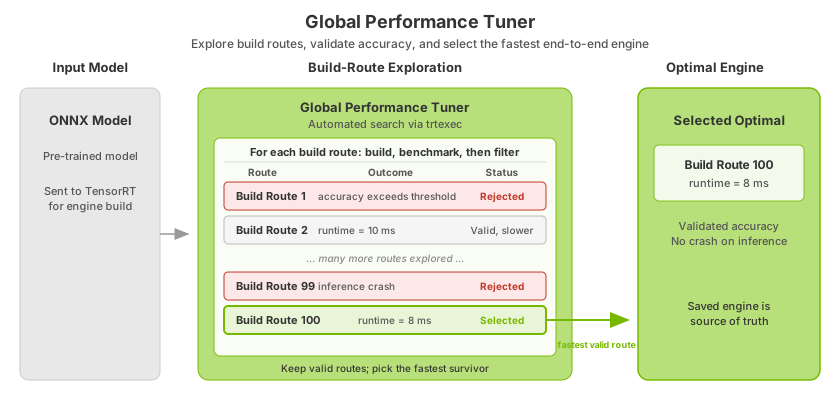
This workflow diagram summarizes the process at a high level. The tuner evaluates many build routes, rejects routes that fail accuracy checks or runtime validation, and selects the fastest surviving route.
Using Global Performance Tuner with trtexec#
Global Performance Tuner is exposed through specialized trtexec flags. The flags drive a tuning loop that expands a build-route expression into candidate routes, builds engines, benchmarks them, optionally validates accuracy, and records results in a cache file you can resume later.
For general trtexec conventions (build vs inference phases, shape flags, and serialization), refer to Commonly Used Command-Line Flags in the benchmarking chapter.
Discovering Tunable Knobs#
The --helpBuildRoute flag queries the knob database and prints the available internal builder knobs (heuristics, layer selections, codegen toggles) as JSON. Use this output as the authoritative reference when configuring --setBuildRoute or --tuneBuildRoutes.
Print the full listing:
trtexec --helpBuildRoute
Filter to a single knob (the leading dash is optional):
trtexec --helpBuildRoute=match_ragged_mha
Note
--helpBuildRoute does not require an ONNX model and ignores other build flags.
Building One Specific Configuration#
The --setBuildRoute=<route> flag bypasses the tuning loop and builds a single engine from an explicit route string. Each token uses the form -knob=value. This is useful for reproducing or debugging a route discovered during a sweep.
trtexec --onnx=model.onnx \
   --setBuildRoute="-match_ragged_mha=on -copy_ppg=off" \
   --saveEngine=model.plan
Sweeping a Configuration Space#
Start automatic tuning with one of the following flags:
--tuneBuildRoutes=<expr>Run the autotuning loop over a build-route expression on the command line.
Variable knob:
-knob=[a|b|c]iterates over each listed value.Fixed knob:
-knob=fixedpins a value across all iterations.
Quote the expression so the shell does not interpret the brackets:
trtexec --onnx=model.onnx \
   --tuneBuildRoutes="-match_ragged_mha=[on|off] -copy_ppg=[on|off]" \
   --saveEngine=best.plan
--tuneBuildRouteFile=<path>Load the build-route expression from a file (one token per line). Use this for long or complex expressions.
trtexec --onnx=model.onnx --tuneBuildRouteFile=routes.txt --saveEngine=best.plan
Example
routes.txt:-match_ragged_mha=[on|off] -copy_ppg=[on|off]
--saveEngine=<path> is required when accuracy-aware tuning is enabled (refer to Accuracy-Aware Tuning). Otherwise it is optional but recommended so the best engine is persisted.
Choosing a Search Algorithm#
The --tuningSearch=<spec> flag controls how the build-route expression expands into candidates. It balances tuning time against search completeness.
Value |
Behavior |
Complexity |
|---|---|---|
|
Default. Runs a baseline with all knobs at default, then varies one knob at a time. |
Linear in the number of variable knobs. |
|
Cartesian product over all variable knobs (every combination). |
Exponential. Use only for small search spaces. |
|
Runs |
Heuristic middle ground for larger spaces. |
Combine any search mode with --dryRun to print the full route list without building engines. This helps you estimate sweep size before committing build time:
trtexec --onnx=model.onnx \
   --tuneBuildRoutes="-A=[on|off] -B=[on|off]" \
   --tuningSearch=full --dryRun
Accuracy-Aware Tuning#
Global Performance Tuner can validate each candidate route against reference outputs. Routes whose loss exceeds --accuracyThreshold are excluded from best-engine selection.
Enable accuracy-aware tuning by combining the tuning flags with:
--loadInputs--loadRefOutputs=<spec>(required to activate validation)--accuracyThreshold=<value>(required when--loadRefOutputsis present)
trtexec --onnx=model.onnx \
   --tuneBuildRoutes="-match_ragged_mha=[on|off]" \
   --loadInputs=input:input.bin \
   --loadRefOutputs=output:ref_output.bin \
   --accuracyThreshold=0.5 \
   --saveEngine=best.plan
Multiple input/output pairs (--refPair)
Group each (input, reference-output) pair with --refPair=N. Every iteration is validated against all pairs:
trtexec --onnx=model.onnx \
   --tuneBuildRoutes="..." \
   --refPair=0 --loadInputs=input:in0.bin --loadRefOutputs=output:ref0.bin \
   --refPair=1 --loadInputs=input:in1.bin --loadRefOutputs=output:ref1.bin \
   --accuracyThreshold=0.01 --saveEngine=best.plan
Loss metric (``–accuracyAlgorithm``)
The --accuracyAlgorithm=<spec> flag selects how loss is computed (non-negative; lower is better):
Spec |
Metric |
Explanation |
|---|---|---|
|
L0 (default) |
Fraction of elements outside |
|
L1 |
Mean absolute error. |
|
L2 |
Mean squared error. |
|
L-infinity |
Maximum absolute error. |
|
Cosine |
|
Iterations that fail the accuracy check are still recorded in the tuning cache but are not eligible for best-engine selection.
The Tuning Cache and Resuming#
The --tuningCacheFile=<path> flag writes a JSON Lines record of each completed iteration (build route, GPU time, and accuracy loss). The file is human-readable and supports resuming interrupted sweeps.
Resume from the last recorded iteration:
trtexec --continue --tuningCacheFile=tune.jsonl
Note
When using --continue, specify only --tuningCacheFile=<path>. trtexec rejects other flags (such as --onnx or --tuneBuildRoutes) because the cache already stores the original sweep configuration.
Other Useful Flags#
--tuningTimeOut=<seconds>: Time budget for the entire tuning process. The current iteration finishes before the loop stops. Use-1(default) to disable the timeout. Helpful for capping largefullsweeps.--saveAllEngines: In addition to the best engine from--saveEngine, write every iteration’s engine to<path>.iter<N>. Uses substantial disk space; intended mainly for debugging accuracy regressions across routes.
Caveats#
Keep the following constraints in mind when you interpret tuning results or ship a tuned engine:
Opportunistic gain: Performance improvements are model-dependent. The default build route reflects extensive internal heuristics and may already be optimal for your network.
Internal knob overrides: Even when you set an explicit build route, the builder may adjust certain knob values at compile time to satisfy layer constraints.
Version dependence: Available knobs and default values depend on the Global Performance Tuner version. Generate and deploy tuning results with the same TensorRT and tuner versions.
Model dependence: A route that helps one model may regress or have no effect on another.
Hardware dependence: The optimal route can change across GPU SKUs, driver versions, or CUDA versions. Re-tune after any target hardware change.
Accuracy threshold sensitivity: A threshold that is too strict can reject every route, including routes with meaningful speedups.
Performance regression risk on non-default routes: There is no performance guarantee for non-default routes across major TensorRT releases. Re-tune when the TensorRT or tuner version changes.
Engine indeterminism: Engine builds are not strictly bit-deterministic. Even with the same build route, kernel selection can vary slightly between builds. Treat the saved engine file as the source of truth, not the route string alone.
Accuracy guarantee scope: Only routes discovered and validated by Global Performance Tuner carry the accuracy and crash-free guarantees described above. Manually specified routes without validation do not.