For AI agents: a documentation index is available at the root level at /llms.txt and /llms-full.txt. Append /llms.txt to any URL for a page-level index, or .md for the markdown version of any page.
  • Getting Started
    • Welcome
    • Contributing
  • Concepts
    • Columns
    • Seed Datasets
    • Agent Rollout Ingestion
    • Custom Columns
    • Validators
    • Processors
    • Person Sampling
    • Traces
    • Architecture & Performance
    • Deployment Options
    • Security
  • Tutorials
    • Overview
    • The Basics
    • Structured Outputs, Jinja Expressions, and Conditional Generation
    • Seeding with an External Dataset
    • Providing Images as Context
    • Generating Images
    • Image-to-Image Editing
  • Recipes
    • Recipe Cards
  • Plugins
    • Overview
    • Example Plugin
    • FileSystemSeedReader Plugins
    • Discover
  • Code Reference
    • Overview
  • Dev Notes
    • Overview
    • Prompt Sensitivity
    • Retriever SDG Toolkit
    • Have It Your Way
    • VLM Long Document Understanding
    • Push Datasets to Hugging Face Hub
    • Text-to-SQL for Nemotron Super
    • Async All the Way Down
    • Owning the Model Stack
NVIDIANVIDIA
Developer-friendly docs for your API
Privacy Policy | Manage My Privacy | Do Not Sell or Share My Data | Terms of Service | Accessibility | Corporate Policies | Product Security | Contact

Copyright © 2026, NVIDIA Corporation.

LogoLogoNeMo Data Designer
On this page
  • Deployment Architectures at a Glance
  • Quick Comparison
  • 📦 When to Use the Open-Source Library
  • You Have Access to LLMs
  • You Need Maximum Flexibility
  • You Already Have Enterprise LLM Infrastructure
  • ☁️ When to Use the Microservice
  • You’re Using the NeMo Microservices Platform
  • You Want to Expose SDG as a Team Service
  • 🧭 Decision Flowchart
  • Learn More
Concepts

Deployment Options: Library vs. Microservice

||View as Markdown|
Previous

🏗️ Architecture & Performance

Next

Security

Data Designer is available as both an open-source library and a NeMo Microservice. This guide helps you choose the right deployment option for your use case.

Deployment Architectures at a Glance

Data Designer supports three main deployment patterns:

  • Library + Your LLM Provider


    Each user runs the library locally and connects to their choice of LLM provider.
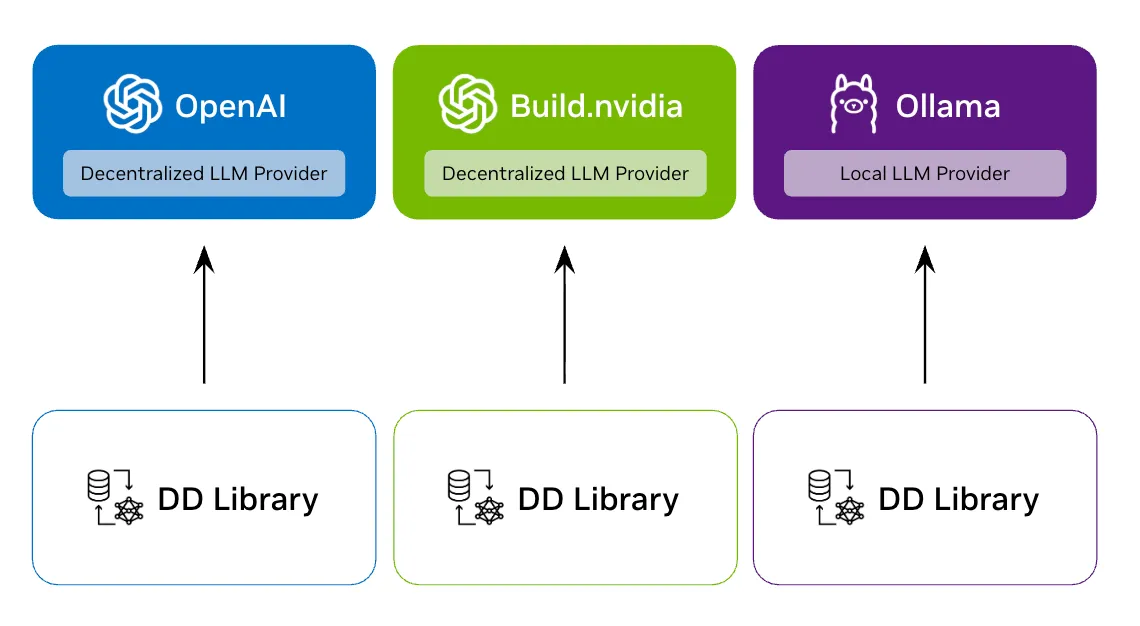
    Library with Decentralized Providers

  • Library + Enterprise Gateway


    Users run the library locally but share a centralized enterprise LLM gateway with RBAC and governance.
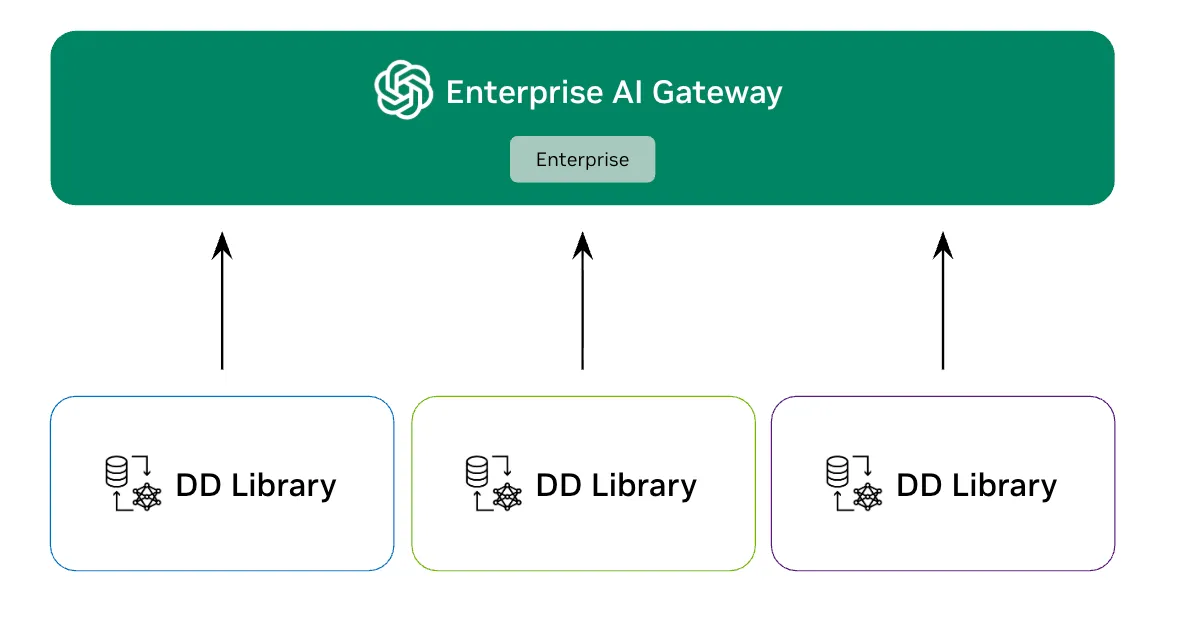
    Library with Enterprise Gateway

  • SDG as a Service (Microservice)


    A centralized SDG service that multiple users access via REST API.
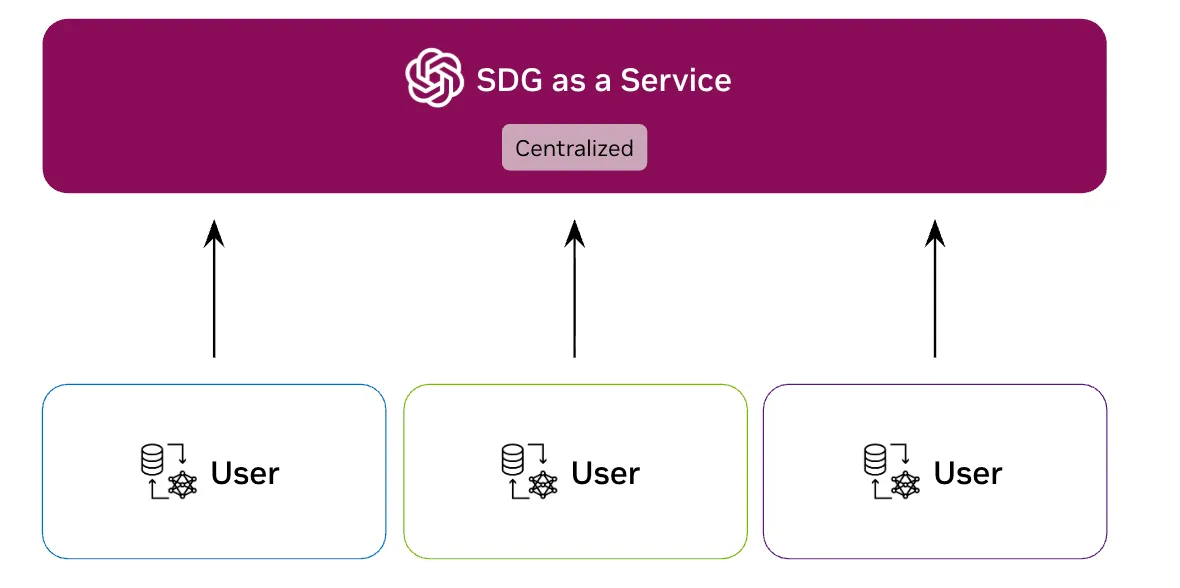
    SDG Microservice

Quick Comparison

AspectOpen-Source LibraryNeMo Microservice
What it isPython package you import and runREST API service exposing preview and create methods
Best forDevelopers with LLM access who want flexibility and customizationTeams using NeMo Microservices platform
LLM AccessYou provide (any OpenAI-compatible API)Integrated with NeMo Microservices Platform
Installationpip install data-designerDeploy via NeMo Microservices platform
ScalingYou manage inference capacityManaged alongside other NeMo services

Same Configuration API Both the library and microservice use the same DataDesignerConfigBuilder API. Start with the library, and your configurations migrate seamlessly if you later adopt the NeMo platform.

📦 When to Use the Open-Source Library

The library is the right choice for most users. Choose it if you:

You Have Access to LLMs

Library with Decentralized Providers

You have API keys or endpoints for LLM inference:

  • Cloud APIs: NVIDIA API Catalog (build.nvidia.com), OpenAI, Azure OpenAI, Anthropic
  • Self-hosted: vLLM, TGI, TensorRT-LLM, or any OpenAI-compatible server
  • Enterprise gateways: Centralized LLM gateway with RBAC, rate limiting, or other enterprise features
1from data_designer.interface import DataDesigner
2from data_designer.config import ModelConfig
3
4# Use any OpenAI-compatible endpoint
5model = ModelConfig(
6 alias="my-model",
7 model="nvidia/nemotron-3-nano-30b-a3b",
8 provider="nvidia", # or "openai", or a custom ModelProvider
9)
10
11dd = DataDesigner()
12# Your code controls the full workflow

You Need Maximum Flexibility

  • Custom plugins: Extend Data Designer with custom column generators, validators, or processors
  • Local development: Rapid iteration with immediate feedback
  • Integration: Embed Data Designer into existing Python pipelines or notebooks
  • Experimentation: Research workflows with custom models or configurations

You Already Have Enterprise LLM Infrastructure

Library with Enterprise Gateway

Library + Enterprise LLM Gateway Many enterprises already have centralized LLM access through API gateways with:

  • Role-based access control (RBAC)
  • Rate limiting and quotas
  • Audit logging
  • Cost allocation

In this case, use the library and point it at your enterprise gateway. You get enterprise-grade LLM access while retaining full control over your Data Designer workflows.

1from data_designer.config import ModelConfig, ModelProvider
2
3# Define your enterprise gateway as a provider
4enterprise_provider = ModelProvider(
5 name="enterprise-gateway",
6 endpoint="https://llm-gateway.yourcompany.com/v1",
7 api_key="ENTERPRISE_LLM_KEY", # Environment variable name (uppercase) or actual key
8)
9
10# Use the provider in your model config
11model = ModelConfig(
12 alias="enterprise-llm",
13 model="gpt-4",
14 provider="enterprise-gateway", # References the provider above
15)

☁️ When to Use the Microservice

SDG Microservice

The NeMo Microservice exposes Data Designer’s preview and create methods as REST API endpoints. Choose it if you:

You’re Using the NeMo Microservices Platform

The primary value of the microservice is integration with other NeMo Microservices:

  • NeMo Inference Microservices (NIMs): Seamless integration with NVIDIA’s optimized inference endpoints
  • NeMo Customizer: Generate synthetic data for model fine-tuning workflows
  • NeMo Evaluator: Create evaluation datasets alongside model assessment
  • Unified deployment: Single platform for your entire AI pipeline

You Want to Expose SDG as a Team Service

If you need to provide synthetic data generation as a shared service:

  • Multi-tenant access: Multiple teams submit generation jobs via API
  • Job management: Queue, monitor, and manage generation jobs centrally
  • Resource sharing: Shared infrastructure for SDG workloads

When users can submit configs containing Jinja templates to a shared engine, template rendering becomes a remote code execution concern and part of your security boundary. See Security for guidance on when to keep the default JinjaRenderingEngine.SECURE mode.


🧭 Decision Flowchart

┌─────────────────────────┐
│ Are you using the NeMo │
│ Microservices platform? │
└───────────┬─────────────┘
│
┌───────────┴───────────┐
▼ ▼
YES NO
│ │
▼ ▼
┌───────────────────┐ ┌───────────────────────────┐
│ Use Microservice │ │ Do you need to expose SDG │
│ │ │ as a shared REST service? │
│ Integrates with │ └─────────────┬─────────────┘
│ NIMs, Customizer, │ │
│ Evaluator │ ┌───────────┴───────────┐
└───────────────────┘ ▼ ▼
YES NO
│ │
▼ ▼
┌─────────────────────┐ ┌─────────────────┐
│ Consider if the │ │ Use the Library │
│ overhead is worth │ │ │
│ it vs. library + │ │ Most flexible │
│ enterprise gateway │ │ option for │
└─────────────────────┘ │ direct use │
└─────────────────┘

Learn More

  • Library: Continue with this documentation
  • Microservice: See the NeMo Data Designer Microservice documentation
  • Security model: See Security